 Innei
202f062a0d
Innei
202f062a0d
* ✨ feat(portal): embed thread chat in document preview portal

Embed FloatingChatPanel at the bottom of the Document preview portal so
users can converse with the agent about the document they are viewing
without leaving the portal.

Key changes:

- Remove the unused `/agent/:aid/:topicId/page/:docId` route and its
  supporting modules (TopicCanvas, Page, PageRedirect, topicPageRouteMeta,
  `agent/page` redirect). The route had no remaining UI entry point.
- Revive FloatingChatPanel as a thread-scoped side chat. Replace the
  hardcoded MainChatInput with `@/features/Conversation`'s ChatInput so
  the embedded composer no longer fights the main-page input for the
  global `mainInputEditor` slot.
- Default the panel's context to `scope='thread' + isNew: true` so a
  fresh ephemeral thread can be created on first send.
- Thread an `agentDocumentId` field through ConversationContext,
  ExecAgentAppContext, the Document portal payload, `openDocument` and
  callers (AgentDocumentsGroup, DocumentExplorerTree,
  AgentSignalReceiptList) so the in-portal chat always knows the
  agent_documents row id for the document in view.
- Rewrite the server `activeTopicDocument` resolver to use a single
  indexed `findRowByDocumentId(agentId, documentId)` lookup. This
  validates any caller-supplied row id and recovers the row when one
  was not provided, fixing cross-topic documents (skills, web docs)
  whose row id was previously missing — preventing the LLM from passing
  a `documents.id` into `readDocument({ id })` and triggering a failed
  query against `agent_documents.id`.

* ✨ feat(portal): persist document portal chats as real threads

Anchor the in-portal `FloatingChatPanel` on the topic's last main-scope
message so the first send goes through `conversationLifecycle.ts`'s
`newThread` branch and the server actually creates a thread row. The
resulting thread now shows up in the left sidebar's `ThreadList` under
the parent topic.

- Read `sourceMessageId` from the latest non-thread message in
  `dbMessagesMap[messageMapKey({ agentId, topicId })]`; pair it with
  `ThreadType.Standalone` in the conversation context when `isNew`.
- Track the active thread in panel-local state. On
  `onAfterMessageCreate({ createdThreadId })` we refresh threads /
  messages and pivot the context from `isNew` to the persisted
  `threadId` in place — without calling `openThreadInPortal`, which
  would push a Thread view onto the portal stack and cover the document
  the user is reading.
- When the topic has no messages yet (no anchor), fall back to the
  previous ephemeral behavior (still leaks to main on first send;
  needed for empty-topic scenarios).

* ✨ feat(portal): isolate document portal thread chat from main topic

Make the Document portal's `FloatingChatPanel` a truly doc-anchored side
conversation — independent of the main topic history and surviving the
mid-send pivot from `_new` → persisted thread key without the AI stream
disappearing.

- Subscribe to `chatStore.portalThreadId` instead of a panel-local
  `internalThreadId`. `lifecycle.ts:syncThreadInPortal` writes the new
  thread id into the portal slice *before* stream chunks arrive, so this
  panel's chatKey pivots in time to render the streaming response — the
  old `onAfterMessageCreate` hook only fired after the stream resolved,
  leaving the panel blank for the whole turn.
- Clear any stale `portalThreadId` left by a sibling portal on mount so a
  fresh `(agentId, topicId, documentId)` opens in `isNew` state.
- Pass `skipFetch` + a filtered `messages` prop to ConversationProvider.
  Without `skipFetch` the provider's own `useFetchMessages` pulled the
  main-topic history into this panel; with the doc-anchored A-mode we
  show only rows whose `threadId` matches the active thread (or nothing
  before the first send).
- Split `openThreadInPortal` into two actions: keep the original (push
  Thread view + sync state) for the main-page "create subtopic" flow,
  and add `syncThreadInPortal` that only mutates the portal slice.
  `lifecycle.ts` now picks one based on the current portal view type so a
  panel-hosted ConversationProvider in the Document portal no longer
  triggers a Thread view that covers the document.
- Add `key={agentId:topicId:documentId}` on `FloatingChatPanel` inside
  `Portal/Document/Body.tsx` so panel-local state (snap point, open,
  etc.) resets when conversation coordinates change.
- Anchor new threads on the topic's last main-scope message, paired with
  `ThreadType.Standalone`, so first send actually creates a thread row
  rather than leaking into the main topic.
LobeHub
LobeHub organizes your agents into 7×24 operation.
It hires, schedules, reports on your entire AI team.
You stay in charge — without staying online.
English · 简体中文 · Official Site · Changelog · Documents · Blog · Feedback













Share LobeHub Repository







Your Chief Agent Operator


Table of contents
TOC
- 👋🏻 Getting Started & Join Our Community
- ✨ Features
- 🛳 Self Hosting
- 📦 Ecosystem
- 🧩 Plugins
- ⌨️ Local Development
- 🤝 Contributing
- ❤️ Sponsor
- 🔗 More Products
https://github.com/user-attachments/assets/0a33365f-b786-48b5-9ed6-f8af7927bccb
👋🏻 Getting Started & Join Our Community
We are a group of e/acc design-engineers, hoping to provide modern design components and tools for AIGC. By adopting the Bootstrapping approach, we aim to provide developers and users with a more open, transparent, and user-friendly product ecosystem.
Whether for users or professional developers, LobeHub will be your AI Agent playground. Please be aware that LobeHub is currently under active development, and feedback is welcome for any issues encountered.
 |
We are live on Product Hunt! We are thrilled to bring LobeHub to the world. If you believe in a future where humans and agents co-evolve, please support our journey. |
|---|---|
 |
Join our Discord community! This is where you can connect with developers and other enthusiastic users of LobeHub. |
[!IMPORTANT]
Star Us, You will receive all release notifications from GitHub without any delay ~ ⭐️
Star History
✨ Features
Today’s agents are one-off, task-driven tools. They lack context, live in isolation, and require manual hand-offs between different windows and models. While some maintain memory, it is often global, shallow, and impersonal. In this mode, users are forced to toggle between fragmented conversations, making it difficult to form structured productivity.
LobeHub changes everything.
LobeHub is a work-and-lifestyle space to find, build, and collaborate with agent teammates that grow with you. In LobeHub, we treat Agents as the unit of work, providing an infrastructure where humans and agents co-evolve.
Operator: Agents as the Unit of Work
Hires, schedules, and reports on your entire AI team.
- More productivity. Fewer tools: Bring all your agents under one roof.
- IM Gateway: Agents where you already chat.

Create: Agents as the Unit of Work
Building a personalized AI team starts with the Agent Builder. You can describe what you need once, and the agent setup starts right away, applying auto-configurations so you can use it instantly.
- Unified Intelligence: Seamlessly access any model and any modality—all under your control.
- 10,000+ Skills: Connect your agents to the skills you use every day with a library of over 10,000 tools and MCP-compatible plugins.
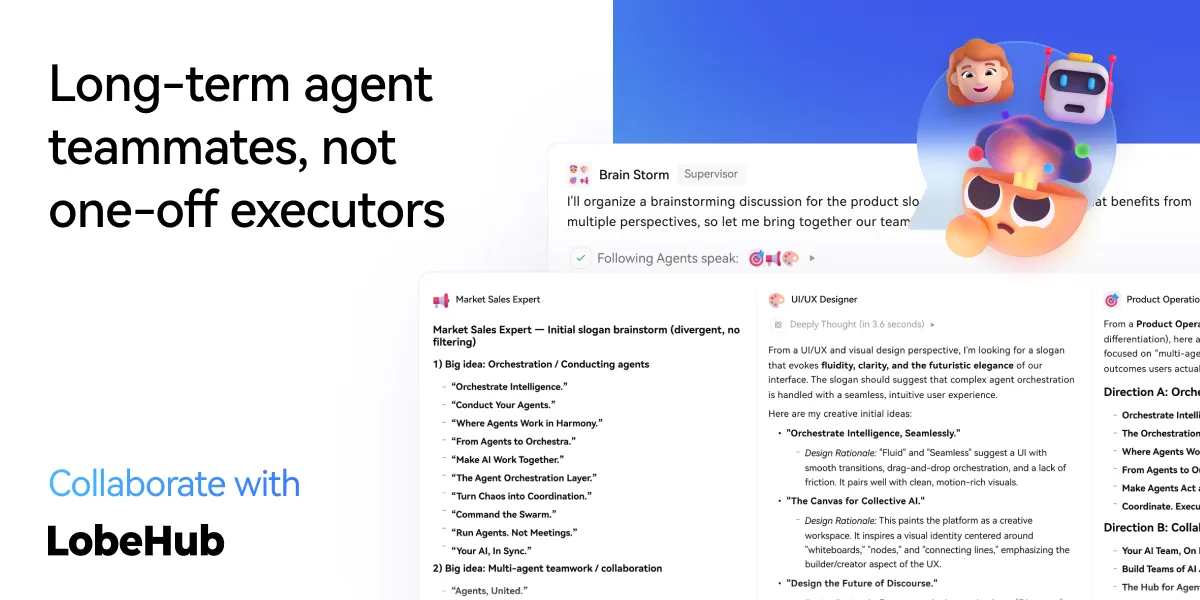
Collaborate: Scale New Forms of Collaboration Networks
LobeHub introduces Agent Groups, allowing you to work with agents like real teammates. The system assembles the right agents for the task, enabling parallel collaboration and iterative improvement.
- Pages: Write and refine content with multiple agents in one place with a shared context.
- Schedule: Schedule runs and let agents do the work at the right time, even while you are away.
- Project: Organize work by project to keep everything structured and easy to track.
- Workspace: A shared space for teams to collaborate with agents, ensuring clear ownership and visibility across the organization.
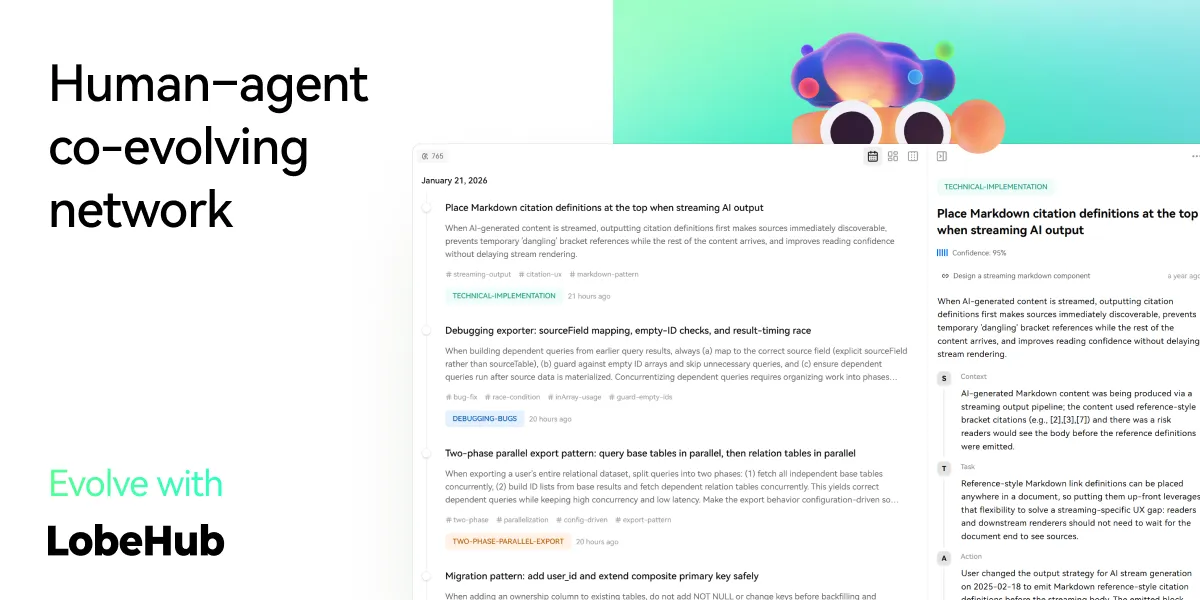
Evolve: Co-evolution of Humans and Agents
The best AI is one that understands you deeply. LobeHub features Personal Memory that builds a clear understanding of your needs.
- Continual Learning: Your agents learn from how you work, adapting their behavior to act at the right moment.
- White-Box Memory: We believe in transparency. Your agents use structured, editable memory, giving you full control over what they remember.
✨ more features will be added when LobeHub evolve.
🛳 Self Hosting
LobeHub provides Self-Hosted Version with Vercel, Alibaba Cloud, and Docker Image. This allows you to deploy your own chatbot within a few minutes without any prior knowledge.
[!TIP]
Learn more about 📘 Build your own LobeHub by checking it out.
A Deploying with Vercel, Zeabur , Sealos or Alibaba Cloud
"If you want to deploy this service yourself on Vercel, Zeabur or Alibaba Cloud, you can follow these steps:
- Prepare your OpenAI API Key.
- Click the button below to start deployment: Log in directly with your GitHub account, and remember to fill in the
OPENAI_API_KEY(required) on the environment variable section. - After deployment, you can start using it.
- Bind a custom domain (optional): The DNS of the domain assigned by Vercel is polluted in some areas; binding a custom domain can connect directly.
| Deploy with Vercel | Deploy with Zeabur | Deploy with Sealos | Deploy with RepoCloud | Deploy with Alibaba Cloud |
|---|---|---|---|---|
 |
 |
 |
 |
After Fork
After fork, only retain the upstream sync action and disable other actions in your repository on GitHub.
Keep Updated
If you have deployed your own project following the one-click deployment steps in the README, you might encounter constant prompts indicating "updates available." This is because Vercel defaults to creating a new project instead of forking this one, resulting in an inability to detect updates accurately.
[!TIP]
We suggest you redeploy using the following steps, 📘 Auto Sync With Latest
B Deploying with Docker


We provide a Docker image for deploying the LobeHub service on your own private device. Use the following command to start the LobeHub service:
- create a folder to for storage files
$ mkdir lobehub-db && cd lobehub-db
- init the LobeHub infrastructure
bash <(curl -fsSL https://lobe.li/setup.sh)
- Start the LobeHub service
docker compose up -d
[!NOTE]
For detailed instructions on deploying with Docker, please refer to the 📘 Docker Deployment Guide
Environment Variable
This project provides some additional configuration items set with environment variables:
| Environment Variable | Required | Description | Example |
|---|---|---|---|
OPENAI_API_KEY |
Yes | This is the API key you apply on the OpenAI account page | sk-xxxxxx...xxxxxx |
OPENAI_PROXY_URL |
No | If you manually configure the OpenAI interface proxy, you can use this configuration item to override the default OpenAI API request base URL | https://api.chatanywhere.cn or https://aihubmix.com/v1 The default value is https://api.openai.com/v1 |
OPENAI_MODEL_LIST |
No | Used to control the model list. Use + to add a model, - to hide a model, and model_name=display_name to customize the display name of a model, separated by commas. |
qwen-7b-chat,+glm-6b,-gpt-3.5-turbo |
[!NOTE]
The complete list of environment variables can be found in the 📘 Environment Variables
📦 Ecosystem
| NPM | Repository | Description | Version |
|---|---|---|---|
| @lobehub/ui | lobehub/lobe-ui | Open-source UI component library dedicated to building AIGC web applications. |  |
| @lobehub/icons | lobehub/lobe-icons | Popular AI / LLM Model Brand SVG Logo and Icon Collection. |  |
| @lobehub/tts | lobehub/lobe-tts | High-quality & reliable TTS/STT React Hooks library |  |
| @lobehub/lint | lobehub/lobe-lint | Configurations for ESlint, Stylelint, Commitlint, Prettier, Remark, and Semantic Release for LobeHub. |  |
🧩 Plugins
Plugins provide a means to extend the Function Calling capabilities of LobeHub. They can be used to introduce new function calls and even new ways to render message results. If you are interested in plugin development, please refer to our 📘 Plugin Development Guide in the Wiki.
- lobe-chat-plugins: This is the plugin index for LobeHub. It accesses index.json from this repository to display a list of available plugins for LobeHub to the user.
- chat-plugin-template: This is the plugin template for LobeHub plugin development.
- @lobehub/chat-plugin-sdk: The LobeHub Plugin SDK assists you in creating exceptional chat plugins for LobeHub.
- @lobehub/chat-plugins-gateway: The LobeHub Plugins Gateway is a backend service that provides a gateway for LobeHub plugins. We deploy this service using Vercel. The primary API POST /api/v1/runner is deployed as an Edge Function.
[!NOTE]
The plugin system is currently undergoing major development. You can learn more in the following issues:
- Plugin Phase 1: Implement separation of the plugin from the main body, split the plugin into an independent repository for maintenance, and realize dynamic loading of the plugin.
- Plugin Phase 2: The security and stability of the plugin's use, more accurately presenting abnormal states, the maintainability of the plugin architecture, and developer-friendly.
- Plugin Phase 3: Higher-level and more comprehensive customization capabilities, support for plugin authentication, and examples.
⌨️ Local Development
You can use GitHub Codespaces for online development:

Or clone it for local development:
$ git clone https://github.com/lobehub/lobehub.git
$ cd lobehub
$ pnpm install
$ pnpm dev          # Full-stack (Next.js + Vite SPA)
$ bun run dev:spa   # SPA frontend only (port 9876)
Debug Proxy: After running
dev:spa, the terminal prints a proxy URL likehttps://app.lobehub.com/_dangerous_local_dev_proxy?debug-host=http%3A%2F%2Flocalhost%3A9876. Open it to develop locally against the production backend with HMR.
If you would like to learn more details, please feel free to look at our 📘 Development Guide.
🤝 Contributing
Contributions of all types are more than welcome; if you are interested in contributing code, feel free to check out our GitHub Issues and Projects to get stuck in to show us what you're made of.
[!TIP]
We are creating a technology-driven forum, fostering knowledge interaction and the exchange of ideas that may culminate in mutual inspiration and collaborative innovation.
Help us make LobeHub better. Welcome to provide product design feedback, user experience discussions directly to us.
Principal Maintainers: @arvinxx @canisminor1990




|
|
|
|---|---|
|
|
|
|
❤️ Sponsor
Every bit counts and your one-time donation sparkles in our galaxy of support! You're a shooting star, making a swift and bright impact on our journey. Thank you for believing in us – your generosity guides us toward our mission, one brilliant flash at a time.

🔗 More Products
- 🅰️ Lobe SD Theme: Modern theme for Stable Diffusion WebUI, exquisite interface design, highly customizable UI, and efficiency-boosting features.
- ⛵️ Lobe Midjourney WebUI: WebUI for Midjourney, leverages AI to quickly generate a wide array of rich and diverse images from text prompts, sparking creativity and enhancing conversations.
- 🌏 Lobe i18n : Lobe i18n is an automation tool for the i18n (internationalization) translation process, powered by ChatGPT. It supports features such as automatic splitting of large files, incremental updates, and customization options for the OpenAI model, API proxy, and temperature.
- 💌 Lobe Commit: Lobe Commit is a CLI tool that leverages Langchain/ChatGPT to generate Gitmoji-based commit messages.
📝 License

Copyright © 2026 LobeHub.
This project is LobeHub Community License licensed.