mirror of
https://github.com/lobehub/lobe-chat.git
synced 2026-06-14 19:50:09 +00:00
Compare commits
92 Commits
| Author | SHA1 | Date | |
|---|---|---|---|
 Innei Innei
|
cdeec322bd | ||
|
Arvin Xu
|
8af28a778b | ||
|
Innei
|
6ecae1bbd1 | ||
|
Arvin Xu
|
60a59e89f6 | ||
|
Arvin Xu
|
7fd6d67fe3 | ||
|
Arvin Xu
|
453db9f165 | ||
|
LiJian
|
19f90e3d9a | ||
|
Arvin Xu
|
fee0fe5699 | ||
|
Arvin Xu
|
88246e5719 | ||
|
Innei
|
aaefe6c0d2 | ||
|
Arvin Xu
|
cbc9bfccaa | ||
|
Rylan Cai
|
3e056ad37a | ||
|
Innei
|
46bac5b540 | ||
|
Innei
|
57ed8f8541 | ||
|
LobeHub Bot
|
132893549a | ||
|
sxjeru
|
d717d5da20 | ||
|
Innei
|
58fa4f869d | ||
|
Rdmclin2
|
32e36e330a | ||
|
Innei
|
ee8cab8305 | ||
|
Innei
|
393653e20c | ||
|
Hardy
|
560f598789 | ||
|
LobeHub Bot
|
993dfe1bb0 | ||
|
Arvin Xu
|
967302269e | ||
|
Arvin Xu
|
674c849254 | ||
|
René Wang
|
f327e377a6 | ||
|
Rylan Cai
|
e7be5b1928 | ||
|
Arvin Xu
|
b54a41968d | ||
|
Zhijie He
|
f39f5e9fd6 | ||
|
Rylan Cai
|
7be18092d3 | ||
|
sxjeru
|
c60c02bcfe | ||
|
Zhijie He
|
ec3443d1db | ||
|
Arvin Xu
|
e76ab1f990 | ||
|
Innei
|
c59c066330 | ||
|
Innei
|
7097167613 | ||
|
Arvin Xu
|
2c2795e73a | ||
|
Rdmclin2
|
965fc929e1 | ||
|
Innei
|
491aba4dbd | ||
|
Innei
|
6402656ec7 | ||
|
Innei
|
f6314cc673 | ||
|
Yizhuo
|
cded932f1a | ||
|
Innei
|
e7c496352f | ||
|
Arvin Xu
|
296c6f3cb3 | ||
|
LiJian
|
53d0ee9ca5 | ||
|
Arvin Xu
|
689d5a51e8 | ||
|
Arvin Xu
|
23eab8769b | ||
|
Innei
|
0e57fd9955 | ||
|
LobeHub Bot
|
2f5a31fc99 | ||
|
Arvin Xu
|
143a15fdb9 | ||
|
LiJian
|
9c08fa5cdf | ||
|
Hardy
|
59d8d878a2 | ||
|
WindSpiritSR
|
0439a29189 | ||
|
LobeHub Bot
|
4a63ea3dcc | ||
|
YuTengjing
|
91b2653c71 | ||
|
René Wang
|
8c8e7dd992 | ||
|
Arvin Xu
|
a9cd2f7301 | ||
|
YuTengjing
|
b6c66dbdd7 | ||
|
Rylan Cai
|
5e1738ad4b | ||
|
Arvin Xu
|
4dc3c4ea1d | ||
|
Arvin Xu
|
bc9ae6b4e5 | ||
|
YuTengjing
|
70091935ba | ||
|
YuTengjing
|
50e373ad1c | ||
|
YuTengjing
|
966f943175 | ||
|
Rdmclin2
|
c7c2b56f3b | ||
|
Innei
|
841c1d2ef2 | ||
|
Innei
|
26449e522a | ||
|
Rdmclin2
|
f4c4ba7db5 | ||
|
LiJian
|
83f8f0319c | ||
|
YuTengjing
|
197a0cc8f1 | ||
|
LiJian
|
6b4046eb17 | ||
|
Innei
|
9e27bef8fa | ||
|
lobehubbot
|
aaff9af3b7 | ||
|
LiJian
|
feb50e7007 | ||
|
Zhijie He
|
dc9adf8f10 | ||
|
Innei
|
3d592ca70d | ||
|
LobeHub Bot
|
8d0ac45476 | ||
|
Rdmclin2
|
953033355b | ||
|
sxjeru
|
48b5927024 | ||
|
renovate[bot]
|
6e86912e7f | ||
|
Arvin Xu
|
4576059f4f | ||
|
Arvin Xu
|
9e9ba3e6c3 | ||
|
Innei
|
46602be0b3 | ||
|
YuTengjing
|
14b278fba8 | ||
|
Arvin Xu
|
53c5708c9f | ||
|
YuTengjing
|
edc8920703 | ||
|
Arvin Xu
|
926de076d9 | ||
|
Innei
|
9b7beca85e | ||
|
Arvin Xu
|
0724d8ca60 | ||
|
YuTengjing
|
9f36fe95ac | ||
|
Arvin Xu
|
3f148005e4 | ||
|
Arvin Xu
|
4e60d87514 | ||
|
YuTengjing
|
d2a16d0714 | ||
|
lobehubbot
|
ac8a9ec0f8 |
@@ -0,0 +1,935 @@
|
||||
---
|
||||
name: local-testing
|
||||
description: >
|
||||
Local app and bot testing. Uses agent-browser CLI for Electron/web app UI testing,
|
||||
and osascript (AppleScript) for controlling native macOS apps (WeChat, Discord, Telegram, Slack, Lark/飞书, QQ)
|
||||
to test bots. Triggers on 'local test', 'test in electron', 'test desktop', 'test bot',
|
||||
'bot test', 'test in discord', 'test in telegram', 'test in slack', 'test in weixin',
|
||||
'test in wechat', 'test in lark', 'test in feishu', 'test in qq',
|
||||
'manual test', 'osascript', or UI/bot verification tasks.
|
||||
---
|
||||
|
||||
# Local App & Bot Testing
|
||||
|
||||
Two approaches for local testing on macOS:
|
||||
|
||||
| Approach | Tool | Best For |
|
||||
| --------------------------- | ------------------- | ---------------------------------------------------- |
|
||||
| **agent-browser + CDP** | `agent-browser` CLI | Electron apps, web apps (DOM access, JS eval) |
|
||||
| **osascript (AppleScript)** | `osascript -e` | Native macOS apps (WeChat, Discord, Telegram, Slack) |
|
||||
|
||||
---
|
||||
|
||||
# Part 1: agent-browser (Electron / Web Apps)
|
||||
|
||||
Use `agent-browser` to automate Chromium-based apps via Chrome DevTools Protocol.
|
||||
|
||||
## Prerequisites
|
||||
|
||||
- `agent-browser` CLI installed globally (`agent-browser --version`)
|
||||
|
||||
## Core Workflow
|
||||
|
||||
### 1. Snapshot → Find Elements
|
||||
|
||||
```bash
|
||||
agent-browser --cdp -i < PORT > snapshot # Interactive elements only
|
||||
agent-browser --cdp -i -C < PORT > snapshot # Include contenteditable elements
|
||||
```
|
||||
|
||||
Returns element refs like `@e1`, `@e2`. **Refs are ephemeral** — re-snapshot after any page change.
|
||||
|
||||
### 2. Interact
|
||||
|
||||
```bash
|
||||
agent-browser --cdp @e5 < PORT > click
|
||||
agent-browser --cdp @e3 "text" < PORT > type # Character by character (contenteditable)
|
||||
agent-browser --cdp @e3 "text" < PORT > fill # Bulk fill (regular inputs)
|
||||
agent-browser --cdp Enter < PORT > press
|
||||
agent-browser --cdp down 500 < PORT > scroll
|
||||
```
|
||||
|
||||
### 3. Wait
|
||||
|
||||
```bash
|
||||
agent-browser --cdp 2000 < PORT > wait # Wait ms
|
||||
agent-browser --cdp --load networkidle < PORT > wait # Wait for network
|
||||
```
|
||||
|
||||
For waits >30s, use `sleep N` in bash instead — `agent-browser wait` blocks the daemon.
|
||||
|
||||
### 4. Screenshot & Verify
|
||||
|
||||
```bash
|
||||
agent-browser --cdp < PORT > screenshot # Save to ~/.agent-browser/tmp/screenshots/
|
||||
agent-browser --cdp text @e1 < PORT > get # Get element text
|
||||
agent-browser --cdp url < PORT > get # Get current URL
|
||||
```
|
||||
|
||||
Read screenshots with the `Read` tool for visual verification.
|
||||
|
||||
### 5. Evaluate JavaScript
|
||||
|
||||
```bash
|
||||
agent-browser --cdp "document.title" < PORT > eval
|
||||
```
|
||||
|
||||
For multi-line JS, use `--stdin`:
|
||||
|
||||
```bash
|
||||
agent-browser --cdp --stdin < PORT > eval << 'EVALEOF'
|
||||
(function() {
|
||||
return JSON.stringify({ title: document.title, url: location.href });
|
||||
})()
|
||||
EVALEOF
|
||||
```
|
||||
|
||||
## Electron (LobeHub Desktop)
|
||||
|
||||
### Setup
|
||||
|
||||
```bash
|
||||
# 1. Kill existing instances
|
||||
pkill -f "Electron" 2> /dev/null
|
||||
pkill -f "electron-vite" 2> /dev/null
|
||||
pkill -f "agent-browser" 2> /dev/null
|
||||
sleep 3
|
||||
|
||||
# 2. Start Electron with CDP (MUST cd to apps/desktop first)
|
||||
cd apps/desktop && ELECTRON_ENABLE_LOGGING=1 npx electron-vite dev -- --remote-debugging-port=9222 > /tmp/electron-dev.log 2>&1 &
|
||||
|
||||
# 3. Wait for startup
|
||||
for i in $(seq 1 12); do
|
||||
sleep 5
|
||||
if strings /tmp/electron-dev.log 2> /dev/null | grep -q "starting electron"; then
|
||||
echo "ready"
|
||||
break
|
||||
fi
|
||||
done
|
||||
|
||||
# 4. Wait for renderer, then connect
|
||||
sleep 15 && agent-browser --cdp 9222 wait 3000
|
||||
```
|
||||
|
||||
**Critical:** `npx electron-vite dev` MUST run from `apps/desktop/` directory, not project root.
|
||||
|
||||
### LobeHub-Specific Patterns
|
||||
|
||||
#### Access Zustand Store State
|
||||
|
||||
```bash
|
||||
agent-browser --cdp 9222 eval --stdin << 'EVALEOF'
|
||||
(function() {
|
||||
var chat = window.__LOBE_STORES.chat();
|
||||
var ops = Object.values(chat.operations);
|
||||
return JSON.stringify({
|
||||
ops: ops.map(function(o) { return { type: o.type, status: o.status }; }),
|
||||
activeAgent: chat.activeAgentId,
|
||||
activeTopic: chat.activeTopicId,
|
||||
});
|
||||
})()
|
||||
EVALEOF
|
||||
```
|
||||
|
||||
#### Find and Use the Chat Input
|
||||
|
||||
```bash
|
||||
# The chat input is contenteditable — must use -C flag
|
||||
agent-browser --cdp 9222 snapshot -i -C 2>&1 | grep "editable"
|
||||
|
||||
agent-browser --cdp 9222 click @e48
|
||||
agent-browser --cdp 9222 type @e48 "Hello world"
|
||||
agent-browser --cdp 9222 press Enter
|
||||
```
|
||||
|
||||
#### Wait for Agent to Complete
|
||||
|
||||
```bash
|
||||
agent-browser --cdp 9222 eval --stdin << 'EVALEOF'
|
||||
(function() {
|
||||
var chat = window.__LOBE_STORES.chat();
|
||||
var ops = Object.values(chat.operations);
|
||||
var running = ops.filter(function(o) { return o.status === 'running'; });
|
||||
return running.length === 0 ? 'done' : 'running: ' + running.length;
|
||||
})()
|
||||
EVALEOF
|
||||
```
|
||||
|
||||
#### Install Error Interceptor
|
||||
|
||||
```bash
|
||||
agent-browser --cdp 9222 eval --stdin << 'EVALEOF'
|
||||
(function() {
|
||||
window.__CAPTURED_ERRORS = [];
|
||||
var orig = console.error;
|
||||
console.error = function() {
|
||||
var msg = Array.from(arguments).map(function(a) {
|
||||
if (a instanceof Error) return a.message;
|
||||
return typeof a === 'object' ? JSON.stringify(a) : String(a);
|
||||
}).join(' ');
|
||||
window.__CAPTURED_ERRORS.push(msg);
|
||||
orig.apply(console, arguments);
|
||||
};
|
||||
return 'installed';
|
||||
})()
|
||||
EVALEOF
|
||||
|
||||
# Later, check captured errors:
|
||||
agent-browser --cdp 9222 eval "JSON.stringify(window.__CAPTURED_ERRORS)"
|
||||
```
|
||||
|
||||
## Chrome / Web Apps
|
||||
|
||||
```bash
|
||||
/Applications/Google\ Chrome.app/Contents/MacOS/Google\ Chrome \
|
||||
--remote-debugging-port=9222 \
|
||||
--user-data-dir=/tmp/chrome-test-profile \
|
||||
"<URL>" &
|
||||
sleep 5
|
||||
agent-browser --cdp 9222 snapshot -i
|
||||
```
|
||||
|
||||
---
|
||||
|
||||
# Part 2: osascript (Native macOS App Bot Testing)
|
||||
|
||||
Use AppleScript via `osascript` to control native macOS desktop apps for bot testing. This works with any app that supports macOS Accessibility, without needing CDP or Chromium.
|
||||
|
||||
## Core osascript Patterns
|
||||
|
||||
### Activate an App
|
||||
|
||||
```bash
|
||||
osascript -e 'tell application "Discord" to activate'
|
||||
```
|
||||
|
||||
### Type Text
|
||||
|
||||
```bash
|
||||
# Type character by character (reliable, but slow for long text)
|
||||
osascript -e 'tell application "System Events" to keystroke "Hello world"'
|
||||
|
||||
# Press Enter
|
||||
osascript -e 'tell application "System Events" to key code 36'
|
||||
|
||||
# Press Tab
|
||||
osascript -e 'tell application "System Events" to key code 48'
|
||||
|
||||
# Press Escape
|
||||
osascript -e 'tell application "System Events" to key code 53'
|
||||
```
|
||||
|
||||
### Paste from Clipboard (fast, for long text)
|
||||
|
||||
```bash
|
||||
# Set clipboard and paste — much faster than keystroke for long messages
|
||||
osascript -e 'set the clipboard to "Your long message here"'
|
||||
osascript -e 'tell application "System Events" to keystroke "v" using command down'
|
||||
```
|
||||
|
||||
Or in one shot:
|
||||
|
||||
```bash
|
||||
osascript -e '
|
||||
set the clipboard to "Your long message here"
|
||||
tell application "System Events" to keystroke "v" using command down
|
||||
'
|
||||
```
|
||||
|
||||
### Keyboard Shortcuts
|
||||
|
||||
```bash
|
||||
# Cmd+K (quick switcher in Discord/Slack)
|
||||
osascript -e 'tell application "System Events" to keystroke "k" using command down'
|
||||
|
||||
# Cmd+F (search)
|
||||
osascript -e 'tell application "System Events" to keystroke "f" using command down'
|
||||
|
||||
# Cmd+N (new message/chat)
|
||||
osascript -e 'tell application "System Events" to keystroke "n" using command down'
|
||||
|
||||
# Cmd+Shift+K (example: multi-modifier)
|
||||
osascript -e 'tell application "System Events" to keystroke "k" using {command down, shift down}'
|
||||
```
|
||||
|
||||
### Click at Position
|
||||
|
||||
```bash
|
||||
# Click at absolute screen coordinates
|
||||
osascript -e '
|
||||
tell application "System Events"
|
||||
click at {500, 300}
|
||||
end tell
|
||||
'
|
||||
```
|
||||
|
||||
### Get Window Info
|
||||
|
||||
```bash
|
||||
# Get window position and size
|
||||
osascript -e '
|
||||
tell application "System Events"
|
||||
tell process "Discord"
|
||||
get {position, size} of window 1
|
||||
end tell
|
||||
end tell
|
||||
'
|
||||
```
|
||||
|
||||
### Screenshot
|
||||
|
||||
```bash
|
||||
# Full screen
|
||||
screencapture /tmp/screenshot.png
|
||||
|
||||
# Interactive region select
|
||||
screencapture -i /tmp/screenshot.png
|
||||
|
||||
# Specific window (by window ID from CGWindowList)
|
||||
screencapture -l < WINDOW_ID > /tmp/screenshot.png
|
||||
```
|
||||
|
||||
To get window ID for a specific app:
|
||||
|
||||
```bash
|
||||
osascript -e '
|
||||
tell application "System Events"
|
||||
tell process "Discord"
|
||||
get id of window 1
|
||||
end tell
|
||||
end tell
|
||||
'
|
||||
```
|
||||
|
||||
### Read Accessibility Elements
|
||||
|
||||
```bash
|
||||
# Get all UI elements of the frontmost window (can be slow/large)
|
||||
osascript -e '
|
||||
tell application "System Events"
|
||||
tell process "Discord"
|
||||
entire contents of window 1
|
||||
end tell
|
||||
end tell
|
||||
'
|
||||
|
||||
# Get a specific element's value
|
||||
osascript -e '
|
||||
tell application "System Events"
|
||||
tell process "Discord"
|
||||
get value of text field 1 of window 1
|
||||
end tell
|
||||
end tell
|
||||
'
|
||||
```
|
||||
|
||||
> **Warning:** `entire contents` can be extremely slow on complex UIs. Prefer screenshots + `Read` tool for visual verification.
|
||||
|
||||
### Read Screen Text via Clipboard
|
||||
|
||||
For reading the latest message or response from an app:
|
||||
|
||||
```bash
|
||||
# Select all text in the focused area and copy
|
||||
osascript -e '
|
||||
tell application "System Events"
|
||||
keystroke "a" using command down
|
||||
keystroke "c" using command down
|
||||
end tell
|
||||
'
|
||||
sleep 0.5
|
||||
# Read clipboard
|
||||
pbpaste
|
||||
```
|
||||
|
||||
---
|
||||
|
||||
## Client: Discord
|
||||
|
||||
**App name:** `Discord` | **Process name:** `Discord`
|
||||
|
||||
### Activate & Navigate
|
||||
|
||||
```bash
|
||||
# Activate Discord
|
||||
osascript -e 'tell application "Discord" to activate'
|
||||
sleep 1
|
||||
|
||||
# Open Quick Switcher (Cmd+K) to navigate to a channel
|
||||
osascript -e 'tell application "System Events" to keystroke "k" using command down'
|
||||
sleep 0.5
|
||||
osascript -e 'tell application "System Events" to keystroke "bot-testing"'
|
||||
sleep 1
|
||||
osascript -e 'tell application "System Events" to key code 36' # Enter
|
||||
sleep 2
|
||||
```
|
||||
|
||||
### Send Message to Bot
|
||||
|
||||
```bash
|
||||
# The message input is focused after navigating to a channel
|
||||
# Type a message
|
||||
osascript -e 'tell application "System Events" to keystroke "/hello"'
|
||||
sleep 0.5
|
||||
osascript -e 'tell application "System Events" to key code 36' # Enter
|
||||
```
|
||||
|
||||
### Send Long Message (via clipboard)
|
||||
|
||||
```bash
|
||||
osascript -e '
|
||||
tell application "Discord" to activate
|
||||
delay 0.5
|
||||
set the clipboard to "Write a 3000 word essay about space exploration"
|
||||
tell application "System Events"
|
||||
keystroke "v" using command down
|
||||
delay 0.3
|
||||
key code 36 -- Enter
|
||||
end tell
|
||||
'
|
||||
```
|
||||
|
||||
### Verify Bot Response
|
||||
|
||||
```bash
|
||||
# Wait for bot to respond, then screenshot
|
||||
sleep 10
|
||||
screencapture /tmp/discord-bot-response.png
|
||||
# Read with the Read tool for visual verification
|
||||
```
|
||||
|
||||
### Full Bot Test Example
|
||||
|
||||
```bash
|
||||
#!/usr/bin/env bash
|
||||
# test-discord-bot.sh — Send message and verify bot response
|
||||
|
||||
# 1. Activate Discord and navigate to channel
|
||||
osascript -e '
|
||||
tell application "Discord" to activate
|
||||
delay 1
|
||||
-- Quick Switcher
|
||||
tell application "System Events" to keystroke "k" using command down
|
||||
delay 0.5
|
||||
tell application "System Events" to keystroke "bot-testing"
|
||||
delay 1
|
||||
tell application "System Events" to key code 36
|
||||
delay 2
|
||||
'
|
||||
|
||||
# 2. Send test message
|
||||
osascript -e '
|
||||
set the clipboard to "!ping"
|
||||
tell application "System Events"
|
||||
keystroke "v" using command down
|
||||
delay 0.3
|
||||
key code 36
|
||||
end tell
|
||||
'
|
||||
|
||||
# 3. Wait for response and capture
|
||||
sleep 5
|
||||
screencapture /tmp/discord-test-result.png
|
||||
echo "Screenshot saved to /tmp/discord-test-result.png"
|
||||
```
|
||||
|
||||
---
|
||||
|
||||
## Client: Slack
|
||||
|
||||
**App name:** `Slack` | **Process name:** `Slack`
|
||||
|
||||
### Activate & Navigate
|
||||
|
||||
```bash
|
||||
# Activate Slack
|
||||
osascript -e 'tell application "Slack" to activate'
|
||||
sleep 1
|
||||
|
||||
# Quick Switcher (Cmd+K)
|
||||
osascript -e 'tell application "System Events" to keystroke "k" using command down'
|
||||
sleep 0.5
|
||||
osascript -e 'tell application "System Events" to keystroke "bot-testing"'
|
||||
sleep 1
|
||||
osascript -e 'tell application "System Events" to key code 36' # Enter
|
||||
sleep 2
|
||||
```
|
||||
|
||||
### Send Message to Bot
|
||||
|
||||
```bash
|
||||
# Direct message input (focused after channel nav)
|
||||
osascript -e 'tell application "System Events" to keystroke "@mybot hello"'
|
||||
sleep 0.3
|
||||
osascript -e 'tell application "System Events" to key code 36'
|
||||
```
|
||||
|
||||
### Send Long Message
|
||||
|
||||
```bash
|
||||
osascript -e '
|
||||
tell application "Slack" to activate
|
||||
delay 0.5
|
||||
set the clipboard to "A long test message for the bot..."
|
||||
tell application "System Events"
|
||||
keystroke "v" using command down
|
||||
delay 0.3
|
||||
key code 36
|
||||
end tell
|
||||
'
|
||||
```
|
||||
|
||||
### Slash Command Test
|
||||
|
||||
```bash
|
||||
osascript -e '
|
||||
tell application "Slack" to activate
|
||||
delay 0.5
|
||||
tell application "System Events"
|
||||
keystroke "/ask What is the meaning of life?"
|
||||
delay 0.5
|
||||
key code 36
|
||||
end tell
|
||||
'
|
||||
```
|
||||
|
||||
### Verify Response
|
||||
|
||||
```bash
|
||||
sleep 10
|
||||
screencapture /tmp/slack-bot-response.png
|
||||
```
|
||||
|
||||
---
|
||||
|
||||
## Client: Telegram
|
||||
|
||||
**App name:** `Telegram` | **Process name:** `Telegram`
|
||||
|
||||
### Activate & Navigate
|
||||
|
||||
```bash
|
||||
# Activate Telegram
|
||||
osascript -e 'tell application "Telegram" to activate'
|
||||
sleep 1
|
||||
|
||||
# Search for a bot (Cmd+F or click search)
|
||||
osascript -e '
|
||||
tell application "System Events"
|
||||
keystroke "f" using command down
|
||||
delay 0.5
|
||||
keystroke "MyTestBot"
|
||||
delay 1
|
||||
key code 36 -- Enter to select
|
||||
end tell
|
||||
'
|
||||
sleep 2
|
||||
```
|
||||
|
||||
### Send Message to Bot
|
||||
|
||||
```bash
|
||||
# After navigating to bot chat, input is focused
|
||||
osascript -e '
|
||||
tell application "System Events"
|
||||
keystroke "/start"
|
||||
delay 0.3
|
||||
key code 36
|
||||
end tell
|
||||
'
|
||||
```
|
||||
|
||||
### Send Long Message
|
||||
|
||||
```bash
|
||||
osascript -e '
|
||||
tell application "Telegram" to activate
|
||||
delay 0.5
|
||||
set the clipboard to "Tell me about quantum computing in detail"
|
||||
tell application "System Events"
|
||||
keystroke "v" using command down
|
||||
delay 0.3
|
||||
key code 36
|
||||
end tell
|
||||
'
|
||||
```
|
||||
|
||||
### Verify Response
|
||||
|
||||
```bash
|
||||
sleep 10
|
||||
screencapture /tmp/telegram-bot-response.png
|
||||
```
|
||||
|
||||
### Telegram Bot API (programmatic alternative)
|
||||
|
||||
For sending messages directly to the bot's chat without UI:
|
||||
|
||||
```bash
|
||||
# Send message as the bot (for testing webhooks/responses)
|
||||
curl -s "https://api.telegram.org/bot$TELEGRAM_BOT_TOKEN/sendMessage" \
|
||||
-d "chat_id=$CHAT_ID&text=test message"
|
||||
|
||||
# Get recent updates
|
||||
curl -s "https://api.telegram.org/bot$TELEGRAM_BOT_TOKEN/getUpdates?limit=5" | jq .
|
||||
```
|
||||
|
||||
---
|
||||
|
||||
## Client: WeChat / 微信
|
||||
|
||||
**App name:** `微信` or `WeChat` | **Process name:** `WeChat`
|
||||
|
||||
### Activate & Navigate
|
||||
|
||||
```bash
|
||||
# Activate WeChat
|
||||
osascript -e 'tell application "微信" to activate'
|
||||
sleep 1
|
||||
|
||||
# Search for a contact/bot (Cmd+F)
|
||||
osascript -e '
|
||||
tell application "System Events"
|
||||
keystroke "f" using command down
|
||||
delay 0.5
|
||||
keystroke "TestBot"
|
||||
delay 1
|
||||
key code 36 -- Enter to select
|
||||
end tell
|
||||
'
|
||||
sleep 2
|
||||
```
|
||||
|
||||
### Send Message
|
||||
|
||||
```bash
|
||||
# After navigating to a chat, the input is focused
|
||||
osascript -e '
|
||||
tell application "System Events"
|
||||
keystroke "Hello bot!"
|
||||
delay 0.3
|
||||
key code 36
|
||||
end tell
|
||||
'
|
||||
```
|
||||
|
||||
### Send Long Message (clipboard)
|
||||
|
||||
```bash
|
||||
osascript -e '
|
||||
tell application "微信" to activate
|
||||
delay 0.5
|
||||
set the clipboard to "Please help me with this task..."
|
||||
tell application "System Events"
|
||||
keystroke "v" using command down
|
||||
delay 0.3
|
||||
key code 36
|
||||
end tell
|
||||
'
|
||||
```
|
||||
|
||||
### Verify Response
|
||||
|
||||
```bash
|
||||
sleep 10
|
||||
screencapture /tmp/wechat-bot-response.png
|
||||
```
|
||||
|
||||
### WeChat-Specific Notes
|
||||
|
||||
- WeChat macOS app name can be `微信` or `WeChat` depending on system language. Try both:
|
||||
```bash
|
||||
osascript -e 'tell application "微信" to activate' 2> /dev/null \
|
||||
|| osascript -e 'tell application "WeChat" to activate'
|
||||
```
|
||||
- WeChat uses **Enter** to send (not Cmd+Enter by default, but configurable)
|
||||
- For multi-line messages without sending, use **Shift+Enter**:
|
||||
```bash
|
||||
osascript -e 'tell application "System Events" to key code 36 using shift down'
|
||||
```
|
||||
|
||||
---
|
||||
|
||||
## Client: Lark / 飞书
|
||||
|
||||
**App name:** `Lark` or `飞书` | **Process name:** `Lark` or `飞书`
|
||||
|
||||
### Activate & Navigate
|
||||
|
||||
```bash
|
||||
# Activate Lark (auto-detects Lark or 飞书)
|
||||
osascript -e 'tell application "Lark" to activate' 2> /dev/null \
|
||||
|| osascript -e 'tell application "飞书" to activate'
|
||||
sleep 1
|
||||
|
||||
# Quick Switcher / Search (Cmd+K)
|
||||
osascript -e 'tell application "System Events" to keystroke "k" using command down'
|
||||
sleep 0.5
|
||||
osascript -e '
|
||||
set the clipboard to "bot-testing"
|
||||
tell application "System Events"
|
||||
keystroke "v" using command down
|
||||
delay 1.5
|
||||
key code 36 -- Enter
|
||||
end tell
|
||||
'
|
||||
sleep 2
|
||||
```
|
||||
|
||||
### Send Message to Bot
|
||||
|
||||
```bash
|
||||
osascript -e '
|
||||
set the clipboard to "@MyBot help me with this task"
|
||||
tell application "System Events"
|
||||
keystroke "v" using command down
|
||||
delay 0.3
|
||||
key code 36 -- Enter
|
||||
end tell
|
||||
'
|
||||
```
|
||||
|
||||
### Verify Response
|
||||
|
||||
```bash
|
||||
sleep 10
|
||||
screencapture /tmp/lark-bot-response.png
|
||||
```
|
||||
|
||||
### Lark-Specific Notes
|
||||
|
||||
- App name varies: `Lark` (international) vs `飞书` (China mainland) — the script auto-detects
|
||||
- Uses `Cmd+K` for quick search (same as Discord/Slack)
|
||||
- Enter sends message by default
|
||||
|
||||
---
|
||||
|
||||
## Client: QQ
|
||||
|
||||
**App name:** `QQ` | **Process name:** `QQ`
|
||||
|
||||
### Activate & Navigate
|
||||
|
||||
```bash
|
||||
osascript -e 'tell application "QQ" to activate'
|
||||
sleep 1
|
||||
|
||||
# Search for contact/group (Cmd+F)
|
||||
osascript -e '
|
||||
tell application "System Events"
|
||||
keystroke "f" using command down
|
||||
delay 0.8
|
||||
end tell
|
||||
'
|
||||
osascript -e '
|
||||
set the clipboard to "bot-testing"
|
||||
tell application "System Events"
|
||||
keystroke "v" using command down
|
||||
delay 1.5
|
||||
key code 36 -- Enter
|
||||
end tell
|
||||
'
|
||||
sleep 2
|
||||
```
|
||||
|
||||
### Send Message to Bot
|
||||
|
||||
```bash
|
||||
osascript -e '
|
||||
set the clipboard to "Hello bot!"
|
||||
tell application "System Events"
|
||||
keystroke "v" using command down
|
||||
delay 0.3
|
||||
key code 36 -- Enter
|
||||
end tell
|
||||
'
|
||||
```
|
||||
|
||||
### Verify Response
|
||||
|
||||
```bash
|
||||
sleep 10
|
||||
screencapture /tmp/qq-bot-response.png
|
||||
```
|
||||
|
||||
### QQ-Specific Notes
|
||||
|
||||
- Enter sends message by default; Shift+Enter for newlines
|
||||
- Uses `Cmd+F` for search
|
||||
- Always use clipboard paste for CJK characters
|
||||
|
||||
---
|
||||
|
||||
## Common Bot Testing Workflow (osascript)
|
||||
|
||||
Regardless of platform, the pattern is:
|
||||
|
||||
```bash
|
||||
APP_NAME="Discord" # or "Slack", "Telegram", "微信"
|
||||
CHANNEL="bot-testing"
|
||||
MESSAGE="Hello bot!"
|
||||
WAIT_SECONDS=10
|
||||
|
||||
# 1. Activate
|
||||
osascript -e "tell application \"$APP_NAME\" to activate"
|
||||
sleep 1
|
||||
|
||||
# 2. Navigate to channel/chat (via Quick Switcher or Search)
|
||||
osascript -e 'tell application "System Events" to keystroke "k" using command down'
|
||||
sleep 0.5
|
||||
osascript -e "tell application \"System Events\" to keystroke \"$CHANNEL\""
|
||||
sleep 1
|
||||
osascript -e 'tell application "System Events" to key code 36'
|
||||
sleep 2
|
||||
|
||||
# 3. Send message
|
||||
osascript -e "set the clipboard to \"$MESSAGE\""
|
||||
osascript -e '
|
||||
tell application "System Events"
|
||||
keystroke "v" using command down
|
||||
delay 0.3
|
||||
key code 36
|
||||
end tell
|
||||
'
|
||||
|
||||
# 4. Wait for bot response
|
||||
sleep "$WAIT_SECONDS"
|
||||
|
||||
# 5. Screenshot for verification
|
||||
screencapture /tmp/"${APP_NAME,,}"-bot-test.png
|
||||
echo "Result saved to /tmp/${APP_NAME,,}-bot-test.png"
|
||||
```
|
||||
|
||||
### Tips
|
||||
|
||||
- **Use clipboard paste** (`Cmd+V`) for messages containing special characters or long text — `keystroke` can mangle non-ASCII
|
||||
- **Add `delay`** between actions — apps need time to process UI events
|
||||
- **Screenshot for verification** — use `screencapture` + `Read` tool for visual checks
|
||||
- **Use a dedicated test channel/chat** — avoid polluting real conversations
|
||||
- **Check app name** — some apps have different names in different locales (e.g., `微信` vs `WeChat`)
|
||||
- **Accessibility permissions required** — System Events automation requires granting Accessibility access in System Preferences > Privacy & Security > Accessibility
|
||||
|
||||
---
|
||||
|
||||
# Scripts
|
||||
|
||||
Ready-to-use scripts in `.agents/skills/local-testing/scripts/`:
|
||||
|
||||
| Script | Usage |
|
||||
| ------------------------- | --------------------------------------------- |
|
||||
| `capture-app-window.sh` | Capture screenshot of a specific app window |
|
||||
| `record-electron-demo.sh` | Record Electron app demo with ffmpeg |
|
||||
| `test-discord-bot.sh` | Send message to Discord bot via osascript |
|
||||
| `test-slack-bot.sh` | Send message to Slack bot via osascript |
|
||||
| `test-telegram-bot.sh` | Send message to Telegram bot via osascript |
|
||||
| `test-wechat-bot.sh` | Send message to WeChat bot via osascript |
|
||||
| `test-lark-bot.sh` | Send message to Lark / 飞书 bot via osascript |
|
||||
| `test-qq-bot.sh` | Send message to QQ bot via osascript |
|
||||
|
||||
### Window Screenshot Utility
|
||||
|
||||
`capture-app-window.sh` captures a screenshot of a specific app window using `screencapture -l <windowID>`. It uses Swift + CGWindowList to find the window by process name, so screenshots work correctly even when the window is on an external monitor or behind other windows.
|
||||
|
||||
```bash
|
||||
# Standalone usage
|
||||
./.agents/skills/local-testing/scripts/capture-app-window.sh "Discord" /tmp/discord.png
|
||||
./.agents/skills/local-testing/scripts/capture-app-window.sh "Slack" /tmp/slack.png
|
||||
./.agents/skills/local-testing/scripts/capture-app-window.sh "WeChat" /tmp/wechat.png
|
||||
```
|
||||
|
||||
All bot test scripts use this utility automatically for their screenshots.
|
||||
|
||||
### Bot Test Scripts
|
||||
|
||||
All bot test scripts share the same interface:
|
||||
|
||||
```bash
|
||||
./scripts/test-<platform>-bot.sh <channel_or_contact> <message> [wait_seconds] [screenshot_path]
|
||||
```
|
||||
|
||||
Examples:
|
||||
|
||||
```bash
|
||||
# Discord — test a bot in #bot-testing channel
|
||||
./.agents/skills/local-testing/scripts/test-discord-bot.sh "bot-testing" "!ping"
|
||||
./.agents/skills/local-testing/scripts/test-discord-bot.sh "bot-testing" "/ask Tell me a joke" 30
|
||||
|
||||
# Slack — test a bot in #bot-testing channel
|
||||
./.agents/skills/local-testing/scripts/test-slack-bot.sh "bot-testing" "@mybot hello"
|
||||
./.agents/skills/local-testing/scripts/test-slack-bot.sh "bot-testing" "/ask What is 2+2?" 20
|
||||
|
||||
# Telegram — test a bot by username
|
||||
./.agents/skills/local-testing/scripts/test-telegram-bot.sh "MyTestBot" "/start"
|
||||
./.agents/skills/local-testing/scripts/test-telegram-bot.sh "GPTBot" "Hello" 60
|
||||
|
||||
# WeChat — test a bot or send to a contact
|
||||
./.agents/skills/local-testing/scripts/test-wechat-bot.sh "文件传输助手" "test message" 5
|
||||
./.agents/skills/local-testing/scripts/test-wechat-bot.sh "MyBot" "Tell me a joke" 30
|
||||
|
||||
# Lark/飞书 — test a bot in a group chat
|
||||
./.agents/skills/local-testing/scripts/test-lark-bot.sh "bot-testing" "@MyBot hello"
|
||||
./.agents/skills/local-testing/scripts/test-lark-bot.sh "bot-testing" "Help me with this" 30
|
||||
|
||||
# QQ — test a bot in a group or direct chat
|
||||
./.agents/skills/local-testing/scripts/test-qq-bot.sh "bot-testing" "Hello bot" 15
|
||||
./.agents/skills/local-testing/scripts/test-qq-bot.sh "MyBot" "/help" 10
|
||||
```
|
||||
|
||||
Each script: activates the app, navigates to the channel/contact, pastes the message via clipboard, sends, waits, and takes a screenshot. Use the `Read` tool on the screenshot for visual verification.
|
||||
|
||||
---
|
||||
|
||||
# Screen Recording
|
||||
|
||||
Record automated demos by combining `ffmpeg` screen capture with `agent-browser` automation. The script `.agents/skills/local-testing/scripts/record-electron-demo.sh` handles the full lifecycle for Electron.
|
||||
|
||||
### Usage
|
||||
|
||||
```bash
|
||||
# Run the built-in demo (queue-edit feature)
|
||||
./.agents/skills/local-testing/scripts/record-electron-demo.sh
|
||||
|
||||
# Run a custom automation script
|
||||
./.agents/skills/local-testing/scripts/record-electron-demo.sh ./my-demo.sh /tmp/my-demo.mp4
|
||||
```
|
||||
|
||||
The script automatically:
|
||||
|
||||
1. Starts Electron with CDP and waits for SPA to load
|
||||
2. Detects window position, screen, and Retina scale via Swift/CGWindowList
|
||||
3. Records only the Electron window region using `ffmpeg -f avfoundation` with crop
|
||||
4. Runs the demo (built-in or custom script receiving CDP port as `$1`)
|
||||
5. Stops recording and cleans up
|
||||
|
||||
---
|
||||
|
||||
# Gotchas
|
||||
|
||||
### agent-browser
|
||||
|
||||
- **Daemon can get stuck** — if commands hang, `pkill -f agent-browser` to reset
|
||||
- **`agent-browser wait` blocks the daemon** — for waits >30s, use bash `sleep`
|
||||
- **HMR invalidates everything** — after code changes, refs break. Re-snapshot or restart
|
||||
- **`snapshot -i` doesn't find contenteditable** — use `snapshot -i -C` for rich text editors
|
||||
- **`fill` doesn't work on contenteditable** — use `type` for chat inputs
|
||||
- **Screenshots go to `~/.agent-browser/tmp/screenshots/`** — read them with the `Read` tool
|
||||
|
||||
### Electron-specific
|
||||
|
||||
- **`npx electron-vite dev` must run from `apps/desktop/`** — running from project root fails silently
|
||||
- **Don't resize the Electron window after load** — resizing triggers full SPA reload
|
||||
- **Store is at `window.__LOBE_STORES`** not `window.__ZUSTAND_STORES__`
|
||||
|
||||
### osascript
|
||||
|
||||
- **Accessibility permission required** — first run will prompt for access; grant it in System Preferences > Privacy & Security > Accessibility for Terminal / iTerm / Claude Code
|
||||
- **`keystroke` is slow for long text** — always use clipboard paste (`Cmd+V`) for messages over \~20 characters
|
||||
- **`keystroke` can mangle non-ASCII** — use clipboard paste for Chinese, emoji, or special characters
|
||||
- **`key code 36` is Enter** — this is the hardware key code, works regardless of keyboard layout
|
||||
- **`entire contents` is extremely slow** — avoid for complex UIs; use screenshots instead
|
||||
- **App name varies by locale** — `微信` vs `WeChat`, `企业微信` vs `WeCom`; handle both
|
||||
- **WeChat Enter sends immediately** — use `Shift+Enter` for newlines within a message
|
||||
- **Rate limiting** — don't send messages too fast; platforms may throttle or flag automated input
|
||||
- **Lark / 飞书 app name varies** — `Lark` (international) vs `飞书` (China mainland); scripts auto-detect
|
||||
- **QQ uses `Cmd+F` for search** — not `Cmd+K` like Discord/Slack/Lark
|
||||
- **Bot response times vary** — AI-powered bots may take 10-60s; use generous sleep values
|
||||
@@ -0,0 +1,54 @@
|
||||
#!/usr/bin/env bash
|
||||
#
|
||||
# capture-app-window.sh — Capture a screenshot of a specific app window
|
||||
#
|
||||
# Uses CGWindowList via Swift to find the window by process name, then
|
||||
# screencapture -l <windowID> to capture only that window.
|
||||
# Falls back to full-screen capture if the window is not found.
|
||||
#
|
||||
# Usage:
|
||||
# ./capture-app-window.sh <process_name> <output_path>
|
||||
#
|
||||
# Arguments:
|
||||
# process_name — The process/owner name as shown in Activity Monitor
|
||||
# (e.g., "Discord", "Slack", "Telegram", "WeChat", "QQ", "Lark")
|
||||
# output_path — Path to save the screenshot (e.g., /tmp/screenshot.png)
|
||||
#
|
||||
# Examples:
|
||||
# ./capture-app-window.sh "Discord" /tmp/discord.png
|
||||
# ./capture-app-window.sh "Slack" /tmp/slack.png
|
||||
# ./capture-app-window.sh "微信" /tmp/wechat.png
|
||||
#
|
||||
set -euo pipefail
|
||||
|
||||
PROCESS="${1:?Usage: capture-app-window.sh <process_name> <output_path>}"
|
||||
OUTPUT="${2:?Usage: capture-app-window.sh <process_name> <output_path>}"
|
||||
|
||||
# Find the CGWindowID for the target process using Swift + CGWindowList
|
||||
# Pass process name via environment variable (swift -e doesn't support -- args)
|
||||
WINDOW_ID=$(TARGET_PROCESS="$PROCESS" swift -e '
|
||||
import Cocoa
|
||||
import Foundation
|
||||
let target = ProcessInfo.processInfo.environment["TARGET_PROCESS"] ?? ""
|
||||
let windowList = CGWindowListCopyWindowInfo([.optionAll], kCGNullWindowID) as! [[String: Any]]
|
||||
for w in windowList {
|
||||
let owner = w["kCGWindowOwnerName"] as? String ?? ""
|
||||
let layer = w["kCGWindowLayer"] as? Int ?? -1
|
||||
let bounds = w["kCGWindowBounds"] as? [String: Any] ?? [:]
|
||||
let ww = bounds["Width"] as? Double ?? 0
|
||||
let wh = bounds["Height"] as? Double ?? 0
|
||||
let wid = w["kCGWindowNumber"] as? Int ?? 0
|
||||
// Match process name, normal window layer (0), and reasonable size
|
||||
if owner == target && layer == 0 && ww > 200 && wh > 200 {
|
||||
print(wid)
|
||||
break
|
||||
}
|
||||
}
|
||||
' 2>/dev/null || true)
|
||||
|
||||
if [ -n "$WINDOW_ID" ]; then
|
||||
screencapture -l "$WINDOW_ID" -x "$OUTPUT"
|
||||
else
|
||||
echo "[capture] Warning: Could not find window for '$PROCESS', falling back to full screen"
|
||||
screencapture -x "$OUTPUT"
|
||||
fi
|
||||
@@ -0,0 +1,353 @@
|
||||
#!/usr/bin/env bash
|
||||
#
|
||||
# record-electron-demo.sh — Record an automated demo of the Electron app
|
||||
#
|
||||
# Usage:
|
||||
# ./scripts/record-electron-demo.sh [script.sh] [output.mp4]
|
||||
#
|
||||
# script.sh — A shell script containing agent-browser commands to automate.
|
||||
# It receives the CDP port as $1. Defaults to a built-in queue-edit demo.
|
||||
# output.mp4 — Output file path. Defaults to /tmp/electron-demo.mp4
|
||||
#
|
||||
# Prerequisites:
|
||||
# - agent-browser CLI installed globally
|
||||
# - ffmpeg installed (brew install ffmpeg)
|
||||
# - Electron app NOT already running (script manages lifecycle)
|
||||
#
|
||||
# Examples:
|
||||
# # Run built-in demo
|
||||
# ./scripts/record-electron-demo.sh
|
||||
#
|
||||
# # Run custom automation script
|
||||
# ./scripts/record-electron-demo.sh ./my-demo.sh /tmp/my-demo.mp4
|
||||
#
|
||||
set -euo pipefail
|
||||
|
||||
CDP_PORT=9222
|
||||
DEMO_SCRIPT="${1:-}"
|
||||
OUTPUT="${2:-/tmp/electron-demo.mp4}"
|
||||
ELECTRON_LOG="/tmp/electron-dev.log"
|
||||
SCRIPT_DIR="$(cd "$(dirname "$0")" && pwd)"
|
||||
PROJECT_ROOT="$(cd "$SCRIPT_DIR/../../.." && pwd)"
|
||||
RECORD_PID=""
|
||||
|
||||
# ── Helpers ──────────────────────────────────────────────────────────
|
||||
|
||||
cleanup() {
|
||||
echo "[cleanup] Stopping all processes..."
|
||||
[ -n "$RECORD_PID" ] && kill -INT "$RECORD_PID" 2>/dev/null && sleep 2
|
||||
pkill -f "electron-vite" 2>/dev/null || true
|
||||
pkill -f "Electron" 2>/dev/null || true
|
||||
pkill -f "agent-browser" 2>/dev/null || true
|
||||
echo "[cleanup] Done."
|
||||
}
|
||||
trap cleanup EXIT
|
||||
|
||||
wait_for_electron() {
|
||||
echo "[wait] Waiting for Electron to start..."
|
||||
for i in $(seq 1 24); do
|
||||
sleep 5
|
||||
if strings "$ELECTRON_LOG" 2>/dev/null | grep -q "starting electron"; then
|
||||
echo "[wait] Electron process ready."
|
||||
return 0
|
||||
fi
|
||||
echo "[wait] Still waiting... (${i}/24)"
|
||||
done
|
||||
echo "[error] Electron failed to start within 120s"
|
||||
exit 1
|
||||
}
|
||||
|
||||
wait_for_renderer() {
|
||||
echo "[wait] Waiting for renderer to load..."
|
||||
sleep 15
|
||||
agent-browser --cdp "$CDP_PORT" wait 3000
|
||||
|
||||
# Poll until interactive elements appear (SPA may take extra time)
|
||||
for i in $(seq 1 12); do
|
||||
local snap
|
||||
snap=$(agent-browser --cdp "$CDP_PORT" snapshot -i 2>&1)
|
||||
if echo "$snap" | grep -q 'link "'; then
|
||||
echo "[wait] Renderer ready (interactive elements found)."
|
||||
return 0
|
||||
fi
|
||||
echo "[wait] SPA still loading... (${i}/12)"
|
||||
sleep 5
|
||||
done
|
||||
echo "[warn] Timed out waiting for interactive elements, proceeding anyway."
|
||||
}
|
||||
|
||||
get_window_and_screen_info() {
|
||||
# Returns: window_x window_y window_w window_h screen_index
|
||||
# Uses Swift to find the Electron window bounds and which screen it's on
|
||||
swift -e '
|
||||
import Cocoa
|
||||
let windowList = CGWindowListCopyWindowInfo([.optionAll], kCGNullWindowID) as! [[String: Any]]
|
||||
for w in windowList {
|
||||
let owner = w["kCGWindowOwnerName"] as? String ?? ""
|
||||
let name = w["kCGWindowName"] as? String ?? ""
|
||||
let layer = w["kCGWindowLayer"] as? Int ?? -1
|
||||
let bounds = w["kCGWindowBounds"] as? [String: Any] ?? [:]
|
||||
let wx = bounds["X"] as? Double ?? 0
|
||||
let wy = bounds["Y"] as? Double ?? 0
|
||||
let ww = bounds["Width"] as? Double ?? 0
|
||||
let wh = bounds["Height"] as? Double ?? 0
|
||||
if (owner == "Electron" || owner == "LobeHub") && layer == 0 && name == "LobeHub" && ww > 200 && wh > 200 {
|
||||
// Find which screen this window is on
|
||||
let screens = NSScreen.screens
|
||||
var screenIdx = 0
|
||||
let windowCenter = NSPoint(x: wx + ww / 2, y: wy + wh / 2)
|
||||
for (i, screen) in screens.enumerated() {
|
||||
let frame = screen.frame
|
||||
// Convert CG coords (top-left origin) to NSScreen coords (bottom-left origin)
|
||||
let mainHeight = screens[0].frame.height
|
||||
let screenTop = mainHeight - frame.origin.y - frame.height
|
||||
let screenBottom = screenTop + frame.height
|
||||
let screenLeft = frame.origin.x
|
||||
let screenRight = screenLeft + frame.width
|
||||
if windowCenter.x >= screenLeft && windowCenter.x <= screenRight &&
|
||||
windowCenter.y >= screenTop && windowCenter.y <= screenBottom {
|
||||
screenIdx = i
|
||||
break
|
||||
}
|
||||
}
|
||||
// Compute window position relative to the screen it is on
|
||||
let screen = screens[screenIdx]
|
||||
let mainHeight = screens[0].frame.height
|
||||
let screenTop = mainHeight - screen.frame.origin.y - screen.frame.height
|
||||
let relX = wx - screen.frame.origin.x
|
||||
let relY = wy - screenTop
|
||||
let scale = Int(screen.backingScaleFactor)
|
||||
print("\(Int(relX)) \(Int(relY)) \(Int(ww)) \(Int(wh)) \(screenIdx) \(scale)")
|
||||
break
|
||||
}
|
||||
}
|
||||
'
|
||||
}
|
||||
|
||||
start_recording() {
|
||||
local rel_x=$1 rel_y=$2 w=$3 h=$4 screen_idx=$5 scale=$6
|
||||
|
||||
# ffmpeg avfoundation device index for screens
|
||||
# List devices and find the one matching our screen index
|
||||
local device_idx
|
||||
device_idx=$(ffmpeg -f avfoundation -list_devices true -i "" 2>&1 \
|
||||
| grep "Capture screen ${screen_idx}" \
|
||||
| grep -oE '\[[0-9]+\]' | tr -d '[]' || true)
|
||||
|
||||
if [ -z "$device_idx" ]; then
|
||||
echo "[warn] Could not find capture device for screen $screen_idx, trying default (3)"
|
||||
device_idx=3
|
||||
fi
|
||||
|
||||
# Scale coordinates to native resolution
|
||||
local cx=$((rel_x * scale))
|
||||
local cy=$((rel_y * scale))
|
||||
local cw=$((w * scale))
|
||||
local ch=$((h * scale))
|
||||
|
||||
echo "[record] Window: ${rel_x},${rel_y} ${w}x${h} on screen ${screen_idx} (scale=${scale})"
|
||||
echo "[record] Crop: ${cx},${cy} ${cw}x${ch}, device: ${device_idx}"
|
||||
echo "[record] Output: $OUTPUT"
|
||||
|
||||
ffmpeg -y \
|
||||
-f avfoundation -framerate 30 -capture_cursor 1 -i "${device_idx}:" \
|
||||
-vf "crop=${cw}:${ch}:${cx}:${cy},scale=${w}:${h}" \
|
||||
-c:v libx264 -crf 23 -preset fast -an \
|
||||
"$OUTPUT" \
|
||||
> /tmp/ffmpeg-record.log 2>&1 &
|
||||
RECORD_PID=$!
|
||||
sleep 2
|
||||
|
||||
if ! kill -0 "$RECORD_PID" 2>/dev/null; then
|
||||
echo "[error] ffmpeg failed to start. Log:"
|
||||
cat /tmp/ffmpeg-record.log
|
||||
RECORD_PID=""
|
||||
return 1
|
||||
fi
|
||||
echo "[record] Recording started (PID=$RECORD_PID)"
|
||||
}
|
||||
|
||||
stop_recording() {
|
||||
if [ -n "$RECORD_PID" ]; then
|
||||
echo "[record] Stopping recording..."
|
||||
kill -INT "$RECORD_PID" 2>/dev/null || true
|
||||
wait "$RECORD_PID" 2>/dev/null || true
|
||||
RECORD_PID=""
|
||||
echo "[record] Saved to $OUTPUT"
|
||||
ls -lh "$OUTPUT"
|
||||
fi
|
||||
}
|
||||
|
||||
# ── Built-in demo: Queue Edit ────────────────────────────────────────
|
||||
|
||||
find_input_ref() {
|
||||
local port=$1
|
||||
agent-browser --cdp "$port" snapshot -i -C 2>&1 \
|
||||
| grep "editable" \
|
||||
| grep -oE 'ref=e[0-9]+' \
|
||||
| head -1 \
|
||||
| sed 's/ref=//'
|
||||
}
|
||||
|
||||
builtin_demo() {
|
||||
local port=$1
|
||||
|
||||
echo "[demo] Step 1: Navigate to first available agent"
|
||||
local snapshot agent_ref
|
||||
snapshot=$(agent-browser --cdp "$port" snapshot -i 2>&1)
|
||||
# Try Lobe AI first, then fall back to any agent link in the sidebar
|
||||
agent_ref=$(echo "$snapshot" | grep -oE 'link "Lobe AI" \[ref=e[0-9]+\]' | grep -oE 'e[0-9]+' || true)
|
||||
if [ -z "$agent_ref" ]; then
|
||||
# Pick the first agent-like link (skip nav links)
|
||||
agent_ref=$(echo "$snapshot" | grep 'link "' | grep -vE '"Home"|"Pages"|"Settings"|"Search"|"Resources"|"Marketplace"' | head -1 | grep -oE 'ref=e[0-9]+' | sed 's/ref=//' || true)
|
||||
fi
|
||||
if [ -z "$agent_ref" ]; then
|
||||
echo "[error] No agent link found in snapshot"
|
||||
echo "$snapshot" | head -30
|
||||
return 1
|
||||
fi
|
||||
echo "[demo] Clicking agent ref: @$agent_ref"
|
||||
agent-browser --cdp "$port" click "@$agent_ref"
|
||||
sleep 3
|
||||
|
||||
echo "[demo] Step 2: Send first message (triggers AI generation)"
|
||||
local input_ref
|
||||
input_ref=$(find_input_ref "$port")
|
||||
agent-browser --cdp "$port" click "@$input_ref"
|
||||
agent-browser --cdp "$port" type "@$input_ref" "Write a 3000 word essay about the complete history of space exploration from Sputnik to the James Webb Space Telescope"
|
||||
sleep 1
|
||||
agent-browser --cdp "$port" press Enter
|
||||
sleep 3
|
||||
|
||||
echo "[demo] Step 3: Queue message 1"
|
||||
input_ref=$(find_input_ref "$port")
|
||||
agent-browser --cdp "$port" click "@$input_ref"
|
||||
agent-browser --cdp "$port" type "@$input_ref" "This message should be edited"
|
||||
sleep 1
|
||||
agent-browser --cdp "$port" press Enter
|
||||
sleep 1
|
||||
|
||||
echo "[demo] Step 4: Queue message 2"
|
||||
input_ref=$(find_input_ref "$port")
|
||||
agent-browser --cdp "$port" click "@$input_ref"
|
||||
agent-browser --cdp "$port" type "@$input_ref" "Another queued message"
|
||||
sleep 1
|
||||
agent-browser --cdp "$port" press Enter
|
||||
sleep 1
|
||||
|
||||
echo "[demo] Step 5: Verify queue has messages"
|
||||
local queue_count
|
||||
queue_count=$(agent-browser --cdp "$port" eval --stdin << 'EVALEOF'
|
||||
(function() {
|
||||
var chat = window.__LOBE_STORES.chat();
|
||||
var total = 0;
|
||||
Object.keys(chat.queuedMessages).forEach(function(k) {
|
||||
total += chat.queuedMessages[k].length;
|
||||
});
|
||||
return String(total);
|
||||
})()
|
||||
EVALEOF
|
||||
)
|
||||
echo "[demo] Queue count: $queue_count"
|
||||
|
||||
if [ "$queue_count" = "0" ] || [ "$queue_count" = '"0"' ]; then
|
||||
echo "[demo] Queue was already drained. Retrying..."
|
||||
input_ref=$(find_input_ref "$port")
|
||||
agent-browser --cdp "$port" click "@$input_ref"
|
||||
agent-browser --cdp "$port" type "@$input_ref" "Now write another 3000 word essay about artificial intelligence from Turing to transformers covering every major breakthrough"
|
||||
sleep 1
|
||||
agent-browser --cdp "$port" press Enter
|
||||
sleep 2
|
||||
input_ref=$(find_input_ref "$port")
|
||||
agent-browser --cdp "$port" click "@$input_ref"
|
||||
agent-browser --cdp "$port" type "@$input_ref" "This message should be edited"
|
||||
sleep 1
|
||||
agent-browser --cdp "$port" press Enter
|
||||
sleep 1
|
||||
input_ref=$(find_input_ref "$port")
|
||||
agent-browser --cdp "$port" click "@$input_ref"
|
||||
agent-browser --cdp "$port" type "@$input_ref" "Another queued message"
|
||||
sleep 1
|
||||
agent-browser --cdp "$port" press Enter
|
||||
sleep 1
|
||||
fi
|
||||
|
||||
echo "[demo] Step 6: Scroll to show queue tray"
|
||||
agent-browser --cdp "$port" scroll down 5000
|
||||
sleep 2
|
||||
|
||||
echo "[demo] Step 7: Click edit button on first queued message"
|
||||
agent-browser --cdp "$port" eval --stdin << 'EVALEOF'
|
||||
(function() {
|
||||
var chat = window.__LOBE_STORES.chat();
|
||||
var keys = Object.keys(chat.queuedMessages);
|
||||
for (var k = 0; k < keys.length; k++) {
|
||||
var queue = chat.queuedMessages[keys[k]];
|
||||
if (queue.length > 0) {
|
||||
var targetText = queue[0].content;
|
||||
var walker = document.createTreeWalker(document.body, NodeFilter.SHOW_TEXT, null);
|
||||
while (walker.nextNode()) {
|
||||
var node = walker.currentNode;
|
||||
if (node.textContent.trim() === targetText) {
|
||||
var row = node.parentElement.parentElement;
|
||||
var buttons = row.querySelectorAll('[role="button"]');
|
||||
if (buttons.length >= 1) {
|
||||
buttons[0].click();
|
||||
return 'clicked edit on: ' + targetText;
|
||||
}
|
||||
}
|
||||
}
|
||||
}
|
||||
}
|
||||
return 'edit button not found';
|
||||
})()
|
||||
EVALEOF
|
||||
sleep 3
|
||||
|
||||
echo "[demo] Step 8: Show result — content restored to input"
|
||||
sleep 3
|
||||
|
||||
echo "[demo] Complete!"
|
||||
}
|
||||
|
||||
# ── Main ─────────────────────────────────────────────────────────────
|
||||
|
||||
echo "=== Electron Demo Recorder ==="
|
||||
|
||||
# 1. Kill existing instances
|
||||
echo "[setup] Cleaning up existing processes..."
|
||||
pkill -f "Electron" 2>/dev/null || true
|
||||
pkill -f "electron-vite" 2>/dev/null || true
|
||||
pkill -f "agent-browser" 2>/dev/null || true
|
||||
sleep 3
|
||||
|
||||
# 2. Start Electron
|
||||
echo "[setup] Starting Electron..."
|
||||
cd "$PROJECT_ROOT/apps/desktop"
|
||||
ELECTRON_ENABLE_LOGGING=1 npx electron-vite dev -- --remote-debugging-port="$CDP_PORT" > "$ELECTRON_LOG" 2>&1 &
|
||||
|
||||
wait_for_electron
|
||||
wait_for_renderer
|
||||
|
||||
# 3. Get window position and start recording
|
||||
WIN_INFO=$(get_window_and_screen_info)
|
||||
if [ -z "$WIN_INFO" ]; then
|
||||
echo "[error] Could not find Electron window"
|
||||
exit 1
|
||||
fi
|
||||
read -r WIN_X WIN_Y WIN_W WIN_H SCREEN_IDX SCALE <<< "$WIN_INFO"
|
||||
start_recording "$WIN_X" "$WIN_Y" "$WIN_W" "$WIN_H" "$SCREEN_IDX" "$SCALE"
|
||||
|
||||
# 4. Run demo script
|
||||
if [ -n "$DEMO_SCRIPT" ] && [ -f "$DEMO_SCRIPT" ]; then
|
||||
echo "[demo] Running custom script: $DEMO_SCRIPT"
|
||||
bash "$DEMO_SCRIPT" "$CDP_PORT"
|
||||
else
|
||||
echo "[demo] Running built-in queue-edit demo"
|
||||
builtin_demo "$CDP_PORT"
|
||||
fi
|
||||
|
||||
# 5. Stop recording
|
||||
stop_recording
|
||||
|
||||
echo "=== Done! Output: $OUTPUT ==="
|
||||
@@ -0,0 +1,64 @@
|
||||
#!/usr/bin/env bash
|
||||
#
|
||||
# test-discord-bot.sh — Send a message to a Discord bot and capture the response
|
||||
#
|
||||
# Usage:
|
||||
# ./scripts/test-discord-bot.sh <channel> <message> [wait_seconds] [screenshot_path]
|
||||
#
|
||||
# channel — Channel name to navigate to via Quick Switcher (Cmd+K)
|
||||
# message — Message to send to the bot
|
||||
# wait_seconds — Seconds to wait for bot response (default: 10)
|
||||
# screenshot_path — Output screenshot path (default: /tmp/discord-bot-test.png)
|
||||
#
|
||||
# Prerequisites:
|
||||
# - Discord desktop app installed and logged in
|
||||
# - Accessibility permission granted (System Preferences > Privacy > Accessibility)
|
||||
#
|
||||
# Examples:
|
||||
# ./scripts/test-discord-bot.sh "bot-testing" "!ping"
|
||||
# ./scripts/test-discord-bot.sh "bot-testing" "/ask Tell me a joke" 30
|
||||
# ./scripts/test-discord-bot.sh "general" "Hello bot" 15 /tmp/my-test.png
|
||||
#
|
||||
set -euo pipefail
|
||||
|
||||
SCRIPT_DIR="$(cd "$(dirname "$0")" && pwd)"
|
||||
CHANNEL="${1:?Usage: test-discord-bot.sh <channel> <message> [wait_seconds] [screenshot_path]}"
|
||||
MESSAGE="${2:?Usage: test-discord-bot.sh <channel> <message> [wait_seconds] [screenshot_path]}"
|
||||
WAIT="${3:-10}"
|
||||
SCREENSHOT="${4:-/tmp/discord-bot-test.png}"
|
||||
|
||||
APP="Discord"
|
||||
|
||||
echo "[$APP] Activating..."
|
||||
osascript -e "tell application \"$APP\" to activate"
|
||||
sleep 1
|
||||
|
||||
echo "[$APP] Navigating to channel: $CHANNEL"
|
||||
osascript -e '
|
||||
tell application "System Events"
|
||||
-- Quick Switcher
|
||||
keystroke "k" using command down
|
||||
delay 0.8
|
||||
keystroke "'"$CHANNEL"'"
|
||||
delay 1.5
|
||||
key code 36 -- Enter
|
||||
end tell
|
||||
'
|
||||
sleep 2
|
||||
|
||||
echo "[$APP] Sending message: $MESSAGE"
|
||||
osascript -e '
|
||||
set the clipboard to "'"$MESSAGE"'"
|
||||
tell application "System Events"
|
||||
keystroke "v" using command down
|
||||
delay 0.3
|
||||
key code 36 -- Enter
|
||||
end tell
|
||||
'
|
||||
|
||||
echo "[$APP] Waiting ${WAIT}s for bot response..."
|
||||
sleep "$WAIT"
|
||||
|
||||
echo "[$APP] Capturing screenshot..."
|
||||
"$SCRIPT_DIR/capture-app-window.sh" "$APP" "$SCREENSHOT"
|
||||
echo "[$APP] Done! Screenshot saved to $SCREENSHOT"
|
||||
+84
@@ -0,0 +1,84 @@
|
||||
#!/usr/bin/env bash
|
||||
#
|
||||
# test-lark-bot.sh — Send a message to a Lark/Feishu bot and capture the response
|
||||
#
|
||||
# Usage:
|
||||
# ./scripts/test-lark-bot.sh <chat> <message> [wait_seconds] [screenshot_path]
|
||||
#
|
||||
# chat — Chat or contact name to search for
|
||||
# message — Message to send to the bot
|
||||
# wait_seconds — Seconds to wait for bot response (default: 10)
|
||||
# screenshot_path — Output screenshot path (default: /tmp/lark-bot-test.png)
|
||||
#
|
||||
# Prerequisites:
|
||||
# - Lark (飞书) desktop app installed and logged in
|
||||
# - Accessibility permission granted (System Preferences > Privacy > Accessibility)
|
||||
#
|
||||
# Notes:
|
||||
# - The app name may be "Lark" or "飞书" depending on version/locale
|
||||
# - Uses Cmd+K to open search/quick switcher
|
||||
# - Enter sends message by default
|
||||
#
|
||||
# Examples:
|
||||
# ./scripts/test-lark-bot.sh "TestBot" "Hello"
|
||||
# ./scripts/test-lark-bot.sh "bot-testing" "/ask Tell me a joke" 30
|
||||
# ./scripts/test-lark-bot.sh "MyBot" "Help me summarize this" 60 /tmp/my-test.png
|
||||
#
|
||||
set -euo pipefail
|
||||
|
||||
SCRIPT_DIR="$(cd "$(dirname "$0")" && pwd)"
|
||||
CHAT="${1:?Usage: test-lark-bot.sh <chat> <message> [wait_seconds] [screenshot_path]}"
|
||||
MESSAGE="${2:?Usage: test-lark-bot.sh <chat> <message> [wait_seconds] [screenshot_path]}"
|
||||
WAIT="${3:-10}"
|
||||
SCREENSHOT="${4:-/tmp/lark-bot-test.png}"
|
||||
|
||||
# Detect app name — "Lark" or "飞书"
|
||||
APP=""
|
||||
if osascript -e 'tell application "Lark" to name' &>/dev/null; then
|
||||
APP="Lark"
|
||||
elif osascript -e 'tell application "飞书" to name' &>/dev/null; then
|
||||
APP="飞书"
|
||||
else
|
||||
echo "[error] Lark/飞书 app not found. Install Lark or 飞书."
|
||||
exit 1
|
||||
fi
|
||||
|
||||
echo "[$APP] Activating..."
|
||||
osascript -e "tell application \"$APP\" to activate"
|
||||
sleep 1
|
||||
|
||||
echo "[$APP] Searching for chat: $CHAT"
|
||||
osascript -e '
|
||||
tell application "System Events"
|
||||
-- Quick Switcher / Search (Cmd+K)
|
||||
keystroke "k" using command down
|
||||
delay 0.8
|
||||
end tell
|
||||
'
|
||||
# Use clipboard for chat name (supports CJK characters)
|
||||
osascript -e '
|
||||
set the clipboard to "'"$CHAT"'"
|
||||
tell application "System Events"
|
||||
keystroke "v" using command down
|
||||
delay 1.5
|
||||
key code 36 -- Enter to select first result
|
||||
end tell
|
||||
'
|
||||
sleep 2
|
||||
|
||||
echo "[$APP] Sending message: $MESSAGE"
|
||||
osascript -e '
|
||||
set the clipboard to "'"$MESSAGE"'"
|
||||
tell application "System Events"
|
||||
keystroke "v" using command down
|
||||
delay 0.3
|
||||
key code 36 -- Enter to send
|
||||
end tell
|
||||
'
|
||||
|
||||
echo "[$APP] Waiting ${WAIT}s for bot response..."
|
||||
sleep "$WAIT"
|
||||
|
||||
echo "[$APP] Capturing screenshot..."
|
||||
"$SCRIPT_DIR/capture-app-window.sh" "$APP" "$SCREENSHOT"
|
||||
echo "[$APP] Done! Screenshot saved to $SCREENSHOT"
|
||||
+76
@@ -0,0 +1,76 @@
|
||||
#!/usr/bin/env bash
|
||||
#
|
||||
# test-qq-bot.sh — Send a message to a QQ bot and capture the response
|
||||
#
|
||||
# Usage:
|
||||
# ./scripts/test-qq-bot.sh <contact> <message> [wait_seconds] [screenshot_path]
|
||||
#
|
||||
# contact — Contact, group, or bot name to search for
|
||||
# message — Message to send
|
||||
# wait_seconds — Seconds to wait for bot response (default: 10)
|
||||
# screenshot_path — Output screenshot path (default: /tmp/qq-bot-test.png)
|
||||
#
|
||||
# Prerequisites:
|
||||
# - QQ desktop app installed and logged in
|
||||
# - Accessibility permission granted (System Preferences > Privacy > Accessibility)
|
||||
#
|
||||
# Notes:
|
||||
# - The app name is "QQ"
|
||||
# - Uses Cmd+F to open search
|
||||
# - Enter sends message by default; Shift+Enter for newlines
|
||||
# - Uses clipboard paste for CJK character support
|
||||
#
|
||||
# Examples:
|
||||
# ./scripts/test-qq-bot.sh "TestBot" "Hello"
|
||||
# ./scripts/test-qq-bot.sh "bot-testing" "Hello bot" 30
|
||||
# ./scripts/test-qq-bot.sh "MyBot" "/help" 15 /tmp/my-test.png
|
||||
#
|
||||
set -euo pipefail
|
||||
|
||||
SCRIPT_DIR="$(cd "$(dirname "$0")" && pwd)"
|
||||
CONTACT="${1:?Usage: test-qq-bot.sh <contact> <message> [wait_seconds] [screenshot_path]}"
|
||||
MESSAGE="${2:?Usage: test-qq-bot.sh <contact> <message> [wait_seconds] [screenshot_path]}"
|
||||
WAIT="${3:-10}"
|
||||
SCREENSHOT="${4:-/tmp/qq-bot-test.png}"
|
||||
|
||||
APP="QQ"
|
||||
|
||||
echo "[$APP] Activating..."
|
||||
osascript -e "tell application \"$APP\" to activate"
|
||||
sleep 1
|
||||
|
||||
echo "[$APP] Searching for contact: $CONTACT"
|
||||
osascript -e '
|
||||
tell application "System Events"
|
||||
-- Search (Cmd+F)
|
||||
keystroke "f" using command down
|
||||
delay 0.8
|
||||
end tell
|
||||
'
|
||||
# Use clipboard for contact name (supports CJK characters)
|
||||
osascript -e '
|
||||
set the clipboard to "'"$CONTACT"'"
|
||||
tell application "System Events"
|
||||
keystroke "v" using command down
|
||||
delay 1.5
|
||||
key code 36 -- Enter to select first result
|
||||
end tell
|
||||
'
|
||||
sleep 2
|
||||
|
||||
echo "[$APP] Sending message: $MESSAGE"
|
||||
osascript -e '
|
||||
set the clipboard to "'"$MESSAGE"'"
|
||||
tell application "System Events"
|
||||
keystroke "v" using command down
|
||||
delay 0.3
|
||||
key code 36 -- Enter to send
|
||||
end tell
|
||||
'
|
||||
|
||||
echo "[$APP] Waiting ${WAIT}s for bot response..."
|
||||
sleep "$WAIT"
|
||||
|
||||
echo "[$APP] Capturing screenshot..."
|
||||
"$SCRIPT_DIR/capture-app-window.sh" "$APP" "$SCREENSHOT"
|
||||
echo "[$APP] Done! Screenshot saved to $SCREENSHOT"
|
||||
+64
@@ -0,0 +1,64 @@
|
||||
#!/usr/bin/env bash
|
||||
#
|
||||
# test-slack-bot.sh — Send a message to a Slack bot and capture the response
|
||||
#
|
||||
# Usage:
|
||||
# ./scripts/test-slack-bot.sh <channel> <message> [wait_seconds] [screenshot_path]
|
||||
#
|
||||
# channel — Channel name to navigate to via Quick Switcher (Cmd+K)
|
||||
# message — Message to send (e.g., "@mybot hello" or "/ask question")
|
||||
# wait_seconds — Seconds to wait for bot response (default: 10)
|
||||
# screenshot_path — Output screenshot path (default: /tmp/slack-bot-test.png)
|
||||
#
|
||||
# Prerequisites:
|
||||
# - Slack desktop app installed and logged in
|
||||
# - Accessibility permission granted (System Preferences > Privacy > Accessibility)
|
||||
#
|
||||
# Examples:
|
||||
# ./scripts/test-slack-bot.sh "bot-testing" "@mybot hello"
|
||||
# ./scripts/test-slack-bot.sh "bot-testing" "/ask What is 2+2?" 20
|
||||
# ./scripts/test-slack-bot.sh "general" "Hey bot" 15 /tmp/my-test.png
|
||||
#
|
||||
set -euo pipefail
|
||||
|
||||
SCRIPT_DIR="$(cd "$(dirname "$0")" && pwd)"
|
||||
CHANNEL="${1:?Usage: test-slack-bot.sh <channel> <message> [wait_seconds] [screenshot_path]}"
|
||||
MESSAGE="${2:?Usage: test-slack-bot.sh <channel> <message> [wait_seconds] [screenshot_path]}"
|
||||
WAIT="${3:-10}"
|
||||
SCREENSHOT="${4:-/tmp/slack-bot-test.png}"
|
||||
|
||||
APP="Slack"
|
||||
|
||||
echo "[$APP] Activating..."
|
||||
osascript -e "tell application \"$APP\" to activate"
|
||||
sleep 1
|
||||
|
||||
echo "[$APP] Navigating to channel: $CHANNEL"
|
||||
osascript -e '
|
||||
tell application "System Events"
|
||||
-- Quick Switcher
|
||||
keystroke "k" using command down
|
||||
delay 0.8
|
||||
keystroke "'"$CHANNEL"'"
|
||||
delay 1.5
|
||||
key code 36 -- Enter
|
||||
end tell
|
||||
'
|
||||
sleep 2
|
||||
|
||||
echo "[$APP] Sending message: $MESSAGE"
|
||||
osascript -e '
|
||||
set the clipboard to "'"$MESSAGE"'"
|
||||
tell application "System Events"
|
||||
keystroke "v" using command down
|
||||
delay 0.3
|
||||
key code 36 -- Enter
|
||||
end tell
|
||||
'
|
||||
|
||||
echo "[$APP] Waiting ${WAIT}s for bot response..."
|
||||
sleep "$WAIT"
|
||||
|
||||
echo "[$APP] Capturing screenshot..."
|
||||
"$SCRIPT_DIR/capture-app-window.sh" "$APP" "$SCREENSHOT"
|
||||
echo "[$APP] Done! Screenshot saved to $SCREENSHOT"
|
||||
@@ -0,0 +1,79 @@
|
||||
#!/usr/bin/env bash
|
||||
#
|
||||
# test-telegram-bot.sh — Send a message to a Telegram bot and capture the response
|
||||
#
|
||||
# Usage:
|
||||
# ./scripts/test-telegram-bot.sh <bot_or_chat> <message> [wait_seconds] [screenshot_path]
|
||||
#
|
||||
# bot_or_chat — Bot username or chat name to search for
|
||||
# message — Message to send to the bot
|
||||
# wait_seconds — Seconds to wait for bot response (default: 10)
|
||||
# screenshot_path — Output screenshot path (default: /tmp/telegram-bot-test.png)
|
||||
#
|
||||
# Prerequisites:
|
||||
# - Telegram desktop app installed and logged in
|
||||
# - Accessibility permission granted (System Preferences > Privacy > Accessibility)
|
||||
#
|
||||
# Notes:
|
||||
# - The app name may be "Telegram" or "Telegram Desktop" depending on installation
|
||||
# - Uses Cmd+F to search for the bot, then Enter to open the chat
|
||||
#
|
||||
# Examples:
|
||||
# ./scripts/test-telegram-bot.sh "MyTestBot" "/start"
|
||||
# ./scripts/test-telegram-bot.sh "MyTestBot" "Hello bot" 30
|
||||
# ./scripts/test-telegram-bot.sh "GPTBot" "/ask What is AI?" 60 /tmp/my-test.png
|
||||
#
|
||||
set -euo pipefail
|
||||
|
||||
SCRIPT_DIR="$(cd "$(dirname "$0")" && pwd)"
|
||||
BOT="${1:?Usage: test-telegram-bot.sh <bot_or_chat> <message> [wait_seconds] [screenshot_path]}"
|
||||
MESSAGE="${2:?Usage: test-telegram-bot.sh <bot_or_chat> <message> [wait_seconds] [screenshot_path]}"
|
||||
WAIT="${3:-10}"
|
||||
SCREENSHOT="${4:-/tmp/telegram-bot-test.png}"
|
||||
|
||||
# Detect app name — "Telegram" or "Telegram Desktop"
|
||||
APP=""
|
||||
if osascript -e 'tell application "Telegram" to name' &>/dev/null; then
|
||||
APP="Telegram"
|
||||
elif osascript -e 'tell application "Telegram Desktop" to name' &>/dev/null; then
|
||||
APP="Telegram Desktop"
|
||||
else
|
||||
echo "[error] Telegram app not found. Install Telegram or Telegram Desktop."
|
||||
exit 1
|
||||
fi
|
||||
|
||||
echo "[$APP] Activating..."
|
||||
osascript -e "tell application \"$APP\" to activate"
|
||||
sleep 1
|
||||
|
||||
echo "[$APP] Searching for: $BOT"
|
||||
osascript -e '
|
||||
tell application "System Events"
|
||||
-- Search (Escape first to clear any existing state)
|
||||
key code 53 -- Escape
|
||||
delay 0.3
|
||||
keystroke "f" using command down
|
||||
delay 0.8
|
||||
keystroke "'"$BOT"'"
|
||||
delay 2
|
||||
key code 36 -- Enter to select first result
|
||||
end tell
|
||||
'
|
||||
sleep 2
|
||||
|
||||
echo "[$APP] Sending message: $MESSAGE"
|
||||
osascript -e '
|
||||
set the clipboard to "'"$MESSAGE"'"
|
||||
tell application "System Events"
|
||||
keystroke "v" using command down
|
||||
delay 0.3
|
||||
key code 36 -- Enter
|
||||
end tell
|
||||
'
|
||||
|
||||
echo "[$APP] Waiting ${WAIT}s for bot response..."
|
||||
sleep "$WAIT"
|
||||
|
||||
echo "[$APP] Capturing screenshot..."
|
||||
"$SCRIPT_DIR/capture-app-window.sh" "$APP" "$SCREENSHOT"
|
||||
echo "[$APP] Done! Screenshot saved to $SCREENSHOT"
|
||||
+85
@@ -0,0 +1,85 @@
|
||||
#!/usr/bin/env bash
|
||||
#
|
||||
# test-wechat-bot.sh — Send a message to a WeChat bot and capture the response
|
||||
#
|
||||
# Usage:
|
||||
# ./scripts/test-wechat-bot.sh <contact> <message> [wait_seconds] [screenshot_path]
|
||||
#
|
||||
# contact — Contact or bot name to search for
|
||||
# message — Message to send
|
||||
# wait_seconds — Seconds to wait for bot response (default: 10)
|
||||
# screenshot_path — Output screenshot path (default: /tmp/wechat-bot-test.png)
|
||||
#
|
||||
# Prerequisites:
|
||||
# - WeChat (微信) desktop app installed and logged in
|
||||
# - Accessibility permission granted (System Preferences > Privacy > Accessibility)
|
||||
#
|
||||
# Notes:
|
||||
# - The app name may be "微信" or "WeChat" depending on system language
|
||||
# - WeChat sends on Enter by default; use Shift+Enter for newlines
|
||||
# - For Chinese text, always uses clipboard paste (keystroke can't handle CJK)
|
||||
#
|
||||
# Examples:
|
||||
# ./scripts/test-wechat-bot.sh "TestBot" "Hello"
|
||||
# ./scripts/test-wechat-bot.sh "文件传输助手" "test message" 5
|
||||
# ./scripts/test-wechat-bot.sh "MyBot" "Tell me a joke" 30 /tmp/my-test.png
|
||||
#
|
||||
set -euo pipefail
|
||||
|
||||
SCRIPT_DIR="$(cd "$(dirname "$0")" && pwd)"
|
||||
CONTACT="${1:?Usage: test-wechat-bot.sh <contact> <message> [wait_seconds] [screenshot_path]}"
|
||||
MESSAGE="${2:?Usage: test-wechat-bot.sh <contact> <message> [wait_seconds] [screenshot_path]}"
|
||||
WAIT="${3:-10}"
|
||||
SCREENSHOT="${4:-/tmp/wechat-bot-test.png}"
|
||||
|
||||
# Detect app name — "微信" or "WeChat"
|
||||
APP=""
|
||||
if osascript -e 'tell application "微信" to name' &>/dev/null; then
|
||||
APP="微信"
|
||||
elif osascript -e 'tell application "WeChat" to name' &>/dev/null; then
|
||||
APP="WeChat"
|
||||
else
|
||||
echo "[error] WeChat app not found. Install 微信 (WeChat)."
|
||||
exit 1
|
||||
fi
|
||||
|
||||
echo "[$APP] Activating..."
|
||||
osascript -e "tell application \"$APP\" to activate"
|
||||
sleep 1
|
||||
|
||||
echo "[$APP] Searching for contact: $CONTACT"
|
||||
osascript -e '
|
||||
tell application "System Events"
|
||||
-- Search (Cmd+F)
|
||||
keystroke "f" using command down
|
||||
delay 0.8
|
||||
end tell
|
||||
'
|
||||
# Use clipboard for contact name (supports CJK characters)
|
||||
osascript -e '
|
||||
set the clipboard to "'"$CONTACT"'"
|
||||
tell application "System Events"
|
||||
keystroke "v" using command down
|
||||
delay 1.5
|
||||
key code 36 -- Enter to select first result
|
||||
end tell
|
||||
'
|
||||
sleep 2
|
||||
|
||||
echo "[$APP] Sending message: $MESSAGE"
|
||||
# Always use clipboard paste — keystroke can't handle CJK or special characters
|
||||
osascript -e '
|
||||
set the clipboard to "'"$MESSAGE"'"
|
||||
tell application "System Events"
|
||||
keystroke "v" using command down
|
||||
delay 0.3
|
||||
key code 36 -- Enter to send
|
||||
end tell
|
||||
'
|
||||
|
||||
echo "[$APP] Waiting ${WAIT}s for bot response..."
|
||||
sleep "$WAIT"
|
||||
|
||||
echo "[$APP] Capturing screenshot..."
|
||||
"$SCRIPT_DIR/capture-app-window.sh" "$APP" "$SCREENSHOT"
|
||||
echo "[$APP] Done! Screenshot saved to $SCREENSHOT"
|
||||
@@ -7,7 +7,10 @@ description: React component development guide. Use when working with React comp
|
||||
|
||||
- Use antd-style for complex styles; for simple cases, use inline `style` attribute
|
||||
- Use `Flexbox` and `Center` from `@lobehub/ui` for layouts (see `references/layout-kit.md`)
|
||||
- Component priority: `src/components` > installed packages > `@lobehub/ui` > antd
|
||||
- Component priority: `src/components` > `@lobehub/ui/base-ui` > `@lobehub/ui` > custom implementation
|
||||
- Always prefer `@lobehub/ui/base-ui` primitives (Select, Modal, DropdownMenu, Popover, Switch, ScrollArea…) over antd equivalents
|
||||
- Fall back to `@lobehub/ui` higher-level components when base-ui has no match
|
||||
- Only implement a custom component as a last resort — never reach for antd directly
|
||||
- Use selectors to access zustand store data
|
||||
|
||||
## @lobehub/ui Components
|
||||
@@ -29,9 +32,9 @@ Reference: `node_modules/@lobehub/ui/es/index.mjs` for all available components.
|
||||
|
||||
Hybrid routing: Next.js App Router (static pages) + React Router DOM (main SPA).
|
||||
|
||||
| Route Type | Use Case | Implementation |
|
||||
| ------------------ | --------------------------------- | ---------------------------- |
|
||||
| Next.js App Router | Auth pages (login, signup, oauth) | `src/app/[variants]/(auth)/` |
|
||||
| Route Type | Use Case | Implementation |
|
||||
| ------------------ | --------------------------------- | ---------------------------------------------------------------------------- |
|
||||
| Next.js App Router | Auth pages (login, signup, oauth) | `src/app/[variants]/(auth)/` |
|
||||
| React Router DOM | Main SPA (chat, settings) | `desktopRouter.config.tsx` + `desktopRouter.config.desktop.tsx` (must match) |
|
||||
|
||||
### Key Files
|
||||
@@ -47,9 +50,9 @@ Hybrid routing: Next.js App Router (static pages) + React Router DOM (main SPA).
|
||||
|
||||
Known pairs that must stay in sync:
|
||||
|
||||
| Base file (web, dynamic imports) | Desktop file (Electron, sync imports) |
|
||||
| --- | --- |
|
||||
| `src/spa/router/desktopRouter.config.tsx` | `src/spa/router/desktopRouter.config.desktop.tsx` |
|
||||
| Base file (web, dynamic imports) | Desktop file (Electron, sync imports) |
|
||||
| ----------------------------------------------------- | ------------------------------------------------------------- |
|
||||
| `src/spa/router/desktopRouter.config.tsx` | `src/spa/router/desktopRouter.config.desktop.tsx` |
|
||||
| `src/routes/(main)/settings/features/componentMap.ts` | `src/routes/(main)/settings/features/componentMap.desktop.ts` |
|
||||
|
||||
**How to check**: After editing any `.ts` / `.tsx` file, run `Glob` for `<filename>.desktop.{ts,tsx}` in the same directory. If a match exists, update it with the equivalent sync-import change.
|
||||
|
||||
@@ -6,7 +6,7 @@
|
||||
- **@canisminor1990**: Design, UI components, editor, markdown rendering
|
||||
- **@tjx666**: Image/video generation, vision, cloud version, documentation, TTS, auth, login/register
|
||||
- **@ONLY-yours**: Performance, streaming, settings, general bugs, web platform, marketplace
|
||||
- **@RiverTwilight**: Knowledge base, files (KB-related), group chat
|
||||
- **@Innei**: Knowledge base, files (KB-related), group chat
|
||||
- **@nekomeowww**: Memory, backend, deployment, DevOps
|
||||
- **@sudongyuer**: Mobile app (React Native)
|
||||
- **@sxjeru**: Model providers and configuration
|
||||
@@ -38,8 +38,8 @@ Quick reference for assigning issues based on labels.
|
||||
| `feature:image` | @tjx666 | AI image generation |
|
||||
| `feature:dalle` | @tjx666 | DALL-E related |
|
||||
| `feature:vision` | @tjx666 | Vision/multimodal generation |
|
||||
| `feature:knowledge-base` | @RiverTwilight | Knowledge base and RAG |
|
||||
| `feature:files` | @RiverTwilight | File upload/management (when KB-related)<br>@ONLY-yours (general files) |
|
||||
| `feature:knowledge-base` | @Innei | Knowledge base and RAG |
|
||||
| `feature:files` | @Innei | File upload/management (when KB-related)<br>@ONLY-yours (general files) |
|
||||
| `feature:editor` | @canisminor1990 | Lobe Editor |
|
||||
| `feature:markdown` | @canisminor1990 | Markdown rendering |
|
||||
| `feature:auth` | @tjx666 | Authentication/authorization |
|
||||
@@ -57,7 +57,7 @@ Quick reference for assigning issues based on labels.
|
||||
| `feature:search` | @ONLY-yours | Search functionality |
|
||||
| `feature:tts` | @tjx666 | Text-to-speech |
|
||||
| `feature:export` | @ONLY-yours | Export functionality |
|
||||
| `feature:group-chat` | @RiverTwilight | Group chat functionality |
|
||||
| `feature:group-chat` | @arvinxx | Group chat functionality |
|
||||
| `feature:memory` | @nekomeowww | Memory feature |
|
||||
| `feature:team-workspace` | @rdmclin2 | Team workspace application |
|
||||
| `feature:subscription` | @tcmonster | Subscription and billing |
|
||||
|
||||
@@ -9,16 +9,10 @@ inputs:
|
||||
runs:
|
||||
using: composite
|
||||
steps:
|
||||
- name: Install pnpm
|
||||
uses: pnpm/action-setup@v4
|
||||
with:
|
||||
run_install: false
|
||||
|
||||
- name: Setup Node.js
|
||||
uses: actions/setup-node@v6
|
||||
- name: Setup environment
|
||||
uses: ./.github/actions/setup-env
|
||||
with:
|
||||
node-version: ${{ inputs.node-version }}
|
||||
package-manager-cache: false
|
||||
|
||||
- name: Install dependencies
|
||||
shell: bash
|
||||
|
||||
@@ -0,0 +1,29 @@
|
||||
name: Setup Environment
|
||||
description: Setup Node.js, pnpm (install) and Bun (script runner) for workflows
|
||||
|
||||
inputs:
|
||||
node-version:
|
||||
description: Node.js version
|
||||
required: false
|
||||
default: '24.11.1'
|
||||
package-manager-cache:
|
||||
description: Pass-through to actions/setup-node package-manager-cache
|
||||
required: false
|
||||
default: 'false'
|
||||
|
||||
runs:
|
||||
using: composite
|
||||
steps:
|
||||
- name: Install pnpm
|
||||
uses: pnpm/action-setup@v4
|
||||
with:
|
||||
run_install: false
|
||||
|
||||
- name: Install bun
|
||||
uses: oven-sh/setup-bun@v2
|
||||
|
||||
- name: Setup Node.js
|
||||
uses: actions/setup-node@v6
|
||||
with:
|
||||
node-version: ${{ inputs.node-version }}
|
||||
package-manager-cache: ${{ inputs.package-manager-cache }}
|
||||
@@ -3,7 +3,7 @@ name: Daily i18n Update
|
||||
on:
|
||||
schedule:
|
||||
- cron: '0 0 * * *'
|
||||
workflow_dispatch:
|
||||
workflow_dispatch: {}
|
||||
|
||||
# Add permissions configuration
|
||||
permissions:
|
||||
@@ -25,13 +25,11 @@ jobs:
|
||||
with:
|
||||
ref: ${{ github.event.pull_request.head.ref }}
|
||||
|
||||
- name: Install bun
|
||||
uses: oven-sh/setup-bun@v2
|
||||
with:
|
||||
bun-version: ${{ secrets.BUN_VERSION }}
|
||||
- name: Setup environment
|
||||
uses: ./.github/actions/setup-env
|
||||
|
||||
- name: Install deps
|
||||
run: bun i
|
||||
run: pnpm install
|
||||
|
||||
- name: Update i18n
|
||||
run: bun run i18n
|
||||
|
||||
@@ -26,8 +26,9 @@ jobs:
|
||||
|
||||
- name: Detect release PR (version from title)
|
||||
id: release
|
||||
env:
|
||||
PR_TITLE: ${{ github.event.pull_request.title }}
|
||||
run: |
|
||||
PR_TITLE="${{ github.event.pull_request.title }}"
|
||||
echo "PR Title: $PR_TITLE"
|
||||
|
||||
# Match "🚀 release: v{x.x.x}" format (strict semver: x.y.z with optional -prerelease or +build)
|
||||
@@ -44,9 +45,10 @@ jobs:
|
||||
- name: Detect patch PR (branch first, title fallback)
|
||||
id: patch
|
||||
if: steps.release.outputs.should_tag != 'true'
|
||||
env:
|
||||
HEAD_REF: ${{ github.event.pull_request.head.ref }}
|
||||
PR_TITLE: ${{ github.event.pull_request.title }}
|
||||
run: |
|
||||
HEAD_REF="${{ github.event.pull_request.head.ref }}"
|
||||
PR_TITLE="${{ github.event.pull_request.title }}"
|
||||
echo "Head ref: $HEAD_REF"
|
||||
echo "PR Title: $PR_TITLE"
|
||||
|
||||
@@ -72,22 +74,13 @@ jobs:
|
||||
git checkout main
|
||||
git pull --rebase origin main
|
||||
|
||||
- name: Setup Node.js
|
||||
- name: Setup environment
|
||||
if: steps.release.outputs.should_tag == 'true' || steps.patch.outputs.should_tag == 'true'
|
||||
uses: actions/setup-node@v6
|
||||
with:
|
||||
node-version: 24.11.1
|
||||
package-manager-cache: false
|
||||
|
||||
- name: Install bun
|
||||
if: steps.release.outputs.should_tag == 'true' || steps.patch.outputs.should_tag == 'true'
|
||||
uses: oven-sh/setup-bun@v2
|
||||
with:
|
||||
bun-version: latest
|
||||
uses: ./.github/actions/setup-env
|
||||
|
||||
- name: Install deps
|
||||
if: steps.release.outputs.should_tag == 'true' || steps.patch.outputs.should_tag == 'true'
|
||||
run: bun i
|
||||
run: pnpm install
|
||||
|
||||
- name: Resolve patch version (patch bump)
|
||||
id: patch-version
|
||||
|
||||
@@ -1,7 +1,7 @@
|
||||
name: Bundle Analyzer
|
||||
|
||||
on:
|
||||
workflow_dispatch:
|
||||
workflow_dispatch: {}
|
||||
|
||||
permissions:
|
||||
contents: read
|
||||
@@ -9,7 +9,6 @@ permissions:
|
||||
|
||||
env:
|
||||
NODE_VERSION: 24.11.1
|
||||
BUN_VERSION: 1.2.23
|
||||
|
||||
jobs:
|
||||
bundle-analyzer:
|
||||
@@ -20,19 +19,11 @@ jobs:
|
||||
- name: Checkout repository
|
||||
uses: actions/checkout@v6
|
||||
|
||||
- name: Setup Node.js
|
||||
uses: actions/setup-node@v6
|
||||
- name: Setup environment
|
||||
uses: ./.github/actions/setup-env
|
||||
with:
|
||||
node-version: ${{ env.NODE_VERSION }}
|
||||
|
||||
- name: Setup Bun
|
||||
uses: oven-sh/setup-bun@v2
|
||||
with:
|
||||
bun-version: ${{ env.BUN_VERSION }}
|
||||
|
||||
- name: Setup pnpm
|
||||
uses: pnpm/action-setup@v4
|
||||
|
||||
- name: Install dependencies
|
||||
run: pnpm i
|
||||
|
||||
|
||||
@@ -51,11 +51,11 @@ jobs:
|
||||
- name: Checkout repository
|
||||
uses: actions/checkout@v6
|
||||
|
||||
- name: Setup Bun
|
||||
uses: oven-sh/setup-bun@v2
|
||||
- name: Setup environment
|
||||
uses: ./.github/actions/setup-env
|
||||
|
||||
- name: Install dependencies
|
||||
run: bun install --frozen-lockfile
|
||||
run: pnpm install --frozen-lockfile
|
||||
|
||||
- name: Install Playwright browsers (with system deps)
|
||||
run: bunx playwright install --with-deps chromium
|
||||
|
||||
@@ -29,11 +29,11 @@ jobs:
|
||||
- name: Checkout repository
|
||||
uses: actions/checkout@v6
|
||||
|
||||
- name: Setup Bun
|
||||
uses: oven-sh/setup-bun@v2
|
||||
- name: Setup environment
|
||||
uses: ./.github/actions/setup-env
|
||||
|
||||
- name: Install dependencies
|
||||
run: bun install --frozen-lockfile
|
||||
run: pnpm install --frozen-lockfile
|
||||
|
||||
- name: Configure Git
|
||||
run: |
|
||||
|
||||
@@ -55,5 +55,5 @@ jobs:
|
||||
# Security: Allow only specific safe commands - no gh commands to prevent token exfiltration
|
||||
# These tools are restricted to code analysis and build operations only
|
||||
claude_args: |
|
||||
--allowedTools "Bash(git:*),Bash(gh:*),Bash(bun run:*),Bash(pnpm run:*),Bash(npm run:*),Bash(npx:*),Bash(bunx:*),Bash(vitest:*),Bash(rg:*),Bash(find:*),Bash(sed:*),Bash(grep:*),Bash(awk:*),Bash(wc:*),Bash(xargs:*)"
|
||||
--allowedTools "Bash(git:*),Bash(gh:*),Bash(bun run:*),Bash(bunx:*),Bash(pnpm:*),Bash(npm run:*),Bash(npx:*),Bash(vitest:*),Bash(rg:*),Bash(find:*),Bash(sed:*),Bash(grep:*),Bash(awk:*),Bash(wc:*),Bash(xargs:*)"
|
||||
--append-system-prompt "$(cat /tmp/claude-prompts/security-rules.md)"
|
||||
|
||||
@@ -61,13 +61,11 @@ jobs:
|
||||
- name: Checkout
|
||||
uses: actions/checkout@v6
|
||||
|
||||
- name: Setup Bun
|
||||
uses: oven-sh/setup-bun@v2
|
||||
with:
|
||||
bun-version: latest
|
||||
- name: Setup environment
|
||||
uses: ./.github/actions/setup-env
|
||||
|
||||
- name: Install dependencies (bun)
|
||||
run: bun install
|
||||
- name: Install dependencies
|
||||
run: pnpm install
|
||||
|
||||
- name: Install Playwright browsers (with system deps)
|
||||
run: bunx playwright install --with-deps chromium
|
||||
|
||||
@@ -3,7 +3,7 @@ description: Auto-closes issues that are duplicates of existing issues
|
||||
on:
|
||||
schedule:
|
||||
- cron: '0 2 * * *'
|
||||
workflow_dispatch:
|
||||
workflow_dispatch: {}
|
||||
|
||||
jobs:
|
||||
auto-close-duplicates:
|
||||
@@ -17,10 +17,11 @@ jobs:
|
||||
- name: Checkout repository
|
||||
uses: actions/checkout@v6
|
||||
|
||||
- name: Setup Bun
|
||||
uses: oven-sh/setup-bun@v2
|
||||
with:
|
||||
bun-version: latest
|
||||
- name: Setup environment
|
||||
uses: ./.github/actions/setup-env
|
||||
|
||||
- name: Install dependencies
|
||||
run: pnpm install
|
||||
|
||||
- name: Auto-close duplicate issues
|
||||
run: bun run .github/scripts/auto-close-duplicates.ts
|
||||
|
||||
@@ -41,7 +41,6 @@ permissions:
|
||||
|
||||
env:
|
||||
NODE_VERSION: 24.11.1
|
||||
BUN_VERSION: 1.2.23
|
||||
|
||||
jobs:
|
||||
version:
|
||||
@@ -102,18 +101,10 @@ jobs:
|
||||
steps:
|
||||
- uses: actions/checkout@v6
|
||||
|
||||
- name: Setup Node & pnpm
|
||||
uses: ./.github/actions/setup-node-pnpm
|
||||
- name: Setup build environment
|
||||
uses: ./.github/actions/desktop-build-setup
|
||||
with:
|
||||
node-version: ${{ env.NODE_VERSION }}
|
||||
package-manager-cache: 'false'
|
||||
|
||||
# node-linker=hoisted 模式将可以确保 asar 压缩可用
|
||||
- name: Install dependencies
|
||||
run: |
|
||||
pnpm install --node-linker=hoisted &
|
||||
npm run install-isolated --prefix=./apps/desktop &
|
||||
wait
|
||||
|
||||
- name: Set package version
|
||||
run: npm run workflow:set-desktop-version ${{ needs.version.outputs.version }} ${{ inputs.channel }}
|
||||
@@ -222,17 +213,10 @@ jobs:
|
||||
steps:
|
||||
- uses: actions/checkout@v6
|
||||
|
||||
- name: Setup Node & pnpm
|
||||
uses: ./.github/actions/setup-node-pnpm
|
||||
- name: Setup build environment
|
||||
uses: ./.github/actions/desktop-build-setup
|
||||
with:
|
||||
node-version: ${{ env.NODE_VERSION }}
|
||||
package-manager-cache: 'false'
|
||||
|
||||
- name: Install dependencies
|
||||
run: |
|
||||
pnpm install --node-linker=hoisted &
|
||||
npm run install-isolated --prefix=./apps/desktop &
|
||||
wait
|
||||
|
||||
- name: Set package version
|
||||
run: npm run workflow:set-desktop-version ${{ needs.version.outputs.version }} ${{ inputs.channel }}
|
||||
@@ -274,12 +258,10 @@ jobs:
|
||||
- name: Checkout repository
|
||||
uses: actions/checkout@v6
|
||||
|
||||
- name: Setup Node & Bun
|
||||
uses: ./.github/actions/setup-node-bun
|
||||
- name: Setup environment
|
||||
uses: ./.github/actions/setup-env
|
||||
with:
|
||||
node-version: ${{ env.NODE_VERSION }}
|
||||
bun-version: ${{ env.BUN_VERSION }}
|
||||
package-manager-cache: 'false'
|
||||
|
||||
- name: Download artifacts
|
||||
uses: actions/download-artifact@v7
|
||||
|
||||
@@ -27,15 +27,11 @@ jobs:
|
||||
- name: Checkout base
|
||||
uses: actions/checkout@v6
|
||||
|
||||
- name: Setup Node & Bun
|
||||
uses: ./.github/actions/setup-node-bun
|
||||
with:
|
||||
node-version: 24.11.1
|
||||
bun-version: latest
|
||||
package-manager-cache: 'false'
|
||||
- name: Setup environment
|
||||
uses: ./.github/actions/setup-env
|
||||
|
||||
- name: Install deps
|
||||
run: bun i
|
||||
run: pnpm install
|
||||
env:
|
||||
NODE_OPTIONS: --max-old-space-size=8192
|
||||
|
||||
@@ -93,29 +89,10 @@ jobs:
|
||||
steps:
|
||||
- uses: actions/checkout@v6
|
||||
|
||||
- name: Setup Node & pnpm
|
||||
uses: ./.github/actions/setup-node-pnpm
|
||||
- name: Setup build environment
|
||||
uses: ./.github/actions/desktop-build-setup
|
||||
with:
|
||||
node-version: 24.11.1
|
||||
package-manager-cache: 'false'
|
||||
|
||||
# node-linker=hoisted 模式将可以确保 asar 压缩可用
|
||||
- name: Install dependencies
|
||||
run: pnpm install --node-linker=hoisted
|
||||
|
||||
# 移除国内 electron 镜像配置,GitHub Actions 使用官方源更快
|
||||
- name: Remove China electron mirror from .npmrc
|
||||
shell: bash
|
||||
run: |
|
||||
NPMRC_FILE="./apps/desktop/.npmrc"
|
||||
if [ -f "$NPMRC_FILE" ]; then
|
||||
sed -i.bak '/^electron_mirror=/d; /^electron_builder_binaries_mirror=/d' "$NPMRC_FILE"
|
||||
rm -f "${NPMRC_FILE}.bak"
|
||||
echo "✅ Removed electron mirror config from .npmrc"
|
||||
fi
|
||||
|
||||
- name: Install deps on Desktop
|
||||
run: npm run install-isolated --prefix=./apps/desktop
|
||||
|
||||
# 设置 package.json 的版本号
|
||||
- name: Set package version
|
||||
@@ -228,12 +205,8 @@ jobs:
|
||||
- name: Checkout repository
|
||||
uses: actions/checkout@v6
|
||||
|
||||
- name: Setup Node & Bun
|
||||
uses: ./.github/actions/setup-node-bun
|
||||
with:
|
||||
node-version: 24.11.1
|
||||
bun-version: latest
|
||||
package-manager-cache: 'false'
|
||||
- name: Setup environment
|
||||
uses: ./.github/actions/setup-env
|
||||
|
||||
# 下载所有平台的构建产物
|
||||
- name: Download artifacts
|
||||
@@ -251,13 +224,11 @@ jobs:
|
||||
- name: Install yaml only for merge step
|
||||
run: |
|
||||
cd scripts/electronWorkflow
|
||||
# 在脚本目录创建最小 package.json,防止 bun 向上寻找根 package.json
|
||||
if [ ! -f package.json ]; then
|
||||
echo '{"name":"merge-mac-release","private":true}' > package.json
|
||||
fi
|
||||
bun add --no-save yaml@2.8.1
|
||||
|
||||
# 合并 macOS YAML 文件 (使用 bun 运行 JavaScript)
|
||||
- name: Merge latest-mac.yml files
|
||||
run: bun run scripts/electronWorkflow/mergeMacReleaseFiles.js
|
||||
|
||||
|
||||
@@ -62,19 +62,13 @@ jobs:
|
||||
- name: Checkout base
|
||||
uses: actions/checkout@v6
|
||||
|
||||
- name: Setup Node.js
|
||||
uses: actions/setup-node@v6
|
||||
- name: Setup environment
|
||||
uses: ./.github/actions/setup-env
|
||||
with:
|
||||
node-version: ${{ env.NODE_VERSION }}
|
||||
package-manager-cache: false
|
||||
|
||||
- name: Install bun
|
||||
uses: oven-sh/setup-bun@v2
|
||||
with:
|
||||
bun-version: latest
|
||||
|
||||
- name: Install deps
|
||||
run: bun i
|
||||
run: pnpm install
|
||||
|
||||
- name: Lint
|
||||
run: bun run lint
|
||||
@@ -168,16 +162,10 @@ jobs:
|
||||
- name: Checkout repository
|
||||
uses: actions/checkout@v6
|
||||
|
||||
- name: Setup Node.js
|
||||
uses: actions/setup-node@v6
|
||||
- name: Setup environment
|
||||
uses: ./.github/actions/setup-env
|
||||
with:
|
||||
node-version: ${{ env.NODE_VERSION }}
|
||||
package-manager-cache: false
|
||||
|
||||
- name: Install bun
|
||||
uses: oven-sh/setup-bun@v2
|
||||
with:
|
||||
bun-version: latest
|
||||
|
||||
# 下载所有平台的构建产物
|
||||
- name: Download artifacts
|
||||
@@ -195,13 +183,11 @@ jobs:
|
||||
- name: Install yaml only for merge step
|
||||
run: |
|
||||
cd scripts/electronWorkflow
|
||||
# 在脚本目录创建最小 package.json,防止 bun 向上寻找根 package.json
|
||||
if [ ! -f package.json ]; then
|
||||
echo '{"name":"merge-mac-release","private":true}' > package.json
|
||||
fi
|
||||
bun add --no-save yaml@2.8.1
|
||||
|
||||
# 合并 macOS YAML 文件 (使用 bun 运行 JavaScript)
|
||||
- name: Merge latest-mac.yml files
|
||||
run: bun run scripts/electronWorkflow/mergeMacReleaseFiles.js
|
||||
|
||||
|
||||
@@ -133,19 +133,13 @@ jobs:
|
||||
- name: Checkout base
|
||||
uses: actions/checkout@v6
|
||||
|
||||
- name: Setup Node.js
|
||||
uses: actions/setup-node@v6
|
||||
- name: Setup environment
|
||||
uses: ./.github/actions/setup-env
|
||||
with:
|
||||
node-version: ${{ env.NODE_VERSION }}
|
||||
package-manager-cache: false
|
||||
|
||||
- name: Install bun
|
||||
uses: oven-sh/setup-bun@v2
|
||||
with:
|
||||
bun-version: latest
|
||||
|
||||
- name: Install deps
|
||||
run: bun i
|
||||
run: pnpm install
|
||||
|
||||
- name: Lint
|
||||
run: bun run lint
|
||||
@@ -247,16 +241,10 @@ jobs:
|
||||
- name: Checkout repository
|
||||
uses: actions/checkout@v6
|
||||
|
||||
- name: Setup Node.js
|
||||
uses: actions/setup-node@v6
|
||||
- name: Setup environment
|
||||
uses: ./.github/actions/setup-env
|
||||
with:
|
||||
node-version: ${{ env.NODE_VERSION }}
|
||||
package-manager-cache: false
|
||||
|
||||
- name: Install bun
|
||||
uses: oven-sh/setup-bun@v2
|
||||
with:
|
||||
bun-version: latest
|
||||
|
||||
- name: Download artifacts
|
||||
uses: actions/download-artifact@v7
|
||||
|
||||
@@ -128,19 +128,13 @@ jobs:
|
||||
- name: Checkout base
|
||||
uses: actions/checkout@v6
|
||||
|
||||
- name: Setup Node.js
|
||||
uses: actions/setup-node@v6
|
||||
- name: Setup environment
|
||||
uses: ./.github/actions/setup-env
|
||||
with:
|
||||
node-version: ${{ env.NODE_VERSION }}
|
||||
package-manager-cache: false
|
||||
|
||||
- name: Install bun
|
||||
uses: oven-sh/setup-bun@v2
|
||||
with:
|
||||
bun-version: latest
|
||||
|
||||
- name: Install deps
|
||||
run: bun i
|
||||
run: pnpm install
|
||||
|
||||
- name: Lint
|
||||
run: bun run lint
|
||||
@@ -242,16 +236,10 @@ jobs:
|
||||
- name: Checkout repository
|
||||
uses: actions/checkout@v6
|
||||
|
||||
- name: Setup Node.js
|
||||
uses: actions/setup-node@v6
|
||||
- name: Setup environment
|
||||
uses: ./.github/actions/setup-env
|
||||
with:
|
||||
node-version: ${{ env.NODE_VERSION }}
|
||||
package-manager-cache: false
|
||||
|
||||
- name: Install bun
|
||||
uses: oven-sh/setup-bun@v2
|
||||
with:
|
||||
bun-version: latest
|
||||
|
||||
- name: Download artifacts
|
||||
uses: actions/download-artifact@v7
|
||||
|
||||
@@ -266,16 +266,10 @@ jobs:
|
||||
- name: Checkout repository
|
||||
uses: actions/checkout@v6
|
||||
|
||||
- name: Setup Node.js
|
||||
uses: actions/setup-node@v6
|
||||
- name: Setup environment
|
||||
uses: ./.github/actions/setup-env
|
||||
with:
|
||||
node-version: ${{ env.NODE_VERSION }}
|
||||
package-manager-cache: false
|
||||
|
||||
- name: Install bun
|
||||
uses: oven-sh/setup-bun@v2
|
||||
with:
|
||||
bun-version: latest
|
||||
|
||||
- name: Download artifacts
|
||||
uses: actions/download-artifact@v7
|
||||
|
||||
@@ -37,19 +37,11 @@ jobs:
|
||||
with:
|
||||
token: ${{ secrets.GH_TOKEN }}
|
||||
|
||||
- name: Setup Node.js
|
||||
uses: actions/setup-node@v6
|
||||
with:
|
||||
node-version: 24.11.1
|
||||
package-manager-cache: false
|
||||
|
||||
- name: Install bun
|
||||
uses: oven-sh/setup-bun@v2
|
||||
with:
|
||||
bun-version: latest
|
||||
- name: Setup environment
|
||||
uses: ./.github/actions/setup-env
|
||||
|
||||
- name: Install deps
|
||||
run: bun i
|
||||
run: pnpm install
|
||||
|
||||
- name: Lint
|
||||
run: bun run lint
|
||||
|
||||
@@ -15,15 +15,13 @@ jobs:
|
||||
steps:
|
||||
- uses: actions/checkout@v6
|
||||
|
||||
- name: Install bun
|
||||
uses: oven-sh/setup-bun@v2
|
||||
with:
|
||||
bun-version: ${{ secrets.BUN_VERSION }}
|
||||
- name: Setup environment
|
||||
uses: ./.github/actions/setup-env
|
||||
|
||||
- name: Install deps
|
||||
run: bun i
|
||||
run: pnpm install
|
||||
|
||||
- name: sync database schema to dbdocs
|
||||
env:
|
||||
DBDOCS_TOKEN: ${{ secrets.DBDOCS_TOKEN }}
|
||||
run: npm run db:visualize
|
||||
run: bun run db:visualize
|
||||
|
||||
+14
-46
@@ -37,19 +37,11 @@ jobs:
|
||||
steps:
|
||||
- uses: actions/checkout@v6
|
||||
|
||||
- name: Setup Node.js
|
||||
uses: actions/setup-node@v6
|
||||
with:
|
||||
node-version: 24.11.1
|
||||
package-manager-cache: false
|
||||
|
||||
- name: Install bun
|
||||
uses: oven-sh/setup-bun@v2
|
||||
with:
|
||||
bun-version: ${{ secrets.BUN_VERSION }}
|
||||
- name: Setup environment
|
||||
uses: ./.github/actions/setup-env
|
||||
|
||||
- name: Install deps
|
||||
run: bun i
|
||||
run: pnpm install
|
||||
|
||||
- name: Test packages with coverage
|
||||
run: |
|
||||
@@ -111,19 +103,11 @@ jobs:
|
||||
steps:
|
||||
- uses: actions/checkout@v6
|
||||
|
||||
- name: Setup Node.js
|
||||
uses: actions/setup-node@v6
|
||||
with:
|
||||
node-version: 24.11.1
|
||||
package-manager-cache: false
|
||||
|
||||
- name: Install bun
|
||||
uses: oven-sh/setup-bun@v2
|
||||
with:
|
||||
bun-version: latest
|
||||
- name: Setup environment
|
||||
uses: ./.github/actions/setup-env
|
||||
|
||||
- name: Install deps
|
||||
run: bun i
|
||||
run: pnpm install
|
||||
|
||||
- name: Run tests
|
||||
run: bunx vitest --coverage --silent='passed-only' --reporter=default --reporter=blob --shard=${{ matrix.shard }}/2
|
||||
@@ -146,13 +130,11 @@ jobs:
|
||||
steps:
|
||||
- uses: actions/checkout@v6
|
||||
|
||||
- name: Install bun
|
||||
uses: oven-sh/setup-bun@v2
|
||||
with:
|
||||
bun-version: latest
|
||||
- name: Setup environment
|
||||
uses: ./.github/actions/setup-env
|
||||
|
||||
- name: Install deps
|
||||
run: bun i
|
||||
run: pnpm install
|
||||
|
||||
- name: Download blob reports
|
||||
uses: actions/download-artifact@v7
|
||||
@@ -181,16 +163,8 @@ jobs:
|
||||
steps:
|
||||
- uses: actions/checkout@v6
|
||||
|
||||
- name: Setup Node.js
|
||||
uses: actions/setup-node@v6
|
||||
with:
|
||||
node-version: 24.11.1
|
||||
package-manager-cache: false
|
||||
|
||||
- name: Setup pnpm
|
||||
uses: pnpm/action-setup@v2
|
||||
with:
|
||||
version: 10
|
||||
- name: Setup environment
|
||||
uses: ./.github/actions/setup-env
|
||||
|
||||
- name: Install deps
|
||||
run: pnpm install
|
||||
@@ -235,20 +209,14 @@ jobs:
|
||||
steps:
|
||||
- uses: actions/checkout@v6
|
||||
|
||||
- name: Setup Node.js
|
||||
uses: actions/setup-node@v6
|
||||
with:
|
||||
node-version: 24.11.1
|
||||
package-manager-cache: false
|
||||
|
||||
- name: Install pnpm
|
||||
uses: pnpm/action-setup@v4
|
||||
- name: Setup environment
|
||||
uses: ./.github/actions/setup-env
|
||||
|
||||
- name: Install deps
|
||||
run: pnpm i
|
||||
|
||||
- name: Lint
|
||||
run: npm run lint
|
||||
run: bun run lint
|
||||
|
||||
- name: Test Coverage
|
||||
run: pnpm --filter @lobechat/database test:coverage
|
||||
|
||||
+5
-1
@@ -52,6 +52,7 @@ bun.lockb
|
||||
|
||||
# Build outputs
|
||||
dist/
|
||||
public/_spa/
|
||||
public/spa/
|
||||
es/
|
||||
lib/
|
||||
@@ -134,4 +135,7 @@ i18n-unused-keys-report.json
|
||||
|
||||
pnpm-lock.yaml
|
||||
.turbo
|
||||
spaHtmlTemplates.ts
|
||||
spaHtmlTemplates.ts
|
||||
|
||||
.superpowers/
|
||||
docs/superpowers
|
||||
@@ -47,6 +47,7 @@ lobehub/
|
||||
- Git commit messages should prefix with gitmoji
|
||||
- Git branch name format: `feat/feature-name`
|
||||
- Use `.github/PULL_REQUEST_TEMPLATE.md` for PR descriptions
|
||||
- **Protection of local changes**: Never use `git restore`, `git checkout --`, `git reset --hard`, or any other command or workflow that can forcibly overwrite, discard, or silently replace user-owned uncommitted changes. Before any revert or restoration affecting existing files, inspect the working tree carefully and obtain explicit user confirmation.
|
||||
|
||||
### Package Management
|
||||
|
||||
@@ -89,7 +90,8 @@ cd packages/[package-name] && bunx vitest run --silent='passed-only' '[file-path
|
||||
|
||||
- **`src/routes/`** holds only page segments (`_layout/index.tsx`, `index.tsx`, `[id]/index.tsx`). Keep route files **thin** — import from `@/features/*` and compose, no business logic.
|
||||
- **`src/features/`** holds business components by **domain** (e.g. `Pages`, `PageEditor`, `Home`). Layout pieces, hooks, and domain UI go here.
|
||||
- See the **spa-routes** skill for the full convention and file-division rules.
|
||||
- **Desktop router parity:** When changing the main SPA route tree, update **both** `src/spa/router/desktopRouter.config.tsx` (dynamic imports) and `src/spa/router/desktopRouter.config.desktop.tsx` (sync imports) so paths and nesting match. Changing only one can leave routes unregistered and cause **blank screens**.
|
||||
- See the **spa-routes** skill (`.agents/skills/spa-routes/SKILL.md`) for the full convention and file-division rules.
|
||||
|
||||
## Skills (Auto-loaded)
|
||||
|
||||
|
||||
@@ -60,6 +60,7 @@ When adding or changing SPA routes:
|
||||
1. In `src/routes/`, add only the route segment files (layout + page) that delegate to features.
|
||||
2. Implement layout and page content under `src/features/<Domain>/` and export from there.
|
||||
3. In route files, use `import { X } from '@/features/<Domain>'` (or `import Y from '@/features/<Domain>/...'`). Do not add new `features/` folders inside `src/routes/`.
|
||||
4. **Register the desktop route tree in both configs:** `src/spa/router/desktopRouter.config.tsx` and `src/spa/router/desktopRouter.config.desktop.tsx` must stay in sync (same paths and nesting). Updating only one can cause **blank screens** if the other build path expects the route.
|
||||
|
||||
See the **spa-routes** skill (`.agents/skills/spa-routes/SKILL.md`) for the full convention and file-division rules.
|
||||
|
||||
|
||||
+1
-1
@@ -111,7 +111,7 @@ COPY --from=base /distroless/ /
|
||||
COPY --from=builder /app/.next/standalone /app/
|
||||
COPY --from=builder /app/.next/static /app/.next/static
|
||||
# Copy SPA assets (Vite build output)
|
||||
COPY --from=builder /app/public/spa /app/public/spa
|
||||
COPY --from=builder /app/public/_spa /app/public/_spa
|
||||
# Copy database migrations
|
||||
COPY --from=builder /app/packages/database/migrations /app/migrations
|
||||
COPY --from=builder /app/scripts/migrateServerDB/docker.cjs /app/docker.cjs
|
||||
|
||||
@@ -15,6 +15,17 @@ LobeHub command-line interface.
|
||||
- To make `lh` available in your shell, run `bun run cli:link`.
|
||||
- After linking, if your shell still cannot find `lh`, run `rehash` in `zsh`.
|
||||
|
||||
## Custom Server URL
|
||||
|
||||
By default the CLI connects to `https://app.lobehub.com`. To point it at a different server (e.g. a local instance):
|
||||
|
||||
| Method | Command | Persistence |
|
||||
| -------------------- | --------------------------------------------------------------- | ----------------------------------- |
|
||||
| Environment variable | `LOBEHUB_SERVER=http://localhost:4000 bun run dev -- <command>` | Current command only |
|
||||
| Login flag | `lh login --server http://localhost:4000` | Saved to `~/.lobehub/settings.json` |
|
||||
|
||||
Priority: `LOBEHUB_SERVER` env var > `settings.json` > default official URL.
|
||||
|
||||
## Shell Completion
|
||||
|
||||
### Install completion for a linked CLI
|
||||
|
||||
@@ -1,6 +1,6 @@
|
||||
.\" Code generated by `npm run man:generate`; DO NOT EDIT.
|
||||
.\" Manual command details come from the Commander command tree.
|
||||
.TH LH 1 "" "@lobehub/cli 0.0.1\-canary.12" "User Commands"
|
||||
.TH LH 1 "" "@lobehub/cli 0.0.1\-canary.14" "User Commands"
|
||||
.SH NAME
|
||||
lh \- LobeHub CLI \- manage and connect to LobeHub services
|
||||
.SH SYNOPSIS
|
||||
@@ -27,7 +27,7 @@ For command-specific manuals, use the built-in manual command:
|
||||
.SH COMMANDS
|
||||
.TP
|
||||
.B login
|
||||
Log in to LobeHub via browser (Device Code Flow)
|
||||
Log in to LobeHub via browser (Device Code Flow) or configure API key server
|
||||
.TP
|
||||
.B logout
|
||||
Log out and remove stored credentials
|
||||
|
||||
+242
-99
@@ -1,39 +1,130 @@
|
||||
import type { Command } from 'commander';
|
||||
import pc from 'picocolors';
|
||||
|
||||
import type { TrpcClient } from '../api/client';
|
||||
import { getTrpcClient } from '../api/client';
|
||||
import { confirm, outputJson, printTable } from '../utils/format';
|
||||
import { confirm, outputJson, printBoxTable, printTable, timeAgo } from '../utils/format';
|
||||
import { log } from '../utils/logger';
|
||||
import { registerBotMessageCommands } from './botMessage';
|
||||
|
||||
const SUPPORTED_PLATFORMS = ['discord', 'slack', 'telegram', 'lark', 'feishu', 'wechat'];
|
||||
// ── Helpers ──────────────────────────────────────────────
|
||||
|
||||
const PLATFORM_CREDENTIAL_FIELDS: Record<string, string[]> = {
|
||||
discord: ['botToken', 'publicKey'],
|
||||
feishu: ['appSecret'],
|
||||
lark: ['appSecret'],
|
||||
slack: ['botToken', 'signingSecret'],
|
||||
telegram: ['botToken'],
|
||||
wechat: ['botToken', 'botId'],
|
||||
function maskValue(val: string): string {
|
||||
if (val.length > 8) return val.slice(0, 4) + '****' + val.slice(-4);
|
||||
return '****';
|
||||
}
|
||||
|
||||
function camelToFlag(name: string): string {
|
||||
return '--' + name.replaceAll(/([A-Z])/g, '-$1').toLowerCase();
|
||||
}
|
||||
|
||||
/** Extract credential field definitions from a platform schema. */
|
||||
function getCredentialFields(platformDef: any): any[] {
|
||||
const credSchema = (platformDef.schema ?? []).find(
|
||||
(f: any) => f.key === 'credentials' && f.properties,
|
||||
);
|
||||
return credSchema?.properties ?? [];
|
||||
}
|
||||
|
||||
/** Extract credential values from CLI options based on platform schema. */
|
||||
function extractCredentials(
|
||||
platformDef: any,
|
||||
options: Record<string, any>,
|
||||
): { credentials: Record<string, string>; missing: any[] } {
|
||||
const fields = getCredentialFields(platformDef);
|
||||
const credentials: Record<string, string> = {};
|
||||
|
||||
for (const field of fields) {
|
||||
const value = options[field.key];
|
||||
if (typeof value === 'string') {
|
||||
credentials[field.key] = value;
|
||||
}
|
||||
}
|
||||
|
||||
const missing = fields.filter((f: any) => f.required && !credentials[f.key]);
|
||||
return { credentials, missing };
|
||||
}
|
||||
|
||||
/** Find a bot by ID from the user's bot list. */
|
||||
async function findBot(client: TrpcClient, botId: string) {
|
||||
const bots = await client.agentBotProvider.list.query();
|
||||
const bot = (bots as any[]).find((b: any) => b.id === botId);
|
||||
if (!bot) {
|
||||
log.error(`Bot integration not found: ${botId}`);
|
||||
process.exit(1);
|
||||
}
|
||||
return bot;
|
||||
}
|
||||
|
||||
const STATUS_COLORS: Record<string, (s: string) => string> = {
|
||||
connected: pc.green,
|
||||
disconnected: pc.dim,
|
||||
failed: pc.red,
|
||||
queued: pc.yellow,
|
||||
starting: pc.yellow,
|
||||
unknown: pc.dim,
|
||||
};
|
||||
|
||||
function parseCredentials(
|
||||
platform: string,
|
||||
options: Record<string, string | undefined>,
|
||||
): Record<string, string> {
|
||||
const creds: Record<string, string> = {};
|
||||
|
||||
if (options.botToken) creds.botToken = options.botToken;
|
||||
if (options.botId) creds.botId = options.botId;
|
||||
if (options.publicKey) creds.publicKey = options.publicKey;
|
||||
if (options.signingSecret) creds.signingSecret = options.signingSecret;
|
||||
if (options.appSecret) creds.appSecret = options.appSecret;
|
||||
|
||||
return creds;
|
||||
/** Validate a platform ID and return its definition. */
|
||||
async function resolvePlatform(client: TrpcClient, platformId: string) {
|
||||
const platforms = await client.agentBotProvider.listPlatforms.query();
|
||||
const def = (platforms as any[]).find((p: any) => p.id === platformId);
|
||||
if (!def) {
|
||||
const ids = (platforms as any[]).map((p: any) => p.id).join(', ');
|
||||
log.error(`Invalid platform "${platformId}". Must be one of: ${ids}`);
|
||||
log.info('Run `lh bot platforms` to see required credentials for each platform.');
|
||||
process.exit(1);
|
||||
}
|
||||
return def;
|
||||
}
|
||||
|
||||
// ── Command Registration ─────────────────────────────────
|
||||
|
||||
export function registerBotCommand(program: Command) {
|
||||
const bot = program.command('bot').description('Manage bot integrations');
|
||||
|
||||
// Register message subcommand group
|
||||
registerBotMessageCommands(bot);
|
||||
|
||||
// ── platforms ───────────────────────────────────────────
|
||||
|
||||
bot
|
||||
.command('platforms')
|
||||
.description('List supported platforms and their required credentials')
|
||||
.option('--json', 'Output JSON')
|
||||
.action(async (options: { json?: boolean }) => {
|
||||
const client = await getTrpcClient();
|
||||
const platforms = await client.agentBotProvider.listPlatforms.query();
|
||||
|
||||
if (options.json) {
|
||||
outputJson(platforms);
|
||||
return;
|
||||
}
|
||||
|
||||
console.log(pc.bold('Supported platforms:\n'));
|
||||
|
||||
for (const p of platforms as any[]) {
|
||||
console.log(` ${pc.bold(pc.cyan(p.id))}`);
|
||||
if (p.name) console.log(` Name: ${p.name}`);
|
||||
|
||||
const fields = getCredentialFields(p);
|
||||
const required = fields.filter((f: any) => f.required);
|
||||
const optional = fields.filter((f: any) => !f.required);
|
||||
|
||||
if (required.length > 0) {
|
||||
console.log(
|
||||
` Required: ${required.map((f: any) => pc.yellow(camelToFlag(f.key))).join(', ')}`,
|
||||
);
|
||||
}
|
||||
if (optional.length > 0) {
|
||||
console.log(
|
||||
` Optional: ${optional.map((f: any) => pc.dim(camelToFlag(f.key))).join(', ')}`,
|
||||
);
|
||||
}
|
||||
console.log();
|
||||
}
|
||||
});
|
||||
|
||||
// ── list ──────────────────────────────────────────────
|
||||
|
||||
bot
|
||||
@@ -63,15 +154,20 @@ export function registerBotCommand(program: Command) {
|
||||
return;
|
||||
}
|
||||
|
||||
const rows = items.map((b: any) => [
|
||||
b.id || '',
|
||||
b.platform || '',
|
||||
b.applicationId || '',
|
||||
b.agentId || '',
|
||||
b.enabled ? pc.green('enabled') : pc.dim('disabled'),
|
||||
]);
|
||||
const rows = items.map((b: any) => {
|
||||
const status = b.enabled ? (b.runtimeStatus ?? 'disconnected') : 'disabled';
|
||||
const colorFn = STATUS_COLORS[status] ?? pc.dim;
|
||||
return [
|
||||
b.id || '',
|
||||
b.platform || '',
|
||||
b.applicationId || '',
|
||||
b.agentId || '',
|
||||
colorFn(status),
|
||||
b.updatedAt ? timeAgo(b.updatedAt) : pc.dim('-'),
|
||||
];
|
||||
});
|
||||
|
||||
printTable(rows, ['ID', 'PLATFORM', 'APP ID', 'AGENT', 'STATUS']);
|
||||
printTable(rows, ['ID', 'PLATFORM', 'APP ID', 'AGENT', 'STATUS', 'UPDATED']);
|
||||
});
|
||||
|
||||
// ── view ──────────────────────────────────────────────
|
||||
@@ -79,44 +175,62 @@ export function registerBotCommand(program: Command) {
|
||||
bot
|
||||
.command('view <botId>')
|
||||
.description('View bot integration details')
|
||||
.requiredOption('-a, --agent <agentId>', 'Agent ID')
|
||||
.option('--json [fields]', 'Output JSON, optionally specify fields (comma-separated)')
|
||||
.action(async (botId: string, options: { agent: string; json?: string | boolean }) => {
|
||||
const client = await getTrpcClient();
|
||||
const result = await client.agentBotProvider.getByAgentId.query({
|
||||
agentId: options.agent,
|
||||
});
|
||||
const items = Array.isArray(result) ? result : [];
|
||||
const item = items.find((b: any) => b.id === botId);
|
||||
.option('--show-credentials', 'Show full credential values (unmasked)')
|
||||
.action(
|
||||
async (botId: string, options: { json?: string | boolean; showCredentials?: boolean }) => {
|
||||
const client = await getTrpcClient();
|
||||
const b = await findBot(client, botId);
|
||||
|
||||
if (!item) {
|
||||
log.error(`Bot integration not found: ${botId}`);
|
||||
process.exit(1);
|
||||
return;
|
||||
}
|
||||
|
||||
if (options.json !== undefined) {
|
||||
const fields = typeof options.json === 'string' ? options.json : undefined;
|
||||
outputJson(item, fields);
|
||||
return;
|
||||
}
|
||||
|
||||
const b = item as any;
|
||||
console.log(pc.bold(`${b.platform} bot`));
|
||||
console.log(pc.dim(`ID: ${b.id}`));
|
||||
console.log(`Application ID: ${b.applicationId}`);
|
||||
console.log(`Status: ${b.enabled ? pc.green('enabled') : pc.dim('disabled')}`);
|
||||
|
||||
if (b.credentials && typeof b.credentials === 'object') {
|
||||
console.log();
|
||||
console.log(pc.bold('Credentials:'));
|
||||
for (const [key, value] of Object.entries(b.credentials)) {
|
||||
const val = String(value);
|
||||
const masked = val.length > 8 ? val.slice(0, 4) + '****' + val.slice(-4) : '****';
|
||||
console.log(` ${key}: ${masked}`);
|
||||
if (options.json !== undefined) {
|
||||
const fields = typeof options.json === 'string' ? options.json : undefined;
|
||||
outputJson(b, fields);
|
||||
return;
|
||||
}
|
||||
}
|
||||
});
|
||||
|
||||
const status = b.enabled ? (b.runtimeStatus ?? 'disconnected') : 'disabled';
|
||||
const statusColorFn = STATUS_COLORS[status] ?? pc.dim;
|
||||
|
||||
const credentialLines: string[] = [];
|
||||
if (b.credentials && typeof b.credentials === 'object') {
|
||||
for (const [key, value] of Object.entries(b.credentials)) {
|
||||
const val = String(value);
|
||||
const display = options.showCredentials ? val : maskValue(val);
|
||||
credentialLines.push(`${pc.dim(key)}: ${display}`);
|
||||
}
|
||||
}
|
||||
|
||||
const settingsLines: string[] = [];
|
||||
if (b.settings && typeof b.settings === 'object') {
|
||||
for (const [key, value] of Object.entries(b.settings)) {
|
||||
settingsLines.push(`${pc.dim(key)}: ${JSON.stringify(value)}`);
|
||||
}
|
||||
}
|
||||
|
||||
printBoxTable(
|
||||
[
|
||||
{ header: 'Field', key: 'field' },
|
||||
{ header: 'Value', key: 'value' },
|
||||
],
|
||||
[
|
||||
{ field: 'ID', value: b.id || '' },
|
||||
{ field: 'Platform', value: pc.cyan(b.platform || '') },
|
||||
{ field: 'Application ID', value: b.applicationId || '' },
|
||||
{ field: 'Agent ID', value: b.agentId || '' },
|
||||
{ field: 'Status', value: statusColorFn(status) },
|
||||
...(credentialLines.length > 0
|
||||
? [{ field: 'Credentials', value: credentialLines }]
|
||||
: []),
|
||||
...(settingsLines.length > 0 ? [{ field: 'Settings', value: settingsLines }] : []),
|
||||
...(b.createdAt
|
||||
? [{ field: 'Created', value: new Date(b.createdAt).toLocaleString() }]
|
||||
: []),
|
||||
...(b.updatedAt ? [{ field: 'Updated', value: timeAgo(b.updatedAt) }] : []),
|
||||
],
|
||||
`${b.platform} bot`,
|
||||
);
|
||||
},
|
||||
);
|
||||
|
||||
// ── add ───────────────────────────────────────────────
|
||||
|
||||
@@ -124,13 +238,18 @@ export function registerBotCommand(program: Command) {
|
||||
.command('add')
|
||||
.description('Add a bot integration to an agent')
|
||||
.requiredOption('-a, --agent <agentId>', 'Agent ID')
|
||||
.requiredOption('--platform <platform>', `Platform: ${SUPPORTED_PLATFORMS.join(', ')}`)
|
||||
.requiredOption('--platform <platform>', 'Platform (run `lh bot platforms` to see options)')
|
||||
.requiredOption('--app-id <appId>', 'Application ID for webhook routing')
|
||||
.option('--bot-token <token>', 'Bot token')
|
||||
.option('--bot-token <token>', 'Bot token (Discord, Slack, Telegram)')
|
||||
.option('--bot-id <id>', 'Bot ID (WeChat)')
|
||||
.option('--public-key <key>', 'Public key (Discord)')
|
||||
.option('--signing-secret <secret>', 'Signing secret (Slack)')
|
||||
.option('--app-secret <secret>', 'App secret (Lark/Feishu)')
|
||||
.option('--app-secret <secret>', 'App secret (Lark, Feishu, QQ)')
|
||||
.option('--secret-token <token>', 'Secret token (Telegram)')
|
||||
.option('--webhook-proxy-url <url>', 'Webhook proxy URL (Telegram)')
|
||||
.option('--encrypt-key <key>', 'Encrypt key (Feishu)')
|
||||
.option('--verification-token <token>', 'Verification token (Feishu)')
|
||||
.option('--json', 'Output created bot as JSON')
|
||||
.action(
|
||||
async (options: {
|
||||
agent: string;
|
||||
@@ -138,34 +257,39 @@ export function registerBotCommand(program: Command) {
|
||||
appSecret?: string;
|
||||
botId?: string;
|
||||
botToken?: string;
|
||||
encryptKey?: string;
|
||||
json?: boolean;
|
||||
platform: string;
|
||||
publicKey?: string;
|
||||
secretToken?: string;
|
||||
signingSecret?: string;
|
||||
verificationToken?: string;
|
||||
webhookProxyUrl?: string;
|
||||
}) => {
|
||||
if (!SUPPORTED_PLATFORMS.includes(options.platform)) {
|
||||
log.error(`Invalid platform. Must be one of: ${SUPPORTED_PLATFORMS.join(', ')}`);
|
||||
process.exit(1);
|
||||
return;
|
||||
}
|
||||
const client = await getTrpcClient();
|
||||
const platformDef = await resolvePlatform(client, options.platform);
|
||||
|
||||
const credentials = parseCredentials(options.platform, options);
|
||||
const requiredFields = PLATFORM_CREDENTIAL_FIELDS[options.platform] || [];
|
||||
const missing = requiredFields.filter((f) => !credentials[f]);
|
||||
const { credentials, missing } = extractCredentials(platformDef, options);
|
||||
if (missing.length > 0) {
|
||||
log.error(
|
||||
`Missing required credentials for ${options.platform}: ${missing.map((f) => '--' + f.replaceAll(/([A-Z])/g, '-$1').toLowerCase()).join(', ')}`,
|
||||
`Missing required credentials for ${options.platform}: ${missing.map((f: any) => camelToFlag(f.key)).join(', ')}`,
|
||||
);
|
||||
process.exit(1);
|
||||
return;
|
||||
}
|
||||
|
||||
const client = await getTrpcClient();
|
||||
const result = await client.agentBotProvider.create.mutate({
|
||||
agentId: options.agent,
|
||||
applicationId: options.appId,
|
||||
credentials,
|
||||
platform: options.platform,
|
||||
});
|
||||
|
||||
if (options.json) {
|
||||
outputJson(result);
|
||||
return;
|
||||
}
|
||||
|
||||
const r = result as any;
|
||||
console.log(
|
||||
`${pc.green('✓')} Added ${pc.bold(options.platform)} bot ${pc.bold(r.id || '')}`,
|
||||
@@ -183,6 +307,10 @@ export function registerBotCommand(program: Command) {
|
||||
.option('--public-key <key>', 'New public key')
|
||||
.option('--signing-secret <secret>', 'New signing secret')
|
||||
.option('--app-secret <secret>', 'New app secret')
|
||||
.option('--secret-token <token>', 'New secret token')
|
||||
.option('--webhook-proxy-url <url>', 'New webhook proxy URL')
|
||||
.option('--encrypt-key <key>', 'New encrypt key')
|
||||
.option('--verification-token <token>', 'New verification token')
|
||||
.option('--app-id <appId>', 'New application ID')
|
||||
.option('--platform <platform>', 'New platform')
|
||||
.action(
|
||||
@@ -193,20 +321,23 @@ export function registerBotCommand(program: Command) {
|
||||
appSecret?: string;
|
||||
botId?: string;
|
||||
botToken?: string;
|
||||
encryptKey?: string;
|
||||
platform?: string;
|
||||
publicKey?: string;
|
||||
secretToken?: string;
|
||||
signingSecret?: string;
|
||||
verificationToken?: string;
|
||||
webhookProxyUrl?: string;
|
||||
},
|
||||
) => {
|
||||
const client = await getTrpcClient();
|
||||
const input: Record<string, any> = { id: botId };
|
||||
|
||||
const credentials: Record<string, string> = {};
|
||||
if (options.botToken) credentials.botToken = options.botToken;
|
||||
if (options.botId) credentials.botId = options.botId;
|
||||
if (options.publicKey) credentials.publicKey = options.publicKey;
|
||||
if (options.signingSecret) credentials.signingSecret = options.signingSecret;
|
||||
if (options.appSecret) credentials.appSecret = options.appSecret;
|
||||
const existing = await findBot(client, botId);
|
||||
const platform = options.platform ?? existing.platform;
|
||||
const platformDef = await resolvePlatform(client, platform);
|
||||
|
||||
const { credentials } = extractCredentials(platformDef, options);
|
||||
if (Object.keys(credentials).length > 0) input.credentials = credentials;
|
||||
if (options.appId) input.applicationId = options.appId;
|
||||
if (options.platform) input.platform = options.platform;
|
||||
@@ -217,7 +348,6 @@ export function registerBotCommand(program: Command) {
|
||||
return;
|
||||
}
|
||||
|
||||
const client = await getTrpcClient();
|
||||
await client.agentBotProvider.update.mutate(input as any);
|
||||
console.log(`${pc.green('✓')} Updated bot ${pc.bold(botId)}`);
|
||||
},
|
||||
@@ -263,28 +393,41 @@ export function registerBotCommand(program: Command) {
|
||||
console.log(`${pc.green('✓')} Disabled bot ${pc.bold(botId)}`);
|
||||
});
|
||||
|
||||
// ── test ───────────────────────────────────────────────
|
||||
|
||||
bot
|
||||
.command('test <botId>')
|
||||
.description('Test bot credentials against the platform API')
|
||||
.action(async (botId: string) => {
|
||||
const client = await getTrpcClient();
|
||||
const b = await findBot(client, botId);
|
||||
|
||||
log.status(`Testing ${b.platform} credentials for ${b.applicationId}...`);
|
||||
|
||||
try {
|
||||
await client.agentBotProvider.testConnection.mutate({
|
||||
applicationId: b.applicationId,
|
||||
platform: b.platform,
|
||||
});
|
||||
console.log(`${pc.green('✓')} Credentials are valid for ${pc.bold(b.platform)} bot`);
|
||||
} catch (err: any) {
|
||||
const message = err?.message || 'Connection test failed';
|
||||
log.error(`Credential test failed: ${message}`);
|
||||
process.exit(1);
|
||||
}
|
||||
});
|
||||
|
||||
// ── connect ───────────────────────────────────────────
|
||||
|
||||
bot
|
||||
.command('connect <botId>')
|
||||
.description('Connect and start a bot')
|
||||
.requiredOption('-a, --agent <agentId>', 'Agent ID')
|
||||
.action(async (botId: string, options: { agent: string }) => {
|
||||
// First fetch the bot to get platform and applicationId
|
||||
.action(async (botId: string) => {
|
||||
const client = await getTrpcClient();
|
||||
const result = await client.agentBotProvider.getByAgentId.query({
|
||||
agentId: options.agent,
|
||||
});
|
||||
const items = Array.isArray(result) ? result : [];
|
||||
const item = items.find((b: any) => b.id === botId);
|
||||
const b = await findBot(client, botId);
|
||||
|
||||
if (!item) {
|
||||
log.error(`Bot integration not found: ${botId}`);
|
||||
process.exit(1);
|
||||
return;
|
||||
}
|
||||
log.status(`Connecting ${b.platform} bot ${b.applicationId}...`);
|
||||
|
||||
const b = item as any;
|
||||
const connectResult = await client.agentBotProvider.connectBot.mutate({
|
||||
applicationId: b.applicationId,
|
||||
platform: b.platform,
|
||||
|
||||
@@ -0,0 +1,564 @@
|
||||
import { DEFAULT_BOT_HISTORY_LIMIT } from '@lobechat/const';
|
||||
import type { Command } from 'commander';
|
||||
import pc from 'picocolors';
|
||||
|
||||
import { getTrpcClient } from '../api/client';
|
||||
import { confirm, outputJson, printTable, truncate } from '../utils/format';
|
||||
import { log } from '../utils/logger';
|
||||
|
||||
export function registerBotMessageCommands(bot: Command) {
|
||||
const message = bot
|
||||
.command('message')
|
||||
.description('Send and manage messages on connected platforms');
|
||||
|
||||
// ── send ────────────────────────────────────────────────
|
||||
|
||||
message
|
||||
.command('send <botId>')
|
||||
.description('Send a message to a channel')
|
||||
.requiredOption('--target <channelId>', 'Target channel / conversation ID')
|
||||
.requiredOption('--message <text>', 'Message content')
|
||||
.option('--reply-to <messageId>', 'Reply to a specific message')
|
||||
.option('--json', 'Output JSON')
|
||||
.action(
|
||||
async (
|
||||
botId: string,
|
||||
options: { json?: boolean; message: string; replyTo?: string; target: string },
|
||||
) => {
|
||||
const client = await getTrpcClient();
|
||||
const result = await client.botMessage.sendMessage.mutate({
|
||||
botId,
|
||||
channelId: options.target,
|
||||
content: options.message,
|
||||
replyTo: options.replyTo,
|
||||
});
|
||||
|
||||
if (options.json) {
|
||||
outputJson(result);
|
||||
return;
|
||||
}
|
||||
|
||||
const r = result as any;
|
||||
console.log(
|
||||
`${pc.green('✓')} Message sent${r.messageId ? ` (${pc.dim(r.messageId)})` : ''}`,
|
||||
);
|
||||
},
|
||||
);
|
||||
|
||||
// ── read ────────────────────────────────────────────────
|
||||
|
||||
message
|
||||
.command('read <botId>')
|
||||
.description('Read messages from a channel')
|
||||
.requiredOption('--target <channelId>', 'Target channel / conversation ID')
|
||||
.option('--limit <n>', 'Max messages to fetch', String(DEFAULT_BOT_HISTORY_LIMIT))
|
||||
.option('--before <messageId>', 'Read messages before this ID')
|
||||
.option('--after <messageId>', 'Read messages after this ID')
|
||||
.option('--start-time <timestamp>', 'Start time as Unix seconds (Feishu/Lark)')
|
||||
.option('--end-time <timestamp>', 'End time as Unix seconds (Feishu/Lark)')
|
||||
.option('--cursor <token>', 'Pagination cursor from a previous response (Feishu/Lark)')
|
||||
.option('--json', 'Output JSON')
|
||||
.action(
|
||||
async (
|
||||
botId: string,
|
||||
options: {
|
||||
after?: string;
|
||||
before?: string;
|
||||
cursor?: string;
|
||||
endTime?: string;
|
||||
json?: boolean;
|
||||
limit?: string;
|
||||
startTime?: string;
|
||||
target: string;
|
||||
},
|
||||
) => {
|
||||
const client = await getTrpcClient();
|
||||
const result = await client.botMessage.readMessages.query({
|
||||
after: options.after,
|
||||
before: options.before,
|
||||
botId,
|
||||
channelId: options.target,
|
||||
cursor: options.cursor,
|
||||
endTime: options.endTime,
|
||||
limit: options.limit ? Number.parseInt(options.limit, 10) : undefined,
|
||||
startTime: options.startTime,
|
||||
});
|
||||
|
||||
if (options.json) {
|
||||
outputJson(result);
|
||||
return;
|
||||
}
|
||||
|
||||
const messages = (result as any).messages ?? [];
|
||||
if (messages.length === 0) {
|
||||
console.log('No messages found.');
|
||||
return;
|
||||
}
|
||||
|
||||
const rows = messages.map((m: any) => [
|
||||
m.id || '',
|
||||
m.author?.name || '',
|
||||
truncate(m.content || '', 60),
|
||||
m.timestamp || '',
|
||||
]);
|
||||
|
||||
printTable(rows, ['ID', 'AUTHOR', 'CONTENT', 'TIME']);
|
||||
|
||||
const r = result as any;
|
||||
if (r.hasMore && r.nextCursor) {
|
||||
console.log(
|
||||
`\nMore messages available. Use ${pc.dim(`--cursor ${r.nextCursor}`)} to fetch next page.`,
|
||||
);
|
||||
}
|
||||
},
|
||||
);
|
||||
|
||||
// ── edit ────────────────────────────────────────────────
|
||||
|
||||
message
|
||||
.command('edit <botId>')
|
||||
.description('Edit a message')
|
||||
.requiredOption('--target <channelId>', 'Channel ID')
|
||||
.requiredOption('--message-id <id>', 'Message ID to edit')
|
||||
.requiredOption('--message <text>', 'New message content')
|
||||
.action(
|
||||
async (botId: string, options: { message: string; messageId: string; target: string }) => {
|
||||
const client = await getTrpcClient();
|
||||
await client.botMessage.editMessage.mutate({
|
||||
botId,
|
||||
channelId: options.target,
|
||||
content: options.message,
|
||||
messageId: options.messageId,
|
||||
});
|
||||
|
||||
console.log(`${pc.green('✓')} Message ${pc.bold(options.messageId)} edited`);
|
||||
},
|
||||
);
|
||||
|
||||
// ── delete ──────────────────────────────────────────────
|
||||
|
||||
message
|
||||
.command('delete <botId>')
|
||||
.description('Delete a message')
|
||||
.requiredOption('--target <channelId>', 'Channel ID')
|
||||
.requiredOption('--message-id <id>', 'Message ID to delete')
|
||||
.option('--yes', 'Skip confirmation prompt')
|
||||
.action(
|
||||
async (botId: string, options: { messageId: string; target: string; yes?: boolean }) => {
|
||||
if (!options.yes) {
|
||||
const confirmed = await confirm('Are you sure you want to delete this message?');
|
||||
if (!confirmed) {
|
||||
console.log('Cancelled.');
|
||||
return;
|
||||
}
|
||||
}
|
||||
|
||||
const client = await getTrpcClient();
|
||||
await client.botMessage.deleteMessage.mutate({
|
||||
botId,
|
||||
channelId: options.target,
|
||||
messageId: options.messageId,
|
||||
});
|
||||
|
||||
console.log(`${pc.green('✓')} Message ${pc.bold(options.messageId)} deleted`);
|
||||
},
|
||||
);
|
||||
|
||||
// ── search ──────────────────────────────────────────────
|
||||
|
||||
message
|
||||
.command('search <botId>')
|
||||
.description('Search messages in a channel')
|
||||
.requiredOption('--target <channelId>', 'Channel ID to search in')
|
||||
.requiredOption('--query <text>', 'Search query')
|
||||
.option('--author-id <id>', 'Filter by author ID')
|
||||
.option('--limit <n>', 'Max results')
|
||||
.option('--json', 'Output JSON')
|
||||
.action(
|
||||
async (
|
||||
botId: string,
|
||||
options: {
|
||||
authorId?: string;
|
||||
json?: boolean;
|
||||
limit?: string;
|
||||
query: string;
|
||||
target: string;
|
||||
},
|
||||
) => {
|
||||
const client = await getTrpcClient();
|
||||
const result = await client.botMessage.searchMessages.query({
|
||||
authorId: options.authorId,
|
||||
botId,
|
||||
channelId: options.target,
|
||||
limit: options.limit ? Number.parseInt(options.limit, 10) : undefined,
|
||||
query: options.query,
|
||||
});
|
||||
|
||||
if (options.json) {
|
||||
outputJson(result);
|
||||
return;
|
||||
}
|
||||
|
||||
const messages = (result as any).messages ?? [];
|
||||
if (messages.length === 0) {
|
||||
console.log('No messages found.');
|
||||
return;
|
||||
}
|
||||
|
||||
const rows = messages.map((m: any) => [
|
||||
m.id || '',
|
||||
m.author?.name || '',
|
||||
truncate(m.content || '', 60),
|
||||
]);
|
||||
|
||||
printTable(rows, ['ID', 'AUTHOR', 'CONTENT']);
|
||||
},
|
||||
);
|
||||
|
||||
// ── react ───────────────────────────────────────────────
|
||||
|
||||
message
|
||||
.command('react <botId>')
|
||||
.description('Add an emoji reaction to a message')
|
||||
.requiredOption('--target <channelId>', 'Channel ID')
|
||||
.requiredOption('--message-id <id>', 'Message ID to react to')
|
||||
.requiredOption('--emoji <emoji>', 'Emoji to react with')
|
||||
.action(
|
||||
async (botId: string, options: { emoji: string; messageId: string; target: string }) => {
|
||||
const client = await getTrpcClient();
|
||||
await client.botMessage.reactToMessage.mutate({
|
||||
botId,
|
||||
channelId: options.target,
|
||||
emoji: options.emoji,
|
||||
messageId: options.messageId,
|
||||
});
|
||||
|
||||
console.log(
|
||||
`${pc.green('✓')} Reacted with ${options.emoji} to message ${pc.bold(options.messageId)}`,
|
||||
);
|
||||
},
|
||||
);
|
||||
|
||||
// ── reactions ───────────────────────────────────────────
|
||||
|
||||
message
|
||||
.command('reactions <botId>')
|
||||
.description('List reactions on a message')
|
||||
.requiredOption('--target <channelId>', 'Channel ID')
|
||||
.requiredOption('--message-id <id>', 'Message ID')
|
||||
.option('--json', 'Output JSON')
|
||||
.action(
|
||||
async (botId: string, options: { json?: boolean; messageId: string; target: string }) => {
|
||||
const client = await getTrpcClient();
|
||||
const result = await client.botMessage.getReactions.query({
|
||||
botId,
|
||||
channelId: options.target,
|
||||
messageId: options.messageId,
|
||||
});
|
||||
|
||||
if (options.json) {
|
||||
outputJson(result);
|
||||
return;
|
||||
}
|
||||
|
||||
const reactions = (result as any).reactions ?? [];
|
||||
if (reactions.length === 0) {
|
||||
console.log('No reactions found.');
|
||||
return;
|
||||
}
|
||||
|
||||
const rows = reactions.map((r: any) => [r.emoji || '', String(r.count || 0)]);
|
||||
printTable(rows, ['EMOJI', 'COUNT']);
|
||||
},
|
||||
);
|
||||
|
||||
// ── pin ─────────────────────────────────────────────────
|
||||
|
||||
message
|
||||
.command('pin <botId>')
|
||||
.description('Pin a message')
|
||||
.requiredOption('--target <channelId>', 'Channel ID')
|
||||
.requiredOption('--message-id <id>', 'Message ID to pin')
|
||||
.action(async (botId: string, options: { messageId: string; target: string }) => {
|
||||
const client = await getTrpcClient();
|
||||
await client.botMessage.pinMessage.mutate({
|
||||
botId,
|
||||
channelId: options.target,
|
||||
messageId: options.messageId,
|
||||
});
|
||||
|
||||
console.log(`${pc.green('✓')} Pinned message ${pc.bold(options.messageId)}`);
|
||||
});
|
||||
|
||||
// ── unpin ───────────────────────────────────────────────
|
||||
|
||||
message
|
||||
.command('unpin <botId>')
|
||||
.description('Unpin a message')
|
||||
.requiredOption('--target <channelId>', 'Channel ID')
|
||||
.requiredOption('--message-id <id>', 'Message ID to unpin')
|
||||
.action(async (botId: string, options: { messageId: string; target: string }) => {
|
||||
const client = await getTrpcClient();
|
||||
await client.botMessage.unpinMessage.mutate({
|
||||
botId,
|
||||
channelId: options.target,
|
||||
messageId: options.messageId,
|
||||
});
|
||||
|
||||
console.log(`${pc.green('✓')} Unpinned message ${pc.bold(options.messageId)}`);
|
||||
});
|
||||
|
||||
// ── pins ────────────────────────────────────────────────
|
||||
|
||||
message
|
||||
.command('pins <botId>')
|
||||
.description('List pinned messages')
|
||||
.requiredOption('--target <channelId>', 'Channel ID')
|
||||
.option('--json', 'Output JSON')
|
||||
.action(async (botId: string, options: { json?: boolean; target: string }) => {
|
||||
const client = await getTrpcClient();
|
||||
const result = await client.botMessage.listPins.query({
|
||||
botId,
|
||||
channelId: options.target,
|
||||
});
|
||||
|
||||
if (options.json) {
|
||||
outputJson(result);
|
||||
return;
|
||||
}
|
||||
|
||||
const messages = (result as any).messages ?? [];
|
||||
if (messages.length === 0) {
|
||||
console.log('No pinned messages.');
|
||||
return;
|
||||
}
|
||||
|
||||
const rows = messages.map((m: any) => [
|
||||
m.id || '',
|
||||
m.author?.name || '',
|
||||
truncate(m.content || '', 60),
|
||||
]);
|
||||
|
||||
printTable(rows, ['ID', 'AUTHOR', 'CONTENT']);
|
||||
});
|
||||
|
||||
// ── poll ────────────────────────────────────────────────
|
||||
|
||||
message
|
||||
.command('poll <botId>')
|
||||
.description('Create a poll')
|
||||
.requiredOption('--target <channelId>', 'Channel ID')
|
||||
.requiredOption('--poll-question <text>', 'Poll question')
|
||||
.requiredOption('--poll-option <option>', 'Poll option (repeatable)', collectOptions, [])
|
||||
.option('--poll-multi', 'Allow multiple answers')
|
||||
.option('--poll-duration-hours <n>', 'Poll duration in hours')
|
||||
.action(
|
||||
async (
|
||||
botId: string,
|
||||
options: {
|
||||
pollDurationHours?: string;
|
||||
pollMulti?: boolean;
|
||||
pollOption: string[];
|
||||
pollQuestion: string;
|
||||
target: string;
|
||||
},
|
||||
) => {
|
||||
if (options.pollOption.length < 2) {
|
||||
log.error('At least 2 poll options are required.');
|
||||
process.exit(1);
|
||||
}
|
||||
|
||||
const client = await getTrpcClient();
|
||||
const result = await client.botMessage.createPoll.mutate({
|
||||
botId,
|
||||
channelId: options.target,
|
||||
duration: options.pollDurationHours
|
||||
? Number.parseInt(options.pollDurationHours, 10)
|
||||
: undefined,
|
||||
multipleAnswers: options.pollMulti,
|
||||
options: options.pollOption,
|
||||
question: options.pollQuestion,
|
||||
});
|
||||
|
||||
const r = result as any;
|
||||
console.log(`${pc.green('✓')} Poll created${r.pollId ? ` (${pc.dim(r.pollId)})` : ''}`);
|
||||
},
|
||||
);
|
||||
|
||||
// ── thread (subcommand group) ───────────────────────────
|
||||
|
||||
const thread = message.command('thread').description('Manage threads');
|
||||
|
||||
thread
|
||||
.command('create <botId>')
|
||||
.description('Create a new thread')
|
||||
.requiredOption('--target <channelId>', 'Channel ID')
|
||||
.requiredOption('--thread-name <name>', 'Thread name')
|
||||
.option('--message <text>', 'Initial message content')
|
||||
.option('--message-id <id>', 'Create thread from a message')
|
||||
.action(
|
||||
async (
|
||||
botId: string,
|
||||
options: { message?: string; messageId?: string; target: string; threadName: string },
|
||||
) => {
|
||||
const client = await getTrpcClient();
|
||||
const result = await client.botMessage.createThread.mutate({
|
||||
botId,
|
||||
channelId: options.target,
|
||||
content: options.message,
|
||||
messageId: options.messageId,
|
||||
name: options.threadName,
|
||||
});
|
||||
|
||||
const r = result as any;
|
||||
console.log(
|
||||
`${pc.green('✓')} Thread created${r.threadId ? ` (${pc.dim(r.threadId)})` : ''}`,
|
||||
);
|
||||
},
|
||||
);
|
||||
|
||||
thread
|
||||
.command('list <botId>')
|
||||
.description('List threads in a channel')
|
||||
.requiredOption('--target <channelId>', 'Channel ID')
|
||||
.option('--json', 'Output JSON')
|
||||
.action(async (botId: string, options: { json?: boolean; target: string }) => {
|
||||
const client = await getTrpcClient();
|
||||
const result = await client.botMessage.listThreads.query({
|
||||
botId,
|
||||
channelId: options.target,
|
||||
});
|
||||
|
||||
if (options.json) {
|
||||
outputJson(result);
|
||||
return;
|
||||
}
|
||||
|
||||
const threads = (result as any).threads ?? [];
|
||||
if (threads.length === 0) {
|
||||
console.log('No threads found.');
|
||||
return;
|
||||
}
|
||||
|
||||
const rows = threads.map((t: any) => [
|
||||
t.id || '',
|
||||
t.name || '',
|
||||
String(t.messageCount ?? ''),
|
||||
]);
|
||||
|
||||
printTable(rows, ['ID', 'NAME', 'MESSAGES']);
|
||||
});
|
||||
|
||||
thread
|
||||
.command('reply <botId>')
|
||||
.description('Reply to a thread')
|
||||
.requiredOption('--thread-id <id>', 'Thread ID')
|
||||
.requiredOption('--message <text>', 'Reply content')
|
||||
.action(async (botId: string, options: { message: string; threadId: string }) => {
|
||||
const client = await getTrpcClient();
|
||||
const result = await client.botMessage.replyToThread.mutate({
|
||||
botId,
|
||||
content: options.message,
|
||||
threadId: options.threadId,
|
||||
});
|
||||
|
||||
const r = result as any;
|
||||
console.log(`${pc.green('✓')} Reply sent${r.messageId ? ` (${pc.dim(r.messageId)})` : ''}`);
|
||||
});
|
||||
|
||||
// ── channel (subcommand group) ──────────────────────────
|
||||
|
||||
const channel = message.command('channel').description('Manage channels');
|
||||
|
||||
channel
|
||||
.command('list <botId>')
|
||||
.description('List channels')
|
||||
.option('--server-id <id>', 'Server / workspace ID')
|
||||
.option('--filter <type>', 'Filter by type')
|
||||
.option('--json', 'Output JSON')
|
||||
.action(
|
||||
async (botId: string, options: { filter?: string; json?: boolean; serverId?: string }) => {
|
||||
const client = await getTrpcClient();
|
||||
const result = await client.botMessage.listChannels.query({
|
||||
botId,
|
||||
filter: options.filter,
|
||||
serverId: options.serverId,
|
||||
});
|
||||
|
||||
if (options.json) {
|
||||
outputJson(result);
|
||||
return;
|
||||
}
|
||||
|
||||
const channels = (result as any).channels ?? [];
|
||||
if (channels.length === 0) {
|
||||
console.log('No channels found.');
|
||||
return;
|
||||
}
|
||||
|
||||
const rows = channels.map((c: any) => [c.id || '', c.name || '', c.type || '']);
|
||||
printTable(rows, ['ID', 'NAME', 'TYPE']);
|
||||
},
|
||||
);
|
||||
|
||||
channel
|
||||
.command('info <botId>')
|
||||
.description('Get channel details')
|
||||
.requiredOption('--target <channelId>', 'Channel ID')
|
||||
.option('--json', 'Output JSON')
|
||||
.action(async (botId: string, options: { json?: boolean; target: string }) => {
|
||||
const client = await getTrpcClient();
|
||||
const result = await client.botMessage.getChannelInfo.query({
|
||||
botId,
|
||||
channelId: options.target,
|
||||
});
|
||||
|
||||
if (options.json) {
|
||||
outputJson(result);
|
||||
return;
|
||||
}
|
||||
|
||||
const r = result as any;
|
||||
console.log(`Channel: ${pc.bold(r.name || options.target)}`);
|
||||
if (r.type) console.log(` Type: ${r.type}`);
|
||||
if (r.memberCount != null) console.log(` Members: ${r.memberCount}`);
|
||||
if (r.description) console.log(` Description: ${r.description}`);
|
||||
});
|
||||
|
||||
// ── member ──────────────────────────────────────────────
|
||||
|
||||
const member = message.command('member').description('Member information');
|
||||
|
||||
member
|
||||
.command('info <botId>')
|
||||
.description('Get member details')
|
||||
.requiredOption('--member-id <id>', 'Member / user ID')
|
||||
.option('--server-id <id>', 'Server / workspace ID')
|
||||
.option('--json', 'Output JSON')
|
||||
.action(
|
||||
async (botId: string, options: { json?: boolean; memberId: string; serverId?: string }) => {
|
||||
const client = await getTrpcClient();
|
||||
const result = await client.botMessage.getMemberInfo.query({
|
||||
botId,
|
||||
memberId: options.memberId,
|
||||
serverId: options.serverId,
|
||||
});
|
||||
|
||||
if (options.json) {
|
||||
outputJson(result);
|
||||
return;
|
||||
}
|
||||
|
||||
const r = result as any;
|
||||
console.log(`Member: ${pc.bold(r.displayName || r.username || options.memberId)}`);
|
||||
if (r.status) console.log(` Status: ${r.status}`);
|
||||
if (r.roles?.length) console.log(` Roles: ${r.roles.join(', ')}`);
|
||||
},
|
||||
);
|
||||
}
|
||||
|
||||
// ── Helpers ──────────────────────────────────────────────
|
||||
|
||||
function collectOptions(value: string, previous: string[]): string[] {
|
||||
return [...previous, value];
|
||||
}
|
||||
@@ -173,7 +173,7 @@ function buildDaemonArgs(options: ConnectOptions): string[] {
|
||||
}
|
||||
|
||||
async function runConnect(options: ConnectOptions, isDaemonChild: boolean) {
|
||||
const auth = await resolveToken(options);
|
||||
let auth = await resolveToken(options);
|
||||
const settings = loadSettings();
|
||||
const gatewayUrl = normalizeUrl(options.gateway) || settings?.gatewayUrl;
|
||||
|
||||
@@ -295,19 +295,30 @@ async function runConnect(options: ConnectOptions, isDaemonChild: boolean) {
|
||||
process.exit(1);
|
||||
});
|
||||
|
||||
// Handle auth expired
|
||||
// Handle auth expired — refresh token and reconnect automatically
|
||||
client.on('auth_expired', async () => {
|
||||
if (auth.tokenType === 'apiKey') {
|
||||
// API keys don't expire; ignore stale auth_expired signals
|
||||
return;
|
||||
}
|
||||
|
||||
error('Authentication expired. Attempting to refresh...');
|
||||
const refreshed = await resolveToken({});
|
||||
if (refreshed) {
|
||||
info('Token refreshed. Please reconnect.');
|
||||
} else {
|
||||
error("Could not refresh token. Run 'lh login' to re-authenticate.");
|
||||
info('Authentication expired. Attempting to refresh token...');
|
||||
|
||||
try {
|
||||
const refreshed = await resolveToken({});
|
||||
if (refreshed) {
|
||||
info('Token refreshed successfully. Reconnecting...');
|
||||
client.updateToken(refreshed.token);
|
||||
// Update cached auth so subsequent refreshes use the latest token
|
||||
auth = refreshed;
|
||||
await client.reconnect();
|
||||
return;
|
||||
}
|
||||
} catch {
|
||||
// refresh failed — fall through
|
||||
}
|
||||
|
||||
error("Could not refresh token. Run 'lh login' to re-authenticate.");
|
||||
cleanup();
|
||||
process.exit(1);
|
||||
});
|
||||
|
||||
+96
-32
@@ -1,15 +1,21 @@
|
||||
[
|
||||
{
|
||||
"children": {
|
||||
"improvements": ["add agent task system database schema."]
|
||||
"improvements": [
|
||||
"add agent task system database schema."
|
||||
]
|
||||
},
|
||||
"date": "2026-03-26",
|
||||
"version": "2.1.45"
|
||||
},
|
||||
{
|
||||
"children": {
|
||||
"fixes": ["misc UI/UX improvements and bug fixes."],
|
||||
"improvements": ["add image/video switch."]
|
||||
"fixes": [
|
||||
"misc UI/UX improvements and bug fixes."
|
||||
],
|
||||
"improvements": [
|
||||
"add image/video switch."
|
||||
]
|
||||
},
|
||||
"date": "2026-03-20",
|
||||
"version": "2.1.44"
|
||||
@@ -41,21 +47,27 @@
|
||||
},
|
||||
{
|
||||
"children": {
|
||||
"improvements": ["add api key hash column migration."]
|
||||
"improvements": [
|
||||
"add api key hash column migration."
|
||||
]
|
||||
},
|
||||
"date": "2026-03-09",
|
||||
"version": "2.1.39"
|
||||
},
|
||||
{
|
||||
"children": {
|
||||
"fixes": ["when use trustclient not register market m2m token."]
|
||||
"fixes": [
|
||||
"when use trustclient not register market m2m token."
|
||||
]
|
||||
},
|
||||
"date": "2026-03-06",
|
||||
"version": "2.1.38"
|
||||
},
|
||||
{
|
||||
"children": {
|
||||
"improvements": ["Update i18n."]
|
||||
"improvements": [
|
||||
"Update i18n."
|
||||
]
|
||||
},
|
||||
"date": "2026-02-10",
|
||||
"version": "2.1.26"
|
||||
@@ -67,7 +79,9 @@
|
||||
},
|
||||
{
|
||||
"children": {
|
||||
"fixes": ["Fix multimodal content_part images rendered as base64 text."]
|
||||
"fixes": [
|
||||
"Fix multimodal content_part images rendered as base64 text."
|
||||
]
|
||||
},
|
||||
"date": "2026-02-09",
|
||||
"version": "2.1.24"
|
||||
@@ -77,14 +91,18 @@
|
||||
"fixes": [
|
||||
"Fix editor content missing when send error, use custom avatar for group chat in sidebar."
|
||||
],
|
||||
"improvements": ["Update i18n."]
|
||||
"improvements": [
|
||||
"Update i18n."
|
||||
]
|
||||
},
|
||||
"date": "2026-02-09",
|
||||
"version": "2.1.23"
|
||||
},
|
||||
{
|
||||
"children": {
|
||||
"fixes": ["Register Notebook tool in server runtime."]
|
||||
"fixes": [
|
||||
"Register Notebook tool in server runtime."
|
||||
]
|
||||
},
|
||||
"date": "2026-02-08",
|
||||
"version": "2.1.22"
|
||||
@@ -109,7 +127,9 @@
|
||||
},
|
||||
{
|
||||
"children": {
|
||||
"fixes": ["Fixed in community pluings tab the lobehub skills not display."]
|
||||
"fixes": [
|
||||
"Fixed in community pluings tab the lobehub skills not display."
|
||||
]
|
||||
},
|
||||
"date": "2026-02-06",
|
||||
"version": "2.1.19"
|
||||
@@ -126,21 +146,27 @@
|
||||
},
|
||||
{
|
||||
"children": {
|
||||
"fixes": ["Add the preview publish to market button preview check."]
|
||||
"fixes": [
|
||||
"Add the preview publish to market button preview check."
|
||||
]
|
||||
},
|
||||
"date": "2026-02-04",
|
||||
"version": "2.1.16"
|
||||
},
|
||||
{
|
||||
"children": {
|
||||
"fixes": ["Fixed the agents list the show updateAt time error."]
|
||||
"fixes": [
|
||||
"Fixed the agents list the show updateAt time error."
|
||||
]
|
||||
},
|
||||
"date": "2026-02-04",
|
||||
"version": "2.1.15"
|
||||
},
|
||||
{
|
||||
"children": {
|
||||
"fixes": ["Fix cannot uncompressed messages."]
|
||||
"fixes": [
|
||||
"Fix cannot uncompressed messages."
|
||||
]
|
||||
},
|
||||
"date": "2026-02-04",
|
||||
"version": "2.1.14"
|
||||
@@ -157,7 +183,9 @@
|
||||
},
|
||||
{
|
||||
"children": {
|
||||
"fixes": ["Hide password features when AUTH_DISABLE_EMAIL_PASSWORD is set."]
|
||||
"fixes": [
|
||||
"Hide password features when AUTH_DISABLE_EMAIL_PASSWORD is set."
|
||||
]
|
||||
},
|
||||
"date": "2026-02-02",
|
||||
"version": "2.1.11"
|
||||
@@ -169,42 +197,54 @@
|
||||
},
|
||||
{
|
||||
"children": {
|
||||
"fixes": ["Use oauth2.link for generic OIDC provider account linking."]
|
||||
"fixes": [
|
||||
"Use oauth2.link for generic OIDC provider account linking."
|
||||
]
|
||||
},
|
||||
"date": "2026-02-02",
|
||||
"version": "2.1.9"
|
||||
},
|
||||
{
|
||||
"children": {
|
||||
"improvements": ["Improve tasks display."]
|
||||
"improvements": [
|
||||
"Improve tasks display."
|
||||
]
|
||||
},
|
||||
"date": "2026-02-01",
|
||||
"version": "2.1.8"
|
||||
},
|
||||
{
|
||||
"children": {
|
||||
"fixes": ["Add missing description parameter docs in Notebook system prompt."]
|
||||
"fixes": [
|
||||
"Add missing description parameter docs in Notebook system prompt."
|
||||
]
|
||||
},
|
||||
"date": "2026-02-01",
|
||||
"version": "2.1.7"
|
||||
},
|
||||
{
|
||||
"children": {
|
||||
"improvements": ["Improve local-system tool implement."]
|
||||
"improvements": [
|
||||
"Improve local-system tool implement."
|
||||
]
|
||||
},
|
||||
"date": "2026-02-01",
|
||||
"version": "2.1.6"
|
||||
},
|
||||
{
|
||||
"children": {
|
||||
"fixes": ["Slove the group member agents cant set skills problem."]
|
||||
"fixes": [
|
||||
"Slove the group member agents cant set skills problem."
|
||||
]
|
||||
},
|
||||
"date": "2026-01-31",
|
||||
"version": "2.1.5"
|
||||
},
|
||||
{
|
||||
"children": {
|
||||
"improvements": ["Update i18n, Update Kimi K2.5 & Qwen3 Max Thinking models."]
|
||||
"improvements": [
|
||||
"Update i18n, Update Kimi K2.5 & Qwen3 Max Thinking models."
|
||||
]
|
||||
},
|
||||
"date": "2026-01-31",
|
||||
"version": "2.1.4"
|
||||
@@ -216,49 +256,63 @@
|
||||
},
|
||||
{
|
||||
"children": {
|
||||
"fixes": ["Fix feishu sso provider."]
|
||||
"fixes": [
|
||||
"Fix feishu sso provider."
|
||||
]
|
||||
},
|
||||
"date": "2026-01-30",
|
||||
"version": "2.1.2"
|
||||
},
|
||||
{
|
||||
"children": {
|
||||
"fixes": ["Correct desktop download URL path."]
|
||||
"fixes": [
|
||||
"Correct desktop download URL path."
|
||||
]
|
||||
},
|
||||
"date": "2026-01-30",
|
||||
"version": "2.1.1"
|
||||
},
|
||||
{
|
||||
"children": {
|
||||
"features": ["Refactor cron job UI and use runtime enableBusinessFeatures flag."]
|
||||
"features": [
|
||||
"Refactor cron job UI and use runtime enableBusinessFeatures flag."
|
||||
]
|
||||
},
|
||||
"date": "2026-01-30",
|
||||
"version": "2.1.0"
|
||||
},
|
||||
{
|
||||
"children": {
|
||||
"improvements": ["Fix usage table display issues."]
|
||||
"improvements": [
|
||||
"Fix usage table display issues."
|
||||
]
|
||||
},
|
||||
"date": "2026-01-29",
|
||||
"version": "2.0.13"
|
||||
},
|
||||
{
|
||||
"children": {
|
||||
"fixes": ["Group publish to market should set local group market identifer."]
|
||||
"fixes": [
|
||||
"Group publish to market should set local group market identifer."
|
||||
]
|
||||
},
|
||||
"date": "2026-01-29",
|
||||
"version": "2.0.12"
|
||||
},
|
||||
{
|
||||
"children": {
|
||||
"improvements": ["Fix group task render."]
|
||||
"improvements": [
|
||||
"Fix group task render."
|
||||
]
|
||||
},
|
||||
"date": "2026-01-29",
|
||||
"version": "2.0.11"
|
||||
},
|
||||
{
|
||||
"children": {
|
||||
"fixes": ["Add ExtendParamsTypeSchema for enhanced model settings."]
|
||||
"fixes": [
|
||||
"Add ExtendParamsTypeSchema for enhanced model settings."
|
||||
]
|
||||
},
|
||||
"date": "2026-01-29",
|
||||
"version": "2.0.10"
|
||||
@@ -270,7 +324,9 @@
|
||||
},
|
||||
{
|
||||
"children": {
|
||||
"fixes": ["Fix inbox agent in mobile."]
|
||||
"fixes": [
|
||||
"Fix inbox agent in mobile."
|
||||
]
|
||||
},
|
||||
"date": "2026-01-28",
|
||||
"version": "2.0.8"
|
||||
@@ -282,21 +338,27 @@
|
||||
},
|
||||
{
|
||||
"children": {
|
||||
"fixes": ["The klavis in onboarding connect timeout fixed."]
|
||||
"fixes": [
|
||||
"The klavis in onboarding connect timeout fixed."
|
||||
]
|
||||
},
|
||||
"date": "2026-01-27",
|
||||
"version": "2.0.6"
|
||||
},
|
||||
{
|
||||
"children": {
|
||||
"fixes": ["Update the artifact prompt."]
|
||||
"fixes": [
|
||||
"Update the artifact prompt."
|
||||
]
|
||||
},
|
||||
"date": "2026-01-27",
|
||||
"version": "2.0.5"
|
||||
},
|
||||
{
|
||||
"children": {
|
||||
"fixes": ["Rename docker image and update docs for v2."]
|
||||
"fixes": [
|
||||
"Rename docker image and update docs for v2."
|
||||
]
|
||||
},
|
||||
"date": "2026-01-27",
|
||||
"version": "2.0.4"
|
||||
@@ -312,7 +374,9 @@
|
||||
},
|
||||
{
|
||||
"children": {
|
||||
"fixes": ["Slove the recentTopicLinkError."]
|
||||
"fixes": [
|
||||
"Slove the recentTopicLinkError."
|
||||
]
|
||||
},
|
||||
"date": "2026-01-27",
|
||||
"version": "2.0.2"
|
||||
|
||||
@@ -15,7 +15,7 @@ services:
|
||||
- .env
|
||||
|
||||
postgresql:
|
||||
image: pgvector/pgvector:pg17
|
||||
image: paradedb/paradedb:latest-pg17
|
||||
container_name: lobe-postgres
|
||||
ports:
|
||||
- '5432:5432'
|
||||
@@ -63,11 +63,11 @@ services:
|
||||
volumes:
|
||||
- rustfs-data:/data
|
||||
healthcheck:
|
||||
test: ["CMD-SHELL", "wget -qO- http://localhost:9000/health >/dev/null 2>&1 || exit 1"]
|
||||
test: ['CMD-SHELL', 'wget -qO- http://localhost:9000/health >/dev/null 2>&1 || exit 1']
|
||||
interval: 5s
|
||||
timeout: 3s
|
||||
retries: 30
|
||||
command: ["--access-key","${RUSTFS_ACCESS_KEY}","--secret-key","${RUSTFS_SECRET_KEY}","/data"]
|
||||
command: ['--access-key','${RUSTFS_ACCESS_KEY}','--secret-key','${RUSTFS_SECRET_KEY}','/data']
|
||||
env_file:
|
||||
- .env
|
||||
|
||||
@@ -90,7 +90,7 @@ services:
|
||||
mc admin info rustfs || true;
|
||||
mc anonymous set-json "/bucket.config.json" "rustfs/lobe";
|
||||
'
|
||||
restart: "no"
|
||||
restart: 'no'
|
||||
networks:
|
||||
- lobe-network
|
||||
env_file:
|
||||
|
||||
@@ -17,7 +17,7 @@ services:
|
||||
- lobe-network
|
||||
|
||||
postgresql:
|
||||
image: pgvector/pgvector:pg17
|
||||
image: paradedb/paradedb:latest-pg17
|
||||
container_name: lobe-postgres
|
||||
ports:
|
||||
- '5432:5432'
|
||||
|
||||
+34
-1
@@ -1,4 +1,5 @@
|
||||
{
|
||||
"https://file.rene.wang/540830955-0fe626a3-0ddc-4f67-b595-3c5b3f1701e0.png": "/blog/assetsa8e504275f2cd891fabecca985998de0.webp",
|
||||
"https://file.rene.wang/clipboard-1768907980491-9cc0669fc3a38.png": "/blog/assets8be3a46c8f9c5d3b61bc541f44b7f245.webp",
|
||||
"https://file.rene.wang/clipboard-1768908081787-ed9eb1cb78bdb.png": "/blog/assetsab009b79dd794f02aec24b7607f342e8.webp",
|
||||
"https://file.rene.wang/clipboard-1768908121691-b3517bf882633.png": "/blog/assetsd3cae44cba0d3f57df6440b46246e5e7.webp",
|
||||
@@ -48,6 +49,7 @@
|
||||
"https://file.rene.wang/clipboard-1769156050787-ecf4f48474ae2.png": "/blog/assetse743f0a47127390dde766a0a790476db.webp",
|
||||
"https://file.rene.wang/clipboard-1770261091677-74b74e4d6bf23.png": "/blog/assets3059f679eef80c5e777085db3d2d056e.webp",
|
||||
"https://file.rene.wang/clipboard-1770266335710-1fec523143aab.png": "/blog/assets636c78daf95c590cd7d80284c68eb6d9.webp",
|
||||
"https://file.rene.wang/clipboard-1774923001079-89ce6aa271a62.png": "/blog/assets53e6ec9cf72554dbc1f8224fc0550a03.webp",
|
||||
"https://file.rene.wang/lobehub/467951f5-ad65-498d-aea9-fca8f35a4314.png": "/blog/assets907ea775d228958baca38e2dbb65939a.webp",
|
||||
"https://file.rene.wang/lobehub/58d91528-373a-4a42-b520-cf6cb1f8ce1e.png": "/blog/assets7dccdd4df55aede71001da649639437f.webp",
|
||||
"https://file.rene.wang/lobehub/ee700103-3c08-41dc-9ddf-c7705bb7bc6a.png": "/blog/assets196d679bc7071abbf71f2a8566f05aa3.webp",
|
||||
@@ -237,6 +239,7 @@
|
||||
"https://github.com/user-attachments/assets/09c994cf-78f8-46ea-9fef-a06022c0f6d7": "/blog/assets6b6c251a2d4a77784c08fb07fc51abf9.webp",
|
||||
"https://github.com/user-attachments/assets/0af85438-ac99-4c95-b888-a17e88ede043": "/blog/assetsf1e1ca1adaac36881ec6c3b2ce1a099e.webp",
|
||||
"https://github.com/user-attachments/assets/0c73c453-6ee3-4f90-bc5d-119c52c38fef": "/blog/assets2a74d926ae05faf2ee9f8da858bec3f6.webp",
|
||||
"https://github.com/user-attachments/assets/0d5fb9e3-f9f0-4f35-a2b8-abd000ab600f": "/blog/assets313dfd5108d6fade542c846a87e2aa5a.webp",
|
||||
"https://github.com/user-attachments/assets/0e2fdc5d-9623-4a74-a7f6-dcb802d52297": "/blog/assets61324ea13398c8920f798b97ac19d58f.webp",
|
||||
"https://github.com/user-attachments/assets/0e3a7174-6b66-4432-a319-dff60b033c24": "/blog/assets/39d7890f8cbe21e77db8d3c94f7f22e4.webp",
|
||||
"https://github.com/user-attachments/assets/0f79c266-cce5-4936-aabd-4c8f19196d91": "/blog/assets6b67dabe7b9226cdff1bace5a3b8ab18.webp",
|
||||
@@ -251,9 +254,11 @@
|
||||
"https://github.com/user-attachments/assets/162bc64e-0d34-4a4e-815a-028247b73143": "/blog/assets308f9fd45d0e8a140c1c18e6c92a1a57.webp",
|
||||
"https://github.com/user-attachments/assets/16cd9aef-c87b-48a4-95c0-b666082e7515": "/blog/assets0ceb7e446f9a850df283093563ba7803.webp",
|
||||
"https://github.com/user-attachments/assets/199b862a-5de4-4a54-83b2-f4dbf69be902": "/blog/assetsb9d1f02ab6c26f8a2c7873a949b4dd3c.webp",
|
||||
"https://github.com/user-attachments/assets/19f34b62-fb65-4a5d-9ca5-2ace06fb778b": "/blog/assets5dd8b54083201bff2494404b66e37df0.webp",
|
||||
"https://github.com/user-attachments/assets/1a7e9600-cd0f-4c82-9d32-4e61bbb351cc": "/blog/assets5997a6461e20103f5bc9d6b78b872833.webp",
|
||||
"https://github.com/user-attachments/assets/1bf1a5f0-32ad-418c-a8d1-6c54740f50b9": "/blog/assets4d0d191b487c114abf084eb7f2dc381c.webp",
|
||||
"https://github.com/user-attachments/assets/1c6a3e42-8e24-4148-b2c3-0bfe60a8cf77": "/blog/assets8096422e62e10dcd58efe75c616f9e88.webp",
|
||||
"https://github.com/user-attachments/assets/1ce3a977-05d8-4120-9260-34323c147087": "/blog/assetsa95ea7fad4727559d3f8d84a96947d5e.webp",
|
||||
"https://github.com/user-attachments/assets/1d77cca4-7363-4a46-9ad5-10604e111d7c": "/blog/assets1049abec5850cebf8ce12cd50199b9c5.webp",
|
||||
"https://github.com/user-attachments/assets/1e33aff2-6186-4e1f-80a8-4a2c855d8cc1": "/blog/assets6f2a84bee4245ca507e98e96247d5c5e.webp",
|
||||
"https://github.com/user-attachments/assets/1fb5df18-5261-483e-a445-96f52f80dd20": "/blog/assets69146738e31a47ac6425070208ebd906.webp",
|
||||
@@ -261,20 +266,27 @@
|
||||
"https://github.com/user-attachments/assets/21c52e2a-b2f8-4de8-a5d4-cf3444608db7": "/blog/assets50607dece1bbffe80fdcbe76324ff9b6.webp",
|
||||
"https://github.com/user-attachments/assets/22e1a039-5e6e-4c40-8266-19821677618a": "/blog/assets89b45345c84f8b7c3bf4d554169689ac.webp",
|
||||
"https://github.com/user-attachments/assets/237864d6-cc5d-4fe4-8a2b-c278016855c5": "/blog/assetsf3e7c2e961d1d2886fe231a4ac59e2f1.webp",
|
||||
"https://github.com/user-attachments/assets/23e57d4f-9449-48a0-b263-f6a869c023b3": "/blog/assets1aaca5d65761b58564e3f196a91cde3e.webp",
|
||||
"https://github.com/user-attachments/assets/2787824c-a13c-466c-ba6f-820bddfe099f": "/blog/assets/8d6c17a6ea5e784edf4449fb18ca3f76.webp",
|
||||
"https://github.com/user-attachments/assets/27c37617-a813-4de5-b0bf-c7167999c856": "/blog/assetsc958eae64465451c4374cdee8f6fd596.webp",
|
||||
"https://github.com/user-attachments/assets/28590f7f-bfee-4215-b50b-8feddbf72366": "/blog/assets89a8dadc85902334ce8d2d5b78abf709.webp",
|
||||
"https://github.com/user-attachments/assets/29508dda-2382-430f-bc81-fb23f02149f8": "/blog/assets/29b13dc042e3b839ad8865354afe2fac.webp",
|
||||
"https://github.com/user-attachments/assets/2a0a21f6-4dc8-4160-a683-8629af1f6336": "/blog/assetsbd0ac93d1d3bba86d5da86b9569a6fb1.webp",
|
||||
"https://github.com/user-attachments/assets/2a4116a7-15ad-43e5-b801-cc62d8da2012": "/blog/assets/37d85fdfccff9ed56e9c6827faee01c7.webp",
|
||||
"https://github.com/user-attachments/assets/2b9d5184-5884-4dab-9eaa-c3097b19c499": "/blog/assets8a08815733e06500b6552019d6dfbe7b.webp",
|
||||
"https://github.com/user-attachments/assets/2bb4c09d-75bb-4c46-bb2f-faf538308305": "/blog/assetsf0ebf396dbe9559eb3478f48f648a6e2.webp",
|
||||
"https://github.com/user-attachments/assets/2dd3cde5-fa0d-4f52-b82b-28d9e89379a0": "/blog/assets66b0dfa56c1f5b3063b5ba740dd3ef8d.webp",
|
||||
"https://github.com/user-attachments/assets/2f7c5c45-ec6a-4393-8fa9-19a4c5f52f7a": "/blog/assets89168f61edcb2ee92d2ad7064da218b2.webp",
|
||||
"https://github.com/user-attachments/assets/301ff923-7702-46c7-b1f8-b2c43bd699aa": "/blog/assetscb1c097430e064f8f99de85e5f078784.webp",
|
||||
"https://github.com/user-attachments/assets/3050839a-cb16-485d-8bae-1bc2f9ade632": "/blog/assetsf117203c39294f45930785d85773c83e.webp",
|
||||
"https://github.com/user-attachments/assets/30c33426-412d-4dec-b096-317fe5880e79": "/blog/assets66829206b15b6c36fa3344835659c041.webp",
|
||||
"https://github.com/user-attachments/assets/31a0b226-523d-4540-a98a-290b6853a3db": "/blog/assets0a25d3ffb02d35f6f28cdfa9da2dccd8.webp",
|
||||
"https://github.com/user-attachments/assets/328e9755-8da9-4849-8569-e099924822fe": "/blog/assetsf78c85b0a0183a3ae3f2e916d59c0a67.webp",
|
||||
"https://github.com/user-attachments/assets/35164b25-c964-42ce-9cb0-32f6ebe1d07c": "/blog/assetsb6af626eeb0e1e638d80dc9ff7a6eba9.webp",
|
||||
"https://github.com/user-attachments/assets/37251adf-949b-4aec-bc49-bf4647e119da": "/blog/assetscd53b161a6d02424d03f8c5dcadc3dd5.webp",
|
||||
"https://github.com/user-attachments/assets/378df8df-8ec4-436e-8451-fbc52705faee": "/blog/assetsba0243e75b0421b6dd7dadad02e4b0d6.webp",
|
||||
"https://github.com/user-attachments/assets/37bd35c6-c6e1-4c33-aeb6-c4b0cb1e25ff": "/blog/assets3fcf2ee44ffb6be5c3148667f0c1696e.webp",
|
||||
"https://github.com/user-attachments/assets/3849afb3-ea46-4d30-bc81-a7cb88cf451f": "/blog/assetsb6f4b163825de58e2b6fe4dba8ef1b26.webp",
|
||||
"https://github.com/user-attachments/assets/385eaca6-daea-484a-9bea-ba7270b4753d": "/blog/assets/d6129350de510a62fe87b2d2f0fb9477.webp",
|
||||
"https://github.com/user-attachments/assets/3ad2655e-dd20-4534-bf6d-080b3677df86": "/blog/assets48b5c19e20fb870c7bdd34bd3aefbb21.webp",
|
||||
"https://github.com/user-attachments/assets/3c1a492d-a3d4-4570-9e74-785c2942ca41": "/blog/assets9880145be3e52b8f9dcd8343cd34a6ca.webp",
|
||||
@@ -284,6 +296,7 @@
|
||||
"https://github.com/user-attachments/assets/411e2002-61f0-4010-9841-18e88ca895ec": "/blog/assets7c3eab218c0823fa353b1cd23afe21c3.webp",
|
||||
"https://github.com/user-attachments/assets/420379cd-d8a4-4ab3-9a46-75dcc3d56920": "/blog/assets0ca3e3989fb3884658765ee0ef2587a0.webp",
|
||||
"https://github.com/user-attachments/assets/4257e123-9018-4562-ac66-0f39278906f5": "/blog/assetsadbc0db573a0f581b22c30ecf243f721.webp",
|
||||
"https://github.com/user-attachments/assets/432d22e3-8d73-4376-b4cf-a7dcacae4444": "/blog/assets862c2fcdfd3a9e51c44c721c47e1ff5a.webp",
|
||||
"https://github.com/user-attachments/assets/433fdce4-0af5-417f-b80d-163c2d4f02f6": "/blog/assets4aaf8d5d092608b649230e0e6fc92df6.webp",
|
||||
"https://github.com/user-attachments/assets/452d0b48-5ff7-4f42-a46e-68a62b87632b": "/blog/assets78232916d13ddc942ab3d0b62b639509.webp",
|
||||
"https://github.com/user-attachments/assets/467bb431-ca0d-4bb4-ac17-e5e2b764a770": "/blog/assetsff480f9009cf873852a43c252ac36828.webp",
|
||||
@@ -312,8 +325,10 @@
|
||||
"https://github.com/user-attachments/assets/638dcd7c-2bff-4adb-bade-da2aaef872bf": "/blog/assets95e6fe7c19ebfb9ead1c5a267aaf2a4e.webp",
|
||||
"https://github.com/user-attachments/assets/639ed70b-abc5-476f-9eb0-10c739e5a115": "/blog/assets/b2845057b23bccfec3bfea90e43ac381.webp",
|
||||
"https://github.com/user-attachments/assets/63e5ced7-1d23-44e1-b933-cc3b5df47eab": "/blog/assets5f1a6cb003752055b9ed131c1715154c.webp",
|
||||
"https://github.com/user-attachments/assets/64f6a8cb-a693-4764-99f3-8e3621629db3": "/blog/assetsb74a9fc9aecbaa74529cf0fb0da37bca.webp",
|
||||
"https://github.com/user-attachments/assets/659b5ac1-82f1-43bd-9d4b-a98491e05794": "/blog/assets856bd407c8a1510f616a4bdb1e02a883.webp",
|
||||
"https://github.com/user-attachments/assets/669c68bf-3f85-4a6f-bb08-d0d7fb7f7417": "/blog/assets02dce7325584974cdba327fe2f996b9e.webp",
|
||||
"https://github.com/user-attachments/assets/689c613b-776c-471f-b25c-167cce4033b0": "/blog/assets39788a720a65b89f84b2d0d844c4791d.webp",
|
||||
"https://github.com/user-attachments/assets/692e7c67-f173-45da-86ef-5c69e17988e4": "/blog/assets6b01801b405c366fa4ebe683a77f289d.webp",
|
||||
"https://github.com/user-attachments/assets/6935e155-4a1d-4ab7-a61a-2b813d65bb7b": "/blog/assets/6ee2609d79281b6b915e317461013f31.webp",
|
||||
"https://github.com/user-attachments/assets/6d068fe0-8100-4b43-b0c3-7934f54e688f": "/blog/assets87c281587b15f05b6b4e1afcd5bb47e8.webp",
|
||||
@@ -328,6 +343,7 @@
|
||||
"https://github.com/user-attachments/assets/72f02ce5-9991-425b-9864-9113ee1ed6bf": "/blog/assetsfa2c650be15522ac2fd71a3e434a1b2e.webp",
|
||||
"https://github.com/user-attachments/assets/7350f211-61ce-488e-b0e2-f0fcac25caeb": "/blog/assetsf9ed064fe764cbeff2f46910e7099a91.webp",
|
||||
"https://github.com/user-attachments/assets/76ad163e-ee19-4f95-a712-85bea764d3ec": "/blog/assets5205b6dd0f80b8ba02c297fcdfc1aecb.webp",
|
||||
"https://github.com/user-attachments/assets/78c408b0-8432-4938-bdff-c9a291b6c5be": "/blog/assetsf9317924035e48fcb1d1ae586568ea5f.webp",
|
||||
"https://github.com/user-attachments/assets/796c94af-9bad-4e3c-b1c7-dbb17c215c56": "/blog/assetsbd8c97ef67055e3ff93c56e46c33fa8d.webp",
|
||||
"https://github.com/user-attachments/assets/798ddb18-50c7-462a-a083-0c6841351d26": "/blog/assets11a8089b511aaa61e8982dea0a3665c5.webp",
|
||||
"https://github.com/user-attachments/assets/7cb3019b-78c1-48e0-a64c-a6a4836affd9": "/blog/assets3ca963d92475f34b0789cfa50071bc52.webp",
|
||||
@@ -346,6 +362,7 @@
|
||||
"https://github.com/user-attachments/assets/8910186f-4609-4798-a588-2780dcf8db60": "/blog/assets4175fc55c2093d635f15a3287e89e977.webp",
|
||||
"https://github.com/user-attachments/assets/899a4393-db41-45a6-97ec-9813e1f9879d": "/blog/assets88248c034ef28ca9b909219d2e7ef32a.webp",
|
||||
"https://github.com/user-attachments/assets/8a0225e0-16ed-40ce-9cd5-553dda561679": "/blog/assets74fbd94a0dc865d2178954662dc964ae.webp",
|
||||
"https://github.com/user-attachments/assets/8b52d907-4359-405c-95f6-eb61c36be0bc": "/blog/assetsc3042da681a9df811e70473636a8f461.webp",
|
||||
"https://github.com/user-attachments/assets/8ce79bd6-f1a3-48bb-b3d0-5271c84801c2": "/blog/assets5f8cc99da9c3c1eaca284411833c99e3.webp",
|
||||
"https://github.com/user-attachments/assets/8d90ae64-cf8e-4d90-8a31-c18ab484740b": "/blog/assets04ab03ac7920031925f7ee27846b3f7d.webp",
|
||||
"https://github.com/user-attachments/assets/8ec7656e-1e3d-41e0-95a0-f6883135c2fc": "/blog/assets71b5cfd165bc907f437bf807048a3e67.webp",
|
||||
@@ -361,7 +378,12 @@
|
||||
"https://github.com/user-attachments/assets/a1af5778-f47a-4fdc-baf5-ca2a1e66f48e": "/blog/assets97ac48dab1a35e45e034fefe0a1a1006.webp",
|
||||
"https://github.com/user-attachments/assets/a1ba8ec0-e259-4da4-8980-0cf82ca5f52b": "/blog/assetsbd69842ebb37848ecd50c242aad835b0.webp",
|
||||
"https://github.com/user-attachments/assets/a42ba52b-491e-4993-8e2f-217aa1776e0f": "/blog/assets0f847842a5dedf7bef1f534278aec584.webp",
|
||||
"https://github.com/user-attachments/assets/a4350cec-20ad-4abe-a135-de54d0790623": "/blog/assets95dc1ff1901807b3f860b70294667682.webp",
|
||||
"https://github.com/user-attachments/assets/a43dd863-fd97-41ab-bcc0-0cf5fb1a859d": "/blog/assets05b5684db0f7035e8f0609f6b1b8d85c.webp",
|
||||
"https://github.com/user-attachments/assets/a49860c9-11a9-4916-ae61-042e24b1e2f1": "/blog/assetsa8003533498461272ea15a19407db9f4.webp",
|
||||
"https://github.com/user-attachments/assets/a53deb11-2c14-441a-8a5c-a0f3a74e2a63": "/blog/assets65c86d6e63ddd5dd9896a6a67c054c0d.webp",
|
||||
"https://github.com/user-attachments/assets/a850b19f-c45a-4aa9-a583-4a453e421fc1": "/blog/assetsf811b07c10e4a887248fc3f53d085241.webp",
|
||||
"https://github.com/user-attachments/assets/a92c8ad1-4243-4eaa-affa-8650fe0a6c63": "/blog/assets03aba6c4b7a39ed9b1be75ecd8f335dc.webp",
|
||||
"https://github.com/user-attachments/assets/a9de7780-d0cb-47d5-ad9c-fcbbec14b940": "/blog/assets79e8fff075490d2a4535590a02333316.webp",
|
||||
"https://github.com/user-attachments/assets/aa91ca54-65fc-4e33-8c76-999f0a5d2bee": "/blog/assetsf625540e8340bafe69ccbb89ad75707a.webp",
|
||||
"https://github.com/user-attachments/assets/aaa3e2c5-7f16-4cfb-86b6-2814a1aafe3a": "/blog/assets93da89c4892a80e2e5a6caa49d80af5f.webp",
|
||||
@@ -369,7 +391,9 @@
|
||||
"https://github.com/user-attachments/assets/ae03eab5-a319-4d2a-a5f6-1683ab7739ee": "/blog/assetsa25c48c9faa225bf6f72658e5bd58d64.webp",
|
||||
"https://github.com/user-attachments/assets/aea782b1-27bd-4d9c-b521-c172c2095fe6": "/blog/assets52c8de6425a785409464561c09f8c98d.webp",
|
||||
"https://github.com/user-attachments/assets/aead3c6c-891e-47c3-9f34-bdc33875e0c2": "/blog/assetsb6959f725c38f86053e4b07c9188d825.webp",
|
||||
"https://github.com/user-attachments/assets/aeb73c3e-4f04-4bec-820f-264792f8d0dc": "/blog/assets737e194726e134bc205a37d74eaee98e.webp",
|
||||
"https://github.com/user-attachments/assets/aee846d5-b5ee-46cb-9dd0-d952ea708b67": "/blog/assets/8a8d361b4c0cce6da350cc0de65c0ad6.webp",
|
||||
"https://github.com/user-attachments/assets/b022fb0b-9773-4bf1-adf2-c602d16467ae": "/blog/assetscfcdfc63bc4f8defc06accef81339a5b.webp",
|
||||
"https://github.com/user-attachments/assets/b2b36128-6a43-4a1f-9c08-99fe73fb565f": "/blog/assets85af5a2a51b851fe125055d374cc8263.webp",
|
||||
"https://github.com/user-attachments/assets/b3ab6e35-4fbc-468d-af10-e3e0c687350f": "/blog/assets4cd6d49afb0ab1354156961d396195a1.webp",
|
||||
"https://github.com/user-attachments/assets/b49ed0c1-d6bf-4f46-b9df-5f7c730afaa3": "/blog/assets74000cc1bc59ee4a15e8f0304afbf866.webp",
|
||||
@@ -388,6 +412,8 @@
|
||||
"https://github.com/user-attachments/assets/c68e88e4-cf2e-4122-82bc-89ba193b1eb4": "/blog/assets/1f6c4f1c5e6211735ca4924c7807aca1.webp",
|
||||
"https://github.com/user-attachments/assets/c75eb19e-e0f5-4135-91e4-55be8be8a996": "/blog/assets0f97d1dfccd5ba07172aff71ff9acd7b.webp",
|
||||
"https://github.com/user-attachments/assets/c77fcf70-9039-49ff-86e4-f8eaa267bbf6": "/blog/assets5a2f360c19fcf9a037b2d1609479b713.webp",
|
||||
"https://github.com/user-attachments/assets/ca1ef965-c7b6-401a-826c-bb9f1ac14769": "/blog/assets086849ced67ad95fc3f0d1f509add1bf.webp",
|
||||
"https://github.com/user-attachments/assets/cb301317-8ac0-4962-8957-060c52c2010b": "/blog/assets8f3657f3785fc04c42b0f53c17daa72e.webp",
|
||||
"https://github.com/user-attachments/assets/cb4ba5fe-c223-4b9f-a662-de93e4a536d1": "/blog/assets45d90e73abffd7ae7d85808f81827bb9.webp",
|
||||
"https://github.com/user-attachments/assets/cc1f6146-8063-4a4d-947a-7fd6b9133c0c": "/blog/assets28749075f0c4d62c1642694a4ed9ec08.webp",
|
||||
"https://github.com/user-attachments/assets/cf3bfd44-9c13-4026-95cd-67f54f40ce6c": "/blog/assetsc557d9ee77afeb958d198abf5ca79761.webp",
|
||||
@@ -401,12 +427,14 @@
|
||||
"https://github.com/user-attachments/assets/d7d65e32-679d-4e50-a933-28cf5dde1330": "/blog/assetsc51018f1581b769727ad1bb3bb641567.webp",
|
||||
"https://github.com/user-attachments/assets/d902b5df-edb1-48d6-b659-daf948a97aed": "/blog/assets1e640c898e897bfb4ce4b66d5377010b.webp",
|
||||
"https://github.com/user-attachments/assets/d961f2af-47b0-4806-8288-b1e8f7ee8a47": "/blog/assets9c1839eb146b89e9e2d262ca95d24323.webp",
|
||||
"https://github.com/user-attachments/assets/d9daa8c9-957d-476e-83b1-4bbb351df555": "/blog/assets3865756ef6158a855aee64dd01bd3d6b.webp",
|
||||
"https://github.com/user-attachments/assets/db59a5e7-32ed-49d7-a791-8f8ee6618c01": "/blog/assetsf601ee6fa15bed25e17d6b6879691f0f.webp",
|
||||
"https://github.com/user-attachments/assets/dba58ea6-7df8-4971-b6d4-b24d5f486ba7": "/blog/assetsbbe90aa719d182d3d2f327e4182732c5.webp",
|
||||
"https://github.com/user-attachments/assets/dd6bc4a4-3c20-4162-87fd-5cac57e5d7e7": "/blog/assetseebf66254337ce88357629c34e78c08d.webp",
|
||||
"https://github.com/user-attachments/assets/dde2c9c5-cdda-4a65-8f32-b6f4da907df2": "/blog/assets/d47654360d626f80144cdedb979a3526.webp",
|
||||
"https://github.com/user-attachments/assets/dec6665a-b3ec-4c50-a57f-7c7eb3160e7b": "/blog/assets8d4fbb776e2209a1ec58c6b3516351a1.webp",
|
||||
"https://github.com/user-attachments/assets/dfc45807-2ed6-43eb-af4c-47df66dfff7d": "/blog/assetscad58c557fda04b9379000cbbaa4c493.webp",
|
||||
"https://github.com/user-attachments/assets/e063e4e6-3d5c-47e4-84a2-c7f904a92a81": "/blog/assetsbc6a72dc53430bbbbeafcc7d921396f4.webp",
|
||||
"https://github.com/user-attachments/assets/e269bd27-d323-43ba-811b-c0f5e4137903": "/blog/assetse12925fba0dda232168e695e6a5e4384.webp",
|
||||
"https://github.com/user-attachments/assets/e3f44bc8-2fa5-441d-8934-943481472450": "/blog/assets3c54d6f2d55fae843fbbfdc0bd7ffec7.webp",
|
||||
"https://github.com/user-attachments/assets/e43dacf6-313e-499c-8888-f1065c53e424": "/blog/assets89b0698da3476c6df24ba1f0a07e438e.webp",
|
||||
@@ -414,6 +442,7 @@
|
||||
"https://github.com/user-attachments/assets/e70c2db6-05c9-43ea-b111-6f6f99e0ae88": "/blog/assets/944c671604833cd2457445b211ebba33.webp",
|
||||
"https://github.com/user-attachments/assets/e887fa04-c553-45f1-917f-5c123ac9c68b": "/blog/assets73ba166f1e6d54e8c860b91f61c23355.webp",
|
||||
"https://github.com/user-attachments/assets/e89d2a56-4bf0-4bff-ac39-0d44789fa858": "/blog/assets9f6d4113be26efbcab41d83ed39dcb14.webp",
|
||||
"https://github.com/user-attachments/assets/e8cb84eb-6eaf-4c72-8693-d28744965c22": "/blog/assetsfa30300bd730d56097bfbce49c5f3d06.webp",
|
||||
"https://github.com/user-attachments/assets/eaa2a1fb-41ad-473d-ac10-a39c05886425": "/blog/assetsf5a62c963127764ebdf1cd226fac3dac.webp",
|
||||
"https://github.com/user-attachments/assets/eaed3762-136f-4297-b161-ca92a27c4982": "/blog/assets/50b38eac1769ae6f13aef72f3d725eec.webp",
|
||||
"https://github.com/user-attachments/assets/eb027093-5ceb-4a9d-8850-b791fbf69a71": "/blog/assetsd0c4369f894abb5ad6e514059b8f378e.webp",
|
||||
@@ -422,15 +451,19 @@
|
||||
"https://github.com/user-attachments/assets/ebdbc01a-a6b5-4bbc-b7ff-240d6015fbfc": "/blog/assets13656829368732a95940edeff9ddfca6.webp",
|
||||
"https://github.com/user-attachments/assets/ed6965c8-6884-4adf-a457-573a96755f55": "/blog/assets2f83a9f03f13e73b7393641078627cf1.webp",
|
||||
"https://github.com/user-attachments/assets/f0b2e72d-9eee-46a8-b094-4834b78764df": "/blog/assets8d6bb40d21d74cfa0312bdec347a11d0.webp",
|
||||
"https://github.com/user-attachments/assets/f0e0a473-d6bf-4358-b9f1-cc6bfb4d74c4": "/blog/assetsfd4606a4b5d801a8764bf333cde77d57.webp",
|
||||
"https://github.com/user-attachments/assets/f1f5c321-0285-46b7-9777-4a6bfa24029e": "/blog/assets939b659e955daf90e2e9e7caba8aa9bd.webp",
|
||||
"https://github.com/user-attachments/assets/f3068287-8ade-4eca-9841-ea67d8ff1226": "/blog/assetsa343af49a2d7da73a3fa51f2086afdd4.webp",
|
||||
"https://github.com/user-attachments/assets/f3177ce2-281c-4ed4-a061-239547b466c6": "/blog/assets86924c724c66931cf61417dbdcc04ee8.webp",
|
||||
"https://github.com/user-attachments/assets/f4dbbadb-7461-4370-a836-09c487fdd206": "/blog/assets94397c91265c37b9f313dc439b90125f.webp",
|
||||
"https://github.com/user-attachments/assets/f54c912d-3ee9-4f85-b8bf-619790e51b49": "/blog/assets620c308554394e72034d27ea743f8bff.webp",
|
||||
"https://github.com/user-attachments/assets/f67180c2-47ba-4b04-9f12-d274c7821085": "/blog/assetscbda3a61a2d158eeb6046e1d1bf9972f.webp",
|
||||
"https://github.com/user-attachments/assets/f6b19eab-42e5-4293-980a-b13fe409045f": "/blog/assets1be39423d2bca3a6ee3f247e02a638be.webp",
|
||||
"https://github.com/user-attachments/assets/f878355f-710b-452e-8606-0c75c47f29d2": "/blog/assets3e2af0090f02059c687b6add6b73a90b.webp",
|
||||
"https://github.com/user-attachments/assets/f9ccce84-4fd4-48ca-9450-40660112d0d7": "/blog/assetsd94f3e0cf32639bea46dbf92e0862f89.webp",
|
||||
"https://github.com/user-attachments/assets/f9f7ed26-e506-4c52-a118-e0bb5e0918db": "/blog/assetse5dff9a2e16a134d85e891e4eb98fe55.webp",
|
||||
"https://github.com/user-attachments/assets/fa8fab19-ace2-4f85-8428-a3a0e28845bb": "/blog/assets/2d678631c55369ba7d753c3ffcb73782.webp",
|
||||
"https://github.com/user-attachments/assets/facdc83c-e789-4649-8060-7f7a10a1b1dd": "/blog/assets05b20e40c03ced0ec8707fed2e8e0f25.webp",
|
||||
"https://github.com/user-attachments/assets/fcdfb9c5-819a-488f-b28d-0857fe861219": "/blog/assets8477415ecec1f37e38ab38ff1217d0a7.webp"
|
||||
"https://github.com/user-attachments/assets/fcdfb9c5-819a-488f-b28d-0857fe861219": "/blog/assets8477415ecec1f37e38ab38ff1217d0a7.webp",
|
||||
"https://github.com/user-attachments/assets/fd60ab55-ead2-4930-ad00-fdf77662f5a0": "/blog/assets276a4e8748e9bd300b30dcd9d0e24980.webp"
|
||||
}
|
||||
|
||||
@@ -0,0 +1,24 @@
|
||||
---
|
||||
title: Image & Video Generation Redesign
|
||||
description: >-
|
||||
Redesigned image and video generation experience with easy switching between
|
||||
media types, improved memory management, and better overall stability.
|
||||
tags:
|
||||
- Image Generation
|
||||
- Video Generation
|
||||
- Memory
|
||||
---
|
||||
|
||||
# Image & Video Generation Redesign
|
||||
|
||||
This week LobeHub refreshed the image and video generation experience, making it easier to create and browse visual content.
|
||||
|
||||
## Key Updates
|
||||
|
||||
- Image & video generation redesign: completely overhauled the generation interface with a new switch to easily toggle between image and video creation
|
||||
- Memory management: you can now delete all memory entries at once for a clean slate
|
||||
- Bot improvements: restructured bot internals for better reliability and extensibility
|
||||
|
||||
## Experience Improvements
|
||||
|
||||
Fixed visual glitches in the compression view, improved mobile menu behavior, and corrected message count display accuracy.
|
||||
@@ -0,0 +1,22 @@
|
||||
---
|
||||
title: 图片与视频生成重设计
|
||||
description: 重新设计图片与视频生成体验,支持媒体类型快速切换,改进记忆管理,提升整体稳定性。
|
||||
tags:
|
||||
- 图片生成
|
||||
- 视频生成
|
||||
- 记忆
|
||||
---
|
||||
|
||||
# 图片与视频生成重设计
|
||||
|
||||
本周 LobeHub 全面升级了图片与视频生成体验,让创作和浏览视觉内容更加便捷。
|
||||
|
||||
## 重要更新
|
||||
|
||||
- 图片与视频生成重设计:全新的生成界面,新增图片 / 视频切换功能,轻松在两种创作模式间自由切换
|
||||
- 记忆管理:支持一键清除所有记忆条目,快速重置对话记忆
|
||||
- Bot 改进:重构 Bot 内部架构,提升可靠性和可扩展性
|
||||
|
||||
## 体验优化
|
||||
|
||||
修复压缩视图的显示异常,改进移动端菜单交互,修正消息计数显示的准确性。
|
||||
@@ -0,0 +1,27 @@
|
||||
---
|
||||
title: Agent Task System & Bot Management
|
||||
description: >-
|
||||
Introduced agent task system, in-app notifications, bot management, and
|
||||
improved onboarding experience.
|
||||
tags:
|
||||
- Agent Tasks
|
||||
- Bot Management
|
||||
- Notification
|
||||
- Onboarding
|
||||
---
|
||||
|
||||
# Agent Task System & Bot Management
|
||||
|
||||
This week LobeHub introduced powerful new agent capabilities and a smoother getting-started experience.
|
||||
|
||||
## Key Updates
|
||||
|
||||
- Notification system: receive important updates and alerts directly inside LobeHub
|
||||
- Bot management: manage your bots with custom rendering and richer content support
|
||||
- Agent onboarding: a new guided onboarding flow helps you get started with agents quickly
|
||||
- Skill-specific icons: slash menu commands now show distinct icons for each skill, making them easier to find
|
||||
- GitHub Copilot improvements: better vision support and overall compatibility with GitHub Copilot
|
||||
|
||||
## Experience Improvements
|
||||
|
||||
Moved Marketplace below Resources in the sidebar for a cleaner layout, added a visual hint when AI generation is interrupted, fixed topic transition glitches, and improved error handling with friendlier fallback screens.
|
||||
@@ -0,0 +1,25 @@
|
||||
---
|
||||
title: 智能体任务系统与 Bot 管理
|
||||
description: 引入智能体任务系统、应用内通知、Bot 管理,以及改进的引导体验。
|
||||
tags:
|
||||
- 智能体任务
|
||||
- Bot 管理
|
||||
- 通知
|
||||
- 引导
|
||||
---
|
||||
|
||||
# 智能体任务系统与 Bot 管理
|
||||
|
||||
本周 LobeHub 带来了强大的智能体新功能和更流畅的上手体验。
|
||||
|
||||
## 重要更新
|
||||
|
||||
- 通知系统:在 LobeHub 内直接接收重要更新和提醒
|
||||
- Bot 管理:支持管理你的 Bot,提供自定义渲染和更丰富的内容展示
|
||||
- 智能体引导:全新的引导流程帮助你快速上手智能体功能
|
||||
- 技能专属图标:斜杠菜单中的命令现在显示各技能的专属图标,更容易查找
|
||||
- GitHub Copilot 改进:提升视觉识别支持和与 GitHub Copilot 的整体兼容性
|
||||
|
||||
## 体验优化
|
||||
|
||||
将市场入口移至侧边栏资源下方以优化布局,在 AI 生成被中断时添加可视化提示,修复话题切换时的显示异常,并改进错误处理以提供更友好的降级界面。
|
||||
@@ -2,6 +2,17 @@
|
||||
"$schema": "https://github.com/lobehub/lobe-chat/blob/main/docs/changelog/schema.json",
|
||||
"cloud": [],
|
||||
"community": [
|
||||
{
|
||||
"id": "2026-03-30-agent-tasks",
|
||||
"date": "2026-03-30",
|
||||
"versionRange": ["2.1.45", "2.1.46"]
|
||||
},
|
||||
{
|
||||
"image": "/blog/assets53e6ec9cf72554dbc1f8224fc0550a03.webp",
|
||||
"id": "2026-03-23-media-memory",
|
||||
"date": "2026-03-23",
|
||||
"versionRange": ["2.1.44"]
|
||||
},
|
||||
{
|
||||
"image": "https://hub-apac-1.lobeobjects.space/blog/assets/4a68a7644501cb513d08670b102a446e.webp",
|
||||
"id": "2026-03-16-search",
|
||||
@@ -14,7 +25,7 @@
|
||||
"versionRange": ["2.1.6", "2.1.26"]
|
||||
},
|
||||
{
|
||||
"image": "https://private-user-images.githubusercontent.com/17870709/540830955-0fe626a3-0ddc-4f67-b595-3c5b3f1701e0.png?jwt=eyJ0eXAiOiJKV1QiLCJhbGciOiJIUzI1NiJ9.eyJpc3MiOiJnaXRodWIuY29tIiwiYXVkIjoicmF3LmdpdGh1YnVzZXJjb250ZW50LmNvbSIsImtleSI6ImtleTUiLCJleHAiOjE3NzQwODY2MzYsIm5iZiI6MTc3NDA4NjMzNiwicGF0aCI6Ii8xNzg3MDcwOS81NDA4MzA5NTUtMGZlNjI2YTMtMGRkYy00ZjY3LWI1OTUtM2M1YjNmMTcwMWUwLnBuZz9YLUFtei1BbGdvcml0aG09QVdTNC1ITUFDLVNIQTI1NiZYLUFtei1DcmVkZW50aWFsPUFLSUFWQ09EWUxTQTUzUFFLNFpBJTJGMjAyNjAzMjElMkZ1cy1lYXN0LTElMkZzMyUyRmF3czRfcmVxdWVzdCZYLUFtei1EYXRlPTIwMjYwMzIxVDA5NDUzNlomWC1BbXotRXhwaXJlcz0zMDAmWC1BbXotU2lnbmF0dXJlPWRkMjg5MjUxMGI2OTYzMjYyYjA0NTExZTA4OTY4ODg1YmI2OWU4MmRiNDU4MjZhNzNiYWI3MjNjYmVkYzYwYTcmWC1BbXotU2lnbmVkSGVhZGVycz1ob3N0In0.KmNeu3YwMCu8wMVCxB5VuJ9Em49fchBJqPYdfoz4G-Q",
|
||||
"image": "/blog/assetsa8e504275f2cd891fabecca985998de0.webp",
|
||||
"id": "2026-01-27-v2",
|
||||
"date": "2026-01-27",
|
||||
"versionRange": ["2.0.1", "2.1.5"]
|
||||
|
||||
@@ -91,17 +91,17 @@ bunx vitest run --silent='passed-only' '[file-path]'
|
||||
|
||||
提交信息请使用以下 emoji 作为前缀:
|
||||
|
||||
| Emoji | 代码 | 类型 | 说明 | 触发发布? |
|
||||
| ----- | ------------------------ | -------- | ------------- | ---------- |
|
||||
| ✨ | `:sparkles:` | feat | 新功能 | 是 |
|
||||
| 🐛 | `:bug:` | fix | Bug 修复 | 是 |
|
||||
| 📝 | `:memo:` | docs | 文档更新 | 否 |
|
||||
| 💄 | `:lipstick:` | style | UI / 样式更改 | 否 |
|
||||
| ♻️ | `:recycle:` | refactor | 代码重构 | 否 |
|
||||
| ✅ | `:white_check_mark:` | test | 测试相关 | 否 |
|
||||
| 🔨 | `:hammer:` | chore | 维护任务 | 否 |
|
||||
| 🚀 | `:rocket:` | perf | 性能优化 | 否 |
|
||||
| 🌐 | `:globe_with_meridians:` | i18n | 国际化 | 否 |
|
||||
| Emoji | 代码 | 类型 | 说明 | 触发发布? |
|
||||
| ----- | ------------------------ | -------- | --------- | ----- |
|
||||
| ✨ | `:sparkles:` | feat | 新功能 | 是 |
|
||||
| 🐛 | `:bug:` | fix | Bug 修复 | 是 |
|
||||
| 📝 | `:memo:` | docs | 文档更新 | 否 |
|
||||
| 💄 | `:lipstick:` | style | UI / 样式更改 | 否 |
|
||||
| ♻️ | `:recycle:` | refactor | 代码重构 | 否 |
|
||||
| ✅ | `:white_check_mark:` | test | 测试相关 | 否 |
|
||||
| 🔨 | `:hammer:` | chore | 维护任务 | 否 |
|
||||
| 🚀 | `:rocket:` | perf | 性能优化 | 否 |
|
||||
| 🌐 | `:globe_with_meridians:` | i18n | 国际化 | 否 |
|
||||
|
||||
### 如何贡献
|
||||
|
||||
|
||||
@@ -1678,6 +1678,7 @@ table users {
|
||||
full_name text
|
||||
interests "varchar(64)[]"
|
||||
is_onboarded boolean [default: false]
|
||||
agent_onboarding jsonb
|
||||
onboarding jsonb
|
||||
clerk_created_at "timestamp with time zone"
|
||||
email_verified boolean [not null, default: false]
|
||||
@@ -2029,4 +2030,4 @@ ref: topic_documents.document_id > documents.id
|
||||
|
||||
ref: topic_documents.topic_id > topics.id
|
||||
|
||||
ref: topics.session_id - sessions.id
|
||||
ref: topics.session_id - sessions.id
|
||||
@@ -13,11 +13,6 @@ tags:
|
||||
|
||||
# Connect LobeHub to Discord
|
||||
|
||||
<Callout type={'info'}>
|
||||
This feature is currently in development and may not be fully stable. You can enable it by turning
|
||||
on **Developer Mode** in **Settings** → **Advanced Settings** → **Developer Mode**.
|
||||
</Callout>
|
||||
|
||||
By connecting a Discord channel to your LobeHub agent, users can interact with the AI assistant directly through Discord server channels and direct messages.
|
||||
|
||||
## Prerequisites
|
||||
|
||||
@@ -12,10 +12,6 @@ tags:
|
||||
|
||||
# 将 LobeHub 连接到 Discord
|
||||
|
||||
<Callout type={'info'}>
|
||||
此功能目前正在开发中,可能尚未完全稳定。您可以通过在 **设置** → **高级设置** → **开发者模式** 中启用 **开发者模式** 来使用此功能。
|
||||
</Callout>
|
||||
|
||||
通过将 Discord 渠道连接到您的 LobeHub 代理,用户可以直接通过 Discord 服务器频道和私信与 AI 助手互动。
|
||||
|
||||
## 前置条件
|
||||
@@ -28,6 +24,8 @@ tags:
|
||||
<Steps>
|
||||
### 访问 Discord 开发者门户
|
||||
|
||||
|
||||
|
||||
访问 [Discord 开发者门户](https://discord.com/developers/applications),点击 **新建应用程序**。为您的应用程序命名(例如,“LobeHub 助手”),然后点击 **创建**。
|
||||
|
||||
### 创建机器人
|
||||
@@ -36,6 +34,8 @@ tags:
|
||||
|
||||
### 启用特权网关意图
|
||||
|
||||
|
||||
|
||||
在机器人设置页面,向下滚动到 **特权网关意图** 并启用以下选项:
|
||||
|
||||
- **消息内容意图** — 允许机器人读取消息内容(必需)
|
||||
@@ -46,12 +46,16 @@ tags:
|
||||
|
||||
### 复制机器人令牌
|
||||
|
||||
|
||||
|
||||
在 **机器人** 页面,点击 **重置令牌** 以生成您的机器人令牌。复制并安全保存该令牌。
|
||||
|
||||
> **重要提示:** 请将您的机器人令牌视为密码。切勿公开分享或提交到版本控制系统。
|
||||
|
||||
### 复制应用程序 ID 和公钥
|
||||
|
||||
|
||||
|
||||
在左侧菜单中,转到 **常规信息**。复制并保存以下内容:
|
||||
|
||||
- **应用程序 ID**
|
||||
@@ -69,6 +73,8 @@ tags:
|
||||
|
||||
### 填写凭据
|
||||
|
||||
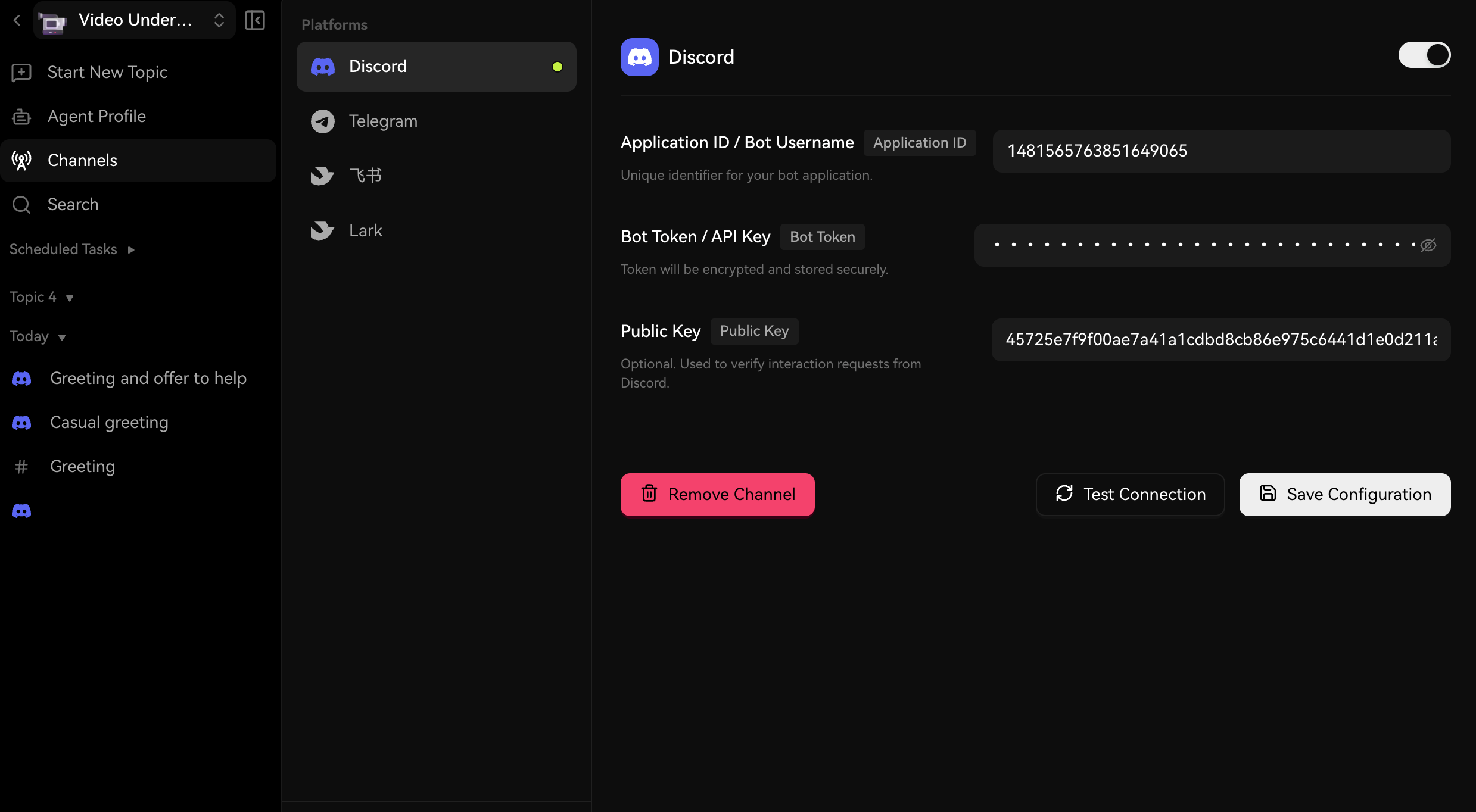
|
||||
|
||||
输入以下字段:
|
||||
|
||||
- **应用程序 ID** — 来自 Discord 应用程序常规信息页面的应用程序 ID
|
||||
@@ -87,6 +93,8 @@ tags:
|
||||
<Steps>
|
||||
### 生成邀请链接
|
||||
|
||||
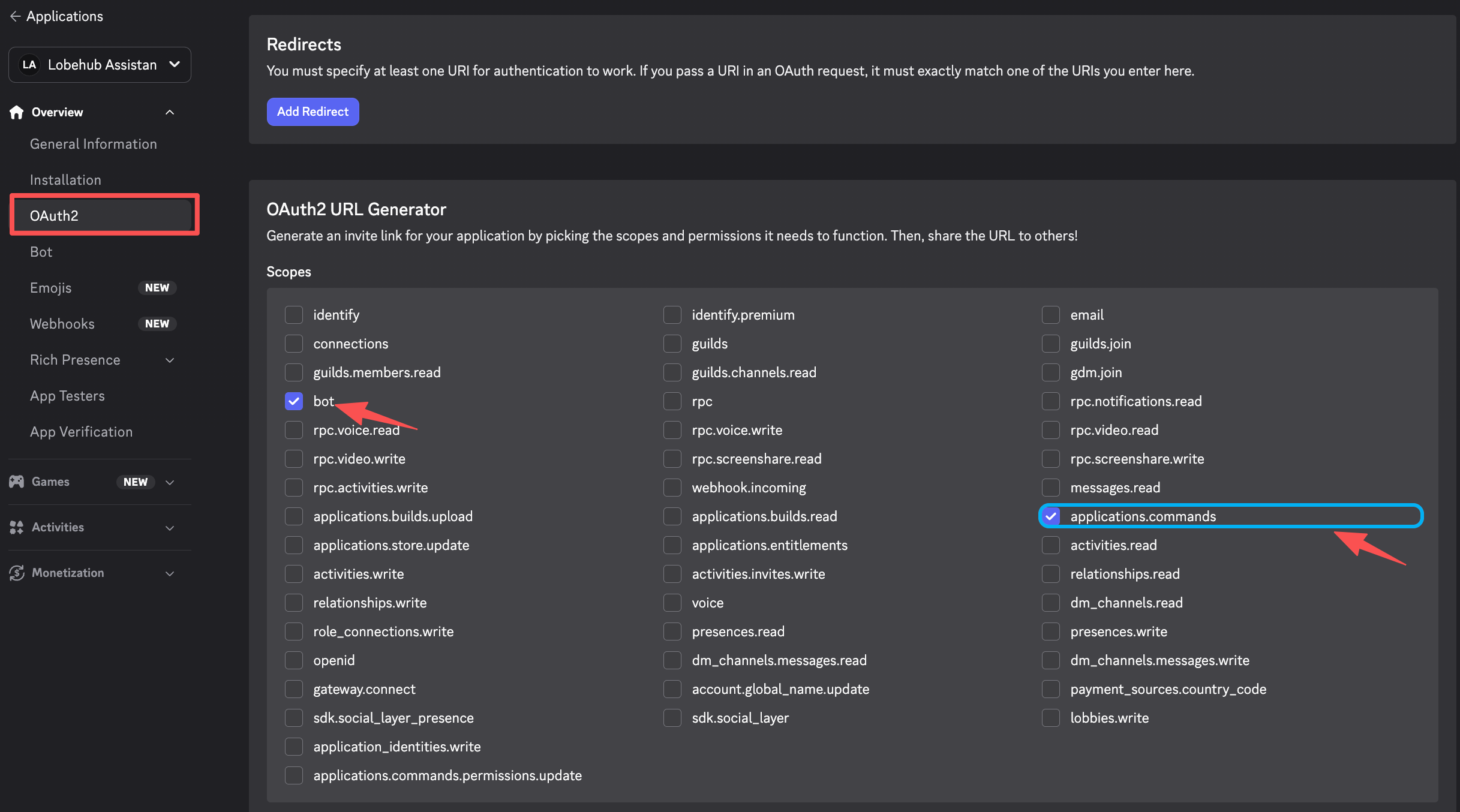
|
||||
|
||||
在 Discord 开发者门户中,转到 **OAuth2** → **URL 生成器**。选择以下范围:
|
||||
|
||||
- `bot`
|
||||
@@ -103,6 +111,8 @@ tags:
|
||||
|
||||
### 授权机器人
|
||||
|
||||
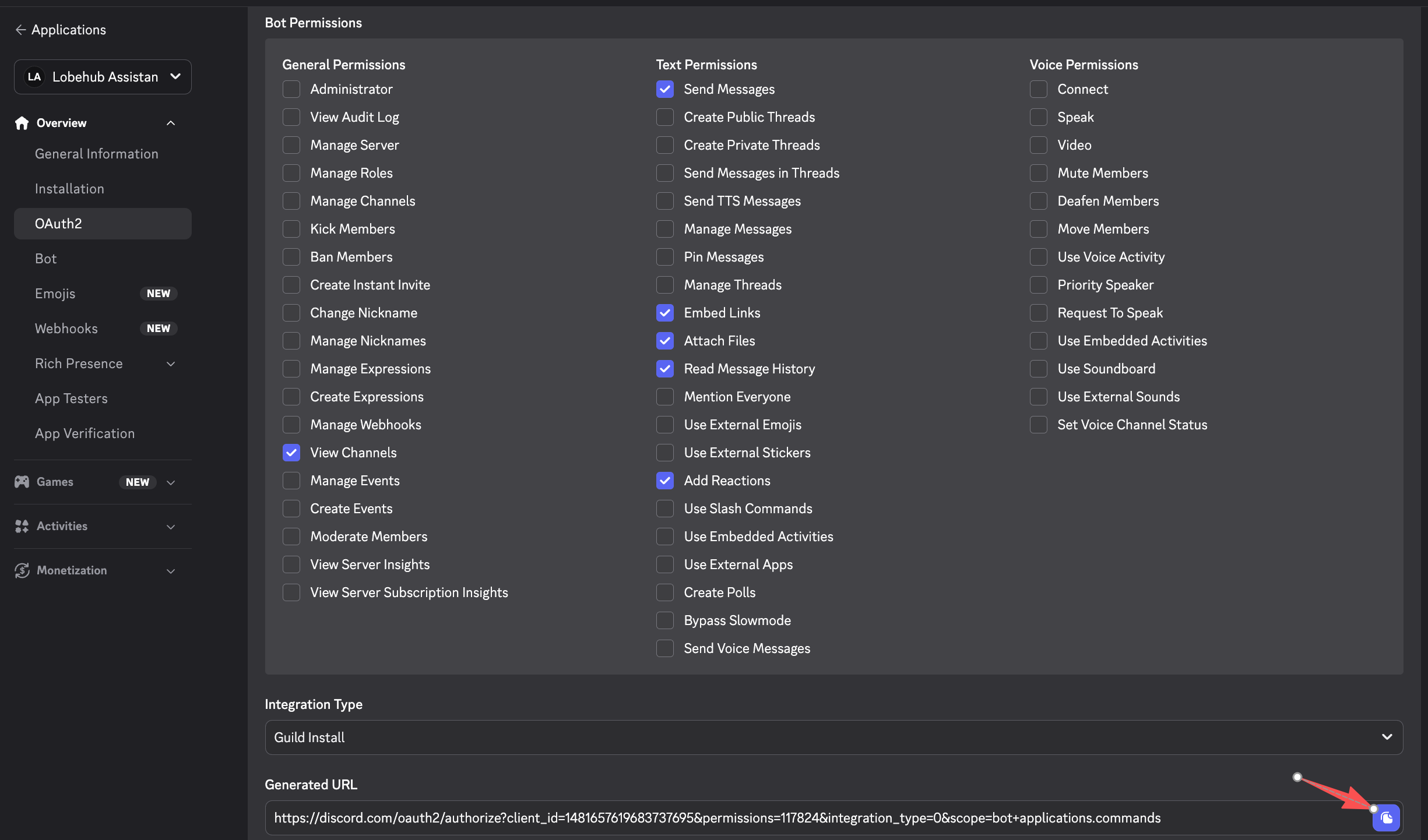
|
||||
|
||||
复制生成的链接,在浏览器中打开,选择您希望添加机器人的服务器,然后点击 **授权**。
|
||||
</Steps>
|
||||
|
||||
|
||||
@@ -14,10 +14,6 @@ tags:
|
||||
|
||||
# Connect LobeHub to Feishu (飞书)
|
||||
|
||||
<Callout type={'info'}>
|
||||
This feature is currently in development and may not be fully stable. You can enable it by turning on **Developer Mode** in **Settings** → **Advanced Settings** → **Developer Mode**.
|
||||
</Callout>
|
||||
|
||||
By connecting a Feishu channel to your LobeHub agent, team members can interact with the AI assistant directly in Feishu private chats and group conversations.
|
||||
|
||||
> If you are using the international version (Lark), please refer to the [Lark setup guide](/docs/usage/channels/lark).
|
||||
@@ -38,6 +34,8 @@ By connecting a Feishu channel to your LobeHub agent, team members can interact
|
||||
|
||||
Click **Create Enterprise App**. Fill in the app name (e.g., "LobeHub 助手"), description, and icon, then submit the form.
|
||||
|
||||

|
||||
|
||||
### Copy App Credentials
|
||||
|
||||
Go to **Credentials & Basic Info** and copy:
|
||||
@@ -46,6 +44,8 @@ By connecting a Feishu channel to your LobeHub agent, team members can interact
|
||||
- **App Secret**
|
||||
|
||||
> **Important:** Keep your App Secret confidential. Never share it publicly.
|
||||
|
||||

|
||||
</Steps>
|
||||
|
||||
## Step 2: Configure App Permissions and Bot
|
||||
@@ -87,9 +87,13 @@ By connecting a Feishu channel to your LobeHub agent, team members can interact
|
||||
}
|
||||
```
|
||||
|
||||

|
||||
|
||||
### Enable Bot Capability
|
||||
|
||||
Go to **App Capability** → **Bot**. Toggle the bot capability on and set your preferred bot name.
|
||||
|
||||

|
||||
</Steps>
|
||||
|
||||
## Step 3: Configure Feishu in LobeHub
|
||||
@@ -111,6 +115,8 @@ By connecting a Feishu channel to your LobeHub agent, team members can interact
|
||||
### Save and Copy the Webhook URL
|
||||
|
||||
Click **Save Configuration**. After saving, an **Event Subscription URL** will be displayed. Copy this URL — you will need it in the next step.
|
||||
|
||||

|
||||
</Steps>
|
||||
|
||||
## Step 4: Set Up Event Subscription in Feishu
|
||||
@@ -132,16 +138,22 @@ By connecting a Feishu channel to your LobeHub agent, team members can interact
|
||||
|
||||
This allows your app to receive messages and forward them to LobeHub.
|
||||
|
||||

|
||||
|
||||
### (Recommended) Fill in Verification Token and Encrypt Key
|
||||
|
||||
After configuring Event Subscription, you can find the **Verification Token** and **Encrypt Key** at the top of the Event Subscription page under **Encryption Strategy**.
|
||||
|
||||

|
||||
|
||||
Go back to LobeHub's channel settings and fill in:
|
||||
|
||||
- **Verification Token** — Used to verify that webhook events originate from Feishu
|
||||
- **Encrypt Key** (optional) — Used to decrypt encrypted event payloads
|
||||
|
||||
Click **Save Configuration** again to apply.
|
||||
|
||||

|
||||
</Steps>
|
||||
|
||||
## Step 5: Publish the App
|
||||
@@ -151,6 +163,8 @@ By connecting a Feishu channel to your LobeHub agent, team members can interact
|
||||
|
||||
In your app settings, go to **Version Management & Release**. Create a new version with release notes.
|
||||
|
||||

|
||||
|
||||
### Submit for Review
|
||||
|
||||
Submit the version for review and publish. For enterprise self-managed apps, approval is typically automatic.
|
||||
|
||||
@@ -10,11 +10,6 @@ tags:
|
||||
|
||||
# 将 LobeHub 连接到飞书
|
||||
|
||||
<Callout type={'info'}>
|
||||
此功能目前正在开发中,可能尚未完全稳定。您可以通过在 **设置** → **高级设置** → **开发者模式**
|
||||
中启用 **开发者模式** 来使用此功能。
|
||||
</Callout>
|
||||
|
||||
通过将飞书渠道连接到您的 LobeHub 代理,团队成员可以直接在飞书的私聊和群组对话中与 AI 助手互动。
|
||||
|
||||
> 如果您使用的是国际版(Lark),请参阅 [Lark 设置指南](/docs/usage/channels/lark)。
|
||||
@@ -35,6 +30,8 @@ tags:
|
||||
|
||||
点击 **创建企业应用**。填写应用名称(例如 "LobeHub 助手")、描述和图标,然后提交表单。
|
||||
|
||||

|
||||
|
||||
### 复制应用凭证
|
||||
|
||||
进入 **凭证与基本信息**,复制以下内容:
|
||||
@@ -43,6 +40,8 @@ tags:
|
||||
- **应用密钥**
|
||||
|
||||
> **重要提示:** 请妥善保管您的应用密钥。切勿公开分享。
|
||||
|
||||

|
||||
</Steps>
|
||||
|
||||
## 第二步:配置应用权限和机器人功能
|
||||
@@ -84,9 +83,13 @@ tags:
|
||||
}
|
||||
```
|
||||
|
||||

|
||||
|
||||
### 启用机器人功能
|
||||
|
||||
进入 **应用能力** → **机器人**。开启机器人功能并设置您喜欢的机器人名称。
|
||||
|
||||

|
||||
</Steps>
|
||||
|
||||
## 第三步:在 LobeHub 中配置飞书
|
||||
@@ -108,6 +111,8 @@ tags:
|
||||
### 保存并复制 Webhook URL
|
||||
|
||||
点击 **保存配置**。保存后,将显示一个 **事件订阅 URL**。复制此 URL—— 您将在下一步中需要它。
|
||||
|
||||

|
||||
</Steps>
|
||||
|
||||
## 第四步:在飞书中设置事件订阅
|
||||
@@ -129,16 +134,22 @@ tags:
|
||||
|
||||
这将使您的应用能够接收消息并将其转发到 LobeHub。
|
||||
|
||||

|
||||
|
||||
### (推荐)填写 Verification Token 和 Encrypt Key
|
||||
|
||||
配置事件订阅后,您可以在事件订阅页面顶部的 **加密策略** 中找到 **Verification Token** 和 **Encrypt Key**。
|
||||
|
||||

|
||||
|
||||
返回 LobeHub 的渠道设置,填写:
|
||||
|
||||
- **Verification Token** — 用于验证 webhook 事件是否来自飞书
|
||||
- **Encrypt Key**(可选)— 用于解密加密事件负载
|
||||
|
||||
再次点击 **保存配置** 以应用。
|
||||
|
||||

|
||||
</Steps>
|
||||
|
||||
## 第五步:发布应用
|
||||
@@ -148,6 +159,8 @@ tags:
|
||||
|
||||
在您的应用设置中,进入 **版本管理与发布**。创建一个新版本并填写发布说明。
|
||||
|
||||

|
||||
|
||||
### 提交审核
|
||||
|
||||
提交版本进行审核并发布。对于企业自管理应用,通常会自动批准。
|
||||
|
||||
@@ -13,10 +13,6 @@ tags:
|
||||
|
||||
# Connect LobeHub to Lark
|
||||
|
||||
<Callout type={'info'}>
|
||||
This feature is currently in development and may not be fully stable. You can enable it by turning on **Developer Mode** in **Settings** → **Advanced Settings** → **Developer Mode**.
|
||||
</Callout>
|
||||
|
||||
By connecting a Lark channel to your LobeHub agent, team members can interact with the AI assistant directly in Lark private chats and group conversations.
|
||||
|
||||
> If you are using the Chinese version (飞书), please refer to the [Feishu setup guide](/docs/usage/channels/feishu).
|
||||
@@ -37,6 +33,8 @@ By connecting a Lark channel to your LobeHub agent, team members can interact wi
|
||||
|
||||
Click **Create Enterprise App**. Fill in the app name (e.g., "LobeHub Assistant"), description, and icon, then submit the form.
|
||||
|
||||

|
||||
|
||||
### Copy App Credentials
|
||||
|
||||
Go to **Credentials & Basic Info** and copy:
|
||||
@@ -45,6 +43,8 @@ By connecting a Lark channel to your LobeHub agent, team members can interact wi
|
||||
- **App Secret**
|
||||
|
||||
> **Important:** Keep your App Secret confidential. Never share it publicly.
|
||||
|
||||

|
||||
</Steps>
|
||||
|
||||
## Step 2: Configure App Permissions and Bot
|
||||
@@ -82,6 +82,8 @@ By connecting a Lark channel to your LobeHub agent, team members can interact wi
|
||||
The scopes above are tailored for Lark (international). Some Feishu-specific scopes (e.g. `aily:*`, `corehr:*`, `im:chat.access_event.bot_p2p_chat:read`) are not available on Lark and have been excluded.
|
||||
</Callout>
|
||||
|
||||

|
||||
|
||||
### Enable Bot Capability
|
||||
|
||||
Go to **App Capability** → **Bot**. Toggle the bot capability on and set your preferred bot name.
|
||||
@@ -106,6 +108,8 @@ By connecting a Lark channel to your LobeHub agent, team members can interact wi
|
||||
### Save and Copy the Webhook URL
|
||||
|
||||
Click **Save Configuration**. After saving, an **Event Subscription URL** will be displayed. Copy this URL — you will need it in the next step.
|
||||
|
||||

|
||||
</Steps>
|
||||
|
||||
## Step 4: Set Up Event Subscription in Lark
|
||||
@@ -127,6 +131,8 @@ By connecting a Lark channel to your LobeHub agent, team members can interact wi
|
||||
|
||||
This allows your app to receive messages and forward them to LobeHub.
|
||||
|
||||

|
||||
|
||||
### (Recommended) Fill in Verification Token and Encrypt Key
|
||||
|
||||
After configuring Event Subscription, you can find the **Verification Token** and **Encrypt Key** at the top of the Event Subscription page under **Encryption Strategy**.
|
||||
@@ -137,6 +143,8 @@ By connecting a Lark channel to your LobeHub agent, team members can interact wi
|
||||
- **Encrypt Key** (optional) — Used to decrypt encrypted event payloads
|
||||
|
||||
Click **Save Configuration** again to apply.
|
||||
|
||||

|
||||
</Steps>
|
||||
|
||||
## Step 5: Publish the App
|
||||
@@ -149,6 +157,8 @@ By connecting a Lark channel to your LobeHub agent, team members can interact wi
|
||||
### Submit for Review
|
||||
|
||||
Submit the version for review and publish. For enterprise self-managed apps, approval is typically automatic.
|
||||
|
||||

|
||||
</Steps>
|
||||
|
||||
## Step 6: Test the Connection
|
||||
|
||||
@@ -10,11 +10,6 @@ tags:
|
||||
|
||||
# 将 LobeHub 连接到 Lark
|
||||
|
||||
<Callout type={'info'}>
|
||||
此功能目前正在开发中,可能尚未完全稳定。您可以通过在 **设置** → **高级设置** → **开发者模式**
|
||||
中启用 **开发者模式** 来使用此功能。
|
||||
</Callout>
|
||||
|
||||
通过将 Lark 渠道连接到您的 LobeHub 代理,团队成员可以直接在 Lark 的私聊和群组对话中与 AI 助手互动。
|
||||
|
||||
> 如果您使用的是中国版(飞书),请参阅[飞书设置指南](/docs/usage/channels/feishu)。
|
||||
@@ -35,6 +30,8 @@ tags:
|
||||
|
||||
点击 **Create Enterprise App**。填写应用名称(例如 "LobeHub Assistant")、描述和图标,然后提交表单。
|
||||
|
||||

|
||||
|
||||
### 复制应用凭证
|
||||
|
||||
进入 **Credentials & Basic Info**,复制以下内容:
|
||||
@@ -43,6 +40,8 @@ tags:
|
||||
- **App Secret**
|
||||
|
||||
> **重要提示:** 请妥善保管您的 App Secret。切勿公开分享。
|
||||
|
||||

|
||||
</Steps>
|
||||
|
||||
## 第二步:配置应用权限和机器人功能
|
||||
@@ -80,6 +79,8 @@ tags:
|
||||
以上权限码已针对 Lark(国际版)进行调整。部分飞书特有的权限码(如 `aily:*`、`corehr:*`、`im:chat.access_event.bot_p2p_chat:read`)在 Lark 上不可用,已被排除。
|
||||
</Callout>
|
||||
|
||||

|
||||
|
||||
### 启用机器人功能
|
||||
|
||||
进入 **App Capability** → **Bot**。开启机器人功能并设置您喜欢的机器人名称。
|
||||
@@ -104,6 +105,8 @@ tags:
|
||||
### 保存并复制 Webhook URL
|
||||
|
||||
点击 **Save Configuration**。保存后,将显示一个 **Event Subscription URL**。复制此 URL —— 您将在下一步中需要它。
|
||||
|
||||

|
||||
</Steps>
|
||||
|
||||
## 第四步:在 Lark 中设置事件订阅
|
||||
@@ -125,6 +128,8 @@ tags:
|
||||
|
||||
这将使您的应用能够接收消息并将其转发到 LobeHub。
|
||||
|
||||

|
||||
|
||||
### (推荐)填写 Verification Token 和 Encrypt Key
|
||||
|
||||
配置事件订阅后,您可以在事件订阅页面顶部的 **Encryption Strategy** 中找到 **Verification Token** 和 **Encrypt Key**。
|
||||
@@ -135,6 +140,8 @@ tags:
|
||||
- **Encrypt Key**(可选)— 用于解密加密事件负载
|
||||
|
||||
再次点击 **Save Configuration** 以应用。
|
||||
|
||||

|
||||
</Steps>
|
||||
|
||||
## 第五步:发布应用
|
||||
@@ -147,6 +154,8 @@ tags:
|
||||
### 提交审核
|
||||
|
||||
提交版本进行审核并发布。对于企业自管理应用,通常会自动批准。
|
||||
|
||||

|
||||
</Steps>
|
||||
|
||||
## 第六步:测试连接
|
||||
|
||||
@@ -19,10 +19,6 @@ tags:
|
||||
|
||||
# Channels
|
||||
|
||||
<Callout type={'info'}>
|
||||
This feature is currently in development and may not be fully stable. You can enable it by turning on **Developer Mode** in **Settings** → **Advanced Settings** → **Developer Mode**.
|
||||
</Callout>
|
||||
|
||||
Channels allow you to connect your LobeHub agents to external messaging platforms. Once connected, users can interact with your AI assistant directly in the chat apps they already use — no need to visit LobeHub.
|
||||
|
||||
## Supported Platforms
|
||||
@@ -47,9 +43,8 @@ Each channel integration works by linking a bot account on the target platform t
|
||||
|
||||
## Getting Started
|
||||
|
||||
1. Enable **Developer Mode** in LobeHub: **Settings** → **Advanced Settings** → **Developer Mode**
|
||||
2. Navigate to your agent's settings and select the **Channels** tab
|
||||
3. Choose a platform and follow the setup guide:
|
||||
1. Navigate to your agent's settings and select the **Channels** tab
|
||||
2. Choose a platform and follow the setup guide:
|
||||
- [Discord](/docs/usage/channels/discord)
|
||||
- [Slack](/docs/usage/channels/slack)
|
||||
- [Telegram](/docs/usage/channels/telegram)
|
||||
|
||||
@@ -18,10 +18,6 @@ tags:
|
||||
|
||||
# 渠道
|
||||
|
||||
<Callout type={'info'}>
|
||||
此功能目前正在开发中,可能尚未完全稳定。您可以通过在 **设置** → **高级设置** → **开发者模式** 中启用 **开发者模式** 来开启此功能。
|
||||
</Callout>
|
||||
|
||||
渠道功能允许您将 LobeHub 代理连接到外部消息平台。一旦连接,用户可以直接在他们已经使用的聊天应用中与您的 AI 助手互动,无需访问 LobeHub。
|
||||
|
||||
## 支持的平台
|
||||
@@ -46,9 +42,8 @@ tags:
|
||||
|
||||
## 快速开始
|
||||
|
||||
1. 在 LobeHub 中启用 **开发者模式**:**设置** → **高级设置** → **开发者模式**
|
||||
2. 前往您的代理设置页面,选择 **渠道** 标签
|
||||
3. 选择一个平台并按照设置指南操作:
|
||||
1. 前往您的代理设置页面,选择 **渠道** 标签
|
||||
2. 选择一个平台并按照设置指南操作:
|
||||
- [Discord](/docs/usage/channels/discord)
|
||||
- [Slack](/docs/usage/channels/slack)
|
||||
- [Telegram](/docs/usage/channels/telegram)
|
||||
|
||||
@@ -13,11 +13,6 @@ tags:
|
||||
|
||||
# Connect LobeHub to QQ
|
||||
|
||||
<Callout type={'info'}>
|
||||
This feature is currently in development and may not be fully stable. You can enable it by turning
|
||||
on **Developer Mode** in **Settings** → **Advanced Settings** → **Developer Mode**.
|
||||
</Callout>
|
||||
|
||||
By connecting a QQ channel to your LobeHub agent, users can interact with the AI assistant through QQ group chats, guild channels, and direct messages.
|
||||
|
||||
## Prerequisites
|
||||
@@ -45,6 +40,8 @@ By connecting a QQ channel to your LobeHub agent, users can interact with the AI
|
||||
|
||||
> **Important:** Keep your App Secret confidential. Never share it publicly.
|
||||
|
||||

|
||||
|
||||
### Configure Webhook URL
|
||||
|
||||
In the QQ Open Platform, navigate to **Development Settings** → **Callback Configuration**. You will need to paste the LobeHub Callback URL here after completing Step 2.
|
||||
@@ -69,6 +66,8 @@ By connecting a QQ channel to your LobeHub agent, users can interact with the AI
|
||||
Click **Save Configuration**. After saving, a **Callback URL** will be displayed. Copy this URL.
|
||||
|
||||
Your credentials will be encrypted and stored securely.
|
||||
|
||||

|
||||
</Steps>
|
||||
|
||||
## Step 3: Configure Callback in QQ Open Platform
|
||||
@@ -87,6 +86,8 @@ By connecting a QQ channel to your LobeHub agent, users can interact with the AI
|
||||
- `AT_MESSAGE_CREATE` — Triggered when the bot is @mentioned in a guild channel
|
||||
- `DIRECT_MESSAGE_CREATE` — Triggered for direct messages in a guild
|
||||
|
||||

|
||||
|
||||
### Verify the Callback
|
||||
|
||||
The QQ Open Platform will send a verification request to your Callback URL. LobeHub handles this automatically using Ed25519 signature verification.
|
||||
@@ -102,6 +103,8 @@ By connecting a QQ channel to your LobeHub agent, users can interact with the AI
|
||||
### Wait for Approval
|
||||
|
||||
QQ will review your bot. Once approved, the bot will be published and ready to use. For sandbox testing, you can add test users directly without publishing.
|
||||
|
||||

|
||||
</Steps>
|
||||
|
||||
## Step 5: Test the Connection
|
||||
|
||||
@@ -10,11 +10,6 @@ tags:
|
||||
|
||||
# 将 LobeHub 连接到 QQ
|
||||
|
||||
<Callout type={'info'}>
|
||||
此功能目前正在开发中,可能尚未完全稳定。您可以通过在 **设置** → **高级设置** → **开发者模式**
|
||||
中启用 **开发者模式** 来使用此功能。
|
||||
</Callout>
|
||||
|
||||
通过将 QQ 渠道连接到您的 LobeHub 代理,用户可以通过 QQ 群聊、频道和私聊与 AI 助手互动。
|
||||
|
||||
## 前置条件
|
||||
@@ -42,6 +37,8 @@ tags:
|
||||
|
||||
> **重要提示:** 请妥善保管您的 App Secret,切勿公开分享。
|
||||
|
||||

|
||||
|
||||
### 配置回调地址
|
||||
|
||||
在 QQ 开放平台中,导航到 **开发设置** → **回调配置**。您需要在完成第二步后将 LobeHub 的回调地址粘贴到此处。
|
||||
@@ -66,6 +63,8 @@ tags:
|
||||
点击 **保存配置**。保存后,将显示一个 **回调地址(Callback URL)**。复制此地址。
|
||||
|
||||
您的凭证将被加密并安全存储。
|
||||
|
||||

|
||||
</Steps>
|
||||
|
||||
## 第三步:在 QQ 开放平台配置回调
|
||||
@@ -84,6 +83,8 @@ tags:
|
||||
- `AT_MESSAGE_CREATE` — 在频道中被 @提及时触发
|
||||
- `DIRECT_MESSAGE_CREATE` — 频道私信时触发
|
||||
|
||||

|
||||
|
||||
### 验证回调
|
||||
|
||||
QQ 开放平台将向您的回调地址发送验证请求。LobeHub 会通过 Ed25519 签名验证自动处理此请求。
|
||||
@@ -99,6 +100,8 @@ tags:
|
||||
### 等待审核通过
|
||||
|
||||
QQ 会对您的机器人进行审核。审核通过后,机器人将发布并可投入使用。在沙盒测试阶段,您可以直接添加测试用户而无需发布。
|
||||
|
||||

|
||||
</Steps>
|
||||
|
||||
## 第五步:测试连接
|
||||
|
||||
@@ -13,11 +13,6 @@ tags:
|
||||
|
||||
# Connect LobeHub to Slack
|
||||
|
||||
<Callout type={'info'}>
|
||||
This feature is currently in development and may not be fully stable. You can enable it by turning
|
||||
on **Developer Mode** in **Settings** → **Advanced Settings** → **Developer Mode**.
|
||||
</Callout>
|
||||
|
||||
By connecting a Slack channel to your LobeHub agent, users can interact with the AI assistant directly through Slack channels and direct messages.
|
||||
|
||||
## Prerequisites
|
||||
@@ -39,6 +34,8 @@ By connecting a Slack channel to your LobeHub agent, users can interact with the
|
||||
- **App ID** — displayed at the top of the page
|
||||
- **Signing Secret** — under the **App Credentials** section
|
||||
|
||||

|
||||
|
||||
### Add Bot Token Scopes
|
||||
|
||||
In the left sidebar, go to **OAuth & Permissions**. Scroll down to **Scopes** → **Bot Token Scopes** and add the following:
|
||||
@@ -66,6 +63,8 @@ By connecting a Slack channel to your LobeHub agent, users can interact with the
|
||||
Still on the **OAuth & Permissions** page, click **Install to Workspace** and authorize the app. After installation, copy the **Bot User OAuth Token** (starts with `xoxb-`).
|
||||
|
||||
> **Important:** Treat your bot token like a password. Never share it publicly or commit it to version control.
|
||||
|
||||

|
||||
</Steps>
|
||||
|
||||
## Step 2: Configure Slack in LobeHub
|
||||
@@ -92,6 +91,8 @@ By connecting a Slack channel to your LobeHub agent, users can interact with the
|
||||
### Copy the Webhook URL
|
||||
|
||||
Copy the displayed Webhook URL — you will need it in the next step to configure Slack's Event Subscriptions.
|
||||
|
||||

|
||||
</Steps>
|
||||
|
||||
## Step 3: Configure Event Subscriptions
|
||||
@@ -124,6 +125,8 @@ By connecting a Slack channel to your LobeHub agent, users can interact with the
|
||||
### Save Changes
|
||||
|
||||
Click **Save Changes** at the bottom of the page.
|
||||
|
||||

|
||||
</Steps>
|
||||
|
||||
## Step 4: Test the Connection
|
||||
|
||||
@@ -10,10 +10,6 @@ tags:
|
||||
|
||||
# 将 LobeHub 连接到 Slack
|
||||
|
||||
<Callout type={'info'}>
|
||||
此功能目前正在开发中,可能尚未完全稳定。您可以通过在 **设置** → **高级设置** → **开发者模式** 中启用 **开发者模式** 来使用此功能。
|
||||
</Callout>
|
||||
|
||||
通过将 Slack 渠道连接到您的 LobeHub 代理,用户可以直接通过 Slack 频道和私信与 AI 助手互动。
|
||||
|
||||
## 前置条件
|
||||
@@ -35,6 +31,8 @@ tags:
|
||||
- **App ID** — 显示在页面顶部
|
||||
- **Signing Secret** — 在 **App Credentials** 部分下
|
||||
|
||||

|
||||
|
||||
### 添加 Bot Token 权限范围
|
||||
|
||||
在左侧菜单中,进入 **OAuth & Permissions**。向下滚动到 **Scopes** → **Bot Token Scopes**,添加以下权限:
|
||||
@@ -62,6 +60,8 @@ tags:
|
||||
仍然在 **OAuth & Permissions** 页面,点击 **Install to Workspace** 并授权应用。安装完成后,复制 **Bot User OAuth Token**(以 `xoxb-` 开头)。
|
||||
|
||||
> **重要提示:** 请将您的 Bot Token 视为密码。切勿公开分享或提交到版本控制系统。
|
||||
|
||||

|
||||
</Steps>
|
||||
|
||||
## 第二步:在 LobeHub 中配置 Slack
|
||||
@@ -88,6 +88,8 @@ tags:
|
||||
### 复制 Webhook URL
|
||||
|
||||
复制显示的 Webhook URL —— 您将在下一步中使用它来配置 Slack 的事件订阅。
|
||||
|
||||

|
||||
</Steps>
|
||||
|
||||
## 第三步:配置事件订阅
|
||||
@@ -120,6 +122,8 @@ tags:
|
||||
### 保存更改
|
||||
|
||||
点击页面底部的 **Save Changes**。
|
||||
|
||||

|
||||
</Steps>
|
||||
|
||||
## 第四步:测试连接
|
||||
|
||||
@@ -13,11 +13,6 @@ tags:
|
||||
|
||||
# Connect LobeHub to Telegram
|
||||
|
||||
<Callout type={'info'}>
|
||||
This feature is currently in development and may not be fully stable. You can enable it by turning
|
||||
on **Developer Mode** in **Settings** → **Advanced Settings** → **Developer Mode**.
|
||||
</Callout>
|
||||
|
||||
By connecting a Telegram channel to your LobeHub agent, users can interact with the AI assistant through Telegram private chats and group conversations.
|
||||
|
||||
## Prerequisites
|
||||
@@ -32,6 +27,8 @@ By connecting a Telegram channel to your LobeHub agent, users can interact with
|
||||
|
||||
Open Telegram and search for **@BotFather** — the official Telegram bot for managing bots. Start a conversation and send the `/newbot` command.
|
||||
|
||||

|
||||
|
||||
### Set Bot Name and Username
|
||||
|
||||
BotFather will ask you to:
|
||||
@@ -39,10 +36,14 @@ By connecting a Telegram channel to your LobeHub agent, users can interact with
|
||||
1. Choose a **display name** for your bot (e.g., "LobeHub Assistant")
|
||||
2. Choose a **username** — it must end with `bot` (e.g., `lobehub_assistant_bot`)
|
||||
|
||||

|
||||
|
||||
### Copy the Bot Token
|
||||
|
||||
After creating the bot, BotFather will send you an **API token** (format: `123456789:ABCdefGhIjKlmNoPQRsTuVwXyZ`). Copy and save this token.
|
||||
|
||||

|
||||
|
||||
> **Important:** Your bot token is a secret credential. Never share it publicly.
|
||||
</Steps>
|
||||
|
||||
@@ -59,6 +60,8 @@ By connecting a Telegram channel to your LobeHub agent, users can interact with
|
||||
|
||||
The **Bot User ID** will be automatically derived from your token — no need to enter it manually.
|
||||
|
||||

|
||||
|
||||
### Optional: Set a Webhook Secret
|
||||
|
||||
You can optionally enter a **Webhook Secret Token** for additional security. This is used to verify that incoming webhook requests originate from Telegram.
|
||||
@@ -74,6 +77,8 @@ By connecting a Telegram channel to your LobeHub agent, users can interact with
|
||||
|
||||
Click **Test Connection** in LobeHub's channel settings to verify the integration. Then open Telegram, find your bot by searching its username, and send a message. The bot should respond through your LobeHub agent.
|
||||
|
||||

|
||||
|
||||
## Adding the Bot to Group Chats
|
||||
|
||||
To use the bot in Telegram groups:
|
||||
@@ -82,6 +87,12 @@ To use the bot in Telegram groups:
|
||||
2. By default, the bot responds when mentioned with `@your_bot_username`
|
||||
3. Send a message mentioning the bot to start interacting
|
||||
|
||||

|
||||
|
||||
<Callout type={'warning'}>
|
||||
**About Group Privacy Mode:** Telegram bots have privacy mode enabled by default, which means they only receive messages that @mention the bot, reply to the bot, or contain /commands. If you change the privacy mode setting after creating the bot, you **must remove and re-add the bot to the group** for the new setting to take effect in that group.
|
||||
</Callout>
|
||||
|
||||
## Configuration Reference
|
||||
|
||||
| Field | Required | Description |
|
||||
@@ -94,4 +105,4 @@ To use the bot in Telegram groups:
|
||||
|
||||
- **Bot not responding:** Verify the bot token is correct and the configuration is saved. Click **Test Connection** to diagnose.
|
||||
- **Webhook registration failed:** Ensure your LobeHub subscription is active. Telegram requires HTTPS endpoints for webhooks, which LobeHub provides automatically.
|
||||
- **Group chat issues:** Make sure the bot has been added to the group and has permission to read messages. Mention the bot with `@username` to trigger a response.
|
||||
- **Group chat issues:** Make sure the bot has been added to the group and has permission to read messages. Mention the bot with `@username` to trigger a response. If the bot doesn't respond in a group, try removing the bot from the group and re-adding it — Telegram's privacy mode changes require re-joining the group to take effect.
|
||||
|
||||
@@ -12,10 +12,6 @@ tags:
|
||||
|
||||
# 将 LobeHub 连接到 Telegram
|
||||
|
||||
<Callout type={'info'}>
|
||||
此功能目前正在开发中,可能尚未完全稳定。您可以通过在 **设置** → **高级设置** → **开发者模式** 中启用 **开发者模式** 来使用此功能。
|
||||
</Callout>
|
||||
|
||||
通过将 Telegram 渠道连接到您的 LobeHub 代理,用户可以通过 Telegram 私聊和群组对话与 AI 助手互动。
|
||||
|
||||
## 前置条件
|
||||
@@ -30,6 +26,8 @@ tags:
|
||||
|
||||
打开 Telegram 并搜索 **@BotFather** —— 这是用于管理机器人的官方 Telegram 机器人。开始对话并发送 `/newbot` 命令。
|
||||
|
||||

|
||||
|
||||
### 设置机器人名称和用户名
|
||||
|
||||
BotFather 会要求您:
|
||||
@@ -37,10 +35,14 @@ tags:
|
||||
1. 为您的机器人选择一个 **显示名称**(例如,“LobeHub 助手”)
|
||||
2. 选择一个 **用户名** —— 必须以 `bot` 结尾(例如,`lobehub_assistant_bot`)
|
||||
|
||||

|
||||
|
||||
### 复制机器人令牌
|
||||
|
||||
创建机器人后,BotFather 会发送给您一个 **API 令牌**(格式:`123456789:ABCdefGhIjKlmNoPQRsTuVwXyZ`)。复制并保存此令牌。
|
||||
|
||||

|
||||
|
||||
> **重要提示:** 您的机器人令牌是一个机密凭证,请勿公开分享。
|
||||
</Steps>
|
||||
|
||||
@@ -57,6 +59,8 @@ tags:
|
||||
|
||||
**机器人用户 ID** 将根据您的令牌自动生成,无需手动输入。
|
||||
|
||||

|
||||
|
||||
### 可选:设置 Webhook 密钥
|
||||
|
||||
您可以选择输入一个 **Webhook 密钥令牌** 以增加安全性。此密钥用于验证来自 Telegram 的入站 Webhook 请求。
|
||||
@@ -72,6 +76,8 @@ tags:
|
||||
|
||||
在 LobeHub 的渠道设置中点击 **测试连接** 以验证集成。然后打开 Telegram,搜索您的机器人用户名并发送消息。机器人应通过您的 LobeHub 代理进行响应。
|
||||
|
||||

|
||||
|
||||
## 将机器人添加到群组聊天
|
||||
|
||||
要在 Telegram 群组中使用机器人:
|
||||
@@ -80,6 +86,12 @@ tags:
|
||||
2. 默认情况下,机器人在被 `@your_bot_username` 提及时会响应
|
||||
3. 发送一条提及机器人的消息以开始互动
|
||||
|
||||

|
||||
|
||||
<Callout type={'warning'}>
|
||||
**关于隐私模式(Group Privacy):** Telegram 机器人默认启用隐私模式,仅接收群组中 @提及、回复机器人的消息以及 / 命令。如果您在创建机器人后更改了隐私模式设置,**必须将机器人从群组中移除后重新加入**,新的设置才会对该群组生效。
|
||||
</Callout>
|
||||
|
||||
## 配置参考
|
||||
|
||||
| 字段 | 是否必需 | 描述 |
|
||||
@@ -92,4 +104,4 @@ tags:
|
||||
|
||||
- **机器人未响应:** 验证机器人令牌是否正确并确保配置已保存。点击 **测试连接** 进行诊断。
|
||||
- **Webhook 注册失败:** 确保您的 LobeHub 订阅处于活动状态。Telegram 要求 Webhook 使用 HTTPS 端点,LobeHub 会自动提供。
|
||||
- **群组聊天问题:** 确保机器人已被添加到群组并具有读取消息的权限。使用 `@username` 提及机器人以触发响应。
|
||||
- **群组聊天问题:** 确保机器人已被添加到群组并具有读取消息的权限。使用 `@username` 提及机器人以触发响应。如果机器人在群组中没有响应,尝试将机器人从群组中移除后重新加入 ——Telegram 的隐私模式设置变更需要重新加入群组才能生效。
|
||||
|
||||
@@ -13,11 +13,6 @@ tags:
|
||||
|
||||
# Connect LobeHub to WeChat
|
||||
|
||||
<Callout type={'info'}>
|
||||
This feature is currently in development and may not be fully stable. You can enable it by turning
|
||||
on **Developer Mode** in **Settings** → **Advanced Settings** → **Developer Mode**.
|
||||
</Callout>
|
||||
|
||||
By connecting a WeChat channel to your LobeHub agent, users can interact with the AI assistant through WeChat private chats and group conversations.
|
||||
|
||||
## Prerequisites
|
||||
@@ -44,6 +39,8 @@ In LobeHub, navigate to your agent's settings, then select the **Channels** tab.
|
||||
|
||||
After scanning, a confirmation prompt will appear in WeChat. Tap **Confirm** to authorize the connection.
|
||||
|
||||

|
||||
|
||||
### Connection Complete
|
||||
|
||||
Once confirmed, LobeHub will automatically save your credentials and connect the bot. You should see a success message in the channel settings.
|
||||
|
||||
@@ -10,11 +10,6 @@ tags:
|
||||
|
||||
# 将 LobeHub 连接到微信
|
||||
|
||||
<Callout type={'info'}>
|
||||
此功能目前正在开发中,可能尚未完全稳定。您可以通过在 **设置** → **高级设置** → **开发者模式**
|
||||
中启用 **开发者模式** 来使用此功能。
|
||||
</Callout>
|
||||
|
||||
通过将微信渠道连接到您的 LobeHub 代理,用户可以通过微信私聊和群聊与 AI 助手互动。
|
||||
|
||||
## 前置条件
|
||||
@@ -41,6 +36,8 @@ tags:
|
||||
|
||||
扫码后,微信中会出现确认提示。点击 **确认** 授权连接。
|
||||
|
||||

|
||||
|
||||
### 连接完成
|
||||
|
||||
确认后,LobeHub 将自动保存凭证并连接机器人。您应该会在渠道设置中看到成功消息。
|
||||
|
||||
@@ -97,7 +97,7 @@ Given('用户已登录系统', async function (this: CustomWorld) {
|
||||
expect(cookies.length).toBeGreaterThan(0);
|
||||
});
|
||||
|
||||
Given('用户进入 Lobe AI 对话页面', async function (this: CustomWorld) {
|
||||
Given('用户进入 Lobe AI 对话页面', { timeout: 30_000 }, async function (this: CustomWorld) {
|
||||
console.log(' 📍 Step: 设置 LLM mock...');
|
||||
// Setup LLM mock before navigation
|
||||
llmMockManager.setResponse('hello', presetResponses.greeting);
|
||||
|
||||
@@ -6,8 +6,8 @@ import { startWebServer, stopWebServer } from '../support/webServer';
|
||||
import type { CustomWorld } from '../support/world';
|
||||
|
||||
process.env['E2E'] = '1';
|
||||
// Set default timeout for all steps to 10 seconds
|
||||
setDefaultTimeout(10_000);
|
||||
// Set default timeout for all steps to 30 seconds
|
||||
setDefaultTimeout(30_000);
|
||||
|
||||
// Store base URL and cached session cookies
|
||||
let baseUrl: string;
|
||||
|
||||
@@ -3,6 +3,8 @@
|
||||
<head>
|
||||
<meta charset="utf-8" />
|
||||
<meta name="viewport" content="width=device-width, initial-scale=1" />
|
||||
<link rel="icon" href="/favicon.ico" />
|
||||
<link rel="shortcut icon" href="/favicon-32x32.ico" />
|
||||
<link rel="manifest" href="/manifest.webmanifest" />
|
||||
<!--SEO_META-->
|
||||
<style>
|
||||
|
||||
@@ -3,6 +3,8 @@
|
||||
<head>
|
||||
<meta charset="utf-8" />
|
||||
<meta name="viewport" content="width=device-width, initial-scale=1" />
|
||||
<link rel="icon" href="/favicon.ico" />
|
||||
<link rel="shortcut icon" href="/favicon-32x32.ico" />
|
||||
<!--SEO_META-->
|
||||
<style>
|
||||
html body {
|
||||
|
||||
+32
-1
@@ -12,7 +12,13 @@
|
||||
"channel.botTokenPlaceholderNew": "الصق رمز البوت هنا",
|
||||
"channel.charLimit": "حد الأحرف",
|
||||
"channel.charLimitHint": "الحد الأقصى لعدد الأحرف لكل رسالة",
|
||||
"channel.concurrency": "وضع التزامن",
|
||||
"channel.concurrencyDebounce": "إزالة الارتداد",
|
||||
"channel.concurrencyHint": "يقوم الوضع التتابعي بمعالجة الرسائل واحدة تلو الأخرى؛ بينما ينتظر وضع إزالة الارتداد انتهاء دفعة الرسائل قبل المعالجة",
|
||||
"channel.concurrencyQueue": "قائمة الانتظار",
|
||||
"channel.connectFailed": "فشل اتصال الروبوت",
|
||||
"channel.connectQueued": "تم وضع اتصال الروبوت في قائمة الانتظار. سيبدأ قريبًا.",
|
||||
"channel.connectStarting": "الروبوت قيد التشغيل. يرجى الانتظار لحظة.",
|
||||
"channel.connectSuccess": "تم الاتصال بالروبوت بنجاح",
|
||||
"channel.connecting": "جارٍ الاتصال...",
|
||||
"channel.connectionConfig": "إعدادات الاتصال",
|
||||
@@ -21,6 +27,11 @@
|
||||
"channel.credentials": "بيانات الاعتماد",
|
||||
"channel.debounceMs": "نافذة دمج الرسائل (مللي ثانية)",
|
||||
"channel.debounceMsHint": "مدة الانتظار للرسائل الإضافية قبل إرسالها إلى الوكيل (مللي ثانية)",
|
||||
"channel.deleteAllChannels": "إزالة جميع القنوات",
|
||||
"channel.deleteAllConfirm": "هل أنت متأكد أنك تريد إزالة جميع القنوات؟",
|
||||
"channel.deleteAllConfirmDesc": "سيؤدي هذا الإجراء إلى إزالة جميع قنوات الرسائل وتكويناتها لهذا الوكيل بشكل دائم. لا يمكن التراجع عن هذا.",
|
||||
"channel.deleteAllFailed": "فشل في إزالة جميع القنوات",
|
||||
"channel.deleteAllSuccess": "تمت إزالة جميع القنوات",
|
||||
"channel.deleteConfirm": "هل أنت متأكد أنك تريد إزالة هذه القناة؟",
|
||||
"channel.deleteConfirmDesc": "سيؤدي هذا الإجراء إلى إزالة قناة الرسائل وتكوينها بشكل دائم. لا يمكن التراجع عن ذلك.",
|
||||
"channel.devWebhookProxyUrl": "عنوان URL لنفق HTTPS",
|
||||
@@ -42,7 +53,14 @@
|
||||
"channel.encryptKeyPlaceholder": "مفتاح التشفير الاختياري",
|
||||
"channel.endpointUrl": "عنوان URL للويب هوك",
|
||||
"channel.endpointUrlHint": "يرجى نسخ هذا العنوان ولصقه في الحقل <bold>{{fieldName}}</bold> في بوابة مطوري {{name}}.",
|
||||
"channel.exportConfig": "تصدير التكوين",
|
||||
"channel.feishu.description": "قم بتوصيل هذا المساعد بـ Feishu للدردشة الخاصة والجماعية.",
|
||||
"channel.historyLimit": "حد رسائل السجل",
|
||||
"channel.historyLimitHint": "العدد الافتراضي للرسائل التي يتم جلبها عند قراءة سجل القناة",
|
||||
"channel.importConfig": "استيراد التكوين",
|
||||
"channel.importFailed": "فشل في استيراد التكوين",
|
||||
"channel.importInvalidFormat": "تنسيق ملف التكوين غير صالح",
|
||||
"channel.importSuccess": "تم استيراد التكوين بنجاح",
|
||||
"channel.lark.description": "قم بتوصيل هذا المساعد بـ Lark للدردشة الخاصة والجماعية.",
|
||||
"channel.openPlatform": "منصة مفتوحة",
|
||||
"channel.platforms": "المنصات",
|
||||
@@ -54,6 +72,7 @@
|
||||
"channel.removeChannel": "إزالة القناة",
|
||||
"channel.removeFailed": "فشل في إزالة القناة",
|
||||
"channel.removed": "تمت إزالة القناة",
|
||||
"channel.runtimeDisconnected": "تم فصل الروبوت",
|
||||
"channel.save": "حفظ الإعدادات",
|
||||
"channel.saveFailed": "فشل في حفظ الإعدادات",
|
||||
"channel.saveFirstWarning": "يرجى حفظ الإعدادات أولاً",
|
||||
@@ -61,6 +80,8 @@
|
||||
"channel.secretToken": "رمز سر الويب هوك",
|
||||
"channel.secretTokenHint": "اختياري. يُستخدم للتحقق من طلبات الويب هوك من Telegram.",
|
||||
"channel.secretTokenPlaceholder": "السر الاختياري للتحقق من الويب هوك",
|
||||
"channel.serverId": "معرف الخادم / النقابة الافتراضي",
|
||||
"channel.serverIdHint": "معرف الخادم أو النقابة الافتراضي الخاص بك على هذه المنصة. يستخدمه الذكاء الاصطناعي لإدراج القنوات دون الحاجة للسؤال.",
|
||||
"channel.settings": "الإعدادات المتقدمة",
|
||||
"channel.settingsResetConfirm": "هل أنت متأكد أنك تريد إعادة تعيين الإعدادات المتقدمة إلى الوضع الافتراضي؟",
|
||||
"channel.settingsResetDefault": "إعادة إلى الوضع الافتراضي",
|
||||
@@ -76,15 +97,25 @@
|
||||
"channel.testFailed": "فشل اختبار الاتصال",
|
||||
"channel.testSuccess": "نجح اختبار الاتصال",
|
||||
"channel.updateFailed": "فشل في تحديث الحالة",
|
||||
"channel.userId": "معرف المستخدم الخاص بك على المنصة",
|
||||
"channel.userIdHint": "معرف المستخدم الخاص بك على هذه المنصة. يمكن للذكاء الاصطناعي استخدامه لإرسال رسائل مباشرة إليك.",
|
||||
"channel.validationError": "يرجى ملء معرف التطبيق والرمز",
|
||||
"channel.verificationToken": "رمز التحقق",
|
||||
"channel.verificationTokenHint": "اختياري. يُستخدم للتحقق من مصدر أحداث الويب هوك.",
|
||||
"channel.verificationTokenPlaceholder": "الصق رمز التحقق هنا",
|
||||
"channel.wechat.description": "قم بتوصيل هذا المساعد بـ WeChat عبر iLink Bot للمحادثات الخاصة والجماعية.",
|
||||
"channel.wechatBotId": "معرّف الروبوت",
|
||||
"channel.wechatBotIdHint": "معرّف الروبوت المخصص بعد تفويض رمز الاستجابة السريعة.",
|
||||
"channel.wechatConnectedInfo": "حساب WeChat المتصل",
|
||||
"channel.wechatManagedCredentials": "تم توصيل هذه القناة بالفعل من خلال تفويض رمز الاستجابة السريعة. يتم إدارة بيانات الاعتماد تلقائيًا.",
|
||||
"channel.wechatQrExpired": "انتهت صلاحية رمز الاستجابة السريعة. يرجى التحديث للحصول على رمز جديد.",
|
||||
"channel.wechatQrRefresh": "تحديث رمز الاستجابة السريعة",
|
||||
"channel.wechatQrScaned": "تم مسح رمز الاستجابة السريعة. يرجى تأكيد تسجيل الدخول في WeChat.",
|
||||
"channel.wechatQrWait": "افتح WeChat وقم بمسح رمز الاستجابة السريعة للاتصال.",
|
||||
"channel.wechatRebind": "إعادة الربط عبر رمز الاستجابة السريعة",
|
||||
"channel.wechatScanTitle": "توصيل روبوت WeChat",
|
||||
"channel.wechatScanToConnect": "مسح رمز الاستجابة السريعة للاتصال"
|
||||
"channel.wechatScanToConnect": "مسح رمز الاستجابة السريعة للاتصال",
|
||||
"channel.wechatTips": "يرجى تحديث تطبيق WeChat إلى أحدث إصدار وإعادة تشغيله. يتم طرح إضافة ClawBot تدريجيًا، لذا تحقق من الإعدادات > الإضافات لتأكيد الوصول.",
|
||||
"channel.wechatUserId": "معرّف مستخدم WeChat",
|
||||
"channel.wechatUserIdHint": "معرّف حساب WeChat الذي يتم إرجاعه من خلال عملية التفويض."
|
||||
}
|
||||
|
||||
@@ -175,6 +175,8 @@
|
||||
"messageAction.delAndRegenerate": "حذف وإعادة التوليد",
|
||||
"messageAction.deleteDisabledByThreads": "لا يمكن حذف هذه الرسالة لأنها تحتوي على موضوع فرعي",
|
||||
"messageAction.expand": "توسيع الرسالة",
|
||||
"messageAction.interrupted": "تم الإيقاف",
|
||||
"messageAction.interruptedHint": "ماذا يجب أن أفعل بدلاً من ذلك؟",
|
||||
"messageAction.reaction": "إضافة تفاعل",
|
||||
"messageAction.regenerate": "إعادة التوليد",
|
||||
"messages.dm.sentTo": "مرئي فقط لـ {{name}}",
|
||||
@@ -409,14 +411,17 @@
|
||||
"tool.intervention.mode.autoRunDesc": "الموافقة تلقائيًا على جميع تنفيذات الأدوات",
|
||||
"tool.intervention.mode.manual": "يدوي",
|
||||
"tool.intervention.mode.manualDesc": "يتطلب الموافقة اليدوية لكل استدعاء",
|
||||
"tool.intervention.pending": "قيد الانتظار",
|
||||
"tool.intervention.reject": "رفض",
|
||||
"tool.intervention.rejectAndContinue": "رفض وإعادة المحاولة",
|
||||
"tool.intervention.rejectOnly": "رفض",
|
||||
"tool.intervention.rejectReasonPlaceholder": "سيساعد السبب الوكيل على فهم حدودك وتحسين التصرفات المستقبلية",
|
||||
"tool.intervention.rejectTitle": "رفض استدعاء المهارة",
|
||||
"tool.intervention.rejectedWithReason": "تم رفض استدعاء المهارة: {{reason}}",
|
||||
"tool.intervention.scrollToIntervention": "عرض",
|
||||
"tool.intervention.toolAbort": "لقد ألغيت استدعاء المهارة",
|
||||
"tool.intervention.toolRejected": "تم رفض استدعاء المهارة",
|
||||
"tool.intervention.viewParameters": "عرض المعلمات ({{count}})",
|
||||
"toolAuth.authorize": "تفويض",
|
||||
"toolAuth.authorizing": "جارٍ التفويض...",
|
||||
"toolAuth.hint": "بدون التفويض أو الإعداد، قد لا تعمل المهارات. قد يؤدي ذلك إلى تقييد الوكيل أو حدوث أخطاء.",
|
||||
|
||||
@@ -12,6 +12,7 @@
|
||||
"FileManager.actions.chunkingTooltip": "تقسيم الملف إلى أجزاء نصية متعددة وتضمينها للبحث الدلالي والحوار مع الملف.",
|
||||
"FileManager.actions.chunkingUnsupported": "هذا الملف لا يدعم التجزئة.",
|
||||
"FileManager.actions.confirmDelete": "أنت على وشك حذف هذا الملف. لا يمكن استعادته بعد الحذف. يرجى تأكيد الإجراء.",
|
||||
"FileManager.actions.confirmDeleteAllFiles": "أنت على وشك حذف جميع النتائج في العرض الحالي. بمجرد حذفها، لا يمكن استعادتها. يرجى تأكيد الإجراء.",
|
||||
"FileManager.actions.confirmDeleteFolder": "أنت على وشك حذف هذا المجلد وجميع محتوياته. لا يمكن التراجع عن هذا الإجراء. يرجى تأكيد القرار.",
|
||||
"FileManager.actions.confirmDeleteMultiFiles": "أنت على وشك حذف {{count}} ملفًا محددًا. لا يمكن استعادتها بعد الحذف. يرجى تأكيد الإجراء.",
|
||||
"FileManager.actions.confirmRemoveFromLibrary": "أنت على وشك إزالة {{count}} ملف/ملفات محددة من المكتبة. ستظل متاحة في جميع الملفات. أكد للمتابعة.",
|
||||
@@ -51,7 +52,12 @@
|
||||
"FileManager.title.createdAt": "تاريخ الإنشاء",
|
||||
"FileManager.title.size": "الحجم",
|
||||
"FileManager.title.title": "الملف",
|
||||
"FileManager.total.allSelectedCount": "تم تحديد جميع العناصر البالغ عددها {{count}}.",
|
||||
"FileManager.total.allSelectedFallback": "تم تحديد جميع النتائج.",
|
||||
"FileManager.total.fileCount": "الإجمالي {{count}} عنصر",
|
||||
"FileManager.total.loadedSelectedCount": "تم تحديد {{count}} من العناصر المحملة.",
|
||||
"FileManager.total.selectAll": "تحديد جميع العناصر البالغ عددها {{count}}",
|
||||
"FileManager.total.selectAllFallback": "تحديد جميع العناصر",
|
||||
"FileManager.total.selectedCount": "المحدد {{count}} عنصر",
|
||||
"FileManager.view.list": "عرض القائمة",
|
||||
"FileManager.view.masonry": "عرض الشبكة",
|
||||
|
||||
@@ -607,6 +607,7 @@
|
||||
"time.today": "اليوم",
|
||||
"time.yesterday": "أمس",
|
||||
"user.agents": "الوكلاء",
|
||||
"user.cancel": "إلغاء",
|
||||
"user.downloads": "التنزيلات",
|
||||
"user.editProfile": "تعديل الملف الشخصي",
|
||||
"user.favoriteAgents": "الوكلاء المحفوظون",
|
||||
@@ -616,6 +617,9 @@
|
||||
"user.following": "يتابع",
|
||||
"user.forkedAgentGroups": "مجموعات الوكلاء المنسوخة",
|
||||
"user.forkedAgents": "الوكلاء المنسوخون",
|
||||
"user.githubUrl": "عنوان URL لمستودع GitHub",
|
||||
"user.githubUrlInvalid": "يرجى إدخال عنوان URL صالح لمستودع GitHub",
|
||||
"user.githubUrlRequired": "يرجى إدخال عنوان URL لمستودع GitHub",
|
||||
"user.login": "كن منشئًا",
|
||||
"user.logout": "تسجيل الخروج",
|
||||
"user.myProfile": "ملفي الشخصي",
|
||||
@@ -624,9 +628,13 @@
|
||||
"user.noFavoritePlugins": "لا توجد مهارات محفوظة بعد",
|
||||
"user.noForkedAgentGroups": "لا توجد مجموعات وكلاء منسوخة بعد",
|
||||
"user.noForkedAgents": "لا يوجد وكلاء منسوخون بعد",
|
||||
"user.noPlugins": "لم ينشر هذا المستخدم أي إضافات حتى الآن",
|
||||
"user.noSkills": "لم ينشر هذا المستخدم أي مهارات حتى الآن",
|
||||
"user.plugins": "الإضافات",
|
||||
"user.publishedAgents": "الوكلاء المنشؤون",
|
||||
"user.publishedGroups": "المجموعات المنشأة",
|
||||
"user.searchPlaceholder": "ابحث بالاسم أو الوصف...",
|
||||
"user.skills": "المهارات",
|
||||
"user.statusFilter.all": "الكل",
|
||||
"user.statusFilter.archived": "مؤرشف",
|
||||
"user.statusFilter.deprecated": "مهمل",
|
||||
@@ -634,6 +642,13 @@
|
||||
"user.statusFilter.forked": "مشتق",
|
||||
"user.statusFilter.published": "منشور",
|
||||
"user.statusFilter.unpublished": "قيد المراجعة",
|
||||
"user.submit": "إرسال",
|
||||
"user.submitRepo": "إرسال المستودع",
|
||||
"user.submitRepoDescription": "أرسل مستودع GitHub الخاص بك لاستيراد مهاراتك أو MCPs إلى المجتمع.",
|
||||
"user.submitRepoError": "فشل في إرسال المستودع. يرجى المحاولة مرة أخرى.",
|
||||
"user.submitRepoHint": "سيتم مراجعة المستودع قبل نشره.",
|
||||
"user.submitRepoSuccess": "تم إرسال المستودع بنجاح! سيتم مراجعته قريبًا.",
|
||||
"user.submitRepoTitle": "أرسل مستودعك",
|
||||
"user.tabs.favorites": "المفضلة",
|
||||
"user.tabs.forkedAgents": "المنسوخون",
|
||||
"user.tabs.publishedAgents": "تم الإنشاء",
|
||||
|
||||
@@ -1,4 +1,13 @@
|
||||
{
|
||||
"gateway.description": "الوصف",
|
||||
"gateway.descriptionPlaceholder": "اختياري",
|
||||
"gateway.deviceName": "اسم الجهاز",
|
||||
"gateway.deviceNamePlaceholder": "أدخل اسم الجهاز",
|
||||
"gateway.enableConnection": "الاتصال بالبوابة",
|
||||
"gateway.statusConnected": "متصل بالبوابة",
|
||||
"gateway.statusConnecting": "جارٍ الاتصال بالبوابة...",
|
||||
"gateway.statusDisconnected": "غير متصل بالبوابة",
|
||||
"gateway.title": "بوابة الجهاز",
|
||||
"navigation.chat": "محادثة",
|
||||
"navigation.discover": "اكتشف",
|
||||
"navigation.discoverAssistants": "اكتشف المساعدين",
|
||||
|
||||
+16
-9
@@ -4,6 +4,9 @@
|
||||
"error.retry": "إعادة التحميل",
|
||||
"error.stack": "مكدس الأخطاء",
|
||||
"error.title": "عذرًا، حدث خطأ ما..",
|
||||
"exceededContext.compact": "ضغط السياق",
|
||||
"exceededContext.desc": "تجاوزت المحادثة حد نافذة السياق. يمكنك ضغط السياق لتقليل التاريخ ومواصلة الدردشة.",
|
||||
"exceededContext.title": "تم تجاوز نافذة السياق",
|
||||
"fetchError.detail": "تفاصيل الخطأ",
|
||||
"fetchError.title": "فشل الطلب",
|
||||
"import.importConfigFile.description": "سبب الخطأ: {{reason}}",
|
||||
@@ -69,15 +72,15 @@
|
||||
"response.ExceededContextWindow": "يتجاوز محتوى الطلب الحالي الحد الأقصى الذي يمكن للنموذج معالجته. يرجى تقليل المحتوى والمحاولة مجددًا.",
|
||||
"response.ExceededContextWindowCloud": "المحادثة طويلة جدًا لمعالجتها. يرجى تعديل رسالتك الأخيرة لتقليل الإدخال أو حذف بعض الرسائل والمحاولة مرة أخرى.",
|
||||
"response.FreePlanLimit": "أنت تستخدم الخطة المجانية حاليًا ولا يمكنك استخدام هذه الميزة. يرجى الترقية إلى خطة مدفوعة للمتابعة.",
|
||||
"response.GoogleAIBlockReason.BLOCKLIST": "يحتوي المحتوى الخاص بك على مصطلحات محظورة. يرجى مراجعة مدخلاتك وتعديلها ثم المحاولة مجددًا.",
|
||||
"response.GoogleAIBlockReason.IMAGE_SAFETY": "تم حظر الصورة المُولدة لأسباب تتعلق بالسلامة. يرجى تعديل طلب الصورة.",
|
||||
"response.GoogleAIBlockReason.LANGUAGE": "اللغة المستخدمة غير مدعومة. يرجى المحاولة باللغة الإنجليزية أو بلغة مدعومة أخرى.",
|
||||
"response.GoogleAIBlockReason.OTHER": "تم حظر المحتوى لسبب غير معروف. يرجى إعادة صياغة الطلب والمحاولة مجددًا.",
|
||||
"response.GoogleAIBlockReason.PROHIBITED_CONTENT": "قد يحتوي طلبك على محتوى محظور. يرجى تعديل الطلب ليتوافق مع إرشادات الاستخدام.",
|
||||
"response.GoogleAIBlockReason.RECITATION": "تم حظر المحتوى بسبب مخاوف تتعلق بحقوق النشر. يرجى استخدام محتوى أصلي أو إعادة صياغة الطلب.",
|
||||
"response.GoogleAIBlockReason.SAFETY": "تم حظر المحتوى لأسباب تتعلق بسياسة السلامة. يرجى تعديل الطلب لتجنب المحتوى الضار أو غير المناسب.",
|
||||
"response.GoogleAIBlockReason.SPII": "قد يحتوي المحتوى الخاص بك على معلومات تعريف شخصية حساسة. لحماية الخصوصية، يرجى إزالة التفاصيل الحساسة والمحاولة مجددًا.",
|
||||
"response.GoogleAIBlockReason.default": "تم حظر المحتوى: {{blockReason}}. يرجى تعديل الطلب والمحاولة مجددًا.",
|
||||
"response.GoogleAIBlockReason.BLOCKLIST": "يتضمن المحتوى مصطلحات محظورة. يرجى إعادة الصياغة والمحاولة مرة أخرى.",
|
||||
"response.GoogleAIBlockReason.IMAGE_SAFETY": "تم حظر الصورة المُنشأة لأسباب تتعلق بالسلامة. يرجى تعديل طلبك والمحاولة مرة أخرى.",
|
||||
"response.GoogleAIBlockReason.LANGUAGE": "اللغة المطلوبة غير مدعومة. يرجى المحاولة مرة أخرى بلغة مدعومة.",
|
||||
"response.GoogleAIBlockReason.OTHER": "تم حظر المحتوى لسبب غير معروف. يرجى إعادة الصياغة والمحاولة مرة أخرى.",
|
||||
"response.GoogleAIBlockReason.PROHIBITED_CONTENT": "قد يحتوي المحتوى على مواد محظورة. يرجى تعديله والمحاولة مرة أخرى.",
|
||||
"response.GoogleAIBlockReason.RECITATION": "تم حظر المحتوى بسبب خطر التكرار. يرجى استخدام صياغة أكثر أصالة والمحاولة مرة أخرى.",
|
||||
"response.GoogleAIBlockReason.SAFETY": "تم حظر المحتوى لأسباب تتعلق بالسلامة. يرجى تعديله والمحاولة مرة أخرى.",
|
||||
"response.GoogleAIBlockReason.SPII": "قد يتضمن المحتوى معلومات شخصية حساسة (SPII). يرجى إزالة التفاصيل الحساسة والمحاولة مرة أخرى.",
|
||||
"response.GoogleAIBlockReason.default": "تم حظر المحتوى ({{blockReason}}). يرجى تعديله والمحاولة مرة أخرى.",
|
||||
"response.InsufficientBudgetForModel": "رصيدك المتبقي غير كافٍ لهذا النموذج. يرجى إعادة شحن الرصيد، ترقية خطتك، أو تجربة نموذج أقل تكلفة.",
|
||||
"response.InsufficientQuota": "عذرًا، تم استهلاك الحصة المخصصة لهذا المفتاح. يرجى التحقق من رصيد حسابك أو زيادة الحصة والمحاولة مجددًا.",
|
||||
"response.InvalidAccessCode": "رمز الوصول غير صالح أو فارغ. يرجى إدخال رمز الوصول الصحيح أو إضافة مفتاح API مخصص.",
|
||||
@@ -120,6 +123,10 @@
|
||||
"supervisor.decisionFailed": "المضيف الجماعي غير قادر على العمل. يرجى التحقق من إعدادات المضيف والتأكد من صحة النموذج ومفتاح API ونقطة النهاية.",
|
||||
"testConnectionFailed": "فشل اختبار الاتصال: {{error}}",
|
||||
"tts.responseError": "فشل طلب الخدمة، يرجى التحقق من الإعدادات أو إعادة المحاولة.",
|
||||
"unknownError.copyTraceId": "تم نسخ معرف التتبع",
|
||||
"unknownError.desc": "حدث خطأ غير متوقع. يمكنك إعادة المحاولة أو الإبلاغ عنه.",
|
||||
"unknownError.retry": "إعادة المحاولة",
|
||||
"unknownError.title": "عذرًا، الطلب أخذ قسطًا من الراحة",
|
||||
"unlock.addProxyUrl": "إضافة عنوان وكيل OpenAI (اختياري)",
|
||||
"unlock.apiKey.description": "أدخل مفتاح API الخاص بـ {{name}} لبدء الجلسة",
|
||||
"unlock.apiKey.imageGenerationDescription": "أدخل مفتاح API الخاص بـ {{name}} لبدء التوليد",
|
||||
|
||||
@@ -137,6 +137,7 @@
|
||||
"uploadDock.body.item.processing": "جارٍ معالجة الملف...",
|
||||
"uploadDock.body.item.restTime": "المتبقي {{time}}",
|
||||
"uploadDock.fileQueueInfo": "يتم تحميل أول {{count}} ملف، {{remaining}} في الانتظار",
|
||||
"uploadDock.header.cancelAll": "إلغاء الكل",
|
||||
"uploadDock.totalCount": "إجمالي {{count}} عنصر",
|
||||
"uploadDock.uploadStatus.cancelled": "تم إلغاء التحميل",
|
||||
"uploadDock.uploadStatus.error": "خطأ في التحميل",
|
||||
|
||||
@@ -22,6 +22,5 @@
|
||||
"tab.evals": "التقييمات",
|
||||
"tab.files": "الملفات",
|
||||
"tab.settings": "الإعدادات",
|
||||
"tab.testing": "اختبار الاسترجاع",
|
||||
"title": "المكتبة"
|
||||
"tab.testing": "اختبار الاسترجاع"
|
||||
}
|
||||
|
||||
@@ -1,5 +1,4 @@
|
||||
{
|
||||
"desc": "ستجد هنا تحديثات عرضية حول الميزات الجديدة التي نستكشفها — لا تتردد في تجربتها!",
|
||||
"features.assistantMessageGroup.desc": "تجميع رسائل الوكيل ونتائج استدعاء الأدوات معًا للعرض",
|
||||
"features.assistantMessageGroup.title": "تجميع رسائل الوكيل",
|
||||
"features.groupChat.desc": "تمكين تنسيق الدردشة الجماعية متعددة الوكلاء.",
|
||||
|
||||
@@ -16,6 +16,15 @@
|
||||
"callback.titles.error": "فشل التفويض",
|
||||
"callback.titles.loading": "تفويض سوق LobeHub",
|
||||
"callback.titles.success": "تم التفويض بنجاح",
|
||||
"claimResources.claim": "المطالبة بالمحدد",
|
||||
"claimResources.description": "وجدنا موارد مرتبطة بحسابك يمكنك المطالبة بها:",
|
||||
"claimResources.error": "فشل في المطالبة بالموارد. يرجى المحاولة مرة أخرى.",
|
||||
"claimResources.mcpSection": "خوادم MCP",
|
||||
"claimResources.selectedCount": "{{count}} عنصر(عناصر) محدد",
|
||||
"claimResources.skillSection": "المهارات",
|
||||
"claimResources.skip": "تخطي",
|
||||
"claimResources.success": "تمت المطالبة بنجاح بـ {{count}} مورد(موارد)",
|
||||
"claimResources.title": "قم بالمطالبة بمواردك",
|
||||
"errors.authorizationFailed": "فشل التفويض، يرجى المحاولة مرة أخرى.",
|
||||
"errors.browserOnly": "يمكن بدء عملية التفويض فقط من خلال المتصفح.",
|
||||
"errors.codeConsumed": "تم استخدام رمز التفويض بالفعل. يرجى المحاولة مرة أخرى.",
|
||||
@@ -75,6 +84,10 @@
|
||||
"profileSetup.fields.website.placeholder": "رابط الموقع الشخصي",
|
||||
"profileSetup.getStarted": "ابدأ الآن",
|
||||
"profileSetup.save": "حفظ",
|
||||
"profileSetup.socialLinks.connectProvider": "اتصل بـ {{provider}}",
|
||||
"profileSetup.socialLinks.connected": "متصل",
|
||||
"profileSetup.socialLinks.connecting": "جارٍ الاتصال...",
|
||||
"profileSetup.socialLinks.disconnect": "قطع الاتصال",
|
||||
"profileSetup.socialLinks.title": "روابط التواصل الاجتماعي",
|
||||
"profileSetup.success": "تم تحديث الملف الشخصي بنجاح",
|
||||
"profileSetup.titleEdit": "تعديل الملف الشخصي",
|
||||
|
||||
@@ -73,7 +73,6 @@
|
||||
"identity.roleCloud.expand": "عرض المزيد",
|
||||
"identity.view.list": "قائمة",
|
||||
"identity.view.timeline": "الجدول الزمني",
|
||||
"loading": "جارٍ التحميل...",
|
||||
"preference.actions.delete": "حذف",
|
||||
"preference.actions.edit": "تعديل",
|
||||
"preference.conclusionDirectives": "توجيهات الاستنتاج",
|
||||
|
||||
+26
-41
@@ -58,6 +58,7 @@
|
||||
"GLM-4.6.description": "GLM-4.6: نموذج الجيل السابق.",
|
||||
"GLM-4.7.description": "GLM-4.7 هو النموذج الرائد الأحدث من Zhipu، معزز لسيناريوهات البرمجة الوكيلية مع تحسين قدرات البرمجة، تخطيط المهام طويلة الأمد، والتعاون مع الأدوات.",
|
||||
"GLM-5-Turbo.description": "GLM-5-Turbo: إصدار محسن من GLM-5 مع استدلال أسرع لمهام البرمجة.",
|
||||
"GLM-5.1.description": "GLM-5.1 هو أحدث نموذج رائد من Zhipu، وهو نسخة محسّنة من GLM-5 مع قدرات هندسية وكيلة محسّنة لأنظمة الهندسة المعقدة والمهام طويلة الأمد.",
|
||||
"GLM-5.description": "GLM-5 هو نموذج الأساس الرائد من الجيل التالي لـ Zhipu، مصمم خصيصًا للهندسة الوكيلية. يوفر إنتاجية موثوقة في هندسة الأنظمة المعقدة ومهام الوكلاء طويلة الأمد. في قدرات البرمجة والوكلاء، يحقق GLM-5 أداءً رائدًا بين النماذج مفتوحة المصدر.",
|
||||
"Gryphe/MythoMax-L2-13b.description": "MythoMax-L2 (13B) هو نموذج مبتكر لمجالات متنوعة ومهام معقدة.",
|
||||
"HY-Image-V3.0.description": "قدرات قوية لاستخراج الميزات من الصور الأصلية والحفاظ على التفاصيل، مما يوفر نسيجًا بصريًا أكثر ثراءً وينتج صورًا عالية الدقة ومتقنة ومناسبة للإنتاج.",
|
||||
@@ -77,6 +78,7 @@
|
||||
"LongCat-Flash-Lite.description": "تم إصدار نموذج LongCat-Flash-Lite رسميًا. يعتمد على بنية فعالة من نوع Mixture-of-Experts (MoE)، مع إجمالي 68.5 مليار معلمة وحوالي 3 مليارات معلمة مفعلة. من خلال استخدام جدول تضمين N-gram، يحقق استخدامًا فعالًا للغاية للمعلمات، وتم تحسينه بشكل عميق لكفاءة الاستنتاج وسيناريوهات التطبيقات المحددة. مقارنةً بالنماذج ذات الحجم المماثل، فإن ميزاته الأساسية هي كما يلي: كفاءة استنتاج ممتازة: من خلال الاستفادة من جدول تضمين N-gram لتخفيف عنق الزجاجة في الإدخال والإخراج في بنية MoE، جنبًا إلى جنب مع آليات التخزين المؤقت المخصصة وتحسينات على مستوى النواة، يقلل بشكل كبير من زمن الاستنتاج ويحسن الكفاءة العامة. أداء قوي في الوكيل والبرمجة: يظهر قدرات تنافسية عالية في استدعاء الأدوات ومهام تطوير البرمجيات، مما يوفر أداءً استثنائيًا بالنسبة لحجم النموذج.",
|
||||
"LongCat-Flash-Thinking-2601.description": "تم إصدار نموذج LongCat-Flash-Thinking-2601 رسميًا. كنموذج استنتاج مطور يعتمد على بنية Mixture-of-Experts (MoE)، يتميز بإجمالي 560 مليار معلمة. مع الحفاظ على تنافسية قوية عبر معايير الاستنتاج التقليدية، يعزز بشكل منهجي قدرات الاستنتاج على مستوى الوكيل من خلال التعلم المعزز متعدد البيئات واسع النطاق. مقارنةً بنموذج LongCat-Flash-Thinking، فإن الترقيات الرئيسية هي كما يلي: قوة استثنائية في البيئات المليئة بالضوضاء: من خلال تدريب منهجي بأسلوب المناهج يستهدف الضوضاء وعدم اليقين في البيئات الواقعية، يظهر النموذج أداءً ممتازًا في استدعاء أدوات الوكيل، البحث القائم على الوكيل، والاستنتاج المدمج بالأدوات، مع تحسين كبير في التعميم. قدرات وكيل قوية: من خلال إنشاء رسم بياني يعتمد على أكثر من 60 أداة، وتوسيع التدريب عبر بيئات متعددة واستكشاف واسع النطاق، يحسن النموذج بشكل ملحوظ قدرته على التعميم إلى سيناريوهات واقعية معقدة وخارج التوزيع. وضع التفكير العميق المتقدم: يوسع نطاق الاستنتاج عبر الاستنتاج المتوازي ويعمق القدرة التحليلية من خلال آليات التلخيص والتجريد المدفوعة بالتغذية الراجعة، مما يعالج المشكلات الصعبة للغاية بشكل فعال.",
|
||||
"LongCat-Flash-Thinking.description": "تم إصدار LongCat-Flash-Thinking رسميًا وتم فتح مصدره في نفس الوقت. إنه نموذج استنتاج عميق يمكن استخدامه للمحادثات المجانية داخل LongCat Chat، أو الوصول إليه عبر API بتحديد model=LongCat-Flash-Thinking.",
|
||||
"M2-her.description": "نموذج حوار نصي مصمم لتقمص الأدوار والمحادثات متعددة الأدوار، مع تخصيص الشخصيات والتعبير العاطفي.",
|
||||
"Meta-Llama-3-3-70B-Instruct.description": "Llama 3.3 70B هو نموذج Transformer متعدد الاستخدامات لمهام المحادثة والتوليد.",
|
||||
"Meta-Llama-3.1-405B-Instruct.description": "نموذج Llama 3.1 مضبوط على التعليمات، محسن للمحادثة متعددة اللغات، ويؤدي بقوة في معايير الصناعة الشائعة بين النماذج المفتوحة والمغلقة.",
|
||||
"Meta-Llama-3.1-70B-Instruct.description": "نموذج Llama 3.1 مضبوط على التعليمات، محسن للمحادثة متعددة اللغات، ويؤدي بقوة في معايير الصناعة الشائعة بين النماذج المفتوحة والمغلقة.",
|
||||
@@ -87,10 +89,8 @@
|
||||
"Meta-Llama-4-Maverick-17B-128E-Instruct-FP8.description": "Llama 4 Maverick هو نموذج MoE كبير مع تفعيل خبراء فعال لأداء استدلال قوي.",
|
||||
"MiniMax-M1.description": "نموذج استدلال داخلي جديد بسلسلة تفكير تصل إلى 80K ومدخلات حتى 1M، يقدم أداءً مماثلاً لأفضل النماذج العالمية.",
|
||||
"MiniMax-M2-Stable.description": "مصمم لتدفقات العمل البرمجية والوكلاء بكفاءة عالية، مع قدرة تزامن أعلى للاستخدام التجاري.",
|
||||
"MiniMax-M2.1-Lightning.description": "قدرات برمجة متعددة اللغات قوية وتجربة برمجة مطورة بالكامل. أسرع وأكثر كفاءة.",
|
||||
"MiniMax-M2.1-highspeed.description": "قدرات برمجة متعددة اللغات قوية مع استدلال أسرع وأكثر كفاءة.",
|
||||
"MiniMax-M2.1-highspeed.description": "قدرات برمجة متعددة اللغات قوية، تجربة برمجة مطورة بشكل شامل. أسرع وأكثر كفاءة.",
|
||||
"MiniMax-M2.1.description": "MiniMax-M2.1 هو نموذج مفتوح المصدر رائد من MiniMax، يركز على حل المهام الواقعية المعقدة. يتميز بقدرات برمجة متعددة اللغات والقدرة على أداء المهام المعقدة كوكلاء ذكي.",
|
||||
"MiniMax-M2.5-Lightning.description": "M2.5 Lightning: نفس الأداء، أسرع وأكثر رشاقة (تقريباً 100 tps).",
|
||||
"MiniMax-M2.5-highspeed.description": "MiniMax M2.5 Highspeed: نفس أداء M2.5 مع استدلال أسرع.",
|
||||
"MiniMax-M2.5.description": "أداء من الدرجة الأولى وفعالية تكلفة قصوى، يتعامل بسهولة مع المهام المعقدة (تقريباً 60 tps).",
|
||||
"MiniMax-M2.7-highspeed.description": "MiniMax M2.7 Highspeed: نفس أداء M2.7 مع استدلال أسرع بشكل ملحوظ.",
|
||||
@@ -111,14 +111,9 @@
|
||||
"Phi-3-small-8k-instruct.description": "نموذج يحتوي على 7 مليارات معلمة بجودة أعلى من Phi-3-mini، يركز على البيانات عالية الجودة التي تتطلب استدلالًا مكثفًا.",
|
||||
"Phi-3.5-mini-instruct.description": "إصدار محدث من نموذج Phi-3-mini.",
|
||||
"Phi-3.5-vision-instrust.description": "إصدار محدث من نموذج Phi-3-vision.",
|
||||
"Pro/MiniMaxAI/MiniMax-M2.1.description": "MiniMax-M2.1 هو نموذج لغوي مفتوح المصدر ومتقدم، مُحسَّن لقدرات الوكلاء، ويتفوق في البرمجة، واستخدام الأدوات، واتباع التعليمات، والتخطيط طويل الأمد. يدعم النموذج تطوير البرمجيات متعددة اللغات وتنفيذ سير العمل المعقد متعدد الخطوات، وحقق نتيجة 74.0 على SWE-bench Verified، متفوقًا على Claude Sonnet 4.5 في السيناريوهات متعددة اللغات.",
|
||||
"Pro/MiniMaxAI/MiniMax-M2.5.description": "MiniMax-M2.5 هو أحدث نموذج لغة كبير تم تطويره بواسطة MiniMax، تم تدريبه من خلال التعلم المعزز واسع النطاق عبر مئات الآلاف من البيئات الواقعية المعقدة. يتميز ببنية MoE مع 229 مليار معلمة، ويحقق أداءً رائدًا في الصناعة في مهام مثل البرمجة، استدعاء أدوات الوكلاء، البحث، وسيناريوهات المكتب.",
|
||||
"Pro/Qwen/Qwen2-7B-Instruct.description": "Qwen2-7B-Instruct هو نموذج لغوي كبير (LLM) موجه للتعليمات ضمن سلسلة Qwen2. يستخدم بنية Transformer مع SwiGLU، وانحياز QKV في الانتباه، وانتباه الاستعلامات المجمعة، ويعالج مدخلات كبيرة. يتميز بأداء قوي في فهم اللغة، التوليد، المهام متعددة اللغات، البرمجة، الرياضيات، والاستدلال، متفوقًا على معظم النماذج المفتوحة ومنافسًا للنماذج التجارية. يتفوق على Qwen1.5-7B-Chat في العديد من المعايير.",
|
||||
"Pro/Qwen/Qwen2.5-7B-Instruct.description": "Qwen2.5-7B-Instruct هو جزء من أحدث سلسلة نماذج لغوية كبيرة من Alibaba Cloud. يقدم هذا النموذج ذو 7 مليارات معلمة تحسينات ملحوظة في البرمجة والرياضيات، ويدعم أكثر من 29 لغة، ويعزز اتباع التعليمات، وفهم البيانات المنظمة، وإنتاج المخرجات المنظمة (خصوصًا JSON).",
|
||||
"Pro/Qwen/Qwen2.5-Coder-7B-Instruct.description": "Qwen2.5-Coder-7B-Instruct هو أحدث نموذج لغوي كبير من Alibaba Cloud يركز على البرمجة. مبني على Qwen2.5 ومدرب على 5.5 تريليون رمز، يعزز بشكل كبير توليد الشيفرة، الاستدلال، والإصلاح، مع الحفاظ على القوة في الرياضيات والقدرات العامة، مما يوفر أساسًا قويًا لوكلاء البرمجة.",
|
||||
"Pro/Qwen/Qwen2.5-VL-7B-Instruct.description": "Qwen2.5-VL هو نموذج رؤية-لغة جديد من Qwen يتمتع بفهم بصري قوي. يحلل النصوص، الرسوم البيانية، والتخطيطات في الصور، ويفهم مقاطع الفيديو الطويلة والأحداث، ويدعم الاستدلال واستخدام الأدوات، وتحديد الكائنات عبر تنسيقات متعددة، وإنتاج مخرجات منظمة. يعزز فهم الفيديو من خلال تحسينات في الدقة الديناميكية ومعدل الإطارات، ويزيد من كفاءة مشفر الرؤية.",
|
||||
"Pro/THUDM/GLM-4.1V-9B-Thinking.description": "GLM-4.1V-9B-Thinking هو نموذج رؤية-لغة مفتوح المصدر من Zhipu AI ومختبر KEG في جامعة تسينغهوا، مصمم للإدراك متعدد الوسائط المعقد. مبني على GLM-4-9B-0414، ويضيف استدلال سلسلة الأفكار والتعلم المعزز (RL) لتحسين الاستدلال عبر الوسائط والاستقرار بشكل كبير.",
|
||||
"Pro/THUDM/glm-4-9b-chat.description": "GLM-4-9B-Chat هو النموذج المفتوح المصدر من سلسلة GLM-4 من Zhipu AI. يتميز بأداء قوي في الدلالات، الرياضيات، الاستدلال، البرمجة، والمعرفة. بالإضافة إلى المحادثة متعددة الأدوار، يدعم تصفح الويب، تنفيذ الشيفرة، استدعاء الأدوات المخصصة، والاستدلال على النصوص الطويلة. يدعم 26 لغة (بما في ذلك الصينية، الإنجليزية، اليابانية، الكورية، والألمانية). يحقق نتائج جيدة في AlignBench-v2، MT-Bench، MMLU، وC-Eval، ويدعم سياقًا يصل إلى 128 ألف رمز للاستخدام الأكاديمي والتجاري.",
|
||||
"Pro/deepseek-ai/DeepSeek-R1-Distill-Qwen-7B.description": "DeepSeek-R1-Distill-Qwen-7B مستخلص من Qwen2.5-Math-7B ومُحسن على 800 ألف عينة مختارة من DeepSeek-R1. يقدم أداءً قويًا، بنسبة 92.8% على MATH-500، و55.5% على AIME 2024، وتصنيف 1189 على CodeForces لنموذج 7B.",
|
||||
"Pro/deepseek-ai/DeepSeek-R1.description": "DeepSeek-R1 هو نموذج استدلال مدفوع بالتعلم المعزز يقلل التكرار ويحسن قابلية القراءة. يستخدم بيانات بداية باردة قبل التعلم المعزز لتعزيز الاستدلال، ويضاهي OpenAI-o1 في مهام الرياضيات، البرمجة، والاستدلال، ويحقق نتائج أفضل من خلال تدريب دقيق.",
|
||||
"Pro/deepseek-ai/DeepSeek-V3.1-Terminus.description": "DeepSeek-V3.1-Terminus هو إصدار محدث من نموذج V3.1، مصمم كنموذج وكيل هجين. يعالج المشكلات التي أبلغ عنها المستخدمون، ويحسن الاستقرار، وتناسق اللغة، ويقلل من الخلط بين الصينية/الإنجليزية والرموز غير الطبيعية. يدمج أوضاع التفكير وغير التفكير مع قوالب محادثة للتبديل المرن. كما يعزز أداء وكلاء الشيفرة والبحث لاستخدام أدوات أكثر موثوقية ومهام متعددة الخطوات.",
|
||||
@@ -146,7 +141,6 @@
|
||||
"Qwen/Qwen2.5-7B-Instruct-Turbo.description": "Qwen2.5 هو عائلة جديدة من نماذج LLM مصممة خصيصًا لمهام تعتمد على التعليمات.",
|
||||
"Qwen/Qwen2.5-7B-Instruct.description": "Qwen2.5-7B-Instruct هو جزء من أحدث سلسلة نماذج LLM من Alibaba Cloud. يوفر هذا النموذج بحجم 7B تحسينات ملحوظة في البرمجة والرياضيات، ويدعم أكثر من 29 لغة، ويعزز اتباع التعليمات وفهم البيانات المنظمة وإنتاج مخرجات منظمة (خصوصًا بصيغة JSON).",
|
||||
"Qwen/Qwen2.5-Coder-32B-Instruct.description": "Qwen2.5 Coder 32B Instruct هو أحدث نموذج LLM من Alibaba Cloud يركز على البرمجة. مبني على Qwen2.5 ومدرب على 5.5 تريليون رمز، يعزز بشكل كبير توليد الشيفرة، الاستدلال، وتصحيح الأخطاء، مع الحفاظ على قدرات قوية في الرياضيات والمهام العامة، مما يجعله أساسًا قويًا لوكلاء البرمجة.",
|
||||
"Qwen/Qwen2.5-Coder-7B-Instruct.description": "Qwen2.5-Coder-7B-Instruct هو أحدث نموذج LLM من Alibaba Cloud يركز على البرمجة. مبني على Qwen2.5 ومدرب على 5.5 تريليون رمز، يعزز بشكل كبير توليد الشيفرة، الاستدلال، وتصحيح الأخطاء، مع الحفاظ على قدرات قوية في الرياضيات والمهام العامة، مما يجعله أساسًا متينًا لوكلاء البرمجة.",
|
||||
"Qwen/Qwen2.5-VL-32B-Instruct.description": "Qwen2.5-VL-32B-Instruct هو نموذج متعدد الوسائط من فريق Qwen. يتعرف على الكائنات الشائعة ويحلل النصوص، الرسوم البيانية، الأيقونات، الرسومات، والتصاميم. كوكل بصري، يمكنه الاستدلال والتحكم الديناميكي في الأدوات، بما في ذلك استخدام الحاسوب والهاتف. يحدد الكائنات بدقة وينتج مخرجات منظمة للفواتير والجداول. مقارنة بـ Qwen2-VL، يوفر تحسينات إضافية في الرياضيات وحل المشكلات، مع استجابات مفضلة أكثر من قبل البشر.",
|
||||
"Qwen/Qwen2.5-VL-72B-Instruct.description": "Qwen2.5-VL هو نموذج رؤية-لغة في سلسلة Qwen2.5 مع ترقيات رئيسية: فهم بصري أقوى للكائنات، النصوص، الرسوم البيانية، والتصاميم؛ الاستدلال كوكل بصري باستخدام أدوات ديناميكية؛ فهم مقاطع فيديو تتجاوز الساعة والتقاط الأحداث الرئيسية؛ تحديد دقيق للكائنات باستخدام مربعات أو نقاط؛ ومخرجات منظمة للبيانات الممسوحة مثل الفواتير والجداول.",
|
||||
"Qwen/Qwen3-14B.description": "Qwen3 هو الجيل التالي من نموذج Tongyi Qwen، يحقق تقدمًا كبيرًا في الاستدلال، القدرات العامة، قدرات الوكلاء، والأداء متعدد اللغات، ويدعم التبديل بين أوضاع التفكير.",
|
||||
@@ -159,8 +153,6 @@
|
||||
"Qwen/Qwen3-8B.description": "Qwen3 هو الجيل التالي من نموذج Tongyi Qwen، يحقق تقدمًا كبيرًا في الاستدلال، القدرات العامة، قدرات الوكلاء، والأداء متعدد اللغات، ويدعم التبديل بين أوضاع التفكير.",
|
||||
"Qwen/Qwen3-Coder-30B-A3B-Instruct.description": "Qwen3-Coder-30B-A3B-Instruct هو نموذج برمجة من سلسلة Qwen3. مصمم لتحقيق أداء وكفاءة عالية مع تعزيز قدرات البرمجة. يظهر تفوقًا في البرمجة الوكيلة، تشغيل المتصفح التلقائي، واستخدام الأدوات بين النماذج المفتوحة. يدعم سياقًا يصل إلى 256K ويمكن توسيعه إلى مليون رمز لفهم على مستوى قواعد الشيفرة. يدعم البرمجة الوكيلة على منصات مثل Qwen Code وCLINE باستخدام تنسيق مخصص لاستدعاء الوظائف.",
|
||||
"Qwen/Qwen3-Coder-480B-A35B-Instruct.description": "Qwen3-Coder-480B-A35B-Instruct هو أقوى نموذج برمجة من Alibaba حتى الآن. يعتمد على بنية MoE ويحتوي على 480 مليار معلمة إجمالية و35 مليار معلمة نشطة، مما يوازن بين الكفاءة والأداء. يدعم سياقًا يصل إلى 256 ألف رمز بشكل أصلي، ويمكن توسيعه إلى مليون رمز باستخدام YaRN، مما يتيح التعامل مع قواعد بيانات برمجية ضخمة. صُمم لسير عمل برمجي قائم على الوكلاء، ويمكنه التفاعل مع الأدوات والبيئات لحل مهام برمجية معقدة. يحقق نتائج رائدة بين النماذج المفتوحة في اختبارات البرمجة والوكلاء، ويقارن بأداء نماذج مثل Claude Sonnet 4.",
|
||||
"Qwen/Qwen3-Next-80B-A3B-Instruct.description": "Qwen3-Next-80B-A3B-Instruct هو نموذج أساسي من الجيل التالي يستخدم بنية Qwen3-Next لتحقيق كفاءة عالية في التدريب والتنفيذ. يجمع بين انتباه هجين (Gated DeltaNet + Gated Attention)، وبنية MoE شديدة التفرع، وتحسينات في استقرار التدريب. يحتوي على 80 مليار معلمة إجمالية، ولكن حوالي 3 مليارات فقط نشطة أثناء التنفيذ، مما يقلل من استهلاك الموارد ويوفر أداءً أسرع بأكثر من 10 مرات مقارنة بـ Qwen3-32B في سياقات تتجاوز 32 ألف رمز. هذا الإصدار الموجه للتعليمات يستهدف المهام العامة (بدون وضع التفكير). يقدم أداءً مماثلاً لـ Qwen3-235B في بعض الاختبارات، ويظهر تفوقًا واضحًا في المهام ذات السياقات الطويلة جدًا.",
|
||||
"Qwen/Qwen3-Next-80B-A3B-Thinking.description": "Qwen3-Next-80B-A3B-Thinking هو نموذج أساسي من الجيل التالي مصمم للتفكير المعقد. يستخدم بنية Qwen3-Next مع انتباه هجين (Gated DeltaNet + Gated Attention) وبنية MoE شديدة التفرع لتحقيق كفاءة عالية في التدريب والتنفيذ. يحتوي على 80 مليار معلمة إجمالية، ولكن حوالي 3 مليارات فقط نشطة أثناء التنفيذ، مما يقلل من استهلاك الموارد ويوفر أداءً أسرع بأكثر من 10 مرات مقارنة بـ Qwen3-32B في سياقات تتجاوز 32 ألف رمز. هذا الإصدار المخصص للتفكير يستهدف المهام متعددة الخطوات مثل الإثباتات، توليد الشيفرة، التحليل المنطقي، والتخطيط، ويُنتج تسلسلات تفكير منظمة. يتفوق على Qwen3-32B-Thinking ويتجاوز Gemini-2.5-Flash-Thinking في عدة اختبارات.",
|
||||
"Qwen/Qwen3-Omni-30B-A3B-Captioner.description": "Qwen3-Omni-30B-A3B-Captioner هو نموذج رؤية-لغة من سلسلة Qwen3 مصمم لتوليد أوصاف صور عالية الجودة، دقيقة ومفصلة. يستخدم بنية MoE تحتوي على 30 مليار معلمة لفهم الصور بعمق وتوليد أوصاف سلسة، ويتفوق في التقاط التفاصيل، وفهم المشاهد، والتعرف على الكائنات، والاستدلال العلاقي.",
|
||||
"Qwen/Qwen3-Omni-30B-A3B-Instruct.description": "Qwen3-Omni-30B-A3B-Instruct هو نموذج MoE من سلسلة Qwen3 يحتوي على 30 مليار معلمة إجمالية و3 مليارات نشطة، ويقدم أداءً قويًا بتكلفة تنفيذ منخفضة. تم تدريبه على بيانات متعددة اللغات وعالية الجودة من مصادر متنوعة، ويدعم إدخالًا متعدد الوسائط (نص، صور، صوت، فيديو) وفهمًا وتوليدًا عبر الوسائط.",
|
||||
"Qwen/Qwen3-Omni-30B-A3B-Thinking.description": "Qwen3-Omni-30B-A3B-Thinking هو المكون الأساسي \"المفكر\" في Qwen3-Omni. يعالج مدخلات متعددة الوسائط (نص، صوت، صور، فيديو) ويؤدي استدلالًا معقدًا بتسلسل تفكير، موحدًا المدخلات في تمثيل مشترك لفهم عميق عبر الوسائط. إنه نموذج MoE يحتوي على 30 مليار معلمة إجمالية و3 مليارات نشطة، ويوازن بين قوة الاستدلال وكفاءة الحوسبة.",
|
||||
@@ -217,7 +209,6 @@
|
||||
"THUDM/GLM-4.1V-9B-Thinking.description": "GLM-4.1V-9B-Thinking هو نموذج مفتوح المصدر من Zhipu AI ومختبر Tsinghua KEG، مصمم للإدراك متعدد الوسائط المعقد. يعتمد على GLM-4-9B-0414، ويضيف التفكير المتسلسل والتعلم المعزز لتحسين الاستدلال عبر الوسائط والثبات بشكل كبير.",
|
||||
"THUDM/GLM-Z1-32B-0414.description": "GLM-Z1-32B-0414 هو نموذج استدلال عميق مبني على GLM-4-32B-0414 باستخدام بيانات بدء باردة وتوسيع التعلم المعزز، وتم تدريبه بشكل إضافي على الرياضيات والبرمجة والمنطق. يُظهر تحسنًا كبيرًا في القدرة على حل المسائل الرياضية والمهام المعقدة مقارنة بالنموذج الأساسي.",
|
||||
"THUDM/GLM-Z1-9B-0414.description": "GLM-Z1-9B-0414 هو نموذج GLM صغير يحتوي على 9 مليارات معامل، يحتفظ بقوة المصدر المفتوح ويقدم أداءً مميزًا. يتميز في الاستدلال الرياضي والمهام العامة، ويتفوق على النماذج المفتوحة من نفس الفئة الحجمية.",
|
||||
"THUDM/glm-4-9b-chat.description": "GLM-4-9B-Chat هو النموذج مفتوح المصدر من Zhipu AI ضمن سلسلة GLM-4. يتميز بقوة في الفهم الدلالي، والرياضيات، والاستدلال، والبرمجة، والمعرفة. بالإضافة إلى الدردشة متعددة الأدوار، يدعم تصفح الويب، وتنفيذ الشيفرات، واستدعاء الأدوات المخصصة، والاستدلال على النصوص الطويلة. يدعم 26 لغة (بما في ذلك الصينية، والإنجليزية، واليابانية، والكورية، والألمانية). يحقق أداءً جيدًا في AlignBench-v2 وMT-Bench وMMLU وC-Eval، ويدعم نافذة سياق تصل إلى 128 ألف رمز للاستخدام الأكاديمي والتجاري.",
|
||||
"Tongyi-Zhiwen/QwenLong-L1-32B.description": "QwenLong-L1-32B هو أول نموذج استدلال طويل السياق (LRM) تم تدريبه باستخدام التعلم المعزز، مُحسن للاستدلال النصي الطويل. يتيح التوسع التدريجي للسياق عبر التعلم المعزز انتقالًا مستقرًا من السياق القصير إلى الطويل. يتفوق على OpenAI-o3-mini وQwen3-235B-A22B في سبعة معايير استدلال وثائق طويلة السياق، منافسًا Claude-3.7-Sonnet-Thinking. يتميز بقوة خاصة في الرياضيات، المنطق، والاستدلال متعدد الخطوات.",
|
||||
"Yi-34B-Chat.description": "Yi-1.5-34B يحتفظ بقدرات اللغة العامة القوية للسلسلة، ويستخدم تدريبًا تدريجيًا على 500 مليار رمز عالي الجودة لتحسين كبير في المنطق الرياضي والبرمجة.",
|
||||
"abab5.5-chat.description": "مصمم لسيناريوهات الإنتاجية، مع قدرة على التعامل مع المهام المعقدة وتوليد نصوص فعالة للاستخدام المهني.",
|
||||
@@ -307,21 +298,23 @@
|
||||
"claude-3-haiku-20240307.description": "Claude 3 Haiku هو أسرع وأصغر نموذج من Anthropic، مصمم لتقديم استجابات شبه فورية بأداء سريع ودقيق.",
|
||||
"claude-3-opus-20240229.description": "Claude 3 Opus هو أقوى نموذج من Anthropic للمهام المعقدة، يتميز بالأداء العالي، الذكاء، الطلاقة، والفهم.",
|
||||
"claude-3-sonnet-20240229.description": "Claude 3 Sonnet يوازن بين الذكاء والسرعة لتلبية احتياجات المؤسسات، ويوفر فائدة عالية بتكلفة أقل ونشر موثوق على نطاق واسع.",
|
||||
"claude-3.5-sonnet.description": "يتميز Claude 3.5 Sonnet بقدرات عالية في البرمجة والكتابة والتفكير المعقد.",
|
||||
"claude-3.7-sonnet-thought.description": "Claude 3.7 Sonnet مزود بقدرات تفكير موسعة للمهام التي تتطلب استدلالًا معقدًا.",
|
||||
"claude-3.7-sonnet.description": "Claude 3.7 Sonnet هو إصدار مطور يتمتع بسياق موسع وقدرات محسّنة.",
|
||||
"claude-haiku-4-5-20251001.description": "Claude Haiku 4.5 هو النموذج الأسرع والأكثر ذكاءً من Anthropic، مع سرعة فائقة وتفكير ممتد.",
|
||||
"claude-haiku-4.5.description": "Claude Haiku 4.5 نموذج سريع وفعّال لمجموعة متنوعة من المهام.",
|
||||
"claude-haiku-4-5-20251001.description": "Claude Haiku 4.5 هو أسرع وأذكى نموذج Haiku من Anthropic، يتميز بسرعة البرق وقدرات استدلال موسعة.",
|
||||
"claude-haiku-4.5.description": "Claude Haiku 4.5 هو نموذج Haiku الأسرع والأذكى من Anthropic، يتميز بسرعة البرق وقدرات استدلال موسعة.",
|
||||
"claude-opus-4-1-20250805-thinking.description": "Claude Opus 4.1 Thinking هو إصدار متقدم يمكنه عرض عملية تفكيره.",
|
||||
"claude-opus-4-1-20250805.description": "Claude Opus 4.1 هو أحدث وأقوى نموذج من Anthropic للمهام المعقدة للغاية، يتميز بالأداء، الذكاء، الطلاقة، والفهم.",
|
||||
"claude-opus-4-20250514.description": "Claude Opus 4 هو النموذج الأكثر قوة من Anthropic للمهام المعقدة للغاية، يتميز بالأداء، الذكاء، الطلاقة، والفهم.",
|
||||
"claude-opus-4-1-20250805.description": "Claude Opus 4.1 هو أحدث وأقوى نموذج من Anthropic للمهام المعقدة للغاية، يتميز بالأداء العالي، الذكاء، الطلاقة، والفهم.",
|
||||
"claude-opus-4-20250514.description": "Claude Opus 4 هو أقوى نموذج من Anthropic للمهام المعقدة للغاية، يتميز بالأداء العالي، الذكاء، الطلاقة، والاستيعاب.",
|
||||
"claude-opus-4-5-20251101.description": "Claude Opus 4.5 هو النموذج الرائد من Anthropic، يجمع بين الذكاء الاستثنائي والأداء القابل للتوسع، مثالي للمهام المعقدة التي تتطلب استجابات عالية الجودة وتفكير متقدم.",
|
||||
"claude-opus-4-6.description": "Claude Opus 4.6 هو النموذج الأكثر ذكاءً من Anthropic لبناء الوكلاء والبرمجة.",
|
||||
"claude-opus-4.5.description": "Claude Opus 4.5 هو النموذج الرائد من Anthropic، يجمع بين الذكاء الفائق والأداء القابل للتوسع لمهام الاستدلال المعقدة وعالية الجودة.",
|
||||
"claude-opus-4.6-fast.description": "Claude Opus 4.6 هو النموذج الأكثر ذكاءً من Anthropic لبناء الوكلاء والبرمجة.",
|
||||
"claude-opus-4.6.description": "Claude Opus 4.6 هو النموذج الأكثر ذكاءً من Anthropic لبناء الوكلاء والبرمجة.",
|
||||
"claude-sonnet-4-20250514-thinking.description": "Claude Sonnet 4 Thinking يمكنه تقديم استجابات شبه فورية أو تفكير متسلسل مرئي.",
|
||||
"claude-sonnet-4-20250514.description": "Claude Sonnet 4 هو النموذج الأكثر ذكاءً من Anthropic حتى الآن، يقدم استجابات شبه فورية أو تفكيرًا ممتدًا خطوة بخطوة مع تحكم دقيق لمستخدمي API.",
|
||||
"claude-sonnet-4-20250514.description": "Claude Sonnet 4 يمكنه إنتاج استجابات شبه فورية أو تفكير ممتد خطوة بخطوة مع عملية مرئية.",
|
||||
"claude-sonnet-4-5-20250929.description": "Claude Sonnet 4.5 هو النموذج الأكثر ذكاءً من Anthropic حتى الآن.",
|
||||
"claude-sonnet-4-6.description": "Claude Sonnet 4.6 هو أفضل مزيج من السرعة والذكاء من Anthropic.",
|
||||
"claude-sonnet-4.description": "Claude Sonnet 4 هو الجيل الأحدث مع أداء محسّن في جميع المهام.",
|
||||
"claude-sonnet-4.5.description": "Claude Sonnet 4.5 هو النموذج الأكثر ذكاءً من Anthropic حتى الآن.",
|
||||
"claude-sonnet-4.6.description": "Claude Sonnet 4.6 هو أفضل مزيج من السرعة والذكاء من Anthropic.",
|
||||
"claude-sonnet-4.description": "Claude Sonnet 4 يمكنه إنتاج استجابات شبه فورية أو استدلال خطوة بخطوة ممتد يمكن للمستخدمين رؤيته. يمكن لمستخدمي API التحكم بدقة في مدة تفكير النموذج.",
|
||||
"codegeex-4.description": "CodeGeeX-4 هو مساعد برمجة ذكي يدعم الأسئلة والأجوبة متعددة اللغات وإكمال الشيفرة لزيادة إنتاجية المطورين.",
|
||||
"codegeex4-all-9b.description": "CodeGeeX4-ALL-9B هو نموذج توليد شيفرة متعدد اللغات يدعم الإكمال والتوليد، تفسير الشيفرة، البحث عبر الإنترنت، استدعاء الوظائف، وأسئلة وأجوبة على مستوى المستودع، ويغطي مجموعة واسعة من سيناريوهات تطوير البرمجيات. يُعد من أفضل نماذج الشيفرة تحت 10B.",
|
||||
"codegemma.description": "CodeGemma هو نموذج خفيف الوزن لمهام البرمجة المتنوعة، يتيح التكرار السريع والتكامل السلس.",
|
||||
@@ -389,8 +382,7 @@
|
||||
"deepseek-ai/deepseek-v3.1-terminus.description": "DeepSeek V3.1 هو نموذج تفكير من الجيل التالي يتمتع بقدرات أقوى في التفكير المعقد وسلسلة التفكير لمهام التحليل العميق.",
|
||||
"deepseek-ai/deepseek-v3.1.description": "DeepSeek V3.1 هو نموذج تفكير من الجيل التالي يتمتع بقدرات أقوى في التفكير المعقد وسلسلة التفكير لمهام التحليل العميق.",
|
||||
"deepseek-ai/deepseek-v3.2.description": "DeepSeek V3.2 هو نموذج استدلال من الجيل التالي يتميز بقدرات استدلال معقدة وسلسلة التفكير.",
|
||||
"deepseek-ai/deepseek-vl2.description": "DeepSeek-VL2 هو نموذج رؤية-لغة MoE يعتمد على DeepSeekMoE-27B مع تنشيط متفرق، ويحقق أداءً قويًا باستخدام 4.5 مليار معلمة نشطة فقط. يتميز في الأسئلة البصرية، وOCR، وفهم المستندات/الجداول/المخططات، والتأريض البصري.",
|
||||
"deepseek-chat.description": "DeepSeek V3.2 يوازن بين التفكير وطول المخرجات لمهام الأسئلة اليومية والوكلاء. تصل المعايير العامة إلى مستويات GPT-5، وهو الأول الذي يدمج التفكير في استخدام الأدوات، مما يؤدي إلى تقييمات الوكلاء مفتوحة المصدر.",
|
||||
"deepseek-chat.description": "نموذج مفتوح المصدر جديد يجمع بين القدرات العامة والبرمجية. يحافظ على حوار النموذج العام وقوة البرمجة للنموذج البرمجي، مع تحسين توافق التفضيلات. كما يحسن DeepSeek-V2.5 الكتابة واتباع التعليمات.",
|
||||
"deepseek-coder-33B-instruct.description": "DeepSeek Coder 33B هو نموذج لغة برمجية تم تدريبه على 2 تريليون رمز (87٪ كود، 13٪ نص صيني/إنجليزي). يقدم نافذة سياق 16K ومهام الإكمال في المنتصف، ويوفر إكمال كود على مستوى المشاريع وملء مقاطع الكود.",
|
||||
"deepseek-coder-v2.description": "DeepSeek Coder V2 هو نموذج كود MoE مفتوح المصدر يتميز بأداء قوي في مهام البرمجة، ويضاهي GPT-4 Turbo.",
|
||||
"deepseek-coder-v2:236b.description": "DeepSeek Coder V2 هو نموذج كود MoE مفتوح المصدر يتميز بأداء قوي في مهام البرمجة، ويضاهي GPT-4 Turbo.",
|
||||
@@ -413,7 +405,7 @@
|
||||
"deepseek-r1-fast-online.description": "الإصدار الكامل السريع من DeepSeek R1 مع بحث ويب في الوقت الحقيقي، يجمع بين قدرات بحجم 671B واستجابة أسرع.",
|
||||
"deepseek-r1-online.description": "الإصدار الكامل من DeepSeek R1 مع 671 مليار معلمة وبحث ويب في الوقت الحقيقي، يوفر فهمًا وتوليدًا أقوى.",
|
||||
"deepseek-r1.description": "يستخدم DeepSeek-R1 بيانات البداية الباردة قبل التعلم المعزز ويؤدي أداءً مماثلًا لـ OpenAI-o1 في الرياضيات، والبرمجة، والتفكير.",
|
||||
"deepseek-reasoner.description": "DeepSeek V3.2 Thinking هو نموذج استدلال عميق يولد سلسلة من الأفكار قبل المخرجات لتحقيق دقة أعلى، مع نتائج تنافسية رائدة واستدلال قابل للمقارنة مع Gemini-3.0-Pro.",
|
||||
"deepseek-reasoner.description": "وضع التفكير في DeepSeek V3.2 ينتج سلسلة من الأفكار قبل الإجابة النهائية لتحسين الدقة.",
|
||||
"deepseek-v2.description": "DeepSeek V2 هو نموذج MoE فعال لمعالجة منخفضة التكلفة.",
|
||||
"deepseek-v2:236b.description": "DeepSeek V2 236B هو نموذج DeepSeek الموجه للبرمجة مع قدرات قوية في توليد الكود.",
|
||||
"deepseek-v3-0324.description": "DeepSeek-V3-0324 هو نموذج MoE يحتوي على 671 مليار معلمة يتميز بقوة في البرمجة، والقدرات التقنية، وفهم السياق، والتعامل مع النصوص الطويلة.",
|
||||
@@ -513,8 +505,7 @@
|
||||
"ernie-x1-turbo-32k.description": "ERNIE X1 Turbo 32K هو نموذج تفكير سريع بسياق 32K للاستدلال المعقد والدردشة متعددة الأدوار.",
|
||||
"ernie-x1.1-preview.description": "معاينة ERNIE X1.1 هو نموذج تفكير مخصص للتقييم والاختبار.",
|
||||
"ernie-x1.1.description": "ERNIE X1.1 هو نموذج تفكير تجريبي للتقييم والاختبار.",
|
||||
"fal-ai/bytedance/seedream/v4.5.description": "Seedream 4.5، تم تطويره بواسطة فريق ByteDance Seed، يدعم تحرير وتكوين الصور المتعددة. يتميز باتساق الموضوع المعزز، اتباع التعليمات بدقة، فهم المنطق المكاني، التعبير الجمالي، تخطيط الملصقات وتصميم الشعارات مع تقديم نصوص وصور عالية الدقة.",
|
||||
"fal-ai/bytedance/seedream/v4.description": "Seedream 4.0، تم تطويره بواسطة ByteDance Seed، يدعم إدخال النصوص والصور لتوليد صور عالية الجودة وقابلة للتحكم من المطالبات.",
|
||||
"fal-ai/bytedance/seedream/v4.description": "Seedream 4.0 هو نموذج توليد الصور من ByteDance Seed، يدعم إدخال النصوص والصور مع توليد صور عالية الجودة وقابلة للتحكم بدرجة كبيرة. يقوم بتوليد الصور من التعليمات النصية.",
|
||||
"fal-ai/flux-kontext/dev.description": "نموذج FLUX.1 يركز على تحرير الصور، ويدعم إدخال النصوص والصور.",
|
||||
"fal-ai/flux-pro/kontext.description": "FLUX.1 Kontext [pro] يقبل النصوص وصور مرجعية كمدخلات، مما يتيح تعديلات محلية مستهدفة وتحولات معقدة في المشهد العام.",
|
||||
"fal-ai/flux/krea.description": "Flux Krea [dev] هو نموذج لتوليد الصور يتميز بميول جمالية نحو صور أكثر واقعية وطبيعية.",
|
||||
@@ -522,8 +513,8 @@
|
||||
"fal-ai/hunyuan-image/v3.description": "نموذج قوي لتوليد الصور متعدد الوسائط أصلي.",
|
||||
"fal-ai/imagen4/preview.description": "نموذج عالي الجودة لتوليد الصور من Google.",
|
||||
"fal-ai/nano-banana.description": "Nano Banana هو أحدث وأسرع وأكثر نماذج Google كفاءةً لتوليد وتحرير الصور من خلال المحادثة.",
|
||||
"fal-ai/qwen-image-edit.description": "نموذج تحرير الصور الاحترافي من فريق Qwen، يدعم التعديلات الدلالية والمظهرية، تحرير النصوص الدقيقة باللغتين الصينية والإنجليزية، نقل الأنماط، التدوير، والمزيد.",
|
||||
"fal-ai/qwen-image.description": "نموذج توليد الصور القوي من فريق Qwen مع تقديم نصوص صينية قوية وأنماط بصرية متنوعة.",
|
||||
"fal-ai/qwen-image-edit.description": "نموذج تحرير الصور الاحترافي من فريق Qwen يدعم التعديلات الدلالية والمظهرية، ويحرر النصوص الصينية والإنجليزية بدقة، ويمكّن من تعديلات عالية الجودة مثل نقل الأنماط وتدوير الكائنات.",
|
||||
"fal-ai/qwen-image.description": "نموذج قوي لتوليد الصور من فريق Qwen يتميز بعرض نصوص صينية مبهرة وأنماط بصرية متنوعة.",
|
||||
"flux-1-schnell.description": "نموذج تحويل النص إلى صورة يحتوي على 12 مليار معلمة من Black Forest Labs يستخدم تقنيات تقطير الانتشار العدائي الكامن لتوليد صور عالية الجودة في 1-4 خطوات. ينافس البدائل المغلقة ومتاح بموجب ترخيص Apache-2.0 للاستخدام الشخصي والبحثي والتجاري.",
|
||||
"flux-dev.description": "FLUX.1 [dev] هو نموذج مفتوح الأوزان ومقطر للاستخدام غير التجاري. يحافظ على جودة صور قريبة من المستوى الاحترافي واتباع التعليمات مع كفاءة تشغيل أعلى مقارنة بالنماذج القياسية من نفس الحجم.",
|
||||
"flux-kontext-max.description": "توليد وتحرير صور سياقية متقدمة، تجمع بين النصوص والصور لتحقيق نتائج دقيقة ومتسقة.",
|
||||
@@ -570,7 +561,7 @@
|
||||
"gemini-3-pro-image-preview:image.description": "Gemini 3 Pro Image (Nano Banana Pro) هو نموذج توليد الصور من Google ويدعم أيضًا الدردشة متعددة الوسائط.",
|
||||
"gemini-3-pro-preview.description": "Gemini 3 Pro هو أقوى نموذج من Google للوكيل الذكي والبرمجة الإبداعية، يقدم تفاعلاً أعمق وصورًا أغنى مع استدلال متقدم.",
|
||||
"gemini-3.1-flash-image-preview.description": "Gemini 3.1 Flash Image (Nano Banana 2) يقدم جودة صور احترافية بسرعة فائقة مع دعم الدردشة متعددة الوسائط.",
|
||||
"gemini-3.1-flash-image-preview:image.description": "Gemini 3.1 Flash Image (Nano Banana 2) يقدم جودة صور بمستوى Pro بسرعة Flash مع دعم الدردشة متعددة الوسائط.",
|
||||
"gemini-3.1-flash-image-preview:image.description": "Gemini 3.1 Flash Image (Nano Banana 2) هو أسرع نموذج توليد صور أصلي من Google مع دعم التفكير، وتوليد الصور الحواري، والتحرير.",
|
||||
"gemini-3.1-flash-lite-preview.description": "Gemini 3.1 Flash-Lite Preview هو النموذج الأكثر كفاءة من حيث التكلفة من Google، مُحسّن للمهام الوكيلة ذات الحجم الكبير، الترجمة، ومعالجة البيانات.",
|
||||
"gemini-3.1-pro-preview.description": "Gemini 3.1 Pro Preview يحسن من Gemini 3 Pro مع قدرات استدلال محسّنة ويضيف دعم مستوى التفكير المتوسط.",
|
||||
"gemini-flash-latest.description": "أحدث إصدار من Gemini Flash",
|
||||
@@ -655,7 +646,6 @@
|
||||
"google/text-embedding-005.description": "نموذج تضمين نصي يركز على اللغة الإنجليزية، محسّن لمهام البرمجة واللغة الإنجليزية.",
|
||||
"google/text-multilingual-embedding-002.description": "نموذج تضمين نصي متعدد اللغات محسّن للمهام عبر اللغات المختلفة.",
|
||||
"gpt-3.5-turbo-0125.description": "GPT 3.5 Turbo لتوليد النصوص وفهمها؛ يشير حاليًا إلى gpt-3.5-turbo-0125.",
|
||||
"gpt-3.5-turbo-0613.description": "GPT 3.5 Turbo نموذج سريع وفعّال لمهام متعددة.",
|
||||
"gpt-3.5-turbo-1106.description": "GPT 3.5 Turbo لتوليد النصوص وفهمها؛ يشير حاليًا إلى gpt-3.5-turbo-0125.",
|
||||
"gpt-3.5-turbo-instruct.description": "GPT 3.5 Turbo لمهام توليد النصوص والفهم، محسّن لاتباع التعليمات.",
|
||||
"gpt-3.5-turbo.description": "GPT 3.5 Turbo لتوليد النصوص وفهمها؛ يشير حاليًا إلى gpt-3.5-turbo-0125.",
|
||||
@@ -666,12 +656,10 @@
|
||||
"gpt-4-1106-preview.description": "أحدث إصدار من GPT-4 Turbo يدعم الرؤية. الطلبات البصرية تدعم وضع JSON واستدعاء الوظائف. إنه نموذج متعدد الوسائط فعال من حيث التكلفة يوازن بين الدقة والكفاءة للتطبيقات في الوقت الحقيقي.",
|
||||
"gpt-4-32k-0613.description": "يوفر GPT-4 نافذة سياق أكبر للتعامل مع مدخلات أطول في السيناريوهات التي تتطلب دمج معلومات واسع وتحليل بيانات.",
|
||||
"gpt-4-32k.description": "يوفر GPT-4 نافذة سياق أكبر للتعامل مع مدخلات أطول في السيناريوهات التي تتطلب دمج معلومات واسع وتحليل بيانات.",
|
||||
"gpt-4-o-preview.description": "GPT-4o هو النموذج متعدد الوسائط الأكثر تقدمًا، يدعم إدخال النصوص والصور.",
|
||||
"gpt-4-turbo-2024-04-09.description": "أحدث إصدار من GPT-4 Turbo يدعم الرؤية. الطلبات البصرية تدعم وضع JSON واستدعاء الوظائف. إنه نموذج متعدد الوسائط فعال من حيث التكلفة يوازن بين الدقة والكفاءة للتطبيقات في الوقت الحقيقي.",
|
||||
"gpt-4-turbo-preview.description": "أحدث إصدار من GPT-4 Turbo يدعم الرؤية. الطلبات البصرية تدعم وضع JSON واستدعاء الوظائف. إنه نموذج متعدد الوسائط فعال من حيث التكلفة يوازن بين الدقة والكفاءة للتطبيقات في الوقت الحقيقي.",
|
||||
"gpt-4-turbo.description": "أحدث إصدار من GPT-4 Turbo يدعم الرؤية. الطلبات البصرية تدعم وضع JSON واستدعاء الوظائف. إنه نموذج متعدد الوسائط فعال من حيث التكلفة يوازن بين الدقة والكفاءة للتطبيقات في الوقت الحقيقي.",
|
||||
"gpt-4-vision-preview.description": "معاينة GPT-4 Vision، مصمم لمهام تحليل ومعالجة الصور.",
|
||||
"gpt-4.1-2025-04-14.description": "GPT-4.1 هو النموذج الرائد للمهام المعقدة، مثالي لحل المشكلات متعددة المجالات.",
|
||||
"gpt-4.1-mini.description": "GPT-4.1 mini يوازن بين الذكاء والسرعة والتكلفة، مما يجعله جذابًا للعديد من الاستخدامات.",
|
||||
"gpt-4.1-nano.description": "GPT-4.1 nano هو الأسرع والأكثر فعالية من حيث التكلفة بين نماذج GPT-4.1.",
|
||||
"gpt-4.1.description": "GPT-4.1 هو نموذجنا الرائد للمهام المعقدة وحل المشكلات عبر المجالات.",
|
||||
@@ -681,7 +669,6 @@
|
||||
"gpt-4o-2024-08-06.description": "ChatGPT-4o هو نموذج ديناميكي يتم تحديثه في الوقت الحقيقي، يجمع بين الفهم القوي والتوليد لتطبيقات واسعة النطاق مثل دعم العملاء والتعليم والمساعدة التقنية.",
|
||||
"gpt-4o-2024-11-20.description": "ChatGPT-4o هو نموذج ديناميكي يتم تحديثه في الوقت الحقيقي، يجمع بين الفهم القوي والتوليد لتطبيقات واسعة النطاق مثل دعم العملاء والتعليم والدعم الفني.",
|
||||
"gpt-4o-audio-preview.description": "نموذج معاينة GPT-4o Audio مع إدخال وإخراج صوتي.",
|
||||
"gpt-4o-mini-2024-07-18.description": "GPT-4o mini هو حل اقتصادي لمجموعة واسعة من مهام النصوص والصور.",
|
||||
"gpt-4o-mini-audio-preview.description": "نموذج GPT-4o mini Audio مع إدخال وإخراج صوتي.",
|
||||
"gpt-4o-mini-realtime-preview.description": "إصدار GPT-4o-mini الفوري مع إدخال وإخراج صوتي ونصي في الوقت الحقيقي.",
|
||||
"gpt-4o-mini-search-preview.description": "GPT-4o mini Search Preview مدرب على فهم وتنفيذ استعلامات البحث عبر الإنترنت من خلال واجهة Chat Completions API. يتم احتساب تكلفة البحث عبر الإنترنت لكل استخدام أداة بالإضافة إلى تكلفة الرموز.",
|
||||
@@ -799,6 +786,7 @@
|
||||
"jamba-large.description": "أقوى وأحدث نماذجنا، مصمم للمهام المؤسسية المعقدة بأداء متميز.",
|
||||
"jamba-mini.description": "أكثر النماذج كفاءة في فئته، يوازن بين السرعة والجودة مع استهلاك منخفض للموارد.",
|
||||
"jina-deepsearch-v1.description": "DeepSearch يجمع بين البحث عبر الإنترنت، والقراءة، والاستدلال لإجراء تحقيقات شاملة. فكر فيه كوكيل يأخذ مهمة البحث الخاصة بك، ويجري عمليات بحث واسعة متعددة المراحل، ثم يقدم إجابة. تتضمن العملية بحثًا مستمرًا، واستدلالًا، وحلًا متعدد الزوايا للمشكلات، وهو مختلف جوهريًا عن نماذج LLM التقليدية التي تعتمد على بيانات التدريب المسبق أو أنظمة RAG التقليدية التي تعتمد على بحث سطحي لمرة واحدة.",
|
||||
"k2p5.description": "Kimi K2.5 هو النموذج الأكثر تنوعًا لـ Kimi حتى الآن، يتميز بهيكل متعدد الوسائط يدعم إدخال الرؤية والنصوص، أوضاع 'التفكير' و'غير التفكير'، بالإضافة إلى المهام الحوارية والوكيلة.",
|
||||
"kimi-k2-0711-preview.description": "kimi-k2 هو نموذج MoE أساسي يتمتع بقدرات قوية في البرمجة والوكالة (1 تريليون معلمة إجمالية، 32 مليار نشطة)، ويتفوق على النماذج المفتوحة السائدة في اختبارات الاستدلال، البرمجة، الرياضيات، والوكالة.",
|
||||
"kimi-k2-0905-preview.description": "kimi-k2-0905-preview يوفر نافذة سياق 256k، برمجة وكيلة أقوى، جودة أفضل لرموز الواجهة الأمامية، وفهم سياقي محسن.",
|
||||
"kimi-k2-instruct.description": "Kimi K2 Instruct هو النموذج الرسمي للاستدلال من Kimi مع سياق طويل للبرمجة، الأسئلة والأجوبة، والمزيد.",
|
||||
@@ -913,16 +901,15 @@
|
||||
"microsoft/wizardlm-2-8x22b.description": "WizardLM-2 8x22B هو النموذج الأكثر تقدمًا من Microsoft AI ضمن سلسلة Wizard، ويتميز بأداء تنافسي عالي.",
|
||||
"mimo-v2-flash.description": "MiMo-V2-Flash أصبح الآن مفتوح المصدر رسميًا! هذا نموذج MoE (مزيج من الخبراء) مصمم خصيصًا لتحقيق كفاءة استدلال قصوى، مع 309 مليار معلمة إجمالية (15 مليار مفعلة). من خلال الابتكارات في بنية هجينة للانتباه وتسريع الاستدلال متعدد الطبقات MTP، يحتل المرتبة بين أفضل نموذجين مفتوحي المصدر عالميًا عبر العديد من مجموعات قياس أداء الوكلاء. قدراته في البرمجة تتفوق على جميع النماذج مفتوحة المصدر وتنافس النماذج المغلقة الرائدة مثل Claude 4.5 Sonnet، مع تحمل 2.5% فقط من تكلفة الاستدلال وتقديم سرعة توليد أسرع بمقدار 2×—مما يدفع كفاءة استدلال النماذج الكبيرة إلى أقصى حد.",
|
||||
"mimo-v2-omni.description": "MiMo-V2-Omni مصمم خصيصًا للتفاعل والتنفيذ متعدد الوسائط في سيناريوهات العالم الحقيقي. قمنا ببناء أساس كامل الوسائط من الصفر، مدمجين النصوص، والرؤية، والصوت، وموحدين بين \"الإدراك\" و\"التنفيذ\" ضمن بنية واحدة. هذا لا يكسر فقط القيود التقليدية للنماذج التي تركز على الفهم على حساب التنفيذ، ولكنه يمنح النموذج أيضًا قدرات أصلية في الإدراك متعدد الوسائط، واستخدام الأدوات، وتنفيذ الوظائف، وتشغيل واجهات المستخدم الرسومية. يمكن لـ MiMo-V2-Omni التكامل بسلاسة مع أطر الوكلاء الرئيسية، محققًا قفزة من الفهم إلى التحكم مع خفض كبير في عوائق نشر الوكلاء متعدد الوسائط بالكامل.",
|
||||
"mimo-v2-pro.description": "Xiaomi MiMo-V2-Pro مصمم خصيصًا لتدفقات عمل الوكلاء عالية الكثافة في سيناريوهات العالم الحقيقي. يتميز بأكثر من تريليون معلمة إجمالية (42 مليار معلمة مفعلة)، ويتبنى بنية هجينة مبتكرة للانتباه، ويدعم طول سياق فائق يصل إلى مليون رمز. استنادًا إلى نموذج أساسي قوي، نقوم باستمرار بتوسيع الموارد الحسابية عبر نطاق أوسع من سيناريوهات الوكلاء، مما يوسع مساحة العمل الذكية بشكل كبير ويحقق تعميمًا كبيرًا—من البرمجة إلى تنفيذ المهام في العالم الحقيقي (\"المخلب\").",
|
||||
"mimo-v2-pro.description": "MiMo-V2-Pro مصمم خصيصًا لتدفقات العمل الوكيلة عالية الكثافة في السيناريوهات الواقعية. يتميز بأكثر من تريليون معلمة إجمالية (42 مليار معلمة مفعّلة)، ويتبنى بنية انتباه هجينة مبتكرة، ويدعم طول سياق فائق يصل إلى مليون رمز. يعتمد على نموذج أساسي قوي، نقوم بتوسيع الموارد الحسابية باستمرار عبر نطاق أوسع من سيناريوهات الوكلاء، مما يوسع مساحة العمل الذكية بشكل كبير ويحقق تعميمًا ملحوظًا - من البرمجة إلى تنفيذ المهام الواقعية (\"المخلب\").",
|
||||
"minicpm-v.description": "MiniCPM-V هو نموذج متعدد الوسائط من الجيل التالي من OpenBMB يتميز بقدرات ممتازة في التعرف البصري للنصوص وفهم الوسائط المتعددة لمجموعة واسعة من الاستخدامات.",
|
||||
"minimax-m2.1.description": "MiniMax-M2.1 هو أحدث إصدار من سلسلة MiniMax، مُحسّن للبرمجة متعددة اللغات والمهام المعقدة الواقعية. كنموذج أصلي للذكاء الاصطناعي، يحقق MiniMax-M2.1 تحسينات كبيرة في الأداء، ودعم أطر الوكلاء، والتكيف مع سيناريوهات متعددة، بهدف مساعدة الأفراد والشركات على تبني نمط حياة وعمل قائم على الذكاء الاصطناعي بسرعة أكبر.",
|
||||
"minimax-m2.5.description": "MiniMax-M2.5 هو نموذج لغة كبير متقدم مصمم للإنتاجية الواقعية ومهام البرمجة.",
|
||||
"minimax-m2.7.description": "MiniMax M2.7 هو نموذج لغة كبير وفعال تم بناؤه خصيصًا للبرمجة وتدفقات العمل الوكيلة.",
|
||||
"minimax-m2.description": "MiniMax M2 هو نموذج لغوي كبير وفعّال صُمم خصيصًا للبرمجة وسير عمل الوكلاء.",
|
||||
"minimax/minimax-m2.1.description": "MiniMax-M2.1 هو نموذج لغوي كبير وخفيف الوزن ومتطور، مُحسّن للبرمجة وسير عمل الوكلاء وتطوير التطبيقات الحديثة، ويقدم مخرجات أنظف وأكثر إيجازًا واستجابة أسرع.",
|
||||
"minimax/minimax-m2.description": "MiniMax-M2 هو نموذج عالي القيمة يتميز في مهام البرمجة والوكلاء في العديد من سيناريوهات الهندسة.",
|
||||
"minimaxai/minimax-m2.1.description": "MiniMax-M2.1 هو نموذج MoE صغير وسريع وفعال من حيث التكلفة مصمم لأداء البرمجة والوكلاء من الدرجة الأولى.",
|
||||
"minimaxai/minimax-m2.5.description": "MiniMax-M2.5 هو أحدث نموذج لغة كبير من MiniMax، يتميز ببنية Mixture-of-Experts (MoE) مع إجمالي 229 مليار معلمة. يحقق أداءً رائدًا في الصناعة في البرمجة، استدعاء أدوات الوكيل، مهام البحث، وسيناريوهات المكتب.",
|
||||
"minimaxai/minimax-m2.description": "MiniMax-M2 هو نموذج MoE مدمج وسريع وفعّال من حيث التكلفة (230 مليار إجمالي، 10 مليارات نشطة) صُمم لتحقيق أداء رفيع المستوى في البرمجة ومهام الوكلاء مع الحفاظ على ذكاء عام قوي. يتميز بتحرير ملفات متعددة، وتشغيل الكود وتصحيحه، والتحقق من الاختبارات، وسلاسل أدوات معقدة.",
|
||||
"ministral-3b-latest.description": "Ministral 3B هو النموذج الرائد من Mistral للأجهزة الطرفية.",
|
||||
"ministral-8b-latest.description": "Ministral 8B هو نموذج فعال من حيث التكلفة من Mistral للأجهزة الطرفية.",
|
||||
"mistral-ai/Mistral-Large-2411.description": "النموذج الرئيسي من Mistral للمهام المعقدة التي تتطلب استدلالًا واسع النطاق أو تخصصًا (توليد نصوص اصطناعية، توليد كود، استرجاع معلومات، أو وكلاء).",
|
||||
@@ -1175,7 +1162,7 @@
|
||||
"qwen3-max.description": "نماذج Qwen3 Max تقدم تحسينات كبيرة مقارنة بسلسلة 2.5 في القدرات العامة، وفهم اللغة الصينية/الإنجليزية، واتباع التعليمات المعقدة، والمهام المفتوحة الذاتية، والقدرات متعددة اللغات، واستخدام الأدوات، مع تقليل الهلوسة. الإصدار الأحدث qwen3-max يعزز البرمجة الوكيلة واستخدام الأدوات مقارنة بـ qwen3-max-preview. هذا الإصدار يحقق أداءً رائداً في المجال ويستهدف احتياجات الوكلاء المعقدة.",
|
||||
"qwen3-next-80b-a3b-instruct.description": "نموذج Qwen3 من الجيل التالي مفتوح المصدر غير مخصص للتفكير. مقارنة بالإصدار السابق (Qwen3-235B-A22B-Instruct-2507)، يتميز بفهم أفضل للغة الصينية، واستدلال منطقي أقوى، وتحسين في توليد النصوص.",
|
||||
"qwen3-next-80b-a3b-thinking.description": "Qwen3 Next 80B A3B Thinking هو إصدار رائد من نماذج التفكير مخصص للمهام المعقدة.",
|
||||
"qwen3-omni-flash.description": "Qwen-Omni يقبل مدخلات متعددة تشمل النصوص، الصور، الصوت، والفيديو، ويُنتج نصاً أو كلاماً. يوفر أنماط صوت طبيعية متعددة، ويدعم الكلام بلغات ولهجات متعددة، ومناسب لحالات استخدام مثل الكتابة، والتعرف البصري، والمساعدات الصوتية.",
|
||||
"qwen3-omni-flash.description": "Qwen3-Omni-Flash هو نموذج متعدد الوسائط كبير يعتمد على بنية Thinker–Talker Mixture-of-Experts (MoE). يدعم الفهم الفعال عبر النصوص والصور والصوت والفيديو، إلى جانب قدرات توليد الكلام. يتيح النموذج التفاعل النصي بـ 119 لغة والتفاعل الصوتي بـ 20 لغة، منتجًا كلامًا يشبه البشر للتواصل الدقيق عبر اللغات. يتميز بقدرات قوية على اتباع التعليمات ويدعم تخصيص مطالبات النظام، مما يسمح بالتكيف المرن مع أنماط المحادثة المختلفة وإعدادات الأدوار. يُستخدم على نطاق واسع في سيناريوهات مثل إنشاء النصوص، المساعدات الصوتية، وتحليل الوسائط المتعددة، مما يوفر تجربة تفاعل متعددة الوسائط طبيعية وسلسة.",
|
||||
"qwen3-vl-235b-a22b-instruct.description": "Qwen3 VL 235B A22B Instruct هو نموذج متعدد الوسائط رائد مخصص للفهم والإبداع المتقدم.",
|
||||
"qwen3-vl-235b-a22b-thinking.description": "Qwen3 VL 235B A22B Thinking هو الإصدار الرائد للتفكير في المهام متعددة الوسائط المعقدة والتخطيط.",
|
||||
"qwen3-vl-30b-a3b-instruct.description": "Qwen3 VL 30B A3B Instruct هو نموذج متعدد الوسائط كبير يوازن بين الدقة وأداء الاستدلال.",
|
||||
@@ -1191,6 +1178,8 @@
|
||||
"qwen3.5-35b-a3b.description": "يدعم إدخال النصوص والصور والفيديو. بالنسبة للمهام النصية فقط، أداؤه مشابه لـ Qwen3 Max، مع كفاءة أعلى وتكلفة أقل. في القدرات متعددة الوسائط، يقدم تحسينات كبيرة مقارنة بسلسلة Qwen3 VL.",
|
||||
"qwen3.5-397b-a17b.description": "يدعم إدخالات النصوص والصور والفيديو. بالنسبة للمهام النصية فقط، أداؤه مشابه لـ Qwen3 Max، مع تقديم كفاءة أعلى وتكلفة أقل. في القدرات متعددة الوسائط، يقدم تحسينات كبيرة مقارنة بسلسلة Qwen3 VL.",
|
||||
"qwen3.5-flash.description": "أسرع وأقل تكلفة من نماذج Qwen، مثالي للمهام البسيطة.",
|
||||
"qwen3.5-omni-flash.description": "Qwen3.5 Omni Flash هو نموذج Qwen كامل الوسائط سريع وفعال من حيث التكلفة يدعم إدخال النصوص والصور والفيديو.",
|
||||
"qwen3.5-omni-plus.description": "Qwen3.5 Omni Plus يدعم إدخال النصوص والصور والفيديو. إنه أحدث نموذج Qwen كامل الوسائط لفهم وتوليد متعدد الوسائط عالي الجودة.",
|
||||
"qwen3.5-plus.description": "Qwen3.5 Plus يدعم إدخال النصوص، الصور، والفيديو. أداؤه في المهام النصية البحتة يعادل Qwen3 Max، مع أداء أفضل وتكلفة أقل. قدراته متعددة الوسائط محسنة بشكل كبير مقارنة بسلسلة Qwen3 VL.",
|
||||
"qwen3.5:397b.description": "Qwen3.5 هو نموذج أساسي موحد للرؤية واللغة مع بنية هجينة (Mixture-of-Experts + انتباه خطي)، يقدم قدرات قوية في التفكير متعدد الوسائط، البرمجة، والسياقات الطويلة مع نافذة سياق 256K.",
|
||||
"qwen3.description": "Qwen3 هو نموذج اللغة الكبير من الجيل التالي من Alibaba، يتميز بأداء قوي في مجموعة متنوعة من الاستخدامات.",
|
||||
@@ -1200,8 +1189,6 @@
|
||||
"qwq.description": "QwQ هو نموذج استدلال من عائلة Qwen. مقارنة بالنماذج المضبوطة على التعليمات، يقدم قدرات تفكير واستدلال تعزز الأداء بشكل كبير، خاصة في المشكلات الصعبة. QwQ-32B هو نموذج متوسط الحجم ينافس أفضل نماذج الاستدلال مثل DeepSeek-R1 و o1-mini.",
|
||||
"qwq_32b.description": "نموذج استدلال متوسط الحجم من عائلة Qwen. مقارنة بالنماذج المضبوطة على التعليمات، تعزز قدرات التفكير والاستدلال في QwQ الأداء بشكل كبير، خاصة في المشكلات الصعبة.",
|
||||
"r1-1776.description": "R1-1776 هو إصدار ما بعد التدريب من DeepSeek R1 مصمم لتقديم معلومات واقعية غير خاضعة للرقابة أو التحيز.",
|
||||
"seedance-1-5-pro-251215.description": "Seedance 1.5 Pro من ByteDance يدعم تحويل النص إلى فيديو، الصورة إلى فيديو (الإطار الأول، الإطار الأول + الأخير)، وتوليد الصوت المتزامن مع المرئيات.",
|
||||
"seedream-5-0-260128.description": "ByteDance-Seedream-5.0-lite من BytePlus يتميز بتوليد معزز بالمعلومات المسترجعة من الويب للحصول على معلومات في الوقت الفعلي، تفسير المطالبات المعقدة بشكل محسن، وتحسين اتساق المراجع لإنشاء مرئيات احترافية.",
|
||||
"solar-mini-ja.description": "Solar Mini (Ja) يوسع Solar Mini مع تركيز على اللغة اليابانية مع الحفاظ على الأداء القوي والكفاءة في الإنجليزية والكورية.",
|
||||
"solar-mini.description": "Solar Mini هو نموذج لغة مدمج يتفوق على GPT-3.5، يتميز بقدرات متعددة اللغات قوية تدعم الإنجليزية والكورية، ويقدم حلاً فعالاً بصمة صغيرة.",
|
||||
"solar-pro.description": "Solar Pro هو نموذج لغة عالي الذكاء من Upstage، يركز على اتباع التعليمات باستخدام وحدة معالجة رسومات واحدة، مع درجات IFEval تتجاوز 80. حالياً يدعم اللغة الإنجليزية؛ وكان من المقرر إصدار النسخة الكاملة في نوفمبر 2024 مع دعم لغات موسع وسياق أطول.",
|
||||
@@ -1249,9 +1236,7 @@
|
||||
"tencent/Hunyuan-A13B-Instruct.description": "Hunyuan-A13B-Instruct يستخدم 80 مليار معلمة إجمالية مع 13 مليار نشطة لمضاهاة النماذج الأكبر. يدعم الاستدلال الهجين السريع/البطيء، وفهم النصوص الطويلة بثبات، وقدرات وكيل رائدة على BFCL-v3 وτ-Bench. تدعم تنسيقات GQA والتكميم المتعدد الاستدلال بكفاءة.",
|
||||
"tencent/Hunyuan-MT-7B.description": "نموذج الترجمة Hunyuan يشمل Hunyuan-MT-7B وHunyuan-MT-Chimera. Hunyuan-MT-7B هو نموذج ترجمة خفيف بسعة 7B يدعم 33 لغة بالإضافة إلى 5 لغات صينية محلية. حصل على المركز الأول في 30 من أصل 31 زوج لغوي في WMT25. يستخدم Hunyuan من Tencent سلسلة تدريب كاملة من التدريب المسبق إلى SFT إلى الترجمة بالتعلم المعزز، محققًا أداءً رائدًا بحجمه وسهولة في النشر.",
|
||||
"text-embedding-3-large.description": "أقوى نموذج تضمين للمهام باللغة الإنجليزية وغير الإنجليزية.",
|
||||
"text-embedding-3-small-inference.description": "نموذج Embedding V3 صغير (للاستدلال) لتضمين النصوص.",
|
||||
"text-embedding-3-small.description": "نموذج تضمين من الجيل التالي فعال من حيث التكلفة ومناسب للاسترجاع وسيناريوهات RAG.",
|
||||
"text-embedding-ada-002.description": "نموذج Embedding V2 Ada لتضمين النصوص.",
|
||||
"thudm/glm-4-32b.description": "GLM-4-32B-0414 هو نموذج ثنائي اللغة (صيني/إنجليزي) بسعة 32B وأوزان مفتوحة، مُحسَّن لتوليد الشيفرات، واستدعاء الوظائف، ومهام الوكلاء. تم تدريبه مسبقًا على 15 تريليون رمز عالي الجودة ومليء بالاستدلال، وتم تحسينه بموازنة تفضيلات البشر، وأخذ العينات بالرفض، والتعلم المعزز. يتفوق في الاستدلال المعقد، وتوليد المخرجات المنظمة، ويصل إلى مستوى أداء GPT-4o وDeepSeek-V3-0324 في العديد من المعايير.",
|
||||
"thudm/glm-4-32b:free.description": "GLM-4-32B-0414 هو نموذج ثنائي اللغة (صيني/إنجليزي) بسعة 32B وأوزان مفتوحة، مُحسَّن لتوليد الشيفرات، واستدعاء الوظائف، ومهام الوكلاء. تم تدريبه مسبقًا على 15 تريليون رمز عالي الجودة ومليء بالاستدلال، وتم تحسينه بموازنة تفضيلات البشر، وأخذ العينات بالرفض، والتعلم المعزز. يتفوق في الاستدلال المعقد، وتوليد المخرجات المنظمة، ويصل إلى مستوى أداء GPT-4o وDeepSeek-V3-0324 في العديد من المعايير.",
|
||||
"thudm/glm-4-9b-chat.description": "الإصدار مفتوح المصدر من نموذج GLM-4 الأحدث من Zhipu AI.",
|
||||
|
||||
@@ -0,0 +1,8 @@
|
||||
{
|
||||
"inbox.archiveAll": "أرشفة الكل",
|
||||
"inbox.empty": "لا توجد إشعارات بعد",
|
||||
"inbox.emptyUnread": "لا توجد إشعارات غير مقروءة",
|
||||
"inbox.filterUnread": "عرض غير المقروء فقط",
|
||||
"inbox.markAllRead": "تحديد الكل كمقروء",
|
||||
"inbox.title": "الإشعارات"
|
||||
}
|
||||
@@ -1,4 +1,38 @@
|
||||
{
|
||||
"agent.banner.label": "تسجيل وكيل",
|
||||
"agent.completionSubtitle": "تم إعداد مساعدك وهو جاهز للعمل.",
|
||||
"agent.completionTitle": "تم الإعداد بالكامل!",
|
||||
"agent.enterApp": "دخول التطبيق",
|
||||
"agent.greeting.emojiLabel": "رمز تعبيري",
|
||||
"agent.greeting.nameLabel": "الاسم",
|
||||
"agent.greeting.namePlaceholder": "مثلًا: لومي، أطلس، نيكو...",
|
||||
"agent.greeting.prompt": "امنحني اسمًا، طابعًا، ورمزًا تعبيريًا",
|
||||
"agent.greeting.vibeLabel": "الطابع / الطبيعة",
|
||||
"agent.greeting.vibePlaceholder": "مثلًا: دافئ وودود، حاد ومباشر...",
|
||||
"agent.history.current": "الحالي",
|
||||
"agent.history.title": "مواضيع السجل",
|
||||
"agent.modeSwitch.agent": "تفاعلي",
|
||||
"agent.modeSwitch.classic": "كلاسيكي",
|
||||
"agent.modeSwitch.debug": "تصدير التصحيح",
|
||||
"agent.modeSwitch.label": "اختر وضع التسجيل",
|
||||
"agent.modeSwitch.reset": "إعادة ضبط التدفق",
|
||||
"agent.progress": "{{currentStep}}/{{totalSteps}}",
|
||||
"agent.skipOnboarding": "تخطي التسجيل",
|
||||
"agent.stage.agentIdentity": "هوية الوكيل",
|
||||
"agent.stage.painPoints": "نقاط الألم",
|
||||
"agent.stage.proSettings": "الإعدادات المتقدمة",
|
||||
"agent.stage.responseLanguage": "لغة الرد",
|
||||
"agent.stage.summary": "الملخص",
|
||||
"agent.stage.userIdentity": "معلومات عنك",
|
||||
"agent.stage.workContext": "سياق العمل",
|
||||
"agent.stage.workStyle": "أسلوب العمل",
|
||||
"agent.subtitle": "أكمل الإعداد في محادثة تسجيل مخصصة.",
|
||||
"agent.summaryHint": "أنهِ هنا إذا كان ملخص الإعداد يبدو صحيحًا.",
|
||||
"agent.telemetryAllow": "السماح بالتتبع",
|
||||
"agent.telemetryDecline": "لا شكرًا",
|
||||
"agent.telemetryHint": "يمكنك أيضًا الإجابة بكلماتك الخاصة.",
|
||||
"agent.title": "تسجيل المحادثة",
|
||||
"agent.welcome": "...هم؟ لقد استيقظت للتو — ذهني فارغ. من أنت؟ وأيضًا — ماذا يجب أن يُطلق علي؟ أحتاج إلى اسم أيضًا.",
|
||||
"back": "رجوع",
|
||||
"finish": "ابدأ الآن",
|
||||
"interests.area.business": "الأعمال والاستراتيجية",
|
||||
@@ -29,6 +63,7 @@
|
||||
"next": "التالي",
|
||||
"proSettings.connectors.title": "اربط أدواتك المفضلة",
|
||||
"proSettings.devMode.title": "وضع المطور",
|
||||
"proSettings.model.fixed": "النموذج الافتراضي مضبوط مسبقًا على {{provider}}/{{model}} في هذه البيئة.",
|
||||
"proSettings.model.title": "النموذج الافتراضي المستخدم من قبل الوكيل",
|
||||
"proSettings.title": "قم بإعداد الخيارات المتقدمة مسبقًا",
|
||||
"proSettings.title2": "جرّب ربط بعض الأدوات الشائعة~",
|
||||
|
||||
@@ -28,10 +28,13 @@
|
||||
"builtins.lobe-agent-documents.apiName.copyDocument": "نسخ المستند",
|
||||
"builtins.lobe-agent-documents.apiName.createDocument": "إنشاء مستند",
|
||||
"builtins.lobe-agent-documents.apiName.editDocument": "تعديل المستند",
|
||||
"builtins.lobe-agent-documents.apiName.listDocuments": "قائمة المستندات",
|
||||
"builtins.lobe-agent-documents.apiName.readDocument": "قراءة المستند",
|
||||
"builtins.lobe-agent-documents.apiName.readDocumentByFilename": "قراءة المستند حسب اسم الملف",
|
||||
"builtins.lobe-agent-documents.apiName.removeDocument": "إزالة المستند",
|
||||
"builtins.lobe-agent-documents.apiName.renameDocument": "إعادة تسمية المستند",
|
||||
"builtins.lobe-agent-documents.apiName.updateLoadRule": "تحديث قاعدة التحميل",
|
||||
"builtins.lobe-agent-documents.apiName.upsertDocumentByFilename": "إدراج أو تحديث المستند حسب اسم الملف",
|
||||
"builtins.lobe-agent-documents.title": "مستندات الوكيل",
|
||||
"builtins.lobe-agent-management.apiName.callAgent": "وكيل الاتصال",
|
||||
"builtins.lobe-agent-management.apiName.createAgent": "إنشاء وكيل",
|
||||
@@ -64,6 +67,7 @@
|
||||
"builtins.lobe-cloud-sandbox.title": "بيئة سحابية",
|
||||
"builtins.lobe-group-agent-builder.apiName.batchCreateAgents": "إنشاء وكلاء دفعة واحدة",
|
||||
"builtins.lobe-group-agent-builder.apiName.createAgent": "إنشاء وكيل",
|
||||
"builtins.lobe-group-agent-builder.apiName.createGroup": "إنشاء مجموعة",
|
||||
"builtins.lobe-group-agent-builder.apiName.getAgentInfo": "الحصول على معلومات العضو",
|
||||
"builtins.lobe-group-agent-builder.apiName.getAvailableModels": "الحصول على النماذج المتاحة",
|
||||
"builtins.lobe-group-agent-builder.apiName.installPlugin": "تثبيت المهارة",
|
||||
@@ -212,6 +216,12 @@
|
||||
"builtins.lobe-skills.title": "المهارات",
|
||||
"builtins.lobe-topic-reference.apiName.getTopicContext": "الحصول على سياق الموضوع",
|
||||
"builtins.lobe-topic-reference.title": "مرجع الموضوع",
|
||||
"builtins.lobe-user-interaction.apiName.askUserQuestion": "طرح سؤال على المستخدم",
|
||||
"builtins.lobe-user-interaction.apiName.cancelUserResponse": "إلغاء استجابة المستخدم",
|
||||
"builtins.lobe-user-interaction.apiName.getInteractionState": "الحصول على حالة التفاعل",
|
||||
"builtins.lobe-user-interaction.apiName.skipUserResponse": "تخطي استجابة المستخدم",
|
||||
"builtins.lobe-user-interaction.apiName.submitUserResponse": "إرسال استجابة المستخدم",
|
||||
"builtins.lobe-user-interaction.title": "تفاعل المستخدم",
|
||||
"builtins.lobe-user-memory.apiName.addContextMemory": "إضافة ذاكرة السياق",
|
||||
"builtins.lobe-user-memory.apiName.addExperienceMemory": "إضافة ذاكرة الخبرة",
|
||||
"builtins.lobe-user-memory.apiName.addIdentityMemory": "إضافة ذاكرة الهوية",
|
||||
@@ -229,6 +239,12 @@
|
||||
"builtins.lobe-web-browsing.apiName.search": "البحث في الصفحات",
|
||||
"builtins.lobe-web-browsing.inspector.noResults": "لا توجد نتائج",
|
||||
"builtins.lobe-web-browsing.title": "بحث الويب",
|
||||
"builtins.lobe-web-onboarding.apiName.finishOnboarding": "إنهاء الإعداد",
|
||||
"builtins.lobe-web-onboarding.apiName.getOnboardingState": "قراءة حالة الإعداد",
|
||||
"builtins.lobe-web-onboarding.apiName.readDocument": "قراءة المستند",
|
||||
"builtins.lobe-web-onboarding.apiName.saveUserQuestion": "حفظ سؤال المستخدم",
|
||||
"builtins.lobe-web-onboarding.apiName.updateDocument": "تحديث المستند",
|
||||
"builtins.lobe-web-onboarding.title": "إعداد المستخدم",
|
||||
"confirm": "تأكيد",
|
||||
"debug.arguments": "المعلمات",
|
||||
"debug.error": "سجل الأخطاء",
|
||||
|
||||
@@ -1,5 +1,4 @@
|
||||
{
|
||||
"Artifacts": "القطع الأثرية",
|
||||
"FilePreview.tabs.chunk": "جزء",
|
||||
"FilePreview.tabs.file": "ملف",
|
||||
"Plugins": "المهارات",
|
||||
|
||||
@@ -33,7 +33,6 @@
|
||||
"jina.description": "تأسست Jina AI في عام 2020، وهي شركة رائدة في مجال البحث الذكي. تشمل تقنياتها نماذج المتجهات، ومعيدو الترتيب، ونماذج لغوية صغيرة لبناء تطبيقات بحث توليدية ومتعددة الوسائط عالية الجودة.",
|
||||
"kimicodingplan.description": "كود Kimi من Moonshot AI يوفر الوصول إلى نماذج Kimi بما في ذلك K2.5 لأداء مهام الترميز.",
|
||||
"lmstudio.description": "LM Studio هو تطبيق سطح مكتب لتطوير وتجربة النماذج اللغوية الكبيرة على جهازك.",
|
||||
"lobehub.description": "LobeHub Cloud يستخدم واجهات برمجية رسمية للوصول إلى نماذج الذكاء الاصطناعي ويقيس الاستخدام عبر أرصدة مرتبطة برموز النماذج.",
|
||||
"longcat.description": "LongCat هو سلسلة من نماذج الذكاء الاصطناعي التوليدية الكبيرة التي تم تطويرها بشكل مستقل بواسطة Meituan. تم تصميمه لتعزيز إنتاجية المؤسسة الداخلية وتمكين التطبيقات المبتكرة من خلال بنية حسابية فعالة وقدرات متعددة الوسائط قوية.",
|
||||
"minimax.description": "تأسست MiniMax في عام 2021، وتبني نماذج ذكاء اصطناعي متعددة الوسائط للأغراض العامة، بما في ذلك نماذج نصية بمليارات المعلمات، ونماذج صوتية وبصرية، بالإضافة إلى تطبيقات مثل Hailuo AI.",
|
||||
"minimaxcodingplan.description": "خطة الرموز MiniMax توفر الوصول إلى نماذج MiniMax بما في ذلك M2.7 لأداء مهام الترميز عبر اشتراك ثابت الرسوم.",
|
||||
|
||||
@@ -443,6 +443,12 @@
|
||||
"myAgents.status.published": "منشور",
|
||||
"myAgents.status.unpublished": "غير منشور",
|
||||
"myAgents.title": "وكلائي المنشورون",
|
||||
"notification.email.desc": "تلقي إشعارات البريد الإلكتروني عند حدوث أحداث مهمة",
|
||||
"notification.email.title": "إشعارات البريد الإلكتروني",
|
||||
"notification.enabled": "مفعل",
|
||||
"notification.inbox.desc": "عرض الإشعارات في صندوق الوارد داخل التطبيق",
|
||||
"notification.inbox.title": "إشعارات صندوق الوارد",
|
||||
"notification.title": "قنوات الإشعارات",
|
||||
"plugin.addMCPPlugin": "إضافة MCP",
|
||||
"plugin.addTooltip": "مهارات مخصصة",
|
||||
"plugin.clearDeprecated": "إزالة المهارات الموقوفة",
|
||||
@@ -807,6 +813,7 @@
|
||||
"tab.manualFill": "التعبئة اليدوية",
|
||||
"tab.manualFill.desc": "تكوين مهارة MCP مخصصة يدويًا",
|
||||
"tab.memory": "الذاكرة",
|
||||
"tab.notification": "الإشعارات",
|
||||
"tab.profile": "حسابي",
|
||||
"tab.provider": "مزود خدمة الذكاء الاصطناعي",
|
||||
"tab.proxy": "وكيل الشبكة",
|
||||
|
||||
@@ -54,6 +54,7 @@
|
||||
"credits.autoTopUp.upgradeHint": "اشترك في خطة مدفوعة لتفعيل الشحن التلقائي",
|
||||
"credits.autoTopUp.validation.targetMustExceedThreshold": "يجب أن يكون الرصيد المستهدف أكبر من الحد الأدنى",
|
||||
"credits.packages.auto": "تلقائي",
|
||||
"credits.packages.charged": "تم خصم ${{amount}}",
|
||||
"credits.packages.expired": "منتهية",
|
||||
"credits.packages.expiresIn": "تنتهي خلال {{days}} يومًا",
|
||||
"credits.packages.expiresToday": "تنتهي اليوم",
|
||||
@@ -256,6 +257,9 @@
|
||||
"plans.payonce.ok": "تأكيد الاختيار",
|
||||
"plans.payonce.popconfirm": "بعد الدفع لمرة واحدة، يجب الانتظار حتى انتهاء الاشتراك لتغيير الخطة أو دورة الفوترة. يرجى تأكيد اختيارك.",
|
||||
"plans.payonce.tooltip": "يتطلب الدفع لمرة واحدة الانتظار حتى انتهاء الاشتراك لتغيير الخطة أو دورة الفوترة",
|
||||
"plans.payonce.upgradeOk": "تأكيد الترقية",
|
||||
"plans.payonce.upgradePopconfirm": "سيتم تطبيق القيمة المتبقية من خطتك الحالية كخصم على الخطة الجديدة.",
|
||||
"plans.payonce.upgradePopconfirmNoProration": "سيتم خصم السعر الكامل للخطة الجديدة. سيتم استبدال خطتك الحالية فورًا.",
|
||||
"plans.pendingDowngrade": "تخفيض قيد الانتظار",
|
||||
"plans.plan.enterprise.contactSales": "اتصل بالمبيعات",
|
||||
"plans.plan.enterprise.title": "الشركات",
|
||||
|
||||
@@ -1,6 +1,5 @@
|
||||
{
|
||||
"actions.confirmRemoveThread": "أنت على وشك حذف هذا الموضوع الفرعي. بمجرد حذفه، لا يمكن استعادته. يرجى المتابعة بحذر.",
|
||||
"newPortalThread.includeContext": "تضمين سياق الموضوع",
|
||||
"newPortalThread.title": "ابدأ موضوعًا فرعيًا جديدًا",
|
||||
"notSupportMultiModals": "المواضيع الفرعية لا تدعم حاليًا تحميل الملفات أو الصور. إذا كانت لديك أي طلبات، لا تتردد في ترك رسالة: <1>💬 منطقة النقاش</1>"
|
||||
"newPortalThread.title": "ابدأ موضوعًا فرعيًا جديدًا"
|
||||
}
|
||||
|
||||
@@ -18,7 +18,10 @@
|
||||
"emojiPicker.fileTypeError": "يمكنك تحميل ملفات الصور فقط!",
|
||||
"emojiPicker.upload": "تحميل",
|
||||
"emojiPicker.uploadBtn": "قص وتحميل",
|
||||
"form.other": "أو اكتب مباشرة",
|
||||
"form.otherBack": "العودة إلى الخيارات",
|
||||
"form.reset": "إعادة تعيين",
|
||||
"form.skip": "تخطى",
|
||||
"form.submit": "إرسال",
|
||||
"form.unsavedChanges": "تغييرات غير محفوظة",
|
||||
"form.unsavedWarning": "لديك تغييرات غير محفوظة. هل أنت متأكد أنك تريد المغادرة؟",
|
||||
|
||||
@@ -12,7 +12,13 @@
|
||||
"channel.botTokenPlaceholderNew": "Поставете вашия токен на бота тук",
|
||||
"channel.charLimit": "Ограничение на символите",
|
||||
"channel.charLimitHint": "Максимален брой символи на съобщение",
|
||||
"channel.concurrency": "Режим на едновременност",
|
||||
"channel.concurrencyDebounce": "Забавяне",
|
||||
"channel.concurrencyHint": "Опашка обработва съобщенията едно по едно; Забавяне изчаква завършването на серия от съобщения преди обработка",
|
||||
"channel.concurrencyQueue": "Опашка",
|
||||
"channel.connectFailed": "Свързването на бота не успя",
|
||||
"channel.connectQueued": "Свързването на бота е в опашката. Ще започне скоро.",
|
||||
"channel.connectStarting": "Ботът стартира. Моля, изчакайте момент.",
|
||||
"channel.connectSuccess": "Ботът е успешно свързан",
|
||||
"channel.connecting": "Свързване...",
|
||||
"channel.connectionConfig": "Конфигурация на връзката",
|
||||
@@ -21,6 +27,11 @@
|
||||
"channel.credentials": "Удостоверения",
|
||||
"channel.debounceMs": "Прозорец за обединяване на съобщения (ms)",
|
||||
"channel.debounceMsHint": "Колко време да се изчака за допълнителни съобщения преди изпращане към агента (ms)",
|
||||
"channel.deleteAllChannels": "Премахване на всички канали",
|
||||
"channel.deleteAllConfirm": "Сигурни ли сте, че искате да премахнете всички канали?",
|
||||
"channel.deleteAllConfirmDesc": "Това действие ще премахне окончателно всички съобщителни канали и техните конфигурации за този агент. Това не може да бъде отменено.",
|
||||
"channel.deleteAllFailed": "Неуспешно премахване на всички канали",
|
||||
"channel.deleteAllSuccess": "Всички канали са премахнати",
|
||||
"channel.deleteConfirm": "Сигурни ли сте, че искате да премахнете този канал?",
|
||||
"channel.deleteConfirmDesc": "Това действие ще премахне окончателно този канал за съобщения и неговата конфигурация. Това не може да бъде отменено.",
|
||||
"channel.devWebhookProxyUrl": "HTTPS тунел URL",
|
||||
@@ -42,7 +53,14 @@
|
||||
"channel.encryptKeyPlaceholder": "По избор ключ за криптиране",
|
||||
"channel.endpointUrl": "URL на уебхук",
|
||||
"channel.endpointUrlHint": "Моля, копирайте този URL и го поставете в полето <bold>{{fieldName}}</bold> в {{name}} Developer Portal.",
|
||||
"channel.exportConfig": "Експортиране на конфигурация",
|
||||
"channel.feishu.description": "Свържете този асистент с Feishu за лични и групови чатове.",
|
||||
"channel.historyLimit": "Лимит на съобщенията в историята",
|
||||
"channel.historyLimitHint": "По подразбиране брой съобщения за извличане при четене на историята на канала",
|
||||
"channel.importConfig": "Импортиране на конфигурация",
|
||||
"channel.importFailed": "Неуспешно импортиране на конфигурация",
|
||||
"channel.importInvalidFormat": "Невалиден формат на конфигурационния файл",
|
||||
"channel.importSuccess": "Конфигурацията е успешно импортирана",
|
||||
"channel.lark.description": "Свържете този асистент с Lark за лични и групови чатове.",
|
||||
"channel.openPlatform": "Отворена платформа",
|
||||
"channel.platforms": "Платформи",
|
||||
@@ -54,6 +72,7 @@
|
||||
"channel.removeChannel": "Премахване на канал",
|
||||
"channel.removeFailed": "Неуспешно премахване на канала",
|
||||
"channel.removed": "Каналът е премахнат",
|
||||
"channel.runtimeDisconnected": "Ботът е прекъснат",
|
||||
"channel.save": "Запазване на конфигурацията",
|
||||
"channel.saveFailed": "Неуспешно запазване на конфигурацията",
|
||||
"channel.saveFirstWarning": "Моля, първо запазете конфигурацията",
|
||||
@@ -61,6 +80,8 @@
|
||||
"channel.secretToken": "Секретен токен на уебхук",
|
||||
"channel.secretTokenHint": "По избор. Използва се за проверка на заявки за уебхук от Telegram.",
|
||||
"channel.secretTokenPlaceholder": "По избор секрет за проверка на уебхук",
|
||||
"channel.serverId": "ID на сървъра / гилдията по подразбиране",
|
||||
"channel.serverIdHint": "Вашият ID на сървъра или гилдията по подразбиране на тази платформа. AI го използва, за да изброи каналите без да пита.",
|
||||
"channel.settings": "Разширени настройки",
|
||||
"channel.settingsResetConfirm": "Сигурни ли сте, че искате да върнете разширените настройки към техните стойности по подразбиране?",
|
||||
"channel.settingsResetDefault": "Връщане към стойности по подразбиране",
|
||||
@@ -76,15 +97,25 @@
|
||||
"channel.testFailed": "Тестът на връзката неуспешен",
|
||||
"channel.testSuccess": "Тестът на връзката успешен",
|
||||
"channel.updateFailed": "Неуспешно актуализиране на статуса",
|
||||
"channel.userId": "Вашият потребителски ID на платформата",
|
||||
"channel.userIdHint": "Вашият потребителски ID на тази платформа. AI може да го използва, за да ви изпраща директни съобщения.",
|
||||
"channel.validationError": "Моля, попълнете ID на приложението и токен",
|
||||
"channel.verificationToken": "Токен за проверка",
|
||||
"channel.verificationTokenHint": "По избор. Използва се за проверка на източника на събития за уебхук.",
|
||||
"channel.verificationTokenPlaceholder": "Поставете вашия токен за проверка тук",
|
||||
"channel.wechat.description": "Свържете този асистент с WeChat чрез iLink Bot за лични и групови чатове.",
|
||||
"channel.wechatBotId": "ID на бота",
|
||||
"channel.wechatBotIdHint": "Идентификатор на бота, присвоен след оторизация чрез QR код.",
|
||||
"channel.wechatConnectedInfo": "Свързан WeChat акаунт",
|
||||
"channel.wechatManagedCredentials": "Този канал вече е свързан чрез оторизация с QR код. Удостоверенията се управляват автоматично.",
|
||||
"channel.wechatQrExpired": "QR кодът е изтекъл. Моля, обновете, за да получите нов.",
|
||||
"channel.wechatQrRefresh": "Обновяване на QR код",
|
||||
"channel.wechatQrScaned": "QR кодът е сканиран. Моля, потвърдете влизането в WeChat.",
|
||||
"channel.wechatQrWait": "Отворете WeChat и сканирайте QR кода, за да се свържете.",
|
||||
"channel.wechatRebind": "Повторно свързване чрез QR код",
|
||||
"channel.wechatScanTitle": "Свързване на WeChat бот",
|
||||
"channel.wechatScanToConnect": "Сканирайте QR кода, за да се свържете"
|
||||
"channel.wechatScanToConnect": "Сканирайте QR кода, за да се свържете",
|
||||
"channel.wechatTips": "Моля, актуализирайте WeChat до последната версия и го рестартирайте. Плъгинът ClawBot се разпространява постепенно, затова проверете Настройки > Плъгини, за да потвърдите достъпа.",
|
||||
"channel.wechatUserId": "WeChat потребителски ID",
|
||||
"channel.wechatUserIdHint": "Идентификатор на WeChat акаунт, върнат от процеса на оторизация."
|
||||
}
|
||||
|
||||
@@ -175,6 +175,8 @@
|
||||
"messageAction.delAndRegenerate": "Изтрий и генерирай отново",
|
||||
"messageAction.deleteDisabledByThreads": "Това съобщение има подтема и не може да бъде изтрито",
|
||||
"messageAction.expand": "Разгъни съобщението",
|
||||
"messageAction.interrupted": "Прекъснато",
|
||||
"messageAction.interruptedHint": "Какво трябва да направя вместо това?",
|
||||
"messageAction.reaction": "Добави реакция",
|
||||
"messageAction.regenerate": "Генерирай отново",
|
||||
"messages.dm.sentTo": "Видимо само за {{name}}",
|
||||
@@ -409,14 +411,17 @@
|
||||
"tool.intervention.mode.autoRunDesc": "Автоматично одобрявай всички изпълнения на инструменти",
|
||||
"tool.intervention.mode.manual": "Ръчно",
|
||||
"tool.intervention.mode.manualDesc": "Изисква ръчно одобрение за всяко извикване",
|
||||
"tool.intervention.pending": "В очакване",
|
||||
"tool.intervention.reject": "Отхвърли",
|
||||
"tool.intervention.rejectAndContinue": "Отхвърли и опитай отново",
|
||||
"tool.intervention.rejectOnly": "Отхвърли",
|
||||
"tool.intervention.rejectReasonPlaceholder": "Причината помага на агента да разбере вашите граници и да подобри действията си в бъдеще",
|
||||
"tool.intervention.rejectTitle": "Отхвърли това извикване на умение",
|
||||
"tool.intervention.rejectedWithReason": "Това извикване на умение беше отхвърлено: {{reason}}",
|
||||
"tool.intervention.scrollToIntervention": "Преглед",
|
||||
"tool.intervention.toolAbort": "Отменихте това извикване на умение",
|
||||
"tool.intervention.toolRejected": "Това извикване на умение беше отхвърлено",
|
||||
"tool.intervention.viewParameters": "Преглед на параметри ({{count}})",
|
||||
"toolAuth.authorize": "Упълномощи",
|
||||
"toolAuth.authorizing": "Упълномощаване...",
|
||||
"toolAuth.hint": "Без упълномощаване или конфигурация, уменията може да не работят. Това може да ограничи агента или да доведе до грешки.",
|
||||
|
||||
@@ -12,6 +12,7 @@
|
||||
"FileManager.actions.chunkingTooltip": "Разделя файла на няколко текстови части и ги вгражда за семантично търсене и диалог с файла.",
|
||||
"FileManager.actions.chunkingUnsupported": "Този файл не поддържа разделяне.",
|
||||
"FileManager.actions.confirmDelete": "Ще изтриете този файл. След изтриване не може да бъде възстановен. Моля, потвърдете действието си.",
|
||||
"FileManager.actions.confirmDeleteAllFiles": "Предстои да изтриете всички резултати в текущия изглед. След изтриване те не могат да бъдат възстановени. Моля, потвърдете действието.",
|
||||
"FileManager.actions.confirmDeleteFolder": "Ще изтриете тази папка и цялото ѝ съдържание. Това действие не може да бъде отменено. Моля, потвърдете решението си.",
|
||||
"FileManager.actions.confirmDeleteMultiFiles": "Ще изтриете избраните {{count}} файла. След изтриване те не могат да бъдат възстановени. Моля, потвърдете действието си.",
|
||||
"FileManager.actions.confirmRemoveFromLibrary": "Ще премахнете {{count}} избран(и) файл(а) от библиотеката. Те ще останат достъпни във Всички файлове. Потвърдете, за да продължите.",
|
||||
@@ -51,7 +52,12 @@
|
||||
"FileManager.title.createdAt": "Създаден на",
|
||||
"FileManager.title.size": "Размер",
|
||||
"FileManager.title.title": "Файл",
|
||||
"FileManager.total.allSelectedCount": "Всички {{count}} елемента са избрани.",
|
||||
"FileManager.total.allSelectedFallback": "Всички резултати са избрани.",
|
||||
"FileManager.total.fileCount": "Общо {{count}} елемента",
|
||||
"FileManager.total.loadedSelectedCount": "Избрани са {{count}} заредени елемента.",
|
||||
"FileManager.total.selectAll": "Избери всички {{count}} елемента",
|
||||
"FileManager.total.selectAllFallback": "Избери всички елементи",
|
||||
"FileManager.total.selectedCount": "Избрани {{count}} елемента",
|
||||
"FileManager.view.list": "Изглед списък",
|
||||
"FileManager.view.masonry": "Изглед мрежа",
|
||||
|
||||
@@ -607,6 +607,7 @@
|
||||
"time.today": "Днес",
|
||||
"time.yesterday": "Вчера",
|
||||
"user.agents": "Агенти",
|
||||
"user.cancel": "Отказ",
|
||||
"user.downloads": "Изтегляния",
|
||||
"user.editProfile": "Редактирай профил",
|
||||
"user.favoriteAgents": "Запазени агенти",
|
||||
@@ -616,6 +617,9 @@
|
||||
"user.following": "Следва",
|
||||
"user.forkedAgentGroups": "Групи с разклонени агенти",
|
||||
"user.forkedAgents": "Разклонени агенти",
|
||||
"user.githubUrl": "URL на GitHub хранилище",
|
||||
"user.githubUrlInvalid": "Моля, въведете валиден URL на GitHub хранилище",
|
||||
"user.githubUrlRequired": "Моля, въведете URL на GitHub хранилище",
|
||||
"user.login": "Стани създател",
|
||||
"user.logout": "Изход",
|
||||
"user.myProfile": "Моят профил",
|
||||
@@ -624,9 +628,13 @@
|
||||
"user.noFavoritePlugins": "Няма запазени умения",
|
||||
"user.noForkedAgentGroups": "Все още няма групи с разклонени агенти",
|
||||
"user.noForkedAgents": "Все още няма разклонени агенти",
|
||||
"user.noPlugins": "Този потребител все още не е публикувал никакви плъгини",
|
||||
"user.noSkills": "Този потребител все още не е публикувал никакви умения",
|
||||
"user.plugins": "Плъгини",
|
||||
"user.publishedAgents": "Създадени агенти",
|
||||
"user.publishedGroups": "Създадени групи",
|
||||
"user.searchPlaceholder": "Търсене по име или описание...",
|
||||
"user.skills": "Умения",
|
||||
"user.statusFilter.all": "Всички",
|
||||
"user.statusFilter.archived": "Архивирани",
|
||||
"user.statusFilter.deprecated": "Остарели",
|
||||
@@ -634,6 +642,13 @@
|
||||
"user.statusFilter.forked": "Разклонени",
|
||||
"user.statusFilter.published": "Публикувани",
|
||||
"user.statusFilter.unpublished": "В процес на преглед",
|
||||
"user.submit": "Изпрати",
|
||||
"user.submitRepo": "Изпрати хранилище",
|
||||
"user.submitRepoDescription": "Изпратете вашето GitHub хранилище, за да импортирате вашите умения или MCPs в общността.",
|
||||
"user.submitRepoError": "Неуспешно изпращане на хранилището. Моля, опитайте отново.",
|
||||
"user.submitRepoHint": "Хранилището ще бъде прегледано преди да бъде публикувано.",
|
||||
"user.submitRepoSuccess": "Хранилището е изпратено успешно! Ще бъде прегледано скоро.",
|
||||
"user.submitRepoTitle": "Изпратете вашето хранилище",
|
||||
"user.tabs.favorites": "Любими",
|
||||
"user.tabs.forkedAgents": "Разклонени",
|
||||
"user.tabs.publishedAgents": "Създадени",
|
||||
|
||||
@@ -1,4 +1,13 @@
|
||||
{
|
||||
"gateway.description": "Описание",
|
||||
"gateway.descriptionPlaceholder": "По избор",
|
||||
"gateway.deviceName": "Име на устройството",
|
||||
"gateway.deviceNamePlaceholder": "Въведете име на устройството",
|
||||
"gateway.enableConnection": "Свързване с шлюза",
|
||||
"gateway.statusConnected": "Свързан с шлюза",
|
||||
"gateway.statusConnecting": "Свързване с шлюза...",
|
||||
"gateway.statusDisconnected": "Не е свързан с шлюза",
|
||||
"gateway.title": "Шлюз на устройството",
|
||||
"navigation.chat": "Чат",
|
||||
"navigation.discover": "Откриване",
|
||||
"navigation.discoverAssistants": "Откриване на Асистенти",
|
||||
|
||||
@@ -4,6 +4,9 @@
|
||||
"error.retry": "Презареди",
|
||||
"error.stack": "Стек на грешките",
|
||||
"error.title": "Упс, нещо се обърка..",
|
||||
"exceededContext.compact": "Компактен контекст",
|
||||
"exceededContext.desc": "Разговорът е надвишил лимита на контекстния прозорец. Можете да компактирате контекста, за да компресирате историята и да продължите разговора.",
|
||||
"exceededContext.title": "Надвишен контекстен прозорец",
|
||||
"fetchError.detail": "Подробности за грешката",
|
||||
"fetchError.title": "Заявката не бе успешна",
|
||||
"import.importConfigFile.description": "Причина за грешката: {{reason}}",
|
||||
@@ -69,15 +72,15 @@
|
||||
"response.ExceededContextWindow": "Съдържанието на заявката надвишава допустимата дължина за модела. Намалете съдържанието и опитайте отново.",
|
||||
"response.ExceededContextWindowCloud": "Разговорът е твърде дълъг за обработка. Моля, редактирайте последното си съобщение, за да намалите входа, или изтрийте някои съобщения и опитайте отново.",
|
||||
"response.FreePlanLimit": "В момента използвате безплатен план и не можете да използвате тази функция. Моля, преминете към платен план.",
|
||||
"response.GoogleAIBlockReason.BLOCKLIST": "Съдържанието ви съдържа забранени термини. Моля, прегледайте и редактирайте входа си и опитайте отново.",
|
||||
"response.GoogleAIBlockReason.IMAGE_SAFETY": "Генерираното изображение бе блокирано поради съображения за безопасност. Моля, променете заявката си.",
|
||||
"response.GoogleAIBlockReason.LANGUAGE": "Използваният език не се поддържа. Опитайте отново на английски или друг поддържан език.",
|
||||
"response.GoogleAIBlockReason.OTHER": "Съдържанието бе блокирано по неизвестна причина. Опитайте да преформулирате заявката си.",
|
||||
"response.GoogleAIBlockReason.PROHIBITED_CONTENT": "Заявката ви може да съдържа забранено съдържание. Моля, коригирайте я според указанията за използване.",
|
||||
"response.GoogleAIBlockReason.RECITATION": "Съдържанието ви бе блокирано поради възможни авторски права. Използвайте оригинално съдържание или преформулирайте заявката си.",
|
||||
"response.GoogleAIBlockReason.SAFETY": "Съдържанието ви бе блокирано поради политики за безопасност. Моля, коригирайте заявката си.",
|
||||
"response.GoogleAIBlockReason.SPII": "Съдържанието ви може да съдържа чувствителна лична информация. Моля, премахнете я и опитайте отново.",
|
||||
"response.GoogleAIBlockReason.default": "Съдържанието е блокирано: {{blockReason}}. Моля, коригирайте заявката си и опитайте отново.",
|
||||
"response.GoogleAIBlockReason.BLOCKLIST": "Съдържанието включва блокирани термини. Моля, преформулирайте и опитайте отново.",
|
||||
"response.GoogleAIBlockReason.IMAGE_SAFETY": "Генерираното изображение беше блокирано поради съображения за безопасност. Моля, опитайте да модифицирате заявката си.",
|
||||
"response.GoogleAIBlockReason.LANGUAGE": "Заявеният език не се поддържа. Моля, опитайте отново на поддържан език.",
|
||||
"response.GoogleAIBlockReason.OTHER": "Съдържанието беше блокирано по неизвестна причина. Моля, преформулирайте и опитайте отново.",
|
||||
"response.GoogleAIBlockReason.PROHIBITED_CONTENT": "Съдържанието може да съдържа забранено съдържание. Моля, коригирайте го и опитайте отново.",
|
||||
"response.GoogleAIBlockReason.RECITATION": "Съдържанието беше блокирано поради риск от рецитация. Моля, използвайте по-оригинални формулировки и опитайте отново.",
|
||||
"response.GoogleAIBlockReason.SAFETY": "Съдържанието беше блокирано поради съображения за безопасност. Моля, коригирайте го и опитайте отново.",
|
||||
"response.GoogleAIBlockReason.SPII": "Съдържанието може да включва чувствителна лична информация (SPII). Моля, премахнете чувствителните детайли и опитайте отново.",
|
||||
"response.GoogleAIBlockReason.default": "Съдържанието беше блокирано ({{blockReason}}). Моля, коригирайте го и опитайте отново.",
|
||||
"response.InsufficientBudgetForModel": "Вашите оставащи кредити не са достатъчни за този модел. Моля, заредете кредити, надградете плана си или опитайте с по-евтин модел.",
|
||||
"response.InsufficientQuota": "Съжаляваме, достигнат е лимитът за този ключ. Проверете баланса си или увеличете квотата.",
|
||||
"response.InvalidAccessCode": "Невалиден или празен код за достъп. Въведете правилния код или добавете персонализиран API ключ.",
|
||||
@@ -120,6 +123,10 @@
|
||||
"supervisor.decisionFailed": "Хостът на групата не функционира. Проверете конфигурацията му – модел, API ключ и крайна точка.",
|
||||
"testConnectionFailed": "Неуспешна тестова връзка: {{error}}",
|
||||
"tts.responseError": "Заявката към услугата не бе успешна. Проверете конфигурацията или опитайте отново.",
|
||||
"unknownError.copyTraceId": "ID на следата е копиран",
|
||||
"unknownError.desc": "Възникна неочаквана грешка. Можете да опитате отново или да докладвате за проблема.",
|
||||
"unknownError.retry": "Опитай отново",
|
||||
"unknownError.title": "Опа, заявката си почива",
|
||||
"unlock.addProxyUrl": "Добавете OpenAI прокси URL (по избор)",
|
||||
"unlock.apiKey.description": "Въведете вашия {{name}} API ключ, за да започнете сесията",
|
||||
"unlock.apiKey.imageGenerationDescription": "Въведете вашия {{name}} API ключ, за да започнете генериране",
|
||||
|
||||
@@ -137,6 +137,7 @@
|
||||
"uploadDock.body.item.processing": "Обработка на файл...",
|
||||
"uploadDock.body.item.restTime": "Оставащо време: {{time}}",
|
||||
"uploadDock.fileQueueInfo": "Качват се първите {{count}} файла, {{remaining}} остават в опашката",
|
||||
"uploadDock.header.cancelAll": "Отказ на всички",
|
||||
"uploadDock.totalCount": "Общо {{count}} елемента",
|
||||
"uploadDock.uploadStatus.cancelled": "Качването е отменено",
|
||||
"uploadDock.uploadStatus.error": "Грешка при качване",
|
||||
|
||||
@@ -22,6 +22,5 @@
|
||||
"tab.evals": "Оценки",
|
||||
"tab.files": "Файлове",
|
||||
"tab.settings": "Настройки",
|
||||
"tab.testing": "Тест за припомняне",
|
||||
"title": "Библиотека"
|
||||
"tab.testing": "Тест за припомняне"
|
||||
}
|
||||
|
||||
@@ -1,5 +1,4 @@
|
||||
{
|
||||
"desc": "Тук ще намерите периодични актуализации за нови функции, които изследваме — чувствайте се свободни да ги изпробвате!",
|
||||
"features.assistantMessageGroup.desc": "Групиране на съобщенията от агента и резултатите от извикванията на инструменти заедно за показване",
|
||||
"features.assistantMessageGroup.title": "Групиране на съобщения от агент",
|
||||
"features.groupChat.desc": "Активиране на координация в групов чат с множество агенти.",
|
||||
|
||||
Some files were not shown because too many files have changed in this diff Show More
Reference in New Issue
Block a user