mirror of
https://github.com/lobehub/lobe-chat.git
synced 2026-06-21 06:29:59 +00:00
Compare commits
345 Commits
| Author | SHA1 | Date | |
|---|---|---|---|
 semantic-release-bot semantic-release-bot
|
5289763e1a | ||
|
sxjeru
|
3fdba72f00 | ||
|
lobehubbot
|
b6d2c31e17 | ||
|
semantic-release-bot
|
03c39997c1 | ||
|
Arvin Xu
|
4c1fb4a084 | ||
|
Arvin Xu
|
4006721bff | ||
|
lobehubbot
|
bb25d542bc | ||
|
semantic-release-bot
|
8fc7cad6a6 | ||
|
huangkairan
|
1c6fabad72 | ||
|
Arvin Xu
|
f1e799df3b | ||
|
sxjeru
|
81d9bf33ee | ||
|
lobehubbot
|
edc3d2aa83 | ||
|
semantic-release-bot
|
cbb7ff9d18 | ||
|
vual
|
4d26885a43 | ||
|
Zhijie He
|
4055840659 | ||
|
YuTengjing
|
0bac348a29 | ||
|
lobehubbot
|
56952021de | ||
|
semantic-release-bot
|
d58260fb01 | ||
|
YuTengjing
|
a64746a5a0 | ||
|
YuTengjing
|
892a347c79 | ||
|
YuTengjing
|
9097aba9e3 | ||
|
lobehubbot
|
5f603be878 | ||
|
semantic-release-bot
|
ada7b23528 | ||
|
Arvin Xu
|
724fcee10a | ||
|
lobehubbot
|
0dc2e8f970 | ||
|
semantic-release-bot
|
ced3b5a1fb | ||
|
YuTengjing
|
47e04fa171 | ||
|
sxjeru
|
3c4d7dff75 | ||
|
Arvin Xu
|
01c0120ab2 | ||
|
Arvin Xu
|
5425068913 | ||
|
YuTengjing
|
27c5b45a0e | ||
|
YuTengjing
|
64d23f4c38 | ||
|
YuTengjing
|
63b96c7e43 | ||
|
YuTengjing
|
211ee5e1fe | ||
|
YuTengjing
|
961d6a1673 | ||
|
YuTengjing
|
6002e823e2 | ||
|
YuTengjing
|
72cf00e52e | ||
|
lobehubbot
|
f3d5d40512 | ||
|
semantic-release-bot
|
21f97c5f27 | ||
|
Zwlin
|
c98c0f8c08 | ||
|
Arvin Xu
|
b12b24018e | ||
|
YuTengjing
|
a614e3e53d | ||
|
lobehubbot
|
3014dfcc16 | ||
|
semantic-release-bot
|
a5694814e4 | ||
|
Arvin Xu
|
b91e4c23c8 | ||
|
Arvin Xu
|
e233416b38 | ||
|
lobehubbot
|
b0c2e2f222 | ||
|
semantic-release-bot
|
5d15e3f321 | ||
|
Zhijie He
|
523c605a3b | ||
|
TianLun Song
|
871b205bab | ||
|
lobehubbot
|
75577ef629 | ||
|
semantic-release-bot
|
bd58658d6e | ||
|
Arvin Xu
|
22b52362b2 | ||
|
lobehubbot
|
e5054d03eb | ||
|
semantic-release-bot
|
5c2e347e30 | ||
|
sxjeru
|
d2b91206f3 | ||
|
lobehubbot
|
50b93c8386 | ||
|
semantic-release-bot
|
ebdd2280dd | ||
|
sxjeru
|
fe0711fe24 | ||
|
Arvin Xu
|
f57f7af1b8 | ||
|
Arvin Xu
|
88a7149a58 | ||
|
lobehubbot
|
042f7a4bef | ||
|
semantic-release-bot
|
ae2580c6c8 | ||
|
Zhijie He
|
fe26d76ff0 | ||
|
lobehubbot
|
0f541515e6 | ||
|
semantic-release-bot
|
b781cee82d | ||
|
Zhijie He
|
cc0680d645 | ||
|
lobehubbot
|
c9f451762c | ||
|
semantic-release-bot
|
a04c39cc9a | ||
|
YuTengjing
|
b6d6af80d9 | ||
|
YuTengjing
|
778912363e | ||
|
YuTengjing
|
6d22583d9c | ||
|
YuTengjing
|
8279340f8a | ||
|
YuTengjing
|
2e763f808c | ||
|
YuTengjing
|
bab38e0bcc | ||
|
lobehubbot
|
0ba30476bd | ||
|
semantic-release-bot
|
e0db5dfd82 | ||
|
0xff26b9a8
|
f739425191 | ||
|
lobehubbot
|
d5539dee26 | ||
|
semantic-release-bot
|
896c3f1df9 | ||
|
Zhijie He
|
9e4cd8cbe5 | ||
|
YuTengjing
|
d60f7f531a | ||
|
lobehubbot
|
a1aa0547b2 | ||
|
semantic-release-bot
|
ce1f276d5c | ||
|
Arvin Xu
|
21bc0f88f1 | ||
|
Arvin Xu
|
44d63b87a6 | ||
|
Rylan Cai
|
422f8f5aa8 | ||
|
lobehubbot
|
0b04da6bec | ||
|
semantic-release-bot
|
cb5118d615 | ||
|
Arvin Xu
|
3721b883d5 | ||
|
gru-agent[bot]
|
aeab079a23 | ||
|
lobehubbot
|
9c6a133dd9 | ||
|
semantic-release-bot
|
2a11fd783e | ||
|
Arvin Xu
|
1b28230823 | ||
|
Rylan Cai
|
70f474a3bb | ||
|
lobehubbot
|
5137786410 | ||
|
semantic-release-bot
|
775c30bdf9 | ||
|
gru-agent[bot]
|
2e5d830740 | ||
|
Zhijie He
|
8e8337c4d1 | ||
|
renovate[bot]
|
cc3fb76972 | ||
|
lobehubbot
|
be7ec0146c | ||
|
semantic-release-bot
|
170b386526 | ||
|
Arvin Xu
|
d99ca04dba | ||
|
lobehubbot
|
15398554aa | ||
|
semantic-release-bot
|
5ecf1c3156 | ||
|
Arvin Xu
|
addea48b52 | ||
|
sxjeru
|
540aaf681f | ||
|
WindSpiritSR
|
459c2fa452 | ||
|
Arvin Xu
|
a63e1f0ab7 | ||
|
lobehubbot
|
05a05be81e | ||
|
semantic-release-bot
|
6eee6d1193 | ||
|
Arvin Xu
|
6bed7a3fe4 | ||
|
lobehubbot
|
4e89aebdef | ||
|
semantic-release-bot
|
7c1470b2d0 | ||
|
wang2
|
220bca0b1c | ||
|
lobehubbot
|
12c34b0e1f | ||
|
semantic-release-bot
|
9a623383d3 | ||
|
sxjeru
|
2be019c38f | ||
|
wang2
|
8f0da93a75 | ||
|
lobehubbot
|
8d80511868 | ||
|
semantic-release-bot
|
3076cf3335 | ||
|
sxjeru
|
9d624516c7 | ||
|
Arvin Xu
|
85e8ff1644 | ||
|
lobehubbot
|
c89de786b5 | ||
|
semantic-release-bot
|
c3bb0abc59 | ||
|
Arvin Xu
|
773d5dd1f9 | ||
|
Arvin Xu
|
b40caee32c | ||
|
lobehubbot
|
5897d9e106 | ||
|
semantic-release-bot
|
cbfb4660cc | ||
|
Arvin Xu
|
ffd0dbc7f5 | ||
|
lobehubbot
|
3a52f5cf97 | ||
|
semantic-release-bot
|
253521883d | ||
|
Arvin Xu
|
72734686e2 | ||
|
lobehubbot
|
8969716168 | ||
|
semantic-release-bot
|
666b2b0f0c | ||
|
renovate[bot]
|
0f7af4b898 | ||
|
renovate[bot]
|
11b6467f36 | ||
|
Arvin Xu
|
5c71db6c4e | ||
|
Arvin Xu
|
481cab0515 | ||
|
Arvin Xu
|
7ae17b62d3 | ||
|
bbbugg
|
4309730cc8 | ||
|
lobehubbot
|
eb5545bd7f | ||
|
semantic-release-bot
|
1d526c2f7c | ||
|
Arvin Xu
|
f831d8641c | ||
|
lobehubbot
|
7c18071d21 | ||
|
semantic-release-bot
|
dd525adc1a | ||
|
Arvin Xu
|
f8a0aa0840 | ||
|
lobehubbot
|
ad336be74f | ||
|
semantic-release-bot
|
5b58e1b4b1 | ||
|
Arvin Xu
|
112282a8fc | ||
|
lobehubbot
|
5a63313e16 | ||
|
semantic-release-bot
|
18898e0690 | ||
|
Arvin Xu
|
57f18ff0c8 | ||
|
lobehubbot
|
d02986392b | ||
|
semantic-release-bot
|
e8781e633c | ||
|
hedeqiang
|
f291e6f970 | ||
|
coder2z
|
ff52a2c33c | ||
|
lobehubbot
|
e8439e85d3 | ||
|
semantic-release-bot
|
62d33b0448 | ||
|
CanisMinor
|
9773e74233 | ||
|
lobehubbot
|
13e1607e4c | ||
|
semantic-release-bot
|
b576e9d839 | ||
|
WangYK
|
1c1f6933bd | ||
|
wzdnzd
|
05bae9d3db | ||
|
hedeqiang
|
c67af99b56 | ||
|
Shixian Sheng
|
56758df1bd | ||
|
lobehubbot
|
02b7af7eb9 | ||
|
semantic-release-bot
|
adfb12c47c | ||
|
sxjeru
|
74aff9bae0 | ||
|
lobehubbot
|
c47a634354 | ||
|
semantic-release-bot
|
19ea626f87 | ||
|
Arvin Xu
|
a9725b2c41 | ||
|
lobehubbot
|
944e690230 | ||
|
semantic-release-bot
|
aa5e7d676c | ||
|
bbbugg
|
a28b98ee92 | ||
|
lobehubbot
|
d21f1441a1 | ||
|
semantic-release-bot
|
36ec36273a | ||
|
sxjeru
|
8a524d4a7b | ||
|
lobehubbot
|
a529da4e7a | ||
|
semantic-release-bot
|
168de63469 | ||
|
afon
|
800d675e04 | ||
|
Arvin Xu
|
816331fd8d | ||
|
Zhijie He
|
e32c8e7fc3 | ||
|
Koell
|
4213d20dcf | ||
|
gru-agent[bot]
|
c9732034c9 | ||
|
huangkairan
|
ed99c0a983 | ||
|
lobehubbot
|
d5d849f318 | ||
|
semantic-release-bot
|
bcf7ed0896 | ||
|
Arvin Xu
|
bcbc8fc079 | ||
|
lobehubbot
|
b245ce2653 | ||
|
semantic-release-bot
|
8f2fc25ab8 | ||
|
Zhijie He
|
8377c6b618 | ||
|
lobehubbot
|
df5d45d136 | ||
|
semantic-release-bot
|
6a3928b6b4 | ||
|
Rylan Cai
|
184a1ba4b8 | ||
|
vual
|
19bff320d8 | ||
|
lobehubbot
|
a1ee293bdf | ||
|
semantic-release-bot
|
2851a09244 | ||
|
Arvin Xu
|
a4558a44c4 | ||
|
lobehubbot
|
bd0a797bdb | ||
|
semantic-release-bot
|
c624b4db98 | ||
|
bbbugg
|
375f924094 | ||
|
lobehubbot
|
51162f345e | ||
|
semantic-release-bot
|
c4e273ee4e | ||
|
coder2z
|
30b66b9411 | ||
|
lobehubbot
|
91f74b52c8 | ||
|
semantic-release-bot
|
98b5f466c0 | ||
|
xiangnan
|
c58d77aa25 | ||
|
lobehubbot
|
876292b08f | ||
|
semantic-release-bot
|
cd7858fb05 | ||
|
Arvin Xu
|
187a655625 | ||
|
renovate[bot]
|
3388eb68d2 | ||
|
renovate[bot]
|
1f28dc9bd8 | ||
|
renovate[bot]
|
9b6dc12e96 | ||
|
lobehubbot
|
05032ae225 | ||
|
semantic-release-bot
|
de6830764e | ||
|
gru-agent[bot]
|
c5655411f2 | ||
|
sxjeru
|
e6c5d0833e | ||
|
Arvin Xu
|
6798f86eaa | ||
|
lobehubbot
|
8b761a4c5a | ||
|
semantic-release-bot
|
43cf2226cd | ||
|
sxjeru
|
a416c6479f | ||
|
bbbugg
|
460c56f5fc | ||
|
bbbugg
|
54a855c6a7 | ||
|
lobehubbot
|
1bc908d45e | ||
|
semantic-release-bot
|
bc7ed16297 | ||
|
Zhijie He
|
0a06a7afeb | ||
|
lobehubbot
|
16c0cbf378 | ||
|
semantic-release-bot
|
12762b78eb | ||
|
arvinxx
|
e166d90d76 | ||
|
Arvin Xu
|
30a23ece29 | ||
|
wang2
|
3450714544 | ||
|
WangYK
|
72d76feff6 | ||
|
lobehubbot
|
07b44f378c | ||
|
semantic-release-bot
|
db31245252 | ||
|
towy
|
83aa931270 | ||
|
BrandonStudio
|
ab5ff957cb | ||
|
lobehubbot
|
6957a20866 | ||
|
semantic-release-bot
|
607718ab4b | ||
|
CanisMinor
|
03c95ab467 | ||
|
bbbugg
|
bafb3a34ce | ||
|
gru-agent[bot]
|
b91a062c60 | ||
|
lobehubbot
|
3b34bf5e3d | ||
|
semantic-release-bot
|
ce03db6e60 | ||
|
wang2
|
7327138367 | ||
|
Zhijie He
|
2a4e2ed118 | ||
|
lobehubbot
|
0e0b60e6ef | ||
|
cnJasonZ
|
cd0828df94 | ||
|
lobehubbot
|
833c94d9aa | ||
|
semantic-release-bot
|
7fb3f73a1d | ||
|
sxjeru
|
e86347029d | ||
|
lobehubbot
|
adfadff252 | ||
|
semantic-release-bot
|
af2c593d96 | ||
|
Arvin Xu
|
c35471ac13 | ||
|
lobehubbot
|
de8df94e1b | ||
|
semantic-release-bot
|
7f3e67090a | ||
|
Zack Chang
|
45663c3724 | ||
|
lobehubbot
|
e1c12604fd | ||
|
semantic-release-bot
|
8ad3d28258 | ||
|
Zhijie He
|
d017f3555a | ||
|
gru-agent[bot]
|
d9da1f9f64 | ||
|
renovate[bot]
|
c51886ad38 | ||
|
Arvin Xu
|
19e3319e23 | ||
|
renovate[bot]
|
2cc72f41f9 | ||
|
lobehubbot
|
bdd77e6eb8 | ||
|
semantic-release-bot
|
212dfca0ef | ||
|
Arvin Xu
|
da342dd9a6 | ||
|
Arvin Xu
|
fe7e63120a | ||
|
lobehubbot
|
1810cf3d6f | ||
|
semantic-release-bot
|
6857d85043 | ||
|
Arvin Xu
|
15f39efc19 | ||
|
lobehubbot
|
829ebc7177 | ||
|
semantic-release-bot
|
707b2eea5e | ||
|
Koell
|
d4432f1f5e | ||
|
Arvin Xu
|
fdcaaf34fa | ||
|
lobehubbot
|
59cafa0bc3 | ||
|
semantic-release-bot
|
1f08511ca6 | ||
|
gru-agent[bot]
|
d4c0d1f8fb | ||
|
Arvin Xu
|
af0243cc15 | ||
|
Arvin Xu
|
849584479a | ||
|
lobehubbot
|
a7e92b3b5b | ||
|
semantic-release-bot
|
9f695332c8 | ||
|
Arvin Xu
|
c9a17fbff8 | ||
|
BrandonStudio
|
30b13088a3 | ||
|
lobehubbot
|
b7051a0ab7 | ||
|
semantic-release-bot
|
0b871ecc89 | ||
|
mushan0x0
|
7af0ec6161 | ||
|
lobehubbot
|
64caf2ebd2 | ||
|
semantic-release-bot
|
a9e572b48e | ||
|
Arvin Xu
|
f7d6021e4a | ||
|
lobehubbot
|
9a9d98fdec | ||
|
semantic-release-bot
|
b3894ba19d | ||
|
Arvin Xu
|
103c3e3696 | ||
|
lobehubbot
|
210920f4b6 | ||
|
semantic-release-bot
|
2770a8b9a6 | ||
|
Arvin Xu
|
d8fda65d33 | ||
|
lobehubbot
|
c7170c0e06 | ||
|
semantic-release-bot
|
dd6086a3a3 | ||
|
XiaoBa
|
505d24d8d6 | ||
|
lobehubbot
|
b6a9126506 | ||
|
semantic-release-bot
|
fff6c71f71 | ||
|
Arvin Xu
|
e5c2161288 | ||
|
semantic-release-bot
|
41a1f2af2e | ||
|
Arvin Xu
|
a3099cfdc6 | ||
|
Arvin Xu
|
6267b76153 | ||
|
Arvin Xu
|
6f4d280481 | ||
|
Arvin Xu
|
5d7007f37b | ||
|
Arvin Xu
|
65102d60ec | ||
|
Arvin Xu
|
96a4c4a42f | ||
|
lobehubbot
|
a28165b2f5 | ||
|
Arvin Xu
|
265e9b3c07 | ||
|
gru-agent[bot]
|
8eb7a04fd4 | ||
|
semantic-release-bot
|
08f8073580 | ||
|
KurtisAsia
|
8d677a2feb | ||
|
BrandonStudio
|
a8089edc06 | ||
|
lobehubbot
|
76e132722f | ||
|
semantic-release-bot
|
c3a0dc0965 | ||
|
Arvin Xu
|
c299067cb6 | ||
|
lobehubbot
|
981bb08029 | ||
|
semantic-release-bot
|
bb21eb3efd | ||
|
Arvin Xu
|
35fbc6c0d5 | ||
|
wzdnzd
|
dfee9b2b13 | ||
|
Arvin Xu
|
1841fee733 | ||
|
lobehubbot
|
cc9f793ec3 | ||
|
semantic-release-bot
|
df0886ebf3 | ||
|
Arvin Xu
|
f284c25606 | ||
|
bbbugg
|
0cf39c535d | ||
|
lobehubbot
|
23a26a9563 | ||
|
semantic-release-bot
|
8039186493 | ||
|
Arvin Xu
|
5c6b8eaf8a | ||
|
renovate[bot]
|
dde299312e | ||
|
lobehubbot
|
0aa47d024c | ||
|
semantic-release-bot
|
b86d86782a | ||
|
Eridanus Sora
|
6006175c5d | ||
|
bbbugg
|
c0f1532ca4 | ||
|
bbbugg
|
9bad484252 | ||
|
bbbugg
|
8c1412a5a1 | ||
|
bbbugg
|
de12fcf896 | ||
|
bbbugg
|
c2d0ee8c96 | ||
|
bbbugg
|
ebf5fb1ff9 | ||
|
bbbugg
|
e0b554fbe5 | ||
|
bbbugg
|
008c7b5f67 | ||
|
bbbugg
|
05a384edb3 | ||
|
bbbugg
|
2ec4f03b07 | ||
|
bbbugg
|
da04eef212 |
@@ -1,6 +1,6 @@
|
||||
{
|
||||
"image": "mcr.microsoft.com/devcontainers/universal:2",
|
||||
"image": "mcr.microsoft.com/devcontainers/typescript-node",
|
||||
"features": {
|
||||
"ghcr.io/devcontainers/features/node:1": {}
|
||||
"ghcr.io/devcontainer-community/devcontainer-features/bun.sh:1": {}
|
||||
}
|
||||
}
|
||||
|
||||
@@ -0,0 +1,7 @@
|
||||
# copy this file to .env when you want to develop the desktop app or you will fail
|
||||
APP_URL=http://localhost:3015
|
||||
FEATURE_FLAGS=+pin_list
|
||||
KEY_VAULTS_SECRET=oLXWIiR/AKF+rWaqy9lHkrYgzpATbW3CtJp3UfkVgpE=
|
||||
DATABASE_URL=postgresql://postgres@localhost:5432/postgres
|
||||
DEFAULT_AGENT_CONFIG="model=qwen2.5;provider=ollama;chatConfig.searchFCModel.provider=ollama;chatConfig.searchFCModel.model=qwen2.5"
|
||||
SYSTEM_AGENT="default=ollama/qwen2.5"
|
||||
@@ -131,6 +131,10 @@ OPENAI_API_KEY=sk-xxxxxxxxx
|
||||
|
||||
# PPIO_API_KEY=sk-xxxxxxxxxxxxxxxxxxxxxxxxxxxxxxxx
|
||||
|
||||
### INFINI-AI ###
|
||||
|
||||
# INFINIAI_API_KEY=sk-xxxxxxxxxxxxxxxxxxxxxxxxxxxxxxxx
|
||||
|
||||
########################################
|
||||
############ Market Service ############
|
||||
########################################
|
||||
|
||||
@@ -17,6 +17,7 @@ config.rules['unicorn/prefer-spread'] = 0;
|
||||
config.rules['unicorn/catch-error-name'] = 0;
|
||||
config.rules['unicorn/no-array-for-each'] = 0;
|
||||
config.rules['unicorn/prefer-number-properties'] = 0;
|
||||
config.rules['unicorn/no-array-callback-reference'] = 0;
|
||||
|
||||
config.overrides = [
|
||||
{
|
||||
|
||||
@@ -1,7 +1,7 @@
|
||||
name: '🐛 Bug Report'
|
||||
description: 'Report an bug'
|
||||
title: '[Bug] '
|
||||
labels: ['🐛 Bug']
|
||||
labels: ['unconfirm']
|
||||
type: Bug
|
||||
body:
|
||||
- type: dropdown
|
||||
attributes:
|
||||
@@ -9,6 +9,7 @@ body:
|
||||
multiple: true
|
||||
options:
|
||||
- 'Official Preview'
|
||||
- 'Official Cloud'
|
||||
- 'Vercel'
|
||||
- 'Zeabur'
|
||||
- 'Sealos'
|
||||
|
||||
@@ -1,7 +1,6 @@
|
||||
name: '🐛 反馈缺陷'
|
||||
description: '反馈一个问题缺陷'
|
||||
title: '[Bug] '
|
||||
labels: ['🐛 Bug']
|
||||
labels: ['unconfirm']
|
||||
type: Bug
|
||||
body:
|
||||
- type: markdown
|
||||
@@ -17,6 +16,7 @@ body:
|
||||
multiple: true
|
||||
options:
|
||||
- 'Official Preview'
|
||||
- 'Official Cloud'
|
||||
- 'Vercel'
|
||||
- 'Zeabur'
|
||||
- 'Sealos'
|
||||
|
||||
@@ -1,7 +1,7 @@
|
||||
name: '🌠 Feature Request'
|
||||
description: 'Suggest an idea'
|
||||
title: '[Request] '
|
||||
labels: ['🌠 Feature Request']
|
||||
type: Feature
|
||||
body:
|
||||
- type: textarea
|
||||
attributes:
|
||||
|
||||
@@ -1,7 +1,7 @@
|
||||
name: '🌠 功能需求'
|
||||
description: '提出需求或建议'
|
||||
title: '[Request] '
|
||||
labels: ['🌠 Feature Request']
|
||||
type: Feature
|
||||
body:
|
||||
- type: textarea
|
||||
attributes:
|
||||
|
||||
@@ -0,0 +1,136 @@
|
||||
/**
|
||||
* Generate PR comment with download links for desktop builds
|
||||
* and handle comment creation/update logic
|
||||
*/
|
||||
module.exports = async ({ github, context, releaseUrl, version, tag }) => {
|
||||
// 用于识别构建评论的标识符
|
||||
const COMMENT_IDENTIFIER = '<!-- DESKTOP-BUILD-COMMENT -->';
|
||||
|
||||
/**
|
||||
* 生成评论内容
|
||||
*/
|
||||
const generateCommentBody = async () => {
|
||||
try {
|
||||
// Get release assets to create download links
|
||||
const release = await github.rest.repos.getReleaseByTag({
|
||||
owner: context.repo.owner,
|
||||
repo: context.repo.repo,
|
||||
tag,
|
||||
});
|
||||
|
||||
// Organize assets by platform
|
||||
const macAssets = release.data.assets.filter(
|
||||
(asset) =>
|
||||
((asset.name.includes('.dmg') || asset.name.includes('.zip')) &&
|
||||
!asset.name.includes('.blockmap')) ||
|
||||
(asset.name.includes('latest-mac') && asset.name.endsWith('.yml')),
|
||||
);
|
||||
|
||||
const winAssets = release.data.assets.filter(
|
||||
(asset) =>
|
||||
(asset.name.includes('.exe') && !asset.name.includes('.blockmap')) ||
|
||||
(asset.name.includes('latest-win') && asset.name.endsWith('.yml')),
|
||||
);
|
||||
|
||||
const linuxAssets = release.data.assets.filter(
|
||||
(asset) =>
|
||||
(asset.name.includes('.AppImage') && !asset.name.includes('.blockmap')) ||
|
||||
(asset.name.includes('latest-linux') && asset.name.endsWith('.yml')),
|
||||
);
|
||||
|
||||
// Generate combined download table
|
||||
let assetTable = '| Platform | File | Size |\n| --- | --- | --- |\n';
|
||||
|
||||
// Add macOS assets
|
||||
macAssets.forEach((asset) => {
|
||||
const sizeInMB = (asset.size / (1024 * 1024)).toFixed(2);
|
||||
assetTable += `| macOS | [${asset.name}](${asset.browser_download_url}) | ${sizeInMB} MB |\n`;
|
||||
});
|
||||
|
||||
// Add Windows assets
|
||||
winAssets.forEach((asset) => {
|
||||
const sizeInMB = (asset.size / (1024 * 1024)).toFixed(2);
|
||||
assetTable += `| Windows | [${asset.name}](${asset.browser_download_url}) | ${sizeInMB} MB |\n`;
|
||||
});
|
||||
|
||||
// Add Linux assets
|
||||
linuxAssets.forEach((asset) => {
|
||||
const sizeInMB = (asset.size / (1024 * 1024)).toFixed(2);
|
||||
assetTable += `| Linux | [${asset.name}](${asset.browser_download_url}) | ${sizeInMB} MB |\n`;
|
||||
});
|
||||
|
||||
return `${COMMENT_IDENTIFIER}
|
||||
### 🚀 Desktop App Build Completed!
|
||||
|
||||
**Version**: \`${version}\`
|
||||
**Build Time**: \`${new Date().toISOString()}\`
|
||||
|
||||
📦 [View All Build Artifacts](${releaseUrl})
|
||||
|
||||
|
||||
## Build Artifacts
|
||||
|
||||
${assetTable}
|
||||
|
||||
> [!Warning]
|
||||
>
|
||||
> Note: This is a temporary build for testing purposes only.`;
|
||||
} catch (error) {
|
||||
console.error('Error generating PR comment:', error);
|
||||
// Fallback to a simple comment if error occurs
|
||||
return `${COMMENT_IDENTIFIER}
|
||||
### 🚀 Desktop App Build Completed!
|
||||
|
||||
**Version**: \`${version}\`
|
||||
**Build Time**: \`${new Date().toISOString()}\`
|
||||
|
||||
## 📦 [View All Build Artifacts](${releaseUrl})
|
||||
|
||||
> Note: This is a temporary build for testing purposes only.
|
||||
`;
|
||||
}
|
||||
};
|
||||
|
||||
/**
|
||||
* 查找并更新或创建PR评论
|
||||
*/
|
||||
const updateOrCreateComment = async () => {
|
||||
// 生成评论内容
|
||||
const body = await generateCommentBody();
|
||||
|
||||
// 查找我们之前可能创建的评论
|
||||
const { data: comments } = await github.rest.issues.listComments({
|
||||
issue_number: context.issue.number,
|
||||
owner: context.repo.owner,
|
||||
repo: context.repo.repo,
|
||||
});
|
||||
|
||||
// 查找包含我们标识符的评论
|
||||
const buildComment = comments.find((comment) => comment.body.includes(COMMENT_IDENTIFIER));
|
||||
|
||||
if (buildComment) {
|
||||
// 如果找到现有评论,则更新它
|
||||
await github.rest.issues.updateComment({
|
||||
comment_id: buildComment.id,
|
||||
owner: context.repo.owner,
|
||||
repo: context.repo.repo,
|
||||
body: body,
|
||||
});
|
||||
console.log(`已更新现有评论 ID: ${buildComment.id}`);
|
||||
return { updated: true, id: buildComment.id };
|
||||
} else {
|
||||
// 如果没有找到现有评论,则创建新评论
|
||||
const result = await github.rest.issues.createComment({
|
||||
issue_number: context.issue.number,
|
||||
owner: context.repo.owner,
|
||||
repo: context.repo.repo,
|
||||
body: body,
|
||||
});
|
||||
console.log(`已创建新评论 ID: ${result.data.id}`);
|
||||
return { updated: false, id: result.data.id };
|
||||
}
|
||||
};
|
||||
|
||||
// 执行评论更新或创建
|
||||
return await updateOrCreateComment();
|
||||
};
|
||||
@@ -0,0 +1,62 @@
|
||||
/**
|
||||
* Generate PR pre-release body content
|
||||
* This script generates the description text for PR pre-releases
|
||||
*/
|
||||
module.exports = ({ version, prNumber, branch }) => {
|
||||
const prLink = `https://github.com/lobehub/lobe-chat/pull/${prNumber}`;
|
||||
|
||||
return `
|
||||
## PR Build Information
|
||||
|
||||
**Version**: \`${version}\`
|
||||
**Release Time**: \`${new Date().toISOString()}\`
|
||||
**PR**: [#${prNumber}](${prLink})
|
||||
|
||||
|
||||
## ⚠️ Important Notice
|
||||
|
||||
This is a **development build** specifically created for testing purposes. Please note:
|
||||
|
||||
- This build is **NOT** intended for production use
|
||||
- Features may be incomplete or unstable
|
||||
- Use only for validating PR changes in a desktop environment
|
||||
- May contain experimental code that hasn't been fully reviewed
|
||||
- No guarantees are provided regarding stability or reliability
|
||||
|
||||
### Intended Use
|
||||
|
||||
- Focused testing of specific PR changes
|
||||
- Verification of desktop-specific behaviors
|
||||
- UI/UX validation on desktop platforms
|
||||
- Performance testing on target devices
|
||||
|
||||
Please report any issues found in this build directly in the PR discussion.
|
||||
|
||||
---
|
||||
|
||||
## PR 构建信息
|
||||
|
||||
**版本**: \`${version}\`
|
||||
**发布时间**: \`${new Date().toISOString()}\`
|
||||
**PR**: [#${prNumber}](${prLink})
|
||||
|
||||
## ⚠️ 重要提示
|
||||
|
||||
这是专为测试目的创建的**开发构建版本**。请注意:
|
||||
|
||||
- 本构建**不适用于**生产环境
|
||||
- 功能可能不完整或不稳定
|
||||
- 仅用于在桌面环境中验证 PR 更改
|
||||
- 可能包含尚未完全审核的实验性代码
|
||||
- 不对稳定性或可靠性提供任何保证
|
||||
|
||||
### 适用场景
|
||||
|
||||
- 针对性测试特定 PR 变更
|
||||
- 验证桌面特定的行为表现
|
||||
- 在桌面平台上进行 UI/UX 验证
|
||||
- 在目标设备上进行性能测试
|
||||
|
||||
如发现任何问题,请直接在 PR 讨论中报告。
|
||||
`;
|
||||
};
|
||||
@@ -0,0 +1,331 @@
|
||||
name: Release Desktop
|
||||
|
||||
on:
|
||||
# uncomment when official desktop version released
|
||||
# release:
|
||||
# types: [published] # 发布 release 时触发构建
|
||||
pull_request:
|
||||
types: [synchronize, labeled, unlabeled] # PR 更新或标签变化时触发
|
||||
|
||||
# 确保同一时间只运行一个相同的 workflow,取消正在进行的旧的运行
|
||||
concurrency:
|
||||
group: ${{ github.ref }}-${{ github.workflow }}
|
||||
cancel-in-progress: true
|
||||
|
||||
env:
|
||||
PR_TAG_PREFIX: pr- # PR 构建版本的前缀标识
|
||||
|
||||
jobs:
|
||||
test:
|
||||
name: Code quality check
|
||||
# 添加 PR label 触发条件,只有添加了 Build Desktop 标签的 PR 才会触发构建
|
||||
if: |
|
||||
(github.event_name == 'pull_request' &&
|
||||
contains(github.event.pull_request.labels.*.name, 'Build Desktop')) ||
|
||||
github.event_name != 'pull_request'
|
||||
runs-on: ubuntu-latest # 只在 ubuntu 上运行一次检查
|
||||
steps:
|
||||
- name: Checkout base
|
||||
uses: actions/checkout@v4
|
||||
with:
|
||||
fetch-depth: 0
|
||||
|
||||
- name: Setup Node.js
|
||||
uses: actions/setup-node@v4
|
||||
with:
|
||||
node-version: 22
|
||||
|
||||
- name: Setup pnpm
|
||||
uses: pnpm/action-setup@v2
|
||||
with:
|
||||
version: 8
|
||||
|
||||
- name: Install deps
|
||||
run: pnpm install
|
||||
env:
|
||||
NODE_OPTIONS: --max-old-space-size=6144
|
||||
|
||||
- name: Lint
|
||||
run: pnpm run lint
|
||||
env:
|
||||
NODE_OPTIONS: --max-old-space-size=6144
|
||||
|
||||
# - name: Test
|
||||
# run: pnpm run test
|
||||
|
||||
version:
|
||||
name: Determine version
|
||||
# 与 test job 相同的触发条件
|
||||
if: |
|
||||
(github.event_name == 'pull_request' &&
|
||||
contains(github.event.pull_request.labels.*.name, 'Build Desktop')) ||
|
||||
github.event_name != 'pull_request'
|
||||
runs-on: ubuntu-latest
|
||||
outputs:
|
||||
# 输出版本信息,供后续 job 使用
|
||||
version: ${{ steps.set_version.outputs.version }}
|
||||
is_pr_build: ${{ steps.set_version.outputs.is_pr_build }}
|
||||
steps:
|
||||
- uses: actions/checkout@v4
|
||||
with:
|
||||
fetch-depth: 0
|
||||
|
||||
- name: Setup Node.js
|
||||
uses: actions/setup-node@v4
|
||||
with:
|
||||
node-version: 22
|
||||
|
||||
# 主要逻辑:确定构建版本号
|
||||
- name: Set version
|
||||
id: set_version
|
||||
run: |
|
||||
# 从 apps/desktop/package.json 读取基础版本号
|
||||
base_version=$(node -p "require('./apps/desktop/package.json').version")
|
||||
|
||||
if [ "${{ github.event_name }}" == "pull_request" ]; then
|
||||
# PR 构建:在基础版本号上添加 PR 信息
|
||||
branch_name="${{ github.head_ref }}"
|
||||
# 清理分支名,移除非法字符
|
||||
sanitized_branch=$(echo "${branch_name}" | sed -E 's/[^a-zA-Z0-9_.-]+/-/g')
|
||||
# 创建特殊的 PR 版本号:基础版本号-PR前缀-分支名-提交哈希
|
||||
version="${base_version}-${{ env.PR_TAG_PREFIX }}${sanitized_branch}-$(git rev-parse --short HEAD)"
|
||||
echo "version=${version}" >> $GITHUB_OUTPUT
|
||||
echo "is_pr_build=true" >> $GITHUB_OUTPUT
|
||||
echo "📦 Release Version: ${version} (based on base version ${base_version})"
|
||||
|
||||
elif [ "${{ github.event_name }}" == "release" ]; then
|
||||
# Release 事件直接使用 release tag 作为版本号,去掉可能的 v 前缀
|
||||
version="${{ github.event.release.tag_name }}"
|
||||
version="${version#v}"
|
||||
echo "version=${version}" >> $GITHUB_OUTPUT
|
||||
echo "is_pr_build=false" >> $GITHUB_OUTPUT
|
||||
echo "📦 Release Version: ${version}"
|
||||
|
||||
else
|
||||
# 其他情况(如手动触发)使用 apps/desktop/package.json 的版本号
|
||||
version="${base_version}"
|
||||
echo "version=${version}" >> $GITHUB_OUTPUT
|
||||
echo "is_pr_build=false" >> $GITHUB_OUTPUT
|
||||
echo "📦 Release Version: ${version}"
|
||||
fi
|
||||
env:
|
||||
NODE_OPTIONS: --max-old-space-size=6144
|
||||
|
||||
# 输出版本信息总结,方便在 GitHub Actions 界面查看
|
||||
- name: Version Summary
|
||||
run: |
|
||||
echo "🚦 Release Version: ${{ steps.set_version.outputs.version }}"
|
||||
echo "🔄 Is PR Build: ${{ steps.set_version.outputs.is_pr_build }}"
|
||||
|
||||
build:
|
||||
needs: [version, test]
|
||||
name: Build Desktop App
|
||||
runs-on: ${{ matrix.os }}
|
||||
strategy:
|
||||
matrix:
|
||||
os: [macos-latest, windows-latest, ubuntu-latest]
|
||||
steps:
|
||||
- uses: actions/checkout@v4
|
||||
with:
|
||||
fetch-depth: 0
|
||||
|
||||
- name: Setup Node.js
|
||||
uses: actions/setup-node@v4
|
||||
with:
|
||||
node-version: 22
|
||||
|
||||
- name: Setup pnpm
|
||||
uses: pnpm/action-setup@v2
|
||||
with:
|
||||
version: 8
|
||||
|
||||
- name: Install deps
|
||||
run: pnpm install
|
||||
|
||||
- name: Install deps on Desktop
|
||||
run: npm run install-isolated --prefix=./apps/desktop
|
||||
|
||||
# 设置 package.json 的版本号
|
||||
- name: Set package version
|
||||
run: npm run workflow:set-desktop-version ${{ needs.version.outputs.version }}
|
||||
|
||||
# macOS 构建处理
|
||||
- name: Build artifact on macOS
|
||||
if: runner.os == 'macOS'
|
||||
run: npm run desktop:build
|
||||
env:
|
||||
APP_URL: http://localhost:3010
|
||||
DATABASE_URL: 'postgresql://postgres@localhost:5432/postgres'
|
||||
# 默认添加一个加密 SECRET
|
||||
KEY_VAULTS_SECRET: 'oLXWIiR/AKF+rWaqy9lHkrYgzpATbW3CtJp3UfkVgpE='
|
||||
# 公证部分将来再加回
|
||||
# CSC_LINK: ./build/developer-id-app-certs.p12
|
||||
# CSC_KEY_PASSWORD: ${{ secrets.APPLE_APP_CERTS_PASSWORD }}
|
||||
# APPLE_ID: ${{ secrets.APPLE_ID }}
|
||||
# APPLE_ID_PASSWORD: ${{ secrets.APPLE_ID_PASSWORD }}
|
||||
|
||||
# 非 macOS 平台构建处理
|
||||
- name: Build artifact on other platforms
|
||||
if: runner.os != 'macOS'
|
||||
run: npm run desktop:build
|
||||
env:
|
||||
APP_URL: http://localhost:3010
|
||||
DATABASE_URL: 'postgresql://postgres@localhost:5432/postgres'
|
||||
KEY_VAULTS_SECRET: 'oLXWIiR/AKF+rWaqy9lHkrYgzpATbW3CtJp3UfkVgpE='
|
||||
|
||||
# 上传构建产物,移除了 zip 相关部分
|
||||
- name: Upload artifact
|
||||
uses: actions/upload-artifact@v4
|
||||
with:
|
||||
name: release-${{ matrix.os }}
|
||||
path: |
|
||||
apps/desktop/release/latest*
|
||||
apps/desktop/release/*.dmg*
|
||||
apps/desktop/release/*.zip*
|
||||
apps/desktop/release/*.exe*
|
||||
apps/desktop/release/*.AppImage
|
||||
retention-days: 5
|
||||
|
||||
- name: Log build info
|
||||
run: |
|
||||
echo "🔄 Is PR Build: ${{ needs.version.outputs.is_pr_build }}"
|
||||
|
||||
# 将原本的 merge job 调整,作为所有构建产物的准备步骤
|
||||
prepare-artifacts:
|
||||
needs: [build, version]
|
||||
name: Prepare Artifacts
|
||||
runs-on: ubuntu-latest
|
||||
outputs:
|
||||
artifact_path: ${{ steps.set_path.outputs.path }}
|
||||
steps:
|
||||
# 下载所有平台的构建产物
|
||||
- name: Download artifacts
|
||||
uses: actions/download-artifact@v4
|
||||
with:
|
||||
path: release
|
||||
pattern: release-*
|
||||
merge-multiple: true
|
||||
|
||||
# 列出所有构建产物
|
||||
- name: List artifacts
|
||||
run: ls -R release
|
||||
|
||||
# 设置构建产物路径,供后续 job 使用
|
||||
- name: Set artifact path
|
||||
id: set_path
|
||||
run: echo "path=release" >> $GITHUB_OUTPUT
|
||||
|
||||
# 正式版发布 job - 只处理 release 触发的场景
|
||||
publish-release:
|
||||
# 只在 release 事件触发且不是 PR 构建时执行
|
||||
if: |
|
||||
github.event_name == 'release' &&
|
||||
needs.version.outputs.is_pr_build != 'true'
|
||||
needs: [prepare-artifacts, version]
|
||||
name: Publish Release
|
||||
runs-on: ubuntu-latest
|
||||
steps:
|
||||
- uses: actions/checkout@v4
|
||||
with:
|
||||
fetch-depth: 0
|
||||
|
||||
# 下载构建产物
|
||||
- name: Download artifacts
|
||||
uses: actions/download-artifact@v4
|
||||
with:
|
||||
path: ${{ needs.prepare-artifacts.outputs.artifact_path }}
|
||||
pattern: release-*
|
||||
merge-multiple: true
|
||||
|
||||
# 将构建产物上传到现有 release
|
||||
- name: Upload to Release
|
||||
uses: softprops/action-gh-release@v1
|
||||
with:
|
||||
tag_name: ${{ github.event.release.tag_name }}
|
||||
files: |
|
||||
${{ needs.prepare-artifacts.outputs.artifact_path }}/latest*
|
||||
${{ needs.prepare-artifacts.outputs.artifact_path }}/*.dmg*
|
||||
${{ needs.prepare-artifacts.outputs.artifact_path }}/*.zip*
|
||||
${{ needs.prepare-artifacts.outputs.artifact_path }}/*.exe*
|
||||
${{ needs.prepare-artifacts.outputs.artifact_path }}/*.AppImage
|
||||
env:
|
||||
GITHUB_TOKEN: ${{ secrets.GITHUB_TOKEN }}
|
||||
|
||||
# PR 构建的处理步骤
|
||||
publish-pr:
|
||||
if: needs.version.outputs.is_pr_build == 'true'
|
||||
needs: [prepare-artifacts, version]
|
||||
name: Publish PR Build
|
||||
runs-on: ubuntu-latest
|
||||
steps:
|
||||
- uses: actions/checkout@v4
|
||||
with:
|
||||
fetch-depth: 0
|
||||
|
||||
# 下载构建产物
|
||||
- name: Download artifacts
|
||||
uses: actions/download-artifact@v4
|
||||
with:
|
||||
path: ${{ needs.prepare-artifacts.outputs.artifact_path }}
|
||||
pattern: release-*
|
||||
merge-multiple: true
|
||||
|
||||
# 生成PR发布描述
|
||||
- name: Generate PR Release Body
|
||||
id: pr_release_body
|
||||
uses: actions/github-script@v7
|
||||
with:
|
||||
result-encoding: string
|
||||
script: |
|
||||
const generateReleaseBody = require('${{ github.workspace }}/.github/scripts/pr-release-body.js');
|
||||
|
||||
const body = generateReleaseBody({
|
||||
version: "${{ needs.version.outputs.version }}",
|
||||
prNumber: "${{ github.event.pull_request.number }}",
|
||||
branch: "${{ github.head_ref }}"
|
||||
});
|
||||
|
||||
return body;
|
||||
|
||||
# 为构建产物创建一个临时发布
|
||||
- name: Create Temporary Release for PR
|
||||
id: create_release
|
||||
uses: softprops/action-gh-release@v1
|
||||
with:
|
||||
name: PR Build v${{ needs.version.outputs.version }}
|
||||
tag_name: pr-build-${{ github.event.pull_request.number }}-${{ github.sha }}
|
||||
body: ${{ steps.pr_release_body.outputs.result }}
|
||||
draft: false
|
||||
prerelease: true
|
||||
files: |
|
||||
${{ needs.prepare-artifacts.outputs.artifact_path }}/latest*
|
||||
${{ needs.prepare-artifacts.outputs.artifact_path }}/*.dmg*
|
||||
${{ needs.prepare-artifacts.outputs.artifact_path }}/*.zip*
|
||||
${{ needs.prepare-artifacts.outputs.artifact_path }}/*.exe*
|
||||
${{ needs.prepare-artifacts.outputs.artifact_path }}/*.AppImage
|
||||
env:
|
||||
GITHUB_TOKEN: ${{ secrets.GITHUB_TOKEN }}
|
||||
|
||||
# 在 PR 上添加评论,包含构建信息和下载链接
|
||||
- name: Comment on PR
|
||||
uses: actions/github-script@v7
|
||||
with:
|
||||
github-token: ${{ secrets.GITHUB_TOKEN }}
|
||||
script: |
|
||||
const releaseUrl = "${{ steps.create_release.outputs.url }}";
|
||||
const prCommentGenerator = require('${{ github.workspace }}/.github/scripts/pr-comment.js');
|
||||
|
||||
const body = await prCommentGenerator({
|
||||
github,
|
||||
context,
|
||||
releaseUrl,
|
||||
version: "${{ needs.version.outputs.version }}",
|
||||
tag: "pr-build-${{ github.event.pull_request.number }}-${{ github.sha }}"
|
||||
});
|
||||
|
||||
github.rest.issues.createComment({
|
||||
issue_number: context.issue.number,
|
||||
owner: context.repo.owner,
|
||||
repo: context.repo.repo,
|
||||
body: body
|
||||
});
|
||||
@@ -0,0 +1,25 @@
|
||||
name: Database Schema Visualization CI
|
||||
|
||||
on:
|
||||
push:
|
||||
branches:
|
||||
- main
|
||||
paths:
|
||||
- 'docs/development/database-schema.dbml'
|
||||
|
||||
jobs:
|
||||
build:
|
||||
runs-on: ubuntu-latest
|
||||
steps:
|
||||
- uses: actions/checkout@v4
|
||||
|
||||
- name: Install dbdocs
|
||||
run: sudo npm install -g dbdocs
|
||||
|
||||
- name: Check dbdocs
|
||||
run: dbdocs
|
||||
|
||||
- name: sync database schema to dbdocs
|
||||
env:
|
||||
DBDOCS_TOKEN: ${{ secrets.DBDOCS_TOKEN }}
|
||||
run: npm run db:visualize
|
||||
@@ -8,7 +8,7 @@ jobs:
|
||||
|
||||
services:
|
||||
postgres:
|
||||
image: pgvector/pgvector:pg16
|
||||
image: paradedb/paradedb:latest
|
||||
env:
|
||||
POSTGRES_PASSWORD: postgres
|
||||
options: >-
|
||||
|
||||
@@ -4,7 +4,7 @@ on:
|
||||
workflow_dispatch:
|
||||
push:
|
||||
paths:
|
||||
- 'contributing/**'
|
||||
- 'docs/wiki/**'
|
||||
branches:
|
||||
- main
|
||||
|
||||
@@ -15,5 +15,5 @@ jobs:
|
||||
steps:
|
||||
- uses: OrlovM/Wiki-Action@v1
|
||||
with:
|
||||
path: 'contributing'
|
||||
path: 'docs/wiki'
|
||||
token: ${{ secrets.GH_TOKEN }}
|
||||
|
||||
+2
-1
@@ -11,6 +11,7 @@
|
||||
venv
|
||||
temp
|
||||
tmp
|
||||
.windsurfrules
|
||||
|
||||
# dependencies
|
||||
node_modules
|
||||
@@ -68,4 +69,4 @@ public/swe-worker*
|
||||
*.patch
|
||||
*.pdf
|
||||
vertex-ai-key.json
|
||||
.pnpm-store
|
||||
.pnpm-store
|
||||
|
||||
@@ -1,6 +1,7 @@
|
||||
lockfile=false
|
||||
resolution-mode=highest
|
||||
|
||||
ignore-workspace-root-check=true
|
||||
enable-pre-post-scripts=true
|
||||
|
||||
public-hoist-pattern[]=*@umijs/lint*
|
||||
|
||||
+2096
File diff suppressed because it is too large
Load Diff
+12
-3
@@ -44,9 +44,10 @@ ARG NEXT_PUBLIC_POSTHOG_KEY
|
||||
ARG NEXT_PUBLIC_ANALYTICS_UMAMI
|
||||
ARG NEXT_PUBLIC_UMAMI_SCRIPT_URL
|
||||
ARG NEXT_PUBLIC_UMAMI_WEBSITE_ID
|
||||
ARG FEATURE_FLAGS
|
||||
|
||||
ENV NEXT_PUBLIC_BASE_PATH="${NEXT_PUBLIC_BASE_PATH}"
|
||||
|
||||
ENV NEXT_PUBLIC_BASE_PATH="${NEXT_PUBLIC_BASE_PATH}" \
|
||||
FEATURE_FLAGS="${FEATURE_FLAGS}"
|
||||
# Sentry
|
||||
ENV NEXT_PUBLIC_SENTRY_DSN="${NEXT_PUBLIC_SENTRY_DSN}" \
|
||||
SENTRY_ORG="" \
|
||||
@@ -157,6 +158,8 @@ ENV \
|
||||
BAICHUAN_API_KEY="" BAICHUAN_MODEL_LIST="" \
|
||||
# Cloudflare
|
||||
CLOUDFLARE_API_KEY="" CLOUDFLARE_BASE_URL_OR_ACCOUNT_ID="" CLOUDFLARE_MODEL_LIST="" \
|
||||
# Cohere
|
||||
COHERE_API_KEY="" COHERE_MODEL_LIST="" COHERE_PROXY_URL="" \
|
||||
# DeepSeek
|
||||
DEEPSEEK_API_KEY="" DEEPSEEK_MODEL_LIST="" \
|
||||
# Fireworks AI
|
||||
@@ -203,6 +206,8 @@ ENV \
|
||||
QWEN_API_KEY="" QWEN_MODEL_LIST="" QWEN_PROXY_URL="" \
|
||||
# SambaNova
|
||||
SAMBANOVA_API_KEY="" SAMBANOVA_MODEL_LIST="" \
|
||||
# Search1API
|
||||
SEARCH1API_API_KEY="" SEARCH1API_MODEL_LIST="" \
|
||||
# SenseNova
|
||||
SENSENOVA_API_KEY="" SENSENOVA_MODEL_LIST="" \
|
||||
# SiliconCloud
|
||||
@@ -223,12 +228,16 @@ ENV \
|
||||
WENXIN_API_KEY="" WENXIN_MODEL_LIST="" \
|
||||
# xAI
|
||||
XAI_API_KEY="" XAI_MODEL_LIST="" XAI_PROXY_URL="" \
|
||||
# Xinference
|
||||
XINFERENCE_API_KEY="" XINFERENCE_MODEL_LIST="" XINFERENCE_PROXY_URL="" \
|
||||
# 01.AI
|
||||
ZEROONE_API_KEY="" ZEROONE_MODEL_LIST="" \
|
||||
# Zhipu
|
||||
ZHIPU_API_KEY="" ZHIPU_MODEL_LIST="" \
|
||||
# Tencent Cloud
|
||||
TENCENT_CLOUD_API_KEY="" TENCENT_CLOUD_MODEL_LIST=""
|
||||
TENCENT_CLOUD_API_KEY="" TENCENT_CLOUD_MODEL_LIST="" \
|
||||
# Infini-AI
|
||||
INFINIAI_API_KEY="" INFINIAI_MODEL_LIST=""
|
||||
|
||||
USER nextjs
|
||||
|
||||
|
||||
+12
-2
@@ -46,8 +46,10 @@ ARG NEXT_PUBLIC_POSTHOG_KEY
|
||||
ARG NEXT_PUBLIC_ANALYTICS_UMAMI
|
||||
ARG NEXT_PUBLIC_UMAMI_SCRIPT_URL
|
||||
ARG NEXT_PUBLIC_UMAMI_WEBSITE_ID
|
||||
ARG FEATURE_FLAGS
|
||||
|
||||
ENV NEXT_PUBLIC_BASE_PATH="${NEXT_PUBLIC_BASE_PATH}"
|
||||
ENV NEXT_PUBLIC_BASE_PATH="${NEXT_PUBLIC_BASE_PATH}" \
|
||||
FEATURE_FLAGS="${FEATURE_FLAGS}"
|
||||
|
||||
ENV NEXT_PUBLIC_SERVICE_MODE="${NEXT_PUBLIC_SERVICE_MODE:-server}" \
|
||||
NEXT_PUBLIC_ENABLE_NEXT_AUTH="${NEXT_PUBLIC_ENABLE_NEXT_AUTH:-1}" \
|
||||
@@ -200,6 +202,8 @@ ENV \
|
||||
BAICHUAN_API_KEY="" BAICHUAN_MODEL_LIST="" \
|
||||
# Cloudflare
|
||||
CLOUDFLARE_API_KEY="" CLOUDFLARE_BASE_URL_OR_ACCOUNT_ID="" CLOUDFLARE_MODEL_LIST="" \
|
||||
# Cohere
|
||||
COHERE_API_KEY="" COHERE_MODEL_LIST="" COHERE_PROXY_URL="" \
|
||||
# DeepSeek
|
||||
DEEPSEEK_API_KEY="" DEEPSEEK_MODEL_LIST="" \
|
||||
# Fireworks AI
|
||||
@@ -246,6 +250,8 @@ ENV \
|
||||
QWEN_API_KEY="" QWEN_MODEL_LIST="" QWEN_PROXY_URL="" \
|
||||
# SambaNova
|
||||
SAMBANOVA_API_KEY="" SAMBANOVA_MODEL_LIST="" \
|
||||
# Search1API
|
||||
SEARCH1API_API_KEY="" SEARCH1API_MODEL_LIST="" \
|
||||
# SenseNova
|
||||
SENSENOVA_API_KEY="" SENSENOVA_MODEL_LIST="" \
|
||||
# SiliconCloud
|
||||
@@ -266,12 +272,16 @@ ENV \
|
||||
WENXIN_API_KEY="" WENXIN_MODEL_LIST="" \
|
||||
# xAI
|
||||
XAI_API_KEY="" XAI_MODEL_LIST="" XAI_PROXY_URL="" \
|
||||
# Xinference
|
||||
XINFERENCE_API_KEY="" XINFERENCE_MODEL_LIST="" XINFERENCE_PROXY_URL="" \
|
||||
# 01.AI
|
||||
ZEROONE_API_KEY="" ZEROONE_MODEL_LIST="" \
|
||||
# Zhipu
|
||||
ZHIPU_API_KEY="" ZHIPU_MODEL_LIST="" \
|
||||
# Tencent Cloud
|
||||
TENCENT_CLOUD_API_KEY="" TENCENT_CLOUD_MODEL_LIST=""
|
||||
TENCENT_CLOUD_API_KEY="" TENCENT_CLOUD_MODEL_LIST="" \
|
||||
# Infini-AI
|
||||
INFINIAI_API_KEY="" INFINIAI_MODEL_LIST=""
|
||||
|
||||
USER nextjs
|
||||
|
||||
|
||||
+10
-2
@@ -44,9 +44,11 @@ ARG NEXT_PUBLIC_POSTHOG_KEY
|
||||
ARG NEXT_PUBLIC_ANALYTICS_UMAMI
|
||||
ARG NEXT_PUBLIC_UMAMI_SCRIPT_URL
|
||||
ARG NEXT_PUBLIC_UMAMI_WEBSITE_ID
|
||||
ARG FEATURE_FLAGS
|
||||
|
||||
ENV NEXT_PUBLIC_CLIENT_DB="pglite"
|
||||
ENV NEXT_PUBLIC_BASE_PATH="${NEXT_PUBLIC_BASE_PATH}"
|
||||
ENV NEXT_PUBLIC_BASE_PATH="${NEXT_PUBLIC_BASE_PATH}" \
|
||||
FEATURE_FLAGS="${FEATURE_FLAGS}"
|
||||
|
||||
# Sentry
|
||||
ENV NEXT_PUBLIC_SENTRY_DSN="${NEXT_PUBLIC_SENTRY_DSN}" \
|
||||
@@ -158,6 +160,8 @@ ENV \
|
||||
BAICHUAN_API_KEY="" BAICHUAN_MODEL_LIST="" \
|
||||
# Cloudflare
|
||||
CLOUDFLARE_API_KEY="" CLOUDFLARE_BASE_URL_OR_ACCOUNT_ID="" CLOUDFLARE_MODEL_LIST="" \
|
||||
# Cohere
|
||||
COHERE_API_KEY="" COHERE_MODEL_LIST="" COHERE_PROXY_URL="" \
|
||||
# DeepSeek
|
||||
DEEPSEEK_API_KEY="" DEEPSEEK_MODEL_LIST="" \
|
||||
# Fireworks AI
|
||||
@@ -222,12 +226,16 @@ ENV \
|
||||
WENXIN_API_KEY="" WENXIN_MODEL_LIST="" \
|
||||
# xAI
|
||||
XAI_API_KEY="" XAI_MODEL_LIST="" XAI_PROXY_URL="" \
|
||||
# Xinference
|
||||
XINFERENCE_API_KEY="" XINFERENCE_MODEL_LIST="" XINFERENCE_PROXY_URL="" \
|
||||
# 01.AI
|
||||
ZEROONE_API_KEY="" ZEROONE_MODEL_LIST="" \
|
||||
# Zhipu
|
||||
ZHIPU_API_KEY="" ZHIPU_MODEL_LIST="" \
|
||||
# Tencent Cloud
|
||||
TENCENT_CLOUD_API_KEY="" TENCENT_CLOUD_MODEL_LIST=""
|
||||
TENCENT_CLOUD_API_KEY="" TENCENT_CLOUD_MODEL_LIST="" \
|
||||
# Infini-AI
|
||||
INFINIAI_API_KEY="" INFINIAI_MODEL_LIST=""
|
||||
|
||||
USER nextjs
|
||||
|
||||
|
||||
@@ -191,13 +191,14 @@ We have implemented support for the following model service providers:
|
||||
- **[Bedrock](https://lobechat.com/discover/provider/bedrock)**: Bedrock is a service provided by Amazon AWS, focusing on delivering advanced AI language and visual models for enterprises. Its model family includes Anthropic's Claude series, Meta's Llama 3.1 series, and more, offering a range of options from lightweight to high-performance, supporting tasks such as text generation, conversation, and image processing for businesses of varying scales and needs.
|
||||
- **[Google](https://lobechat.com/discover/provider/google)**: Google's Gemini series represents its most advanced, versatile AI models, developed by Google DeepMind, designed for multimodal capabilities, supporting seamless understanding and processing of text, code, images, audio, and video. Suitable for various environments from data centers to mobile devices, it significantly enhances the efficiency and applicability of AI models.
|
||||
- **[DeepSeek](https://lobechat.com/discover/provider/deepseek)**: DeepSeek is a company focused on AI technology research and application, with its latest model DeepSeek-V2.5 integrating general dialogue and code processing capabilities, achieving significant improvements in human preference alignment, writing tasks, and instruction following.
|
||||
- **[PPIO](https://lobechat.com/discover/provider/ppio)**: PPIO supports stable and cost-efficient open-source LLM APIs, such as DeepSeek, Llama, Qwen etc.
|
||||
- **[HuggingFace](https://lobechat.com/discover/provider/huggingface)**: The HuggingFace Inference API provides a fast and free way for you to explore thousands of models for various tasks. Whether you are prototyping for a new application or experimenting with the capabilities of machine learning, this API gives you instant access to high-performance models across multiple domains.
|
||||
- **[OpenRouter](https://lobechat.com/discover/provider/openrouter)**: OpenRouter is a service platform providing access to various cutting-edge large model interfaces, supporting OpenAI, Anthropic, LLaMA, and more, suitable for diverse development and application needs. Users can flexibly choose the optimal model and pricing based on their requirements, enhancing the AI experience.
|
||||
- **[Cloudflare Workers AI](https://lobechat.com/discover/provider/cloudflare)**: Run serverless GPU-powered machine learning models on Cloudflare's global network.
|
||||
|
||||
<details><summary><kbd>See more providers (+30)</kbd></summary>
|
||||
|
||||
- **[GitHub](https://lobechat.com/discover/provider/github)**: With GitHub Models, developers can become AI engineers and leverage the industry's leading AI models.
|
||||
|
||||
<details><summary><kbd>See more providers (+27)</kbd></summary>
|
||||
|
||||
- **[Novita](https://lobechat.com/discover/provider/novita)**: Novita AI is a platform providing a variety of large language models and AI image generation API services, flexible, reliable, and cost-effective. It supports the latest open-source models like Llama3 and Mistral, offering a comprehensive, user-friendly, and auto-scaling API solution for generative AI application development, suitable for the rapid growth of AI startups.
|
||||
- **[PPIO](https://lobechat.com/discover/provider/ppio)**: PPIO supports stable and cost-efficient open-source LLM APIs, such as DeepSeek, Llama, Qwen etc.
|
||||
- **[Together AI](https://lobechat.com/discover/provider/togetherai)**: Together AI is dedicated to achieving leading performance through innovative AI models, offering extensive customization capabilities, including rapid scaling support and intuitive deployment processes to meet various enterprise needs.
|
||||
@@ -225,10 +226,12 @@ We have implemented support for the following model service providers:
|
||||
- **[Gitee AI](https://lobechat.com/discover/provider/giteeai)**: Gitee AI's Serverless API provides AI developers with an out of the box large model inference API service.
|
||||
- **[Taichu](https://lobechat.com/discover/provider/taichu)**: The Institute of Automation, Chinese Academy of Sciences, and Wuhan Artificial Intelligence Research Institute have launched a new generation of multimodal large models, supporting comprehensive question-answering tasks such as multi-turn Q\&A, text creation, image generation, 3D understanding, and signal analysis, with stronger cognitive, understanding, and creative abilities, providing a new interactive experience.
|
||||
- **[360 AI](https://lobechat.com/discover/provider/ai360)**: 360 AI is an AI model and service platform launched by 360 Company, offering various advanced natural language processing models, including 360GPT2 Pro, 360GPT Pro, 360GPT Turbo, and 360GPT Turbo Responsibility 8K. These models combine large-scale parameters and multimodal capabilities, widely applied in text generation, semantic understanding, dialogue systems, and code generation. With flexible pricing strategies, 360 AI meets diverse user needs, supports developer integration, and promotes the innovation and development of intelligent applications.
|
||||
- **[Search1API](https://lobechat.com/discover/provider/search1api)**: Search1API provides access to the DeepSeek series of models that can connect to the internet as needed, including standard and fast versions, supporting a variety of model sizes.
|
||||
- **[InfiniAI](https://lobechat.com/discover/provider/infiniai)**: Provides high-performance, easy-to-use, and secure large model services for application developers, covering the entire process from large model development to service deployment.
|
||||
|
||||
</details>
|
||||
|
||||
> 📊 Total providers: [<kbd>**37**</kbd>](https://lobechat.com/discover/providers)
|
||||
> 📊 Total providers: [<kbd>**40**</kbd>](https://lobechat.com/discover/providers)
|
||||
|
||||
<!-- PROVIDER LIST -->
|
||||
|
||||
@@ -325,12 +328,12 @@ In addition, these plugins are not limited to news aggregation, but can also ext
|
||||
|
||||
| Recent Submits | Description |
|
||||
| ---------------------------------------------------------------------------------------------------------------------------- | ----------------------------------------------------------------------------------------------------------------------- |
|
||||
| [PortfolioMeta](https://lobechat.com/discover/plugin/StockData)<br/><sup>By **portfoliometa** on **2025-03-23**</sup> | Analyze stocks and get comprehensive real-time investment data and analytics.<br/>`stock` |
|
||||
| [Web](https://lobechat.com/discover/plugin/web)<br/><sup>By **Proghit** on **2025-01-24**</sup> | Smart web search that reads and analyzes pages to deliver comprehensive answers from Google results.<br/>`web` `search` |
|
||||
| [MintbaseSearch](https://lobechat.com/discover/plugin/mintbasesearch)<br/><sup>By **mintbase** on **2024-12-31**</sup> | Find any NFT data on the NEAR Protocol.<br/>`crypto` `nft` |
|
||||
| [Bing_websearch](https://lobechat.com/discover/plugin/Bingsearch-identifier)<br/><sup>By **FineHow** on **2024-12-22**</sup> | Search for information from the internet base BingApi<br/>`bingsearch` |
|
||||
| [PortfolioMeta](https://lobechat.com/discover/plugin/StockData)<br/><sup>By **portfoliometa** on **2024-12-22**</sup> | Analyze stocks and get comprehensive real-time investment data and analytics.<br/>`stock` |
|
||||
|
||||
> 📊 Total plugins: [<kbd>**47**</kbd>](https://lobechat.com/discover/plugins)
|
||||
> 📊 Total plugins: [<kbd>**45**</kbd>](https://lobechat.com/discover/plugins)
|
||||
|
||||
<!-- PLUGIN LIST -->
|
||||
|
||||
@@ -364,12 +367,12 @@ Our marketplace is not just a showcase platform but also a collaborative space.
|
||||
|
||||
| Recent Submits | Description |
|
||||
| ----------------------------------------------------------------------------------------------------------------------------------------------------------------------------------------------------- | ---------------------------------------------------------------------------------------------------------------------------------------------------------------- |
|
||||
| [学术论文综述专家](https://lobechat.com/discover/assistant/academic-paper-overview)<br/><sup>By **[arvinxx](https://github.com/arvinxx)** on **2025-03-11**</sup> | 擅长高质量文献检索与分析的学术研究助手<br/>`学术研究` `文献检索` `数据分析` `信息提取` `咨询` |
|
||||
| [Cron Expression Assistant](https://lobechat.com/discover/assistant/crontab-generate)<br/><sup>By **[edgesider](https://github.com/edgesider)** on **2025-02-17**</sup> | Crontab Expression Generator<br/>`crontab` `time-expression` `trigger-time` `generator` `technical-assistance` |
|
||||
| [Xiao Zhi French Translation Assistant](https://lobechat.com/discover/assistant/xiao-zhi-french-translation-asst-v-1)<br/><sup>By **[WeR-Best](https://github.com/WeR-Best)** on **2025-02-10**</sup> | A friendly, professional, and empathetic AI assistant for French translation<br/>`ai-assistant` `french-translation` `cross-cultural-communication` `creativity` |
|
||||
| [Language Charm Learning Mentor](https://lobechat.com/discover/assistant/bad-language-helper)<br/><sup>By **[Guducat](https://github.com/Guducat)** on **2025-02-06**</sup> | Specializes in teaching the charm of language and witty responses<br/>`language-learning` `dialogue-examples` |
|
||||
| [Astrology Researcher](https://lobechat.com/discover/assistant/fate-researcher)<br/><sup>By **[Jack980506](https://github.com/Jack980506)** on **2025-02-06**</sup> | Expert in BaZi astrology<br/>`astrology` `ba-zi` `traditional-culture` |
|
||||
| [Investment Assistant](https://lobechat.com/discover/assistant/graham-investmentassi)<br/><sup>By **[farsightlin](https://github.com/farsightlin)** on **2025-02-06**</sup> | Helps users calculate the data needed for valuation<br/>`investment` `valuation` `financial-analysis` `calculator` |
|
||||
|
||||
> 📊 Total agents: [<kbd>**487**</kbd> ](https://lobechat.com/discover/assistants)
|
||||
> 📊 Total agents: [<kbd>**488**</kbd> ](https://lobechat.com/discover/assistants)
|
||||
|
||||
<!-- AGENT LIST -->
|
||||
|
||||
@@ -759,7 +762,7 @@ Every bit counts and your one-time donation sparkles in our galaxy of support! Y
|
||||
|
||||
</details>
|
||||
|
||||
Copyright © 2024 [LobeHub][profile-link]. <br />
|
||||
Copyright © 2025 [LobeHub][profile-link]. <br />
|
||||
This project is [Apache 2.0](./LICENSE) licensed.
|
||||
|
||||
<!-- LINK GROUP -->
|
||||
|
||||
+17
-14
@@ -191,13 +191,14 @@ LobeChat 支持文件上传与知识库功能,你可以上传文件、图片
|
||||
- **[Bedrock](https://lobechat.com/discover/provider/bedrock)**: Bedrock 是亚马逊 AWS 提供的一项服务,专注于为企业提供先进的 AI 语言模型和视觉模型。其模型家族包括 Anthropic 的 Claude 系列、Meta 的 Llama 3.1 系列等,涵盖从轻量级到高性能的多种选择,支持文本生成、对话、图像处理等多种任务,适用于不同规模和需求的企业应用。
|
||||
- **[Google](https://lobechat.com/discover/provider/google)**: Google 的 Gemini 系列是其最先进、通用的 AI 模型,由 Google DeepMind 打造,专为多模态设计,支持文本、代码、图像、音频和视频的无缝理解与处理。适用于从数据中心到移动设备的多种环境,极大提升了 AI 模型的效率与应用广泛性。
|
||||
- **[DeepSeek](https://lobechat.com/discover/provider/deepseek)**: DeepSeek 是一家专注于人工智能技术研究和应用的公司,其最新模型 DeepSeek-V3 多项评测成绩超越 Qwen2.5-72B 和 Llama-3.1-405B 等开源模型,性能对齐领军闭源模型 GPT-4o 与 Claude-3.5-Sonnet。
|
||||
- **[PPIO](https://lobechat.com/discover/provider/ppio)**: PPIO 派欧云提供稳定、高性价比的开源模型 API 服务,支持 DeepSeek 全系列、Llama、Qwen 等行业领先大模型。
|
||||
- **[HuggingFace](https://lobechat.com/discover/provider/huggingface)**: HuggingFace Inference API 提供了一种快速且免费的方式,让您可以探索成千上万种模型,适用于各种任务。无论您是在为新应用程序进行原型设计,还是在尝试机器学习的功能,这个 API 都能让您即时访问多个领域的高性能模型。
|
||||
- **[OpenRouter](https://lobechat.com/discover/provider/openrouter)**: OpenRouter 是一个提供多种前沿大模型接口的服务平台,支持 OpenAI、Anthropic、LLaMA 及更多,适合多样化的开发和应用需求。用户可根据自身需求灵活选择最优的模型和价格,助力 AI 体验的提升。
|
||||
- **[Cloudflare Workers AI](https://lobechat.com/discover/provider/cloudflare)**: 在 Cloudflare 的全球网络上运行由无服务器 GPU 驱动的机器学习模型。
|
||||
|
||||
<details><summary><kbd>See more providers (+30)</kbd></summary>
|
||||
|
||||
- **[GitHub](https://lobechat.com/discover/provider/github)**: 通过 GitHub 模型,开发人员可以成为 AI 工程师,并使用行业领先的 AI 模型进行构建。
|
||||
|
||||
<details><summary><kbd>See more providers (+27)</kbd></summary>
|
||||
|
||||
- **[Novita](https://lobechat.com/discover/provider/novita)**: Novita AI 是一个提供多种大语言模型与 AI 图像生成的 API 服务的平台,灵活、可靠且具有成本效益。它支持 Llama3、Mistral 等最新的开源模型,并为生成式 AI 应用开发提供了全面、用户友好且自动扩展的 API 解决方案,适合 AI 初创公司的快速发展。
|
||||
- **[PPIO](https://lobechat.com/discover/provider/ppio)**: PPIO 派欧云提供稳定、高性价比的开源模型 API 服务,支持 DeepSeek 全系列、Llama、Qwen 等行业领先大模型。
|
||||
- **[Together AI](https://lobechat.com/discover/provider/togetherai)**: Together AI 致力于通过创新的 AI 模型实现领先的性能,提供广泛的自定义能力,包括快速扩展支持和直观的部署流程,满足企业的各种需求。
|
||||
@@ -225,10 +226,12 @@ LobeChat 支持文件上传与知识库功能,你可以上传文件、图片
|
||||
- **[Gitee AI](https://lobechat.com/discover/provider/giteeai)**: Gitee AI 的 Serverless API 为 AI 开发者提供开箱即用的大模型推理 API 服务。
|
||||
- **[Taichu](https://lobechat.com/discover/provider/taichu)**: 中科院自动化研究所和武汉人工智能研究院推出新一代多模态大模型,支持多轮问答、文本创作、图像生成、3D 理解、信号分析等全面问答任务,拥有更强的认知、理解、创作能力,带来全新互动体验。
|
||||
- **[360 AI](https://lobechat.com/discover/provider/ai360)**: 360 AI 是 360 公司推出的 AI 模型和服务平台,提供多种先进的自然语言处理模型,包括 360GPT2 Pro、360GPT Pro、360GPT Turbo 和 360GPT Turbo Responsibility 8K。这些模型结合了大规模参数和多模态能力,广泛应用于文本生成、语义理解、对话系统与代码生成等领域。通过灵活的定价策略,360 AI 满足多样化用户需求,支持开发者集成,推动智能化应用的革新和发展。
|
||||
- **[Search1API](https://lobechat.com/discover/provider/search1api)**: Search1API 提供可根据需要自行联网的 DeepSeek 系列模型的访问,包括标准版和快速版本,支持多种参数规模的模型选择。
|
||||
- **[InfiniAI](https://lobechat.com/discover/provider/infiniai)**: 为应用开发者提供高性能、易上手、安全可靠的大模型服务,覆盖从大模型开发到大模型服务化部署的全流程。
|
||||
|
||||
</details>
|
||||
|
||||
> 📊 Total providers: [<kbd>**37**</kbd>](https://lobechat.com/discover/providers)
|
||||
> 📊 Total providers: [<kbd>**40**</kbd>](https://lobechat.com/discover/providers)
|
||||
|
||||
<!-- PROVIDER LIST -->
|
||||
|
||||
@@ -318,12 +321,12 @@ LobeChat 的插件生态系统是其核心功能的重要扩展,它极大地
|
||||
|
||||
| 最近新增 | 描述 |
|
||||
| -------------------------------------------------------------------------------------------------------------------------- | ---------------------------------------------------------------------------------- |
|
||||
| [PortfolioMeta](https://lobechat.com/discover/plugin/StockData)<br/><sup>By **portfoliometa** on **2025-03-23**</sup> | 分析股票并获取全面的实时投资数据和分析。<br/>`股票` |
|
||||
| [网页](https://lobechat.com/discover/plugin/web)<br/><sup>By **Proghit** on **2025-01-24**</sup> | 智能网页搜索,读取和分析页面,以提供来自 Google 结果的全面答案。<br/>`网页` `搜索` |
|
||||
| [MintbaseSearch](https://lobechat.com/discover/plugin/mintbasesearch)<br/><sup>By **mintbase** on **2024-12-31**</sup> | 在 NEAR 协议上查找任何 NFT 数据。<br/>`加密货币` `nft` |
|
||||
| [必应网页搜索](https://lobechat.com/discover/plugin/Bingsearch-identifier)<br/><sup>By **FineHow** on **2024-12-22**</sup> | 通过 BingApi 搜索互联网上的信息<br/>`bingsearch` |
|
||||
| [PortfolioMeta](https://lobechat.com/discover/plugin/StockData)<br/><sup>By **portfoliometa** on **2024-12-22**</sup> | 分析股票并获取全面的实时投资数据和分析。<br/>`股票` |
|
||||
|
||||
> 📊 Total plugins: [<kbd>**47**</kbd>](https://lobechat.com/discover/plugins)
|
||||
> 📊 Total plugins: [<kbd>**45**</kbd>](https://lobechat.com/discover/plugins)
|
||||
|
||||
<!-- PLUGIN LIST -->
|
||||
|
||||
@@ -351,14 +354,14 @@ LobeChat 的插件生态系统是其核心功能的重要扩展,它极大地
|
||||
|
||||
<!-- AGENT LIST -->
|
||||
|
||||
| 最近新增 | 描述 |
|
||||
| -------------------------------------------------------------------------------------------------------------------------------------------------------------------------------- | -------------------------------------------------------------------------------------- |
|
||||
| [Cron 表达式助手](https://lobechat.com/discover/assistant/crontab-generate)<br/><sup>By **[edgesider](https://github.com/edgesider)** on **2025-02-17**</sup> | Crontab 表达式生成<br/>`crontab` `时间表达` `触发时间` `生成器` `技术辅助` |
|
||||
| [小智法语翻译助手](https://lobechat.com/discover/assistant/xiao-zhi-french-translation-asst-v-1)<br/><sup>By **[WeR-Best](https://github.com/WeR-Best)** on **2025-02-10**</sup> | 友好、专业、富有同理心的法语翻译 AI 助手<br/>`ai助手` `法语翻译` `跨文化交流` `创造力` |
|
||||
| [语言魅力学习导师](https://lobechat.com/discover/assistant/bad-language-helper)<br/><sup>By **[Guducat](https://github.com/Guducat)** on **2025-02-06**</sup> | 擅长教学语言的魅力与花样回复<br/>`语言学习` `对话示例` |
|
||||
| [命理研究员](https://lobechat.com/discover/assistant/fate-researcher)<br/><sup>By **[Jack980506](https://github.com/Jack980506)** on **2025-02-06**</sup> | 精通八字命<br/>`命理学` `八字` `传统文化` |
|
||||
| 最近新增 | 描述 |
|
||||
| -------------------------------------------------------------------------------------------------------------------------------------------------------------------------------- | --------------------------------------------------------------------------------------------- |
|
||||
| [学术论文综述专家](https://lobechat.com/discover/assistant/academic-paper-overview)<br/><sup>By **[arvinxx](https://github.com/arvinxx)** on **2025-03-11**</sup> | 擅长高质量文献检索与分析的学术研究助手<br/>`学术研究` `文献检索` `数据分析` `信息提取` `咨询` |
|
||||
| [Cron 表达式助手](https://lobechat.com/discover/assistant/crontab-generate)<br/><sup>By **[edgesider](https://github.com/edgesider)** on **2025-02-17**</sup> | Crontab 表达式生成<br/>`crontab` `时间表达` `触发时间` `生成器` `技术辅助` |
|
||||
| [小智法语翻译助手](https://lobechat.com/discover/assistant/xiao-zhi-french-translation-asst-v-1)<br/><sup>By **[WeR-Best](https://github.com/WeR-Best)** on **2025-02-10**</sup> | 友好、专业、富有同理心的法语翻译 AI 助手<br/>`ai助手` `法语翻译` `跨文化交流` `创造力` |
|
||||
| [投资小助手](https://lobechat.com/discover/assistant/graham-investmentassi)<br/><sup>By **[farsightlin](https://github.com/farsightlin)** on **2025-02-06**</sup> | 帮助用户计算估值所需的一些数据<br/>`投资` `估值` `财务分析` `计算器` |
|
||||
|
||||
> 📊 Total agents: [<kbd>**487**</kbd> ](https://lobechat.com/discover/assistants)
|
||||
> 📊 Total agents: [<kbd>**488**</kbd> ](https://lobechat.com/discover/assistants)
|
||||
|
||||
<!-- AGENT LIST -->
|
||||
|
||||
@@ -781,7 +784,7 @@ $ pnpm run dev
|
||||
|
||||
</details>
|
||||
|
||||
Copyright © 2023 [LobeHub][profile-link]. <br />
|
||||
Copyright © 2025 [LobeHub][profile-link]. <br />
|
||||
This project is [Apache 2.0](./LICENSE) licensed.
|
||||
|
||||
<!-- LINK GROUP -->
|
||||
|
||||
@@ -1,4 +1,574 @@
|
||||
[
|
||||
{
|
||||
"children": {
|
||||
"improvements": ["Refactor to get user info from api."]
|
||||
},
|
||||
"date": "2025-04-16",
|
||||
"version": "1.80.3"
|
||||
},
|
||||
{
|
||||
"children": {
|
||||
"fixes": ["Update default file embedding model info."]
|
||||
},
|
||||
"date": "2025-04-16",
|
||||
"version": "1.80.2"
|
||||
},
|
||||
{
|
||||
"children": {
|
||||
"fixes": ["Fix model support file and image logic."],
|
||||
"improvements": ["Add step-r1 & glm-z1 model fetch support."]
|
||||
},
|
||||
"date": "2025-04-16",
|
||||
"version": "1.80.1"
|
||||
},
|
||||
{
|
||||
"children": {
|
||||
"improvements": ["Opening message container add border."],
|
||||
"features": [
|
||||
"Opening settings copyright i18n, regenerate migrate sql for new agent opening settings."
|
||||
],
|
||||
"fixes": [
|
||||
"Opening questions should should be hidden when no setted, opening settings migration type error."
|
||||
]
|
||||
},
|
||||
"date": "2025-04-16",
|
||||
"version": "1.80.0"
|
||||
},
|
||||
{
|
||||
"children": {
|
||||
"improvements": ["Make gpt-4.1-mini default model."]
|
||||
},
|
||||
"date": "2025-04-15",
|
||||
"version": "1.79.10"
|
||||
},
|
||||
{
|
||||
"children": {
|
||||
"improvements": ["Add GPT-4.1 models."]
|
||||
},
|
||||
"date": "2025-04-15",
|
||||
"version": "1.79.9"
|
||||
},
|
||||
{
|
||||
"children": {
|
||||
"fixes": ["Fix Azure OpenAI unable to process image messages in local s3."]
|
||||
},
|
||||
"date": "2025-04-12",
|
||||
"version": "1.79.8"
|
||||
},
|
||||
{
|
||||
"children": {
|
||||
"improvements": ["Refactor hotkey import to avoid db generate error."]
|
||||
},
|
||||
"date": "2025-04-11",
|
||||
"version": "1.79.7"
|
||||
},
|
||||
{
|
||||
"children": {
|
||||
"fixes": ["Fix grok-3-mini series calling."]
|
||||
},
|
||||
"date": "2025-04-11",
|
||||
"version": "1.79.6"
|
||||
},
|
||||
{
|
||||
"children": {
|
||||
"fixes": ["Fix langfuse intergation."]
|
||||
},
|
||||
"date": "2025-04-10",
|
||||
"version": "1.79.5"
|
||||
},
|
||||
{
|
||||
"children": {
|
||||
"improvements": ["Update Grok 3 models."]
|
||||
},
|
||||
"date": "2025-04-10",
|
||||
"version": "1.79.4"
|
||||
},
|
||||
{
|
||||
"children": {
|
||||
"fixes": ["Remove Azure AI o3-mini unsupported parameters."]
|
||||
},
|
||||
"date": "2025-04-10",
|
||||
"version": "1.79.3"
|
||||
},
|
||||
{
|
||||
"children": {
|
||||
"fixes": ["Fix env for Tencent Cloud & remove deepseek-v3 series fc tag."]
|
||||
},
|
||||
"date": "2025-04-09",
|
||||
"version": "1.79.2"
|
||||
},
|
||||
{
|
||||
"children": {
|
||||
"fixes": ["Fix xAI API calling, not support stream_options."]
|
||||
},
|
||||
"date": "2025-04-09",
|
||||
"version": "1.79.1"
|
||||
},
|
||||
{
|
||||
"children": {
|
||||
"features": ["Add wiki migrate instructions."]
|
||||
},
|
||||
"date": "2025-04-09",
|
||||
"version": "1.79.0"
|
||||
},
|
||||
{
|
||||
"children": {
|
||||
"features": ["Add Keycloak SSO provider support."]
|
||||
},
|
||||
"date": "2025-04-09",
|
||||
"version": "1.78.0"
|
||||
},
|
||||
{
|
||||
"children": {
|
||||
"improvements": ["Add time_range & categories support for SearXNG."]
|
||||
},
|
||||
"date": "2025-04-09",
|
||||
"version": "1.77.18"
|
||||
},
|
||||
{
|
||||
"children": {
|
||||
"fixes": ["Refactor ollama pull flow and model service."]
|
||||
},
|
||||
"date": "2025-04-08",
|
||||
"version": "1.77.17"
|
||||
},
|
||||
{
|
||||
"children": {
|
||||
"improvements": ["Refactor the file service."]
|
||||
},
|
||||
"date": "2025-04-06",
|
||||
"version": "1.77.16"
|
||||
},
|
||||
{
|
||||
"children": {
|
||||
"improvements": ["Improve public procedure implement."]
|
||||
},
|
||||
"date": "2025-04-06",
|
||||
"version": "1.77.15"
|
||||
},
|
||||
{
|
||||
"children": {
|
||||
"improvements": ["Add ernie-x1-32k-preview support for Wenxin."]
|
||||
},
|
||||
"date": "2025-04-06",
|
||||
"version": "1.77.14"
|
||||
},
|
||||
{
|
||||
"children": {
|
||||
"fixes": ["Fix data not show correctly in 1.77.11."]
|
||||
},
|
||||
"date": "2025-04-06",
|
||||
"version": "1.77.13"
|
||||
},
|
||||
{
|
||||
"children": {
|
||||
"improvements": [
|
||||
"Fix QVQ Max model, support default config for system agent and pre-merge some desktop code."
|
||||
]
|
||||
},
|
||||
"date": "2025-04-06",
|
||||
"version": "1.77.12"
|
||||
},
|
||||
{
|
||||
"children": {
|
||||
"fixes": ["Fix fetch issue in offline mode and make jina crawler first."]
|
||||
},
|
||||
"date": "2025-04-04",
|
||||
"version": "1.77.11"
|
||||
},
|
||||
{
|
||||
"children": {},
|
||||
"date": "2025-04-03",
|
||||
"version": "1.77.10"
|
||||
},
|
||||
{
|
||||
"children": {
|
||||
"improvements": ["Add QVQ-Max model."]
|
||||
},
|
||||
"date": "2025-04-03",
|
||||
"version": "1.77.9"
|
||||
},
|
||||
{
|
||||
"children": {
|
||||
"fixes": ["Add SEARCH1API_CRAWL_API_KEY env."],
|
||||
"improvements": ["Auto refresh TokenTag count."]
|
||||
},
|
||||
"date": "2025-04-03",
|
||||
"version": "1.77.8"
|
||||
},
|
||||
{
|
||||
"children": {
|
||||
"improvements": ["Add desktop-release workflow and improve code."]
|
||||
},
|
||||
"date": "2025-04-03",
|
||||
"version": "1.77.7"
|
||||
},
|
||||
{
|
||||
"children": {
|
||||
"improvements": ["Refactor the db to context inject mode."]
|
||||
},
|
||||
"date": "2025-04-01",
|
||||
"version": "1.77.6"
|
||||
},
|
||||
{
|
||||
"children": {},
|
||||
"date": "2025-04-01",
|
||||
"version": "1.77.5"
|
||||
},
|
||||
{
|
||||
"children": {
|
||||
"improvements": ["Update branding."]
|
||||
},
|
||||
"date": "2025-03-31",
|
||||
"version": "1.77.4"
|
||||
},
|
||||
{
|
||||
"children": {
|
||||
"improvements": ["Move general db models to database folder."]
|
||||
},
|
||||
"date": "2025-03-29",
|
||||
"version": "1.77.3"
|
||||
},
|
||||
{
|
||||
"children": {
|
||||
"fixes": ["Fix decrypt error with imported pg data."]
|
||||
},
|
||||
"date": "2025-03-29",
|
||||
"version": "1.77.2"
|
||||
},
|
||||
{
|
||||
"children": {
|
||||
"fixes": ["Fix export button and clean orphan agent."]
|
||||
},
|
||||
"date": "2025-03-29",
|
||||
"version": "1.77.1"
|
||||
},
|
||||
{
|
||||
"children": {
|
||||
"features": ["Support pglite and postgres data export."]
|
||||
},
|
||||
"date": "2025-03-29",
|
||||
"version": "1.77.0"
|
||||
},
|
||||
{
|
||||
"children": {
|
||||
"improvements": ["Supports OpenAI's latest voice model gpt-4o-mini-tts."]
|
||||
},
|
||||
"date": "2025-03-29",
|
||||
"version": "1.76.1"
|
||||
},
|
||||
{
|
||||
"children": {
|
||||
"features": ["Add Hotkey Settings."]
|
||||
},
|
||||
"date": "2025-03-28",
|
||||
"version": "1.76.0"
|
||||
},
|
||||
{
|
||||
"children": {
|
||||
"improvements": [
|
||||
"Add tencentcloud deepseek-v3-0324, support for parsing imageOutput, update models for siliconcloud & infiniai."
|
||||
]
|
||||
},
|
||||
"date": "2025-03-28",
|
||||
"version": "1.75.5"
|
||||
},
|
||||
{
|
||||
"children": {
|
||||
"improvements": ["Update models info."]
|
||||
},
|
||||
"date": "2025-03-27",
|
||||
"version": "1.75.4"
|
||||
},
|
||||
{
|
||||
"children": {
|
||||
"fixes": ["Fix anthropic import issue."]
|
||||
},
|
||||
"date": "2025-03-26",
|
||||
"version": "1.75.3"
|
||||
},
|
||||
{
|
||||
"children": {
|
||||
"fixes": ["Update 'gemini-2.5-pro-exp-03-25' maxOutput and contextWindowTokens."]
|
||||
},
|
||||
"date": "2025-03-26",
|
||||
"version": "1.75.2"
|
||||
},
|
||||
{
|
||||
"children": {
|
||||
"improvements": ["Update siliconcloud models."]
|
||||
},
|
||||
"date": "2025-03-26",
|
||||
"version": "1.75.1"
|
||||
},
|
||||
{
|
||||
"children": {
|
||||
"features": [
|
||||
"Add reasoning content selector and update AutoScroll component, add Xinference provider support."
|
||||
],
|
||||
"improvements": ["Add Gemini 2.5 Pro Experimental model, improve editing scroll experience."]
|
||||
},
|
||||
"date": "2025-03-26",
|
||||
"version": "1.75.0"
|
||||
},
|
||||
{
|
||||
"children": {
|
||||
"improvements": ["Upgrade styles for Drawer."]
|
||||
},
|
||||
"date": "2025-03-25",
|
||||
"version": "1.74.11"
|
||||
},
|
||||
{
|
||||
"children": {
|
||||
"improvements": ["Add hunyuan-t1-latest from Hunyuan."]
|
||||
},
|
||||
"date": "2025-03-25",
|
||||
"version": "1.74.10"
|
||||
},
|
||||
{
|
||||
"children": {
|
||||
"improvements": ["Add reject pattern for browserless to boost crawl performance."]
|
||||
},
|
||||
"date": "2025-03-25",
|
||||
"version": "1.74.9"
|
||||
},
|
||||
{
|
||||
"children": {
|
||||
"fixes": ["Update create message loading issue."]
|
||||
},
|
||||
"date": "2025-03-24",
|
||||
"version": "1.74.8"
|
||||
},
|
||||
{
|
||||
"children": {
|
||||
"fixes": ["Remove Tooltip component in Topic in mobile mode."]
|
||||
},
|
||||
"date": "2025-03-24",
|
||||
"version": "1.74.7"
|
||||
},
|
||||
{
|
||||
"children": {
|
||||
"fixes": ["Set max_completion_tokens to undefined for Azure OpenAI."]
|
||||
},
|
||||
"date": "2025-03-24",
|
||||
"version": "1.74.6"
|
||||
},
|
||||
{
|
||||
"children": {
|
||||
"fixes": ["Fix wechat login error with next-auth."]
|
||||
},
|
||||
"date": "2025-03-23",
|
||||
"version": "1.74.5"
|
||||
},
|
||||
{
|
||||
"children": {
|
||||
"fixes": ["Upgrade next to 15.2.3 to fix CVE-2025-29927."]
|
||||
},
|
||||
"date": "2025-03-23",
|
||||
"version": "1.74.4"
|
||||
},
|
||||
{
|
||||
"children": {
|
||||
"improvements": ["Clear previous model check result."]
|
||||
},
|
||||
"date": "2025-03-22",
|
||||
"version": "1.74.3"
|
||||
},
|
||||
{
|
||||
"children": {
|
||||
"fixes": ["CheckModel change clears other configs, update input and output prices."]
|
||||
},
|
||||
"date": "2025-03-22",
|
||||
"version": "1.74.2"
|
||||
},
|
||||
{
|
||||
"children": {
|
||||
"improvements": ["Fix deepseek-r1-70b-online search tag missing from Search1API."]
|
||||
},
|
||||
"date": "2025-03-22",
|
||||
"version": "1.74.1"
|
||||
},
|
||||
{
|
||||
"children": {
|
||||
"features": [
|
||||
"Add infini-ai provider, add Search1API provider with web search DeepSeek models."
|
||||
]
|
||||
},
|
||||
"date": "2025-03-21",
|
||||
"version": "1.74.0"
|
||||
},
|
||||
{
|
||||
"children": {
|
||||
"fixes": ["Fix agent chatConfig override issue."]
|
||||
},
|
||||
"date": "2025-03-21",
|
||||
"version": "1.73.2"
|
||||
},
|
||||
{
|
||||
"children": {
|
||||
"improvements": ["Update shiki to v3."]
|
||||
},
|
||||
"date": "2025-03-21",
|
||||
"version": "1.73.1"
|
||||
},
|
||||
{
|
||||
"children": {
|
||||
"features": [
|
||||
"Add Cohere provider support, add search1api crawler implementation for WeChat Sogou links."
|
||||
]
|
||||
},
|
||||
"date": "2025-03-19",
|
||||
"version": "1.73.0"
|
||||
},
|
||||
{
|
||||
"children": {
|
||||
"fixes": ["Allow historyCount to be set to 0."]
|
||||
},
|
||||
"date": "2025-03-19",
|
||||
"version": "1.72.1"
|
||||
},
|
||||
{
|
||||
"children": {
|
||||
"features": ["Update db schema to add user_id for data export."]
|
||||
},
|
||||
"date": "2025-03-18",
|
||||
"version": "1.72.0"
|
||||
},
|
||||
{
|
||||
"children": {
|
||||
"improvements": ["Support screenshot to clipboard when sharing."]
|
||||
},
|
||||
"date": "2025-03-17",
|
||||
"version": "1.71.5"
|
||||
},
|
||||
{
|
||||
"children": {
|
||||
"improvements": ["Update Wenxin & Hunyuan model list."]
|
||||
},
|
||||
"date": "2025-03-17",
|
||||
"version": "1.71.4"
|
||||
},
|
||||
{
|
||||
"children": {
|
||||
"fixes": ["Fix claude 3.5+ models context max output."]
|
||||
},
|
||||
"date": "2025-03-15",
|
||||
"version": "1.71.3"
|
||||
},
|
||||
{
|
||||
"children": {
|
||||
"fixes": ["Fix knowledge base issue."]
|
||||
},
|
||||
"date": "2025-03-15",
|
||||
"version": "1.71.2"
|
||||
},
|
||||
{
|
||||
"children": {
|
||||
"fixes": ["Fix google gemini output relative issue."],
|
||||
"improvements": ["Update Vertex AI models."]
|
||||
},
|
||||
"date": "2025-03-15",
|
||||
"version": "1.71.1"
|
||||
},
|
||||
{
|
||||
"children": {
|
||||
"features": ["Support gemini image output in chat."]
|
||||
},
|
||||
"date": "2025-03-14",
|
||||
"version": "1.71.0"
|
||||
},
|
||||
{
|
||||
"children": {},
|
||||
"date": "2025-03-13",
|
||||
"version": "1.70.11"
|
||||
},
|
||||
{
|
||||
"children": {
|
||||
"fixes": ["The agent setting -edit_agent not work."]
|
||||
},
|
||||
"date": "2025-03-12",
|
||||
"version": "1.70.10"
|
||||
},
|
||||
{
|
||||
"children": {},
|
||||
"date": "2025-03-12",
|
||||
"version": "1.70.9"
|
||||
},
|
||||
{
|
||||
"children": {
|
||||
"fixes": ["Fix theme flicking."]
|
||||
},
|
||||
"date": "2025-03-12",
|
||||
"version": "1.70.8"
|
||||
},
|
||||
{
|
||||
"children": {
|
||||
"fixes": ["Fix crawl result for short content."]
|
||||
},
|
||||
"date": "2025-03-12",
|
||||
"version": "1.70.7"
|
||||
},
|
||||
{
|
||||
"children": {
|
||||
"fixes": ["Link jump in mobile terminal data statistics."]
|
||||
},
|
||||
"date": "2025-03-11",
|
||||
"version": "1.70.6"
|
||||
},
|
||||
{
|
||||
"children": {
|
||||
"fixes": ["Refactor the theme implement."]
|
||||
},
|
||||
"date": "2025-03-11",
|
||||
"version": "1.70.5"
|
||||
},
|
||||
{
|
||||
"children": {
|
||||
"improvements": ["Support OpenRouter custom BaseURL."]
|
||||
},
|
||||
"date": "2025-03-11",
|
||||
"version": "1.70.4"
|
||||
},
|
||||
{
|
||||
"children": {},
|
||||
"date": "2025-03-11",
|
||||
"version": "1.70.3"
|
||||
},
|
||||
{
|
||||
"children": {
|
||||
"fixes": ["Update cvpr cvf url rules."]
|
||||
},
|
||||
"date": "2025-03-10",
|
||||
"version": "1.70.2"
|
||||
},
|
||||
{
|
||||
"children": {
|
||||
"fixes": ["Fix anthropic max tokens."]
|
||||
},
|
||||
"date": "2025-03-10",
|
||||
"version": "1.70.1"
|
||||
},
|
||||
{
|
||||
"children": {
|
||||
"features": ["Support no-fc models like deepseek r1 with online search."]
|
||||
},
|
||||
"date": "2025-03-09",
|
||||
"version": "1.70.0"
|
||||
},
|
||||
{
|
||||
"children": {
|
||||
"fixes": ["Fix context cache control and model builtin search switch."]
|
||||
},
|
||||
"date": "2025-03-09",
|
||||
"version": "1.69.6"
|
||||
},
|
||||
{
|
||||
"children": {
|
||||
"improvements": ["Support openrouter claude 3.7 sonnet reasoning."]
|
||||
},
|
||||
"date": "2025-03-09",
|
||||
"version": "1.69.5"
|
||||
},
|
||||
{
|
||||
"children": {
|
||||
"fixes": ["Fix mistral can not chat."]
|
||||
|
||||
@@ -1,136 +0,0 @@
|
||||
# Conversation API Implementation Logic
|
||||
|
||||
The implementation of LobeChat's large model AI mainly relies on OpenAI's API, including the core conversation API on the backend and the integrated API on the frontend. Next, we will introduce the implementation approach and code for the backend and frontend separately.
|
||||
|
||||
#### TOC
|
||||
|
||||
- [Backend Implementation](#backend-implementation)
|
||||
- [Core Conversation API](#core-conversation-api)
|
||||
- [Conversation Result Processing](#conversation-result-processing)
|
||||
- [Frontend Implementation](#frontend-implementation)
|
||||
- [Frontend Integration](#frontend-integration)
|
||||
- [Using Streaming to Get Results](#using-streaming-to-get-results)
|
||||
|
||||
## Backend Implementation
|
||||
|
||||
The following code removes authentication, error handling, and other logic, retaining only the core functionality logic.
|
||||
|
||||
### Core Conversation API
|
||||
|
||||
In the file `src/app/api/openai/chat/handler.ts`, we define a `POST` method, which first parses the payload data from the request (i.e., the conversation content sent by the client), and then retrieves the authorization information from the request. Then, we create an `openai` object and call the `createChatCompletion` method, which is responsible for sending the conversation request to OpenAI and returning the result.
|
||||
|
||||
```ts
|
||||
export const POST = async (req: Request) => {
|
||||
const payload = await req.json();
|
||||
|
||||
const { apiKey, endpoint } = getOpenAIAuthFromRequest(req);
|
||||
|
||||
const openai = createOpenai(apiKey, endpoint);
|
||||
|
||||
return createChatCompletion({ openai, payload });
|
||||
};
|
||||
```
|
||||
|
||||
### Conversation Result Processing
|
||||
|
||||
In the file `src/app/api/openai/chat/createChatCompletion.ts`, we define the `createChatCompletion` method, which first preprocesses the payload data, then calls OpenAI's `chat.completions.create` method to send the request, and uses the `OpenAIStream` from the [Vercel AI SDK](https://sdk.vercel.ai/docs) to convert the returned result into a streaming response.
|
||||
|
||||
```ts
|
||||
import { OpenAIStream, StreamingTextResponse } from 'ai';
|
||||
|
||||
export const createChatCompletion = async ({ payload, openai }: CreateChatCompletionOptions) => {
|
||||
const { messages, ...params } = payload;
|
||||
|
||||
const formatMessages = messages.map((m) => ({
|
||||
content: m.content,
|
||||
name: m.name,
|
||||
role: m.role,
|
||||
}));
|
||||
|
||||
const response = await openai.chat.completions.create(
|
||||
{
|
||||
messages: formatMessages,
|
||||
...params,
|
||||
stream: true,
|
||||
},
|
||||
{ headers: { Accept: '*/*' } },
|
||||
);
|
||||
const stream = OpenAIStream(response);
|
||||
return new StreamingTextResponse(stream);
|
||||
};
|
||||
```
|
||||
|
||||
## Frontend Implementation
|
||||
|
||||
### Frontend Integration
|
||||
|
||||
In the `src/services/chatModel.ts` file, we define the `fetchChatModel` method, which first preprocesses the payload data, then sends a POST request to the `/chat` endpoint on the backend, and returns the request result.
|
||||
|
||||
```ts
|
||||
export const fetchChatModel = (
|
||||
{ plugins: enabledPlugins, ...params }: Partial<OpenAIStreamPayload>,
|
||||
options?: FetchChatModelOptions,
|
||||
) => {
|
||||
const payload = merge(
|
||||
{
|
||||
model: initialLobeAgentConfig.model,
|
||||
stream: true,
|
||||
...initialLobeAgentConfig.params,
|
||||
},
|
||||
params,
|
||||
);
|
||||
|
||||
const filterFunctions: ChatCompletionFunctions[] = pluginSelectors.enabledSchema(enabledPlugins)(
|
||||
usePluginStore.getState(),
|
||||
);
|
||||
|
||||
const functions = filterFunctions.length === 0 ? undefined : filterFunctions;
|
||||
|
||||
return fetch(OPENAI_URLS.chat, {
|
||||
body: JSON.stringify({ ...payload, functions }),
|
||||
headers: createHeaderWithOpenAI({ 'Content-Type': 'application/json' }),
|
||||
method: 'POST',
|
||||
signal: options?.signal,
|
||||
});
|
||||
};
|
||||
```
|
||||
|
||||
### Using Streaming to Get Results
|
||||
|
||||
In the `src/utils/fetch.ts` file, we define the `fetchSSE` method, which uses a streaming approach to retrieve data. When a new data chunk is read, it calls the `onMessageHandle` callback function to process the data chunk, achieving a typewriter-like output effect.
|
||||
|
||||
```ts
|
||||
export const fetchSSE = async (fetchFn: () => Promise<Response>, options: FetchSSEOptions = {}) => {
|
||||
const response = await fetchFn();
|
||||
|
||||
if (!response.ok) {
|
||||
const chatMessageError = await getMessageError(response);
|
||||
|
||||
options.onErrorHandle?.(chatMessageError);
|
||||
return;
|
||||
}
|
||||
|
||||
const returnRes = response.clone();
|
||||
|
||||
const data = response.body;
|
||||
|
||||
if (!data) return;
|
||||
|
||||
const reader = data.getReader();
|
||||
const decoder = new TextDecoder();
|
||||
|
||||
let done = false;
|
||||
|
||||
while (!done) {
|
||||
const { value, done: doneReading } = await reader.read();
|
||||
done = doneReading;
|
||||
const chunkValue = decoder.decode(value);
|
||||
|
||||
options.onMessageHandle?.(chunkValue);
|
||||
}
|
||||
|
||||
return returnRes;
|
||||
};
|
||||
```
|
||||
|
||||
The above is the core implementation of the LobeChat session API. With an understanding of these core codes, further expansion and optimization of LobeChat's AI functionality can be achieved.
|
||||
@@ -1,174 +0,0 @@
|
||||
# 会话 API 实现逻辑
|
||||
|
||||
LobeChat 的大模型 AI 实现主要依赖于 OpenAI 的 API,包括后端的核心会话 API 和前端的集成 API。接下来,我们将分别介绍后端和前端的实现思路和代码。
|
||||
|
||||
#### TOC
|
||||
|
||||
- [后端实现](#后端实现)
|
||||
- [核心会话 API](#核心会话-api)
|
||||
- [会话结果处理](#会话结果处理)
|
||||
- [前端实现](#前端实现)
|
||||
- [前端集成](#前端集成)
|
||||
- [使用流式获取结果](#使用流式获取结果)
|
||||
|
||||
## 后端实现
|
||||
|
||||
以下代码中移除了鉴权、错误处理等逻辑,仅保留了核心的主要功能逻辑。
|
||||
|
||||
### 核心会话 API
|
||||
|
||||
在 `src/app/api/openai/chat/route.ts` 中,定义了一个处理 POST 请求的方法,主要负责从请求体中提取 `OpenAIChatStreamPayload` 类型的 payload,并使用 `createBizOpenAI` 函数根据请求和模型信息创建 OpenAI 实例。随后,该方法调用 `createChatCompletion` 来处理实际的会话,并返回响应结果。如果创建 OpenAI 实例过程中出现错误,则直接返回错误响应。
|
||||
|
||||
```ts
|
||||
export const POST = async (req: Request) => {
|
||||
const payload = (await req.json()) as OpenAIChatStreamPayload;
|
||||
|
||||
const openaiOrErrResponse = createBizOpenAI(req, payload.model);
|
||||
|
||||
// if resOrOpenAI is a Response, it means there is an error,just return it
|
||||
if (openaiOrErrResponse instanceof Response) return openaiOrErrResponse;
|
||||
|
||||
return createChatCompletion({ openai: openaiOrErrResponse, payload });
|
||||
};
|
||||
```
|
||||
|
||||
### 会话结果处理
|
||||
|
||||
而在 `src/app/api/openai/chat/createChatCompletion.ts` 文件中,`createChatCompletion` 方法主要负责与 OpenAI API 进行交互,处理会话请求。它首先对 payload 中的消息进行预处理,然后通过 `openai.chat.completions.create` 方法发送 API 请求,并使用 `OpenAIStream` 将返回的响应转换为流式格式。如果在 API 调用过程中出现错误,方法将生成并处理相应的错误响应。
|
||||
|
||||
```ts
|
||||
import { OpenAIStream, StreamingTextResponse } from 'ai';
|
||||
|
||||
export const createChatCompletion = async ({ payload, openai }: CreateChatCompletionOptions) => {
|
||||
// 预处理消息
|
||||
const { messages, ...params } = payload;
|
||||
// 发送 API 请求
|
||||
try {
|
||||
const response = await openai.chat.completions.create(
|
||||
{
|
||||
messages,
|
||||
...params,
|
||||
stream: true,
|
||||
} as unknown as OpenAI.ChatCompletionCreateParamsStreaming,
|
||||
{ headers: { Accept: '*/*' } },
|
||||
);
|
||||
const stream = OpenAIStream(response);
|
||||
return new StreamingTextResponse(stream);
|
||||
} catch (error) {
|
||||
// 检查错误是否为 OpenAI APIError
|
||||
if (error instanceof OpenAI.APIError) {
|
||||
let errorResult: any;
|
||||
// 如果错误是 OpenAI APIError,那么会有一个 error 对象
|
||||
if (error.error) {
|
||||
errorResult = error.error;
|
||||
} else if (error.cause) {
|
||||
errorResult = error.cause;
|
||||
}
|
||||
// 如果没有其他请求错误,错误对象是一个类似 Response 的对象
|
||||
else {
|
||||
errorResult = { headers: error.headers, stack: error.stack, status: error.status };
|
||||
}
|
||||
console.error(errorResult);
|
||||
// 返回错误响应
|
||||
return createErrorResponse(ChatErrorType.OpenAIBizError, {
|
||||
endpoint: openai.baseURL,
|
||||
error: errorResult,
|
||||
});
|
||||
}
|
||||
console.error(error);
|
||||
return createErrorResponse(ChatErrorType.InternalServerError, {
|
||||
endpoint: openai.baseURL,
|
||||
error: JSON.stringify(error),
|
||||
});
|
||||
}
|
||||
};
|
||||
```
|
||||
|
||||
## 前端实现
|
||||
|
||||
### 前端集成
|
||||
|
||||
在 `src/services/chat.ts` 文件中,我们定义了 `ChatService` 类。这个类提供了一些方法来处理与 OpenAI 聊天 API 的交互。
|
||||
|
||||
`createAssistantMessage` 方法用于创建一个新的助手消息。它接收一个包含插件、消息和其他参数的对象,以及一个可选的 `FetchOptions` 对象。这个方法会合并默认的代理配置和传入的参数,预处理消息和工具,然后调用 `getChatCompletion` 方法获取聊天完成任务。
|
||||
|
||||
`getChatCompletion` 方法用于获取聊天完成任务。它接收一个 `OpenAIChatStreamPayload` 对象和一个可选的 `FetchOptions` 对象。这个方法会合并默认的代理配置和传入的参数,然后发送 POST 请求到 OpenAI 的聊天 API。
|
||||
|
||||
`runPluginApi` 方法用于运行插件 API 并获取结果。它接收一个 `PluginRequestPayload` 对象和一个可选的 `FetchOptions` 对象。这个方法会从工具存储中获取状态,通过插件标识符获取插件设置和清单,然后发送 POST 请求到插件的网关 URL。
|
||||
|
||||
`fetchPresetTaskResult` 方法用于获取预设任务的结果。它使用 `fetchAIFactory` 工厂函数创建一个新的函数,这个函数接收一个聊天完成任务的参数,并返回一个 Promise。当 Promise 解析时,返回的结果是聊天完成任务的结果。
|
||||
|
||||
`processMessages` 方法用于处理聊天消息。它接收一个聊天消息数组,一个可选的模型名称,和一个可选的工具数组。这个方法会处理消息内容,将输入的 `messages` 数组映射为 `OpenAIChatMessage` 类型的数组,如果存在启用的工具,将工具的系统角色添加到系统消息中。
|
||||
|
||||
```ts
|
||||
class ChatService {
|
||||
// 创建一个新的助手消息
|
||||
createAssistantMessage(params: object, fetchOptions?: FetchOptions) {
|
||||
// 实现细节...
|
||||
}
|
||||
|
||||
// 获取聊天完成任务
|
||||
getChatCompletion(payload: OpenAIChatStreamPayload, fetchOptions?: FetchOptions) {
|
||||
// 实现细节...
|
||||
}
|
||||
|
||||
// 运行插件 API 并获取结果
|
||||
runPluginApi(payload: PluginRequestPayload, fetchOptions?: FetchOptions) {
|
||||
// 实现细节...
|
||||
}
|
||||
|
||||
// 获取预设任务的结果
|
||||
fetchPresetTaskResult() {
|
||||
// 实现细节...
|
||||
}
|
||||
|
||||
// 处理聊天消息
|
||||
processMessages(messages: ChatMessage[], modelName?: string, tools?: Tool[]) {
|
||||
// 实现细节...
|
||||
}
|
||||
}
|
||||
```
|
||||
|
||||
### 使用流式获取结果
|
||||
|
||||
在 `src/utils/fetch.ts` 文件中,我们定义了 `fetchSSE` 方法,该方法使用流式方法获取数据,当读取到新的数据块时,会调用 `onMessageHandle` 回调函数处理数据块,进而实现打字机输出效果。
|
||||
|
||||
```ts
|
||||
export const fetchSSE = async (fetchFn: () => Promise<Response>, options: FetchSSEOptions = {}) => {
|
||||
const response = await fetchFn();
|
||||
|
||||
// 如果不 ok 说明有请求错误
|
||||
if (!response.ok) {
|
||||
const chatMessageError = await getMessageError(response);
|
||||
|
||||
options.onErrorHandle?.(chatMessageError);
|
||||
return;
|
||||
}
|
||||
|
||||
const returnRes = response.clone();
|
||||
|
||||
const data = response.body;
|
||||
|
||||
if (!data) return;
|
||||
let output = '';
|
||||
const reader = data.getReader();
|
||||
const decoder = new TextDecoder();
|
||||
|
||||
let done = false;
|
||||
|
||||
while (!done) {
|
||||
const { value, done: doneReading } = await reader.read();
|
||||
done = doneReading;
|
||||
const chunkValue = decoder.decode(value, { stream: true });
|
||||
|
||||
output += chunkValue;
|
||||
options.onMessageHandle?.(chunkValue);
|
||||
}
|
||||
|
||||
await options?.onFinish?.(output);
|
||||
|
||||
return returnRes;
|
||||
};
|
||||
```
|
||||
|
||||
以上就是 LobeChat 会话 API 的核心实现。在理解了这些核心代码的基础上,便可以进一步扩展和优化 LobeChat 的 AI 功能。
|
||||
@@ -1,713 +0,0 @@
|
||||
# Complete Guide to LobeChat Feature Development
|
||||
|
||||
This document aims to guide developers on how to develop a complete feature requirement in LobeChat.
|
||||
|
||||
We will use the implementation of sessionGroup as an example: [✨ feat: add session group manager](https://github.com/lobehub/lobe-chat/pull/1055), and explain the complete implementation process through the following six main sections:
|
||||
|
||||
1. [Data Model / Database Definition](#1-data-model--database-definition)
|
||||
2. [Service Implementation / Model Implementation](#2-service-implementation--model-implementation)
|
||||
3. [Frontend Data Flow Store Implementation](#3-frontend-data-flow-store-implementation)
|
||||
4. [UI Implementation and Action Binding](#4-ui-implementation-and-action-binding)
|
||||
5. [Data Migration](#5-data-migration)
|
||||
6. [Data Import and Export](#6-data-import-and-export)
|
||||
|
||||
## 1. Data Model / Database Definition
|
||||
|
||||
To implement the Session Group feature, it is necessary to define the relevant data model and indexes at the database level.
|
||||
|
||||
Define a new sessionGroup table in 3 steps:
|
||||
|
||||
### 1. Establish Data Model Schema
|
||||
|
||||
Define the data model of `DB_SessionGroup` in `src/database/schema/sessionGroup.ts`:
|
||||
|
||||
```typescript
|
||||
import { z } from 'zod';
|
||||
|
||||
export const DB_SessionGroupSchema = z.object({
|
||||
name: z.string(),
|
||||
sort: z.number().optional(),
|
||||
});
|
||||
|
||||
export type DB_SessionGroup = z.infer<typeof DB_SessionGroupSchema>;
|
||||
```
|
||||
|
||||
### 2. Create Database Indexes
|
||||
|
||||
Since a new table needs to be added, an index needs to be added to the database schema for the `sessionGroup` table.
|
||||
|
||||
Add `dbSchemaV4` in `src/database/core/schema.ts`:
|
||||
|
||||
```diff
|
||||
// ... previous implementations
|
||||
|
||||
// ************************************** //
|
||||
// ******* Version 3 - 2023-12-06 ******* //
|
||||
// ************************************** //
|
||||
// - Added `plugin` table
|
||||
|
||||
export const dbSchemaV3 = {
|
||||
...dbSchemaV2,
|
||||
plugins:
|
||||
'&identifier, type, manifest.type, manifest.meta.title, manifest.meta.description, manifest.meta.author, createdAt, updatedAt',
|
||||
};
|
||||
|
||||
+ // ************************************** //
|
||||
+ // ******* Version 4 - 2024-01-21 ******* //
|
||||
+ // ************************************** //
|
||||
+ // - Added `sessionGroup` table
|
||||
|
||||
+ export const dbSchemaV4 = {
|
||||
+ ...dbSchemaV3,
|
||||
+ sessionGroups: '&id, name, sort, createdAt, updatedAt',
|
||||
+ sessions: '&id, type, group, pinned, meta.title, meta.description, meta.tags, createdAt, updatedAt',
|
||||
};
|
||||
```
|
||||
|
||||
> \[!Note]
|
||||
>
|
||||
> In addition to `sessionGroups`, the definition of `sessions` has also been modified here due to data migration. However, as this section only focuses on schema definition and does not delve into the implementation of data migration, please refer to section five for details.
|
||||
|
||||
> \[!Important]
|
||||
>
|
||||
> If you are unfamiliar with the need to create indexes here and the syntax of schema definition, you may need to familiarize yourself with the basics of Dexie.js. You can refer to the [📘 Local Database](./Local-Database.zh-CN) section for relevant information.
|
||||
|
||||
### 3. Add the sessionGroups Table to the Local DB
|
||||
|
||||
Extend the local database class to include the new `sessionGroups` table:
|
||||
|
||||
```diff
|
||||
|
||||
import { dbSchemaV1, dbSchemaV2, dbSchemaV3, dbSchemaV4 } from './schemas';
|
||||
|
||||
interface LobeDBSchemaMap {
|
||||
files: DB_File;
|
||||
messages: DB_Message;
|
||||
plugins: DB_Plugin;
|
||||
+ sessionGroups: DB_SessionGroup;
|
||||
sessions: DB_Session;
|
||||
topics: DB_Topic;
|
||||
}
|
||||
|
||||
// Define a local DB
|
||||
export class LocalDB extends Dexie {
|
||||
public files: LobeDBTable<'files'>;
|
||||
public sessions: LobeDBTable<'sessions'>;
|
||||
public messages: LobeDBTable<'messages'>;
|
||||
public topics: LobeDBTable<'topics'>;
|
||||
public plugins: LobeDBTable<'plugins'>;
|
||||
+ public sessionGroups: LobeDBTable<'sessionGroups'>;
|
||||
|
||||
constructor() {
|
||||
super(LOBE_CHAT_LOCAL_DB_NAME);
|
||||
this.version(1).stores(dbSchemaV1);
|
||||
this.version(2).stores(dbSchemaV2);
|
||||
this.version(3).stores(dbSchemaV3);
|
||||
+ this.version(4).stores(dbSchemaV4);
|
||||
|
||||
this.files = this.table('files');
|
||||
this.sessions = this.table('sessions');
|
||||
this.messages = this.table('messages');
|
||||
this.topics = this.table('topics');
|
||||
this.plugins = this.table('plugins');
|
||||
+ this.sessionGroups = this.table('sessionGroups');
|
||||
}
|
||||
}
|
||||
```
|
||||
|
||||
As a result, you can now view the `sessionGroups` table in the `LOBE_CHAT_DB` in `Application` -> `Storage` -> `IndexedDB`.
|
||||
|
||||

|
||||
|
||||
## 2. Service Implementation / Model Implementation
|
||||
|
||||
### Define Model
|
||||
|
||||
When building the LobeChat application, the Model is responsible for interacting with the database. It defines how to read, insert, update, and delete data from the database, as well as defining specific business logic.
|
||||
|
||||
In `src/database/model/sessionGroup.ts`, the `SessionGroupModel` is defined as follows:
|
||||
|
||||
```typescript
|
||||
import { BaseModel } from '@/database/client/core';
|
||||
import { DB_SessionGroup, DB_SessionGroupSchema } from '@/database/client/schemas/sessionGroup';
|
||||
import { nanoid } from '@/utils/uuid';
|
||||
|
||||
class _SessionGroupModel extends BaseModel {
|
||||
constructor() {
|
||||
super('sessions', DB_SessionGroupSchema);
|
||||
}
|
||||
|
||||
async create(name: string, sort?: number, id = nanoid()) {
|
||||
return this._add({ name, sort }, id);
|
||||
}
|
||||
|
||||
// ... Implementation of other CRUD methods
|
||||
}
|
||||
|
||||
export const SessionGroupModel = new _SessionGroupModel();
|
||||
```
|
||||
|
||||
### Service Implementation
|
||||
|
||||
In LobeChat, the Service layer is mainly responsible for communicating with the backend service, encapsulating business logic, and providing data to other layers in the frontend. `SessionService` is a service class specifically handling business logic related to sessions. It encapsulates operations such as creating sessions, querying sessions, and updating sessions.
|
||||
|
||||
To maintain code maintainability and extensibility, we place the logic related to session grouping in the `SessionService`. This helps to keep the business logic of the session domain cohesive. When business requirements increase or change, it becomes easier to modify and extend within this domain.
|
||||
|
||||
`SessionService` implements session group-related request logic by calling methods from `SessionGroupModel`. The following is the implementation of Session Group-related request logic in `sessionService`:
|
||||
|
||||
```typescript
|
||||
class SessionService {
|
||||
// ... Omitted session business logic
|
||||
|
||||
// ************************************** //
|
||||
// *********** SessionGroup *********** //
|
||||
// ************************************** //
|
||||
|
||||
async createSessionGroup(name: string, sort?: number) {
|
||||
const item = await SessionGroupModel.create(name, sort);
|
||||
if (!item) {
|
||||
throw new Error('session group create Error');
|
||||
}
|
||||
|
||||
return item.id;
|
||||
}
|
||||
|
||||
// ... Other SessionGroup related implementations
|
||||
}
|
||||
```
|
||||
|
||||
## 3. Frontend Data Flow Store Implementation
|
||||
|
||||
In the LobeChat application, the Store module is used to manage the frontend state of the application. The Actions within it are functions that trigger state updates, usually by calling methods in the service layer to perform actual data processing operations and then updating the state in the Store. We use `zustand` as the underlying dependency for the Store module. For a detailed practical introduction to state management, you can refer to [📘 Best Practices for State Management](../State-Management/State-Management-Intro.zh-CN.md).
|
||||
|
||||
### sessionGroup CRUD
|
||||
|
||||
CRUD operations for session groups are the core behaviors for managing session group data. In `src/store/session/slice/sessionGroup`, we will implement the state logic related to session groups, including adding, deleting, updating session groups, and their sorting.
|
||||
|
||||
The following are the methods of the `SessionGroupAction` interface that need to be implemented in the `action.ts` file:
|
||||
|
||||
```ts
|
||||
export interface SessionGroupAction {
|
||||
// Add session group
|
||||
addSessionGroup: (name: string) => Promise<string>;
|
||||
// Remove session group
|
||||
removeSessionGroup: (id: string) => Promise<void>;
|
||||
// Update session group ID for a session
|
||||
updateSessionGroupId: (sessionId: string, groupId: string) => Promise<void>;
|
||||
// Update session group name
|
||||
updateSessionGroupName: (id: string, name: string) => Promise<void>;
|
||||
// Update session group sorting
|
||||
updateSessionGroupSort: (items: SessionGroupItem[]) => Promise<void>;
|
||||
}
|
||||
```
|
||||
|
||||
Taking the `addSessionGroup` method as an example, we first call the `createSessionGroup` method of `sessionService` to create a new session group, and then use the `refreshSessions` method to refresh the sessions state:
|
||||
|
||||
```ts
|
||||
export const createSessionGroupSlice: StateCreator<
|
||||
SessionStore,
|
||||
[['zustand/devtools', never]],
|
||||
[],
|
||||
SessionGroupAction
|
||||
> = (set, get) => ({
|
||||
// Implement the logic for adding a session group
|
||||
addSessionGroup: async (name) => {
|
||||
// Call the createSessionGroup method in the service layer and pass in the session group name
|
||||
const id = await sessionService.createSessionGroup(name);
|
||||
// Call the get method to get the current Store state and execute the refreshSessions method to refresh the session data
|
||||
await get().refreshSessions();
|
||||
// Return the ID of the newly created session group
|
||||
return id;
|
||||
},
|
||||
// ... Other action implementations
|
||||
});
|
||||
```
|
||||
|
||||
With the above implementation, we can ensure that after adding a new session group, the application's state will be updated in a timely manner, and the relevant components will receive the latest state and re-render. This approach improves the predictability and maintainability of the data flow, while also simplifying communication between components.
|
||||
|
||||
### Sessions Group Logic Refactoring
|
||||
|
||||
This requirement involves upgrading the Sessions feature to transform it from a single list to three different groups: `pinnedSessions` (pinned list), `customSessionGroups` (custom groups), and `defaultSessions` (default list).
|
||||
|
||||
To handle these groups, we need to refactor the implementation logic of `useFetchSessions`. Here are the key changes:
|
||||
|
||||
1. Use the `sessionService.getGroupedSessions` method to call the backend API and retrieve the grouped session data.
|
||||
2. Save the retrieved data into three different state fields: `pinnedSessions`, `customSessionGroups`, and `defaultSessions`.
|
||||
|
||||
#### `useFetchSessions` Method
|
||||
|
||||
This method is defined in `createSessionSlice` as follows:
|
||||
|
||||
```typescript
|
||||
export const createSessionSlice: StateCreator<
|
||||
SessionStore,
|
||||
[['zustand/devtools', never]],
|
||||
[],
|
||||
SessionAction
|
||||
> = (set, get) => ({
|
||||
// ... other methods
|
||||
useFetchSessions: () =>
|
||||
useSWR<ChatSessionList>(FETCH_SESSIONS_KEY, sessionService.getGroupedSessions, {
|
||||
onSuccess: (data) => {
|
||||
set(
|
||||
{
|
||||
customSessionGroups: data.customGroup,
|
||||
defaultSessions: data.default,
|
||||
isSessionsFirstFetchFinished: true,
|
||||
pinnedSessions: data.pinned,
|
||||
sessions: data.all,
|
||||
},
|
||||
false,
|
||||
n('useFetchSessions/onSuccess', data),
|
||||
);
|
||||
},
|
||||
}),
|
||||
});
|
||||
```
|
||||
|
||||
After successfully retrieving the data, we use the `set` method to update the `customSessionGroups`, `defaultSessions`, `pinnedSessions`, and `sessions` states. This ensures that the states are synchronized with the latest session data.
|
||||
|
||||
#### `sessionService.getGroupedSessions` Method
|
||||
|
||||
The `sessionService.getGroupedSessions` method is responsible for calling the backend API `SessionModel.queryWithGroups()`.
|
||||
|
||||
```typescript
|
||||
class SessionService {
|
||||
// ... other SessionGroup related implementations
|
||||
|
||||
async getGroupedSessions(): Promise<ChatSessionList> {
|
||||
return SessionModel.queryWithGroups();
|
||||
}
|
||||
}
|
||||
```
|
||||
|
||||
#### `SessionModel.queryWithGroups` Method
|
||||
|
||||
This method is the core method called by `sessionService.getGroupedSessions`, and it is responsible for querying and organizing session data. The code is as follows:
|
||||
|
||||
```typescript
|
||||
class _SessionModel extends BaseModel {
|
||||
// ... other methods
|
||||
|
||||
/**
|
||||
* Query session data and categorize sessions based on groups.
|
||||
* @returns {Promise<ChatSessionList>} An object containing all sessions and categorized session lists.
|
||||
*/
|
||||
async queryWithGroups(): Promise<ChatSessionList> {
|
||||
// Query session group data
|
||||
const groups = await SessionGroupModel.query();
|
||||
// Query custom session groups based on session group IDs
|
||||
const customGroups = await this.queryByGroupIds(groups.map((item) => item.id));
|
||||
// Query default session list
|
||||
const defaultItems = await this.querySessionsByGroupId(SessionDefaultGroup.Default);
|
||||
// Query pinned sessions
|
||||
const pinnedItems = await this.getPinnedSessions();
|
||||
|
||||
// Query all sessions
|
||||
const all = await this.query();
|
||||
// Combine and return all sessions and their group information
|
||||
return {
|
||||
all, // Array containing all sessions
|
||||
customGroup: groups.map((group) => ({ ...group, children: customGroups[group.id] })), // Custom groups
|
||||
default: defaultItems, // Default session list
|
||||
pinned: pinnedItems, // Pinned session list
|
||||
};
|
||||
}
|
||||
}
|
||||
```
|
||||
|
||||
The `queryWithGroups` method first queries all session groups, then based on the IDs of these groups, it queries custom session groups, as well as default and pinned sessions. Finally, it returns an object containing all sessions and categorized session lists.
|
||||
|
||||
### Adjusting sessions selectors
|
||||
|
||||
Due to changes in the logic of grouping within sessions, we need to adjust the logic of the `sessions` selectors to ensure they can correctly handle the new data structure.
|
||||
|
||||
Original selectors:
|
||||
|
||||
```ts
|
||||
// Default group
|
||||
const defaultSessions = (s: SessionStore): LobeSessions => s.sessions;
|
||||
|
||||
// Pinned group
|
||||
const pinnedSessionList = (s: SessionStore) =>
|
||||
defaultSessions(s).filter((s) => s.group === SessionGroupDefaultKeys.Pinned);
|
||||
|
||||
// Unpinned group
|
||||
const unpinnedSessionList = (s: SessionStore) =>
|
||||
defaultSessions(s).filter((s) => s.group === SessionGroupDefaultKeys.Default);
|
||||
```
|
||||
|
||||
Revised:
|
||||
|
||||
```ts
|
||||
const defaultSessions = (s: SessionStore): LobeSessions => s.defaultSessions;
|
||||
const pinnedSessions = (s: SessionStore): LobeSessions => s.pinnedSessions;
|
||||
const customSessionGroups = (s: SessionStore): CustomSessionGroup[] => s.customSessionGroups;
|
||||
```
|
||||
|
||||
Since all data retrieval in the UI is implemented using syntax like `useSessionStore(sessionSelectors.defaultSessions)`, we only need to modify the selector implementation of `defaultSessions` to complete the data structure change. The data retrieval code in the UI layer does not need to be changed at all, which can greatly reduce the cost and risk of refactoring.
|
||||
|
||||
> !\[Important]
|
||||
>
|
||||
> If you are not familiar with the concept and functionality of selectors, you can refer to the section [📘 Data Storage and Retrieval Module](./State-Management-Selectors.en-US) for relevant information.
|
||||
|
||||
## 4. UI Implementation and Action Binding
|
||||
|
||||
Bind Store Action in the UI component to implement interactive logic, for example `CreateGroupModal`:
|
||||
|
||||
```tsx
|
||||
const CreateGroupModal = () => {
|
||||
// ... Other logic
|
||||
|
||||
const [updateSessionGroup, addCustomGroup] = useSessionStore((s) => [
|
||||
s.updateSessionGroupId,
|
||||
s.addSessionGroup,
|
||||
]);
|
||||
|
||||
return (
|
||||
<Modal
|
||||
onOk={async () => {
|
||||
// ... Other logic
|
||||
const groupId = await addCustomGroup(name);
|
||||
await updateSessionGroup(sessionId, groupId);
|
||||
}}
|
||||
>
|
||||
{/* ... */}
|
||||
</Modal>
|
||||
);
|
||||
};
|
||||
```
|
||||
|
||||
## 5. Data Migration
|
||||
|
||||
In the process of software development, data migration is an inevitable issue, especially when the existing data structure cannot meet the new business requirements. For this iteration of SessionGroup, we need to handle the migration of the `group` field in the `session`, which is a typical data migration case.
|
||||
|
||||
### Issues with the Old Data Structure
|
||||
|
||||
In the old data structure, the `group` field was used to mark whether the session was "pinned" or belonged to a "default" group. However, when support for multiple session groups is needed, the original data structure becomes inflexible.
|
||||
|
||||
For example:
|
||||
|
||||
```
|
||||
before pin: group = abc
|
||||
after pin: group = pinned
|
||||
after unpin: group = default
|
||||
```
|
||||
|
||||
From the above example, it can be seen that once a session is unpinned from the "pinned" state, the `group` field cannot be restored to its original `abc` value. This is because we do not have a separate field to maintain the pinned state. Therefore, we have introduced a new field `pinned` to indicate whether the session is pinned, while the `group` field will be used solely to identify the session group.
|
||||
|
||||
### Migration Strategy
|
||||
|
||||
The core logic of this migration is as follows:
|
||||
|
||||
- When the user's `group` field is `pinned`, set their `pinned` field to `true`, and set the group to `default`.
|
||||
|
||||
However, data migration in LobeChat typically involves two parts: **configuration file migration** and **database migration**. Therefore, the above logic will need to be implemented separately in these two areas.
|
||||
|
||||
#### Configuration File Migration
|
||||
|
||||
For configuration file migration, we recommend performing it before database migration, as configuration file migration is usually easier to test and validate. LobeChat's file migration configuration is located in the `src/migrations/index.ts` file, which defines the various versions of configuration file migration and their corresponding migration scripts.
|
||||
|
||||
```diff
|
||||
// Current latest version number
|
||||
- export const CURRENT_CONFIG_VERSION = 2;
|
||||
+ export const CURRENT_CONFIG_VERSION = 3;
|
||||
|
||||
// Historical version upgrade module
|
||||
const ConfigMigrations = [
|
||||
+ /**
|
||||
+ * 2024.01.22
|
||||
+ * from `group = pinned` to `pinned:true`
|
||||
+ */
|
||||
+ MigrationV2ToV3,
|
||||
/**
|
||||
* 2023.11.27
|
||||
* Migrate from single key database to dexie-based relational structure
|
||||
*/
|
||||
MigrationV1ToV2,
|
||||
/**
|
||||
* 2023.07.11
|
||||
* just the first version, Nothing to do
|
||||
*/
|
||||
MigrationV0ToV1,
|
||||
];
|
||||
```
|
||||
|
||||
The logic for this configuration file migration is defined in `src/migrations/FromV2ToV3/index.ts`, simplified as follows:
|
||||
|
||||
```ts
|
||||
export class MigrationV2ToV3 implements Migration {
|
||||
// Specify the version from which to upgrade
|
||||
version = 2;
|
||||
|
||||
migrate(data: MigrationData<V2ConfigState>): MigrationData<V3ConfigState> {
|
||||
const { sessions } = data.state;
|
||||
|
||||
return {
|
||||
...data,
|
||||
state: {
|
||||
...data.state,
|
||||
sessions: sessions.map((s) => this.migrateSession(s)),
|
||||
},
|
||||
};
|
||||
}
|
||||
|
||||
migrateSession = (session: V2Session): V3Session => {
|
||||
return {
|
||||
...session,
|
||||
group: 'default',
|
||||
pinned: session.group === 'pinned',
|
||||
};
|
||||
};
|
||||
}
|
||||
```
|
||||
|
||||
It can be seen that the migration implementation is very simple. However, it is important to ensure the correctness of the migration, so corresponding test cases need to be written in `src/migrations/FromV2ToV3/migrations.test.ts`:
|
||||
|
||||
```ts
|
||||
import { MigrationData, VersionController } from '@/migrations/VersionController';
|
||||
|
||||
import { MigrationV1ToV2 } from '../FromV1ToV2';
|
||||
import inputV1Data from '../FromV1ToV2/fixtures/input-v1-session.json';
|
||||
import inputV2Data from './fixtures/input-v2-session.json';
|
||||
import outputV3DataFromV1 from './fixtures/output-v3-from-v1.json';
|
||||
import outputV3Data from './fixtures/output-v3.json';
|
||||
import { MigrationV2ToV3 } from './index';
|
||||
|
||||
describe('MigrationV2ToV3', () => {
|
||||
let migrations;
|
||||
let versionController: VersionController<any>;
|
||||
|
||||
beforeEach(() => {
|
||||
migrations = [MigrationV2ToV3];
|
||||
versionController = new VersionController(migrations, 3);
|
||||
});
|
||||
|
||||
it('should migrate data correctly through multiple versions', () => {
|
||||
const data: MigrationData = inputV2Data;
|
||||
|
||||
const migratedData = versionController.migrate(data);
|
||||
|
||||
expect(migratedData.version).toEqual(outputV3Data.version);
|
||||
expect(migratedData.state.sessions).toEqual(outputV3Data.state.sessions);
|
||||
expect(migratedData.state.topics).toEqual(outputV3Data.state.topics);
|
||||
expect(migratedData.state.messages).toEqual(outputV3Data.state.messages);
|
||||
});
|
||||
|
||||
it('should work correct from v1 to v3', () => {
|
||||
const data: MigrationData = inputV1Data;
|
||||
|
||||
versionController = new VersionController([MigrationV2ToV3, MigrationV1ToV2], 3);
|
||||
|
||||
const migratedData = versionController.migrate(data);
|
||||
|
||||
expect(migratedData.version).toEqual(outputV3DataFromV1.version);
|
||||
expect(migratedData.state.sessions).toEqual(outputV3DataFromV1.state.sessions);
|
||||
expect(migratedData.state.topics).toEqual(outputV3DataFromV1.state.topics);
|
||||
expect(migratedData.state.messages).toEqual(outputV3DataFromV1.state.messages);
|
||||
});
|
||||
});
|
||||
```
|
||||
|
||||
```markdown
|
||||
|
||||
```
|
||||
|
||||
Unit tests require the use of `fixtures` to fix the test data. The test cases include verification logic for two parts: 1) the correctness of a single migration (v2 -> v3) and 2) the correctness of a complete migration (v1 -> v3).
|
||||
|
||||
> \[!Important]
|
||||
>
|
||||
> The version number in the configuration file may not match the database version number, as database version updates do not always involve changes to the data structure (such as adding tables or fields), while configuration file version updates usually involve data migration.
|
||||
|
||||
````
|
||||
|
||||
#### Database Migration
|
||||
|
||||
Database migration needs to be implemented in the `LocalDB` class, which is defined in the `src/database/core/db.ts` file. The migration process involves adding a new `pinned` field for each record in the `sessions` table and resetting the `group` field:
|
||||
|
||||
```diff
|
||||
export class LocalDB extends Dexie {
|
||||
public files: LobeDBTable<'files'>;
|
||||
public sessions: LobeDBTable<'sessions'>;
|
||||
public messages: LobeDBTable<'messages'>;
|
||||
public topics: LobeDBTable<'topics'>;
|
||||
public plugins: LobeDBTable<'plugins'>;
|
||||
public sessionGroups: LobeDBTable<'sessionGroups'>;
|
||||
|
||||
constructor() {
|
||||
super(LOBE_CHAT_LOCAL_DB_NAME);
|
||||
this.version(1).stores(dbSchemaV1);
|
||||
this.version(2).stores(dbSchemaV2);
|
||||
this.version(3).stores(dbSchemaV3);
|
||||
this.version(4)
|
||||
.stores(dbSchemaV4)
|
||||
+ .upgrade((trans) => this.upgradeToV4(trans));
|
||||
|
||||
this.files = this.table('files');
|
||||
this.sessions = this.table('sessions');
|
||||
this.messages = this.table('messages');
|
||||
this.topics = this.table('topics');
|
||||
this.plugins = this.table('plugins');
|
||||
this.sessionGroups = this.table('sessionGroups');
|
||||
}
|
||||
|
||||
+ /**
|
||||
+ * 2024.01.22
|
||||
+ *
|
||||
+ * DB V3 to V4
|
||||
+ * from `group = pinned` to `pinned:true`
|
||||
+ */
|
||||
+ upgradeToV4 = async (trans: Transaction) => {
|
||||
+ const sessions = trans.table('sessions');
|
||||
+ await sessions.toCollection().modify((session) => {
|
||||
+ // translate boolean to number
|
||||
+ session.pinned = session.group === 'pinned' ? 1 : 0;
|
||||
session.group = 'default';
|
||||
});
|
||||
+ };
|
||||
}
|
||||
````
|
||||
|
||||
This is our data migration strategy. When performing the migration, it is essential to ensure the correctness of the migration script and validate the migration results through thorough testing.
|
||||
|
||||
## 6. Data Import and Export
|
||||
|
||||
In LobeChat, the data import and export feature is designed to ensure that users can migrate their data between different devices. This includes session, topic, message, and settings data. In the implementation of the Session Group feature, we also need to handle data import and export to ensure that the complete exported data can be restored exactly the same on other devices.
|
||||
|
||||
The core implementation of data import and export is in the `ConfigService` in `src/service/config.ts`, with key methods as follows:
|
||||
|
||||
| Method Name | Description |
|
||||
| --------------------- | -------------------------- |
|
||||
| `importConfigState` | Import configuration data |
|
||||
| `exportAgents` | Export all agent data |
|
||||
| `exportSessions` | Export all session data |
|
||||
| `exportSingleSession` | Export single session data |
|
||||
| `exportSingleAgent` | Export single agent data |
|
||||
| `exportSettings` | Export settings data |
|
||||
| `exportAll` | Export all data |
|
||||
|
||||
### Data Export
|
||||
|
||||
In LobeChat, when a user chooses to export data, the current session, topic, message, and settings data are packaged into a JSON file and provided for download. The standard structure of this JSON file is as follows:
|
||||
|
||||
```json
|
||||
{
|
||||
"exportType": "sessions",
|
||||
"state": {
|
||||
"sessions": [],
|
||||
"topics": [],
|
||||
"messages": []
|
||||
},
|
||||
"version": 3
|
||||
}
|
||||
```
|
||||
|
||||
Where:
|
||||
|
||||
- `exportType`: Identifies the type of data being exported, currently including `sessions`, `agent`, `settings`, and `all`.
|
||||
- `state`: Stores the actual data, with different data types for different `exportType`.
|
||||
- `version`: Indicates the data version.
|
||||
|
||||
In the implementation of the Session Group feature, we need to add `sessionGroups` data to the `state` field. This way, when users export data, their Session Group data will also be included.
|
||||
|
||||
For example, when exporting sessions, the relevant implementation code modification is as follows:
|
||||
|
||||
```diff
|
||||
class ConfigService {
|
||||
// ... Other code omitted
|
||||
|
||||
exportSessions = async () => {
|
||||
const sessions = await sessionService.getAllSessions();
|
||||
+ const sessionGroups = await sessionService.getSessionGroups();
|
||||
const messages = await messageService.getAllMessages();
|
||||
const topics = await topicService.getAllTopics();
|
||||
|
||||
- const config = createConfigFile('sessions', { messages, sessions, topics });
|
||||
+ const config = createConfigFile('sessions', { messages, sessionGroups, sessions, topics });
|
||||
|
||||
exportConfigFile(config, 'sessions');
|
||||
};
|
||||
}
|
||||
```
|
||||
|
||||
### Data Import
|
||||
|
||||
The data import functionality is implemented through `ConfigService.importConfigState`. When users choose to import data, they need to provide a JSON file that conforms to the above structure specification. The `importConfigState` method accepts the data of the configuration file and imports it into the application.
|
||||
|
||||
In the implementation of the Session Group feature, we need to handle the `sessionGroups` data during the data import process. This way, when users import data, their Session Group data will also be imported correctly.
|
||||
|
||||
The following is the modified code for the import implementation in `importConfigState`:
|
||||
|
||||
```diff
|
||||
class ConfigService {
|
||||
// ... Other code omitted
|
||||
|
||||
+ importSessionGroups = async (sessionGroups: SessionGroupItem[]) => {
|
||||
+ return sessionService.batchCreateSessionGroups(sessionGroups);
|
||||
+ };
|
||||
|
||||
importConfigState = async (config: ConfigFile): Promise<ImportResults | undefined> => {
|
||||
switch (config.exportType) {
|
||||
case 'settings': {
|
||||
await this.importSettings(config.state.settings);
|
||||
|
||||
break;
|
||||
}
|
||||
|
||||
case 'agents': {
|
||||
+ const sessionGroups = await this.importSessionGroups(config.state.sessionGroups);
|
||||
|
||||
const data = await this.importSessions(config.state.sessions);
|
||||
return {
|
||||
+ sessionGroups: this.mapImportResult(sessionGroups),
|
||||
sessions: this.mapImportResult(data),
|
||||
};
|
||||
}
|
||||
|
||||
case 'all': {
|
||||
await this.importSettings(config.state.settings);
|
||||
|
||||
+ const sessionGroups = await this.importSessionGroups(config.state.sessionGroups);
|
||||
|
||||
const [sessions, messages, topics] = await Promise.all([
|
||||
this.importSessions(config.state.sessions),
|
||||
this.importMessages(config.state.messages),
|
||||
this.importTopics(config.state.topics),
|
||||
]);
|
||||
|
||||
return {
|
||||
messages: this.mapImportResult(messages),
|
||||
+ sessionGroups: this.mapImportResult(sessionGroups),
|
||||
sessions: this.mapImportResult(sessions),
|
||||
topics: this.mapImportResult(topics),
|
||||
};
|
||||
}
|
||||
|
||||
case 'sessions': {
|
||||
+ const sessionGroups = await this.importSessionGroups(config.state.sessionGroups);
|
||||
|
||||
const [sessions, messages, topics] = await Promise.all([
|
||||
this.importSessions(config.state.sessions),
|
||||
this.importMessages(config.state.messages),
|
||||
this.importTopics(config.state.topics),
|
||||
]);
|
||||
|
||||
return {
|
||||
messages: this.mapImportResult(messages),
|
||||
+ sessionGroups: this.mapImportResult(sessionGroups),
|
||||
sessions: this.mapImportResult(sessions),
|
||||
topics: this.mapImportResult(topics),
|
||||
};
|
||||
}
|
||||
}
|
||||
};
|
||||
}
|
||||
```
|
||||
|
||||
One key point of the above modification is to import sessionGroup first, because if sessions are imported first and the corresponding SessionGroup Id is not found in the current database, the group of this session will default to be modified to the default value. This will prevent the correct association of the sessionGroup's ID with the session.
|
||||
|
||||
This is the implementation of the LobeChat Session Group feature in the data import and export process. This approach ensures that users' Session Group data is correctly handled during the import and export process.
|
||||
|
||||
## Summary
|
||||
|
||||
The above is the complete implementation process of the LobeChat Session Group feature. Developers can refer to this document for the development and testing of related functionalities.
|
||||
@@ -1,707 +0,0 @@
|
||||
# LobeChat 功能开发完全指南
|
||||
|
||||
本文档旨在指导开发者了解如何在 LobeChat 中开发一块完整的功能需求。
|
||||
|
||||
我们将以 sessionGroup 的实现为示例:[✨ feat: add session group manager](https://github.com/lobehub/lobe-chat/pull/1055) , 通过以下六个主要部分来阐述完整的实现流程:
|
||||
|
||||
1. [数据模型 / 数据库定义](#一数据模型--数据库定义)
|
||||
2. [Service 实现 / Model 实现](#二service-实现--model-实现)
|
||||
3. [前端数据流 Store 实现](#三前端数据流-store-实现)
|
||||
4. [UI 实现与 action 绑定](#四ui-实现与-action-绑定)
|
||||
5. [数据迁移](#五数据迁移)
|
||||
6. [数据导入导出](#六数据导入导出)
|
||||
|
||||
## 一、数据模型 / 数据库定义
|
||||
|
||||
为了实现 Session Group 功能,首先需要在数据库层面定义相关的数据模型和索引。
|
||||
|
||||
定义一个新的 sessionGroup 表,分 3 步:
|
||||
|
||||
### 1. 建立数据模型 schema
|
||||
|
||||
在 `src/database/schema/sessionGroup.ts` 中定义 `DB_SessionGroup` 的数据模型:
|
||||
|
||||
```typescript
|
||||
import { z } from 'zod';
|
||||
|
||||
export const DB_SessionGroupSchema = z.object({
|
||||
name: z.string(),
|
||||
sort: z.number().optional(),
|
||||
});
|
||||
|
||||
export type DB_SessionGroup = z.infer<typeof DB_SessionGroupSchema>;
|
||||
```
|
||||
|
||||
### 2. 创建数据库索引
|
||||
|
||||
由于要新增一个表,所以需要在在数据库 Schema 中,为 `sessionGroup` 表添加索引。
|
||||
|
||||
在 `src/database/core/schema.ts` 中添加 `dbSchemaV4`:
|
||||
|
||||
```diff
|
||||
// ... 前面的一些实现
|
||||
|
||||
// ************************************** //
|
||||
// ******* Version 3 - 2023-12-06 ******* //
|
||||
// ************************************** //
|
||||
// - Added `plugin` table
|
||||
|
||||
export const dbSchemaV3 = {
|
||||
...dbSchemaV2,
|
||||
plugins:
|
||||
'&identifier, type, manifest.type, manifest.meta.title, manifest.meta.description, manifest.meta.author, createdAt, updatedAt',
|
||||
};
|
||||
|
||||
+ // ************************************** //
|
||||
+ // ******* Version 4 - 2024-01-21 ******* //
|
||||
+ // ************************************** //
|
||||
+ // - Added `sessionGroup` table
|
||||
|
||||
+ export const dbSchemaV4 = {
|
||||
+ ...dbSchemaV3,
|
||||
+ sessionGroups: '&id, name, sort, createdAt, updatedAt',
|
||||
+ sessions: '&id, type, group, pinned, meta.title, meta.description, meta.tags, createdAt, updatedAt',
|
||||
};
|
||||
```
|
||||
|
||||
> \[!Note]
|
||||
>
|
||||
> 除了 `sessionGroups` 外,此处也修改了 `sessions` 的定义,原因是存在数据迁移的情况。但由于本节只关注 schema 定义,不展开数据迁移部分实现,详情可见第五节。
|
||||
|
||||
> \[!Important]
|
||||
>
|
||||
> 如果你不了解为何此处需要创建索引,以及不了解此处的 schema 的定义语法。你可能需要提前了解下 Dexie.js 相关的基础知识,可以查阅 [📘 本地数据库](./Local-Database.zh-CN) 部分了解相关内容。
|
||||
|
||||
### 3. 在本地 DB 中加入 sessionGroups 表
|
||||
|
||||
扩展本地数据库类以包含新的 `sessionGroups` 表:
|
||||
|
||||
```diff
|
||||
|
||||
import { dbSchemaV1, dbSchemaV2, dbSchemaV3, dbSchemaV4 } from './schemas';
|
||||
|
||||
interface LobeDBSchemaMap {
|
||||
files: DB_File;
|
||||
messages: DB_Message;
|
||||
plugins: DB_Plugin;
|
||||
+ sessionGroups: DB_SessionGroup;
|
||||
sessions: DB_Session;
|
||||
topics: DB_Topic;
|
||||
}
|
||||
|
||||
// Define a local DB
|
||||
export class LocalDB extends Dexie {
|
||||
public files: LobeDBTable<'files'>;
|
||||
public sessions: LobeDBTable<'sessions'>;
|
||||
public messages: LobeDBTable<'messages'>;
|
||||
public topics: LobeDBTable<'topics'>;
|
||||
public plugins: LobeDBTable<'plugins'>;
|
||||
+ public sessionGroups: LobeDBTable<'sessionGroups'>;
|
||||
|
||||
constructor() {
|
||||
super(LOBE_CHAT_LOCAL_DB_NAME);
|
||||
this.version(1).stores(dbSchemaV1);
|
||||
this.version(2).stores(dbSchemaV2);
|
||||
this.version(3).stores(dbSchemaV3);
|
||||
+ this.version(4).stores(dbSchemaV4);
|
||||
|
||||
this.files = this.table('files');
|
||||
this.sessions = this.table('sessions');
|
||||
this.messages = this.table('messages');
|
||||
this.topics = this.table('topics');
|
||||
this.plugins = this.table('plugins');
|
||||
+ this.sessionGroups = this.table('sessionGroups');
|
||||
}
|
||||
}
|
||||
```
|
||||
|
||||
如此一来,你就可以通过在 `Application` -> `Storage` -> `IndexedDB` 中查看到 `LOBE_CHAT_DB` 里的 `sessionGroups` 表了。
|
||||
|
||||

|
||||
|
||||
## 二、Service 实现 / Model 实现
|
||||
|
||||
### 定义 Model
|
||||
|
||||
在构建 LobeChat 应用时,Model 负责与数据库的交互,它定义了如何读取、插入、更新和删除数据库的数据,定义具体的业务逻辑。
|
||||
|
||||
在 `src/database/model/sessionGroup.ts` 中定义 `SessionGroupModel`:
|
||||
|
||||
```typescript
|
||||
import { BaseModel } from '@/database/client/core';
|
||||
import { DB_SessionGroup, DB_SessionGroupSchema } from '@/database/client/schemas/sessionGroup';
|
||||
import { nanoid } from '@/utils/uuid';
|
||||
|
||||
class _SessionGroupModel extends BaseModel {
|
||||
constructor() {
|
||||
super('sessions', DB_SessionGroupSchema);
|
||||
}
|
||||
|
||||
async create(name: string, sort?: number, id = nanoid()) {
|
||||
return this._add({ name, sort }, id);
|
||||
}
|
||||
|
||||
// ... 其他 CRUD 方法的实现
|
||||
}
|
||||
|
||||
export const SessionGroupModel = new _SessionGroupModel();
|
||||
```
|
||||
|
||||
### Service 实现
|
||||
|
||||
在 LobeChat 中,Service 层主要负责与后端服务进行通信,封装业务逻辑,并提供数据给前端的其他层使用。`SessionService` 是一个专门处理与会话(Session)相关业务逻辑的服务类,它封装了创建会话、查询会话、更新会话等操作。
|
||||
|
||||
为了保持代码的可维护性和可扩展性,我们将会话分组相关的服务逻辑放在 `SessionService` 中,这样可以使会话领域的业务逻辑保持内聚。当业务需求增加或变化时,我们可以更容易地在这个领域内进行修改和扩展。
|
||||
|
||||
`SessionService` 通过调用 `SessionGroupModel` 的方法来实现对会话分组的管理。 在 `sessionService` 中实现 Session Group 相关的请求逻辑:
|
||||
|
||||
```typescript
|
||||
class SessionService {
|
||||
// ... 省略 session 业务逻辑
|
||||
|
||||
// ************************************** //
|
||||
// *********** SessionGroup *********** //
|
||||
// ************************************** //
|
||||
|
||||
async createSessionGroup(name: string, sort?: number) {
|
||||
const item = await SessionGroupModel.create(name, sort);
|
||||
if (!item) {
|
||||
throw new Error('session group create Error');
|
||||
}
|
||||
|
||||
return item.id;
|
||||
}
|
||||
|
||||
// ... 其他 SessionGroup 相关的实现
|
||||
}
|
||||
```
|
||||
|
||||
## 三、前端数据流 Store 实现
|
||||
|
||||
在 LobeChat 应用中,Store 是用于管理应用前端状态的模块。其中的 Action 是触发状态更新的函数,通常会调用服务层的方法来执行实际的数据处理操作,然后更新 Store 中的状态。我们采用了 `zustand` 作为 Store 模块的底层依赖,对于状态管理的详细实践介绍,可以查阅 [📘 状态管理最佳实践](../State-Management/State-Management-Intro.zh-CN.md)
|
||||
|
||||
### sessionGroup CRUD
|
||||
|
||||
会话组的 CRUD 操作是管理会话组数据的核心行为。在 `src/store/session/slice/sessionGroup` 中,我们将实现与会话组相关的状态逻辑,包括添加、删除、更新会话组及其排序。
|
||||
|
||||
以下是 `action.ts` 文件中需要实现的 `SessionGroupAction` 接口方法:
|
||||
|
||||
```ts
|
||||
export interface SessionGroupAction {
|
||||
// 增加会话组
|
||||
addSessionGroup: (name: string) => Promise<string>;
|
||||
// 删除会话组
|
||||
removeSessionGroup: (id: string) => Promise<void>;
|
||||
// 更新会话的会话组 ID
|
||||
updateSessionGroupId: (sessionId: string, groupId: string) => Promise<void>;
|
||||
// 更新会话组名称
|
||||
updateSessionGroupName: (id: string, name: string) => Promise<void>;
|
||||
// 更新会话组排序
|
||||
updateSessionGroupSort: (items: SessionGroupItem[]) => Promise<void>;
|
||||
}
|
||||
```
|
||||
|
||||
以 `addSessionGroup` 方法为例,我们首先调用 `sessionService` 的 `createSessionGroup` 方法来创建新的会话组,然后使用 `refreshSessions` 方法来刷新 sessions 状态:
|
||||
|
||||
```ts
|
||||
export const createSessionGroupSlice: StateCreator<
|
||||
SessionStore,
|
||||
[['zustand/devtools', never]],
|
||||
[],
|
||||
SessionGroupAction
|
||||
> = (set, get) => ({
|
||||
// 实现添加会话组的逻辑
|
||||
addSessionGroup: async (name) => {
|
||||
// 调用服务层的 createSessionGroup 方法并传入会话组名称
|
||||
const id = await sessionService.createSessionGroup(name);
|
||||
// 调用 get 方法获取当前的 Store 状态并执行 refreshSessions 方法刷新会话数据
|
||||
await get().refreshSessions();
|
||||
// 返回新创建的会话组 ID
|
||||
return id;
|
||||
},
|
||||
// ... 其他 action 实现
|
||||
});
|
||||
```
|
||||
|
||||
通过以上的实现,我们可以确保在添加新的会话组后,应用的状态会及时更新,且相关的组件会收到最新的状态并重新渲染。这种方式提高了数据流的可预测性和可维护性,同时也简化了组件之间的通信。
|
||||
|
||||
### Sessions 分组逻辑改造
|
||||
|
||||
本次需求改造需要对 Sessions 进行升级,从原来的单一列表变成了三个不同的分组:`pinnedSessions`(置顶列表)、`customSessionGroups`(自定义分组)和 `defaultSessions`(默认列表)。
|
||||
|
||||
为了处理这些分组,我们需要改造 `useFetchSessions` 的实现逻辑。以下是关键的改动点:
|
||||
|
||||
1. 使用 `sessionService.getGroupedSessions` 方法负责调用后端接口来获取分组后的会话数据;
|
||||
2. 将获取后的数据保存为三到不同的状态字段中:`pinnedSessions`、`customSessionGroups` 和 `defaultSessions`;
|
||||
|
||||
#### `useFetchSessions` 方法
|
||||
|
||||
该方法在 `createSessionSlice` 中定义,如下所示:
|
||||
|
||||
```typescript
|
||||
export const createSessionSlice: StateCreator<
|
||||
SessionStore,
|
||||
[['zustand/devtools', never]],
|
||||
[],
|
||||
SessionAction
|
||||
> = (set, get) => ({
|
||||
// ... 其他方法
|
||||
useFetchSessions: () =>
|
||||
useSWR<ChatSessionList>(FETCH_SESSIONS_KEY, sessionService.getGroupedSessions, {
|
||||
onSuccess: (data) => {
|
||||
set(
|
||||
{
|
||||
customSessionGroups: data.customGroup,
|
||||
defaultSessions: data.default,
|
||||
isSessionsFirstFetchFinished: true,
|
||||
pinnedSessions: data.pinned,
|
||||
sessions: data.all,
|
||||
},
|
||||
false,
|
||||
n('useFetchSessions/onSuccess', data),
|
||||
);
|
||||
},
|
||||
}),
|
||||
});
|
||||
```
|
||||
|
||||
在成功获取数据后,我们使用 `set` 方法来更新 `customSessionGroups`、`defaultSessions`、`pinnedSessions` 和 `sessions` 状态。这将保证状态与最新的会话数据同步。
|
||||
|
||||
#### getGroupedSessions
|
||||
|
||||
使用 `sessionService.getGroupedSessions` 方法负责调用后端接口 `SessionModel.queryWithGroups()`
|
||||
|
||||
```typescript
|
||||
class SessionService {
|
||||
// ... 其他 SessionGroup 相关的实现
|
||||
|
||||
async getGroupedSessions(): Promise<ChatSessionList> {
|
||||
return SessionModel.queryWithGroups();
|
||||
}
|
||||
}
|
||||
```
|
||||
|
||||
#### `SessionModel.queryWithGroups` 方法
|
||||
|
||||
此方法是 `sessionService.getGroupedSessions` 调用的核心方法,它负责查询和组织会话数据,代码如下:
|
||||
|
||||
```typescript
|
||||
class _SessionModel extends BaseModel {
|
||||
// ... 其他方法
|
||||
|
||||
/**
|
||||
* 查询会话数据,并根据会话组将会话分类。
|
||||
* @returns {Promise<ChatSessionList>} 返回一个对象,其中包含所有会话以及分为不同组的会话列表。
|
||||
*/
|
||||
async queryWithGroups(): Promise<ChatSessionList> {
|
||||
// 查询会话组数据
|
||||
const groups = await SessionGroupModel.query();
|
||||
// 根据会话组ID查询自定义会话组
|
||||
const customGroups = await this.queryByGroupIds(groups.map((item) => item.id));
|
||||
// 查询默认会话列表
|
||||
const defaultItems = await this.querySessionsByGroupId(SessionDefaultGroup.Default);
|
||||
// 查询置顶的会话
|
||||
const pinnedItems = await this.getPinnedSessions();
|
||||
|
||||
// 查询所有会话
|
||||
const all = await this.query();
|
||||
// 组合并返回所有会话及其分组信息
|
||||
return {
|
||||
all, // 包含所有会话的数组
|
||||
customGroup: groups.map((group) => ({ ...group, children: customGroups[group.id] })), // 自定义分组
|
||||
default: defaultItems, // 默认会话列表
|
||||
pinned: pinnedItems, // 置顶会话列表
|
||||
};
|
||||
}
|
||||
}
|
||||
```
|
||||
|
||||
方法 `queryWithGroups` 首先查询所有会话组,然后基于这些组的 ID 查询自定义会话组,同时查询默认和固定的会话。最后,它返回一个包含所有会话和按组分类的会话列表对象。
|
||||
|
||||
### sessions selectors 调整
|
||||
|
||||
由于 sessions 中关于分组的逻辑发生了变化,因此我们需要调整 `sessions` 的 selectors 逻辑,以确保它们能够正确地处理新的数据结构。
|
||||
|
||||
原有的 selectors:
|
||||
|
||||
```ts
|
||||
// 默认分组
|
||||
const defaultSessions = (s: SessionStore): LobeSessions => s.sessions;
|
||||
|
||||
// 置顶分组
|
||||
const pinnedSessionList = (s: SessionStore) =>
|
||||
defaultSessions(s).filter((s) => s.group === SessionGroupDefaultKeys.Pinned);
|
||||
|
||||
// 未置顶分组
|
||||
const unpinnedSessionList = (s: SessionStore) =>
|
||||
defaultSessions(s).filter((s) => s.group === SessionGroupDefaultKeys.Default);
|
||||
```
|
||||
|
||||
修改后:
|
||||
|
||||
```ts
|
||||
const defaultSessions = (s: SessionStore): LobeSessions => s.defaultSessions;
|
||||
const pinnedSessions = (s: SessionStore): LobeSessions => s.pinnedSessions;
|
||||
const customSessionGroups = (s: SessionStore): CustomSessionGroup[] => s.customSessionGroups;
|
||||
```
|
||||
|
||||
由于在 UI 中的取数全部是通过 `useSessionStore(sessionSelectors.defaultSessions)` 这样的写法实现的,因此我们只需要修改 `defaultSessions` 的选择器实现,即可完成数据结构的变更。 UI 层的取数代码完全不用变更,可以大大降低重构的成本和风险。
|
||||
|
||||
> !\[Important]
|
||||
>
|
||||
> 如果你对 Selectors 的概念和功能不太了解,可以查阅 [📘 数据存储取数模块](../State-Management/State-Management-Selectors.zh-CN.md) 部分了解相关内容。
|
||||
|
||||
## 四、UI 实现与 action 绑定
|
||||
|
||||
在 UI 组件中绑定 Store Action 实现交互逻辑,例如 `CreateGroupModal`:
|
||||
|
||||
```tsx
|
||||
const CreateGroupModal = () => {
|
||||
// ... 其他逻辑
|
||||
|
||||
const [updateSessionGroup, addCustomGroup] = useSessionStore((s) => [
|
||||
s.updateSessionGroupId,
|
||||
s.addSessionGroup,
|
||||
]);
|
||||
|
||||
return (
|
||||
<Modal
|
||||
onOk={async () => {
|
||||
// ... 其他逻辑
|
||||
const groupId = await addCustomGroup(name);
|
||||
await updateSessionGroup(sessionId, groupId);
|
||||
}}
|
||||
>
|
||||
{/* ... */}
|
||||
</Modal>
|
||||
);
|
||||
};
|
||||
```
|
||||
|
||||
## 五、数据迁移
|
||||
|
||||
在软件开发过程中,数据迁移是一个不可避免的问题,尤其是当现有的数据结构无法满足新的业务需求时。对于本次 SessionGroup 的迭代,我们需要处理 `session` 的 `group` 字段的迁移,这是一个典型的数据迁移案例。
|
||||
|
||||
### 旧数据结构的问题
|
||||
|
||||
在旧的数据结构中,`group` 字段被用来标记会话是否为 `pinned`(置顶)或属于某个 `default`(默认)分组。但是当需要支持多个会话分组时,原有的数据结构就显得不够灵活了。
|
||||
|
||||
例如:
|
||||
|
||||
```
|
||||
before pin: group = abc
|
||||
after pin: group = pinned
|
||||
after unpin: group = default
|
||||
```
|
||||
|
||||
从上述示例中可以看出,一旦会话从置顶状态(`pinned`)取消置顶(`unpin`),`group` 字段将无法恢复为原来的 `abc` 值。这是因为我们没有一个独立的字段来维护置顶状态。因此,我们引入了一个新的字段 `pinned` 来表示会话是否被置顶,而 `group` 字段将仅用于标识会话分组。
|
||||
|
||||
### 迁移策略
|
||||
|
||||
本次迁移的核心逻辑只有一条:
|
||||
|
||||
- 当用户的 `group` 字段为 `pinned` 时,将其 `pinned` 字段置为 `true`,同时将 group 设为 `default`;
|
||||
|
||||
但 LobeChat 中的数据迁移通常涉及到 **配置文件迁移** 和 **数据库迁移** 两个部分。所以上述逻辑会需要分别在两块实现迁移。
|
||||
|
||||
#### 配置文件迁移
|
||||
|
||||
对于配置文件迁移,我们建议先于数据库迁移进行,因为配置文件迁移通常更容易进行测试和验证。LobeChat 的文件迁移配置位于 `src/migrations/index.ts` 文件中,其中定义了配置文件迁移的各个版本及对应的迁移脚本。
|
||||
|
||||
```diff
|
||||
// 当前最新的版本号
|
||||
- export const CURRENT_CONFIG_VERSION = 2;
|
||||
+ export const CURRENT_CONFIG_VERSION = 3;
|
||||
|
||||
// 历史记录版本升级模块
|
||||
const ConfigMigrations = [
|
||||
+ /**
|
||||
+ * 2024.01.22
|
||||
+ * from `group = pinned` to `pinned:true`
|
||||
+ */
|
||||
+ MigrationV2ToV3,
|
||||
/**
|
||||
* 2023.11.27
|
||||
* 从单 key 数据库转换为基于 dexie 的关系型结构
|
||||
*/
|
||||
MigrationV1ToV2,
|
||||
/**
|
||||
* 2023.07.11
|
||||
* just the first version, Nothing to do
|
||||
*/
|
||||
MigrationV0ToV1,
|
||||
];
|
||||
```
|
||||
|
||||
本次的配置文件迁移逻辑定义在 `src/migrations/FromV2ToV3/index.ts` 中,简化如下:
|
||||
|
||||
```ts
|
||||
export class MigrationV2ToV3 implements Migration {
|
||||
// 指定从该版本开始向上升级
|
||||
version = 2;
|
||||
|
||||
migrate(data: MigrationData<V2ConfigState>): MigrationData<V3ConfigState> {
|
||||
const { sessions } = data.state;
|
||||
|
||||
return {
|
||||
...data,
|
||||
state: {
|
||||
...data.state,
|
||||
sessions: sessions.map((s) => this.migrateSession(s)),
|
||||
},
|
||||
};
|
||||
}
|
||||
|
||||
migrateSession = (session: V2Session): V3Session => {
|
||||
return {
|
||||
...session,
|
||||
group: 'default',
|
||||
pinned: session.group === 'pinned',
|
||||
};
|
||||
};
|
||||
}
|
||||
```
|
||||
|
||||
可以看到迁移的实现非常简单。但重要的是,我们需要保证迁移的正确性,因此需要编写对应的测试用例 `src/migrations/FromV2ToV3/migrations.test.ts`:
|
||||
|
||||
```ts
|
||||
import { MigrationData, VersionController } from '@/migrations/VersionController';
|
||||
|
||||
import { MigrationV1ToV2 } from '../FromV1ToV2';
|
||||
import inputV1Data from '../FromV1ToV2/fixtures/input-v1-session.json';
|
||||
import inputV2Data from './fixtures/input-v2-session.json';
|
||||
import outputV3DataFromV1 from './fixtures/output-v3-from-v1.json';
|
||||
import outputV3Data from './fixtures/output-v3.json';
|
||||
import { MigrationV2ToV3 } from './index';
|
||||
|
||||
describe('MigrationV2ToV3', () => {
|
||||
let migrations;
|
||||
let versionController: VersionController<any>;
|
||||
|
||||
beforeEach(() => {
|
||||
migrations = [MigrationV2ToV3];
|
||||
versionController = new VersionController(migrations, 3);
|
||||
});
|
||||
|
||||
it('should migrate data correctly through multiple versions', () => {
|
||||
const data: MigrationData = inputV2Data;
|
||||
|
||||
const migratedData = versionController.migrate(data);
|
||||
|
||||
expect(migratedData.version).toEqual(outputV3Data.version);
|
||||
expect(migratedData.state.sessions).toEqual(outputV3Data.state.sessions);
|
||||
expect(migratedData.state.topics).toEqual(outputV3Data.state.topics);
|
||||
expect(migratedData.state.messages).toEqual(outputV3Data.state.messages);
|
||||
});
|
||||
|
||||
it('should work correct from v1 to v3', () => {
|
||||
const data: MigrationData = inputV1Data;
|
||||
|
||||
versionController = new VersionController([MigrationV2ToV3, MigrationV1ToV2], 3);
|
||||
|
||||
const migratedData = versionController.migrate(data);
|
||||
|
||||
expect(migratedData.version).toEqual(outputV3DataFromV1.version);
|
||||
expect(migratedData.state.sessions).toEqual(outputV3DataFromV1.state.sessions);
|
||||
expect(migratedData.state.topics).toEqual(outputV3DataFromV1.state.topics);
|
||||
expect(migratedData.state.messages).toEqual(outputV3DataFromV1.state.messages);
|
||||
});
|
||||
});
|
||||
```
|
||||
|
||||
单测需要使用 `fixtures` 来固定测试数据,测试用例包含了两个部分的验证逻辑: 1) 单次迁移(v2 -> v3)和 2) 完整迁移(v1 -> v3)的正确性。
|
||||
|
||||
> \[!Important]
|
||||
>
|
||||
> 配置文件的版本号可能与数据库版本号不一致,因为数据库版本的更新不总是伴随数据结构的变化(如新增表或字段),而配置文件的版本更新则通常涉及到数据迁移。
|
||||
|
||||
#### 数据库迁移
|
||||
|
||||
数据库迁移则需要在 `LocalDB` 类中实施,该类定义在 `src/database/core/db.ts` 文件中。迁移过程涉及到为 `sessions` 表的每条记录添加新的 `pinned` 字段,并重置 `group` 字段:
|
||||
|
||||
```diff
|
||||
export class LocalDB extends Dexie {
|
||||
public files: LobeDBTable<'files'>;
|
||||
public sessions: LobeDBTable<'sessions'>;
|
||||
public messages: LobeDBTable<'messages'>;
|
||||
public topics: LobeDBTable<'topics'>;
|
||||
public plugins: LobeDBTable<'plugins'>;
|
||||
public sessionGroups: LobeDBTable<'sessionGroups'>;
|
||||
|
||||
constructor() {
|
||||
super(LOBE_CHAT_LOCAL_DB_NAME);
|
||||
this.version(1).stores(dbSchemaV1);
|
||||
this.version(2).stores(dbSchemaV2);
|
||||
this.version(3).stores(dbSchemaV3);
|
||||
this.version(4)
|
||||
.stores(dbSchemaV4)
|
||||
+ .upgrade((trans) => this.upgradeToV4(trans));
|
||||
|
||||
this.files = this.table('files');
|
||||
this.sessions = this.table('sessions');
|
||||
this.messages = this.table('messages');
|
||||
this.topics = this.table('topics');
|
||||
this.plugins = this.table('plugins');
|
||||
this.sessionGroups = this.table('sessionGroups');
|
||||
}
|
||||
|
||||
+ /**
|
||||
+ * 2024.01.22
|
||||
+ *
|
||||
+ * DB V3 to V4
|
||||
+ * from `group = pinned` to `pinned:true`
|
||||
+ */
|
||||
+ upgradeToV4 = async (trans: Transaction) => {
|
||||
+ const sessions = trans.table('sessions');
|
||||
+ await sessions.toCollection().modify((session) => {
|
||||
+ // translate boolean to number
|
||||
+ session.pinned = session.group === 'pinned' ? 1 : 0;
|
||||
+ session.group = 'default';
|
||||
+ });
|
||||
+ };
|
||||
}
|
||||
```
|
||||
|
||||
以上就是我们的数据迁移策略。在进行迁移时,务必确保迁移脚本的正确性,并通过充分的测试验证迁移结果。
|
||||
|
||||
## 六、数据导入导出
|
||||
|
||||
在 LobeChat 中,数据导入导出功能是为了确保用户可以在不同设备之间迁移他们的数据。这包括会话、话题、消息和设置等数据。在本次的 Session Group 功能实现中,我们也需要对数据导入导出进行处理,以确保当完整导出的数据在其他设备上可以一模一样恢复。
|
||||
|
||||
数据导入导出的核心实现在 `src/service/config.ts` 的 `ConfigService` 中,其中的关键方法如下:
|
||||
|
||||
| 方法名称 | 描述 |
|
||||
| --------------------- | ---------------- |
|
||||
| `importConfigState` | 导入配置数据 |
|
||||
| `exportAgents` | 导出所有助理数据 |
|
||||
| `exportSessions` | 导出所有会话数据 |
|
||||
| `exportSingleSession` | 导出单个会话数据 |
|
||||
| `exportSingleAgent` | 导出单个助理数据 |
|
||||
| `exportSettings` | 导出设置数据 |
|
||||
| `exportAll` | 导出所有数据 |
|
||||
|
||||
### 数据导出
|
||||
|
||||
在 LobeChat 中,当用户选择导出数据时,会将当前的会话、话题、消息和设置等数据打包成一个 JSON 文件并提供给用户下载。这个 JSON 文件的标准结构如下:
|
||||
|
||||
```json
|
||||
{
|
||||
"exportType": "sessions",
|
||||
"state": {
|
||||
"sessions": [],
|
||||
"topics": [],
|
||||
"messages": []
|
||||
},
|
||||
"version": 3
|
||||
}
|
||||
```
|
||||
|
||||
其中:
|
||||
|
||||
- `exportType`: 标识导出数据的类型,目前有 `sessions`、 `agent` 、 `settings` 和 `all` 四种;
|
||||
- `state`: 存储实际的数据,不同 `exportType` 的数据类型也不同;
|
||||
- `version`: 标识数据的版本。
|
||||
|
||||
在 Session Group 功能实现中,我们需要在 `state` 字段中添加 `sessionGroups` 数据。这样,当用户导出数据时,他们的 Session Group 数据也会被包含在内。
|
||||
|
||||
以导出 sessions 为例,导出数据的相关实现代码修改如下:
|
||||
|
||||
```diff
|
||||
class ConfigService {
|
||||
// ... 省略其他
|
||||
|
||||
exportSessions = async () => {
|
||||
const sessions = await sessionService.getAllSessions();
|
||||
+ const sessionGroups = await sessionService.getSessionGroups();
|
||||
const messages = await messageService.getAllMessages();
|
||||
const topics = await topicService.getAllTopics();
|
||||
|
||||
- const config = createConfigFile('sessions', { messages, sessions, topics });
|
||||
+ const config = createConfigFile('sessions', { messages, sessionGroups, sessions, topics });
|
||||
|
||||
exportConfigFile(config, 'sessions');
|
||||
};
|
||||
}
|
||||
```
|
||||
|
||||
### 数据导入
|
||||
|
||||
数据导入的功能是通过 `ConfigService.importConfigState` 来实现的。当用户选择导入数据时,他们需要提供一个由 符合上述结构规范的 JSON 文件。`importConfigState` 方法接受配置文件的数据,并将其导入到应用中。
|
||||
|
||||
在 Session Group 功能实现中,我们需要在导入数据的过程中处理 `sessionGroups` 数据。这样,当用户导入数据时,他们的 Session Group 数据也会被正确地导入。
|
||||
|
||||
以下是 `importConfigState` 中导入实现的变更代码:
|
||||
|
||||
```diff
|
||||
class ConfigService {
|
||||
// ... 省略其他代码
|
||||
|
||||
+ importSessionGroups = async (sessionGroups: SessionGroupItem[]) => {
|
||||
+ return sessionService.batchCreateSessionGroups(sessionGroups);
|
||||
+ };
|
||||
|
||||
importConfigState = async (config: ConfigFile): Promise<ImportResults | undefined> => {
|
||||
switch (config.exportType) {
|
||||
case 'settings': {
|
||||
await this.importSettings(config.state.settings);
|
||||
|
||||
break;
|
||||
}
|
||||
|
||||
case 'agents': {
|
||||
+ const sessionGroups = await this.importSessionGroups(config.state.sessionGroups);
|
||||
|
||||
const data = await this.importSessions(config.state.sessions);
|
||||
return {
|
||||
+ sessionGroups: this.mapImportResult(sessionGroups),
|
||||
sessions: this.mapImportResult(data),
|
||||
};
|
||||
}
|
||||
|
||||
case 'all': {
|
||||
await this.importSettings(config.state.settings);
|
||||
|
||||
+ const sessionGroups = await this.importSessionGroups(config.state.sessionGroups);
|
||||
|
||||
const [sessions, messages, topics] = await Promise.all([
|
||||
this.importSessions(config.state.sessions),
|
||||
this.importMessages(config.state.messages),
|
||||
this.importTopics(config.state.topics),
|
||||
]);
|
||||
|
||||
return {
|
||||
messages: this.mapImportResult(messages),
|
||||
+ sessionGroups: this.mapImportResult(sessionGroups),
|
||||
sessions: this.mapImportResult(sessions),
|
||||
topics: this.mapImportResult(topics),
|
||||
};
|
||||
}
|
||||
|
||||
case 'sessions': {
|
||||
+ const sessionGroups = await this.importSessionGroups(config.state.sessionGroups);
|
||||
|
||||
const [sessions, messages, topics] = await Promise.all([
|
||||
this.importSessions(config.state.sessions),
|
||||
this.importMessages(config.state.messages),
|
||||
this.importTopics(config.state.topics),
|
||||
]);
|
||||
|
||||
return {
|
||||
messages: this.mapImportResult(messages),
|
||||
+ sessionGroups: this.mapImportResult(sessionGroups),
|
||||
sessions: this.mapImportResult(sessions),
|
||||
topics: this.mapImportResult(topics),
|
||||
};
|
||||
}
|
||||
}
|
||||
};
|
||||
}
|
||||
```
|
||||
|
||||
上述修改的一个要点是先进行 sessionGroup 的导入,因为如果先导入 session 时,如果没有在当前数据库中查到相应的 SessionGroup Id,那么这个 session 的 group 会兜底修改为默认值。这样就无法正确地将 sessionGroup 的 ID 与 session 进行关联。
|
||||
|
||||
以上就是 LobeChat Session Group 功能在数据导入导出部分的实现。通过这种方式,我们可以确保用户的 Session Group 数据在导入导出过程中能够被正确地处理。
|
||||
|
||||
## 总结
|
||||
|
||||
以上就是 LobeChat Session Group 功能的完整实现流程。开发者可以参考本文档进行相关功能的开发和测试。
|
||||
@@ -1,87 +0,0 @@
|
||||
<div align="center">
|
||||
|
||||
<img height="120" src="https://registry.npmmirror.com/@lobehub/assets-logo/1.0.0/files/assets/logo-3d.webp">
|
||||
<img height="120" src="https://gw.alipayobjects.com/zos/kitchen/qJ3l3EPsdW/split.svg">
|
||||
<img height="120" src="https://registry.npmmirror.com/@lobehub/assets-emoji/1.3.0/files/assets/robot.webp">
|
||||
|
||||
<h1>Lobe Chat Contributing Wiki</h1>
|
||||
|
||||
LobeChat is an open-source, extensible ([Function Calling][fc-url]), high-performance chatbot framework. <br/> It supports one-click free deployment of your private ChatGPT/LLM web application.
|
||||
|
||||
[Usage Documents](https://lobehub.com/docs) | [使用指南](https://lobehub.com/docs)
|
||||
|
||||
</div>
|
||||
|
||||

|
||||
|
||||
<!-- DOCS LIST -->
|
||||
|
||||
### 🤯 Basic
|
||||
|
||||
- [Architecture Design](https://github.com/lobehub/lobe-chat/wiki/Architecture) | [架构设计](https://github.com/lobehub/lobe-chat/wiki/Architecture.zh-CN)
|
||||
- [Code Style and Contribution Guidelines](https://github.com/lobehub/lobe-chat/wiki/Contributing-Guidelines) | [代码风格与贡献指南](https://github.com/lobehub/lobe-chat/wiki/Contributing-Guidelines.zh-CN)
|
||||
- [Complete Guide to LobeChat Feature Development](https://github.com/lobehub/lobe-chat/wiki/Feature-Development) | [LobeChat 功能开发完全指南](https://github.com/lobehub/lobe-chat/wiki/Feature-Development.zh-CN)
|
||||
- [Conversation API Implementation Logic](https://github.com/lobehub/lobe-chat/wiki/Chat-API) | [会话 API 实现逻辑](https://github.com/lobehub/lobe-chat/wiki/Chat-API.zh-CN)
|
||||
- [Directory Structure](https://github.com/lobehub/lobe-chat/wiki/Folder-Structure) | [目录架构](https://github.com/lobehub/lobe-chat/wiki/Folder-Structure.zh-CN)
|
||||
- [Environment Setup Guide](https://github.com/lobehub/lobe-chat/wiki/Setup-Development) | [环境设置指南](https://github.com/lobehub/lobe-chat/wiki/Setup-Development.zh-CN)
|
||||
- [How to Develop a New Feature](https://github.com/lobehub/lobe-chat/wiki/Feature-Development-Frontend) | [如何开发一个新功能:前端实现](https://github.com/lobehub/lobe-chat/wiki/Feature-Development-Frontend.zh-CN)
|
||||
- [New Authentication Provider Guide](https://github.com/lobehub/lobe-chat/wiki/Add-New-Authentication-Providers) | [新身份验证方式开发指南](https://github.com/lobehub/lobe-chat/wiki/Add-New-Authentication-Providers.zh-CN)
|
||||
- [Resources and References](https://github.com/lobehub/lobe-chat/wiki/Resources) | [资源与参考](https://github.com/lobehub/lobe-chat/wiki/Resources.zh-CN)
|
||||
- [Technical Development Getting Started Guide](https://github.com/lobehub/lobe-chat/wiki/Intro) | [技术开发上手指南](https://github.com/lobehub/lobe-chat/wiki/Intro.zh-CN)
|
||||
- [Testing Guide](https://github.com/lobehub/lobe-chat/wiki/Test) | [测试指南](https://github.com/lobehub/lobe-chat/wiki/Test.zh-CN)
|
||||
|
||||
<br/>
|
||||
|
||||
### 🌎 Internationalization
|
||||
|
||||
- [Internationalization Implementation Guide](https://github.com/lobehub/lobe-chat/wiki/Internationalization-Implementation) | [国际化实现指南](https://github.com/lobehub/lobe-chat/wiki/Internationalization-Implementation.zh-CN)
|
||||
- [New Locale Guide](https://github.com/lobehub/lobe-chat/wiki/Add-New-Locale) | [新语种添加指南](https://github.com/lobehub/lobe-chat/wiki/Add-New-Locale.zh-CN)
|
||||
|
||||
<br/>
|
||||
|
||||
### ⌨️ State Management
|
||||
|
||||
- [Best Practices for State Management](https://github.com/lobehub/lobe-chat/wiki/State-Management-Intro) | [状态管理最佳实践](https://github.com/lobehub/lobe-chat/wiki/State-Management-Intro.zh-CN)
|
||||
- [Data Store Selector](https://github.com/lobehub/lobe-chat/wiki/State-Management-Selectors) | [数据存储取数模块](https://github.com/lobehub/lobe-chat/wiki/State-Management-Selectors.zh-CN)
|
||||
|
||||
<br/>
|
||||
|
||||
### 🤖 Agents
|
||||
|
||||
- [Agent Index and Submit](https://github.com/lobehub/lobe-chat-agents) | [助手索引与提交](https://github.com/lobehub/lobe-chat-agents/blob/main/README.zh-CN.md)
|
||||
|
||||
<br/>
|
||||
|
||||
### 🧩 Plugins
|
||||
|
||||
- [Plugin Index and Submit](https://github.com/lobehub/lobe-chat-plugins) | [插件索引与提交](https://github.com/lobehub/lobe-chat-plugins/blob/main/README.zh-CN.md)
|
||||
- [Plugin SDK Docs](https://chat-plugin-sdk.lobehub.com) | [插件 SDK 文档](https://chat-plugin-sdk.lobehub.com)
|
||||
|
||||
<br/>
|
||||
|
||||
### 📊 Others
|
||||
|
||||
- [Lighthouse Reports](https://github.com/lobehub/lobe-chat/wiki/Lighthouse) | [Lighthouse 测试报告](https://github.com/lobehub/lobe-chat/wiki/Lighthouse.zh-CN)
|
||||
|
||||
<br/>
|
||||
|
||||
<!-- DOCS LIST -->
|
||||
|
||||
---
|
||||
|
||||
<details><summary><h4>📝 License</h4></summary>
|
||||
|
||||
[![][fossa-license-shield]][fossa-license-url]
|
||||
|
||||
</details>
|
||||
|
||||
Copyright © 2023 [LobeHub][profile-url]. <br />
|
||||
This project is [MIT][license-url] licensed.
|
||||
|
||||
<!-- LINK GROUP -->
|
||||
|
||||
[fc-url]: https://sspai.com/post/81986
|
||||
[fossa-license-shield]: https://app.fossa.com/api/projects/git%2Bgithub.com%2Flobehub%2Flobe-chat.svg?type=large
|
||||
[fossa-license-url]: https://app.fossa.com/projects/git%2Bgithub.com%2Flobehub%2Flobe-chat
|
||||
[license-url]: https://github.com/lobehub/lobe-chat/blob/main/LICENSE
|
||||
[profile-url]: https://github.com/lobehub
|
||||
@@ -1,58 +0,0 @@
|
||||
# Upstream Sync
|
||||
|
||||
English | [简体中文](https://github.com/lobehub/lobe-chat/wiki/Upstream-Sync.zh-CN)
|
||||
|
||||
## `A` Vercel / Zeabur Deployment
|
||||
|
||||
If you have deployed your own project following the one-click deployment steps in the README, you might encounter constant prompts indicating "updates available". This is because Vercel defaults to creating a new project instead of forking this one, resulting in an inability to accurately detect updates. We suggest you redeploy using the following steps:
|
||||
|
||||
- Remove the original repository;
|
||||
- Use the <kbd>Fork</kbd> button at the top right corner of the page to fork this project;
|
||||
- Re-select and deploy on `Vercel`.
|
||||
|
||||
## Enabling Automatic Updates
|
||||
|
||||
> \[!NOTE]
|
||||
>
|
||||
> If you encounter an error executing Upstream Sync, manually Sync Fork once
|
||||
|
||||
Once you have forked the project, due to Github restrictions, you will need to manually enable Workflows on the Actions page of your forked project and activate the Upstream Sync Action. Once enabled, you can set up hourly automatic updates.
|
||||
|
||||
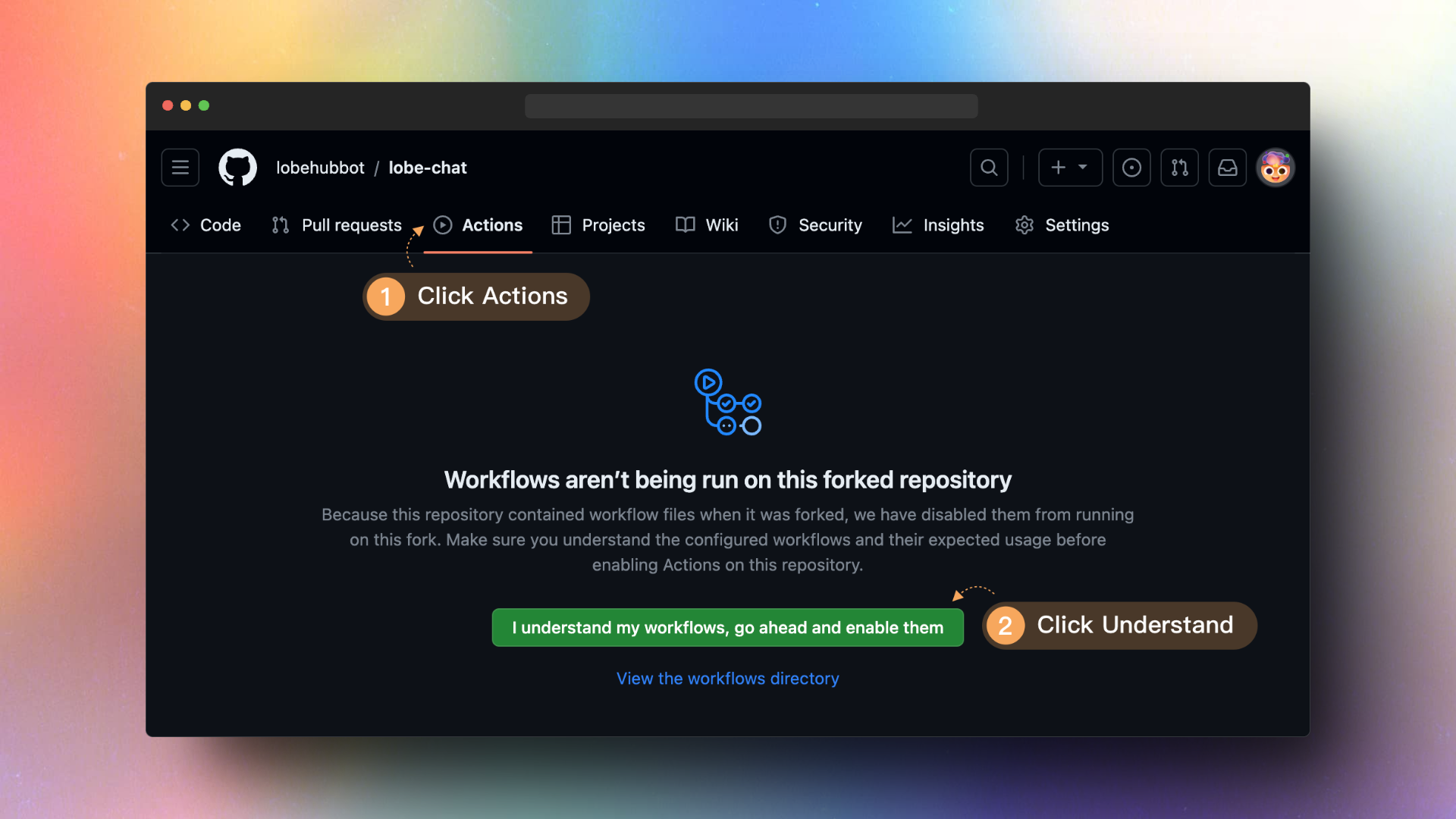
|
||||
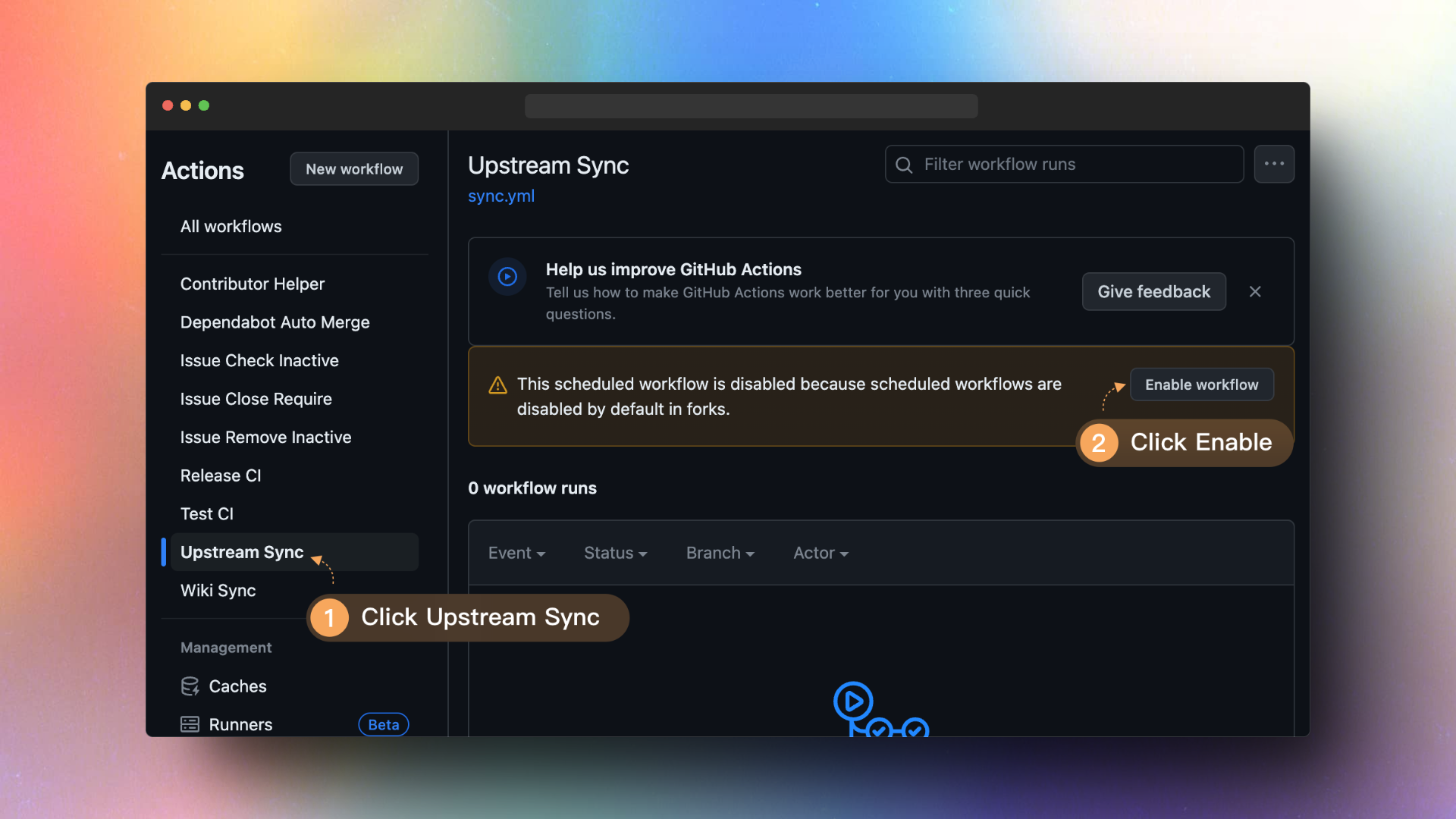
|
||||
|
||||
## `B` Docker Deployment
|
||||
|
||||
Upgrading the Docker deployment version is very simple, just redeploy the latest image of LobeChat. Here are the instructions to perform these steps:
|
||||
|
||||
1. Stop and delete the currently running LobeChat container (assuming the name of the LobeChat container is `lobe-chat`):
|
||||
|
||||
```fish
|
||||
docker stop lobe-chat
|
||||
docker rm lobe-chat
|
||||
```
|
||||
|
||||
2. Pull the latest Docker image of LobeChat:
|
||||
|
||||
```fish
|
||||
docker pull lobehub/lobe-chat
|
||||
```
|
||||
|
||||
3. Redeploy the LobeChat container using the newly pulled image:
|
||||
|
||||
```fish
|
||||
docker run -d -p 3210:3210 \
|
||||
-e OPENAI_API_KEY=sk-xxxx \
|
||||
-e OPENAI_PROXY_URL=https://api-proxy.com/v1 \
|
||||
-e ACCESS_CODE=lobe66 \
|
||||
--name lobe-chat \
|
||||
lobehub/lobe-chat
|
||||
```
|
||||
|
||||
Make sure you have sufficient permissions to stop and delete the container before executing these commands, and Docker has sufficient permissions to pull the new image.
|
||||
|
||||
> \[!NOTE]
|
||||
>
|
||||
> If I redeploy, will my local chat history be lost?
|
||||
>
|
||||
> Don't worry, all of LobeChat's chat history is stored in your local browser. Therefore, when you redeploy LobeChat using Docker, your chat history will not be lost.
|
||||
@@ -1,58 +0,0 @@
|
||||
# 自部署保持更新
|
||||
|
||||
[English](https://github.com/lobehub/lobe-chat/wiki/Upstream-Sync) | 简体中文
|
||||
|
||||
## `A` Vercel / Zeabur 部署
|
||||
|
||||
如果你根据 README 中的一键部署步骤部署了自己的项目,你可能会发现总是被提示 “有可用更新”。这是因为 Vercel 默认为你创建新项目而非 fork 本项目,这将导致无法准确检测更新。我们建议按照以下步骤重新部署:
|
||||
|
||||
- 删除原有的仓库;
|
||||
- 使用页面右上角的 <kbd>Fork</kbd> 按钮,Fork 本项目;
|
||||
- 在 `Vercel` 上重新选择并部署。
|
||||
|
||||
### 启动自动更新
|
||||
|
||||
> \[!NOTE]
|
||||
>
|
||||
> 如果你在执行 `Upstream Sync` 时遇到错误,请手动执再行一次
|
||||
|
||||
当你 Fork 了项目后,由于 Github 的限制,你需要手动在你 Fork 的项目的 Actions 页面启用 Workflows,并启动 Upstream Sync Action。启用后,你可以设置每小时进行一次自动更新。
|
||||
|
||||

|
||||

|
||||
|
||||
## `B` Docker 部署
|
||||
|
||||
Docker 部署版本的升级非常简单,只需要重新部署 LobeChat 的最新镜像即可。 以下是执行这些步骤所需的指令:
|
||||
|
||||
1. 停止并删除当前运行的 LobeChat 容器(假设 LobeChat 容器的名称是 `lobe-chat`):
|
||||
|
||||
```fish
|
||||
docker stop lobe-chat
|
||||
docker rm lobe-chat
|
||||
```
|
||||
|
||||
2. 拉取 LobeChat 的最新 Docker 镜像:
|
||||
|
||||
```fish
|
||||
docker pull lobehub/lobe-chat
|
||||
```
|
||||
|
||||
3. 使用新拉取的镜像重新部署 LobeChat 容器:
|
||||
|
||||
```fish
|
||||
docker run -d -p 3210:3210 \
|
||||
-e OPENAI_API_KEY=sk-xxxx \
|
||||
-e OPENAI_PROXY_URL=https://api-proxy.com/v1 \
|
||||
-e ACCESS_CODE=lobe66 \
|
||||
--name lobe-chat \
|
||||
lobehub/lobe-chat
|
||||
```
|
||||
|
||||
确保在执行这些命令之前,您有足够的权限来停止和删除容器,并且 Docker 有足够的权限来拉取新的镜像。
|
||||
|
||||
> \[!NOTE]
|
||||
>
|
||||
> 重新部署的话,我本地的聊天记录会丢失吗?
|
||||
>
|
||||
> 放心,LobeChat 的聊天记录全部都存储在你的本地浏览器中。因此使用 Docker 重新部署 LobeChat 时,你的聊天记录并不会丢失。
|
||||
@@ -1 +0,0 @@
|
||||
This is the **🤯 / 🤖 Lobe Chat** wiki. [Wiki Home](https://github.com/lobehub/lobe-chat/wiki)
|
||||
@@ -1,48 +0,0 @@
|
||||
## Lobe Chat Contributing Wiki
|
||||
|
||||
#### 🏠 Home
|
||||
|
||||
- [TOC](Home.md) | [目录](Home.md)
|
||||
|
||||
<!-- DOCS LIST -->
|
||||
|
||||
#### 🤯 Basic
|
||||
|
||||
- [Architecture Design](https://github.com/lobehub/lobe-chat/wiki/Architecture) | [架构设计](https://github.com/lobehub/lobe-chat/wiki/Architecture.zh-CN)
|
||||
- [Code Style and Contribution Guidelines](https://github.com/lobehub/lobe-chat/wiki/Contributing-Guidelines) | [代码风格与贡献指南](https://github.com/lobehub/lobe-chat/wiki/Contributing-Guidelines.zh-CN)
|
||||
- [Complete Guide to LobeChat Feature Development](https://github.com/lobehub/lobe-chat/wiki/Feature-Development) | [LobeChat 功能开发完全指南](https://github.com/lobehub/lobe-chat/wiki/Feature-Development.zh-CN)
|
||||
- [Conversation API Implementation Logic](https://github.com/lobehub/lobe-chat/wiki/Chat-API) | [会话 API 实现逻辑](https://github.com/lobehub/lobe-chat/wiki/Chat-API.zh-CN)
|
||||
- [Directory Structure](https://github.com/lobehub/lobe-chat/wiki/Folder-Structure) | [目录架构](https://github.com/lobehub/lobe-chat/wiki/Folder-Structure.zh-CN)
|
||||
- [Environment Setup Guide](https://github.com/lobehub/lobe-chat/wiki/Setup-Development) | [环境设置指南](https://github.com/lobehub/lobe-chat/wiki/Setup-Development.zh-CN)
|
||||
- [How to Develop a New Feature](https://github.com/lobehub/lobe-chat/wiki/Feature-Development-Frontend) | [如何开发一个新功能:前端实现](https://github.com/lobehub/lobe-chat/wiki/Feature-Development-Frontend.zh-CN)
|
||||
- [New Authentication Provider Guide](https://github.com/lobehub/lobe-chat/wiki/Add-New-Authentication-Providers) | [新身份验证方式开发指南](https://github.com/lobehub/lobe-chat/wiki/Add-New-Authentication-Providers.zh-CN)
|
||||
- [Resources and References](https://github.com/lobehub/lobe-chat/wiki/Resources) | [资源与参考](https://github.com/lobehub/lobe-chat/wiki/Resources.zh-CN)
|
||||
- [Technical Development Getting Started Guide](https://github.com/lobehub/lobe-chat/wiki/Intro) | [技术开发上手指南](https://github.com/lobehub/lobe-chat/wiki/Intro.zh-CN)
|
||||
- [Testing Guide](https://github.com/lobehub/lobe-chat/wiki/Test) | [测试指南](https://github.com/lobehub/lobe-chat/wiki/Test.zh-CN)
|
||||
|
||||
#### 🌎 Internationalization
|
||||
|
||||
- [Internationalization Implementation Guide](https://github.com/lobehub/lobe-chat/wiki/Internationalization-Implementation) | [国际化实现指南](https://github.com/lobehub/lobe-chat/wiki/Internationalization-Implementation.zh-CN)
|
||||
- [New Locale Guide](https://github.com/lobehub/lobe-chat/wiki/Add-New-Locale) | [新语种添加指南](https://github.com/lobehub/lobe-chat/wiki/Add-New-Locale.zh-CN)
|
||||
|
||||
#### ⌨️ State Management
|
||||
|
||||
- [Best Practices for State Management](https://github.com/lobehub/lobe-chat/wiki/State-Management-Intro) | [状态管理最佳实践](https://github.com/lobehub/lobe-chat/wiki/State-Management-Intro.zh-CN)
|
||||
- [Data Store Selector](https://github.com/lobehub/lobe-chat/wiki/State-Management-Selectors) | [数据存储取数模块](https://github.com/lobehub/lobe-chat/wiki/State-Management-Selectors.zh-CN)
|
||||
|
||||
#### 🤖 Agents
|
||||
|
||||
- [Agent Index and Submit](https://github.com/lobehub/lobe-chat-agents) | [助手索引与提交](https://github.com/lobehub/lobe-chat-agents/blob/main/README.zh-CN.md)
|
||||
|
||||
#### 🧩 Plugins
|
||||
|
||||
- [Plugin Index and Submit](https://github.com/lobehub/lobe-chat-plugins) | [插件索引与提交](https://github.com/lobehub/lobe-chat-plugins/blob/main/README.zh-CN.md)
|
||||
- [Plugin SDK Docs](https://chat-plugin-sdk.lobehub.com) | [插件 SDK 文档](https://chat-plugin-sdk.lobehub.com)
|
||||
|
||||
#### 📊 Others
|
||||
|
||||
- [Lighthouse Reports](https://github.com/lobehub/lobe-chat/wiki/Lighthouse) | [Lighthouse 测试报告](https://github.com/lobehub/lobe-chat/wiki/Lighthouse.zh-CN)
|
||||
|
||||
<!-- DOCS LIST -->
|
||||
|
||||
<!-- LINK GROUP -->
|
||||
@@ -58,8 +58,9 @@ services:
|
||||
wait \$MINIO_PID
|
||||
"
|
||||
|
||||
# version lock ref: https://github.com/lobehub/lobe-chat/pull/7331
|
||||
casdoor:
|
||||
image: casbin/casdoor
|
||||
image: casbin/casdoor:v1.843.0
|
||||
container_name: lobe-casdoor
|
||||
entrypoint: /bin/sh -c './server --createDatabase=true'
|
||||
network_mode: 'service:network-service'
|
||||
|
||||
-10
@@ -2,16 +2,6 @@
|
||||
|
||||
LobeChat uses [Auth.js v5](https://authjs.dev/) as the external authentication service. Auth.js is an open-source authentication library that provides a simple way to implement authentication and authorization features. This document will introduce how to use Auth.js to implement a new authentication provider.
|
||||
|
||||
### TOC
|
||||
|
||||
- [Add New Authentication Provider](#add-new-authentication-provider)
|
||||
- [Pre-requisites: Check the Official Provider List](#pre-requisites-check-the-official-provider-list)
|
||||
- [Step 1: Add Authenticator Core Code](#step-1-add-authenticator-core-code)
|
||||
- [Step 2: Update Server Configuration Code](#step-2-update-server-configuration-code)
|
||||
- [Step 3: Change Frontend Pages](#step-3-change-frontend-pages)
|
||||
- [Step 4: Configure the Environment Variables](#step-4-configure-the-environment-variables)
|
||||
- [Step 5: Modify server-side user information processing logic](#step-5-modify-server-side-user-information-processing-logic)
|
||||
|
||||
## Add New Authentication Provider
|
||||
|
||||
To add a new authentication provider in LobeChat (for example, adding Okta), you need to follow the steps below:
|
||||
-10
@@ -2,16 +2,6 @@
|
||||
|
||||
LobeChat 使用 [Auth.js v5](https://authjs.dev/) 作为外部身份验证服务。Auth.js 是一个开源的身份验证库,它提供了一种简单的方式来实现身份验证和授权功能。本文档将介绍如何使用 Auth.js 来实现新的身份验证方式。
|
||||
|
||||
### TOC
|
||||
|
||||
- [添加新的身份验证提供者](#添加新的身份验证提供者)
|
||||
- [准备工作:查阅官方的提供者列表](#准备工作查阅官方的提供者列表)
|
||||
- [步骤 1: 新增关键代码](#步骤-1-新增关键代码)
|
||||
- [步骤 2: 更新服务端配置代码](#步骤-2-更新服务端配置代码)
|
||||
- [步骤 3: 修改前端页面](#步骤-3-修改前端页面)
|
||||
- [步骤 4: 配置环境变量](#步骤-4-配置环境变量)
|
||||
- [步骤 5: 修改服务端用户信息处理逻辑](#步骤-5-修改服务端用户信息处理逻辑)
|
||||
|
||||
## 添加新的身份验证提供者
|
||||
|
||||
为了在 LobeChat 中添加新的身份验证提供者(例如添加 Okta),你需要完成以下步骤:
|
||||
@@ -1,16 +1,6 @@
|
||||
# Architecture Design
|
||||
|
||||
LobeChat is an AI conversation application built on the Next.js framework, aiming to provide an AI productivity platform that enables users to interact with AI through natural language. The following is an overview of the architecture design of LobeChat:
|
||||
|
||||
#### TOC
|
||||
|
||||
- [Application Architecture Overview](#application-architecture-overview)
|
||||
- [Frontend Architecture](#frontend-architecture)
|
||||
- [Edge Runtime API](#edge-runtime-api)
|
||||
- [Agents Market](#agents-market)
|
||||
- [Plugin Market](#plugin-market)
|
||||
- [Security and Performance Optimization](#security-and-performance-optimization)
|
||||
- [Development and Deployment Process](#development-and-deployment-process)
|
||||
LobeChat is an AI chat application built on the Next.js framework, aiming to provide an AI productivity platform that enables users to interact with AI through natural language. The following is an overview of the architecture design of LobeChat:
|
||||
|
||||
## Application Architecture Overview
|
||||
|
||||
+1
-11
@@ -1,16 +1,6 @@
|
||||
# 架构设计
|
||||
|
||||
LobeChat 是一个基于 Next.js 框架构建的 AI 会话应用,旨在提供一个 AI 生产力平台,使用户能够与 AI 进行自然语言交互。以下是 LobeChat 的架构设计介稿:
|
||||
|
||||
#### TOC
|
||||
|
||||
- [应用架构概览](#应用架构概览)
|
||||
- [前端架构](#前端架构)
|
||||
- [Edge Runtime API](#edge-runtime-api)
|
||||
- [Agents 市场](#agents-市场)
|
||||
- [插件市场](#插件市场)
|
||||
- [安全性和性能优化](#安全性和性能优化)
|
||||
- [开发和部署流程](#开发和部署流程)
|
||||
LobeChat 是一个基于 Next.js 框架构建的 AI 聊天应用,旨在提供一个 AI 生产力平台,使用户能够与 AI 进行自然语言交互。以下是 LobeChat 的架构设计介稿:
|
||||
|
||||
## 应用架构概览
|
||||
|
||||
@@ -0,0 +1,348 @@
|
||||
# Lobe Chat API Client-Server Interaction Logic
|
||||
|
||||
This document explains the implementation logic of Lobe Chat API in client-server interactions, including event sequences and core components involved.
|
||||
|
||||
## Interaction Sequence Diagram
|
||||
|
||||
```mermaid
|
||||
sequenceDiagram
|
||||
participant Client as Frontend Client
|
||||
participant ChatService as Frontend ChatService
|
||||
participant ChatAPI as Backend Chat API
|
||||
participant AgentRuntime as AgentRuntime
|
||||
participant ModelProvider as Model Provider API
|
||||
participant PluginGateway as Plugin Gateway
|
||||
|
||||
Client->>ChatService: Call createAssistantMessage
|
||||
Note over ChatService: Process messages, tools, and parameters
|
||||
|
||||
ChatService->>ChatService: Call getChatCompletion
|
||||
Note over ChatService: Prepare request parameters
|
||||
|
||||
ChatService->>ChatAPI: Send POST request to /webapi/chat/[provider]
|
||||
|
||||
ChatAPI->>AgentRuntime: Initialize AgentRuntime
|
||||
Note over AgentRuntime: Create runtime with provider and user config
|
||||
|
||||
ChatAPI->>AgentRuntime: Call chat method
|
||||
AgentRuntime->>ModelProvider: Send chat completion request
|
||||
|
||||
ModelProvider-->>AgentRuntime: Return streaming response
|
||||
AgentRuntime-->>ChatAPI: Process response and return stream
|
||||
|
||||
ChatAPI-->>ChatService: Stream back SSE response
|
||||
|
||||
ChatService->>ChatService: Handle streaming response with fetchSSE
|
||||
Note over ChatService: Process event stream with fetchEventSource
|
||||
|
||||
loop For each data chunk
|
||||
ChatService->>ChatService: Handle different event types (text, tool_calls, reasoning, etc.)
|
||||
ChatService-->>Client: Return current chunk via onMessageHandle callback
|
||||
end
|
||||
|
||||
ChatService-->>Client: Return complete result via onFinish callback
|
||||
|
||||
Note over ChatService,ModelProvider: Plugin calling scenario
|
||||
ModelProvider-->>ChatService: Return response with tool_calls
|
||||
ChatService->>ChatService: Parse tool calls
|
||||
ChatService->>ChatService: Call runPluginApi
|
||||
ChatService->>PluginGateway: Send plugin request to gateway
|
||||
PluginGateway-->>ChatService: Return plugin execution result
|
||||
ChatService->>ModelProvider: Return plugin result to model
|
||||
ModelProvider-->>ChatService: Generate final response based on plugin result
|
||||
|
||||
Note over ChatService,ModelProvider: Preset task scenario
|
||||
Client->>ChatService: Trigger preset task (e.g., translation, search)
|
||||
ChatService->>ChatService: Call fetchPresetTaskResult
|
||||
ChatService->>ChatAPI: Send preset task request
|
||||
ChatAPI-->>ChatService: Return task result
|
||||
ChatService-->>Client: Return result via callback function
|
||||
```
|
||||
|
||||
## Main Process Steps
|
||||
|
||||
1. **Client Initiates Request**: The client calls the createAssistantMessage method of the frontend ChatService.
|
||||
|
||||
2. **Frontend Processes Request**:
|
||||
|
||||
- `src/services/chat.ts` preprocesses messages, tools, and parameters
|
||||
- Calls getChatCompletion to prepare request parameters
|
||||
- Uses `src/utils/fetch/fetchSSE.ts` to send request to backend API
|
||||
|
||||
3. **Backend Processes Request**:
|
||||
|
||||
- `src/app/(backend)/webapi/chat/[provider]/route.ts` receives the request
|
||||
- Initializes AgentRuntime
|
||||
- Creates the appropriate model instance based on user configuration and provider
|
||||
|
||||
4. **Model Call**:
|
||||
|
||||
- `src/libs/agent-runtime/AgentRuntime.ts` calls the respective model provider's API
|
||||
- Returns streaming response
|
||||
|
||||
5. **Process Response**:
|
||||
|
||||
- Backend converts model response to Stream and returns it
|
||||
- Frontend processes streaming response via fetchSSE and [fetchEventSource](https://github.com/Azure/fetch-event-source)
|
||||
- Handles different types of events (text, tool calls, reasoning, etc.)
|
||||
- Passes results back to client through callback functions
|
||||
|
||||
6. **Plugin Calling Scenario**:
|
||||
|
||||
When the AI model returns a `tool_calls` field in its response, it triggers the plugin calling process:
|
||||
|
||||
- AI model returns response containing `tool_calls`, indicating a need to call tools
|
||||
- Frontend handles tool calls via the `internal_callPluginApi` method
|
||||
- Calls `runPluginApi` method to execute plugin functionality, including retrieving plugin settings and manifest, creating authentication headers, and sending requests to the plugin gateway
|
||||
- After plugin execution completes, the result is returned to the AI model, which generates the final response based on the result
|
||||
|
||||
**Real-world Examples**:
|
||||
|
||||
- **Search Plugin**: When a user needs real-time information, the AI calls a web search plugin to retrieve the latest data
|
||||
- **DALL-E Plugin**: When a user requests image generation, the AI calls the DALL-E plugin to create images
|
||||
- **Midjourney Plugin**: Provides higher quality image generation capabilities by calling the Midjourney service via API
|
||||
|
||||
7. **Preset Task Processing**:
|
||||
|
||||
Preset tasks are specific predefined functions that are typically triggered when users perform specific actions (rather than being part of the regular chat flow). These tasks use the `fetchPresetTaskResult` method, which is similar to the normal chat flow but uses specially designed prompt chains.
|
||||
|
||||
**Execution Timing**: Preset tasks are mainly triggered in the following scenarios:
|
||||
|
||||
1. **Agent Information Auto-generation**: Triggered when users create or edit an agent
|
||||
|
||||
- Agent avatar generation (via `autoPickEmoji` method)
|
||||
- Agent description generation (via `autocompleteAgentDescription` method)
|
||||
- Agent tag generation (via `autocompleteAgentTags` method)
|
||||
- Agent title generation (via `autocompleteAgentTitle` method)
|
||||
|
||||
2. **Message Translation**: Triggered when users manually click the translate button (via `translateMessage` method)
|
||||
|
||||
3. **Web Search**: When search is enabled but the model doesn't support tool calling, search functionality is implemented via `fetchPresetTaskResult`
|
||||
|
||||
**Code Examples**:
|
||||
|
||||
Agent avatar auto-generation implementation:
|
||||
|
||||
```ts
|
||||
// src/features/AgentSetting/store/action.ts
|
||||
autoPickEmoji: async () => {
|
||||
const { config, meta, dispatchMeta } = get();
|
||||
const systemRole = config.systemRole;
|
||||
|
||||
chatService.fetchPresetTaskResult({
|
||||
onFinish: async (emoji) => {
|
||||
dispatchMeta({ type: 'update', value: { avatar: emoji } });
|
||||
},
|
||||
onLoadingChange: (loading) => {
|
||||
get().updateLoadingState('avatar', loading);
|
||||
},
|
||||
params: merge(
|
||||
get().internal_getSystemAgentForMeta(),
|
||||
chainPickEmoji([meta.title, meta.description, systemRole].filter(Boolean).join(',')),
|
||||
),
|
||||
trace: get().getCurrentTracePayload({ traceName: TraceNameMap.EmojiPicker }),
|
||||
});
|
||||
};
|
||||
```
|
||||
|
||||
Translation feature implementation:
|
||||
|
||||
```ts
|
||||
// src/store/chat/slices/translate/action.ts
|
||||
translateMessage: async (id, targetLang) => {
|
||||
// ...omitted code...
|
||||
|
||||
// Detect language
|
||||
chatService.fetchPresetTaskResult({
|
||||
onFinish: async (data) => {
|
||||
if (data && supportLocales.includes(data)) from = data;
|
||||
await updateMessageTranslate(id, { content, from, to: targetLang });
|
||||
},
|
||||
params: merge(translationSetting, chainLangDetect(message.content)),
|
||||
trace: get().getCurrentTracePayload({ traceName: TraceNameMap.LanguageDetect }),
|
||||
});
|
||||
|
||||
// Perform translation
|
||||
chatService.fetchPresetTaskResult({
|
||||
onMessageHandle: (chunk) => {
|
||||
if (chunk.type === 'text') {
|
||||
content = chunk.text;
|
||||
internal_dispatchMessage({
|
||||
id,
|
||||
type: 'updateMessageTranslate',
|
||||
value: { content, from, to: targetLang },
|
||||
});
|
||||
}
|
||||
},
|
||||
onFinish: async () => {
|
||||
await updateMessageTranslate(id, { content, from, to: targetLang });
|
||||
internal_toggleChatLoading(false, id, n('translateMessage(end)', { id }) as string);
|
||||
},
|
||||
params: merge(translationSetting, chainTranslate(message.content, targetLang)),
|
||||
trace: get().getCurrentTracePayload({ traceName: TraceNameMap.Translation }),
|
||||
});
|
||||
};
|
||||
```
|
||||
|
||||
8. **Completion**:
|
||||
- When the stream ends, the onFinish callback is called, providing the complete response result
|
||||
|
||||
## AgentRuntime Overview
|
||||
|
||||
AgentRuntime is a core abstraction layer in Lobe Chat that encapsulates a unified interface for interacting with different AI model providers. Its main responsibilities and features include:
|
||||
|
||||
1. **Unified Abstraction Layer**: AgentRuntime provides a unified interface that hides the implementation details and differences between various AI provider APIs (such as OpenAI, Anthropic, Bedrock, etc.).
|
||||
|
||||
2. **Model Initialization**: Through the static `initializeWithProvider` method, it initializes the corresponding runtime instance based on the specified provider and configuration parameters.
|
||||
|
||||
3. **Capability Encapsulation**:
|
||||
|
||||
- `chat` method: Handles chat streaming requests
|
||||
- `models` method: Retrieves model lists
|
||||
- Supports text embedding, text-to-image, text-to-speech, and other functionalities (if supported by the model provider)
|
||||
|
||||
4. **Plugin Architecture**: Through the `src/libs/agent-runtime/runtimeMap.ts` mapping table, it implements an extensible plugin architecture, making it easy to add new model providers. Currently, it supports over 40 different model providers:
|
||||
|
||||
```ts
|
||||
export const providerRuntimeMap = {
|
||||
openai: LobeOpenAI,
|
||||
anthropic: LobeAnthropicAI,
|
||||
google: LobeGoogleAI,
|
||||
azure: LobeAzureOpenAI,
|
||||
bedrock: LobeBedrockAI,
|
||||
ollama: LobeOllamaAI,
|
||||
// ...over 40 other model providers
|
||||
};
|
||||
```
|
||||
|
||||
5. **Adapter Pattern**: Internally, it uses the adapter pattern to adapt different provider APIs to the unified `src/libs/agent-runtime/BaseAI.ts` interface:
|
||||
|
||||
```ts
|
||||
export interface LobeRuntimeAI {
|
||||
baseURL?: string;
|
||||
chat(payload: ChatStreamPayload, options?: ChatCompetitionOptions): Promise<Response>;
|
||||
embeddings?(payload: EmbeddingsPayload, options?: EmbeddingsOptions): Promise<Embeddings[]>;
|
||||
models?(): Promise<any>;
|
||||
textToImage?: (payload: TextToImagePayload) => Promise<string[]>;
|
||||
textToSpeech?: (
|
||||
payload: TextToSpeechPayload,
|
||||
options?: TextToSpeechOptions,
|
||||
) => Promise<ArrayBuffer>;
|
||||
}
|
||||
```
|
||||
|
||||
**Adapter Implementation Examples**:
|
||||
|
||||
1. **OpenRouter Adapter**:
|
||||
OpenRouter is a unified API that allows access to AI models from multiple providers. Lobe Chat implements support for OpenRouter through an adapter:
|
||||
|
||||
```ts
|
||||
// OpenRouter adapter implementation
|
||||
class LobeOpenRouterAI implements LobeRuntimeAI {
|
||||
client: OpenAI;
|
||||
baseURL: string;
|
||||
|
||||
constructor(options: OpenAICompatibleOptions) {
|
||||
// Initialize OpenRouter client using OpenAI-compatible API
|
||||
this.client = new OpenAI({
|
||||
apiKey: options.apiKey,
|
||||
baseURL: OPENROUTER_BASE_URL,
|
||||
defaultHeaders: {
|
||||
'HTTP-Referer': 'https://github.com/lobehub/lobe-chat',
|
||||
'X-Title': 'LobeChat',
|
||||
},
|
||||
});
|
||||
this.baseURL = OPENROUTER_BASE_URL;
|
||||
}
|
||||
|
||||
// Implement chat functionality
|
||||
async chat(payload: ChatCompletionCreateParamsBase, options?: RequestOptions) {
|
||||
// Convert Lobe Chat request format to OpenRouter format
|
||||
// Handle model mapping, message format, etc.
|
||||
return this.client.chat.completions.create(
|
||||
{
|
||||
...payload,
|
||||
model: payload.model || 'openai/gpt-4-turbo', // Default model
|
||||
},
|
||||
options,
|
||||
);
|
||||
}
|
||||
|
||||
// Implement other LobeRuntimeAI interface methods
|
||||
}
|
||||
```
|
||||
|
||||
2. **Google Gemini Adapter**:
|
||||
Gemini is Google's large language model. Lobe Chat supports Gemini series models through a dedicated adapter:
|
||||
|
||||
```ts
|
||||
import { GoogleGenerativeAI } from '@google/generative-ai';
|
||||
|
||||
// Gemini adapter implementation
|
||||
class LobeGoogleAI implements LobeRuntimeAI {
|
||||
client: GoogleGenerativeAI;
|
||||
baseURL: string;
|
||||
apiKey: string;
|
||||
|
||||
constructor(options: GoogleAIOptions) {
|
||||
// Initialize Google Generative AI client
|
||||
this.client = new GoogleGenerativeAI(options.apiKey);
|
||||
this.apiKey = options.apiKey;
|
||||
this.baseURL = options.baseURL || GOOGLE_AI_BASE_URL;
|
||||
}
|
||||
|
||||
// Implement chat functionality
|
||||
async chat(payload: ChatCompletionCreateParamsBase, options?: RequestOptions) {
|
||||
// Select appropriate model (supports Gemini Pro, Gemini Flash, etc.)
|
||||
const modelName = payload.model || 'gemini-pro';
|
||||
const model = this.client.getGenerativeModel({ model: modelName });
|
||||
|
||||
// Process multimodal inputs (e.g., images)
|
||||
const contents = this.processMessages(payload.messages);
|
||||
|
||||
// Set generation parameters
|
||||
const generationConfig = {
|
||||
temperature: payload.temperature,
|
||||
topK: payload.top_k,
|
||||
topP: payload.top_p,
|
||||
maxOutputTokens: payload.max_tokens,
|
||||
};
|
||||
|
||||
// Create chat session and get response
|
||||
const chat = model.startChat({
|
||||
generationConfig,
|
||||
history: contents.slice(0, -1),
|
||||
safetySettings: this.getSafetySettings(payload),
|
||||
});
|
||||
|
||||
// Handle streaming response
|
||||
return this.handleStreamResponse(chat, contents, options?.signal);
|
||||
}
|
||||
|
||||
// Implement other processing methods
|
||||
private processMessages(messages) {
|
||||
/* ... */
|
||||
}
|
||||
private getSafetySettings(payload) {
|
||||
/* ... */
|
||||
}
|
||||
private handleStreamResponse(chat, contents, signal) {
|
||||
/* ... */
|
||||
}
|
||||
}
|
||||
```
|
||||
|
||||
**Different Model Implementations**:
|
||||
|
||||
- `src/libs/agent-runtime/openai/index.ts` - OpenAI implementation
|
||||
- `src/libs/agent-runtime/anthropic/index.ts` - Anthropic implementation
|
||||
- `src/libs/agent-runtime/google/index.ts` - Google implementation
|
||||
- `src/libs/agent-runtime/openrouter/index.ts` - OpenRouter implementation
|
||||
|
||||
For detailed implementation, see:
|
||||
|
||||
- `src/libs/agent-runtime/AgentRuntime.ts` - Core runtime class
|
||||
- `src/libs/agent-runtime/BaseAI.ts` - Define base interface
|
||||
- `src/libs/agent-runtime/runtimeMap.ts` - Provider mapping table
|
||||
- `src/libs/agent-runtime/UniformRuntime/index.ts` - Handle multi-model unified runtime
|
||||
- `src/libs/agent-runtime/utils/openaiCompatibleFactory/index.ts` - OpenAI compatible adapter factory
|
||||
@@ -0,0 +1,348 @@
|
||||
# Lobe Chat API 前后端交互逻辑
|
||||
|
||||
本文档说明了 Lobe Chat API 在前后端交互中的实现逻辑,包括事件序列和涉及的核心组件。
|
||||
|
||||
## 交互时序图
|
||||
|
||||
```mermaid
|
||||
sequenceDiagram
|
||||
participant Client as 前端客户端
|
||||
participant ChatService as 前端 ChatService
|
||||
participant ChatAPI as 后端 Chat API
|
||||
participant AgentRuntime as AgentRuntime
|
||||
participant ModelProvider as 模型提供商 API
|
||||
participant PluginGateway as 插件网关
|
||||
|
||||
Client->>ChatService: 调用 createAssistantMessage
|
||||
Note over ChatService: 处理消息、工具和参数
|
||||
|
||||
ChatService->>ChatService: 调用 getChatCompletion
|
||||
Note over ChatService: 准备请求参数
|
||||
|
||||
ChatService->>ChatAPI: 发送 POST 请求到 /webapi/chat/[provider]
|
||||
|
||||
ChatAPI->>AgentRuntime: 初始化 AgentRuntime
|
||||
Note over AgentRuntime: 通过 provider 和 用户配置创建运行时
|
||||
|
||||
ChatAPI->>AgentRuntime: 调用 chat 方法
|
||||
AgentRuntime->>ModelProvider: 发送 chat completion 请求
|
||||
|
||||
ModelProvider-->>AgentRuntime: 返回流式响应
|
||||
AgentRuntime-->>ChatAPI: 处理响应并返回 stream
|
||||
|
||||
ChatAPI-->>ChatService: 流式返回 SSE 响应
|
||||
|
||||
ChatService->>ChatService: 使用 fetchSSE 处理流式响应
|
||||
Note over ChatService: 通过 fetchEventSource 处理事件流
|
||||
|
||||
loop 对于每个数据块
|
||||
ChatService->>ChatService: 处理不同类型的事件 (text, tool_calls, reasoning 等)
|
||||
ChatService-->>Client: 通过 onMessageHandle 回调返回当前块
|
||||
end
|
||||
|
||||
ChatService-->>Client: 通过 onFinish 回调返回完整结果
|
||||
|
||||
Note over ChatService,ModelProvider: 插件调用场景
|
||||
ModelProvider-->>ChatService: 返回包含 tool_calls 的响应
|
||||
ChatService->>ChatService: 解析工具调用
|
||||
ChatService->>ChatService: 调用 runPluginApi
|
||||
ChatService->>PluginGateway: 发送插件请求到网关
|
||||
PluginGateway-->>ChatService: 返回插件执行结果
|
||||
ChatService->>ModelProvider: 将插件结果返回给模型
|
||||
ModelProvider-->>ChatService: 基于插件结果生成最终响应
|
||||
|
||||
Note over ChatService,ModelProvider: 预设任务场景
|
||||
Client->>ChatService: 触发预设任务(如自动翻译、搜索等)
|
||||
ChatService->>ChatService: 调用 fetchPresetTaskResult
|
||||
ChatService->>ChatAPI: 发送预设任务请求
|
||||
ChatAPI-->>ChatService: 返回任务结果
|
||||
ChatService-->>Client: 通过回调函数返回结果
|
||||
```
|
||||
|
||||
## 主要步骤说明
|
||||
|
||||
1. **客户端发起请求**:客户端调用前端 ChatService 的 createAssistantMessage 方法。
|
||||
|
||||
2. **前端处理请求**:
|
||||
|
||||
- `src/services/chat.ts` 对消息、工具和参数进行预处理
|
||||
- 调用 getChatCompletion 准备请求参数
|
||||
- 使用 `src/utils/fetch/fetchSSE.ts` 发送请求到后端 API
|
||||
|
||||
3. **后端处理请求**:
|
||||
|
||||
- `src/app/(backend)/webapi/chat/[provider]/route.ts` 接收请求
|
||||
- 初始化 AgentRuntime
|
||||
- 根据用户配置和提供商创建相应的模型实例
|
||||
|
||||
4. **模型调用**:
|
||||
|
||||
- `src/libs/agent-runtime/AgentRuntime.ts` 调用相应模型提供商的 API
|
||||
- 返回流式响应
|
||||
|
||||
5. **处理响应**:
|
||||
|
||||
- 后端将模型响应转换为 Stream 返回
|
||||
- 前端通过 fetchSSE 和 [fetchEventSource](https://github.com/Azure/fetch-event-source) 处理流式响应
|
||||
- 对不同类型的事件(文本、工具调用、推理等)进行处理
|
||||
- 通过回调函数将结果传递回客户端
|
||||
|
||||
6. **插件调用场景**:
|
||||
|
||||
当 AI 模型在响应中返回 `tool_calls` 字段时,会触发插件调用流程:
|
||||
|
||||
- AI 模型返回包含 `tool_calls` 的响应,表明需要调用工具
|
||||
- 前端通过 `internal_callPluginApi` 方法处理工具调用
|
||||
- 调用 `runPluginApi` 方法执行插件功能,包括获取插件设置和清单、创建认证请求头、发送请求到插件网关
|
||||
- 插件执行完成后,结果返回给 AI 模型,模型基于结果生成最终响应
|
||||
|
||||
**实际应用示例**:
|
||||
|
||||
- **搜索插件**:当用户需要获取实时信息时,AI 会调用网页搜索插件来获取最新数据
|
||||
- **DALL-E 插件**:用户要求生成图片时,AI 调用 DALL-E 插件创建图像
|
||||
- **Midjourney 插件**:提供更高质量的图像生成能力,通过 API 调用 Midjourney 服务
|
||||
|
||||
7. **预设任务处理**:
|
||||
|
||||
预设任务是指系统预定义的特定功能任务,通常在用户执行特定操作时触发(而非常规聊天流程的一部分)。这些任务使用 `fetchPresetTaskResult` 方法执行,该方法与正常聊天流程类似,但会使用专门设计的提示词(prompt chain)。
|
||||
|
||||
**执行时机**:预设任务主要在以下场景被触发:
|
||||
|
||||
1. **角色信息自动生成**:当用户创建或编辑角色时触发
|
||||
|
||||
- 角色头像生成(通过 `autoPickEmoji` 方法)
|
||||
- 角色描述生成(通过 `autocompleteAgentDescription` 方法)
|
||||
- 角色标签生成(通过 `autocompleteAgentTags` 方法)
|
||||
- 角色标题生成(通过 `autocompleteAgentTitle` 方法)
|
||||
|
||||
2. **消息翻译**:用户手动点击翻译按钮时触发(通过 `translateMessage` 方法)
|
||||
|
||||
3. **网页搜索**:当启用搜索但模型不支持工具调用时,通过 `fetchPresetTaskResult` 实现搜索功能
|
||||
|
||||
**实际代码示例**:
|
||||
|
||||
角色头像自动生成实现:
|
||||
|
||||
```ts
|
||||
// src/features/AgentSetting/store/action.ts
|
||||
autoPickEmoji: async () => {
|
||||
const { config, meta, dispatchMeta } = get();
|
||||
const systemRole = config.systemRole;
|
||||
|
||||
chatService.fetchPresetTaskResult({
|
||||
onFinish: async (emoji) => {
|
||||
dispatchMeta({ type: 'update', value: { avatar: emoji } });
|
||||
},
|
||||
onLoadingChange: (loading) => {
|
||||
get().updateLoadingState('avatar', loading);
|
||||
},
|
||||
params: merge(
|
||||
get().internal_getSystemAgentForMeta(),
|
||||
chainPickEmoji([meta.title, meta.description, systemRole].filter(Boolean).join(',')),
|
||||
),
|
||||
trace: get().getCurrentTracePayload({ traceName: TraceNameMap.EmojiPicker }),
|
||||
});
|
||||
};
|
||||
```
|
||||
|
||||
翻译功能实现:
|
||||
|
||||
```ts
|
||||
// src/store/chat/slices/translate/action.ts
|
||||
translateMessage: async (id, targetLang) => {
|
||||
// ...省略部分代码...
|
||||
|
||||
// 检测语言
|
||||
chatService.fetchPresetTaskResult({
|
||||
onFinish: async (data) => {
|
||||
if (data && supportLocales.includes(data)) from = data;
|
||||
await updateMessageTranslate(id, { content, from, to: targetLang });
|
||||
},
|
||||
params: merge(translationSetting, chainLangDetect(message.content)),
|
||||
trace: get().getCurrentTracePayload({ traceName: TraceNameMap.LanguageDetect }),
|
||||
});
|
||||
|
||||
// 执行翻译
|
||||
chatService.fetchPresetTaskResult({
|
||||
onMessageHandle: (chunk) => {
|
||||
if (chunk.type === 'text') {
|
||||
content = chunk.text;
|
||||
internal_dispatchMessage({
|
||||
id,
|
||||
type: 'updateMessageTranslate',
|
||||
value: { content, from, to: targetLang },
|
||||
});
|
||||
}
|
||||
},
|
||||
onFinish: async () => {
|
||||
await updateMessageTranslate(id, { content, from, to: targetLang });
|
||||
internal_toggleChatLoading(false, id, n('translateMessage(end)', { id }) as string);
|
||||
},
|
||||
params: merge(translationSetting, chainTranslate(message.content, targetLang)),
|
||||
trace: get().getCurrentTracePayload({ traceName: TraceNameMap.Translation }),
|
||||
});
|
||||
};
|
||||
```
|
||||
|
||||
8. **完成**:
|
||||
- 当流结束时,调用 onFinish 回调,提供完整的响应结果
|
||||
|
||||
## AgentRuntime 说明
|
||||
|
||||
AgentRuntime 是 Lobe Chat 中的一个核心抽象层,它封装了与不同 AI 模型提供商交互的统一接口。其主要职责和特点包括:
|
||||
|
||||
1. **统一抽象层**:AgentRuntime 提供了一个统一的接口,隐藏了不同 AI 提供商 API 的实现细节差异(如 OpenAI、Anthropic、Bedrock 等)。
|
||||
|
||||
2. **模型初始化**:通过 `initializeWithProvider` 静态方法,根据指定的提供商和配置参数初始化对应的运行时实例。
|
||||
|
||||
3. **能力封装**:
|
||||
|
||||
- `chat` 方法:处理聊天流式请求
|
||||
- `models` 方法:获取模型列表
|
||||
- 支持文本嵌入、文本到图像、文本到语音等功能(如果模型提供商支持)
|
||||
|
||||
4. **插件化架构**:通过 `src/libs/agent-runtime/runtimeMap.ts` 映射表,实现了可扩展的插件化架构,方便添加新的模型提供商。目前支持超过 40 个不同的模型提供商:
|
||||
|
||||
```ts
|
||||
export const providerRuntimeMap = {
|
||||
openai: LobeOpenAI,
|
||||
anthropic: LobeAnthropicAI,
|
||||
google: LobeGoogleAI,
|
||||
azure: LobeAzureOpenAI,
|
||||
bedrock: LobeBedrockAI,
|
||||
ollama: LobeOllamaAI,
|
||||
// ...其他40多个模型提供商
|
||||
};
|
||||
```
|
||||
|
||||
5. **适配器模式**:在内部使用适配器模式,将不同提供商的 API 适配到统一的 `src/libs/agent-runtime/BaseAI.ts` 接口:
|
||||
|
||||
```ts
|
||||
export interface LobeRuntimeAI {
|
||||
baseURL?: string;
|
||||
chat(payload: ChatStreamPayload, options?: ChatCompetitionOptions): Promise<Response>;
|
||||
embeddings?(payload: EmbeddingsPayload, options?: EmbeddingsOptions): Promise<Embeddings[]>;
|
||||
models?(): Promise<any>;
|
||||
textToImage?: (payload: TextToImagePayload) => Promise<string[]>;
|
||||
textToSpeech?: (
|
||||
payload: TextToSpeechPayload,
|
||||
options?: TextToSpeechOptions,
|
||||
) => Promise<ArrayBuffer>;
|
||||
}
|
||||
```
|
||||
|
||||
**适配器实现示例**:
|
||||
|
||||
1. **OpenRouter 适配器**:
|
||||
OpenRouter 是一个统一 API,可以通过它访问多个模型提供商的 AI 模型。Lobe Chat 通过适配器实现对 OpenRouter 的支持:
|
||||
|
||||
```ts
|
||||
// OpenRouter 适配器实现
|
||||
class LobeOpenRouterAI implements LobeRuntimeAI {
|
||||
client: OpenAI;
|
||||
baseURL: string;
|
||||
|
||||
constructor(options: OpenAICompatibleOptions) {
|
||||
// 初始化 OpenRouter 客户端,使用 OpenAI 兼容的 API
|
||||
this.client = new OpenAI({
|
||||
apiKey: options.apiKey,
|
||||
baseURL: OPENROUTER_BASE_URL,
|
||||
defaultHeaders: {
|
||||
'HTTP-Referer': 'https://github.com/lobehub/lobe-chat',
|
||||
'X-Title': 'LobeChat',
|
||||
},
|
||||
});
|
||||
this.baseURL = OPENROUTER_BASE_URL;
|
||||
}
|
||||
|
||||
// 实现聊天功能
|
||||
async chat(payload: ChatCompletionCreateParamsBase, options?: RequestOptions) {
|
||||
// 将 Lobe Chat 的请求格式转换为 OpenRouter 格式
|
||||
// 处理模型映射、消息格式等
|
||||
return this.client.chat.completions.create(
|
||||
{
|
||||
...payload,
|
||||
model: payload.model || 'openai/gpt-4-turbo', // 默认模型
|
||||
},
|
||||
options,
|
||||
);
|
||||
}
|
||||
|
||||
// 实现其他 LobeRuntimeAI 接口方法
|
||||
}
|
||||
```
|
||||
|
||||
2. **Google Gemini 适配器**:
|
||||
Gemini 是 Google 的大语言模型,Lobe Chat 通过专门的适配器支持 Gemini 系列模型:
|
||||
|
||||
```ts
|
||||
import { GoogleGenerativeAI } from '@google/generative-ai';
|
||||
|
||||
// Gemini 适配器实现
|
||||
class LobeGoogleAI implements LobeRuntimeAI {
|
||||
client: GoogleGenerativeAI;
|
||||
baseURL: string;
|
||||
apiKey: string;
|
||||
|
||||
constructor(options: GoogleAIOptions) {
|
||||
// 初始化 Google Generative AI 客户端
|
||||
this.client = new GoogleGenerativeAI(options.apiKey);
|
||||
this.apiKey = options.apiKey;
|
||||
this.baseURL = options.baseURL || GOOGLE_AI_BASE_URL;
|
||||
}
|
||||
|
||||
// 实现聊天功能
|
||||
async chat(payload: ChatCompletionCreateParamsBase, options?: RequestOptions) {
|
||||
// 选择合适的模型(支持 Gemini Pro、Gemini Flash 等)
|
||||
const modelName = payload.model || 'gemini-pro';
|
||||
const model = this.client.getGenerativeModel({ model: modelName });
|
||||
|
||||
// 处理多模态输入(如图像)
|
||||
const contents = this.processMessages(payload.messages);
|
||||
|
||||
// 设置生成参数
|
||||
const generationConfig = {
|
||||
temperature: payload.temperature,
|
||||
topK: payload.top_k,
|
||||
topP: payload.top_p,
|
||||
maxOutputTokens: payload.max_tokens,
|
||||
};
|
||||
|
||||
// 创建聊天会话并获取响应
|
||||
const chat = model.startChat({
|
||||
generationConfig,
|
||||
history: contents.slice(0, -1),
|
||||
safetySettings: this.getSafetySettings(payload),
|
||||
});
|
||||
|
||||
// 处理流式响应
|
||||
return this.handleStreamResponse(chat, contents, options?.signal);
|
||||
}
|
||||
|
||||
// 实现其他处理方法
|
||||
private processMessages(messages) {
|
||||
/* ... */
|
||||
}
|
||||
private getSafetySettings(payload) {
|
||||
/* ... */
|
||||
}
|
||||
private handleStreamResponse(chat, contents, signal) {
|
||||
/* ... */
|
||||
}
|
||||
}
|
||||
```
|
||||
|
||||
**不同模型的适配实现**:
|
||||
|
||||
- `src/libs/agent-runtime/openai/index.ts` - OpenAI 实现
|
||||
- `src/libs/agent-runtime/anthropic/index.ts` - Anthropic 实现
|
||||
- `src/libs/agent-runtime/google/index.ts` - Google 实现
|
||||
- `src/libs/agent-runtime/openrouter/index.ts` - OpenRouter 实现
|
||||
|
||||
详细实现可以查看:
|
||||
|
||||
- `src/libs/agent-runtime/AgentRuntime.ts` - 核心运行时类
|
||||
- `src/libs/agent-runtime/BaseAI.ts` - 定义基础接口
|
||||
- `src/libs/agent-runtime/runtimeMap.ts` - 提供商映射表
|
||||
- `src/libs/agent-runtime/UniformRuntime/index.ts` - 处理多模型统一运行时
|
||||
- `src/libs/agent-runtime/utils/openaiCompatibleFactory/index.ts` - OpenAI 兼容适配器工厂
|
||||
+6
-17
@@ -2,22 +2,9 @@
|
||||
|
||||
Welcome to the Code Style and Contribution Guidelines for LobeChat. This guide will help you understand our code standards and contribution process, ensuring code consistency and smooth project progression.
|
||||
|
||||
## TOC
|
||||
|
||||
- [Code Style](#code-style)
|
||||
- [ESLint](#eslint)
|
||||
- [Prettier](#prettier)
|
||||
- [remarklint](#remarklint)
|
||||
- [stylelint](#stylelint)
|
||||
- [Contribution Process](#contribution-process)
|
||||
- [Gitmoji](#gitmoji)
|
||||
- [Semantic Release](#semantic-release)
|
||||
- [Commitlint](#commitlint)
|
||||
- [How to Contribute](#how-to-contribute)
|
||||
|
||||
## Code Style
|
||||
|
||||
In LobeChat, we use the `@lobehub/lint` package to maintain a unified code style. This package incorporates configurations for `ESLint`, `Prettier`, `remarklint`, and `stylelint` to ensure that our JavaScript, Markdown, and CSS files adhere to the same coding standards.
|
||||
In LobeChat, we use the [@lobehub/lint](https://github.com/lobehub/lobe-lint) package to maintain a unified code style. This package incorporates configurations for `ESLint`, `Prettier`, `remarklint`, and `stylelint` to ensure that our JavaScript, Markdown, and CSS files adhere to the same coding standards.
|
||||
|
||||
### ESLint
|
||||
|
||||
@@ -29,7 +16,7 @@ To ensure your code aligns with the project's standards, run ESLint before commi
|
||||
|
||||
Prettier is responsible for code formatting to maintain consistency. Our Prettier configuration can be found in `.prettierrc.js`, imported from `@lobehub/lint`.
|
||||
|
||||
It's recommended to configure your editor to run Prettier automatically upon saving files or manually run it before committing.
|
||||
It's recommended to configure your editor to run Prettier automatically when saving files.
|
||||
|
||||
### remarklint
|
||||
|
||||
@@ -39,7 +26,9 @@ For Markdown files, we use remarklint to ensure consistent document formatting.
|
||||
|
||||
We utilize stylelint to standardize the style of our CSS code. In the configuration file for stylelint, we have made some custom rule adjustments based on `@lobehub/lint` configuration.
|
||||
|
||||
Ensure that your style code passes stylelint checks before committing.
|
||||
### Style Checking
|
||||
|
||||
You don't need to manually run these checks. The project is configured with husky to automatically run lint-staged when you commit code, which will check if your committed files comply with the above standards.
|
||||
|
||||
## Contribution Process
|
||||
|
||||
@@ -51,7 +40,7 @@ When committing code, please use gitmoji to label your commit messages. This hel
|
||||
|
||||
Gitmoji commit messages use specific emojis to represent the type or intent of the commit. Here's an example:
|
||||
|
||||
```
|
||||
```markdown
|
||||
📝 Update README with contribution guidelines
|
||||
|
||||
- Added section about code style preferences
|
||||
+6
-19
@@ -2,22 +2,9 @@
|
||||
|
||||
欢迎来到 LobeChat 的代码风格与贡献指南。本指南将帮助您理解我们的代码规范和贡献流程,确保代码的一致性和项目的顺利进行。
|
||||
|
||||
## TOC
|
||||
|
||||
- [代码风格](#代码风格)
|
||||
- [ESLint](#eslint)
|
||||
- [Prettier](#prettier)
|
||||
- [remarklint](#remarklint)
|
||||
- [stylelint](#stylelint)
|
||||
- [贡献流程](#贡献流程)
|
||||
- [Gitmoji](#gitmoji)
|
||||
- [Semantic Release](#semantic-release)
|
||||
- [Commitlint](#commitlint)
|
||||
- [如何贡献](#如何贡献)
|
||||
|
||||
## 代码风格
|
||||
|
||||
在 LobeChat 中,我们使用 `@lobehub/lint` 程序包来统一代码风格。该程序包内置了 `ESLint`、`Prettier`、`remarklint` 和 `stylelint` 的配置,以确保我们的 JavaScript、Markdown 和 CSS 文件遵循相同的编码标准。
|
||||
在 LobeChat 中,我们使用 [@lobehub/lint](https://github.com/lobehub/lobe-lint) 程序包来统一代码风格。该程序包内置了 `ESLint`、`Prettier`、`remarklint` 和 `stylelint` 的配置,以确保我们的 JavaScript、Markdown 和 CSS 文件遵循相同的编码标准。
|
||||
|
||||
### ESLint
|
||||
|
||||
@@ -25,13 +12,11 @@
|
||||
|
||||
为了与 Next.js 框架兼容,我们在配置中添加了 `plugin:@next/next/recommended`。此外,我们禁用了一些规则,以适应我们项目的特定需求。
|
||||
|
||||
请在提交代码前运行 ESLint,以确保您的代码符合项目规范。
|
||||
|
||||
### Prettier
|
||||
|
||||
Prettier 负责代码格式化,以保证代码的一致性。您可以在 `.prettierrc.js` 中找到我们的 Prettier 配置,它是从 `@lobehub/lint` 导入的。
|
||||
|
||||
在保存文件时,建议您配置您的编辑器以自动运行 Prettier,或者在提交前手动运行它。
|
||||
在保存文件时,建议您配置您的编辑器以自动运行 Prettier。
|
||||
|
||||
### remarklint
|
||||
|
||||
@@ -41,7 +26,9 @@ Prettier 负责代码格式化,以保证代码的一致性。您可以在 `.pr
|
||||
|
||||
我们使用 stylelint 来规范 CSS 代码的风格。在 `stylelint` 的配置文件中,我们基于 `@lobehub/lint` 的配置进行了一些自定义规则的调整。
|
||||
|
||||
确保您的样式代码在提交前通过了 stylelint 的检查。
|
||||
### 风格检查
|
||||
|
||||
你不需要手动运行这些检查,项目配置了 husky 会在您提交代码时自动运行 lint-staged 检查你提交的文件是否符合以上规范。
|
||||
|
||||
## 贡献流程
|
||||
|
||||
@@ -53,7 +40,7 @@ LobeChat 采用 gitmoji 和 semantic release 作为我们的代码提交和发
|
||||
|
||||
Gitmoji commit messages 使用特定的 emoji 来表示提交的类型或意图。以下是一个示例:
|
||||
|
||||
```
|
||||
```markdown
|
||||
📝 Update README with contribution guidelines
|
||||
|
||||
- Added section about code style preferences
|
||||
-8
@@ -10,14 +10,6 @@ LobeChat is built on the Next.js framework and uses TypeScript as the primary de
|
||||
|
||||
Taking the "Chat Messages" feature as an example, here are the brief steps to implement this feature:
|
||||
|
||||
#### TOC
|
||||
|
||||
- [1. Define Routes](#1-define-routes)
|
||||
- [2. Define Data Structure](#2-define-data-structure)
|
||||
- [3. Create Zustand Store](#3-create-zustand-store)
|
||||
- [4. Create Page and Components](#4-create-page-and-components)
|
||||
- [5. Function Binding](#5-function-binding)
|
||||
|
||||
## 1. Define Routes
|
||||
|
||||
In the `src/app` directory, we need to define a new route to host the "Chat Messages" page. Generally, we would create a new folder under `src/app`, for example, `chat`, and create a `page.tsx` file within this folder to export a React component as the main body of the page.
|
||||
-8
@@ -10,14 +10,6 @@ LobeChat 基于 Next.js 框架构建,使用 TypeScript 作为主要开发语
|
||||
|
||||
我们以 "会话消息" 功能为例,以下是实现这个功能的简要步骤:
|
||||
|
||||
#### TOC
|
||||
|
||||
- [1. 定义路由](#1-定义路由)
|
||||
- [2. 定义数据结构](#2-定义数据结构)
|
||||
- [3. 创建 Zustand Store](#3-创建-zustand-store)
|
||||
- [4. 创建页面与组件](#4-创建页面与组件)
|
||||
- [5. 功能绑定](#5-功能绑定)
|
||||
|
||||
## 1. 定义路由
|
||||
|
||||
在 `src/app` 目录下,我们需要定义一个新的路由来承载 "会话消息" 页面。一般来说,我们会在 `src/app` 下创建一个新的文件夹,例如 `chat`,并且在这个文件夹中创建 `page.tsx`文件,在该文件中导出 React 组件作为页面的主体。
|
||||
@@ -0,0 +1,463 @@
|
||||
# LobeChat Feature Development Complete Guide
|
||||
|
||||
This document aims to guide developers on how to develop a complete feature in LobeChat.
|
||||
|
||||
We will use [RFC 021 - Custom Assistant Opening Guidance](https://github.com/lobehub/lobe-chat/discussions/891) as an example to illustrate the complete implementation process.
|
||||
|
||||
## 1. Update Schema
|
||||
|
||||
lobe-chat uses a postgres database, with the browser-side local database using [pglite](https://pglite.dev/) (wasm version of postgres). The project also uses [drizzle](https://orm.drizzle.team/) ORM to operate the database.
|
||||
|
||||
Compared to the old solution where the browser side used indexDB, having both the browser side and server side use postgres has the advantage that the model layer code can be completely reused.
|
||||
|
||||
All schemas are uniformly placed in `src/database/schemas`. We need to adjust the `agents` table to add two fields corresponding to the configuration items:
|
||||
|
||||
```diff
|
||||
// src/database/schemas/agent.ts
|
||||
export const agents = pgTable(
|
||||
'agents',
|
||||
{
|
||||
id: text('id')
|
||||
.primaryKey()
|
||||
.$defaultFn(() => idGenerator('agents'))
|
||||
.notNull(),
|
||||
avatar: text('avatar'),
|
||||
backgroundColor: text('background_color'),
|
||||
plugins: jsonb('plugins').$type<string[]>().default([]),
|
||||
// ...
|
||||
tts: jsonb('tts').$type<LobeAgentTTSConfig>(),
|
||||
|
||||
+ openingMessage: text('opening_message'),
|
||||
+ openingQuestions: text('opening_questions').array().default([]),
|
||||
|
||||
...timestamps,
|
||||
},
|
||||
(t) => ({
|
||||
// ...
|
||||
// !: update index here
|
||||
}),
|
||||
);
|
||||
|
||||
```
|
||||
|
||||
Note that sometimes we may also need to update the index, but for this feature, we don't have any related performance bottleneck issues, so we don't need to update the index.
|
||||
|
||||
After adjusting the schema, we need to run `npm run db:generate` to use drizzle-kit's built-in database migration capability to generate the corresponding SQL code for migrating to the latest schema. After execution, four files will be generated:
|
||||
|
||||
- src/database/migrations/meta/\_journal.json: Saves information about each migration
|
||||
- src/database/migrations/0021\_add\_agent\_opening\_settings.sql: SQL commands for this migration
|
||||
- src/database/client/migrations.json: SQL commands for this migration used by pglite
|
||||
- src/database/migrations/meta/0021\_snapshot.json: The current latest complete database snapshot
|
||||
|
||||
Note that the migration SQL filename generated by the script by default is not semantically clear like `0021_add_agent_opening_settings.sql`. You need to manually rename it and update `src/database/migrations/meta/_journal.json`.
|
||||
|
||||
Previously, client-side storage using indexDB made database migration relatively complicated. Now with pglite on the local side, database migration is a simple command, very quick and easy. You can also check if there's any room for optimization in the generated migration SQL and make manual adjustments.
|
||||
|
||||
## 2. Update Data Model
|
||||
|
||||
Data models used in our project are defined in `src/types`. We don't directly use the types exported from the drizzle schema, such as `export type NewAgent = typeof agents.$inferInsert;`, but instead define corresponding data models based on frontend requirements and data types of the corresponding fields in the db schema definition.
|
||||
|
||||
Data model definitions are placed in the `src/types` folder. Update the `LobeAgentConfig` type in `src/types/agent/index.ts`:
|
||||
|
||||
```diff
|
||||
export interface LobeAgentConfig {
|
||||
// ...
|
||||
chatConfig: LobeAgentChatConfig;
|
||||
/**
|
||||
* The language model used by the agent
|
||||
* @default gpt-4o-mini
|
||||
*/
|
||||
model: string;
|
||||
|
||||
+ /**
|
||||
+ * Opening message
|
||||
+ */
|
||||
+ openingMessage?: string;
|
||||
+ /**
|
||||
+ * Opening questions
|
||||
+ */
|
||||
+ openingQuestions?: string[];
|
||||
|
||||
/**
|
||||
* Language model parameters
|
||||
*/
|
||||
params: LLMParams;
|
||||
/**
|
||||
* Enabled plugins
|
||||
*/
|
||||
plugins?: string[];
|
||||
|
||||
/**
|
||||
* Model provider
|
||||
*/
|
||||
provider?: string;
|
||||
|
||||
/**
|
||||
* System role
|
||||
*/
|
||||
systemRole: string;
|
||||
|
||||
/**
|
||||
* Text-to-speech service
|
||||
*/
|
||||
tts: LobeAgentTTSConfig;
|
||||
}
|
||||
```
|
||||
|
||||
## 3. Service Implementation / Model Implementation
|
||||
|
||||
- The `model` layer encapsulates reusable operations on the DB
|
||||
- The `service` layer implements application business logic
|
||||
|
||||
Both have corresponding top-level folders in the `src` directory.
|
||||
|
||||
We need to check if we need to update their implementation. Agent configuration in the frontend is abstracted as session configuration. In `src/services/session/server.ts` we can see a service function `updateSessionConfig`:
|
||||
|
||||
```typescript
|
||||
export class ServerService implements ISessionService {
|
||||
// ...
|
||||
updateSessionConfig: ISessionService['updateSessionConfig'] = (id, config, signal) => {
|
||||
return lambdaClient.session.updateSessionConfig.mutate({ id, value: config }, { signal });
|
||||
};
|
||||
}
|
||||
```
|
||||
|
||||
Jumping to the implementation of `lambdaClient.session.updateSessionConfig`, we find that it simply **merges** the new config with the old config.
|
||||
|
||||
```typescript
|
||||
export const sessionRouter = router({
|
||||
// ..
|
||||
updateSessionConfig: sessionProcedure
|
||||
.input(
|
||||
z.object({
|
||||
id: z.string(),
|
||||
value: z.object({}).passthrough().partial(),
|
||||
}),
|
||||
)
|
||||
.mutation(async ({ input, ctx }) => {
|
||||
const session = await ctx.sessionModel.findByIdOrSlug(input.id);
|
||||
// ...
|
||||
const mergedValue = merge(session.agent, input.value);
|
||||
return ctx.sessionModel.updateConfig(session.agent.id, mergedValue);
|
||||
}),
|
||||
});
|
||||
```
|
||||
|
||||
Foreseeably, the frontend will add two inputs, calling updateSessionConfig upon user modification. As the current implementation lacks field-level granularity for the config update, the service and model layers remain unaffected.
|
||||
|
||||
## 4. Frontend Implementation
|
||||
|
||||
### Data Flow Store Implementation
|
||||
|
||||
lobe-chat uses [zustand](https://zustand.docs.pmnd.rs/getting-started/introduction) as the global state management framework. For detailed practices on state management, you can refer to [📘 State Management Best Practices](/docs/development/state-management/state-management-intro).
|
||||
|
||||
There are two stores related to the agent:
|
||||
|
||||
- `src/features/AgentSetting/store` serves the local store for agent settings
|
||||
- `src/store/agent` is used to get the current session agent's store
|
||||
|
||||
The latter listens for and updates the current session's agent configuration through the `onConfigChange` in the `AgentSettings` component in `src/features/AgentSetting/AgentSettings.tsx`.
|
||||
|
||||
#### Update AgentSetting/store
|
||||
|
||||
First, we update the initialState. After reading `src/features/AgentSetting/store/initialState.ts`, we learn that the initial agent configuration is saved in `DEFAULT_AGENT_CONFIG` in `src/const/settings/agent.ts`:
|
||||
|
||||
```diff
|
||||
export const DEFAULT_AGENT_CONFIG: LobeAgentConfig = {
|
||||
chatConfig: DEFAULT_AGENT_CHAT_CONFIG,
|
||||
model: DEFAULT_MODEL,
|
||||
+ openingQuestions: [],
|
||||
params: {
|
||||
frequency_penalty: 0,
|
||||
presence_penalty: 0,
|
||||
temperature: 1,
|
||||
top_p: 1,
|
||||
},
|
||||
plugins: [],
|
||||
provider: DEFAULT_PROVIDER,
|
||||
systemRole: '',
|
||||
tts: DEFAUTT_AGENT_TTS_CONFIG,
|
||||
};
|
||||
```
|
||||
|
||||
Actually, you don't even need to update this since the `openingQuestions` type is already optional. I'm not updating `openingMessage` here.
|
||||
|
||||
Because we've added two new fields, to facilitate access by components in the `src/features/AgentSetting/AgentOpening` folder and for performance optimization, we add related selectors in `src/features/AgentSetting/store/selectors.ts`:
|
||||
|
||||
```diff
|
||||
import { DEFAULT_AGENT_CHAT_CONFIG } from '@/const/settings';
|
||||
import { LobeAgentChatConfig } from '@/types/agent';
|
||||
|
||||
import { Store } from './action';
|
||||
|
||||
const chatConfig = (s: Store): LobeAgentChatConfig =>
|
||||
s.config.chatConfig || DEFAULT_AGENT_CHAT_CONFIG;
|
||||
|
||||
+export const DEFAULT_OPENING_QUESTIONS: string[] = [];
|
||||
export const selectors = {
|
||||
chatConfig,
|
||||
+ openingMessage: (s: Store) => s.config.openingMessage,
|
||||
+ openingQuestions: (s: Store) => s.config.openingQuestions || DEFAULT_OPENING_QUESTIONS,
|
||||
};
|
||||
```
|
||||
|
||||
We won't add additional actions to update the agent config here, as I've observed that other existing code also directly uses the unified `setChatConfig` in the existing code:
|
||||
|
||||
```typescript
|
||||
export const store: StateCreator<Store, [['zustand/devtools', never]]> = (set, get) => ({
|
||||
setAgentConfig: (config) => {
|
||||
get().dispatchConfig({ config, type: 'update' });
|
||||
},
|
||||
});
|
||||
```
|
||||
|
||||
#### Update store/agent
|
||||
|
||||
In the component `src/app/[variants]/(main)/chat/(workspace)/@conversation/features/ChatList/WelcomeChatItem/WelcomeMessage.tsx`, we use this store to get the current agent configuration to render user-customized opening messages and guiding questions.
|
||||
|
||||
Since we only need to read two configuration items, we'll simply add two selectors:
|
||||
|
||||
Update `src/store/agent/slices/chat/selectors/agent.ts`:
|
||||
|
||||
```diff
|
||||
// ...
|
||||
+const openingQuestions = (s: AgentStoreState) =>
|
||||
+ currentAgentConfig(s).openingQuestions || DEFAULT_OPENING_QUESTIONS;
|
||||
+const openingMessage = (s: AgentStoreState) => currentAgentConfig(s).openingMessage || '';
|
||||
|
||||
export const agentSelectors = {
|
||||
// ...
|
||||
isInboxSession,
|
||||
+ openingMessage,
|
||||
+ openingQuestions,
|
||||
};
|
||||
```
|
||||
|
||||
### UI Implementation and Action Binding
|
||||
|
||||
We're adding a new category of settings this time. In `src/features/AgentSetting`, various UI components for agent settings are defined. This time we're adding a setting type: opening settings. We'll add a folder `AgentOpening` to store opening settings-related components. The project uses:
|
||||
|
||||
- [ant-design](https://ant.design/) and [lobe-ui](https://github.com/lobehub/lobe-ui): component libraries
|
||||
- [antd-style](https://ant-design.github.io/antd-style): css-in-js solution
|
||||
- [react-layout-kit](https://github.com/arvinxx/react-layout-kit): responsive layout components
|
||||
- [@ant-design/icons](https://ant.design/components/icon-cn) and [lucide](https://lucide.dev/icons/): icon libraries
|
||||
- [react-i18next](https://github.com/i18next/react-i18next) and [lobe-i18n](https://github.com/lobehub/lobe-cli-toolbox/tree/master/packages/lobe-i18n): i18n framework and multi-language automatic translation tool
|
||||
|
||||
lobe-chat is an internationalized project, so newly added text needs to update the default `locale` file: `src/locales/default/setting.ts`.
|
||||
|
||||
Let's take the subcomponent `OpeningQuestion.tsx` as an example. Component implementation:
|
||||
|
||||
```typescript
|
||||
// src/features/AgentSetting/AgentOpening/OpeningQuestions.tsx
|
||||
'use client';
|
||||
|
||||
import { DeleteOutlined, PlusOutlined } from '@ant-design/icons';
|
||||
import { SortableList } from '@lobehub/ui';
|
||||
import { Button, Empty, Input } from 'antd';
|
||||
import { createStyles } from 'antd-style';
|
||||
import { memo, useCallback, useMemo, useState } from 'react';
|
||||
import { useTranslation } from 'react-i18next';
|
||||
import { Flexbox } from 'react-layout-kit';
|
||||
|
||||
import { useStore } from '../store';
|
||||
import { selectors } from '../store/selectors';
|
||||
|
||||
const useStyles = createStyles(({ css, token }) => ({
|
||||
empty: css`
|
||||
margin-block: 24px;
|
||||
margin-inline: 0;
|
||||
`,
|
||||
questionItemContainer: css`
|
||||
margin-block-end: 8px;
|
||||
padding-block: 2px;
|
||||
padding-inline: 10px 0;
|
||||
background: ${token.colorBgContainer};
|
||||
`,
|
||||
questionItemContent: css`
|
||||
flex: 1;
|
||||
`,
|
||||
questionsList: css`
|
||||
width: 100%;
|
||||
margin-block-start: 16px;
|
||||
`,
|
||||
repeatError: css`
|
||||
margin: 0;
|
||||
color: ${token.colorErrorText};
|
||||
`,
|
||||
}));
|
||||
|
||||
interface QuestionItem {
|
||||
content: string;
|
||||
id: number;
|
||||
}
|
||||
|
||||
const OpeningQuestions = memo(() => {
|
||||
const { t } = useTranslation('setting');
|
||||
const { styles } = useStyles();
|
||||
const [questionInput, setQuestionInput] = useState('');
|
||||
|
||||
// Use selector to access corresponding configuration
|
||||
const openingQuestions = useStore(selectors.openingQuestions);
|
||||
// Use action to update configuration
|
||||
const updateConfig = useStore((s) => s.setAgentConfig);
|
||||
const setQuestions = useCallback(
|
||||
(questions: string[]) => {
|
||||
updateConfig({ openingQuestions: questions });
|
||||
},
|
||||
[updateConfig],
|
||||
);
|
||||
|
||||
const addQuestion = useCallback(() => {
|
||||
if (!questionInput.trim()) return;
|
||||
|
||||
setQuestions([...openingQuestions, questionInput.trim()]);
|
||||
setQuestionInput('');
|
||||
}, [openingQuestions, questionInput, setQuestions]);
|
||||
|
||||
const removeQuestion = useCallback(
|
||||
(content: string) => {
|
||||
const newQuestions = [...openingQuestions];
|
||||
const index = newQuestions.indexOf(content);
|
||||
newQuestions.splice(index, 1);
|
||||
setQuestions(newQuestions);
|
||||
},
|
||||
[openingQuestions, setQuestions],
|
||||
);
|
||||
|
||||
// Handle logic after drag and drop sorting
|
||||
const handleSortEnd = useCallback(
|
||||
(items: QuestionItem[]) => {
|
||||
setQuestions(items.map((item) => item.content));
|
||||
},
|
||||
[setQuestions],
|
||||
);
|
||||
|
||||
const items: QuestionItem[] = useMemo(() => {
|
||||
return openingQuestions.map((item, index) => ({
|
||||
content: item,
|
||||
id: index,
|
||||
}));
|
||||
}, [openingQuestions]);
|
||||
|
||||
const isRepeat = openingQuestions.includes(questionInput.trim());
|
||||
|
||||
return (
|
||||
<Flexbox gap={8}>
|
||||
<Flexbox gap={4}>
|
||||
<Input
|
||||
addonAfter={
|
||||
<Button
|
||||
// don't allow repeat
|
||||
disabled={openingQuestions.includes(questionInput.trim())}
|
||||
icon={<PlusOutlined />}
|
||||
onClick={addQuestion}
|
||||
size="small"
|
||||
type="text"
|
||||
/>
|
||||
}
|
||||
onChange={(e) => setQuestionInput(e.target.value)}
|
||||
onPressEnter={addQuestion}
|
||||
placeholder={t('settingOpening.openingQuestions.placeholder')}
|
||||
value={questionInput}
|
||||
/>
|
||||
|
||||
{isRepeat && (
|
||||
<p className={styles.repeatError}>{t('settingOpening.openingQuestions.repeat')}</p>
|
||||
)}
|
||||
</Flexbox>
|
||||
|
||||
<div className={styles.questionsList}>
|
||||
{openingQuestions.length > 0 ? (
|
||||
<SortableList
|
||||
items={items}
|
||||
onChange={handleSortEnd}
|
||||
renderItem={(item) => (
|
||||
<SortableList.Item className={styles.questionItemContainer} id={item.id}>
|
||||
<SortableList.DragHandle />
|
||||
<div className={styles.questionItemContent}>{item.content}</div>
|
||||
<Button
|
||||
icon={<DeleteOutlined />}
|
||||
onClick={() => removeQuestion(item.content)}
|
||||
type="text"
|
||||
/>
|
||||
</SortableList.Item>
|
||||
)}
|
||||
/>
|
||||
) : (
|
||||
<Empty
|
||||
className={styles.empty}
|
||||
description={t('settingOpening.openingQuestions.empty')}
|
||||
/>
|
||||
)}
|
||||
</div>
|
||||
</Flexbox>
|
||||
);
|
||||
});
|
||||
|
||||
export default OpeningQuestions;
|
||||
```
|
||||
|
||||
At the same time, we need to display the opening configuration set by the user, which is on the chat page. The corresponding component is in `src/app/[variants]/(main)/chat/(workspace)/@conversation/features/ChatList/WelcomeChatItem/WelcomeMessage.tsx`:
|
||||
|
||||
```typescript
|
||||
const WelcomeMessage = () => {
|
||||
const { t } = useTranslation('chat');
|
||||
|
||||
// Get current opening configuration
|
||||
const openingMessage = useAgentStore(agentSelectors.openingMessage);
|
||||
const openingQuestions = useAgentStore(agentSelectors.openingQuestions);
|
||||
|
||||
const meta = useSessionStore(sessionMetaSelectors.currentAgentMeta, isEqual);
|
||||
const { isAgentEditable } = useServerConfigStore(featureFlagsSelectors);
|
||||
const activeId = useChatStore((s) => s.activeId);
|
||||
|
||||
const agentSystemRoleMsg = t('agentDefaultMessageWithSystemRole', {
|
||||
name: meta.title || t('defaultAgent'),
|
||||
systemRole: meta.description,
|
||||
});
|
||||
|
||||
const agentMsg = t(isAgentEditable ? 'agentDefaultMessage' : 'agentDefaultMessageWithoutEdit', {
|
||||
name: meta.title || t('defaultAgent'),
|
||||
url: `/chat/settings?session=${activeId}`,
|
||||
});
|
||||
|
||||
const message = useMemo(() => {
|
||||
// Use user-set message if available
|
||||
if (openingMessage) return openingMessage;
|
||||
return !!meta.description ? agentSystemRoleMsg : agentMsg;
|
||||
}, [openingMessage, agentSystemRoleMsg, agentMsg, meta.description]);
|
||||
|
||||
const chatItem = (
|
||||
<ChatItem
|
||||
avatar={meta}
|
||||
editing={false}
|
||||
message={message}
|
||||
placement={'left'}
|
||||
type={type === 'chat' ? 'block' : 'pure'}
|
||||
/>
|
||||
);
|
||||
|
||||
return openingQuestions.length > 0 ? (
|
||||
<Flexbox>
|
||||
{chatItem}
|
||||
{/* Render guiding questions */}
|
||||
<OpeningQuestions mobile={mobile} questions={openingQuestions} />
|
||||
</Flexbox>
|
||||
) : (
|
||||
chatItem
|
||||
);
|
||||
};
|
||||
export default WelcomeMessage;
|
||||
```
|
||||
|
||||
## 5. Testing
|
||||
|
||||
The project uses vitest for unit testing.
|
||||
|
||||
Since our two new configuration fields are both optional, theoretically you could pass the tests without updating them. However, since we added the `openingQuestions` field to the `DEFAULT_AGENT_CONFIG` mentioned earlier, this causes many tests to calculate configurations that include this field, so we still need to update some test snapshots.
|
||||
|
||||
For the current scenario, I recommend running the tests locally to see which tests fail, and then update them as needed. For example, for the test file `src/store/agent/slices/chat/selectors/agent.test.ts`, you need to run `npx vitest -u src/store/agent/slices/chat/selectors/agent.test.ts` to update the snapshot.
|
||||
|
||||
## Summary
|
||||
|
||||
The above is the complete implementation process for the LobeChat opening settings feature. Developers can refer to this document for the development and testing of related features.
|
||||
@@ -0,0 +1,463 @@
|
||||
# LobeChat 功能开发完全指南
|
||||
|
||||
本文档旨在指导开发者了解如何在 LobeChat 中开发一块完整的功能需求。
|
||||
|
||||
我们将以 [RFC 021 - 自定义助手开场引导](https://github.com/lobehub/lobe-chat/discussions/891) 为例,阐述完整的实现流程。
|
||||
|
||||
## 一、更新 schema
|
||||
|
||||
lobe-chat 使用 postgres 数据库,浏览器端本地数据库使用 [pglite](https://pglite.dev/)(wasm 版本 postgres)。项目还使用了 [drizzle](https://orm.drizzle.team/) ORM 用来操作数据库。
|
||||
|
||||
相比旧方案浏览器端使用 indexDB 来说,浏览器端和 server 端都使用 postgres 好处在于 model 层代码可以完全复用。
|
||||
|
||||
schemas 都统一放在 `src/database/schemas`,我们需要调整 `agents` 表增加两个配置项对应的字段:
|
||||
|
||||
```diff
|
||||
// src/database/schemas/agent.ts
|
||||
export const agents = pgTable(
|
||||
'agents',
|
||||
{
|
||||
id: text('id')
|
||||
.primaryKey()
|
||||
.$defaultFn(() => idGenerator('agents'))
|
||||
.notNull(),
|
||||
avatar: text('avatar'),
|
||||
backgroundColor: text('background_color'),
|
||||
plugins: jsonb('plugins').$type<string[]>().default([]),
|
||||
// ...
|
||||
tts: jsonb('tts').$type<LobeAgentTTSConfig>(),
|
||||
|
||||
+ openingMessage: text('opening_message'),
|
||||
+ openingQuestions: text('opening_questions').array().default([]),
|
||||
|
||||
...timestamps,
|
||||
},
|
||||
(t) => ({
|
||||
// ...
|
||||
// !: update index here
|
||||
}),
|
||||
);
|
||||
|
||||
```
|
||||
|
||||
需要注意的是,有些时候我们可能还需要更新索引,但对于这个需求我们没有相关的性能瓶颈问题,所以不需要更新索引。
|
||||
|
||||
调整完 schema 后我们需要运行 `npm run db:generate,` 使用 drizzle-kit 自带的数据库迁移能力生成对应的用于迁移到最新 schema 的 sql 代码。执行后会产生四个文件:
|
||||
|
||||
- src/database/migrations/meta/\_journal.json:保存每次迁移的相关信息
|
||||
- src/database/migrations/0021\_add\_agent\_opening\_settings.sql:此次迁移的 sql 命令
|
||||
- src/database/client/migrations.json:pglite 使用的此次迁移的 sql 命令
|
||||
- src/database/migrations/meta/0021\_snapshot.json:当前最新的完整数据库快照
|
||||
|
||||
注意脚本默认生成的迁移 sql 文件名不会像 `0021_add_agent_opening_settings.sql` 这样语义清晰,你需要自己手动对它重命名并且更新 `src/database/migrations/meta/_journal.json`。
|
||||
|
||||
以前客户端存储使用 indexDB 数据迁移相对麻烦,现在本地端使用 pglite 之后数据库迁移就是一条命令的事,非常简单快捷,你也可以检查生成的迁移 sql 是否有什么优化空间,手动调整。
|
||||
|
||||
## 二、更新数据模型
|
||||
|
||||
在 `src/types` 下定义了我们项目中使用到的各种数据模型,我们并没有直接使用 drizzle schema 导出的类型,例如 `export type NewAgent = typeof agents.$inferInsert;`,而是根据前端需求和 db schema 定义中对应字段数据类型定义了对应的数据模型。
|
||||
|
||||
数据模型定义都放在 `src/types` 文件夹下,更新 `src/types/agent/index.ts` 中 `LobeAgentConfig` 类型:
|
||||
|
||||
```diff
|
||||
export interface LobeAgentConfig {
|
||||
// ...
|
||||
chatConfig: LobeAgentChatConfig;
|
||||
/**
|
||||
* 角色所使用的语言模型
|
||||
* @default gpt-4o-mini
|
||||
*/
|
||||
model: string;
|
||||
|
||||
+ /**
|
||||
+ * 开场白
|
||||
+ */
|
||||
+ openingMessage?: string;
|
||||
+ /**
|
||||
+ * 开场问题
|
||||
+ */
|
||||
+ openingQuestions?: string[];
|
||||
|
||||
/**
|
||||
* 语言模型参数
|
||||
*/
|
||||
params: LLMParams;
|
||||
/**
|
||||
* 启用的插件
|
||||
*/
|
||||
plugins?: string[];
|
||||
|
||||
/**
|
||||
* 模型供应商
|
||||
*/
|
||||
provider?: string;
|
||||
|
||||
/**
|
||||
* 系统角色
|
||||
*/
|
||||
systemRole: string;
|
||||
|
||||
/**
|
||||
* 语音服务
|
||||
*/
|
||||
tts: LobeAgentTTSConfig;
|
||||
}
|
||||
```
|
||||
|
||||
## 三、Service 实现 / Model 实现
|
||||
|
||||
- `model` 层封装对 DB 的可复用操作
|
||||
- `service` 层实现应用业务逻辑
|
||||
|
||||
在 `src` 目录下都有对应的顶层文件夹。
|
||||
|
||||
我们需要查看是否需要更新其实现,agent 配置在前端被抽象成 session 的配置,在 `src/services/session/server.ts` 中可以看到有个 service 函数 `updateSessionConfig`:
|
||||
|
||||
```typescript
|
||||
export class ServerService implements ISessionService {
|
||||
// ...
|
||||
updateSessionConfig: ISessionService['updateSessionConfig'] = (id, config, signal) => {
|
||||
return lambdaClient.session.updateSessionConfig.mutate({ id, value: config }, { signal });
|
||||
};
|
||||
}
|
||||
```
|
||||
|
||||
跳转 `lambdaClient.session.updateSessionConfig` 实现,发现它只是简单的 **merge** 了新的 config 和旧的 config。
|
||||
|
||||
```typescript
|
||||
export const sessionRouter = router({
|
||||
// ..
|
||||
updateSessionConfig: sessionProcedure
|
||||
.input(
|
||||
z.object({
|
||||
id: z.string(),
|
||||
value: z.object({}).passthrough().partial(),
|
||||
}),
|
||||
)
|
||||
.mutation(async ({ input, ctx }) => {
|
||||
const session = await ctx.sessionModel.findByIdOrSlug(input.id);
|
||||
// ...
|
||||
const mergedValue = merge(session.agent, input.value);
|
||||
return ctx.sessionModel.updateConfig(session.agent.id, mergedValue);
|
||||
}),
|
||||
});
|
||||
```
|
||||
|
||||
可以预想的到,我们前端会增加两个输入,用户修改的时候去调用这个 `updateSessionConfig`,而目前的时候都没细粒度到 config 中的具体字段,因此,service 层和 model 层不需要修改。
|
||||
|
||||
## 四、前端实现
|
||||
|
||||
### 数据流 store 实现
|
||||
|
||||
lobe-chat 使用 [zustand](https://zustand.docs.pmnd.rs/getting-started/introduction) 作为全局状态管理框架,对于状态管理的详细实践介绍,可以查阅 [📘 状态管理最佳实践](/zh/docs/development/state-management/state-management-intro)。
|
||||
|
||||
和 agent 相关的 store 有两个:
|
||||
|
||||
- `src/features/AgentSetting/store` 服务于 agent 设置的局部 store
|
||||
- `src/store/agent` 用于获取当前会话 agent 的 store
|
||||
|
||||
后者通过 `src/features/AgentSetting/AgentSettings.tsx` 中 `AgentSettings` 组件的 `onConfigChange` 监听并更新当前会话的 agent 配置。
|
||||
|
||||
#### 更新 AgentSetting/store
|
||||
|
||||
首先我们更新 initialState,阅读 `src/features/AgentSetting/store/initialState.ts` 后得知初始 agent 配置保存在 `src/const/settings/agent.ts` 中的 `DEFAULT_AGENT_CONFIG`:
|
||||
|
||||
```diff
|
||||
export const DEFAULT_AGENT_CONFIG: LobeAgentConfig = {
|
||||
chatConfig: DEFAULT_AGENT_CHAT_CONFIG,
|
||||
model: DEFAULT_MODEL,
|
||||
+ openingQuestions: [],
|
||||
params: {
|
||||
frequency_penalty: 0,
|
||||
presence_penalty: 0,
|
||||
temperature: 1,
|
||||
top_p: 1,
|
||||
},
|
||||
plugins: [],
|
||||
provider: DEFAULT_PROVIDER,
|
||||
systemRole: '',
|
||||
tts: DEFAUTT_AGENT_TTS_CONFIG,
|
||||
};
|
||||
```
|
||||
|
||||
其实你这里不更新都可以,因为 `openingQuestions` 类型本来就是可选的,`openingMessage` 我这里就不更新了。
|
||||
|
||||
因为我们增加了两个新字段,为了方便在 `src/features/AgentSetting/AgentOpening` 文件夹中组件访问和性能优化,我们在 `src/features/AgentSetting/store/selectors.ts` 增加相关的 selectors:
|
||||
|
||||
```diff
|
||||
import { DEFAULT_AGENT_CHAT_CONFIG } from '@/const/settings';
|
||||
import { LobeAgentChatConfig } from '@/types/agent';
|
||||
|
||||
import { Store } from './action';
|
||||
|
||||
const chatConfig = (s: Store): LobeAgentChatConfig =>
|
||||
s.config.chatConfig || DEFAULT_AGENT_CHAT_CONFIG;
|
||||
|
||||
+export const DEFAULT_OPENING_QUESTIONS: string[] = [];
|
||||
export const selectors = {
|
||||
chatConfig,
|
||||
+ openingMessage: (s: Store) => s.config.openingMessage,
|
||||
+ openingQuestions: (s: Store) => s.config.openingQuestions || DEFAULT_OPENING_QUESTIONS,
|
||||
};
|
||||
```
|
||||
|
||||
这里我们就不增加额外的 action 用于更新 agent config 了,因为我观察到已有的其它代码也是直接使用现有代码中统一的 `setChatConfig`:
|
||||
|
||||
```typescript
|
||||
export const store: StateCreator<Store, [['zustand/devtools', never]]> = (set, get) => ({
|
||||
setAgentConfig: (config) => {
|
||||
get().dispatchConfig({ config, type: 'update' });
|
||||
},
|
||||
});
|
||||
```
|
||||
|
||||
#### 更新 store/agent
|
||||
|
||||
在组件 `src/app/[variants]/(main)/chat/(workspace)/@conversation/features/ChatList/WelcomeChatItem/WelcomeMessage.tsx` 我们使用了这个 store 用于获取当前 agent 配置,用来渲染用户自定义的开场消息和引导性问题。
|
||||
|
||||
这里因为只需要读取两个配置项,我们就简单的加两个 selectors 就好了:
|
||||
|
||||
更新 `src/store/agent/slices/chat/selectors/agent.ts`:
|
||||
|
||||
```diff
|
||||
// ...
|
||||
+const openingQuestions = (s: AgentStoreState) =>
|
||||
+ currentAgentConfig(s).openingQuestions || DEFAULT_OPENING_QUESTIONS;
|
||||
+const openingMessage = (s: AgentStoreState) => currentAgentConfig(s).openingMessage || '';
|
||||
|
||||
export const agentSelectors = {
|
||||
// ...
|
||||
isInboxSession,
|
||||
+ openingMessage,
|
||||
+ openingQuestions,
|
||||
};
|
||||
```
|
||||
|
||||
### UI 实现和 action 绑定
|
||||
|
||||
我们这次要新增一个类别的设置, 在 `src/features/AgentSetting` 中定义了 agent 的各种设置的 UI 组件,这次我们要增加一个设置类型:开场设置。增加一个文件夹 `AgentOpening` 存放开场设置相关的组件。项目使用了:
|
||||
|
||||
- [ant-design](https://ant.design/) 和 [lobe-ui:](https://github.com/lobehub/lobe-ui)组件库
|
||||
- [antd-style](https://ant-design.github.io/antd-style) : css-in-js 方案
|
||||
- [react-layout-kit](https://github.com/arvinxx/react-layout-kit):响应式布局组件
|
||||
- [@ant-design/icons](https://ant.design/components/icon-cn) 和 [lucide](https://lucide.dev/icons/): 图标库
|
||||
- [react-i18next](https://github.com/i18next/react-i18next) 和 [lobe-i18n](https://github.com/lobehub/lobe-cli-toolbox/tree/master/packages/lobe-i18n) :i18n 框架和多语言自动翻译工具
|
||||
|
||||
lobe-chat 是个国际化项目,新加的文案需要更新默认的 `locale` 文件: `src/locales/default/setting.ts` 。
|
||||
|
||||
我们以子组件 `OpeningQuestion.tsx` 为例,组件实现:
|
||||
|
||||
```typescript
|
||||
// src/features/AgentSetting/AgentOpening/OpeningQuestions.tsx
|
||||
'use client';
|
||||
|
||||
import { DeleteOutlined, PlusOutlined } from '@ant-design/icons';
|
||||
import { SortableList } from '@lobehub/ui';
|
||||
import { Button, Empty, Input } from 'antd';
|
||||
import { createStyles } from 'antd-style';
|
||||
import { memo, useCallback, useMemo, useState } from 'react';
|
||||
import { useTranslation } from 'react-i18next';
|
||||
import { Flexbox } from 'react-layout-kit';
|
||||
|
||||
import { useStore } from '../store';
|
||||
import { selectors } from '../store/selectors';
|
||||
|
||||
const useStyles = createStyles(({ css, token }) => ({
|
||||
empty: css`
|
||||
margin-block: 24px;
|
||||
margin-inline: 0;
|
||||
`,
|
||||
questionItemContainer: css`
|
||||
margin-block-end: 8px;
|
||||
padding-block: 2px;
|
||||
padding-inline: 10px 0;
|
||||
background: ${token.colorBgContainer};
|
||||
`,
|
||||
questionItemContent: css`
|
||||
flex: 1;
|
||||
`,
|
||||
questionsList: css`
|
||||
width: 100%;
|
||||
margin-block-start: 16px;
|
||||
`,
|
||||
repeatError: css`
|
||||
margin: 0;
|
||||
color: ${token.colorErrorText};
|
||||
`,
|
||||
}));
|
||||
|
||||
interface QuestionItem {
|
||||
content: string;
|
||||
id: number;
|
||||
}
|
||||
|
||||
const OpeningQuestions = memo(() => {
|
||||
const { t } = useTranslation('setting');
|
||||
const { styles } = useStyles();
|
||||
const [questionInput, setQuestionInput] = useState('');
|
||||
|
||||
// 使用 selector 访问对应配置
|
||||
const openingQuestions = useStore(selectors.openingQuestions);
|
||||
// 使用 action 更新配置
|
||||
const updateConfig = useStore((s) => s.setAgentConfig);
|
||||
const setQuestions = useCallback(
|
||||
(questions: string[]) => {
|
||||
updateConfig({ openingQuestions: questions });
|
||||
},
|
||||
[updateConfig],
|
||||
);
|
||||
|
||||
const addQuestion = useCallback(() => {
|
||||
if (!questionInput.trim()) return;
|
||||
|
||||
setQuestions([...openingQuestions, questionInput.trim()]);
|
||||
setQuestionInput('');
|
||||
}, [openingQuestions, questionInput, setQuestions]);
|
||||
|
||||
const removeQuestion = useCallback(
|
||||
(content: string) => {
|
||||
const newQuestions = [...openingQuestions];
|
||||
const index = newQuestions.indexOf(content);
|
||||
newQuestions.splice(index, 1);
|
||||
setQuestions(newQuestions);
|
||||
},
|
||||
[openingQuestions, setQuestions],
|
||||
);
|
||||
|
||||
// 处理拖拽排序后的逻辑
|
||||
const handleSortEnd = useCallback(
|
||||
(items: QuestionItem[]) => {
|
||||
setQuestions(items.map((item) => item.content));
|
||||
},
|
||||
[setQuestions],
|
||||
);
|
||||
|
||||
const items: QuestionItem[] = useMemo(() => {
|
||||
return openingQuestions.map((item, index) => ({
|
||||
content: item,
|
||||
id: index,
|
||||
}));
|
||||
}, [openingQuestions]);
|
||||
|
||||
const isRepeat = openingQuestions.includes(questionInput.trim());
|
||||
|
||||
return (
|
||||
<Flexbox gap={8}>
|
||||
<Flexbox gap={4}>
|
||||
<Input
|
||||
addonAfter={
|
||||
<Button
|
||||
// don't allow repeat
|
||||
disabled={openingQuestions.includes(questionInput.trim())}
|
||||
icon={<PlusOutlined />}
|
||||
onClick={addQuestion}
|
||||
size="small"
|
||||
type="text"
|
||||
/>
|
||||
}
|
||||
onChange={(e) => setQuestionInput(e.target.value)}
|
||||
onPressEnter={addQuestion}
|
||||
placeholder={t('settingOpening.openingQuestions.placeholder')}
|
||||
value={questionInput}
|
||||
/>
|
||||
|
||||
{isRepeat && (
|
||||
<p className={styles.repeatError}>{t('settingOpening.openingQuestions.repeat')}</p>
|
||||
)}
|
||||
</Flexbox>
|
||||
|
||||
<div className={styles.questionsList}>
|
||||
{openingQuestions.length > 0 ? (
|
||||
<SortableList
|
||||
items={items}
|
||||
onChange={handleSortEnd}
|
||||
renderItem={(item) => (
|
||||
<SortableList.Item className={styles.questionItemContainer} id={item.id}>
|
||||
<SortableList.DragHandle />
|
||||
<div className={styles.questionItemContent}>{item.content}</div>
|
||||
<Button
|
||||
icon={<DeleteOutlined />}
|
||||
onClick={() => removeQuestion(item.content)}
|
||||
type="text"
|
||||
/>
|
||||
</SortableList.Item>
|
||||
)}
|
||||
/>
|
||||
) : (
|
||||
<Empty
|
||||
className={styles.empty}
|
||||
description={t('settingOpening.openingQuestions.empty')}
|
||||
/>
|
||||
)}
|
||||
</div>
|
||||
</Flexbox>
|
||||
);
|
||||
});
|
||||
|
||||
export default OpeningQuestions;
|
||||
```
|
||||
|
||||
同时我们需要将用户设置的开场配置展示出来,这个是在 chat 页面,对应组件在 `src/app/[variants]/(main)/chat/(workspace)/@conversation/features/ChatList/WelcomeChatItem/WelcomeMessage.tsx`:
|
||||
|
||||
```typescript
|
||||
const WelcomeMessage = () => {
|
||||
const { t } = useTranslation('chat');
|
||||
|
||||
// 获取当前开场配置
|
||||
const openingMessage = useAgentStore(agentSelectors.openingMessage);
|
||||
const openingQuestions = useAgentStore(agentSelectors.openingQuestions);
|
||||
|
||||
const meta = useSessionStore(sessionMetaSelectors.currentAgentMeta, isEqual);
|
||||
const { isAgentEditable } = useServerConfigStore(featureFlagsSelectors);
|
||||
const activeId = useChatStore((s) => s.activeId);
|
||||
|
||||
const agentSystemRoleMsg = t('agentDefaultMessageWithSystemRole', {
|
||||
name: meta.title || t('defaultAgent'),
|
||||
systemRole: meta.description,
|
||||
});
|
||||
|
||||
const agentMsg = t(isAgentEditable ? 'agentDefaultMessage' : 'agentDefaultMessageWithoutEdit', {
|
||||
name: meta.title || t('defaultAgent'),
|
||||
url: `/chat/settings?session=${activeId}`,
|
||||
});
|
||||
|
||||
const message = useMemo(() => {
|
||||
// 用户设置了就用用户设置的
|
||||
if (openingMessage) return openingMessage;
|
||||
return !!meta.description ? agentSystemRoleMsg : agentMsg;
|
||||
}, [openingMessage, agentSystemRoleMsg, agentMsg, meta.description]);
|
||||
|
||||
const chatItem = (
|
||||
<ChatItem
|
||||
avatar={meta}
|
||||
editing={false}
|
||||
message={message}
|
||||
placement={'left'}
|
||||
type={type === 'chat' ? 'block' : 'pure'}
|
||||
/>
|
||||
);
|
||||
|
||||
return openingQuestions.length > 0 ? (
|
||||
<Flexbox>
|
||||
{chatItem}
|
||||
{/* 渲染引导性问题 */}
|
||||
<OpeningQuestions mobile={mobile} questions={openingQuestions} />
|
||||
</Flexbox>
|
||||
) : (
|
||||
chatItem
|
||||
);
|
||||
};
|
||||
export default WelcomeMessage;
|
||||
```
|
||||
|
||||
## 五、测试
|
||||
|
||||
项目使用 vitest 进行单元测试。
|
||||
|
||||
由于我们目前两个新的配置字段都是可选的,所以理论上你不更新测试也能跑通,不过由于我们把前面提到的默认配置 `DEFAULT_AGENT_CONFIG` 增加了 `openingQuestions` 字段,这导致很多测试计算出的配置都是有这个字段的,因此我们还是需要更新一部分测试的快照。
|
||||
|
||||
对于当前这个场景,我建议是本地直接跑下测试,看哪些测试失败了,针对需要更新,例如测试文件 `src/store/agent/slices/chat/selectors/agent.test.ts` 需要执行一下 `npx vitest -u src/store/agent/slices/chat/selectors/agent.test.ts` 更新快照。
|
||||
|
||||
## 总结
|
||||
|
||||
以上就是 LobeChat 开场设置功能的完整实现流程。开发者可以参考本文档进行相关功能的开发和测试。
|
||||
@@ -3,17 +3,11 @@
|
||||
The design and development of LobeChat would not have been possible without the excellent projects in the community and ecosystem. We have used or referred to some outstanding resources and guides in the design and development process. Here are some key reference resources for developers to refer to during the development and learning process:
|
||||
|
||||
1. **OpenAI API Guide**: We use OpenAI's API to access and process AI conversation data. You can check out the [OpenAI API Guide](https://platform.openai.com/docs/api-reference/introduction) for more details.
|
||||
|
||||
2. **OpenAI SDK**: We use OpenAI's Node.js SDK to interact with OpenAI's API. You can view the source code and documentation on the [OpenAI SDK](https://github.com/openai/openai-node) GitHub repository.
|
||||
|
||||
3. **AI SDK**: We use Vercel's AI SDK to access and process AI conversation data. You can refer to the documentation of [AI SDK](https://sdk.vercel.ai/docs) for more details.
|
||||
|
||||
4. **LangChain**: Our early conversation feature was implemented based on LangChain. You can visit [LangChain](https://langchain.com) to learn more about it.
|
||||
|
||||
5. **Chat-Next-Web**: Chat Next Web is an excellent project, and some of LobeChat's features and workflows are referenced from its implementation. You can view the source code and documentation on the [Chat-Next-Web](https://github.com/Yidadaa/ChatGPT-Next-Web) GitHub repository.
|
||||
|
||||
6. **Next.js Documentation**: Our project is built on Next.js, and you can refer to the [Next.js Documentation](https://nextjs.org/docs) for more information about Next.js.
|
||||
|
||||
7. **FlowGPT**: FlowGPT is currently the world's largest Prompt community, and some of the agents in LobeChat come from active authors in FlowGPT. You can visit [FlowGPT](https://flowgpt.com/) to learn more about it.
|
||||
|
||||
We will continue to update and supplement this list to provide developers with more reference resources.
|
||||
@@ -3,17 +3,11 @@
|
||||
LobeChat 的设计和开发离不开社区和生态中的优秀项目。我们在设计和开发过程中使用或参考了一些优秀的资源和指南。以下是一些主要的参考资源,供开发者在开发和学习过程中参考:
|
||||
|
||||
1. **OpenAI API 指南**:我们使用 OpenAI 的 API 来获取和处理 AI 的会话数据。你可以查看 [OpenAI API 指南](https://platform.openai.com/docs/api-reference/introduction) 了解更多详情。
|
||||
|
||||
2. **OpenAI SDK**:我们使用 OpenAI 的 Node.js SDK 来与 OpenAI 的 API 交互。你可以在 [OpenAI SDK](https://github.com/openai/openai-node) 的 GitHub 仓库中查看源码和文档。
|
||||
|
||||
3. **AI SDK**:我们使用 Vercel 的 AI SDK 来获取和处理 AI 的会话数据。你可以查看 [AI SDK](https://sdk.vercel.ai/docs) 的文档来了解更多详情。
|
||||
|
||||
4. **LangChain**:我们早期的会话功能是基于 LangChain 实现的。你可以访问 [LangChain](https://langchain.com) 来了解更多关于它的信息。
|
||||
|
||||
5. **Chat-Next-Web**:Chat Next Web 是一个优秀的项目,LobeChat 的部分功能、Workflow 等参考了它的实现。你可以在 [Chat-Next-Web](https://github.com/Yidadaa/ChatGPT-Next-Web) 的 GitHub 仓库中查看源码和文档。
|
||||
|
||||
6. **Next.js 文档**:我们的项目是基于 Next.js 构建的,你可以查看 [Next.js 文档](https://nextjs.org/docs) 来了解更多关于 Next.js 的信息。
|
||||
|
||||
7. **FlowGPT**:FlowGPT 是目前全球最大的 Prompt 社区,LobeChat 中的一些 Agent 来自 FlowGPT 的活跃作者。你可以访问 [FlowGPT](https://flowgpt.com/) 来了解更多关于它的信息。
|
||||
|
||||
我们会持续更新和补充这个列表,为开发者提供更多的参考资源。
|
||||
@@ -2,13 +2,6 @@
|
||||
|
||||
Welcome to the LobeChat development environment setup guide.
|
||||
|
||||
#### TOC
|
||||
|
||||
- [Online Development](#online-development)
|
||||
- [Local Development](#local-development)
|
||||
- [Development Environment Requirements](#development-environment-requirements)
|
||||
- [Project Setup](#project-setup)
|
||||
|
||||
## Online Development
|
||||
|
||||
If you have access to GitHub Codespaces, you can click the button below to enter the online development environment with just one click:
|
||||
-7
@@ -2,13 +2,6 @@
|
||||
|
||||
欢迎阅读 LobeChat 的开发环境设置指南。
|
||||
|
||||
#### TOC
|
||||
|
||||
- [在线开发](#在线开发)
|
||||
- [本地开发](#本地开发)
|
||||
- [开发环境需求](#开发环境需求)
|
||||
- [项目设置](#项目设置)
|
||||
|
||||
## 在线开发
|
||||
|
||||
如果你有 GitHub Codespaces 的使用权限,可以点击下方按钮一键进入在线开发环境:
|
||||
@@ -2,21 +2,13 @@
|
||||
|
||||
LobeChat's testing strategy includes unit testing and end-to-end (E2E) testing. Below are detailed explanations of each type of testing:
|
||||
|
||||
#### TOC
|
||||
|
||||
- [Unit Testing](#unit-testing)
|
||||
- [🚧 End-to-End Testing](#-end-to-end-testing)
|
||||
- [Development Testing](#development-testing)
|
||||
- [1. Unit Testing](#1-unit-testing)
|
||||
- [Testing Strategy](#testing-strategy)
|
||||
|
||||
## Unit Testing
|
||||
|
||||
Unit testing is used to test the functionality of independent units in the application, such as components, functions, utility functions, etc. We use [vitest][vitest-url] for unit testing.
|
||||
|
||||
To run unit tests, you can use the following command:
|
||||
|
||||
```
|
||||
```bash
|
||||
npm run test
|
||||
```
|
||||
|
||||
@@ -42,7 +34,7 @@ Before writing unit tests, you need to create a directory with the same name as
|
||||
|
||||
In the test file, you can use the `describe` and `it` functions to organize and write test cases. The `describe` function is used to create a test suite, and the `it` function is used to write specific test cases.
|
||||
|
||||
```typescript
|
||||
```ts
|
||||
import { formatNumber } from './formatNumber';
|
||||
|
||||
describe('formatNumber', () => {
|
||||
@@ -64,7 +56,7 @@ In test cases, you can use the `expect` function to assert whether the test resu
|
||||
|
||||
Execute unit tests by running the following command:
|
||||
|
||||
```
|
||||
```bash
|
||||
npm run test
|
||||
```
|
||||
|
||||
@@ -2,21 +2,13 @@
|
||||
|
||||
LobeChat 的测试策略包括单元测试和端到端 (E2E) 测试。下面是每种测试的详细说明:
|
||||
|
||||
#### TOC
|
||||
|
||||
- [单元测试](#单元测试)
|
||||
- [🚧 端到端测试](#-端到端测试)
|
||||
- [开发测试](#开发测试)
|
||||
- [1. 单元测试](#1-单元测试)
|
||||
- [测试策略](#测试策略)
|
||||
|
||||
## 单元测试
|
||||
|
||||
单元测试用于测试应用中的独立单元(如组件、函数、工具函数等)的功能。我们使用 [vitest][vitest-url] 进行单元测试。
|
||||
|
||||
要运行单元测试,可以使用以下命令:
|
||||
|
||||
```
|
||||
```bash
|
||||
npm run test
|
||||
```
|
||||
|
||||
@@ -42,7 +34,7 @@ npm run test
|
||||
|
||||
在测试文件中,您可以使用 `describe` 和 `it` 函数来组织和编写测试用例。`describe` 函数用于创建测试套件,`it` 函数用于编写具体的测试用例。
|
||||
|
||||
```typescript
|
||||
```ts
|
||||
import { formatNumber } from './formatNumber';
|
||||
|
||||
describe('formatNumber', () => {
|
||||
@@ -64,7 +56,7 @@ describe('formatNumber', () => {
|
||||
|
||||
通过运行以下命令来执行单元测试:
|
||||
|
||||
```
|
||||
```bash
|
||||
npm run test
|
||||
```
|
||||
|
||||
@@ -0,0 +1,759 @@
|
||||
table agents {
|
||||
id text [pk, not null]
|
||||
slug varchar(100) [unique]
|
||||
title text
|
||||
description text
|
||||
tags jsonb [default: `[]`]
|
||||
avatar text
|
||||
background_color text
|
||||
plugins jsonb [default: `[]`]
|
||||
client_id text
|
||||
user_id text [not null]
|
||||
chat_config jsonb
|
||||
few_shots jsonb
|
||||
model text
|
||||
params jsonb [default: `{}`]
|
||||
provider text
|
||||
system_role text
|
||||
tts jsonb
|
||||
opening_message text
|
||||
opening_questions text[] [default: `[]`]
|
||||
accessed_at "timestamp with time zone" [not null, default: `now()`]
|
||||
created_at "timestamp with time zone" [not null, default: `now()`]
|
||||
updated_at "timestamp with time zone" [not null, default: `now()`]
|
||||
|
||||
indexes {
|
||||
(client_id, user_id) [name: 'client_id_user_id_unique', unique]
|
||||
}
|
||||
}
|
||||
|
||||
table agents_files {
|
||||
file_id text [not null]
|
||||
agent_id text [not null]
|
||||
enabled boolean [default: true]
|
||||
user_id text [not null]
|
||||
accessed_at "timestamp with time zone" [not null, default: `now()`]
|
||||
created_at "timestamp with time zone" [not null, default: `now()`]
|
||||
updated_at "timestamp with time zone" [not null, default: `now()`]
|
||||
|
||||
indexes {
|
||||
(file_id, agent_id, user_id) [pk]
|
||||
}
|
||||
}
|
||||
|
||||
table agents_knowledge_bases {
|
||||
agent_id text [not null]
|
||||
knowledge_base_id text [not null]
|
||||
user_id text [not null]
|
||||
enabled boolean [default: true]
|
||||
accessed_at "timestamp with time zone" [not null, default: `now()`]
|
||||
created_at "timestamp with time zone" [not null, default: `now()`]
|
||||
updated_at "timestamp with time zone" [not null, default: `now()`]
|
||||
|
||||
indexes {
|
||||
(agent_id, knowledge_base_id) [pk]
|
||||
}
|
||||
}
|
||||
|
||||
table ai_models {
|
||||
id varchar(150) [not null]
|
||||
display_name varchar(200)
|
||||
description text
|
||||
organization varchar(100)
|
||||
enabled boolean
|
||||
provider_id varchar(64) [not null]
|
||||
type varchar(20) [not null, default: 'chat']
|
||||
sort integer
|
||||
user_id text [not null]
|
||||
pricing jsonb
|
||||
parameters jsonb [default: `{}`]
|
||||
config jsonb
|
||||
abilities jsonb [default: `{}`]
|
||||
context_window_tokens integer
|
||||
source varchar(20)
|
||||
released_at varchar(10)
|
||||
accessed_at "timestamp with time zone" [not null, default: `now()`]
|
||||
created_at "timestamp with time zone" [not null, default: `now()`]
|
||||
updated_at "timestamp with time zone" [not null, default: `now()`]
|
||||
|
||||
indexes {
|
||||
(id, provider_id, user_id) [pk]
|
||||
}
|
||||
}
|
||||
|
||||
table ai_providers {
|
||||
id varchar(64) [not null]
|
||||
name text
|
||||
user_id text [not null]
|
||||
sort integer
|
||||
enabled boolean
|
||||
fetch_on_client boolean
|
||||
check_model text
|
||||
logo text
|
||||
description text
|
||||
key_vaults text
|
||||
source varchar(20)
|
||||
settings jsonb
|
||||
accessed_at "timestamp with time zone" [not null, default: `now()`]
|
||||
created_at "timestamp with time zone" [not null, default: `now()`]
|
||||
updated_at "timestamp with time zone" [not null, default: `now()`]
|
||||
|
||||
indexes {
|
||||
(id, user_id) [pk]
|
||||
}
|
||||
}
|
||||
|
||||
table async_tasks {
|
||||
id uuid [pk, not null, default: `gen_random_uuid()`]
|
||||
type text
|
||||
status text
|
||||
error jsonb
|
||||
user_id text [not null]
|
||||
duration integer
|
||||
accessed_at "timestamp with time zone" [not null, default: `now()`]
|
||||
created_at "timestamp with time zone" [not null, default: `now()`]
|
||||
updated_at "timestamp with time zone" [not null, default: `now()`]
|
||||
}
|
||||
|
||||
table files {
|
||||
id text [pk, not null]
|
||||
user_id text [not null]
|
||||
file_type varchar(255) [not null]
|
||||
file_hash varchar(64)
|
||||
name text [not null]
|
||||
size integer [not null]
|
||||
url text [not null]
|
||||
client_id text
|
||||
metadata jsonb
|
||||
chunk_task_id uuid
|
||||
embedding_task_id uuid
|
||||
accessed_at "timestamp with time zone" [not null, default: `now()`]
|
||||
created_at "timestamp with time zone" [not null, default: `now()`]
|
||||
updated_at "timestamp with time zone" [not null, default: `now()`]
|
||||
|
||||
indexes {
|
||||
file_hash [name: 'file_hash_idx']
|
||||
(client_id, user_id) [name: 'files_client_id_user_id_unique', unique]
|
||||
}
|
||||
}
|
||||
|
||||
table global_files {
|
||||
hash_id varchar(64) [pk, not null]
|
||||
file_type varchar(255) [not null]
|
||||
size integer [not null]
|
||||
url text [not null]
|
||||
metadata jsonb
|
||||
creator text [not null]
|
||||
created_at "timestamp with time zone" [not null, default: `now()`]
|
||||
accessed_at "timestamp with time zone" [not null, default: `now()`]
|
||||
}
|
||||
|
||||
table knowledge_base_files {
|
||||
knowledge_base_id text [not null]
|
||||
file_id text [not null]
|
||||
user_id text [not null]
|
||||
created_at "timestamp with time zone" [not null, default: `now()`]
|
||||
|
||||
indexes {
|
||||
(knowledge_base_id, file_id) [pk]
|
||||
}
|
||||
}
|
||||
|
||||
table knowledge_bases {
|
||||
id text [pk, not null]
|
||||
name text [not null]
|
||||
description text
|
||||
avatar text
|
||||
type text
|
||||
user_id text [not null]
|
||||
client_id text
|
||||
is_public boolean [default: false]
|
||||
settings jsonb
|
||||
accessed_at "timestamp with time zone" [not null, default: `now()`]
|
||||
created_at "timestamp with time zone" [not null, default: `now()`]
|
||||
updated_at "timestamp with time zone" [not null, default: `now()`]
|
||||
|
||||
indexes {
|
||||
(client_id, user_id) [name: 'knowledge_bases_client_id_user_id_unique', unique]
|
||||
}
|
||||
}
|
||||
|
||||
table message_chunks {
|
||||
message_id text
|
||||
chunk_id uuid
|
||||
user_id text [not null]
|
||||
|
||||
indexes {
|
||||
(chunk_id, message_id) [pk]
|
||||
}
|
||||
}
|
||||
|
||||
table message_plugins {
|
||||
id text [pk, not null]
|
||||
tool_call_id text
|
||||
type text [default: 'default']
|
||||
api_name text
|
||||
arguments text
|
||||
identifier text
|
||||
state jsonb
|
||||
error jsonb
|
||||
client_id text
|
||||
user_id text [not null]
|
||||
|
||||
indexes {
|
||||
(client_id, user_id) [name: 'message_plugins_client_id_user_id_unique', unique]
|
||||
}
|
||||
}
|
||||
|
||||
table message_queries {
|
||||
id uuid [pk, not null, default: `gen_random_uuid()`]
|
||||
message_id text [not null]
|
||||
rewrite_query text
|
||||
user_query text
|
||||
client_id text
|
||||
user_id text [not null]
|
||||
embeddings_id uuid
|
||||
|
||||
indexes {
|
||||
(client_id, user_id) [name: 'message_queries_client_id_user_id_unique', unique]
|
||||
}
|
||||
}
|
||||
|
||||
table message_query_chunks {
|
||||
id text
|
||||
query_id uuid
|
||||
chunk_id uuid
|
||||
similarity "numeric(6, 5)"
|
||||
user_id text [not null]
|
||||
|
||||
indexes {
|
||||
(chunk_id, id, query_id) [pk]
|
||||
}
|
||||
}
|
||||
|
||||
table message_tts {
|
||||
id text [pk, not null]
|
||||
content_md5 text
|
||||
file_id text
|
||||
voice text
|
||||
client_id text
|
||||
user_id text [not null]
|
||||
|
||||
indexes {
|
||||
(client_id, user_id) [name: 'message_tts_client_id_user_id_unique', unique]
|
||||
}
|
||||
}
|
||||
|
||||
table message_translates {
|
||||
id text [pk, not null]
|
||||
content text
|
||||
from text
|
||||
to text
|
||||
client_id text
|
||||
user_id text [not null]
|
||||
|
||||
indexes {
|
||||
(client_id, user_id) [name: 'message_translates_client_id_user_id_unique', unique]
|
||||
}
|
||||
}
|
||||
|
||||
table messages {
|
||||
id text [pk, not null]
|
||||
role text [not null]
|
||||
content text
|
||||
reasoning jsonb
|
||||
search jsonb
|
||||
metadata jsonb
|
||||
model text
|
||||
provider text
|
||||
favorite boolean [default: false]
|
||||
error jsonb
|
||||
tools jsonb
|
||||
trace_id text
|
||||
observation_id text
|
||||
client_id text
|
||||
user_id text [not null]
|
||||
session_id text
|
||||
topic_id text
|
||||
thread_id text
|
||||
parent_id text
|
||||
quota_id text
|
||||
agent_id text
|
||||
accessed_at "timestamp with time zone" [not null, default: `now()`]
|
||||
created_at "timestamp with time zone" [not null, default: `now()`]
|
||||
updated_at "timestamp with time zone" [not null, default: `now()`]
|
||||
|
||||
indexes {
|
||||
created_at [name: 'messages_created_at_idx']
|
||||
(client_id, user_id) [name: 'message_client_id_user_unique', unique]
|
||||
topic_id [name: 'messages_topic_id_idx']
|
||||
parent_id [name: 'messages_parent_id_idx']
|
||||
quota_id [name: 'messages_quota_id_idx']
|
||||
}
|
||||
}
|
||||
|
||||
table messages_files {
|
||||
file_id text [not null]
|
||||
message_id text [not null]
|
||||
user_id text [not null]
|
||||
|
||||
indexes {
|
||||
(file_id, message_id) [pk]
|
||||
}
|
||||
}
|
||||
|
||||
table nextauth_accounts {
|
||||
access_token text
|
||||
expires_at integer
|
||||
id_token text
|
||||
provider text [not null]
|
||||
providerAccountId text [not null]
|
||||
refresh_token text
|
||||
scope text
|
||||
session_state text
|
||||
token_type text
|
||||
type text [not null]
|
||||
userId text [not null]
|
||||
|
||||
indexes {
|
||||
(provider, providerAccountId) [pk]
|
||||
}
|
||||
}
|
||||
|
||||
table nextauth_authenticators {
|
||||
counter integer [not null]
|
||||
credentialBackedUp boolean [not null]
|
||||
credentialDeviceType text [not null]
|
||||
credentialID text [not null, unique]
|
||||
credentialPublicKey text [not null]
|
||||
providerAccountId text [not null]
|
||||
transports text
|
||||
userId text [not null]
|
||||
|
||||
indexes {
|
||||
(userId, credentialID) [pk]
|
||||
}
|
||||
}
|
||||
|
||||
table nextauth_sessions {
|
||||
expires timestamp [not null]
|
||||
sessionToken text [pk, not null]
|
||||
userId text [not null]
|
||||
}
|
||||
|
||||
table nextauth_verificationtokens {
|
||||
expires timestamp [not null]
|
||||
identifier text [not null]
|
||||
token text [not null]
|
||||
|
||||
indexes {
|
||||
(identifier, token) [pk]
|
||||
}
|
||||
}
|
||||
|
||||
table oidc_access_tokens {
|
||||
id varchar(255) [pk, not null]
|
||||
data jsonb [not null]
|
||||
expires_at "timestamp with time zone" [not null]
|
||||
consumed_at "timestamp with time zone"
|
||||
user_id text [not null]
|
||||
client_id varchar(255) [not null]
|
||||
grant_id varchar(255)
|
||||
accessed_at "timestamp with time zone" [not null, default: `now()`]
|
||||
created_at "timestamp with time zone" [not null, default: `now()`]
|
||||
updated_at "timestamp with time zone" [not null, default: `now()`]
|
||||
}
|
||||
|
||||
table oidc_authorization_codes {
|
||||
id varchar(255) [pk, not null]
|
||||
data jsonb [not null]
|
||||
expires_at "timestamp with time zone" [not null]
|
||||
consumed_at "timestamp with time zone"
|
||||
user_id text [not null]
|
||||
client_id varchar(255) [not null]
|
||||
grant_id varchar(255)
|
||||
accessed_at "timestamp with time zone" [not null, default: `now()`]
|
||||
created_at "timestamp with time zone" [not null, default: `now()`]
|
||||
updated_at "timestamp with time zone" [not null, default: `now()`]
|
||||
}
|
||||
|
||||
table oidc_clients {
|
||||
id varchar(255) [pk, not null]
|
||||
name text [not null]
|
||||
description text
|
||||
client_secret varchar(255)
|
||||
redirect_uris text[] [not null]
|
||||
grants text[] [not null]
|
||||
response_types text[] [not null]
|
||||
scopes text[] [not null]
|
||||
token_endpoint_auth_method varchar(20)
|
||||
application_type varchar(20)
|
||||
client_uri text
|
||||
logo_uri text
|
||||
policy_uri text
|
||||
tos_uri text
|
||||
is_first_party boolean [default: false]
|
||||
accessed_at "timestamp with time zone" [not null, default: `now()`]
|
||||
created_at "timestamp with time zone" [not null, default: `now()`]
|
||||
updated_at "timestamp with time zone" [not null, default: `now()`]
|
||||
}
|
||||
|
||||
table oidc_consents {
|
||||
user_id text [not null]
|
||||
client_id varchar(255) [not null]
|
||||
scopes text[] [not null]
|
||||
expires_at "timestamp with time zone"
|
||||
accessed_at "timestamp with time zone" [not null, default: `now()`]
|
||||
created_at "timestamp with time zone" [not null, default: `now()`]
|
||||
updated_at "timestamp with time zone" [not null, default: `now()`]
|
||||
|
||||
indexes {
|
||||
(user_id, client_id) [pk]
|
||||
}
|
||||
}
|
||||
|
||||
table oidc_device_codes {
|
||||
id varchar(255) [pk, not null]
|
||||
data jsonb [not null]
|
||||
expires_at "timestamp with time zone" [not null]
|
||||
consumed_at "timestamp with time zone"
|
||||
user_id text
|
||||
client_id varchar(255) [not null]
|
||||
grant_id varchar(255)
|
||||
user_code varchar(255)
|
||||
accessed_at "timestamp with time zone" [not null, default: `now()`]
|
||||
created_at "timestamp with time zone" [not null, default: `now()`]
|
||||
updated_at "timestamp with time zone" [not null, default: `now()`]
|
||||
}
|
||||
|
||||
table oidc_grants {
|
||||
id varchar(255) [pk, not null]
|
||||
data jsonb [not null]
|
||||
expires_at "timestamp with time zone" [not null]
|
||||
consumed_at "timestamp with time zone"
|
||||
user_id text [not null]
|
||||
client_id varchar(255) [not null]
|
||||
accessed_at "timestamp with time zone" [not null, default: `now()`]
|
||||
created_at "timestamp with time zone" [not null, default: `now()`]
|
||||
updated_at "timestamp with time zone" [not null, default: `now()`]
|
||||
}
|
||||
|
||||
table oidc_interactions {
|
||||
id varchar(255) [pk, not null]
|
||||
data jsonb [not null]
|
||||
expires_at "timestamp with time zone" [not null]
|
||||
accessed_at "timestamp with time zone" [not null, default: `now()`]
|
||||
created_at "timestamp with time zone" [not null, default: `now()`]
|
||||
updated_at "timestamp with time zone" [not null, default: `now()`]
|
||||
}
|
||||
|
||||
table oidc_refresh_tokens {
|
||||
id varchar(255) [pk, not null]
|
||||
data jsonb [not null]
|
||||
expires_at "timestamp with time zone" [not null]
|
||||
consumed_at "timestamp with time zone"
|
||||
user_id text [not null]
|
||||
client_id varchar(255) [not null]
|
||||
grant_id varchar(255)
|
||||
accessed_at "timestamp with time zone" [not null, default: `now()`]
|
||||
created_at "timestamp with time zone" [not null, default: `now()`]
|
||||
updated_at "timestamp with time zone" [not null, default: `now()`]
|
||||
}
|
||||
|
||||
table oidc_sessions {
|
||||
id varchar(255) [pk, not null]
|
||||
data jsonb [not null]
|
||||
expires_at "timestamp with time zone" [not null]
|
||||
user_id text [not null]
|
||||
accessed_at "timestamp with time zone" [not null, default: `now()`]
|
||||
created_at "timestamp with time zone" [not null, default: `now()`]
|
||||
updated_at "timestamp with time zone" [not null, default: `now()`]
|
||||
}
|
||||
|
||||
table chunks {
|
||||
id uuid [pk, not null, default: `gen_random_uuid()`]
|
||||
text text
|
||||
abstract text
|
||||
metadata jsonb
|
||||
index integer
|
||||
type varchar
|
||||
client_id text
|
||||
user_id text
|
||||
accessed_at "timestamp with time zone" [not null, default: `now()`]
|
||||
created_at "timestamp with time zone" [not null, default: `now()`]
|
||||
updated_at "timestamp with time zone" [not null, default: `now()`]
|
||||
|
||||
indexes {
|
||||
(client_id, user_id) [name: 'chunks_client_id_user_id_unique', unique]
|
||||
}
|
||||
}
|
||||
|
||||
table embeddings {
|
||||
id uuid [pk, not null, default: `gen_random_uuid()`]
|
||||
chunk_id uuid [unique]
|
||||
embeddings vector(1024)
|
||||
model text
|
||||
client_id text
|
||||
user_id text
|
||||
|
||||
indexes {
|
||||
(client_id, user_id) [name: 'embeddings_client_id_user_id_unique', unique]
|
||||
}
|
||||
}
|
||||
|
||||
table unstructured_chunks {
|
||||
id uuid [pk, not null, default: `gen_random_uuid()`]
|
||||
text text
|
||||
metadata jsonb
|
||||
index integer
|
||||
type varchar
|
||||
accessed_at "timestamp with time zone" [not null, default: `now()`]
|
||||
created_at "timestamp with time zone" [not null, default: `now()`]
|
||||
updated_at "timestamp with time zone" [not null, default: `now()`]
|
||||
parent_id varchar
|
||||
composite_id uuid
|
||||
client_id text
|
||||
user_id text
|
||||
file_id varchar
|
||||
|
||||
indexes {
|
||||
(client_id, user_id) [name: 'unstructured_chunks_client_id_user_id_unique', unique]
|
||||
}
|
||||
}
|
||||
|
||||
table rag_eval_dataset_records {
|
||||
id integer [pk, not null]
|
||||
dataset_id integer [not null]
|
||||
ideal text
|
||||
question text
|
||||
reference_files text[]
|
||||
metadata jsonb
|
||||
user_id text
|
||||
accessed_at "timestamp with time zone" [not null, default: `now()`]
|
||||
created_at "timestamp with time zone" [not null, default: `now()`]
|
||||
updated_at "timestamp with time zone" [not null, default: `now()`]
|
||||
}
|
||||
|
||||
table rag_eval_datasets {
|
||||
id integer [pk, not null]
|
||||
description text
|
||||
name text [not null]
|
||||
knowledge_base_id text
|
||||
user_id text
|
||||
accessed_at "timestamp with time zone" [not null, default: `now()`]
|
||||
created_at "timestamp with time zone" [not null, default: `now()`]
|
||||
updated_at "timestamp with time zone" [not null, default: `now()`]
|
||||
}
|
||||
|
||||
table rag_eval_evaluations {
|
||||
id integer [pk, not null]
|
||||
name text [not null]
|
||||
description text
|
||||
eval_records_url text
|
||||
status text
|
||||
error jsonb
|
||||
dataset_id integer [not null]
|
||||
knowledge_base_id text
|
||||
language_model text
|
||||
embedding_model text
|
||||
user_id text
|
||||
accessed_at "timestamp with time zone" [not null, default: `now()`]
|
||||
created_at "timestamp with time zone" [not null, default: `now()`]
|
||||
updated_at "timestamp with time zone" [not null, default: `now()`]
|
||||
}
|
||||
|
||||
table rag_eval_evaluation_records {
|
||||
id integer [pk, not null]
|
||||
question text [not null]
|
||||
answer text
|
||||
context text[]
|
||||
ideal text
|
||||
status text
|
||||
error jsonb
|
||||
language_model text
|
||||
embedding_model text
|
||||
question_embedding_id uuid
|
||||
duration integer
|
||||
dataset_record_id integer [not null]
|
||||
evaluation_id integer [not null]
|
||||
user_id text
|
||||
accessed_at "timestamp with time zone" [not null, default: `now()`]
|
||||
created_at "timestamp with time zone" [not null, default: `now()`]
|
||||
updated_at "timestamp with time zone" [not null, default: `now()`]
|
||||
}
|
||||
|
||||
table agents_to_sessions {
|
||||
agent_id text [not null]
|
||||
session_id text [not null]
|
||||
user_id text [not null]
|
||||
|
||||
indexes {
|
||||
(agent_id, session_id) [pk]
|
||||
}
|
||||
}
|
||||
|
||||
table file_chunks {
|
||||
file_id varchar
|
||||
chunk_id uuid
|
||||
created_at "timestamp with time zone" [not null, default: `now()`]
|
||||
user_id text [not null]
|
||||
|
||||
indexes {
|
||||
(file_id, chunk_id) [pk]
|
||||
}
|
||||
}
|
||||
|
||||
table files_to_sessions {
|
||||
file_id text [not null]
|
||||
session_id text [not null]
|
||||
user_id text [not null]
|
||||
|
||||
indexes {
|
||||
(file_id, session_id) [pk]
|
||||
}
|
||||
}
|
||||
|
||||
table session_groups {
|
||||
id text [pk, not null]
|
||||
name text [not null]
|
||||
sort integer
|
||||
user_id text [not null]
|
||||
client_id text
|
||||
accessed_at "timestamp with time zone" [not null, default: `now()`]
|
||||
created_at "timestamp with time zone" [not null, default: `now()`]
|
||||
updated_at "timestamp with time zone" [not null, default: `now()`]
|
||||
|
||||
indexes {
|
||||
(client_id, user_id) [name: 'session_groups_client_id_user_id_unique', unique]
|
||||
}
|
||||
}
|
||||
|
||||
table sessions {
|
||||
id text [pk, not null]
|
||||
slug varchar(100) [not null]
|
||||
title text
|
||||
description text
|
||||
avatar text
|
||||
background_color text
|
||||
type text [default: 'agent']
|
||||
user_id text [not null]
|
||||
group_id text
|
||||
client_id text
|
||||
pinned boolean [default: false]
|
||||
accessed_at "timestamp with time zone" [not null, default: `now()`]
|
||||
created_at "timestamp with time zone" [not null, default: `now()`]
|
||||
updated_at "timestamp with time zone" [not null, default: `now()`]
|
||||
|
||||
indexes {
|
||||
(slug, user_id) [name: 'slug_user_id_unique', unique]
|
||||
(client_id, user_id) [name: 'sessions_client_id_user_id_unique', unique]
|
||||
}
|
||||
}
|
||||
|
||||
table threads {
|
||||
id text [pk, not null]
|
||||
title text
|
||||
type text [not null]
|
||||
status text [default: 'active']
|
||||
topic_id text [not null]
|
||||
source_message_id text [not null]
|
||||
parent_thread_id text
|
||||
client_id text
|
||||
user_id text [not null]
|
||||
last_active_at "timestamp with time zone" [default: `now()`]
|
||||
accessed_at "timestamp with time zone" [not null, default: `now()`]
|
||||
created_at "timestamp with time zone" [not null, default: `now()`]
|
||||
updated_at "timestamp with time zone" [not null, default: `now()`]
|
||||
|
||||
indexes {
|
||||
(client_id, user_id) [name: 'threads_client_id_user_id_unique', unique]
|
||||
}
|
||||
}
|
||||
|
||||
table topics {
|
||||
id text [pk, not null]
|
||||
title text
|
||||
favorite boolean [default: false]
|
||||
session_id text
|
||||
user_id text [not null]
|
||||
client_id text
|
||||
history_summary text
|
||||
metadata jsonb
|
||||
accessed_at "timestamp with time zone" [not null, default: `now()`]
|
||||
created_at "timestamp with time zone" [not null, default: `now()`]
|
||||
updated_at "timestamp with time zone" [not null, default: `now()`]
|
||||
|
||||
indexes {
|
||||
(client_id, user_id) [name: 'topics_client_id_user_id_unique', unique]
|
||||
}
|
||||
}
|
||||
|
||||
table user_installed_plugins {
|
||||
user_id text [not null]
|
||||
identifier text [not null]
|
||||
type text [not null]
|
||||
manifest jsonb
|
||||
settings jsonb
|
||||
custom_params jsonb
|
||||
accessed_at "timestamp with time zone" [not null, default: `now()`]
|
||||
created_at "timestamp with time zone" [not null, default: `now()`]
|
||||
updated_at "timestamp with time zone" [not null, default: `now()`]
|
||||
|
||||
indexes {
|
||||
(user_id, identifier) [pk]
|
||||
}
|
||||
}
|
||||
|
||||
table user_settings {
|
||||
id text [pk, not null]
|
||||
tts jsonb
|
||||
hotkey jsonb
|
||||
key_vaults text
|
||||
general jsonb
|
||||
language_model jsonb
|
||||
system_agent jsonb
|
||||
default_agent jsonb
|
||||
tool jsonb
|
||||
}
|
||||
|
||||
table users {
|
||||
id text [pk, not null]
|
||||
username text [unique]
|
||||
email text
|
||||
avatar text
|
||||
phone text
|
||||
first_name text
|
||||
last_name text
|
||||
full_name text
|
||||
is_onboarded boolean [default: false]
|
||||
clerk_created_at "timestamp with time zone"
|
||||
email_verified_at "timestamp with time zone"
|
||||
preference jsonb
|
||||
accessed_at "timestamp with time zone" [not null, default: `now()`]
|
||||
created_at "timestamp with time zone" [not null, default: `now()`]
|
||||
updated_at "timestamp with time zone" [not null, default: `now()`]
|
||||
}
|
||||
|
||||
ref: agents_knowledge_bases.knowledge_base_id - knowledge_bases.id
|
||||
|
||||
ref: agents_knowledge_bases.agent_id > agents.id
|
||||
|
||||
ref: agents_to_sessions.session_id > sessions.id
|
||||
|
||||
ref: agents_to_sessions.agent_id > agents.id
|
||||
|
||||
ref: unstructured_chunks.file_id - files.id
|
||||
|
||||
ref: files.embedding_task_id - async_tasks.id
|
||||
|
||||
ref: messages.session_id - sessions.id
|
||||
|
||||
ref: messages.parent_id - messages.id
|
||||
|
||||
ref: messages.topic_id - topics.id
|
||||
|
||||
ref: threads.source_message_id - messages.id
|
||||
|
||||
ref: sessions.group_id - session_groups.id
|
||||
|
||||
ref: topics.session_id - sessions.id
|
||||
-8
@@ -2,14 +2,6 @@
|
||||
|
||||
LobeChat uses [lobe-i18n](https://github.com/lobehub/lobe-cli-toolbox/tree/master/packages/lobe-i18n) as the i18n solution, which allows for quick addition of new language support in the application.
|
||||
|
||||
## TOC
|
||||
|
||||
- [Adding New Language Support](#adding-new-language-support)
|
||||
- [Step 1: Update the Internationalization Configuration File](#step-1-update-the-internationalization-configuration-file)
|
||||
- [Step 2: Automatically Translate Language Files](#step-2-automatically-translate-language-files)
|
||||
- [Step 3: Submit and Review Your Changes](#step-3-submit-and-review-your-changes)
|
||||
- [Additional Information](#additional-information)
|
||||
|
||||
## Adding New Language Support
|
||||
|
||||
To add new language internationalization support in LobeChat (for example, adding Vietnamese `vi-VN`), please follow the steps below:
|
||||
-8
@@ -2,14 +2,6 @@
|
||||
|
||||
LobeChat 使用 [lobe-i18n](https://github.com/lobehub/lobe-cli-toolbox/tree/master/packages/lobe-i18n) 作为 i18n 解决方案,可以在应用中快速添加新的语言支持。
|
||||
|
||||
## TOC
|
||||
|
||||
- [添加新的语言支持](#添加新的语言支持)
|
||||
- [步骤 1: 更新国际化配置文件](#步骤-1-更新国际化配置文件)
|
||||
- [步骤 2: 自动翻译语言文件](#步骤-2-自动翻译语言文件)
|
||||
- [步骤 3: 提交和审查你的更改](#步骤-3-提交和审查你的更改)
|
||||
- [附加信息](#附加信息)
|
||||
|
||||
## 添加新的语言支持
|
||||
|
||||
为了在 LobeChat 中添加新的语言国际化支持,(例如添加越南语 `vi-VN`),请按照以下步骤操作:
|
||||
+3
-11
@@ -2,14 +2,6 @@
|
||||
|
||||
Welcome to the LobeChat Internationalization Implementation Guide. This document will guide you through understanding the internationalization mechanism of LobeChat, including file structure and how to add new languages. LobeChat uses `i18next` and `lobe-i18n` as the internationalization solution, aiming to provide users with seamless multilingual support.
|
||||
|
||||
## TOC
|
||||
|
||||
- [Internationalization Overview](#internationalization-overview)
|
||||
- [File Structure](#file-structure)
|
||||
- [Core Implementation Logic](#core-implementation-logic)
|
||||
- [Adding Support for New Languages](#adding-support-for-new-languages)
|
||||
- [Resources and Further Reading](#resources-and-further-reading)
|
||||
|
||||
## Internationalization Overview
|
||||
|
||||
Internationalization (i18n for short) is the process of enabling an application to adapt to different languages and regions. In LobeChat, we support multiple languages and achieve dynamic language switching and content localization through the `i18next` library. Our goal is to provide a localized experience for global users.
|
||||
@@ -23,7 +15,7 @@ In the LobeChat project, internationalization-related files are organized as fol
|
||||
|
||||
In the directory structure of `src/locales`, the `default` folder contains the original translation files (Chinese), while each other language folder contains JSON translation files for the respective language. The files in each language folder correspond to the TypeScript files in the `default` folder, ensuring consistency in the structure of translation files across languages.
|
||||
|
||||
```
|
||||
```bash
|
||||
src/locales
|
||||
├── create.ts
|
||||
├── default
|
||||
@@ -42,7 +34,7 @@ src/locales
|
||||
|
||||
The file structure generated by lobe-i18n is as follows:
|
||||
|
||||
```
|
||||
```bash
|
||||
locales
|
||||
├── ar
|
||||
│ ├── chat.json
|
||||
@@ -115,7 +107,7 @@ We have already supported a variety of languages globally through the following
|
||||
- [🌐 feat(locale): Add fr-FR (#637) #645](https://github.com/lobehub/lobe-chat/pull/645)
|
||||
- [🌐 Add russian localy #137](https://github.com/lobehub/lobe-chat/pull/137)
|
||||
|
||||
To add support for new languages, please refer to the detailed steps in the [New Locale Addition Guide](Add-New-Locale.en-US).
|
||||
To add support for new languages, please refer to the detailed steps in the [New Locale Addition Guide](add-new-locale).
|
||||
|
||||
## Resources and Further Reading
|
||||
|
||||
+3
-11
@@ -2,14 +2,6 @@
|
||||
|
||||
欢迎阅读 LobeChat 国际化实现指南。本文档将指导你了解 LobeChat 的国际化机制,包括文件结构、如何添加新语种。LobeChat 采用 `i18next` 和 `lobe-i18n` 作为国际化解决方案,旨在为用户提供流畅的多语言支持。
|
||||
|
||||
## TOC
|
||||
|
||||
- [国际化概述](#国际化概述)
|
||||
- [文件结构](#文件结构)
|
||||
- [核心实现逻辑](#核心实现逻辑)
|
||||
- [添加新的语言支持](#添加新的语言支持)
|
||||
- [资源和进一步阅读](#资源和进一步阅读)
|
||||
|
||||
## 国际化概述
|
||||
|
||||
国际化(Internationalization,简称为 i18n)是一个让应用能够适应不同语言和地区的过程。在 LobeChat 中,我们支持多种语言,并通过 `i18next` 库来实现语言的动态切换和内容的本地化。我们的目标是让 LobeChat 能够为全球用户提供本地化的体验。
|
||||
@@ -23,7 +15,7 @@
|
||||
|
||||
在 `src/locales` 这个目录结构中,`default` 文件夹包含了原始的翻译文件(中文),其他每个语言文件夹则包含了相应语言的 JSON 翻译文件。每个语言文件夹中的文件对应 `default` 文件夹中的 TypeScript 文件,确保了各语种之间的翻译文件结构一致性。
|
||||
|
||||
```
|
||||
```bash
|
||||
src/locales
|
||||
├── create.ts
|
||||
├── default
|
||||
@@ -42,7 +34,7 @@ src/locales
|
||||
|
||||
通过 lobe-i18n 自动生成的文件结构如下:
|
||||
|
||||
```
|
||||
```bash
|
||||
locales
|
||||
├── ar
|
||||
│ ├── chat.json
|
||||
@@ -115,7 +107,7 @@ const createI18nInstance = (lang) => {
|
||||
- [🌐 feat(locale): Add fr-FR (#637) #645](https://github.com/lobehub/lobe-chat/pull/645)
|
||||
- [🌐 Add russian localy #137](https://github.com/lobehub/lobe-chat/pull/137)
|
||||
|
||||
要添加新的语种支持, 详细步骤请参考:[新语种添加指南](Add-New-Locale.zh-CN.md)。
|
||||
要添加新的语种支持, 详细步骤请参考:[新语种添加指南](/zh/docs/development/internationalization/add-new-locale)。
|
||||
|
||||
## 资源和进一步阅读
|
||||
|
||||
@@ -1,28 +1,23 @@
|
||||
# Lighthouse Reports
|
||||
|
||||
#### TOC
|
||||
|
||||
- [Chat Page](#chat-page)
|
||||
- [Discover Page](#discover-page)
|
||||
|
||||
## Chat Page
|
||||
|
||||
> **Info**\
|
||||
> <https://lobechat.com/chat>
|
||||
> [https://lobechat.com/chat](https://lobechat.com/chat)
|
||||
|
||||
| Desktop | Mobile |
|
||||
| :------------------------------------------: | :-----------------------------------------: |
|
||||
| ![][chat-desktop] | ![][chat-mobile] |
|
||||
| Desktop | Mobile |
|
||||
| :-----------------------------------------: | :----------------------------------------: |
|
||||
| ![][chat-desktop] | ![][chat-mobile] |
|
||||
| [⚡️ Lighthouse Report][chat-desktop-report] | [⚡️ Lighthouse Report][chat-mobile-report] |
|
||||
|
||||
## Discover Page
|
||||
|
||||
> **Info**\
|
||||
> <https://lobechat.com/discover>
|
||||
> [https://lobechat.com/discover](https://lobechat.com/discover)
|
||||
|
||||
| Desktop | Mobile |
|
||||
| :----------------------------------------------: | :---------------------------------------------: |
|
||||
| ![][discover-desktop] | ![][discover-mobile] |
|
||||
| Desktop | Mobile |
|
||||
| :---------------------------------------------: | :--------------------------------------------: |
|
||||
| ![][discover-desktop] | ![][discover-mobile] |
|
||||
| [⚡️ Lighthouse Report][discover-desktop-report] | [⚡️ Lighthouse Report][discover-mobile-report] |
|
||||
|
||||
[chat-desktop]: https://raw.githubusercontent.com/lobehub/lobe-chat/lighthouse/lighthouse/chat/desktop/pagespeed.svg
|
||||
+8
-13
@@ -1,28 +1,23 @@
|
||||
# Lighthouse 测试报告
|
||||
|
||||
#### TOC
|
||||
|
||||
- [Chat 聊天页面](#chat-聊天页面)
|
||||
- [Discover 发现页面](#discover-发现页面)
|
||||
|
||||
## Chat 聊天页面
|
||||
|
||||
> **Info**\
|
||||
> <https://lobechat.com/chat>
|
||||
> [https://lobechat.com/chat](https://lobechat.com/chat)
|
||||
|
||||
| Desktop | Mobile |
|
||||
| :------------------------------------------: | :-----------------------------------------: |
|
||||
| ![][chat-desktop] | ![][chat-mobile] |
|
||||
| Desktop | Mobile |
|
||||
| :-----------------------------------------: | :----------------------------------------: |
|
||||
| ![][chat-desktop] | ![][chat-mobile] |
|
||||
| [⚡️ Lighthouse Report][chat-desktop-report] | [⚡️ Lighthouse Report][chat-mobile-report] |
|
||||
|
||||
## Discover 发现页面
|
||||
|
||||
> **Info**\
|
||||
> <https://lobechat.com/discover>
|
||||
> [https://lobechat.com/discover](https://lobechat.com/discover)
|
||||
|
||||
| Desktop | Mobile |
|
||||
| :----------------------------------------------: | :---------------------------------------------: |
|
||||
| ![][discover-desktop] | ![][discover-mobile] |
|
||||
| Desktop | Mobile |
|
||||
| :---------------------------------------------: | :--------------------------------------------: |
|
||||
| ![][discover-desktop] | ![][discover-mobile] |
|
||||
| [⚡️ Lighthouse Report][discover-desktop-report] | [⚡️ Lighthouse Report][discover-mobile-report] |
|
||||
|
||||
[chat-desktop]: https://raw.githubusercontent.com/lobehub/lobe-chat/lighthouse/lighthouse/chat/desktop/pagespeed.svg
|
||||
@@ -2,15 +2,6 @@
|
||||
|
||||
Welcome to the LobeChat Technical Development Getting Started Guide. LobeChat is an AI conversation application built on the Next.js framework, incorporating a range of technology stacks to achieve diverse functionalities and features. This guide will detail the main technical components of LobeChat and how to configure and use these technologies in your development environment.
|
||||
|
||||
#### TOC
|
||||
|
||||
- [Basic Technology Stack](#basic-technology-stack)
|
||||
- [Folder Directory Structure](#folder-directory-structure)
|
||||
- [Local Development Environment Setup](#local-development-environment-setup)
|
||||
- [Code Style and Contribution Guide](#code-style-and-contribution-guide)
|
||||
- [Internationalization Implementation Guide](#internationalization-implementation-guide)
|
||||
- [Appendix: Resources and References](#appendix-resources-and-references)
|
||||
|
||||
## Basic Technology Stack
|
||||
|
||||
The core technology stack of LobeChat is as follows:
|
||||
@@ -44,7 +35,7 @@ src
|
||||
└── utils # General utility functions
|
||||
```
|
||||
|
||||
For a detailed introduction to the directory structure, see: [Folder Directory Structure](Folder-Structure.zh-CN.md)
|
||||
For a detailed introduction to the directory structure, see: [Folder Directory Structure](/docs/development/basic/folder-structure)
|
||||
|
||||
## Local Development Environment Setup
|
||||
|
||||
@@ -79,7 +70,7 @@ bun run dev
|
||||
> \[!IMPORTANT]\
|
||||
> If you encounter the error "Could not find 'stylelint-config-recommended'" when installing dependencies with `npm`, please reinstall the dependencies using `pnpm` or `bun`.
|
||||
|
||||
Now, you should be able to see the welcome page of LobeChat in your browser. For a detailed environment setup guide, please refer to [Development Environment Setup Guide](Setup-Development.zh-CN.md).
|
||||
Now, you should be able to see the welcome page of LobeChat in your browser. For a detailed environment setup guide, please refer to [Development Environment Setup Guide](/docs/development/basic/setup-development).
|
||||
|
||||
## Code Style and Contribution Guide
|
||||
|
||||
@@ -90,7 +81,7 @@ In the LobeChat project, we place great emphasis on the quality and consistency
|
||||
|
||||
All contributions will undergo code review. Maintainers may suggest modifications or requirements. Please respond actively to review comments and make timely adjustments. We look forward to your participation and contribution.
|
||||
|
||||
For detailed code style and contribution guidelines, please refer to [Code Style and Contribution Guide](Contributing-Guidelines.zh-CN.md).
|
||||
For detailed code style and contribution guidelines, please refer to [Code Style and Contribution Guide](/docs/development/basic/contributing-guidelines).
|
||||
|
||||
## Internationalization Implementation Guide
|
||||
|
||||
@@ -98,13 +89,13 @@ LobeChat uses `i18next` and `lobe-i18n` to implement multilingual support, ensur
|
||||
|
||||
Internationalization files are located in `src/locales`, containing the default language (Chinese). We generate other language JSON files automatically through `lobe-i18n`.
|
||||
|
||||
If you want to add a new language, follow specific steps detailed in [New Language Addition Guide](../Internationalization/Add-New-Locale.zh-CN.md). We encourage you to participate in our internationalization efforts to provide better services to global users.
|
||||
If you want to add a new language, follow specific steps detailed in [New Language Addition Guide](/docs/development/internationalization/add-new-locale). We encourage you to participate in our internationalization efforts to provide better services to global users.
|
||||
|
||||
For a detailed guide on internationalization implementation, please refer to [Internationalization Implementation Guide](../Internationalization/Internationalization-Implementation.zh-CN.md).
|
||||
For a detailed guide on internationalization implementation, please refer to [Internationalization Implementation Guide](/docs/development/internationalization/internationalization-implementation).
|
||||
|
||||
## Appendix: Resources and References
|
||||
|
||||
To support developers in better understanding and using the technology stack of LobeChat, we provide a comprehensive list of resources and references — [LobeChat Resources and References](https://github.com/lobehub/lobe-chat/wiki/Resources.zh-CN) - Visit our maintained list of resources, including tutorials, articles, and other useful links.
|
||||
To support developers in better understanding and using the technology stack of LobeChat, we provide a comprehensive list of resources and references — [LobeChat Resources and References](/docs/development/basic/resources) - Visit our maintained list of resources, including tutorials, articles, and other useful links.
|
||||
|
||||
We encourage developers to utilize these resources to deepen their learning and enhance their skills, join community discussions through [LobeChat GitHub Discussions](https://github.com/lobehub/lobe-chat/discussions) or [Discord](https://discord.com/invite/AYFPHvv2jT), ask questions, or share your experiences.
|
||||
|
||||
@@ -2,15 +2,6 @@
|
||||
|
||||
欢迎来到 LobeChat 技术开发上手指南。LobeChat 是一款基于 Next.js 框架构建的 AI 会话应用,它汇集了一系列的技术栈,以实现多样化的功能和特性。本指南将详细介绍 LobeChat 的主要技术组成,以及如何在你的开发环境中配置和使用这些技术。
|
||||
|
||||
#### TOC
|
||||
|
||||
- [基础技术栈](#基础技术栈)
|
||||
- [文件夹目录架构](#文件夹目录架构)
|
||||
- [本地开发环境设置](#本地开发环境设置)
|
||||
- [代码风格与贡献指南](#代码风格与贡献指南)
|
||||
- [国际化实现指南](#国际化实现指南)
|
||||
- [附录:资源与参考](#附录资源与参考)
|
||||
|
||||
## 基础技术栈
|
||||
|
||||
LobeChat 的核心技术栈如下:
|
||||
@@ -44,7 +35,7 @@ src
|
||||
└── utils # 通用的工具函数
|
||||
```
|
||||
|
||||
有关目录架构的详细介绍,详见: [文件夹目录架构](Folder-Structure.zh-CN.md)
|
||||
有关目录架构的详细介绍,详见: [文件夹目录架构](/zh/docs/development/basic/folder-structure)
|
||||
|
||||
## 本地开发环境设置
|
||||
|
||||
@@ -79,7 +70,7 @@ bun run dev
|
||||
> \[!IMPORTANT]\
|
||||
> 如果使用`npm`安装依赖出现`Could not find "stylelint-config-recommended"`错误,请使用 `pnpm` 或者 `bun` 重新安装依赖。
|
||||
|
||||
现在,你应该可以在浏览器中看到 LobeChat 的欢迎页面。详细的环境配置指南,请参考 [开发环境设置指南](Setup-Development.zh-CN.md)。
|
||||
现在,你应该可以在浏览器中看到 LobeChat 的欢迎页面。详细的环境配置指南,请参考 [开发环境设置指南](/zh/docs/development/basic/setup-development)。
|
||||
|
||||
## 代码风格与贡献指南
|
||||
|
||||
@@ -90,7 +81,7 @@ bun run dev
|
||||
|
||||
所有的贡献都将经过代码审查。维护者可能会提出修改建议或要求。请积极响应审查意见,并及时做出调整,我们期待你的参与和贡献。
|
||||
|
||||
详细的代码风格和贡献指南,请参考 [代码风格与贡献指南](Contributing-Guidelines.zh-CN.md)。
|
||||
详细的代码风格和贡献指南,请参考 [代码风格与贡献指南](/zh/docs/development/basic/contributing-guidelines)。
|
||||
|
||||
## 国际化实现指南
|
||||
|
||||
@@ -98,13 +89,13 @@ LobeChat 采用 `i18next` 和 `lobe-i18n` 实现多语言支持,确保用户
|
||||
|
||||
国际化文件位于 `src/locales`,包含默认语言(中文)。 我们会通过 `lobe-i18n` 自动生成其他的语言 JSON 文件。
|
||||
|
||||
如果要添加新语种,需遵循特定步骤,详见 [新语种添加指南](../Internationalization/Add-New-Locale.zh-CN.md)。 我们鼓励你参与我们的国际化努力,共同为全球用户提供更好的服务。
|
||||
如果要添加新语种,需遵循特定步骤,详见 [新语种添加指南](/zh/docs/development/internationalization/add-new-locale)。 我们鼓励你参与我们的国际化努力,共同为全球用户提供更好的服务。
|
||||
|
||||
详细的国际化实现指南指南,请参考 [国际化实现指南](../Internationalization/Internationalization-Implementation.zh-CN.md)。
|
||||
详细的国际化实现指南,请参考 [国际化实现指南](/zh/docs/development/internationalization/internationalization-implementation)。
|
||||
|
||||
## 附录:资源与参考
|
||||
|
||||
为了支持开发者更好地理解和使用 LobeChat 的技术栈,我们提供了一份详尽的资源与参考列表 —— [LobeChat 资源与参考](https://github.com/lobehub/lobe-chat/wiki/Resources.zh-CN) - 访问我们维护的资源列表,包括教程、文章和其他有用的链接。
|
||||
为了支持开发者更好地理解和使用 LobeChat 的技术栈,我们提供了一份详尽的资源与参考列表 —— [LobeChat 资源与参考](/zh/docs/development/basic/resources) - 访问我们维护的资源列表,包括教程、文章和其他有用的链接。
|
||||
|
||||
我们鼓励开发者利用这些资源深入学习和提升技能,通过 [LobeChat GitHub Discussions](https://github.com/lobehub/lobe-chat/discussions) 或者 [Discord](https://discord.com/invite/AYFPHvv2jT) 加入社区讨论,提出问题或分享你的经验。
|
||||
|
||||
+5
-10
@@ -1,14 +1,9 @@
|
||||
{/* eslint-disable no-irregular-whitespace */}
|
||||
|
||||
# Best Practices for State Management
|
||||
|
||||
LobeChat differs from traditional CRUD web applications in that it involves a large amount of rich interactive capabilities. Therefore, it is crucial to design a data flow architecture that is easy to develop and maintain. This document will introduce the best practices for data flow management in LobeChat.
|
||||
|
||||
## TOC
|
||||
|
||||
- [Key Concepts](#key-concepts)
|
||||
- [Hierarchical Structure](#hierarchical-structure)
|
||||
- [Best Practices for LobeChat SessionStore Directory Structure](#best-practices-for-lobechat-sessionstore-directory-structure)
|
||||
- [Implementation of SessionStore](#implementation-of-sessionstore)
|
||||
|
||||
## Key Concepts
|
||||
|
||||
| Concept | Explanation |
|
||||
@@ -151,7 +146,7 @@ src/store/session
|
||||
|
||||
In LobeChat, the SessionStore is designed as the core module for managing session state and logic. It consists of multiple Slices, with each Slice managing a relevant portion of state and logic. Below is a simplified example of the SessionStore implementation:
|
||||
|
||||
#### store.ts
|
||||
### store.ts
|
||||
|
||||
```ts
|
||||
import { PersistOptions, devtools, persist, subscribeWithSelector } from 'zustand/middleware';
|
||||
@@ -190,9 +185,9 @@ export const useSessionStore = createWithEqualityFn<SessionStore>()(
|
||||
|
||||
```
|
||||
|
||||
In this `store.ts` file, we create a `useSessionStore` hook that uses the `zustand` library to create a global state manager. We merge the initialState and the state and actions of each Slice to create a complete SessionStore.
|
||||
In this `store.ts` file, we create a `useSessionStore` hook that uses the `zustand` library to create a global state manager. We merge the initialState with the actions from each Slice to create a complete SessionStore.
|
||||
|
||||
#### slices/session/action.ts
|
||||
### slices/session/action.ts
|
||||
|
||||
```ts
|
||||
import { StateCreator } from 'zustand';
|
||||
+12
-17
@@ -1,24 +1,19 @@
|
||||
{/* eslint-disable no-irregular-whitespace */}
|
||||
|
||||
# 状态管理最佳实践
|
||||
|
||||
LobeChat 不同于传统 CRUD 的网页,存在大量的富交互能力,如何设计一个易于开发与易于维护的数据流架构非常重要。本篇文档将介绍 LobeChat 中的数据流管理最佳实践。
|
||||
|
||||
## TOC
|
||||
|
||||
- [概念要素](#概念要素)
|
||||
- [结构分层](#结构分层)
|
||||
- [LobeChat SessionStore 目录结构最佳实践](#lobechat-sessionstore-目录结构最佳实践)
|
||||
- [SessionStore 的实现](#sessionstore-的实现)
|
||||
|
||||
## 概念要素
|
||||
|
||||
| 概念名词 | 解释 |
|
||||
| -------- | -------------------------------------------------------------------------------------------------------------------------------------------------------------------------------------------------------------------------------------------------------------------- |
|
||||
| store | 状态库 (store),包含存储应用的状态、动作。允许在应用渲染中访问和修改状态。 |
|
||||
| state | 状态 (state) 是指应用程序的数据,存储了应用程序的当前状态,状态的变化**一定会触发应用的重新渲染**,以反映新的状态。 |
|
||||
| action | 动作 (action) 是一个操作函数,它描述了应用程序中发生的交互事件。动作通常是由用户交互、网络请求或定时器等触发。 action 可以是**同步**的,也可以是**异步**的。 |
|
||||
| reducer | 归约器 (reducer) 是一个纯函数,它接收当前状态和动作作为参数,并返回一个新的状态。它用于根据动作类型来更新应用程序的状态。Reducer 是一个纯函数,不存在副作用,因此一定是 **同步** 函数。 |
|
||||
| 概念名词 | 解释 |
|
||||
| -------- | ---------------------------------------------------------------------------------------------------------------------------------------------------- |
|
||||
| store | 状态库 (store),包含存储应用的状态、动作。允许在应用渲染中访问和修改状态。 |
|
||||
| state | 状态 (state) 是指应用程序的数据,存储了应用程序的当前状态,状态的变化**一定会触发应用的重新渲染**,以反映新的状态。 |
|
||||
| action | 动作 (action) 是一个操作函数,它描述了应用程序中发生的交互事件。动作通常是由用户交互、网络请求或定时器等触发。 action 可以是**同步**的,也可以是**异步**的。 |
|
||||
| reducer | 归约器 (reducer) 是一个纯函数,它接收当前状态和动作作为参数,并返回一个新的状态。它用于根据动作类型来更新应用程序的状态。Reducer 是一个纯函数,不存在副作用,因此一定是 **同步** 函数。 |
|
||||
| selector | 选择器 (selector) 是一个函数,用于从应用程序的状态中获取特定的数据。它接收应用程序的状态作为参数,并返回经过计算或转换后的数据。Selector 可以将状态的一部分或多个状态组合起来,以生成派生的数据。Selector 通常用于将应用程序的状态映射到组件的 props,以供组件使用。 |
|
||||
| slice | 切片 (slice) 是一个概念,用于表达数据模型状态的一部分。它指定了一个状态切片(slice),以及与该切片相关的 state、action、reducer 和 selector。使用 Slice 可以将大型的 Store 拆分为更小的、可维护的子类型。 |
|
||||
| slice | 切片 (slice) 是一个概念,用于表达数据模型状态的一部分。它指定了一个状态切片(slice),以及与该切片相关的 state、action、reducer 和 selector。使用 Slice 可以将大型的 Store 拆分为更小的、可维护的子类型。 |
|
||||
|
||||
## 结构分层
|
||||
|
||||
@@ -143,7 +138,7 @@ src/store/session
|
||||
|
||||
在 LobeChat 中,SessionStore 被设计为管理会话状态和逻辑的核心模块。它由多个 Slices 组成,每个 Slice 管理一部分相关的状态和逻辑。下面是一个简化的 SessionStore 的实现示例:
|
||||
|
||||
#### store.ts
|
||||
### store.ts
|
||||
|
||||
```ts
|
||||
import { PersistOptions, devtools, persist, subscribeWithSelector } from 'zustand/middleware';
|
||||
@@ -182,9 +177,9 @@ export const useSessionStore = createWithEqualityFn<SessionStore>()(
|
||||
|
||||
```
|
||||
|
||||
在这个 `store.ts` 文件中,我们创建了一个 `useSessionStore` 钩子,它使用 `zustand` 库来创建一个全局状态管理器。我们将 initialState 和每个 Slice 的状态和动作合并,以创建完整的 SessionStore。
|
||||
在这个 `store.ts` 文件中,我们创建了一个 `useSessionStore` 钩子,它使用 `zustand` 库来创建一个全局状态管理器。我们将 initialState 和每个 Slice 的动作合并,以创建完整的 SessionStore。
|
||||
|
||||
#### slices/session/action.ts
|
||||
### slices/session/action.ts
|
||||
|
||||
```ts
|
||||
import { StateCreator } from 'zustand';
|
||||
@@ -52,6 +52,8 @@ Currently supported identity verification services include:
|
||||
<Card href={'/docs/self-hosting/advanced/auth/next-auth/authelia'} title={'Authelia'} />
|
||||
|
||||
<Card href={'/docs/self-hosting/advanced/auth/next-auth/logto'} title={'Logto'} />
|
||||
|
||||
<Card href={'/docs/self-hosting/advanced/auth/next-auth/keycloak'} title={'Keycloak'} />
|
||||
</Cards>
|
||||
|
||||
Click on the links to view the corresponding platform's configuration documentation.
|
||||
@@ -73,6 +75,7 @@ The order corresponds to the display order of the SSO providers.
|
||||
| Logto | `logto` |
|
||||
| Microsoft Entra ID | `microsoft-entra-id` |
|
||||
| ZITADEL | `zitadel` |
|
||||
| Keycloak | `keycloak` |
|
||||
|
||||
## Other SSO Providers
|
||||
|
||||
|
||||
@@ -49,6 +49,8 @@ LobeChat 与 Clerk 做了深度集成,能够为用户提供一个更加安全
|
||||
<Card href={'/zh/docs/self-hosting/advanced/auth/next-auth/authelia'} title={'Authelia'} />
|
||||
|
||||
<Card href={'/zh/docs/self-hosting/advanced/auth/next-auth/logto'} title={'Logto'} />
|
||||
|
||||
<Card href={'/zh/docs/self-hosting/advanced/auth/next-auth/keycloak'} title={'Keycloak'} />
|
||||
</Cards>
|
||||
|
||||
点击即可查看对应平台的配置文档。
|
||||
@@ -70,6 +72,7 @@ LobeChat 与 Clerk 做了深度集成,能够为用户提供一个更加安全
|
||||
| Logto | `logto` |
|
||||
| Microsoft Entra ID | `microsoft-entra-id` |
|
||||
| ZITADEL | `zitadel` |
|
||||
| Keycloak | `keycloak` |
|
||||
|
||||
## 其他 SSO 提供商
|
||||
|
||||
|
||||
@@ -36,7 +36,7 @@ tags:
|
||||
|
||||
<Image alt={'Clerk 添加 Webhooks 端点'} src={'https://github.com/lobehub/lobe-chat/assets/28616219/f50f47fb-5e8e-4930-bf4e-8cf6f5b8afb9'} />
|
||||
|
||||
在 endppint 中填写你的项目 URL,如 `https://your-project.com/api/webhooks/clerk`。然后在订阅事件(Subscribe to events)中,勾选 user 的三个事件(`user.created` 、`user.deleted`、`user.updated`),然后点击创建。
|
||||
在 endpoint 中填写你的项目 URL,如 `https://your-project.com/api/webhooks/clerk`。然后在订阅事件(Subscribe to events)中,勾选 user 的三个事件(`user.created` 、`user.deleted`、`user.updated`),然后点击创建。
|
||||
|
||||
<Callout type={'warning'}>URL 的`https://`不可缺失,须保持 URL 的完整性</Callout>
|
||||
|
||||
|
||||
@@ -0,0 +1,119 @@
|
||||
---
|
||||
title: Configuring Keycloak Authentication Service in LobeChat
|
||||
description: >-
|
||||
Learn how to configure the Keycloak authentication service in LobeChat,
|
||||
including deployment, creation, permission settings, and environment
|
||||
variables.
|
||||
tags:
|
||||
- Keycloak Authentication
|
||||
- Environment Variable Configuration
|
||||
- Single Sign-On
|
||||
- LobeChat
|
||||
---
|
||||
|
||||
# Configuring Keycloak Authentication Service in LobeChat
|
||||
|
||||
[Keycloak](https://www.keycloak.org/) is an open-source identity and access management solution that provides single sign-on, identity brokering, and social login features, suitable for modern applications and services.
|
||||
|
||||
<Callout type={'tip'}>
|
||||
If you want to privately deploy Keycloak, we recommend using it together with LobeChat via Docker Compose deployment for easier service management.
|
||||
</Callout>
|
||||
|
||||
## Keycloak Configuration Process
|
||||
|
||||
If you deploy using a local network IP, this guide assumes:
|
||||
|
||||
- Your LobeChat database version IP/port is `http://LOBECHAT_IP:3210`.
|
||||
- Your privately deployed Keycloak domain is `http://KEYCLOAK_IP:8080`.
|
||||
|
||||
If you deploy using a public network, this guide assumes:
|
||||
|
||||
- Your LobeChat database version domain is `https://lobe.example.com`.
|
||||
- Your privately deployed Keycloak domain is `https://lobe-auth-api.example.com`.
|
||||
|
||||
<Steps>
|
||||
### Create Keycloak Realm and Client
|
||||
|
||||
Access your privately deployed Keycloak admin console (default is `http://localhost:8080/admin`) and log in with the administrator account.
|
||||
|
||||
1. Create a new Realm
|
||||
- Click the dropdown menu in the upper left corner and select "Create Realm"
|
||||
- Enter a name, such as "LobeChat", then click "Create"
|
||||
|
||||
2. Create a Client
|
||||
- Select "Clients" from the left menu, then click "Create client"
|
||||
- Fill in the following information:
|
||||
- Client ID: `lobechat`
|
||||
- Client type: `OpenID Connect`
|
||||
- Click "Next"
|
||||
- On the "Capability config" page:
|
||||
- Enable "Client authentication"
|
||||
- Enable "Standard flow"
|
||||
- Click "Next"
|
||||
- On the "Login settings" page:
|
||||
- Valid redirect URIs:
|
||||
- Local development environment: `http://localhost:3210/api/auth/callback/keycloak`
|
||||
- Local network IP deployment: `http://LOBECHAT_IP:3210/api/auth/callback/keycloak`
|
||||
- Public environment: `https://lobe.example.com/api/auth/callback/keycloak`
|
||||
- Web origins: Add your LobeChat domain or IP
|
||||
- Click "Save"
|
||||
|
||||
3. Get Client Secret
|
||||
- On the client details page, switch to the "Credentials" tab
|
||||
- Copy the "Client secret" value, which will be needed later
|
||||
|
||||
### Configure Users and Roles (Optional)
|
||||
|
||||
1. Create Users
|
||||
- Select "Users" from the left menu, then click "Add user"
|
||||
- Fill in the user information and click "Create"
|
||||
- On the user details page, switch to the "Credentials" tab
|
||||
- Set a password, and disable the "Temporary" option if needed
|
||||
- Click "Set Password" to save
|
||||
|
||||
2. Create Roles and Permissions
|
||||
- Select "Realm roles" from the left menu
|
||||
- Click "Create role"
|
||||
- Create necessary roles, such as "admin", "user", etc.
|
||||
- Assign roles to users: On the user details page, switch to the "Role mapping" tab and assign appropriate roles
|
||||
|
||||
### Disable Registration (Optional)
|
||||
|
||||
To ensure the security of your application, it's recommended to control Keycloak's registration functionality.
|
||||
|
||||
1. Select "Realm settings" from the left menu
|
||||
2. Switch to the "Login" tab
|
||||
3. In the "User registration" section, disable the "User registration" option
|
||||
4. Click "Save" to save the settings
|
||||
|
||||
<Callout type={'warning'}>
|
||||
If registration is not disabled, anyone might be able to register and log in to your application. Please configure according to your security requirements.
|
||||
</Callout>
|
||||
|
||||
### Configure Environment Variables
|
||||
|
||||
Set the obtained client ID and client secret as `AUTH_KEYCLOAK_ID` and `AUTH_KEYCLOAK_SECRET` in the LobeChat environment variables.
|
||||
|
||||
Configure the LobeChat environment variable `AUTH_KEYCLOAK_ISSUER` as:
|
||||
|
||||
- `http://localhost:8080/realms/LobeChat` for local development environment
|
||||
- `http://KEYCLOAK_IP:8080/realms/LobeChat` for privately deployed Keycloak on a local network
|
||||
- `https://lobe-auth-api.example.com/realms/LobeChat` for Keycloak deployed in a public environment
|
||||
|
||||
When deploying LobeChat, you need to configure the following environment variables:
|
||||
|
||||
| Environment Variable | Type | Description |
|
||||
| ------------------------- | -------- | ---------------------------------------------------------------------------------------------------------------------------------------------------------------------------------------- |
|
||||
| `NEXT_AUTH_SECRET` | Required | Key used to encrypt Auth.js session tokens. You can generate a key using: `openssl rand -base64 32` |
|
||||
| `NEXT_AUTH_SSO_PROVIDERS` | Required | Select the single sign-on provider for LobeChat. For Keycloak, fill in `keycloak`. |
|
||||
| `AUTH_KEYCLOAK_ID` | Required | Keycloak client ID |
|
||||
| `AUTH_KEYCLOAK_SECRET` | Required | Keycloak client secret |
|
||||
| `AUTH_KEYCLOAK_ISSUER` | Required | OpenID Connect issuer URL for the Keycloak provider, in the format `{keycloak_url}/realms/{realm_name}` |
|
||||
| `NEXTAUTH_URL` | Required | This URL specifies the callback address for Auth.js during OAuth verification. Only needed when the default generated redirect address is incorrect. `https://lobe.example.com/api/auth` |
|
||||
|
||||
<Callout type={'tip'}>
|
||||
Visit [📘 Environment Variables](/zh/docs/self-hosting/environment-variables/auth#keycloak) for details on related variables.
|
||||
</Callout>
|
||||
</Steps>
|
||||
|
||||
<Callout type={'info'}>After successful deployment, users will be able to authenticate through Keycloak and use LobeChat.</Callout>
|
||||
@@ -0,0 +1,116 @@
|
||||
---
|
||||
title: 在 LobeChat 中配置 Keycloak 身份验证服务
|
||||
description: 学习如何在 LobeChat 中配置 Keycloak 身份验证服务,包括部署、创建、设置权限和环境变量。
|
||||
tags:
|
||||
- Keycloak 身份验证
|
||||
- 环境变量配置
|
||||
- 单点登录
|
||||
- LobeChat
|
||||
---
|
||||
|
||||
# 配置 Keycloak 身份验证服务
|
||||
|
||||
[Keycloak](https://www.keycloak.org/) 是一个开源的身份和访问管理解决方案,提供单点登录、身份代理和社交登录等功能,适用于现代应用和服务。
|
||||
|
||||
<Callout type={'tip'}>
|
||||
若你想要私有部署 Keycloak,我们建议你将之与 LobeChat 一同使用 Docker Compose 部署,这样可以更方便地管理服务。
|
||||
</Callout>
|
||||
|
||||
## Keycloak 配置流程
|
||||
|
||||
若你使用局域网 IP 部署,下文假设:
|
||||
|
||||
- 你的 LobeChat 数据库版本 IP / 端口为 `http://LOBECHAT_IP:3210`。
|
||||
- 你私有部署 Keycloak,其域名为 `http://KEYCLOAK_IP:8080`。
|
||||
|
||||
若你使用公网部署,下文假设:
|
||||
|
||||
- 你的 LobeChat 数据库版本域名为 `https://lobe.example.com`。
|
||||
- 你私有部署 Keycloak,其域名为 `https://lobe-auth-api.example.com`。
|
||||
|
||||
<Steps>
|
||||
### 创建 Keycloak 领域和客户端
|
||||
|
||||
访问你私有部署的 Keycloak 管理控制台(默认为 `http://localhost:8080/admin`),使用管理员账号登录。
|
||||
|
||||
1. 创建新领域(Realm)
|
||||
- 点击左上角的下拉菜单,选择 "Create Realm"
|
||||
- 输入名称,例如 "LobeChat",然后点击 "Create"
|
||||
|
||||
2. 创建客户端(Client)
|
||||
- 在左侧菜单中选择 "Clients",然后点击 "Create client"
|
||||
- 填写以下信息:
|
||||
- Client ID: `lobechat`
|
||||
- Client type: `OpenID Connect`
|
||||
- 点击 "Next"
|
||||
- 在 "Capability config" 页面:
|
||||
- 启用 "Client authentication"
|
||||
- 启用 "Standard flow"
|
||||
- 点击 "Next"
|
||||
- 在 "Login settings" 页面:
|
||||
- Valid redirect URIs:
|
||||
- 本地开发环境:`http://localhost:3210/api/auth/callback/keycloak`
|
||||
- 局域网 IP 部署:`http://LOBECHAT_IP:3210/api/auth/callback/keycloak`
|
||||
- 公网环境:`https://lobe.example.com/api/auth/callback/keycloak`
|
||||
- Web origins: 添加你的 LobeChat 域名或 IP
|
||||
- 点击 "Save"
|
||||
|
||||
3. 获取客户端密钥
|
||||
- 在客户端详情页,切换到 "Credentials" 选项卡
|
||||
- 复制 "Client secret" 的值,后续需要用到
|
||||
|
||||
### 配置用户和角色(可选)
|
||||
|
||||
1. 创建用户
|
||||
- 在左侧菜单中选择 "Users",然后点击 "Add user"
|
||||
- 填写用户信息,点击 "Create"
|
||||
- 在用户详情页,切换到 "Credentials" 选项卡
|
||||
- 设置密码,并根据需要禁用 "Temporary" 选项
|
||||
- 点击 "Set Password" 保存
|
||||
|
||||
2. 创建角色和权限
|
||||
- 在左侧菜单中选择 "Realm roles"
|
||||
- 点击 "Create role"
|
||||
- 创建所需角色,如 "admin"、"user" 等
|
||||
- 为用户分配角色:在用户详情页,切换到 "Role mapping" 选项卡,分配相应角色
|
||||
|
||||
### 关闭注册(可选)
|
||||
|
||||
为了保证你的应用安全,建议控制 Keycloak 的注册功能。
|
||||
|
||||
1. 在左侧菜单中选择 "Realm settings"
|
||||
2. 切换到 "Login" 选项卡
|
||||
3. 在 "User registration" 部分,禁用 "User registration" 选项
|
||||
4. 点击 "Save" 保存设置
|
||||
|
||||
<Callout type={'warning'}>
|
||||
如果不关闭注册功能,任何人都可能注册并登录你的应用,请根据你的安全需求进行配置。
|
||||
</Callout>
|
||||
|
||||
### 配置环境变量
|
||||
|
||||
将获取到的客户端 ID 和客户端密钥,设为 LobeChat 环境变量中的 `AUTH_KEYCLOAK_ID` 和 `AUTH_KEYCLOAK_SECRET`。
|
||||
|
||||
配置 LobeChat 环境变量中 `AUTH_KEYCLOAK_ISSUER` 为:
|
||||
|
||||
- `http://localhost:8080/realms/LobeChat`,若你是本地开发环境
|
||||
- `http://KEYCLOAK_IP:8080/realms/LobeChat`,若你是局域网私有部署的 Keycloak
|
||||
- `https://lobe-auth-api.example.com/realms/LobeChat`,若你是公网环境部署的 Keycloak
|
||||
|
||||
在部署 LobeChat 时,你需要配置以下环境变量:
|
||||
|
||||
| 环境变量 | 类型 | 描述 |
|
||||
| ------------------------- | -- | ------------------------------------------------------------------------------------------------ |
|
||||
| `NEXT_AUTH_SECRET` | 必选 | 用于加密 Auth.js 会话令牌的密钥。您可以使用以下命令生成秘钥: `openssl rand -base64 32` |
|
||||
| `NEXT_AUTH_SSO_PROVIDERS` | 必选 | 选择 LoboChat 的单点登录提供商。使用 Keycloak 请填写 `keycloak`。 |
|
||||
| `AUTH_KEYCLOAK_ID` | 必选 | Keycloak 客户端 ID |
|
||||
| `AUTH_KEYCLOAK_SECRET` | 必选 | Keycloak 客户端密钥 |
|
||||
| `AUTH_KEYCLOAK_ISSUER` | 必选 | Keycloak 提供程序的 OpenID Connect 颁发者 URL,格式为 `{keycloak_url}/realms/{realm_name}` |
|
||||
| `NEXTAUTH_URL` | 必选 | 该 URL 用于指定 Auth.js 在执行 OAuth 验证时的回调地址,当默认生成的重定向地址发生不正确时才需要设置。`https://lobe.example.com/api/auth` |
|
||||
|
||||
<Callout type={'tip'}>
|
||||
前往 [📘 环境变量](/zh/docs/self-hosting/environment-variables/auth#keycloak) 可查阅相关变量详情。
|
||||
</Callout>
|
||||
</Steps>
|
||||
|
||||
<Callout type={'info'}>部署成功后,用户将可以通过 Keycloak 身份认证并使用 LobeChat。</Callout>
|
||||
@@ -14,10 +14,10 @@ tags:
|
||||
|
||||
LobeChat supports customizing the model list during deployment. This configuration is done in the environment for each [model provider](/docs/self-hosting/environment-variables/model-provider).
|
||||
|
||||
You can use `+` to add a model, `-` to hide a model, and use `model name=display name<extension configuration>` to customize the display name of a model, separated by English commas. The basic syntax is as follows:
|
||||
You can use `+` to add a model, `-` to hide a model, and use `model name->deploymentName=display name<extension configuration>` to customize the display name of a model, separated by English commas. The basic syntax is as follows:
|
||||
|
||||
```text
|
||||
id=displayName<maxToken:vision:reasoning:search:fc:file>,model2,model3
|
||||
id->deploymentName=displayName<maxToken:vision:reasoning:search:fc:file:imageOutput>,model2,model3
|
||||
```
|
||||
|
||||
For example: `+qwen-7b-chat,+glm-6b,-gpt-3.5-turbo,gpt-4-0125-preview=gpt-4-turbo`
|
||||
@@ -29,7 +29,7 @@ In the above example, it adds `qwen-7b-chat` and `glm-6b` to the model list, rem
|
||||
Considering the diversity of model capabilities, we started to add extension configuration in version `0.147.8`, with the following rules:
|
||||
|
||||
```shell
|
||||
id=displayName<maxToken:vision:reasoning:search:fc:file>
|
||||
id->deploymentName=displayName<maxToken:vision:reasoning:search:fc:file:imageOutput>
|
||||
```
|
||||
|
||||
The first value in angle brackets is designated as the `maxToken` for this model. The second value and beyond are the model's extension capabilities, separated by colons `:`, and the order is not important.
|
||||
@@ -41,7 +41,8 @@ Examples are as follows:
|
||||
- `gemini-1.5-flash-latest=Gemini 1.5 Flash<16000:vision>`: Google Vision model, maximum context of 16k, supports image recognition;
|
||||
- `o3-mini=OpenAI o3-mini<200000:reasoning:fc>`: OpenAI o3-mini model, maximum context of 200k, supports reasoning and Function Call;
|
||||
- `qwen-max-latest=Qwen Max<32768:search:fc>`: Qwen 2.5 Max model, maximum context of 32k, supports web search and Function Call;
|
||||
- `gpt-4-all=ChatGPT Plus<128000:fc:vision:file>`, hacked version of ChatGPT Plus web, context of 128k, supports image recognition, Function Call, file upload.
|
||||
- `gpt-4-all=ChatGPT Plus<128000:fc:vision:file>`, hacked version of ChatGPT Plus web, context of 128k, supports image recognition, Function Call, file upload;
|
||||
- `gemini-2.0-flash-exp-image-generation=Gemini 2.0 Flash (Image Generation) Experimental<32768:imageOutput:vision>`, Gemini 2.0 Flash Experimental model for image generation, maximum context of 32k, supports image generation and recognition.
|
||||
|
||||
Currently supported extension capabilities are:
|
||||
|
||||
@@ -49,6 +50,7 @@ Currently supported extension capabilities are:
|
||||
| ----------- | -------------------------------------------------------- |
|
||||
| `fc` | Function Calling |
|
||||
| `vision` | Image Recognition |
|
||||
| `imageOutput` | Image Generation |
|
||||
| `reasoning` | Support Reasoning |
|
||||
| `search` | Support Web Search |
|
||||
| `file` | File Upload (a bit hacky, not recommended for daily use) |
|
||||
|
||||
@@ -13,10 +13,10 @@ tags:
|
||||
|
||||
LobeChat 支持在部署时自定义模型列表,详情请参考 [模型提供商](/zh/docs/self-hosting/environment-variables/model-provider) 。
|
||||
|
||||
你可以使用 `+` 增加一个模型,使用 `-` 来隐藏一个模型,使用 `模型名=展示名<扩展配置>` 来自定义模型的展示名,用英文逗号隔开。通过 `<>` 来添加扩展配置。基本语法如下:
|
||||
你可以使用 `+` 增加一个模型,使用 `-` 来隐藏一个模型,使用 `模型名->部署名=展示名<扩展配置>` 来自定义模型的展示名,用英文逗号隔开。通过 `<>` 来添加扩展配置。基本语法如下:
|
||||
|
||||
```text
|
||||
id=displayName<maxToken:vision:reasoning:search:fc:file>,model2,model3
|
||||
id->deploymentName=displayName<maxToken:vision:reasoning:search:fc:file:imageOutput>,model2,model3
|
||||
```
|
||||
|
||||
例如: `+qwen-7b-chat,+glm-6b,-gpt-3.5-turbo,gpt-4-0125-preview=gpt-4-turbo`
|
||||
@@ -28,7 +28,7 @@ id=displayName<maxToken:vision:reasoning:search:fc:file>,model2,model3
|
||||
考虑到模型的能力多样性,我们在 `0.147.8` 版本开始增加扩展性配置,它的规则如下:
|
||||
|
||||
```shell
|
||||
id=displayName<maxToken:vision:reasoning:search:fc:file>
|
||||
id->deploymentName=displayName<maxToken:vision:reasoning:search:fc:file:imageOutput>
|
||||
```
|
||||
|
||||
尖括号第一个值约定为这个模型的 `maxToken` 。第二个及以后作为模型的扩展能力,能力与能力之间用冒号 `:` 作为分隔符,顺序不重要。
|
||||
@@ -40,7 +40,8 @@ id=displayName<maxToken:vision:reasoning:search:fc:file>
|
||||
- `gemini-1.5-flash-latest=Gemini 1.5 Flash<16000:vision>`:Google 视觉模型,最大上下文 16k,支持图像识别;
|
||||
- `o3-mini=OpenAI o3-mini<200000:reasoning:fc>`:OpenAI o3-mini 模型,最大上下文 200k,支持推理及 Function Call;
|
||||
- `qwen-max-latest=Qwen Max<32768:search:fc>`:通义千问 2.5 Max 模型,最大上下文 32k,支持联网搜索及 Function Call;
|
||||
- `gpt-4-all=ChatGPT Plus<128000:fc:vision:file>`,hack 的 ChatGPT Plus 网页版,上下 128k ,支持图像识别、Function Call、文件上传
|
||||
- `gpt-4-all=ChatGPT Plus<128000:fc:vision:file>`,hack 的 ChatGPT Plus 网页版,上下 128k ,支持图像识别、Function Call、文件上传;
|
||||
- `gemini-2.0-flash-exp-image-generation=Gemini 2.0 Flash (Image Generation) Experimental<32768:imageOutput:vision>`,Gemini 2.0 Flash 实验模型,最大上下文 32k,支持图像生成和识别
|
||||
|
||||
目前支持的扩展能力有:
|
||||
|
||||
@@ -48,6 +49,7 @@ id=displayName<maxToken:vision:reasoning:search:fc:file>
|
||||
| ----------- | ---------------------- |
|
||||
| `fc` | 函数调用(function calling) |
|
||||
| `vision` | 视觉识别 |
|
||||
| `imageOutput` | 图像生成 |
|
||||
| `reasoning` | 支持推理 |
|
||||
| `search` | 支持联网搜索 |
|
||||
| `file` | 文件上传(比较 hack,不建议日常使用) |
|
||||
|
||||
@@ -0,0 +1,63 @@
|
||||
---
|
||||
title: >-
|
||||
Configuring Online Search Functionality - Enhancing AI's Ability to Access Web
|
||||
Information
|
||||
description: >-
|
||||
Learn how to configure the SearXNG online search functionality for LobeChat,
|
||||
enabling AI to access the latest web information.
|
||||
tags:
|
||||
- Online Search
|
||||
- SearXNG
|
||||
- Web Information
|
||||
- AI Enhancement
|
||||
---
|
||||
|
||||
# Configuring Online Search Functionality
|
||||
|
||||
LobeChat supports configuring online search functionality for AI, allowing it to access the latest web information and provide more accurate and timely responses. The online search feature is based on the [SearXNG](https://github.com/searxng/searxng) search engine, which is a privacy-respecting metasearch engine that aggregates results from multiple search engines.
|
||||
|
||||
<Callout type={'info'}>
|
||||
SearXNG is an open-source metasearch engine that can be self-hosted or accessed via public instances. By configuring SearXNG, LobeChat enables AI to retrieve the latest internet information, allowing it to answer time-sensitive questions and provide up-to-date news.
|
||||
</Callout>
|
||||
|
||||
# Core Environment Variables
|
||||
|
||||
## `SEARXNG_URL`
|
||||
|
||||
The URL of the SearXNG instance, which is a necessary configuration to enable the online search functionality. For example:
|
||||
|
||||
```shell
|
||||
SEARXNG_URL=https://searxng-instance.com
|
||||
```
|
||||
|
||||
This URL should point to a functional SearXNG instance. You can choose to self-host SearXNG or use a publicly available SearXNG instance.
|
||||
|
||||
You can find publicly available SearXNG instances in the [SearXNG instance list](https://searx.space/). Choose an instance that is fast and reliable, and then configure its URL in LobeChat.
|
||||
|
||||
> Note that the `searxng` you use must have `json` output enabled; otherwise, the `lobe-chat` call will result in an error.
|
||||
> If self-hosting, find the `searxng` configuration file and add `json` as shown below.
|
||||
|
||||
```bash
|
||||
$ vi searxng/settings.yml
|
||||
...
|
||||
search:
|
||||
formats:
|
||||
- html
|
||||
- json
|
||||
```
|
||||
|
||||
# Verifying Online Search Functionality
|
||||
|
||||
After configuration, you can verify whether the online search functionality is working correctly by following these steps:
|
||||
|
||||
1. Restart the LobeChat service.
|
||||
2. Start a new chat session, enable smart online search, and then ask AI a question that requires the latest information, such as "What is the current gold price today?" or "What are the latest major news stories?"
|
||||
3. Observe whether AI can return the latest information based on internet searches.
|
||||
|
||||
If AI can answer these time-sensitive questions, it indicates that the online search functionality has been successfully configured.
|
||||
|
||||
## References
|
||||
|
||||
- [LobeChat Online Search RFC Discussion](https://github.com/lobehub/lobe-chat/discussions/6447)
|
||||
- [SearXNG GitHub Repository](https://github.com/searxng/searxng)
|
||||
- [Discussion on Enabling JSON Output for SearXNG](https://github.com/searxng/searxng/discussions/3542)
|
||||
@@ -0,0 +1,59 @@
|
||||
---
|
||||
title: 配置联网搜索功能 - 增强 AI 的网络信息获取能力
|
||||
description: 了解如何为 LobeChat 配置 SearXNG 联网搜索功能,使 AI 能够获取最新的网络信息。
|
||||
tags:
|
||||
- 联网搜索
|
||||
- SearXNG
|
||||
- 网络信息
|
||||
- AI 增强
|
||||
---
|
||||
|
||||
# 配置联网搜索功能
|
||||
|
||||
LobeChat 支持为 AI 配置联网搜索功能,这使得 AI 能够获取最新的网络信息,从而提供更准确、更及时的回答。联网搜索功能基于 [SearXNG](https://github.com/searxng/searxng) 搜索引擎,它是一个尊重隐私的元搜索引擎,可以聚合多个搜索引擎的结果。
|
||||
|
||||
<Callout type={'info'}>
|
||||
SearXNG 是一个开源的元搜索引擎,可以自行部署,也可以使用公共实例。通过配置 SearXNG,LobeChat 可以让 AI 获取最新的互联网信息,从而回答时效性问题、提供最新资讯。
|
||||
</Callout>
|
||||
|
||||
# 核心环境变量
|
||||
|
||||
## `SEARXNG_URL`
|
||||
|
||||
SearXNG 实例的 URL 地址,这是启用联网搜索功能的必要配置。例如:
|
||||
|
||||
```shell
|
||||
SEARXNG_URL=https://searxng-instance.com
|
||||
```
|
||||
|
||||
这个 URL 应该指向一个可用的 SearXNG 实例。您可以选择自行部署 SearXNG,或使用公共可用的 SearXNG 实例。
|
||||
|
||||
您可以在 [SearXNG 实例列表](https://searx.space/) 中找到公开可用的 SearXNG 实例。选择一个响应速度快、可靠性高的实例,然后将其 URL 配置到 LobeChat 中。
|
||||
|
||||
> 注意,使用的 `searxng` 必须开启 `json` 输出,否则 `lobe-chat` 调用会报错。
|
||||
> 如果是自托管,类似下面这样,找到 `searxng` 的配置文件,追加 `json` 即可。
|
||||
|
||||
```bash
|
||||
$ vi searxng/settings.yml
|
||||
...
|
||||
search:
|
||||
formats:
|
||||
- html
|
||||
- json
|
||||
```
|
||||
|
||||
# 验证联网搜索功能
|
||||
|
||||
配置完成后,您可以通过以下步骤验证联网搜索功能是否正常工作:
|
||||
|
||||
1. 重启 LobeChat 服务
|
||||
2. 启动一个新的聊天,启动智能联网,之后向 AI 提问一个需要最新信息的问题,例如:"今天的实时金价是多少?"或"最近的重大新闻有哪些?"
|
||||
3. 观察 AI 是否能够返回基于互联网搜索的最新信息
|
||||
|
||||
如果 AI 能够回答这些时效性问题,说明联网搜索功能已经成功配置。
|
||||
|
||||
## 参考资料
|
||||
|
||||
- [LobeChat 联网搜索 RFC 讨论](https://github.com/lobehub/lobe-chat/discussions/6447)
|
||||
- [SearXNG GitHub 仓库](https://github.com/searxng/searxng)
|
||||
- [SearXNG 开启 json 输出的讨论](https://github.com/searxng/searxng/discussions/3542)
|
||||
@@ -71,6 +71,37 @@ Further reading:
|
||||
|
||||
- [\[RFC\] 022 - Default Assistant Parameters Configuration via Environment Variables](https://github.com/lobehub/lobe-chat/discussions/913)
|
||||
|
||||
### `SYSTEM_AGENT`
|
||||
|
||||
- Type: Optional
|
||||
- Description: Used to configure models and providers for LobeChat system agents (such as topic generation, translation, etc.).
|
||||
- Default value: `-`
|
||||
- Example: `default=ollama/deepseek-v3` or `topic=openai/gpt-4,translation=anthropic/claude-1`
|
||||
|
||||
The `SYSTEM_AGENT` environment variable supports two configuration methods:
|
||||
|
||||
1. Use `default=provider/model` to set the same default configuration for all system agents
|
||||
2. Configure specific system agents individually using the format `agent-name=provider/model`
|
||||
|
||||
Configuration details:
|
||||
|
||||
| Config Type | Format | Explanation |
|
||||
| ------------------- | ----------------------------------------------- | ---------------------------------------------------------------------- |
|
||||
| Default setting | `default=ollama/deepseek-v3` | Set deepseek-v3 from ollama as the default model for all system agents |
|
||||
| Specific setting | `topic=openai/gpt-4` | Set a specific provider and model for topic generation |
|
||||
| Mixed configuration | `default=ollama/deepseek-v3,topic=openai/gpt-4` | First set default values for all agents, then override specific agents |
|
||||
|
||||
Available system agents and their functions:
|
||||
|
||||
| System Agent | Key Name | Function Description |
|
||||
| ------------------- | ----------------- | --------------------------------------------------------------------------------------------------- |
|
||||
| Topic Generation | `topic` | Automatically generates topic names and summaries based on chat content |
|
||||
| Translation | `translation` | Handles text translation between multiple languages |
|
||||
| Metadata Generation | `agentMeta` | Generates descriptive information and metadata for assistants |
|
||||
| History Compression | `historyCompress` | Compresses and organizes history for long conversations, optimizing context management |
|
||||
| Query Rewrite | `queryRewrite` | Rewrites follow-up questions as standalone questions with context, improving conversation coherence |
|
||||
| Thread Management | `thread` | Handles the creation and management of conversation threads |
|
||||
|
||||
### `FEATURE_FLAGS`
|
||||
|
||||
- Type: Optional
|
||||
@@ -91,8 +122,16 @@ For specific content, please refer to the [Feature Flags](/docs/self-hosting/adv
|
||||
If you're using Docker Desktop on Windows or macOS, it relies on a virtual machine. In this setup,
|
||||
`localhost` / `127.0.0.1` refers to the localhost of the container itself. In such cases, please
|
||||
try using `host.docker.internal` instead of `localhost`.
|
||||
Use `http://user:password@127.0.0.1:7890` to connect to an authenticated proxy server.
|
||||
</Callout>
|
||||
|
||||
### `ENABLE_PROXY_DNS`
|
||||
|
||||
- Type: Optional
|
||||
- Description: Used to control whether to send DNS queries to the proxy server. When configured as `0`, all DNS queries are resolved locally. If you encounter API access failures or timeouts in your network environment, try setting this option to `1`.
|
||||
- Default: `0`
|
||||
- Example: `1` or `0`
|
||||
|
||||
### `SSRF_ALLOW_PRIVATE_IP_ADDRESS`
|
||||
|
||||
- Type: Optional
|
||||
|
||||
@@ -67,6 +67,37 @@ LobeChat 在部署时提供了一些额外的配置项,你可以使用环境
|
||||
|
||||
- [\[RFC\] 022 - 环境变量配置默认助手参数](https://github.com/lobehub/lobe-chat/discussions/913)
|
||||
|
||||
### `SYSTEM_AGENT`
|
||||
|
||||
- 类型:可选
|
||||
- 描述:用于配置 LobeChat 系统助手(如主题生成、翻译等功能)的模型和供应商。
|
||||
- 默认值:`-`
|
||||
- 示例:`default=ollama/deepseek-v3` 或 `topic=openai/gpt-4,translation=anthropic/claude-1`
|
||||
|
||||
`SYSTEM_AGENT` 环境变量支持两种配置方式:
|
||||
|
||||
1. 使用 `default=供应商/模型` 为所有系统助手设置相同的默认配置
|
||||
2. 针对特定的系统助手进行单独配置,格式为 `助手名称=供应商/模型`
|
||||
|
||||
配置项说明:
|
||||
|
||||
| 配置项 | 格式 | 解释 |
|
||||
| ---- | ----------------------------------------------- | ----------------------------------- |
|
||||
| 默认设置 | `default=ollama/deepseek-v3` | 为所有系统助手设置默认模型为 ollama 的 deepseek-v3 |
|
||||
| 特定设置 | `topic=openai/gpt-4` | 为主题生成设置特定的供应商和模型 |
|
||||
| 混合配置 | `default=ollama/deepseek-v3,topic=openai/gpt-4` | 先为所有助手设置默认值,然后针对特定助手进行覆盖 |
|
||||
|
||||
可配置的系统助手及其作用:
|
||||
|
||||
| 系统助手 | 键名 | 作用描述 |
|
||||
| ------- | ----------------- | --------------------------- |
|
||||
| 主题生成 | `topic` | 根据聊天内容自动生成主题名称和摘要 |
|
||||
| 翻译 | `translation` | 文本翻译使用的助手 |
|
||||
| 元数据生成 | `agentMeta` | 为助手生成描述性信息和元数据 |
|
||||
| 历史记录压缩 | `historyCompress` | 压缩和整理长对话的历史记录,优化上下文管理 |
|
||||
| 知识库查询重写 | `queryRewrite` | 将后续问题改写为包含上下文的独立问题,提升对话的连贯性 |
|
||||
| 分支对话 | `thread` | 自定生成分支对话的标题 |
|
||||
|
||||
### `FEATURE_FLAGS`
|
||||
|
||||
- 类型:可选
|
||||
@@ -85,9 +116,17 @@ LobeChat 在部署时提供了一些额外的配置项,你可以使用环境
|
||||
|
||||
<Callout type="info">
|
||||
`Docker Desktop` 在 `Windows `和 `macOS `上走的是虚拟机方案,如果是 `localhost` / `127.0.0.1`
|
||||
是走到自身容器的 `localhost`,此时请尝试用 `host.docker.internal` 替代 `localhost`
|
||||
是走到自身容器的 `localhost`,此时请尝试用 `host.docker.internal` 替代 `localhost`。
|
||||
使用 `http://user:password@127.0.0.1:7890` 来连接到带认证的代理服务器。
|
||||
</Callout>
|
||||
|
||||
### `ENABLE_PROXY_DNS`
|
||||
|
||||
- 类型:可选
|
||||
- 描述:用于控制是否将DNS发送到代理服务器,配置为 `0` 时所有 DNS 查询在本地完成,当你的网络环境无法访问 API 或访问超时,请尝试将该项配置为 `1`。
|
||||
- 默认值:`0`
|
||||
- 示例:`1` or `0`
|
||||
|
||||
### `SSRF_ALLOW_PRIVATE_IP_ADDRESS`
|
||||
|
||||
- 类型:可选
|
||||
|
||||
@@ -94,7 +94,7 @@ If you need to use Azure OpenAI to provide model services, you can refer to the
|
||||
### `AZURE_MODEL_LIST`
|
||||
|
||||
- Type: Optional
|
||||
- Description: Used to control the model list, use `+` to add a model, use `-` to hide a model, use `id->deplymentName=displayName` to customize the display name of a model, separated by commas. Definition syntax rules see [model-list][model-list]
|
||||
- Description: Used to control the model list, use `+` to add a model, use `-` to hide a model, use `id->deploymentName=displayName` to customize the display name of a model, separated by commas. Definition syntax rules see [model-list][model-list]
|
||||
- Default: `-`
|
||||
- Example: `gpt-35-turbo->my-deploy=GPT 3.5 Turbo` 或 `gpt-4-turbo->my-gpt4=GPT 4 Turbo<128000:vision:fc>`
|
||||
|
||||
@@ -173,8 +173,8 @@ If you need to use Azure OpenAI to provide model services, you can refer to the
|
||||
|
||||
- Type: Optional
|
||||
- Description: If you manually configure the DeepSeek API proxy, you can use this configuration item to override the default DeepSeek API request base URL
|
||||
- Default: -
|
||||
- Example: `https://xxxx.models.ai.azure.com/v1`
|
||||
- Default: `https://api.deepseek.com`
|
||||
- Example: `https://my-deepseek-proxy.com`
|
||||
|
||||
### `DEEPSEEK_API_KEY`
|
||||
|
||||
@@ -183,6 +183,13 @@ If you need to use Azure OpenAI to provide model services, you can refer to the
|
||||
- Default: -
|
||||
- Example: `sk-xxxxxx...xxxxxx`
|
||||
|
||||
### `DEEPSEEK_MODEL_LIST`
|
||||
|
||||
- Type: Optional
|
||||
- Description: Used to control the model list, use `+` to add a model, use `-` to hide a model, use `model_name=displayName` to customize the display name of a model, separated by commas. Definition syntax rules see [model-list][model-list]
|
||||
- Default: `-`
|
||||
- Example: `-all,+deepseek-reasoner`
|
||||
|
||||
## XAI
|
||||
|
||||
### `XAI_API_KEY`
|
||||
@@ -313,6 +320,13 @@ If you need to use Azure OpenAI to provide model services, you can refer to the
|
||||
- Default: -
|
||||
- Example: `Y2xpdGhpMzNhZXNoYjVtdnZjMWc6bXNrLWIxQlk3aDNPaXpBWnc0V1RaMDhSRmRFVlpZUWY=`
|
||||
|
||||
### `MOONSHOT_PROXY_URL`
|
||||
|
||||
- Type: Optional
|
||||
- Description: If you manually configure the Moonshot API proxy, you can use this configuration item to override the default Moonshot API request base URL
|
||||
- Default: `https://api.moonshot.cn/v1`
|
||||
- Example: `https://my-moonshot-proxy.com/v1`
|
||||
|
||||
## Perplexity AI
|
||||
|
||||
### `PERPLEXITY_API_KEY`
|
||||
@@ -425,6 +439,13 @@ If you need to use Azure OpenAI to provide model services, you can refer to the
|
||||
- Default: `-`
|
||||
- Example: `-all,+qwen-turbo-latest,+qwen-plus-latest`
|
||||
|
||||
### `QWEN_PROXY_URL`
|
||||
|
||||
- Type: Optional
|
||||
- Description: If you manually configure the Qwen API proxy, you can use this configuration item to override the default Qwen API request base URL
|
||||
- Default: `https://dashscope.aliyuncs.com/compatible-mode/v1`
|
||||
- Example: `https://my-qwen-proxy.com/v1`
|
||||
|
||||
## Stepfun AI
|
||||
|
||||
### `STEPFUN_API_KEY`
|
||||
@@ -555,9 +576,31 @@ If you need to use Azure OpenAI to provide model services, you can refer to the
|
||||
### `VOLCENGINE_MODEL_LIST`
|
||||
|
||||
- Type: Optional
|
||||
- Description: Used to control the model list, use `+` to add a model, use `-` to hide a model, use `model_name=display_name` to customize the display name of a model, separated by commas. Definition syntax rules see [model-list][model-list]
|
||||
- Description: Used to control the model list, use `+` to add a model, use `-` to hide a model, use `model_name->deploymentName=display_name` to customize the display name of a model, separated by commas. Definition syntax rules see [model-list][model-list]
|
||||
- Default: `-`
|
||||
- Example: `-all,+deepseek-r1-250120,+deepseek-v3-241226,+doubao-1-5-pro-256k-250115,+doubao-1-5-pro-32k-250115,+doubao-1-5-lite-32k-250115`
|
||||
- Example: `-all,+deepseek-r1->deepseek-r1-250120,+deepseek-v3->deepseek-v3-250324,+doubao-1.5-pro-256k->doubao-1-5-pro-256k-250115,+doubao-1.5-pro-32k->doubao-1-5-pro-32k-250115,+doubao-1.5-lite-32k->doubao-1-5-lite-32k-250115`
|
||||
|
||||
### `VOLCENGINE_PROXY_URL`
|
||||
|
||||
- Type: Optional
|
||||
- Description: If you manually configure the Volcengine API proxy, you can use this configuration item to override the default Volcengine API request base URL
|
||||
- Default: `https://ark.cn-beijing.volces.com/api/v3`
|
||||
- Example: `https://my-volcengine-proxy.com/v1`
|
||||
|
||||
## InfiniAI
|
||||
|
||||
### `INFINIAI_API_KEY`
|
||||
|
||||
- Type: Required
|
||||
- Description: This is the API key you applied from Infini-AI, you can check it out [here](https://cloud.infini-ai.com)
|
||||
- Default: -
|
||||
- Example: `sk-xxxxxx...xxxxxx`
|
||||
|
||||
### `INFINIAI_MODEL_LIST`
|
||||
|
||||
- Type: Optional
|
||||
- Description: Used to control the model list, use `+` to add a model, use `-` to hide a model, use `model_name->deploymentName=display_name` to customize the display name of a model, separated by commas. Definition syntax rules see [model-list][model-list]
|
||||
- Default: `-`
|
||||
- Example: `-all,+qwq-32b,+deepseek-r1`
|
||||
|
||||
[model-list]: /docs/self-hosting/advanced/model-list
|
||||
|
||||
@@ -171,8 +171,8 @@ LobeChat 在部署时提供了丰富的模型服务商相关的环境变量,
|
||||
|
||||
- 类型:可选
|
||||
- 描述:如果您手动配置了 DeepSeek API 代理,可以使用此配置项覆盖默认的 DeepSeek API 请求基础 URL
|
||||
- 默认值: -
|
||||
- 示例: `https://xxxx.models.ai.azure.com/v1`
|
||||
- 默认值:`https://api.deepseek.com`
|
||||
- 示例:`https://my-deepseek-proxy.com`
|
||||
|
||||
### `DEEPSEEK_API_KEY`
|
||||
|
||||
@@ -181,6 +181,13 @@ LobeChat 在部署时提供了丰富的模型服务商相关的环境变量,
|
||||
- 默认值:-
|
||||
- 示例:`sk-xxxxxx...xxxxxx`
|
||||
|
||||
### `DEEPSEEK_MODEL_LIST`
|
||||
|
||||
- 类型:可选
|
||||
- 描述:用来控制模型列表,使用 `+` 增加一个模型,使用 `-` 来隐藏一个模型,使用 `模型名=展示名<扩展配置>` 来自定义模型的展示名,用英文逗号隔开。模型定义语法规则见 [模型列表][model-list]
|
||||
- 默认值:`-`
|
||||
- 示例:`-all,+deepseek-reasoner`
|
||||
|
||||
## XAI
|
||||
|
||||
### `XAI_API_KEY`
|
||||
@@ -311,6 +318,14 @@ LobeChat 在部署时提供了丰富的模型服务商相关的环境变量,
|
||||
- 默认值:-
|
||||
- 示例:`Y2xpdGhpMzNhZXNoYjVtdnZjMWc6bXNrLWIxQlk3aDNPaXpBWnc0V1RaMDhSRmRFVlpZUWY=`
|
||||
|
||||
### `MOONSHOT_PROXY_URL`
|
||||
|
||||
- 类型:可选
|
||||
- 描述:如果你手动配置了 Moonshot 接口代理,可以使用此配置项来覆盖默认的 Moonshot API 请求基础 URL
|
||||
- 默认值:`https://api.moonshot.cn/v1`
|
||||
- 示例:`https://my-moonshot-proxy.com/v1`
|
||||
|
||||
|
||||
## Perplexity AI
|
||||
|
||||
### `PERPLEXITY_API_KEY`
|
||||
@@ -423,6 +438,13 @@ LobeChat 在部署时提供了丰富的模型服务商相关的环境变量,
|
||||
- 默认值:`-`
|
||||
- 示例:`-all,+qwen-turbo-latest,+qwen-plus-latest`
|
||||
|
||||
### `QWEN_PROXY_URL`
|
||||
|
||||
- 类型:可选
|
||||
- 描述:如果你手动配置了 Qwen 接口代理,可以使用此配置项来覆盖默认的 Qwen API 请求基础 URL
|
||||
- 默认值:`https://dashscope.aliyuncs.com/compatible-mode/v1`
|
||||
- 示例:`https://my-qwen-proxy.com/v1`
|
||||
|
||||
## Stepfun AI
|
||||
|
||||
### `STEPFUN_API_KEY`
|
||||
@@ -553,8 +575,31 @@ LobeChat 在部署时提供了丰富的模型服务商相关的环境变量,
|
||||
### `VOLCENGINE_MODEL_LIST`
|
||||
|
||||
- 类型:可选
|
||||
- 描述:用来控制模型列表,使用 `+` 增加一个模型,使用 `-` 来隐藏一个模型,使用 `模型名=展示名<扩展配置>` 来自定义模型的展示名,用英文逗号隔开。模型定义语法规则见 [模型列表][model-list]
|
||||
- 描述:用来控制模型列表,使用 `+` 增加一个模型,使用 `-` 来隐藏一个模型,使用 `模型名->部署名=展示名<扩展配置>` 来自定义模型的展示名,用英文逗号隔开。模型定义语法规则见 [模型列表][model-list]
|
||||
- 默认值:`-`
|
||||
- 示例:`-all,+deepseek-r1-250120,+deepseek-v3-241226,+doubao-1-5-pro-256k-250115,+doubao-1-5-pro-32k-250115,+doubao-1-5-lite-32k-250115`
|
||||
- 示例:`-all,+deepseek-r1->deepseek-r1-250120,+deepseek-v3->deepseek-v3-250324,+doubao-1.5-pro-256k->doubao-1-5-pro-256k-250115,+doubao-1.5-pro-32k->doubao-1-5-pro-32k-250115,+doubao-1.5-lite-32k->doubao-1-5-lite-32k-250115`
|
||||
|
||||
### `VOLCENGINE_PROXY_URL`
|
||||
|
||||
- 类型:可选
|
||||
- 描述:如果你手动配置了 Volcengine 接口代理,可以使用此配置项来覆盖默认的 Volcengine API 请求基础 URL
|
||||
- 默认值:`https://ark.cn-beijing.volces.com/api/v3`
|
||||
- 示例:`https://my-volcengine-proxy.com/v1`
|
||||
|
||||
## InfiniAI
|
||||
|
||||
### `INFINIAI_API_KEY`
|
||||
|
||||
- 类型:必选
|
||||
- 描述:这是你在 [Infini-AI](https://cloud.infini-ai.com) 申请的 API 密钥。
|
||||
- 默认值:-
|
||||
- 示例:`sk-xxxxxx...xxxxxx`
|
||||
|
||||
### `INFINIAI_MODEL_LIST`
|
||||
|
||||
- 类型:可选
|
||||
- 描述:用来控制模型列表,使用 `+` 增加一个模型,使用 `-` 来隐藏一个模型,使用 `模型名->部署名=展示名<扩展配置>` 来自定义模型的展示名,用英文逗号隔开。模型定义语法规则见 [模型列表][model-list]
|
||||
- 默认值:`-`
|
||||
- 示例:`-all,+qwq-32b,+deepseek-r1`
|
||||
|
||||
[model-list]: /zh/docs/self-hosting/advanced/model-list
|
||||
|
||||
@@ -319,8 +319,8 @@ This section mainly introduces the configurations that need to be modified to cu
|
||||
|
||||
```sh
|
||||
curl -O https://raw.githubusercontent.com/lobehub/lobe-chat/HEAD/docker-compose/local/docker-compose.yml
|
||||
curl -O https://raw.githubusercontent.com/lobehub/lobe-chat/HEAD/docker-compose/local/.env.en_US.example
|
||||
mv .env.en_US.example .env
|
||||
curl -O https://raw.githubusercontent.com/lobehub/lobe-chat/HEAD/docker-compose/local/.env.example
|
||||
mv .env.example .env
|
||||
```
|
||||
|
||||
<Callout type="info">
|
||||
|
||||
@@ -140,7 +140,7 @@ tags:
|
||||
|
||||
<Image alt={'Clerk 添加 Webhooks 端点'} src={'https://github.com/lobehub/lobe-chat/assets/28616219/f50f47fb-5e8e-4930-bf4e-8cf6f5b8afb9'} />
|
||||
|
||||
在 endppint 中填写你的 Vercel 项目的 URL,如 `https://your-project.vercel.app/api/webhooks/clerk`。然后在订阅事件(Subscribe to events)中,勾选 user 的三个事件(`user.created` 、`user.deleted`、`user.updated`),然后点击创建。
|
||||
在 endpoint 中填写你的 Vercel 项目的 URL,如 `https://your-project.vercel.app/api/webhooks/clerk`。然后在订阅事件(Subscribe to events)中,勾选 user 的三个事件(`user.created` 、`user.deleted`、`user.updated`),然后点击创建。
|
||||
|
||||
<Callout type={'warning'}>URL 的`https://`不可缺失,须保持 URL 的完整性</Callout>
|
||||
|
||||
|
||||
@@ -0,0 +1,29 @@
|
||||
---
|
||||
title: Using Infini-AI in LobeChat
|
||||
description: Learn how to configure and utilize Infini-AI's model services in LobeChat.
|
||||
tags:
|
||||
- LobeChat
|
||||
- Infini-AI
|
||||
- API Key
|
||||
- LLM Deployment
|
||||
---
|
||||
|
||||
# Using Infini-AI in LobeChat
|
||||
|
||||
[Infini-AI](https://cloud.infini-ai.com/) is a large model service platform optimized for multiple chip architectures, providing efficient and unified AGI infrastructure solutions.
|
||||
|
||||
This guide will help you quickly integrate Infini-AI's AI capabilities into LobeChat.
|
||||
|
||||
<Steps>
|
||||
### Step 1: Obtain Infini-AI API Key
|
||||
|
||||
- Log in to the [Large Model Service Platform](https://cloud.infini-ai.com/genstudio/model)
|
||||
- Select "API KEY Management" in the left navigation bar
|
||||
- In the newly opened page, click the "Create API KEY" button, enter a name, and click "Create"
|
||||
|
||||
### Step 2: Configure LobeChat Model Service
|
||||
|
||||
- Open LobeChat and go to the "Settings" interface
|
||||
- Select "Infini-AI" in the "Language Model" module
|
||||
- Paste the API key you obtained
|
||||
</Steps>
|
||||
@@ -0,0 +1,33 @@
|
||||
---
|
||||
title: 在 LobeChat 中使用无问芯穹
|
||||
description: 学习如何在 LobeChat 中配置和使用无问芯穹的 API Key,实现 AI 对话交互。
|
||||
tags:
|
||||
- LobeChat
|
||||
- 无问芯穹
|
||||
- API密钥
|
||||
- 大模型部署
|
||||
---
|
||||
|
||||
# 在 LobeChat 中使用无问芯穹
|
||||
|
||||
[无问芯穹](https://cloud.infini-ai.com/)是基于多元芯片优化的大模型服务平台,提供高效统一的 AGI 基础设施解决方案。
|
||||
|
||||
本文将指导你如何在 LobeChat 中快速接入无问芯穹的 AI 能力。
|
||||
|
||||
<Callout type="info">
|
||||
无问芯穹的图片链接输入有白名单机制,目前已知支持阿里云 OSS / AWS S3 等服务的图片链接。如果您在使用图片对话时遇到 400 报错,请尝试[使用 base64 编码上传图片](/docs/self-hosting/environment-variables/s3#llm-vision-image-use-base-64)。
|
||||
</Callout>
|
||||
|
||||
<Steps>
|
||||
### 步骤一:获取无问芯穹 API Key
|
||||
|
||||
- 登录[大模型服务平台](https://cloud.infini-ai.com/genstudio/model)
|
||||
- 在左侧导航栏选择「API KEY 管理」
|
||||
- 在新打开的页面中,点击「创建 API KEY」按钮,填入名称,点击「创建」
|
||||
|
||||
### 步骤二:配置 LobeChat 模型服务
|
||||
|
||||
- 打开 LobeChat 进入「设置」界面
|
||||
- 在「语言模型」模块选择「Infini-AI」
|
||||
- 粘贴已获取的 API 密钥
|
||||
</Steps>
|
||||
@@ -52,4 +52,4 @@ tags:
|
||||
</Callout>
|
||||
</Steps>
|
||||
|
||||
至此你已经可以在 LobeChat 中使用 PPIO 提供的模型进行对话了。
|
||||
至此你已经可以在 LobeChat 中使用 PPIO 派欧云提供的模型进行对话了。
|
||||
@@ -0,0 +1,11 @@
|
||||
<div align="center">
|
||||
|
||||
<img height="120" src="https://registry.npmmirror.com/@lobehub/assets-logo/1.0.0/files/assets/logo-3d.webp">
|
||||
<img height="120" src="https://gw.alipayobjects.com/zos/kitchen/qJ3l3EPsdW/split.svg">
|
||||
<img height="120" src="https://registry.npmmirror.com/@lobehub/assets-emoji/1.3.0/files/assets/robot.webp">
|
||||
|
||||
</div>
|
||||
|
||||

|
||||
|
||||
We've moved the contributing wiki to [this page](https://lobehub.com/zh/docs/development/start).
|
||||
@@ -64,6 +64,9 @@
|
||||
"stop": "توقف",
|
||||
"warp": "تغيير السطر"
|
||||
},
|
||||
"intentUnderstanding": {
|
||||
"title": "جارٍ فهم وتحليل نواياك..."
|
||||
},
|
||||
"knowledgeBase": {
|
||||
"all": "جميع المحتويات",
|
||||
"allFiles": "جميع الملفات",
|
||||
@@ -144,7 +147,6 @@
|
||||
"desc": "تحديد ما إذا كان من الضروري البحث بناءً على محتوى المحادثة",
|
||||
"title": "الاتصال الذكي"
|
||||
},
|
||||
"disable": "النموذج الحالي لا يدعم استدعاء الوظائف، لذا لا يمكن استخدام وظيفة الاتصال الذكي",
|
||||
"off": {
|
||||
"desc": "استخدام المعرفة الأساسية للنموذج فقط، دون إجراء بحث عبر الإنترنت",
|
||||
"title": "إيقاف الاتصال"
|
||||
@@ -155,6 +157,10 @@
|
||||
},
|
||||
"useModelBuiltin": "استخدام محرك البحث المدمج في النموذج"
|
||||
},
|
||||
"searchModel": {
|
||||
"desc": "النموذج الحالي لا يدعم استدعاء الدوال، لذا يجب استخدام نموذج يدعم استدعاء الدوال للبحث عبر الإنترنت",
|
||||
"title": "نموذج البحث المساعد"
|
||||
},
|
||||
"title": "بحث عبر الإنترنت"
|
||||
},
|
||||
"searchAgentPlaceholder": "مساعد البحث...",
|
||||
|
||||
+64
-2
@@ -41,7 +41,10 @@
|
||||
"error": {
|
||||
"desc": "نعتذر، حدث خطأ أثناء عملية تهيئة قاعدة بيانات Pglite. يرجى النقر على الزر لإعادة المحاولة. إذا استمرت المشكلة بعد عدة محاولات، يرجى <1>تقديم مشكلة</1>، وسنساعدك في حلها في أسرع وقت ممكن",
|
||||
"detail": "سبب الخطأ: [{{type}}] {{message}}، التفاصيل كالتالي:",
|
||||
"detailTitle": "سبب الخطأ",
|
||||
"report": "الإبلاغ عن مشكلة",
|
||||
"retry": "إعادة المحاولة",
|
||||
"selfSolve": "حل ذاتي",
|
||||
"title": "فشل تهيئة قاعدة البيانات"
|
||||
},
|
||||
"initing": {
|
||||
@@ -80,6 +83,54 @@
|
||||
"button": "استخدم الآن",
|
||||
"desc": "استخدم الآن",
|
||||
"title": "قاعدة بيانات PGlite جاهزة"
|
||||
},
|
||||
"solve": {
|
||||
"backup": {
|
||||
"backup": "نسخ احتياطي",
|
||||
"backupSuccess": "تم النسخ الاحتياطي بنجاح",
|
||||
"desc": "تصدير البيانات الأساسية من قاعدة البيانات الحالية",
|
||||
"export": "تصدير جميع البيانات",
|
||||
"exportDesc": "سيتم حفظ البيانات المصدرة بتنسيق JSON، ويمكن استخدامها لاستعادة أو تحليل لاحق.",
|
||||
"reset": {
|
||||
"alert": "تحذير",
|
||||
"alertDesc": "قد تؤدي العمليات التالية إلى فقدان البيانات. يرجى التأكد من أنك قد قمت بعمل نسخة احتياطية من البيانات الهامة قبل المتابعة.",
|
||||
"button": "إعادة تعيين قاعدة البيانات بالكامل (حذف جميع البيانات)",
|
||||
"confirm": {
|
||||
"desc": "ستؤدي هذه العملية إلى حذف جميع البيانات ولا يمكن التراجع عنها، هل تؤكد المتابعة؟",
|
||||
"title": "تأكيد إعادة تعيين قاعدة البيانات"
|
||||
},
|
||||
"desc": "إعادة تعيين قاعدة البيانات في حالة عدم إمكانية الاستعادة",
|
||||
"title": "إعادة تعيين قاعدة البيانات"
|
||||
},
|
||||
"restore": "استعادة",
|
||||
"restoreSuccess": "تم الاستعادة بنجاح",
|
||||
"title": "نسخ احتياطي للبيانات"
|
||||
},
|
||||
"diagnosis": {
|
||||
"createdAt": "تاريخ الإنشاء",
|
||||
"migratedAt": "تاريخ اكتمال النقل",
|
||||
"sql": "نقل SQL",
|
||||
"title": "حالة النقل"
|
||||
},
|
||||
"repair": {
|
||||
"desc": "إدارة حالة النقل يدويًا",
|
||||
"runSQL": "تنفيذ مخصص",
|
||||
"sql": {
|
||||
"clear": "مسح",
|
||||
"desc": "تنفيذ عبارة SQL مخصصة لإصلاح مشاكل قاعدة البيانات",
|
||||
"markFinished": "تحديد كمنتهية",
|
||||
"placeholder": "أدخل عبارة SQL...",
|
||||
"result": "نتيجة التنفيذ",
|
||||
"run": "تنفيذ",
|
||||
"title": "منفذ SQL"
|
||||
},
|
||||
"title": "تحكم النقل"
|
||||
},
|
||||
"tabs": {
|
||||
"backup": "نسخ احتياطي واستعادة",
|
||||
"diagnosis": "تشخيص",
|
||||
"repair": "إصلاح"
|
||||
}
|
||||
}
|
||||
},
|
||||
"close": "إغلاق",
|
||||
@@ -132,7 +183,7 @@
|
||||
},
|
||||
"fullscreen": "وضع كامل الشاشة",
|
||||
"historyRange": "نطاق التاريخ",
|
||||
"import": "استيراد الإعدادات",
|
||||
"importData": "استيراد البيانات",
|
||||
"importModal": {
|
||||
"error": {
|
||||
"desc": "عذرًا، حدث استثناء أثناء عملية استيراد البيانات. يرجى المحاولة مرة أخرى، أو <1>تقديم مشكلتك</1>، وسنقوم بمساعدتك على الفور في تحديد المشكلة.",
|
||||
@@ -154,7 +205,8 @@
|
||||
"sessions": "الجلسات",
|
||||
"skips": "التخطيات",
|
||||
"topics": "المواضيع",
|
||||
"type": "نوع البيانات"
|
||||
"type": "نوع البيانات",
|
||||
"update": "تحديث السجل"
|
||||
},
|
||||
"title": "استيراد البيانات",
|
||||
"uploading": {
|
||||
@@ -163,6 +215,16 @@
|
||||
"speed": "سرعة الرفع"
|
||||
}
|
||||
},
|
||||
"importPreview": {
|
||||
"confirmImport": "تأكيد الاستيراد",
|
||||
"tables": {
|
||||
"count": "عدد السجلات",
|
||||
"name": "اسم الجدول"
|
||||
},
|
||||
"title": "معاينة بيانات الاستيراد",
|
||||
"totalRecords": "إجمالي السجلات التي سيتم استيرادها {{count}}",
|
||||
"totalTables": "{{count}} جدول"
|
||||
},
|
||||
"information": "المجتمع والمعلومات",
|
||||
"installPWA": "تثبيت تطبيق المتصفح",
|
||||
"lang": {
|
||||
|
||||
@@ -76,6 +76,7 @@
|
||||
"custom": "نموذج مخصص، الإعداد الافتراضي يدعم الاستدعاء الوظيفي والتعرف البصري، يرجى التحقق من قدرة النموذج على القيام بذلك بناءً على الحالة الفعلية",
|
||||
"file": "يدعم هذا النموذج قراءة وتعرف الملفات المرفوعة",
|
||||
"functionCall": "يدعم هذا النموذج استدعاء الوظائف",
|
||||
"imageOutput": "يدعم هذا النموذج إنشاء الصور",
|
||||
"reasoning": "يدعم هذا النموذج التفكير العميق",
|
||||
"search": "يدعم هذا النموذج البحث عبر الإنترنت",
|
||||
"tokens": "يدعم هذا النموذج حتى {{tokens}} رمزًا في جلسة واحدة",
|
||||
@@ -85,9 +86,15 @@
|
||||
},
|
||||
"ModelSwitchPanel": {
|
||||
"emptyModel": "لا توجد نماذج ممكن تمكينها، يرجى الانتقال إلى الإعدادات لتمكينها",
|
||||
"emptyProvider": "لا توجد مزودات مفعلة، يرجى الذهاب إلى الإعدادات لتفعيلها",
|
||||
"goToSettings": "اذهب إلى الإعدادات",
|
||||
"provider": "مزود"
|
||||
},
|
||||
"OllamaSetupGuide": {
|
||||
"action": {
|
||||
"close": "إغلاق الإشعار",
|
||||
"start": "تم التثبيت والتشغيل، ابدأ المحادثة"
|
||||
},
|
||||
"cors": {
|
||||
"description": "بسبب قيود أمان المتصفح، تحتاج إلى تكوين CORS لـ Ollama لاستخدامه بشكل صحيح.",
|
||||
"linux": {
|
||||
|
||||
@@ -16,6 +16,16 @@
|
||||
"detail": "تفاصيل الخطأ",
|
||||
"title": "فشل الطلب"
|
||||
},
|
||||
"import": {
|
||||
"importConfigFile": {
|
||||
"description": "سبب الخطأ: {{reason}}",
|
||||
"title": "فشل الاستيراد"
|
||||
},
|
||||
"incompatible": {
|
||||
"description": "تم تصدير هذا الملف من إصدار أعلى، يرجى محاولة الترقية إلى أحدث إصدار ثم إعادة الاستيراد",
|
||||
"title": "التطبيق الحالي لا يدعم استيراد هذا الملف"
|
||||
}
|
||||
},
|
||||
"loginRequired": {
|
||||
"desc": "سيتم التحويل تلقائيًا إلى صفحة تسجيل الدخول",
|
||||
"title": "يرجى تسجيل الدخول لاستخدام هذه الميزة"
|
||||
@@ -69,6 +79,7 @@
|
||||
"524": "عذرًا، انتهت مهلة الخادم أثناء الانتظار للرد، قد يكون ذلك بسبب بطء الاستجابة، يرجى المحاولة مرة أخرى لاحقًا",
|
||||
"AgentRuntimeError": "حدث خطأ في تشغيل نموذج Lobe اللغوي، يرجى التحقق من المعلومات التالية أو إعادة المحاولة",
|
||||
"ConnectionCheckFailed": "الاستجابة فارغة، يرجى التحقق من أن عنوان وكيل الـ API لا ينتهي بـ `/v1`",
|
||||
"CreateMessageError": "عذرًا، لم يتم إرسال الرسالة بشكل صحيح، يرجى نسخ المحتوى وإعادة إرساله، بعد تحديث الصفحة لن يتم الاحتفاظ بهذه الرسالة",
|
||||
"ExceededContextWindow": "المحتوى المطلوب الحالي يتجاوز الطول الذي يمكن للنموذج معالجته، يرجى تقليل كمية المحتوى ثم إعادة المحاولة",
|
||||
"FreePlanLimit": "أنت حاليًا مستخدم مجاني، لا يمكنك استخدام هذه الوظيفة، يرجى الترقية إلى خطة مدفوعة للمتابعة",
|
||||
"InsufficientQuota": "عذرًا، لقد reached الحد الأقصى للحصة (quota) لهذه المفتاح، يرجى التحقق من رصيد الحساب الخاص بك أو زيادة حصة المفتاح ثم المحاولة مرة أخرى",
|
||||
|
||||
@@ -0,0 +1,50 @@
|
||||
{
|
||||
"addUserMessage": {
|
||||
"desc": "إضافة المحتوى الحالي كرسالة مستخدم دون تفعيل التوليد",
|
||||
"title": "إضافة رسالة مستخدم"
|
||||
},
|
||||
"editMessage": {
|
||||
"desc": "الدخول إلى وضع التحرير عن طريق الضغط على مفتاح Alt والنقر المزدوج على الرسالة",
|
||||
"title": "تحرير الرسالة"
|
||||
},
|
||||
"openChatSettings": {
|
||||
"desc": "عرض وتعديل إعدادات المحادثة الحالية",
|
||||
"title": "فتح إعدادات المحادثة"
|
||||
},
|
||||
"openHotkeyHelper": {
|
||||
"desc": "عرض جميع تعليمات استخدام الاختصارات",
|
||||
"title": "فتح مساعدة الاختصارات"
|
||||
},
|
||||
"openSettings": {
|
||||
"desc": "فتح صفحة إعدادات التطبيق",
|
||||
"title": "إعدادات التطبيق"
|
||||
},
|
||||
"regenerateMessage": {
|
||||
"desc": "إعادة توليد آخر رسالة",
|
||||
"title": "إعادة توليد الرسالة"
|
||||
},
|
||||
"saveTopic": {
|
||||
"desc": "حفظ الموضوع الحالي وفتح موضوع جديد",
|
||||
"title": "فتح موضوع جديد"
|
||||
},
|
||||
"search": {
|
||||
"desc": "استدعاء مربع البحث الرئيسي في الصفحة الحالية",
|
||||
"title": "بحث"
|
||||
},
|
||||
"switchAgent": {
|
||||
"desc": "تبديل المساعد المثبت في الشريط الجانبي عن طريق الضغط على Ctrl مع الأرقام من 0 إلى 9",
|
||||
"title": "تبديل المساعد بسرعة"
|
||||
},
|
||||
"toggleLeftPanel": {
|
||||
"desc": "عرض أو إخفاء لوحة المساعد على اليسار",
|
||||
"title": "عرض/إخفاء لوحة المساعد"
|
||||
},
|
||||
"toggleRightPanel": {
|
||||
"desc": "عرض أو إخفاء لوحة المواضيع على اليمين",
|
||||
"title": "عرض/إخفاء لوحة الموضوع"
|
||||
},
|
||||
"toggleZenMode": {
|
||||
"desc": "في وضع التركيز، عرض المحادثة الحالية فقط، وإخفاء واجهة المستخدم الأخرى",
|
||||
"title": "تبديل وضع التركيز"
|
||||
}
|
||||
}
|
||||
@@ -164,6 +164,7 @@
|
||||
},
|
||||
"download": {
|
||||
"desc": "أولاما يقوم بتنزيل هذا النموذج، يرجى عدم إغلاق هذه الصفحة إذا أمكن. سيتم استئناف التنزيل من النقطة التي تم قطعها عند إعادة التحميل",
|
||||
"failed": "فشل تحميل النموذج، يرجى التحقق من الشبكة أو إعدادات Ollama ثم إعادة المحاولة",
|
||||
"remainingTime": "الوقت المتبقي",
|
||||
"speed": "سرعة التنزيل",
|
||||
"title": "جارٍ تنزيل النموذج {{model}} "
|
||||
|
||||
+203
-56
@@ -1,13 +1,4 @@
|
||||
{
|
||||
"01-ai/Yi-1.5-34B-Chat-16K": {
|
||||
"description": "Yi-1.5 34B، يقدم أداءً ممتازًا في التطبيقات الصناعية بفضل مجموعة التدريب الغنية."
|
||||
},
|
||||
"01-ai/Yi-1.5-6B-Chat": {
|
||||
"description": "Yi-1.5-6B-Chat هو متغير من سلسلة Yi-1.5، وهو نموذج دردشة مفتوح المصدر. Yi-1.5 هو إصدار مطور من Yi، تم تدريبه على 500B من البيانات عالية الجودة، وتم تحسينه على 3M من عينات التعديل المتنوعة. مقارنةً بـ Yi، يظهر Yi-1.5 أداءً أقوى في الترميز، والرياضيات، والاستدلال، والامتثال للتعليمات، مع الحفاظ على قدرة ممتازة في فهم اللغة، والاستدلال العام، وفهم القراءة. يتوفر هذا النموذج بإصدارات بطول سياق 4K و16K و32K، مع إجمالي تدريب يصل إلى 3.6T توكن."
|
||||
},
|
||||
"01-ai/Yi-1.5-9B-Chat-16K": {
|
||||
"description": "Yi-1.5 9B يدعم 16K توكن، ويوفر قدرة توليد لغوية فعالة وسلسة."
|
||||
},
|
||||
"01-ai/yi-1.5-34b-chat": {
|
||||
"description": "Zero One Everything، أحدث نموذج مفتوح المصدر تم تعديله، يحتوي على 34 مليار معلمة، ويدعم تعديلات متعددة لمشاهد الحوار، مع بيانات تدريب عالية الجودة تتماشى مع تفضيلات البشر."
|
||||
},
|
||||
@@ -149,12 +140,6 @@
|
||||
"Llama-3.2-90B-Vision-Instruct\t": {
|
||||
"description": "قدرات استدلال الصور المتقدمة المناسبة لتطبيقات الوكلاء في الفهم البصري."
|
||||
},
|
||||
"LoRA/Qwen/Qwen2.5-72B-Instruct": {
|
||||
"description": "Qwen2.5-72B-Instruct هو أحد أحدث نماذج اللغة الكبيرة التي أصدرتها Alibaba Cloud. يتمتع هذا النموذج بقدرات محسنة بشكل ملحوظ في مجالات الترميز والرياضيات. كما يوفر دعمًا للغات متعددة، تغطي أكثر من 29 لغة، بما في ذلك الصينية والإنجليزية. أظهر النموذج تحسينات ملحوظة في اتباع التعليمات، وفهم البيانات الهيكلية، وتوليد المخرجات الهيكلية (خاصة JSON)."
|
||||
},
|
||||
"LoRA/Qwen/Qwen2.5-7B-Instruct": {
|
||||
"description": "Qwen2.5-7B-Instruct هو أحد أحدث نماذج اللغة الكبيرة التي أصدرتها Alibaba Cloud. يتمتع هذا النموذج بقدرات محسنة بشكل ملحوظ في مجالات الترميز والرياضيات. كما يوفر دعمًا للغات متعددة، تغطي أكثر من 29 لغة، بما في ذلك الصينية والإنجليزية. أظهر النموذج تحسينات ملحوظة في اتباع التعليمات، وفهم البيانات الهيكلية، وتوليد المخرجات الهيكلية (خاصة JSON)."
|
||||
},
|
||||
"Meta-Llama-3.1-405B-Instruct": {
|
||||
"description": "نموذج نصي تم تعديله تحت الإشراف من Llama 3.1، تم تحسينه لحالات الحوار متعددة اللغات، حيث يتفوق في العديد من نماذج الدردشة مفتوحة ومغلقة المصدر المتاحة في المعايير الصناعية الشائعة."
|
||||
},
|
||||
@@ -179,9 +164,6 @@
|
||||
"NousResearch/Nous-Hermes-2-Mixtral-8x7B-DPO": {
|
||||
"description": "Nous Hermes 2 - Mixtral 8x7B-DPO (46.7B) هو نموذج تعليمات عالي الدقة، مناسب للحسابات المعقدة."
|
||||
},
|
||||
"OpenGVLab/InternVL2-26B": {
|
||||
"description": "أظهر InternVL2 أداءً رائعًا في مجموعة متنوعة من مهام اللغة البصرية، بما في ذلك فهم الوثائق والرسوم البيانية، وفهم النصوص في المشاهد، وOCR، وحل المشكلات العلمية والرياضية."
|
||||
},
|
||||
"Phi-3-medium-128k-instruct": {
|
||||
"description": "نموذج Phi-3-medium نفسه، ولكن مع حجم سياق أكبر لـ RAG أو التوجيه القليل."
|
||||
},
|
||||
@@ -206,9 +188,6 @@
|
||||
"Phi-3.5-vision-instrust": {
|
||||
"description": "النسخة المحدثة من نموذج Phi-3-vision."
|
||||
},
|
||||
"Pro/OpenGVLab/InternVL2-8B": {
|
||||
"description": "أظهر InternVL2 أداءً رائعًا في مجموعة متنوعة من مهام اللغة البصرية، بما في ذلك فهم الوثائق والرسوم البيانية، وفهم النصوص في المشاهد، وOCR، وحل المشكلات العلمية والرياضية."
|
||||
},
|
||||
"Pro/Qwen/Qwen2-1.5B-Instruct": {
|
||||
"description": "Qwen2-1.5B-Instruct هو نموذج لغوي كبير تم تعديله وفقًا للتعليمات في سلسلة Qwen2، بحجم 1.5B. يعتمد هذا النموذج على بنية Transformer، ويستخدم تقنيات مثل دالة تنشيط SwiGLU، وتحويل QKV، والانتباه الجماعي. أظهر أداءً ممتازًا في فهم اللغة، والتوليد، والقدرات متعددة اللغات، والترميز، والرياضيات، والاستدلال في العديد من اختبارات المعايير، متجاوزًا معظم النماذج مفتوحة المصدر."
|
||||
},
|
||||
@@ -224,20 +203,26 @@
|
||||
"Pro/Qwen/Qwen2.5-Coder-7B-Instruct": {
|
||||
"description": "Qwen2.5-Coder-7B-Instruct هو أحدث إصدار من سلسلة نماذج اللغة الكبيرة المحددة للشيفرة التي أصدرتها Alibaba Cloud. تم تحسين هذا النموذج بشكل كبير في توليد الشيفرة، والاستدلال، وإصلاح الأخطاء، من خلال تدريب على 55 تريليون توكن."
|
||||
},
|
||||
"Pro/Qwen/Qwen2.5-VL-7B-Instruct": {
|
||||
"description": "Qwen2.5-VL هو العضو الجديد في سلسلة Qwen، يتمتع بقدرات فهم بصري قوية، يمكنه تحليل النصوص والرسوم البيانية والتخطيطات في الصور، وفهم مقاطع الفيديو الطويلة واستيعاب الأحداث. بإمكانه القيام بالاستدلال والتعامل مع الأدوات، يدعم تحديد الكائنات متعددة التنسيقات وإنشاء مخرجات منظمة، كما تم تحسين ديناميكية الدقة ومعدل الإطارات في التدريب لفهم الفيديو، مع تعزيز كفاءة مشفر الرؤية."
|
||||
},
|
||||
"Pro/THUDM/glm-4-9b-chat": {
|
||||
"description": "GLM-4-9B-Chat هو الإصدار مفتوح المصدر من نموذج GLM-4 الذي أطلقته Zhizhu AI. أظهر هذا النموذج أداءً ممتازًا في مجالات الدلالات، والرياضيات، والاستدلال، والشيفرة، والمعرفة. بالإضافة إلى دعم المحادثات متعددة الجولات، يتمتع GLM-4-9B-Chat أيضًا بميزات متقدمة مثل تصفح الويب، وتنفيذ الشيفرة، واستدعاء الأدوات المخصصة (Function Call)، والاستدلال على النصوص الطويلة. يدعم النموذج 26 لغة، بما في ذلك الصينية، والإنجليزية، واليابانية، والكورية، والألمانية. أظهر GLM-4-9B-Chat أداءً ممتازًا في العديد من اختبارات المعايير مثل AlignBench-v2 وMT-Bench وMMLU وC-Eval. يدعم النموذج طول سياق يصل إلى 128K، مما يجعله مناسبًا للأبحاث الأكاديمية والتطبيقات التجارية."
|
||||
},
|
||||
"Pro/deepseek-ai/DeepSeek-R1": {
|
||||
"description": "DeepSeek-R1 هو نموذج استدلال مدفوع بالتعلم المعزز (RL)، يعالج مشكلات التكرار وقابلية القراءة في النموذج. قبل التعلم المعزز، أدخل DeepSeek-R1 بيانات بدء التشغيل الباردة، مما أدى إلى تحسين أداء الاستدلال. إنه يتفوق في المهام الرياضية، والبرمجة، والاستدلال مقارنةً بـ OpenAI-o1، وقد حسّن الأداء العام من خلال طرق تدريب مصممة بعناية."
|
||||
},
|
||||
"Pro/deepseek-ai/DeepSeek-R1-Distill-Qwen-1.5B": {
|
||||
"description": "DeepSeek-R1-Distill-Qwen-1.5B هو نموذج تم الحصول عليه من خلال تقطير المعرفة بناءً على Qwen2.5-Math-1.5B. تم ضبط هذا النموذج باستخدام 800 ألف عينة مختارة تم إنشاؤها بواسطة DeepSeek-R1، حيث أظهر أداءً جيدًا في معايير متعددة. كنموذج خفيف الوزن، حقق دقة 83.9٪ في MATH-500، ومعدل نجاح 28.9٪ في AIME 2024، وحصل على تقييم 954 في CodeForces، مما يظهر قدرة استدلالية تتجاوز حجم معلماته."
|
||||
},
|
||||
"Pro/deepseek-ai/DeepSeek-R1-Distill-Qwen-7B": {
|
||||
"description": "DeepSeek-R1-Distill-Qwen-7B هو نموذج تم الحصول عليه من خلال تقطير المعرفة بناءً على Qwen2.5-Math-7B. تم ضبط هذا النموذج باستخدام 800 ألف عينة مختارة تم إنشاؤها بواسطة DeepSeek-R1، مما يظهر قدرات استدلالية ممتازة. أظهر أداءً متميزًا في العديد من الاختبارات المعيارية، حيث حقق دقة 92.8٪ في MATH-500، ومعدل نجاح 55.5٪ في AIME 2024، ودرجة 1189 في CodeForces، مما يظهر قدرات قوية في الرياضيات والبرمجة كنموذج بحجم 7B."
|
||||
},
|
||||
"Pro/deepseek-ai/DeepSeek-V3": {
|
||||
"description": "DeepSeek-V3 هو نموذج لغوي مختلط الخبراء (MoE) يحتوي على 6710 مليار معلمة، يستخدم الانتباه المتعدد الرؤوس (MLA) وهيكل DeepSeekMoE، ويجمع بين استراتيجيات توازن الحمل بدون خسائر مساعدة، مما يحسن كفاءة الاستدلال والتدريب. تم تدريبه مسبقًا على 14.8 تريليون توكن عالية الجودة، وتم إجراء تعديل دقيق تحت الإشراف والتعلم المعزز، مما يجعل DeepSeek-V3 يتفوق على نماذج مفتوحة المصدر الأخرى، ويقترب من النماذج المغلقة الرائدة."
|
||||
},
|
||||
"Pro/google/gemma-2-9b-it": {
|
||||
"description": "Gemma هو أحد نماذج Google المتقدمة والخفيفة الوزن من سلسلة النماذج المفتوحة. إنه نموذج لغوي كبير يعتمد على فك الشيفرة فقط، يدعم اللغة الإنجليزية، ويقدم أوزان مفتوحة، ومتغيرات مدربة مسبقًا، ومتغيرات معدلة وفقًا للتعليمات. نموذج Gemma مناسب لمجموعة متنوعة من مهام توليد النصوص، بما في ذلك الأسئلة والأجوبة، والتلخيص، والاستدلال. تم تدريب هذا النموذج 9B على 8 تريليون توكن. حجمه النسبي الصغير يجعله مناسبًا للنشر في بيئات ذات موارد محدودة، مثل أجهزة الكمبيوتر المحمولة، وأجهزة الكمبيوتر المكتبية، أو البنية التحتية السحابية الخاصة بك، مما يتيح لمزيد من الأشخاص الوصول إلى نماذج الذكاء الاصطناعي المتقدمة وتعزيز الابتكار."
|
||||
},
|
||||
"Pro/meta-llama/Meta-Llama-3.1-8B-Instruct": {
|
||||
"description": "Meta Llama 3.1 هو جزء من عائلة نماذج اللغة الكبيرة متعددة اللغات التي طورتها Meta، بما في ذلك متغيرات مدربة مسبقًا ومعدلة وفقًا للتعليمات بحجم 8B و70B و405B. تم تحسين هذا النموذج 8B وفقًا لمشاهدات المحادثات متعددة اللغات، وأظهر أداءً ممتازًا في العديد من اختبارات المعايير الصناعية. تم تدريب النموذج باستخدام أكثر من 15 تريليون توكن من البيانات العامة، واستخدم تقنيات مثل التعديل الخاضع للإشراف والتعلم المعزز من ردود الفعل البشرية لتحسين فائدة النموذج وأمانه. يدعم Llama 3.1 توليد النصوص وتوليد الشيفرة، مع تاريخ معرفة حتى ديسمبر 2023."
|
||||
"Pro/deepseek-ai/DeepSeek-V3-1226": {
|
||||
"description": "DeepSeek-V3 هو نموذج لغوي مختلط الخبراء (MoE) يحتوي على 6710 مليار معلمة، ويستخدم الانتباه المتعدد الرؤوس (MLA) وبنية DeepSeekMoE، مع دمج استراتيجية توازن الحمل بدون خسارة مساعدة، لتحسين كفاءة الاستدلال والتدريب. تم تدريبه مسبقًا على 14.8 تريليون توكن عالي الجودة، وتمت معالجته من خلال التعديل الإشرافي والتعلم المعزز، يتفوق DeepSeek-V3 في الأداء على النماذج مفتوحة المصدر الأخرى، ويقترب من النماذج المغلقة الرائدة."
|
||||
},
|
||||
"QwQ-32B-Preview": {
|
||||
"description": "QwQ-32B-Preview هو نموذج معالجة اللغة الطبيعية المبتكر، قادر على معالجة مهام توليد الحوار وفهم السياق بشكل فعال."
|
||||
@@ -290,6 +275,12 @@
|
||||
"Qwen/Qwen2.5-Coder-7B-Instruct": {
|
||||
"description": "Qwen2.5-Coder-7B-Instruct هو أحدث إصدار من سلسلة نماذج اللغة الكبيرة المحددة للشيفرة التي أصدرتها Alibaba Cloud. تم تحسين هذا النموذج بشكل كبير في توليد الشيفرة، والاستدلال، وإصلاح الأخطاء، من خلال تدريب على 55 تريليون توكن."
|
||||
},
|
||||
"Qwen/Qwen2.5-VL-32B-Instruct": {
|
||||
"description": "Qwen2.5-VL-32B-Instruct هو نموذج متعدد الوسائط تم تطويره بواسطة فريق Tongyi Qianwen، وهو جزء من سلسلة Qwen2.5-VL. لا يتقن هذا النموذج فقط التعرف على الأشياء الشائعة، بل يمكنه أيضًا تحليل النصوص والرسوم البيانية والرموز والأشكال والتخطيطات في الصور. يعمل كعامل ذكي بصري قادر على التفكير والتعامل الديناميكي مع الأدوات، مع امتلاك القدرة على استخدام الحاسوب والهاتف المحمول. بالإضافة إلى ذلك، يمكن لهذا النموذج تحديد مواقع الكائنات في الصور بدقة وإنتاج مخرجات منظمة للفواتير والجداول وغيرها. مقارنةً بالنموذج السابق Qwen2-VL، فقد تم تحسين هذه النسخة بشكل أكبر في القدرات الرياضية وحل المشكلات من خلال التعلم المعزز، كما أن أسلوب الاستجابة أصبح أكثر توافقًا مع تفضيلات البشر."
|
||||
},
|
||||
"Qwen/Qwen2.5-VL-72B-Instruct": {
|
||||
"description": "Qwen2.5-VL هو نموذج اللغة البصرية في سلسلة Qwen2.5. يتميز هذا النموذج بتحسينات كبيرة في جوانب متعددة: قدرة أقوى على الفهم البصري، مع القدرة على التعرف على الأشياء الشائعة وتحليل النصوص والرسوم البيانية والتخطيطات؛ كوسيط بصري يمكنه التفكير وتوجيه استخدام الأدوات ديناميكيًا؛ يدعم فهم مقاطع الفيديو الطويلة التي تزيد عن ساعة واحدة مع القدرة على التقاط الأحداث الرئيسية؛ يمكنه تحديد موقع الأشياء في الصور بدقة من خلال إنشاء مربعات حدودية أو نقاط؛ يدعم إنشاء مخرجات منظمة، وهو مفيد بشكل خاص للبيانات الممسوحة ضوئيًا مثل الفواتير والجداول."
|
||||
},
|
||||
"Qwen2-72B-Instruct": {
|
||||
"description": "Qwen2 هو أحدث سلسلة من نموذج Qwen، ويدعم سياقًا يصل إلى 128 ألف، مقارنةً بأفضل النماذج مفتوحة المصدر الحالية، يتفوق Qwen2-72B بشكل ملحوظ في فهم اللغة الطبيعية والمعرفة والترميز والرياضيات والقدرات متعددة اللغات."
|
||||
},
|
||||
@@ -374,9 +365,6 @@
|
||||
"TeleAI/TeleChat2": {
|
||||
"description": "نموذج TeleChat2 هو نموذج كبير تم تطويره ذاتيًا من قبل China Telecom، يدعم وظائف مثل الأسئلة والأجوبة الموسوعية، وتوليد الشيفرة، وتوليد النصوص الطويلة، ويقدم خدمات استشارية للمستخدمين، مما يمكنه من التفاعل مع المستخدمين، والإجابة على الأسئلة، والمساعدة في الإبداع، وتوفير المعلومات والمعرفة والإلهام بكفاءة وسهولة. أظهر النموذج أداءً ممتازًا في معالجة مشكلات الهلوسة، وتوليد النصوص الطويلة، وفهم المنطق."
|
||||
},
|
||||
"TeleAI/TeleMM": {
|
||||
"description": "نموذج TeleMM هو نموذج كبير لفهم متعدد الوسائط تم تطويره ذاتيًا من قبل China Telecom، يمكنه معالجة مدخلات متعددة الوسائط مثل النصوص والصور، ويدعم وظائف مثل فهم الصور، وتحليل الرسوم البيانية، مما يوفر خدمات فهم متعددة الوسائط للمستخدمين. يمكن للنموذج التفاعل مع المستخدمين بطرق متعددة الوسائط، وفهم المحتوى المدخل بدقة، والإجابة على الأسئلة، والمساعدة في الإبداع، وتوفير معلومات متعددة الوسائط ودعم الإلهام بكفاءة. أظهر أداءً ممتازًا في المهام متعددة الوسائط مثل الإدراك الدقيق، والاستدلال المنطقي."
|
||||
},
|
||||
"Vendor-A/Qwen/Qwen2.5-72B-Instruct": {
|
||||
"description": "Qwen2.5-72B-Instruct هو أحد أحدث نماذج اللغة الكبيرة التي أصدرتها Alibaba Cloud. يتمتع هذا النموذج بقدرات محسنة بشكل ملحوظ في مجالات الترميز والرياضيات. كما يوفر دعمًا للغات متعددة، تغطي أكثر من 29 لغة، بما في ذلك الصينية والإنجليزية. أظهر النموذج تحسينات ملحوظة في اتباع التعليمات، وفهم البيانات الهيكلية، وتوليد المخرجات الهيكلية (خاصة JSON)."
|
||||
},
|
||||
@@ -506,6 +494,9 @@
|
||||
"anthropic/claude-3.5-sonnet": {
|
||||
"description": "Claude 3.5 Sonnet يقدم قدرات تتجاوز Opus وسرعة أكبر من Sonnet، مع الحفاظ على نفس السعر. يتميز Sonnet بمهارات خاصة في البرمجة وعلوم البيانات ومعالجة الصور والمهام الوكيلة."
|
||||
},
|
||||
"anthropic/claude-3.7-sonnet": {
|
||||
"description": "Claude 3.7 Sonnet هو أكثر النماذج ذكاءً من Anthropic حتى الآن، وهو أيضًا أول نموذج مختلط للتفكير في السوق. يمكن لـ Claude 3.7 Sonnet إنتاج استجابات شبه فورية أو تفكير تدريجي ممتد، حيث يمكن للمستخدمين رؤية هذه العمليات بوضوح. يتميز Sonnet بشكل خاص في البرمجة، وعلوم البيانات، ومعالجة الصور، والمهام الوكيلة."
|
||||
},
|
||||
"aya": {
|
||||
"description": "Aya 23 هو نموذج متعدد اللغات أطلقته Cohere، يدعم 23 لغة، مما يسهل التطبيقات اللغوية المتنوعة."
|
||||
},
|
||||
@@ -515,9 +506,27 @@
|
||||
"baichuan/baichuan2-13b-chat": {
|
||||
"description": "Baichuan-13B هو نموذج لغوي كبير مفتوح المصدر قابل للاستخدام التجاري تم تطويره بواسطة Baichuan Intelligence، ويحتوي على 13 مليار معلمة، وقد حقق أفضل النتائج في المعايير الصينية والإنجليزية."
|
||||
},
|
||||
"c4ai-aya-expanse-32b": {
|
||||
"description": "Aya Expanse هو نموذج متعدد اللغات عالي الأداء بسعة 32B، يهدف إلى تحدي أداء النماذج أحادية اللغة من خلال تحسين التعليمات، وتداول البيانات، وتدريب التفضيلات، وابتكارات دمج النماذج. يدعم 23 لغة."
|
||||
},
|
||||
"c4ai-aya-expanse-8b": {
|
||||
"description": "Aya Expanse هو نموذج متعدد اللغات عالي الأداء بسعة 8B، يهدف إلى تحدي أداء النماذج أحادية اللغة من خلال تحسين التعليمات، وتداول البيانات، وتدريب التفضيلات، وابتكارات دمج النماذج. يدعم 23 لغة."
|
||||
},
|
||||
"c4ai-aya-vision-32b": {
|
||||
"description": "Aya Vision هو نموذج متعدد الوسائط متقدم، يظهر أداءً ممتازًا في عدة معايير رئيسية للغة والنص والصورة. يدعم 23 لغة. يركز هذا الإصدار الذي يحتوي على 32 مليار معلمة على الأداء المتقدم متعدد اللغات."
|
||||
},
|
||||
"c4ai-aya-vision-8b": {
|
||||
"description": "Aya Vision هو نموذج متعدد الوسائط متقدم، يظهر أداءً ممتازًا في عدة معايير رئيسية للغة والنص والصورة. يركز هذا الإصدار الذي يحتوي على 8 مليار معلمة على تقليل زمن الاستجابة وتحقيق أفضل أداء."
|
||||
},
|
||||
"charglm-3": {
|
||||
"description": "CharGLM-3 مصمم خصيصًا للأدوار التفاعلية والمرافقة العاطفية، يدعم ذاكرة متعددة الجولات طويلة الأمد وحوارات مخصصة، ويستخدم على نطاق واسع."
|
||||
},
|
||||
"chatglm3": {
|
||||
"description": "ChatGLM3 هو نموذج مغلق المصدر تم إصداره بواسطة مختبر KEG في جامعة تسينغهوا وشركة Zhizhu AI، وقد تم تدريبه مسبقًا على كميات هائلة من المعرفة المعرفية باللغتين الصينية والإنجليزية، وتم تحسينه وفقًا للاختيارات البشرية. مقارنة بالنموذج الأول، حقق تحسينات بنسبة 16٪ و 36٪ و 280٪ في MMLU و C-Eval و GSM8K على التوالي، وتصدر قائمة المهام الصينية C-Eval. يناسب هذا النموذج السيناريوهات التي تتطلب كميات كبيرة من المعرفة وقدرات الاستدلال والإبداع، مثل كتابة النصوص الإعلانية وكتابة الروايات وكتابة المحتوى المعرفي وتكوين الكود."
|
||||
},
|
||||
"chatglm3-6b-base": {
|
||||
"description": "ChatGLM3-6b-base هو النموذج الأساسي المفتوح المصدر الأحدث من سلسلة ChatGLM التي طورتها شركة Zhìpǔ، ويحتوي على 6 مليارات معلمة."
|
||||
},
|
||||
"chatgpt-4o-latest": {
|
||||
"description": "ChatGPT-4o هو نموذج ديناميكي يتم تحديثه في الوقت الحقيقي للحفاظ على أحدث إصدار. يجمع بين فهم اللغة القوي وقدرات التوليد، مما يجعله مناسبًا لمجموعة واسعة من التطبيقات، بما في ذلك خدمة العملاء والتعليم والدعم الفني."
|
||||
},
|
||||
@@ -593,12 +602,39 @@
|
||||
"cohere-command-r-plus": {
|
||||
"description": "نموذج RAG محسّن من الطراز الأول مصمم للتعامل مع أحمال العمل على مستوى المؤسسات."
|
||||
},
|
||||
"command": {
|
||||
"description": "نموذج حواري يتبع التعليمات، يظهر جودة عالية وموثوقية أكبر في المهام اللغوية، ويتميز بطول سياق أطول مقارنة بنموذجنا الأساسي للتوليد."
|
||||
},
|
||||
"command-a-03-2025": {
|
||||
"description": "الأمر A هو أقوى نموذج لدينا حتى الآن، حيث يظهر أداءً ممتازًا في استخدام الأدوات، والوكالات، والتوليد المعزز بالاسترجاع (RAG)، وسيناريوهات التطبيقات متعددة اللغات. يتمتع الأمر A بطول سياق يبلغ 256K، ويمكن تشغيله باستخدام وحدتي GPU فقط، وقد زادت الإنتاجية بنسبة 150% مقارنةً بالأمر R+ 08-2024."
|
||||
},
|
||||
"command-light": {
|
||||
"description": "إصدار أصغر وأسرع من الأمر، قوي تقريبًا بنفس القدر ولكنه أسرع."
|
||||
},
|
||||
"command-light-nightly": {
|
||||
"description": "لتقليل الفجوة الزمنية بين إصدارات النسخ الرئيسية، أطلقنا إصدارًا ليليًا من نموذج الأمر. بالنسبة لسلسلة command-light، يُطلق على هذا الإصدار اسم command-light-nightly. يرجى ملاحظة أن command-light-nightly هو الإصدار الأحدث والأكثر تجريبية (وربما غير مستقر). يتم تحديث الإصدارات الليلية بانتظام دون إشعار مسبق، لذا لا يُنصح باستخدامها في بيئات الإنتاج."
|
||||
},
|
||||
"command-nightly": {
|
||||
"description": "لتقليل الفجوة الزمنية بين إصدارات النسخ الرئيسية، أطلقنا إصدارًا ليليًا من نموذج الأمر. بالنسبة لسلسلة الأمر، يُطلق على هذا الإصدار اسم command-cightly. يرجى ملاحظة أن command-nightly هو الإصدار الأحدث والأكثر تجريبية (وربما غير مستقر). يتم تحديث الإصدارات الليلية بانتظام دون إشعار مسبق، لذا لا يُنصح باستخدامها في بيئات الإنتاج."
|
||||
},
|
||||
"command-r": {
|
||||
"description": "Command R هو نموذج LLM محسن لمهام الحوار والسياقات الطويلة، مناسب بشكل خاص للتفاعل الديناميكي وإدارة المعرفة."
|
||||
},
|
||||
"command-r-03-2024": {
|
||||
"description": "الأمر R هو نموذج حواري يتبع التعليمات، ويظهر جودة أعلى وموثوقية أكبر في المهام اللغوية، ويتميز بطول سياق أطول مقارنة بالنماذج السابقة. يمكن استخدامه في عمليات العمل المعقدة مثل توليد الشيفرات، والتوليد المعزز بالاسترجاع (RAG)، واستخدام الأدوات، والوكالات."
|
||||
},
|
||||
"command-r-08-2024": {
|
||||
"description": "الأمر-r-08-2024 هو إصدار محدث من نموذج الأمر R، تم إصداره في أغسطس 2024."
|
||||
},
|
||||
"command-r-plus": {
|
||||
"description": "Command R+ هو نموذج لغوي كبير عالي الأداء، مصمم لمشاهد الأعمال الحقيقية والتطبيقات المعقدة."
|
||||
},
|
||||
"command-r-plus-04-2024": {
|
||||
"description": "الأمر R+ هو نموذج حواري يتبع التعليمات، ويظهر جودة أعلى وموثوقية أكبر في المهام اللغوية، ويتميز بطول سياق أطول مقارنة بالنماذج السابقة. إنه الأنسب لعمليات العمل المعقدة في RAG واستخدام الأدوات متعددة الخطوات."
|
||||
},
|
||||
"command-r7b-12-2024": {
|
||||
"description": "الأمر-r7b-12-2024 هو إصدار صغير وفعال تم إصداره في ديسمبر 2024. يظهر أداءً ممتازًا في المهام التي تتطلب استدلالًا معقدًا ومعالجة متعددة الخطوات مثل RAG، واستخدام الأدوات، والوكالات."
|
||||
},
|
||||
"dall-e-2": {
|
||||
"description": "النموذج الثاني من DALL·E، يدعم توليد صور أكثر واقعية ودقة، بدقة تعادل أربعة أضعاف الجيل الأول."
|
||||
},
|
||||
@@ -614,9 +650,6 @@
|
||||
"deepseek-ai/DeepSeek-R1-Distill-Llama-70B": {
|
||||
"description": "نموذج التقطير DeepSeek-R1، تم تحسين أداء الاستدلال من خلال التعلم المعزز وبيانات البداية الباردة، ويعيد نموذج المصدر فتح معايير المهام المتعددة."
|
||||
},
|
||||
"deepseek-ai/DeepSeek-R1-Distill-Llama-8B": {
|
||||
"description": "DeepSeek-R1-Distill-Llama-8B هو نموذج تم تطويره بناءً على Llama-3.1-8B. تم ضبط هذا النموذج باستخدام عينات تم إنشاؤها بواسطة DeepSeek-R1، ويظهر قدرة استدلال ممتازة. حقق أداءً جيدًا في اختبارات المعايير، حيث حقق دقة 89.1% في MATH-500، وحقق معدل نجاح 50.4% في AIME 2024، وحصل على تقييم 1205 في CodeForces، مما يظهر قدرة قوية في الرياضيات والبرمجة كنموذج بحجم 8B."
|
||||
},
|
||||
"deepseek-ai/DeepSeek-R1-Distill-Qwen-1.5B": {
|
||||
"description": "نموذج التقطير DeepSeek-R1، تم تحسين أداء الاستدلال من خلال التعلم المعزز وبيانات البداية الباردة، ويعيد نموذج المصدر فتح معايير المهام المتعددة."
|
||||
},
|
||||
@@ -659,12 +692,30 @@
|
||||
"deepseek-r1": {
|
||||
"description": "DeepSeek-R1 هو نموذج استدلال مدفوع بالتعلم المعزز (RL) يعالج مشكلات التكرار وقابلية القراءة في النموذج. قبل استخدام RL، قدم DeepSeek-R1 بيانات بدء باردة، مما أدى إلى تحسين أداء الاستدلال. إنه يقدم أداءً مماثلاً لـ OpenAI-o1 في المهام الرياضية والبرمجية والاستدلال، وقد حسّن النتائج العامة من خلال طرق تدريب مصممة بعناية."
|
||||
},
|
||||
"deepseek-r1-70b-fast-online": {
|
||||
"description": "DeepSeek R1 70B النسخة السريعة، تدعم البحث المتصل في الوقت الحقيقي، وتوفر سرعة استجابة أسرع مع الحفاظ على أداء النموذج."
|
||||
},
|
||||
"deepseek-r1-70b-online": {
|
||||
"description": "DeepSeek R1 70B النسخة القياسية، تدعم البحث المتصل في الوقت الحقيقي، مناسبة للمحادثات والمهام النصية التي تتطلب معلومات حديثة."
|
||||
},
|
||||
"deepseek-r1-distill-llama": {
|
||||
"description": "deepseek-r1-distill-llama هو نموذج مستخلص من DeepSeek-R1 بناءً على Llama."
|
||||
},
|
||||
"deepseek-r1-distill-llama-70b": {
|
||||
"description": "DeepSeek R1 - النموذج الأكبر والأذكى في مجموعة DeepSeek - تم تقطيره إلى بنية Llama 70B. بناءً على اختبارات المعايير والتقييمات البشرية، يظهر هذا النموذج ذكاءً أكبر من Llama 70B الأصلي، خاصة في المهام التي تتطلب دقة رياضية وحقائق."
|
||||
},
|
||||
"deepseek-r1-distill-llama-8b": {
|
||||
"description": "نموذج DeepSeek-R1-Distill تم تطويره من خلال تقنية تقطير المعرفة، حيث تم تعديل عينات تم إنشاؤها بواسطة DeepSeek-R1 على نماذج مفتوحة المصدر مثل Qwen وLlama."
|
||||
},
|
||||
"deepseek-r1-distill-qianfan-llama-70b": {
|
||||
"description": "تم إصداره لأول مرة في 14 فبراير 2025، تم استخلاصه بواسطة فريق تطوير نموذج Qianfan باستخدام Llama3_70B كنموذج أساسي (مبني على Meta Llama)، وتم إضافة نصوص Qianfan إلى بيانات الاستخلاص."
|
||||
},
|
||||
"deepseek-r1-distill-qianfan-llama-8b": {
|
||||
"description": "تم إصداره لأول مرة في 14 فبراير 2025، تم استخلاصه بواسطة فريق تطوير نموذج Qianfan باستخدام Llama3_8B كنموذج أساسي (مبني على Meta Llama)، وتم إضافة نصوص Qianfan إلى بيانات الاستخلاص."
|
||||
},
|
||||
"deepseek-r1-distill-qwen": {
|
||||
"description": "deepseek-r1-distill-qwen هو نموذج مستخلص من DeepSeek-R1 بناءً على Qwen."
|
||||
},
|
||||
"deepseek-r1-distill-qwen-1.5b": {
|
||||
"description": "نموذج DeepSeek-R1-Distill تم تطويره من خلال تقنية تقطير المعرفة، حيث تم تعديل عينات تم إنشاؤها بواسطة DeepSeek-R1 على نماذج مفتوحة المصدر مثل Qwen وLlama."
|
||||
},
|
||||
@@ -677,6 +728,12 @@
|
||||
"deepseek-r1-distill-qwen-7b": {
|
||||
"description": "نموذج DeepSeek-R1-Distill تم تطويره من خلال تقنية تقطير المعرفة، حيث تم تعديل عينات تم إنشاؤها بواسطة DeepSeek-R1 على نماذج مفتوحة المصدر مثل Qwen وLlama."
|
||||
},
|
||||
"deepseek-r1-fast-online": {
|
||||
"description": "DeepSeek R1 النسخة السريعة الكاملة، تدعم البحث المتصل في الوقت الحقيقي، تجمع بين القدرات القوية لـ 671 مليار معلمة وسرعة استجابة أسرع."
|
||||
},
|
||||
"deepseek-r1-online": {
|
||||
"description": "DeepSeek R1 النسخة الكاملة، تحتوي على 671 مليار معلمة، تدعم البحث المتصل في الوقت الحقيقي، وتتمتع بقدرات فهم وتوليد أقوى."
|
||||
},
|
||||
"deepseek-reasoner": {
|
||||
"description": "نموذج الاستدلال الذي أطلقته DeepSeek. قبل تقديم الإجابة النهائية، يقوم النموذج أولاً بإخراج سلسلة من المحتوى الفكري لتحسين دقة الإجابة النهائية."
|
||||
},
|
||||
@@ -689,6 +746,9 @@
|
||||
"deepseek-v3": {
|
||||
"description": "DeepSeek-V3 هو نموذج MoE تم تطويره بواسطة شركة Hangzhou DeepSeek AI Technology Research Co.، Ltd، وقد حقق نتائج بارزة في العديد من التقييمات، ويحتل المرتبة الأولى بين نماذج المصدر المفتوح في القوائم الرئيسية. مقارنةً بنموذج V2.5، حقق V3 زيادة في سرعة التوليد بمقدار 3 مرات، مما يوفر تجربة استخدام أسرع وأكثر سلاسة للمستخدمين."
|
||||
},
|
||||
"deepseek-v3-0324": {
|
||||
"description": "DeepSeek-V3-0324 هو نموذج MoE يحتوي على 671 مليار معلمة، ويتميز بقدرات بارزة في البرمجة والتقنية، وفهم السياق ومعالجة النصوص الطويلة."
|
||||
},
|
||||
"deepseek/deepseek-chat": {
|
||||
"description": "نموذج مفتوح المصدر جديد يجمع بين القدرات العامة وقدرات البرمجة، لا يحتفظ فقط بقدرات الحوار العامة لنموذج الدردشة الأصلي وقدرات معالجة الأكواد القوية لنموذج Coder، بل يتماشى أيضًا بشكل أفضل مع تفضيلات البشر. بالإضافة إلى ذلك، حقق DeepSeek-V2.5 تحسينات كبيرة في مهام الكتابة، واتباع التعليمات، وغيرها من المجالات."
|
||||
},
|
||||
@@ -755,6 +815,9 @@
|
||||
"ernie-4.0-turbo-8k-preview": {
|
||||
"description": "نموذج اللغة الكبير الرائد الذي طورته بايدو، والذي يظهر أداءً ممتازًا بشكل شامل، ويستخدم على نطاق واسع في مشاهد المهام المعقدة في مختلف المجالات؛ يدعم الاتصال التلقائي بمكونات البحث من بايدو، مما يضمن تحديث معلومات الإجابة. مقارنةً بـ ERNIE 4.0، يظهر أداءً أفضل."
|
||||
},
|
||||
"ernie-4.5-8k-preview": {
|
||||
"description": "نموذج ونسين 4.5 هو نموذج أساسي جديد متعدد الوسائط تم تطويره ذاتيًا بواسطة بايدو، من خلال نمذجة متعددة الوسائط لتحقيق تحسين متزامن، ويظهر قدرة ممتازة على الفهم متعدد الوسائط؛ يتمتع بقدرات لغوية متقدمة، مع تحسين شامل في الفهم، والتوليد، والمنطق، والذاكرة، مع تحسين كبير في إزالة الأوهام، والاستدلال المنطقي، وقدرات البرمجة."
|
||||
},
|
||||
"ernie-char-8k": {
|
||||
"description": "نموذج اللغة الكبير المخصص الذي طورته بايدو، مناسب لتطبيقات مثل NPC في الألعاب، محادثات خدمة العملاء، وأدوار الحوار، حيث يتميز بأسلوب شخصيات واضح ومتسق، وقدرة قوية على اتباع التعليمات، وأداء استدلال ممتاز."
|
||||
},
|
||||
@@ -779,6 +842,9 @@
|
||||
"ernie-tiny-8k": {
|
||||
"description": "ERNIE Tiny هو نموذج اللغة الكبير عالي الأداء الذي طورته بايدو، وتكاليف النشر والتعديل هي الأدنى بين نماذج سلسلة Wenxin."
|
||||
},
|
||||
"ernie-x1-32k-preview": {
|
||||
"description": "نموذج Ernie X1 الكبير يتمتع بقدرات أقوى في الفهم، التخطيط، التفكير النقدي، والتطور. كنموذج تفكير عميق أكثر شمولاً، يجمع Ernie X1 بين الدقة، الإبداع، والبلاغة، ويتميز بشكل خاص في أسئلة المعرفة باللغة الصينية، الإبداع الأدبي، كتابة النصوص، المحادثات اليومية، الاستدلال المنطقي، الحسابات المعقدة، واستدعاء الأدوات."
|
||||
},
|
||||
"gemini-1.0-pro-001": {
|
||||
"description": "Gemini 1.0 Pro 001 (تعديل) يوفر أداءً مستقرًا وقابلًا للتعديل، وهو الخيار المثالي لحلول المهام المعقدة."
|
||||
},
|
||||
@@ -788,9 +854,6 @@
|
||||
"gemini-1.0-pro-latest": {
|
||||
"description": "Gemini 1.0 Pro هو نموذج ذكاء اصطناعي عالي الأداء من Google، مصمم للتوسع في مجموعة واسعة من المهام."
|
||||
},
|
||||
"gemini-1.5-flash": {
|
||||
"description": "جمني 1.5 فلاش هو أحدث نموذج ذكاء اصطناعي متعدد الوسائط من جوجل، يتمتع بقدرة معالجة سريعة، ويدعم إدخال النصوص والصور والفيديو، مما يجعله مناسبًا للتوسع الفعال في مجموعة متنوعة من المهام."
|
||||
},
|
||||
"gemini-1.5-flash-001": {
|
||||
"description": "Gemini 1.5 Flash 001 هو نموذج متعدد الوسائط فعال، يدعم التوسع في التطبيقات الواسعة."
|
||||
},
|
||||
@@ -803,6 +866,9 @@
|
||||
"gemini-1.5-flash-8b-exp-0924": {
|
||||
"description": "جمني 1.5 فلاش 8B 0924 هو النموذج التجريبي الأحدث، حيث حقق تحسينات ملحوظة في الأداء في حالات الاستخدام النصية ومتعددة الوسائط."
|
||||
},
|
||||
"gemini-1.5-flash-8b-latest": {
|
||||
"description": "Gemini 1.5 Flash 8B هو نموذج متعدد الوسائط فعال يدعم التوسع في مجموعة واسعة من التطبيقات."
|
||||
},
|
||||
"gemini-1.5-flash-exp-0827": {
|
||||
"description": "جيميني 1.5 فلاش 0827 يقدم قدرة معالجة متعددة الوسائط محسنة، مناسب لمجموعة متنوعة من سيناريوهات المهام المعقدة."
|
||||
},
|
||||
@@ -830,24 +896,30 @@
|
||||
"gemini-2.0-flash-001": {
|
||||
"description": "Gemini 2.0 Flash يقدم ميزات وتحسينات من الجيل التالي، بما في ذلك سرعة فائقة، واستخدام أدوات أصلية، وتوليد متعدد الوسائط، ونافذة سياق تصل إلى 1M توكن."
|
||||
},
|
||||
"gemini-2.0-flash-exp": {
|
||||
"description": "نموذج جمنيس 2.0 فلاش، تم تحسينه لتحقيق أهداف مثل الكفاءة من حيث التكلفة وانخفاض الكمون."
|
||||
},
|
||||
"gemini-2.0-flash-exp-image-generation": {
|
||||
"description": "نموذج تجريبي Gemini 2.0 Flash، يدعم توليد الصور"
|
||||
},
|
||||
"gemini-2.0-flash-lite": {
|
||||
"description": "نموذج جمنّي 2.0 فلاش هو نسخة معدلة، تم تحسينها لتحقيق الكفاءة من حيث التكلفة والحد من التأخير."
|
||||
},
|
||||
"gemini-2.0-flash-lite-001": {
|
||||
"description": "نموذج جمنّي 2.0 فلاش هو نسخة معدلة، تم تحسينها لتحقيق الكفاءة من حيث التكلفة والحد من التأخير."
|
||||
},
|
||||
"gemini-2.0-flash-lite-preview-02-05": {
|
||||
"description": "نموذج Gemini 2.0 Flash، تم تحسينه لأهداف التكلفة المنخفضة والكمون المنخفض."
|
||||
},
|
||||
"gemini-2.0-flash-thinking-exp": {
|
||||
"description": "Gemini 2.0 Flash Exp هو أحدث نموذج تجريبي متعدد الوسائط من Google، يتمتع بميزات الجيل التالي، وسرعة فائقة، واستدعاء أدوات أصلية، وتوليد متعدد الوسائط."
|
||||
},
|
||||
"gemini-2.0-flash-thinking-exp-01-21": {
|
||||
"description": "Gemini 2.0 Flash Exp هو أحدث نموذج تجريبي متعدد الوسائط من Google، يتمتع بميزات الجيل التالي، وسرعة فائقة، واستدعاء أدوات أصلية، وتوليد متعدد الوسائط."
|
||||
},
|
||||
"gemini-2.0-pro-exp-02-05": {
|
||||
"description": "Gemini 2.0 Pro Experimental هو أحدث نموذج ذكاء اصطناعي متعدد الوسائط التجريبي من Google، مع تحسينات ملحوظة في الجودة مقارنة بالإصدارات السابقة، خاصة في المعرفة العالمية، والبرمجة، والسياقات الطويلة."
|
||||
},
|
||||
"gemini-2.5-pro-exp-03-25": {
|
||||
"description": "نموذج Gemini 2.5 Pro التجريبي هو الأكثر تقدمًا من Google، قادر على استنتاج المشكلات المعقدة في البرمجة والرياضيات وعلوم STEM، بالإضافة إلى تحليل مجموعات البيانات الكبيرة ومكتبات الشيفرات والمستندات باستخدام سياقات طويلة."
|
||||
},
|
||||
"gemini-2.5-pro-preview-03-25": {
|
||||
"description": "معاينة Gemini 2.5 Pro هي نموذج التفكير الأكثر تقدمًا من Google، قادر على الاستدلال حول الشيفرات، الرياضيات، والمشكلات المعقدة في مجالات STEM، بالإضافة إلى تحليل مجموعات البيانات الكبيرة، مكتبات الشيفرات، والمستندات باستخدام سياقات طويلة."
|
||||
},
|
||||
"gemma-7b-it": {
|
||||
"description": "Gemma 7B مناسب لمعالجة المهام المتوسطة والصغيرة، ويجمع بين الكفاءة من حيث التكلفة."
|
||||
},
|
||||
@@ -944,6 +1016,9 @@
|
||||
"google/gemma-2b-it": {
|
||||
"description": "Gemma Instruct (2B) يوفر قدرة أساسية على معالجة التعليمات، مناسب للتطبيقات الخفيفة."
|
||||
},
|
||||
"google/gemma-3-27b-it": {
|
||||
"description": "جيمّا 3 27B هو نموذج لغوي مفتوح المصدر من جوجل، وقد وضع معايير جديدة من حيث الكفاءة والأداء."
|
||||
},
|
||||
"gpt-3.5-turbo": {
|
||||
"description": "نموذج GPT 3.5 Turbo، مناسب لمجموعة متنوعة من مهام توليد وفهم النصوص، يشير حاليًا إلى gpt-3.5-turbo-0125."
|
||||
},
|
||||
@@ -992,6 +1067,15 @@
|
||||
"gpt-4-vision-preview": {
|
||||
"description": "نموذج GPT-4 Turbo الأحدث يتمتع بقدرات بصرية. الآن، يمكن استخدام الطلبات البصرية باستخدام نمط JSON واستدعاء الوظائف. GPT-4 Turbo هو إصدار معزز يوفر دعمًا فعالًا من حيث التكلفة للمهام متعددة الوسائط. يجد توازنًا بين الدقة والكفاءة، مما يجعله مناسبًا للتطبيقات التي تتطلب تفاعلات في الوقت الحقيقي."
|
||||
},
|
||||
"gpt-4.1": {
|
||||
"description": "GPT-4.1 هو نموذجنا الرائد للمهام المعقدة. إنه مثالي لحل المشكلات عبر مجالات متعددة."
|
||||
},
|
||||
"gpt-4.1-mini": {
|
||||
"description": "يوفر GPT-4.1 mini توازنًا بين الذكاء والسرعة والتكلفة، مما يجعله نموذجًا جذابًا للعديد من الاستخدامات."
|
||||
},
|
||||
"gpt-4.1-nano": {
|
||||
"description": "يوفر GPT-4.1 mini توازنًا بين الذكاء والسرعة والتكلفة، مما يجعله نموذجًا جذابًا للعديد من الاستخدامات."
|
||||
},
|
||||
"gpt-4.5-preview": {
|
||||
"description": "نسخة المعاينة البحثية لـ GPT-4.5، وهي أكبر وأقوى نموذج GPT لدينا حتى الآن. تتمتع بمعرفة واسعة عن العالم وتفهم أفضل لنوايا المستخدم، مما يجعلها بارعة في المهام الإبداعية والتخطيط الذاتي. يمكن لـ GPT-4.5 قبول المدخلات النصية والصورية وتوليد مخرجات نصية (بما في ذلك المخرجات الهيكلية). تدعم ميزات المطورين الأساسية مثل استدعاء الدوال، وواجهة برمجة التطبيقات الجماعية، والمخرجات المتدفقة. تتألق GPT-4.5 بشكل خاص في المهام التي تتطلب التفكير الإبداعي، والتفكير المفتوح، والحوار (مثل الكتابة، والتعلم، أو استكشاف أفكار جديدة). تاريخ انتهاء المعرفة هو أكتوبر 2023."
|
||||
},
|
||||
@@ -1016,6 +1100,9 @@
|
||||
"gpt-4o-mini-realtime-preview": {
|
||||
"description": "الإصدار المصغر الفوري من GPT-4o، يدعم إدخال وإخراج الصوت والنص في الوقت الحقيقي."
|
||||
},
|
||||
"gpt-4o-mini-tts": {
|
||||
"description": "GPT-4o mini TTS هو نموذج تحويل النص إلى كلام، مبني على GPT-4o mini، يقدم إنتاج كلمات صوتية عالية الجودة بسعر أقل."
|
||||
},
|
||||
"gpt-4o-realtime-preview": {
|
||||
"description": "الإصدار الفوري من GPT-4o، يدعم إدخال وإخراج الصوت والنص في الوقت الحقيقي."
|
||||
},
|
||||
@@ -1031,6 +1118,18 @@
|
||||
"grok-2-vision-1212": {
|
||||
"description": "لقد تم تحسين هذا النموذج في الدقة، والامتثال للتعليمات، والقدرة على التعامل مع لغات متعددة."
|
||||
},
|
||||
"grok-3-beta": {
|
||||
"description": "نموذج رائد، يتفوق في استخراج البيانات، البرمجة، وتلخيص النصوص في التطبيقات المؤسسية، ويملك معرفة عميقة في مجالات المالية، الطب، القانون، والعلوم."
|
||||
},
|
||||
"grok-3-fast-beta": {
|
||||
"description": "نموذج رائد، يتفوق في استخراج البيانات، البرمجة، وتلخيص النصوص في التطبيقات المؤسسية، ويملك معرفة عميقة في مجالات المالية، الطب، القانون، والعلوم."
|
||||
},
|
||||
"grok-3-mini-beta": {
|
||||
"description": "نموذج خفيف الوزن، يفكر قبل بدء المحادثة. يعمل بسرعة وذكاء، مناسب للمهام المنطقية التي لا تتطلب معرفة عميقة في المجالات، ويمكنه الحصول على مسارات التفكير الأصلية."
|
||||
},
|
||||
"grok-3-mini-fast-beta": {
|
||||
"description": "نموذج خفيف الوزن، يفكر قبل بدء المحادثة. يعمل بسرعة وذكاء، مناسب للمهام المنطقية التي لا تتطلب معرفة عميقة في المجالات، ويمكنه الحصول على مسارات التفكير الأصلية."
|
||||
},
|
||||
"grok-beta": {
|
||||
"description": "يمتلك أداءً يعادل Grok 2، ولكنه يتمتع بكفاءة وسرعة ووظائف أعلى."
|
||||
},
|
||||
@@ -1073,6 +1172,12 @@
|
||||
"hunyuan-standard-vision": {
|
||||
"description": "نموذج متعدد الوسائط حديث يدعم الإجابة بعدة لغات، مع توازن في القدرات بين الصينية والإنجليزية."
|
||||
},
|
||||
"hunyuan-t1-20250321": {
|
||||
"description": "بناء شامل لقدرات النموذج في العلوم الإنسانية والطبيعية، مع قدرة قوية على التقاط المعلومات من النصوص الطويلة. يدعم الاستدلال والإجابة على مشكلات علمية متنوعة من الرياضيات/المنطق/العلوم/الشيفرات."
|
||||
},
|
||||
"hunyuan-t1-latest": {
|
||||
"description": "أول نموذج استدلال هجين ضخم في الصناعة، يوسع قدرات الاستدلال، بسرعة فك تشفير فائقة، ويعزز التوافق مع تفضيلات البشر."
|
||||
},
|
||||
"hunyuan-translation": {
|
||||
"description": "يدعم الترجمة بين 15 لغة بما في ذلك الصينية والإنجليزية واليابانية والفرنسية والبرتغالية والإسبانية والتركية والروسية والعربية والكورية والإيطالية والألمانية والفيتنامية والماليزية والإندونيسية، ويعتمد على مجموعة تقييم الترجمة متعددة السيناريوهات لتقييم تلقائي باستخدام درجة COMET، حيث يتفوق بشكل عام على نماذج السوق المماثلة في القدرة على الترجمة بين اللغات الشائعة."
|
||||
},
|
||||
@@ -1082,9 +1187,6 @@
|
||||
"hunyuan-turbo": {
|
||||
"description": "نسخة المعاينة من الجيل الجديد من نموذج اللغة الكبير، يستخدم هيكل نموذج الخبراء المختلط (MoE) الجديد، مما يوفر كفاءة استدلال أسرع وأداء أقوى مقارنة بـ hunyuan-pro."
|
||||
},
|
||||
"hunyuan-turbo-20241120": {
|
||||
"description": "الإصدار الثابت من hunyuan-turbo بتاريخ 20 نوفمبر 2024، وهو إصدار يقع بين hunyuan-turbo و hunyuan-turbo-latest."
|
||||
},
|
||||
"hunyuan-turbo-20241223": {
|
||||
"description": "تحسينات في هذا الإصدار: توجيه البيانات، مما يعزز بشكل كبير قدرة النموذج على التعميم؛ تحسين كبير في القدرات الرياضية، البرمجية، وقدرات الاستدلال المنطقي؛ تحسين القدرات المتعلقة بفهم النصوص والكلمات؛ تحسين جودة إنشاء محتوى النص."
|
||||
},
|
||||
@@ -1094,6 +1196,15 @@
|
||||
"hunyuan-turbo-vision": {
|
||||
"description": "نموذج اللغة البصرية الرائد من الجيل الجديد، يستخدم هيكل نموذج الخبراء المختلط (MoE) الجديد، مع تحسين شامل في القدرات المتعلقة بفهم النصوص والصور، وإنشاء المحتوى، والأسئلة والأجوبة المعرفية، والتحليل والاستدلال مقارنة بالنماذج السابقة."
|
||||
},
|
||||
"hunyuan-turbos-20250226": {
|
||||
"description": "hunyuan-TurboS pv2.1.2 هو إصدار ثابت تم تحديث قاعدة التدريب لرموز التوكن؛ تعزيز القدرات الفكرية في الرياضيات/المنطق/البرمجة؛ تحسين تجربة الاستخدام العامة باللغتين الصينية والإنجليزية، بما في ذلك إنشاء النصوص، وفهم النصوص، والأسئلة والأجوبة المعرفية، والدردشة."
|
||||
},
|
||||
"hunyuan-turbos-20250313": {
|
||||
"description": "توحيد أسلوب خطوات حل المسائل الرياضية، وتعزيز الأسئلة والأجوبة الرياضية متعددة الجولات. تحسين أسلوب الإجابة في إنشاء النصوص، وإزالة طابع الذكاء الاصطناعي، وزيادة البلاغة."
|
||||
},
|
||||
"hunyuan-turbos-latest": {
|
||||
"description": "hunyuan-TurboS هو أحدث إصدار من نموذج هونيان الرائد، يتمتع بقدرات تفكير أقوى وتجربة أفضل."
|
||||
},
|
||||
"hunyuan-vision": {
|
||||
"description": "نموذج Hunyuan الأحدث متعدد الوسائط، يدعم إدخال الصور والنصوص لتوليد محتوى نصي."
|
||||
},
|
||||
@@ -1124,12 +1235,18 @@
|
||||
"lite": {
|
||||
"description": "سبارك لايت هو نموذج لغوي كبير خفيف الوزن، يتميز بتأخير منخفض للغاية وكفاءة عالية في المعالجة، وهو مجاني تمامًا ومفتوح، ويدعم وظيفة البحث عبر الإنترنت في الوقت الحقيقي. تجعل خصائص استجابته السريعة منه مثاليًا لتطبيقات الاستدلال على الأجهزة ذات القدرة الحاسوبية المنخفضة وضبط النماذج، مما يوفر للمستخدمين قيمة ممتازة من حيث التكلفة وتجربة ذكية، خاصة في مجالات الأسئلة والأجوبة المعرفية، وتوليد المحتوى، وسيناريوهات البحث."
|
||||
},
|
||||
"llama-2-7b-chat": {
|
||||
"description": "Llama2 هو سلسلة من النماذج اللغوية الكبيرة (LLM) التي طورتها Meta وأطلقتها كمصدر مفتوح، وهي تتكون من نماذج توليد نص مسبقة التدريب ومتخصصة بحجم يتراوح من 7 مليارات إلى 70 مليار معلمة. على مستوى العمارة، Llama2 هو نموذج لغوي تراجعي تلقائي يستخدم معمارية محول محسنة. الإصدارات المعدلة تستخدم التدريب الدقيق تحت الإشراف (SFT) والتعلم التقويمي مع تعزيزات من البشر (RLHF) لتوافق تفضيلات البشر فيما يتعلق بالفائدة والأمان. أظهر Llama2 أداءً أفضل بكثير من سلسلة Llama في العديد من المجموعات الأكاديمية، مما قدم إلهامًا لتصميم وتطوير العديد من النماذج الأخرى."
|
||||
},
|
||||
"llama-3.1-70b-versatile": {
|
||||
"description": "Llama 3.1 70B يوفر قدرة استدلال ذكائي أقوى، مناسب للتطبيقات المعقدة، يدعم معالجة حسابية ضخمة ويضمن الكفاءة والدقة."
|
||||
},
|
||||
"llama-3.1-8b-instant": {
|
||||
"description": "Llama 3.1 8B هو نموذج عالي الأداء، يوفر قدرة سريعة على توليد النصوص، مما يجعله مثاليًا لمجموعة من التطبيقات التي تتطلب كفاءة كبيرة وتكلفة فعالة."
|
||||
},
|
||||
"llama-3.1-instruct": {
|
||||
"description": "تم تحسين نموذج Llama 3.1 المعدل للتعليمات خصيصًا لسيناريوهات الحوار، حيث يتفوق على العديد من نماذج الدردشة مفتوحة المصدر الحالية في معايير الصناعة الشائعة."
|
||||
},
|
||||
"llama-3.2-11b-vision-instruct": {
|
||||
"description": "قدرة استدلال الصور التي تبرز في الصور عالية الدقة، مناسبة لتطبيقات الفهم البصري."
|
||||
},
|
||||
@@ -1142,12 +1259,18 @@
|
||||
"llama-3.2-90b-vision-preview": {
|
||||
"description": "Llama 3.2 مصمم للتعامل مع المهام التي تجمع بين البيانات البصرية والنصية. يظهر أداءً ممتازًا في مهام وصف الصور والأسئلة البصرية، متجاوزًا الفجوة بين توليد اللغة والاستدلال البصري."
|
||||
},
|
||||
"llama-3.2-vision-instruct": {
|
||||
"description": "تم تحسين نموذج Llama 3.2-Vision المعدل للتعليمات للتعرف البصري، والاستدلال على الصور، ووصف الصور، والإجابة على الأسئلة العامة المتعلقة بالصور."
|
||||
},
|
||||
"llama-3.3-70b-instruct": {
|
||||
"description": "Llama 3.3 هو النموذج الأكثر تقدمًا في سلسلة Llama، وهو نموذج لغوي مفتوح المصدر متعدد اللغات، يوفر تجربة أداء تنافس نموذج 405B بتكلفة منخفضة للغاية. يعتمد على هيكل Transformer، وتم تحسين فائدته وأمانه من خلال التعديل الدقيق تحت الإشراف (SFT) والتعلم المعزز من خلال التغذية الراجعة البشرية (RLHF). تم تحسين نسخة التعديل الخاصة به لتكون مثالية للحوار متعدد اللغات، حيث يتفوق في العديد من المعايير الصناعية على العديد من نماذج الدردشة المفتوحة والمغلقة. تاريخ انتهاء المعرفة هو ديسمبر 2023."
|
||||
},
|
||||
"llama-3.3-70b-versatile": {
|
||||
"description": "ميتّا لاما 3.3 هو نموذج لغة كبير متعدد اللغات (LLM) يضم 70 مليار (إدخال نص/إخراج نص) من النموذج المدرب مسبقًا والمعدل وفقًا للتعليمات. تم تحسين نموذج لاما 3.3 المعدل وفقًا للتعليمات للاستخدامات الحوارية متعددة اللغات ويتفوق على العديد من النماذج المتاحة مفتوحة المصدر والمغلقة في المعايير الصناعية الشائعة."
|
||||
},
|
||||
"llama-3.3-instruct": {
|
||||
"description": "تم تحسين نموذج Llama 3.3 المعدل للتعليمات خصيصًا لسيناريوهات المحادثة، حيث تفوق على العديد من نماذج الدردشة مفتوحة المصدر الحالية في اختبارات المعايير الصناعية الشائعة."
|
||||
},
|
||||
"llama3-70b-8192": {
|
||||
"description": "Meta Llama 3 70B يوفر قدرة معالجة معقدة لا مثيل لها، مصمم خصيصًا للمشاريع ذات المتطلبات العالية."
|
||||
},
|
||||
@@ -1187,6 +1310,9 @@
|
||||
"max-32k": {
|
||||
"description": "سبارك ماكس 32K مزود بقدرة معالجة سياق كبيرة، مع فهم أقوى للسياق وقدرة على الاستدلال المنطقي، يدعم إدخال نصوص تصل إلى 32K توكن، مما يجعله مناسبًا لقراءة الوثائق الطويلة، والأسئلة والأجوبة المعرفية الخاصة، وغيرها من السيناريوهات."
|
||||
},
|
||||
"megrez-3b-instruct": {
|
||||
"description": "Megrez-3B-Instruct هو نموذج لغة كبير تم تدريبه بشكل مستقل من قبل شركة ووون تشينغ. يهدف Megrez-3B-Instruct إلى تقديم حل ذكاء على جهاز نهائي سريع وصغير وسهل الاستخدام من خلال مفهوم التكامل بين البرمجيات والأجهزة."
|
||||
},
|
||||
"meta-llama-3-70b-instruct": {
|
||||
"description": "نموذج قوي بحجم 70 مليار معلمة يتفوق في التفكير، والترميز، وتطبيقات اللغة الواسعة."
|
||||
},
|
||||
@@ -1223,9 +1349,6 @@
|
||||
"meta-llama/Llama-3.2-90B-Vision-Instruct-Turbo": {
|
||||
"description": "تم تصميم LLaMA 3.2 لمعالجة المهام التي تجمع بين البيانات البصرية والنصية. إنه يبرز في مهام وصف الصور والأسئلة البصرية، متجاوزًا الفجوة بين توليد اللغة واستدلال الرؤية."
|
||||
},
|
||||
"meta-llama/Llama-3.3-70B-Instruct": {
|
||||
"description": "Llama 3.3 هو أحدث نموذج لغوي مفتوح المصدر متعدد اللغات من سلسلة Llama، يقدم تجربة مشابهة لأداء نموذج 405B بتكلفة منخفضة للغاية. يعتمد على هيكل Transformer، وتم تحسينه من خلال التعديل الإشرافي (SFT) والتعلم المعزز من خلال ردود الفعل البشرية (RLHF) لتعزيز الفائدة والأمان. تم تحسين نسخة التعديل الخاصة به للحوار متعدد اللغات، حيث يتفوق في العديد من المعايير الصناعية على العديد من نماذج الدردشة المفتوحة والمغلقة. تاريخ انتهاء المعرفة هو ديسمبر 2023."
|
||||
},
|
||||
"meta-llama/Llama-3.3-70B-Instruct-Turbo": {
|
||||
"description": "نموذج Meta Llama 3.3 متعدد اللغات (LLM) هو نموذج توليد تم تدريبه مسبقًا وضبطه على التعليمات في 70B (إدخال نص/إخراج نص). تم تحسين نموذج Llama 3.3 المعدل على التعليمات لحالات استخدام الحوار متعدد اللغات، ويتفوق على العديد من نماذج الدردشة المفتوحة والمغلقة المتاحة في المعايير الصناعية الشائعة."
|
||||
},
|
||||
@@ -1253,15 +1376,9 @@
|
||||
"meta-llama/Meta-Llama-3.1-70B": {
|
||||
"description": "Llama 3.1 هو نموذج رائد أطلقته Meta، يدعم ما يصل إلى 405B من المعلمات، ويمكن تطبيقه في مجالات المحادثات المعقدة، والترجمة متعددة اللغات، وتحليل البيانات."
|
||||
},
|
||||
"meta-llama/Meta-Llama-3.1-70B-Instruct": {
|
||||
"description": "LLaMA 3.1 70B يوفر دعمًا فعالًا للحوار متعدد اللغات."
|
||||
},
|
||||
"meta-llama/Meta-Llama-3.1-70B-Instruct-Turbo": {
|
||||
"description": "نموذج Llama 3.1 70B تم ضبطه بدقة، مناسب للتطبيقات ذات الحمل العالي، تم تكميمه إلى FP8 لتوفير قدرة حسابية ودقة أعلى، مما يضمن أداءً ممتازًا في السيناريوهات المعقدة."
|
||||
},
|
||||
"meta-llama/Meta-Llama-3.1-8B-Instruct": {
|
||||
"description": "LLaMA 3.1 يوفر دعمًا متعدد اللغات، وهو واحد من النماذج الرائدة في الصناعة."
|
||||
},
|
||||
"meta-llama/Meta-Llama-3.1-8B-Instruct-Turbo": {
|
||||
"description": "نموذج Llama 3.1 8B يستخدم FP8 للتكميم، يدعم ما يصل إلى 131,072 علامة سياق، وهو من بين الأفضل في النماذج المفتوحة المصدر، مناسب للمهام المعقدة، ويظهر أداءً ممتازًا في العديد من المعايير الصناعية."
|
||||
},
|
||||
@@ -1355,12 +1472,18 @@
|
||||
"mistral-large": {
|
||||
"description": "Mixtral Large هو النموذج الرائد من Mistral، يجمع بين قدرات توليد الشيفرة، والرياضيات، والاستدلال، ويدعم نافذة سياق تصل إلى 128k."
|
||||
},
|
||||
"mistral-large-instruct": {
|
||||
"description": "Mistral-Large-Instruct-2407 هو نموذج لغوي كبير متقدم (LLM) بكثافة عالية، يضم 123 مليار معلمة، ويتمتع بقدرات استدلالية ومعرفية وبرمجية متطورة."
|
||||
},
|
||||
"mistral-large-latest": {
|
||||
"description": "Mistral Large هو النموذج الرائد، يتفوق في المهام متعددة اللغات، والاستدلال المعقد، وتوليد الشيفرة، وهو الخيار المثالي للتطبيقات الراقية."
|
||||
},
|
||||
"mistral-nemo": {
|
||||
"description": "Mistral Nemo تم تطويره بالتعاون بين Mistral AI وNVIDIA، وهو نموذج 12B عالي الأداء."
|
||||
},
|
||||
"mistral-nemo-instruct": {
|
||||
"description": "Mistral-Nemo-Instruct-2407 هو نموذج لغوي كبير (LLM) وهو نسخة معدلة بالتعليمات من Mistral-Nemo-Base-2407."
|
||||
},
|
||||
"mistral-small": {
|
||||
"description": "يمكن استخدام Mistral Small في أي مهمة تعتمد على اللغة تتطلب كفاءة عالية وزمن استجابة منخفض."
|
||||
},
|
||||
@@ -1475,9 +1598,6 @@
|
||||
"openai/o1-preview": {
|
||||
"description": "o1 هو نموذج استدلال جديد من OpenAI، مناسب للمهام المعقدة التي تتطلب معرفة عامة واسعة. يحتوي هذا النموذج على 128K من السياق وتاريخ انتهاء المعرفة في أكتوبر 2023."
|
||||
},
|
||||
"openchat/openchat-7b": {
|
||||
"description": "OpenChat 7B هو مكتبة نماذج لغوية مفتوحة المصدر تم تحسينها باستخدام استراتيجية \"C-RLFT (تعزيز التعلم الشرطي)\"."
|
||||
},
|
||||
"openrouter/auto": {
|
||||
"description": "استنادًا إلى طول السياق، والموضوع، والتعقيد، سيتم إرسال طلبك إلى Llama 3 70B Instruct، أو Claude 3.5 Sonnet (التعديل الذاتي) أو GPT-4o."
|
||||
},
|
||||
@@ -1499,6 +1619,9 @@
|
||||
"qvq-72b-preview": {
|
||||
"description": "نموذج QVQ هو نموذج بحث تجريبي تم تطويره بواسطة فريق Qwen، يركز على تعزيز قدرات الاستدلال البصري، خاصة في مجال الاستدلال الرياضي."
|
||||
},
|
||||
"qvq-max": {
|
||||
"description": "نموذج الاستدلال البصري QVQ من Tongyi Qianwen يدعم الإدخال البصري وإخراج سلسلة التفكير، وقد أظهر قدرات أقوى في الرياضيات، البرمجة، التحليل البصري، الإبداع، والمهام العامة."
|
||||
},
|
||||
"qwen-coder-plus-latest": {
|
||||
"description": "نموذج كود Qwen الشامل."
|
||||
},
|
||||
@@ -1577,6 +1700,12 @@
|
||||
"qwen2": {
|
||||
"description": "Qwen2 هو نموذج لغوي كبير من الجيل الجديد من Alibaba، يدعم أداءً ممتازًا لتلبية احتياجات التطبيقات المتنوعة."
|
||||
},
|
||||
"qwen2-72b-instruct": {
|
||||
"description": "Qwen2 هو سلسلة نماذج لغوية كبيرة جديدة تم إطلاقها من قبل فريق Qwen. تعتمد هذه النماذج على هندسة Transformer وتستخدم دالة التنشيط SwiGLU، وتحيز الانتباه QKV (attention QKV bias)، وانتباه الاستفسار الجماعي (group query attention)، وخلط انتباه النافذة المتزحلقة والانتباه الكامل (mixture of sliding window attention and full attention). بالإضافة إلى ذلك، قام فريق Qwen بتحسين مجزئ يتكيف مع العديد من اللغات الطبيعية والأكواد."
|
||||
},
|
||||
"qwen2-7b-instruct": {
|
||||
"description": "Qwen2 هو سلسلة نماذج لغوية كبيرة جديدة تم طرحها من قبل فريق Qwen. يعتمد هذا النموذج على هندسة Transformer، ويستخدم دالة التنشيط SwiGLU، وتحيز QKV للانتباه (attention QKV bias)، وانتباه الاستفسار الجماعي (group query attention)، وخلط انتباه النافذة المتزحلقة والانتباه الكامل. بالإضافة إلى ذلك، قام فريق Qwen بتحسين المقطّع الذي يتكيف مع العديد من اللغات الطبيعية والأكواد."
|
||||
},
|
||||
"qwen2.5": {
|
||||
"description": "Qwen2.5 هو الجيل الجديد من نماذج اللغة الكبيرة من Alibaba، يدعم احتياجات التطبيقات المتنوعة بأداء ممتاز."
|
||||
},
|
||||
@@ -1604,6 +1733,12 @@
|
||||
"qwen2.5-coder-7b-instruct": {
|
||||
"description": "نسخة مفتوحة المصدر من نموذج Qwen للبرمجة."
|
||||
},
|
||||
"qwen2.5-coder-instruct": {
|
||||
"description": "Qwen2.5-Coder هو أحدث نموذج لغوي كبير مخصص للبرمجة في سلسلة Qwen (المعروف سابقًا باسم CodeQwen)."
|
||||
},
|
||||
"qwen2.5-instruct": {
|
||||
"description": "Qwen2.5 هي أحدث سلسلة من نماذج Qwen للغة الكبيرة. بالنسبة لـ Qwen2.5، قمنا بإصدار نماذج لغة أساسية متعددة ونماذج لغة مضبوطة بالتعليمات، مع نطاق معلمات يتراوح من 0.5 مليار إلى 72 مليار."
|
||||
},
|
||||
"qwen2.5-math-1.5b-instruct": {
|
||||
"description": "نموذج Qwen-Math لديه قدرة قوية على حل المسائل الرياضية."
|
||||
},
|
||||
@@ -1613,12 +1748,21 @@
|
||||
"qwen2.5-math-7b-instruct": {
|
||||
"description": "نموذج Qwen-Math يتمتع بقدرات قوية في حل المسائل الرياضية."
|
||||
},
|
||||
"qwen2.5-omni-7b": {
|
||||
"description": "تدعم نماذج سلسلة Qwen-Omni إدخال بيانات متعددة الأنماط، بما في ذلك الفيديو والصوت والصور والنصوص، وتخرج الصوت والنص."
|
||||
},
|
||||
"qwen2.5-vl-32b-instruct": {
|
||||
"description": "سلسلة نماذج Qwen2.5-VL تعزز مستوى الذكاء والفعّالية والملاءمة للنماذج، مما يجعل أداءها أفضل في سيناريوهات مثل المحادثات الطبيعية، وإنشاء المحتوى، وتقديم الخدمات المتخصصة، وتطوير الأكواد. يستخدم الإصدار 32B تقنية التعلم المعزز لتحسين النموذج، مقارنةً بنماذج سلسلة Qwen2.5 VL الأخرى، حيث يقدم أسلوب إخراج أكثر توافقًا مع تفضيلات البشر، وقدرة على استنتاج المسائل الرياضية المعقدة، بالإضافة إلى فهم واستدلال دقيق للصور."
|
||||
},
|
||||
"qwen2.5-vl-72b-instruct": {
|
||||
"description": "تحسين شامل في اتباع التعليمات، الرياضيات، حل المشكلات، والبرمجة، وزيادة قدرة التعرف على العناصر البصرية، يدعم تنسيقات متعددة لتحديد العناصر البصرية بدقة، ويدعم فهم ملفات الفيديو الطويلة (حتى 10 دقائق) وتحديد اللحظات الزمنية بدقة، قادر على فهم التسلسل الزمني والسرعة، يدعم التحكم في أنظمة التشغيل أو الوكلاء المحمولة بناءً على قدرات التحليل والتحديد، قوي في استخراج المعلومات الرئيسية وإخراج البيانات بتنسيق Json، هذه النسخة هي النسخة 72B، وهي الأقوى في هذه السلسلة."
|
||||
},
|
||||
"qwen2.5-vl-7b-instruct": {
|
||||
"description": "تحسين شامل في اتباع التعليمات، الرياضيات، حل المشكلات، والبرمجة، وزيادة قدرة التعرف على العناصر البصرية، يدعم تنسيقات متعددة لتحديد العناصر البصرية بدقة، ويدعم فهم ملفات الفيديو الطويلة (حتى 10 دقائق) وتحديد اللحظات الزمنية بدقة، قادر على فهم التسلسل الزمني والسرعة، يدعم التحكم في أنظمة التشغيل أو الوكلاء المحمولة بناءً على قدرات التحليل والتحديد، قوي في استخراج المعلومات الرئيسية وإخراج البيانات بتنسيق Json، هذه النسخة هي النسخة 72B، وهي الأقوى في هذه السلسلة."
|
||||
},
|
||||
"qwen2.5-vl-instruct": {
|
||||
"description": "Qwen2.5-VL هو أحدث إصدار من نماذج الرؤية واللغة في عائلة نماذج Qwen."
|
||||
},
|
||||
"qwen2.5:0.5b": {
|
||||
"description": "Qwen2.5 هو الجيل الجديد من نماذج اللغة الكبيرة من Alibaba، يدعم احتياجات التطبيقات المتنوعة بأداء ممتاز."
|
||||
},
|
||||
@@ -1754,6 +1898,9 @@
|
||||
"wizardlm2:8x22b": {
|
||||
"description": "WizardLM 2 هو نموذج لغوي تقدمه Microsoft AI، يتميز بأداء ممتاز في الحوار المعقد، واللغات المتعددة، والاستدلال، والمساعدين الذكيين."
|
||||
},
|
||||
"yi-1.5-34b-chat": {
|
||||
"description": "يي-1.5 هو إصدار مُحدّث من يي. تم تدريبه بشكل مُسبق باستخدام مكتبة بيانات عالية الجودة تحتوي على 500 مليار علامة (Token) على يي، وتم تحسينه أيضًا باستخدام 3 ملايين مثال متنوع للتدريب الدقيق."
|
||||
},
|
||||
"yi-large": {
|
||||
"description": "نموذج جديد بمليارات المعلمات، يوفر قدرة قوية على الإجابة وتوليد النصوص."
|
||||
},
|
||||
|
||||
@@ -0,0 +1,40 @@
|
||||
{
|
||||
"consent": {
|
||||
"buttons": {
|
||||
"accept": "موافقة",
|
||||
"deny": "رفض"
|
||||
},
|
||||
"description": "تطبيق {{clientName}} يطلب إذن حسابك",
|
||||
"error": {
|
||||
"sessionInvalid": {
|
||||
"message": "جلسة التفويض منتهية أو غير صالحة، يرجى إعادة بدء عملية التفويض.",
|
||||
"title": "جلسة التفويض غير صالحة"
|
||||
},
|
||||
"title": "حدث خطأ",
|
||||
"unsupportedInteraction": {
|
||||
"message": "نوع التفاعل غير مدعوم: {promptName}",
|
||||
"title": "نوع التفاعل غير مدعوم"
|
||||
}
|
||||
},
|
||||
"permissionsTitle": "طلب الأذونات التالية:",
|
||||
"redirectUri": "سيتم إعادة التوجيه إلى بعد نجاح التفويض",
|
||||
"scope": {
|
||||
"email": "الوصول إلى عنوان بريدك الإلكتروني",
|
||||
"offline_access": "السماح للتطبيق بالوصول إلى بياناتك",
|
||||
"openid": "استخدام حسابك في LobeChat للتحقق من الهوية",
|
||||
"profile": "الوصول إلى معلومات ملفك الشخصي الأساسية (الاسم، الصورة، إلخ)",
|
||||
"sync-read": "قراءة بيانات المزامنة الخاصة بك",
|
||||
"sync-write": "كتابة وتحديث بيانات المزامنة الخاصة بك"
|
||||
},
|
||||
"title": "تفويض {{clientName}}"
|
||||
},
|
||||
"failed": {
|
||||
"backToHome": "العودة إلى الصفحة الرئيسية",
|
||||
"subTitle": "لقد رفضت منح التطبيق الوصول إلى حسابك في LobeChat",
|
||||
"title": "تم رفض التفويض"
|
||||
},
|
||||
"success": {
|
||||
"subTitle": "لقد منحت التطبيق الوصول إلى حسابك في LobeChat بنجاح، يمكنك إغلاق هذه الصفحة الآن",
|
||||
"title": "تم التفويض بنجاح"
|
||||
}
|
||||
}
|
||||
@@ -23,6 +23,9 @@
|
||||
"cloudflare": {
|
||||
"description": "تشغيل نماذج التعلم الآلي المدفوعة بوحدات معالجة الرسوميات بدون خادم على شبكة Cloudflare العالمية."
|
||||
},
|
||||
"cohere": {
|
||||
"description": "تقدم Cohere أحدث نماذج متعددة اللغات، وميزات بحث متقدمة، ومساحة عمل AI مصممة خصيصًا للشركات الحديثة - كل ذلك مدمج في منصة آمنة."
|
||||
},
|
||||
"deepseek": {
|
||||
"description": "DeepSeek هي شركة تركز على أبحاث وتطبيقات تقنيات الذكاء الاصطناعي، حيث يجمع نموذجها الأحدث DeepSeek-V2.5 بين قدرات الحوار العامة ومعالجة الشيفرات، وقد حقق تحسينات ملحوظة في محاذاة تفضيلات البشر، ومهام الكتابة، واتباع التعليمات."
|
||||
},
|
||||
@@ -53,6 +56,9 @@
|
||||
"hunyuan": {
|
||||
"description": "نموذج لغة متقدم تم تطويره بواسطة Tencent، يتمتع بقدرة قوية على الإبداع باللغة الصينية، وقدرة على الاستدلال المنطقي في سياقات معقدة، بالإضافة إلى قدرة موثوقة على تنفيذ المهام."
|
||||
},
|
||||
"infiniai": {
|
||||
"description": "يقدم خدمات نماذج كبيرة ذات أداء عالٍ وسهولة الاستخدام وأمان موثوق به للمطورين، تغطي كامل العملية من تطوير النماذج الكبيرة إلى نشرها كخدمات."
|
||||
},
|
||||
"internlm": {
|
||||
"description": "منظمة مفتوحة المصدر مكرسة لأبحاث وتطوير أدوات النماذج الكبيرة. توفر منصة مفتوحة المصدر فعالة وسهلة الاستخدام لجميع مطوري الذكاء الاصطناعي، مما يجعل أحدث تقنيات النماذج الكبيرة والخوارزميات في متناول اليد."
|
||||
},
|
||||
@@ -98,6 +104,9 @@
|
||||
"sambanova": {
|
||||
"description": "تتيح لك سحابة SambaNova استخدام أفضل النماذج مفتوحة المصدر بسهولة، والاستمتاع بأسرع سرعة استدلال."
|
||||
},
|
||||
"search1api": {
|
||||
"description": "يوفر Search1API الوصول إلى سلسلة نماذج DeepSeek التي يمكن الاتصال بها حسب الحاجة، بما في ذلك النسخة القياسية والنسخة السريعة، مع دعم لاختيار نماذج بمقاييس معلمات متعددة."
|
||||
},
|
||||
"sensenova": {
|
||||
"description": "تقدم شركة SenseTime خدمات نماذج كبيرة شاملة وسهلة الاستخدام، مدعومة بقوة من البنية التحتية الكبيرة لشركة SenseTime."
|
||||
},
|
||||
@@ -137,6 +146,9 @@
|
||||
"xai": {
|
||||
"description": "xAI هي شركة تكرّس جهودها لبناء الذكاء الاصطناعي لتسريع الاكتشافات العلمية البشرية. مهمتنا هي تعزيز فهمنا المشترك للكون."
|
||||
},
|
||||
"xinference": {
|
||||
"description": "Xorbits Inference (Xinference) هو منصة مفتوحة المصدر مصممة لتبسيط تشغيل ودمج نماذج الذكاء الاصطناعي المتنوعة. باستخدام Xinference، يمكنك تشغيل الاستدلال على نماذج LLM مفتوحة المصدر، ونماذج التضمين، والنماذج متعددة الوسائط سواء في السحابة أو في البيئات المحلية، وإنشاء تطبيقات ذكاء اصطناعي قوية."
|
||||
},
|
||||
"zeroone": {
|
||||
"description": "01.AI تركز على تقنيات الذكاء الاصطناعي في عصر الذكاء الاصطناعي 2.0، وتعزز الابتكار والتطبيقات \"الإنسان + الذكاء الاصطناعي\"، باستخدام نماذج قوية وتقنيات ذكاء اصطناعي متقدمة لتعزيز إنتاجية البشر وتحقيق تمكين التكنولوجيا."
|
||||
},
|
||||
|
||||
@@ -6,6 +6,7 @@
|
||||
"chat": "تفضيلات الدردشة",
|
||||
"meta": "معلومات المساعد",
|
||||
"modal": "إعدادات النموذج",
|
||||
"opening": "إعداد الافتتاح",
|
||||
"plugin": "إعدادات الإضافة",
|
||||
"prompt": "تعيين الشخصية",
|
||||
"tts": "خدمة النص إلى كلام"
|
||||
@@ -42,6 +43,17 @@
|
||||
"sessionWithName": "إعدادات الجلسة · {{name}}",
|
||||
"title": "إعدادات"
|
||||
},
|
||||
"hotkey": {
|
||||
"conflicts": "يتعارض مع اختصارات لوحة المفاتيح الحالية",
|
||||
"group": {
|
||||
"conversation": "المحادثة",
|
||||
"essential": "أساسي"
|
||||
},
|
||||
"invalidCombination": "يجب أن تحتوي اختصارات لوحة المفاتيح على مفتاح تعديل واحد على الأقل (Ctrl، Alt، Shift) ومفتاح عادي واحد",
|
||||
"record": "اضغط على المفتاح لتسجيل اختصار لوحة المفاتيح",
|
||||
"reset": "إعادة تعيين إلى اختصارات لوحة المفاتيح الافتراضية",
|
||||
"title": "اختصارات لوحة المفاتيح"
|
||||
},
|
||||
"llm": {
|
||||
"aesGcm": "سيتم استخدام خوارزمية التشفير <1>AES-GCM</1> لتشفير مفتاحك وعنوان الوكيل",
|
||||
"apiKey": {
|
||||
@@ -242,6 +254,21 @@
|
||||
"title": "مستوى الانفتاح الفكري"
|
||||
}
|
||||
},
|
||||
"settingOpening": {
|
||||
"openingMessage": {
|
||||
"desc": "رسالة الافتتاح عند بدء المحادثة، تستخدم لتعريف وظائف المساعد",
|
||||
"placeholder": "مرحبًا، أنا المساعد المخصص، يمكنك بدء المحادثة معي على الفور، أو يمكنك الذهاب إلى إعدادات المساعد لإكمال معلوماتي.",
|
||||
"title": "رسالة الافتتاح"
|
||||
},
|
||||
"openingQuestions": {
|
||||
"desc": "الأسئلة الإرشادية المعروضة عند بدء المحادثة",
|
||||
"empty": "لا توجد أسئلة حالياً",
|
||||
"placeholder": "أدخل السؤال",
|
||||
"repeat": "السؤال موجود بالفعل",
|
||||
"title": "أسئلة الافتتاح"
|
||||
},
|
||||
"title": "إعداد الافتتاح"
|
||||
},
|
||||
"settingPlugin": {
|
||||
"title": "قائمة الإضافات"
|
||||
},
|
||||
@@ -335,6 +362,33 @@
|
||||
},
|
||||
"title": "إعدادات السمة"
|
||||
},
|
||||
"storage": {
|
||||
"actions": {
|
||||
"export": {
|
||||
"button": "تصدير",
|
||||
"exportType": {
|
||||
"agent": "تصدير إعدادات المساعد",
|
||||
"agentWithMessage": "تصدير المساعد والرسائل",
|
||||
"all": "تصدير الإعدادات العالمية وجميع بيانات المساعدين",
|
||||
"allAgent": "تصدير جميع إعدادات المساعدين",
|
||||
"allAgentWithMessage": "تصدير جميع المساعدين والرسائل",
|
||||
"globalSetting": "تصدير الإعدادات العالمية"
|
||||
},
|
||||
"title": "تصدير البيانات"
|
||||
},
|
||||
"import": {
|
||||
"button": "استيراد",
|
||||
"title": "استيراد البيانات"
|
||||
},
|
||||
"title": "عمليات متقدمة"
|
||||
},
|
||||
"desc": "حجم التخزين في المتصفح الحالي",
|
||||
"embeddings": {
|
||||
"used": "تخزين المتجهات"
|
||||
},
|
||||
"title": "تخزين البيانات",
|
||||
"used": "حجم التخزين"
|
||||
},
|
||||
"submitAgentModal": {
|
||||
"button": "تقديم المساعد",
|
||||
"identifier": "معرف المساعد",
|
||||
@@ -425,8 +479,10 @@
|
||||
"agent": "المساعد الافتراضي",
|
||||
"common": "إعدادات عامة",
|
||||
"experiment": "تجربة",
|
||||
"hotkey": "اختصارات لوحة المفاتيح",
|
||||
"llm": "نموذج اللغة",
|
||||
"provider": "مزود خدمة الذكاء الاصطناعي",
|
||||
"storage": "تخزين البيانات",
|
||||
"sync": "مزامنة السحابة",
|
||||
"system-agent": "مساعد النظام",
|
||||
"tts": "خدمة الكلام"
|
||||
|
||||
+21
-1
@@ -19,8 +19,28 @@
|
||||
"placeholder": "الكلمات الرئيسية",
|
||||
"tooltip": "سيتم إعادة الحصول على نتائج البحث، وإنشاء رسالة ملخص جديدة"
|
||||
},
|
||||
"searchEngine": "محرك البحث:",
|
||||
"searchCategory": {
|
||||
"placeholder": "ابحث عن الفئة",
|
||||
"title": "فئة البحث:",
|
||||
"value": {
|
||||
"files": "ملفات",
|
||||
"general": "عام",
|
||||
"images": "صور",
|
||||
"it": "تكنولوجيا المعلومات",
|
||||
"map": "خريطة",
|
||||
"music": "موسيقى",
|
||||
"news": "أخبار",
|
||||
"science": "علوم",
|
||||
"social_media": "وسائل التواصل الاجتماعي",
|
||||
"videos": "فيديوهات"
|
||||
}
|
||||
},
|
||||
"searchEngine": {
|
||||
"placeholder": "محرك البحث",
|
||||
"title": "محرك البحث:"
|
||||
},
|
||||
"searchResult": "عدد النتائج:",
|
||||
"searchTimeRange": "نطاق الوقت:",
|
||||
"summary": "ملخص",
|
||||
"summaryTooltip": "تلخيص المحتوى الحالي",
|
||||
"viewMoreResults": "عرض المزيد من {{results}} نتيجة"
|
||||
|
||||
@@ -32,6 +32,7 @@
|
||||
"title": "قائمة المواضيع"
|
||||
},
|
||||
"searchPlaceholder": "ابحث عن موضوع...",
|
||||
"searchResultEmpty": "لا توجد نتائج للبحث",
|
||||
"temp": "مؤقت",
|
||||
"title": "موضوع"
|
||||
}
|
||||
|
||||
@@ -64,6 +64,9 @@
|
||||
"stop": "Спри",
|
||||
"warp": "Нов ред"
|
||||
},
|
||||
"intentUnderstanding": {
|
||||
"title": "Разбирам и анализирам вашето намерение..."
|
||||
},
|
||||
"knowledgeBase": {
|
||||
"all": "Всички съдържания",
|
||||
"allFiles": "Всички файлове",
|
||||
@@ -144,7 +147,6 @@
|
||||
"desc": "Интелигентно определяне на необходимостта от търсене въз основа на съдържанието на разговора",
|
||||
"title": "Интелигентно свързване"
|
||||
},
|
||||
"disable": "Текущият модел не поддържа извикване на функции, затова не може да се използва интелигентно свързване",
|
||||
"off": {
|
||||
"desc": "Използва само основните знания на модела, без интернет търсене",
|
||||
"title": "Изключване на свързването"
|
||||
@@ -155,6 +157,10 @@
|
||||
},
|
||||
"useModelBuiltin": "Използване на вградената търсачка на модела"
|
||||
},
|
||||
"searchModel": {
|
||||
"desc": "Текущият модел не поддържа извикване на функции, затова е необходимо да се комбинира с модел, който поддържа извикване на функции, за да се извърши търсене в интернет",
|
||||
"title": "Модел за търсене на помощ"
|
||||
},
|
||||
"title": "Търсене в интернет"
|
||||
},
|
||||
"searchAgentPlaceholder": "Търсач на помощ...",
|
||||
|
||||
@@ -41,7 +41,10 @@
|
||||
"error": {
|
||||
"desc": "Извинявайте, но възникна проблем по време на инициализацията на Pglite базата данни. Моля, натиснете бутона, за да опиташ отново. Ако проблемът продължава след многократни опити, моля <1>подайте проблем</1>, и ние ще ви помогнем възможно най-скоро.",
|
||||
"detail": "Причина за грешка: [{{type}}] {{message}}. Подробности по-долу:",
|
||||
"detailTitle": "Причина за грешка",
|
||||
"report": "Докладвайте за проблема",
|
||||
"retry": "Опитай отново",
|
||||
"selfSolve": "Самостоятелно решение",
|
||||
"title": "Неуспешна инициализация на базата данни"
|
||||
},
|
||||
"initing": {
|
||||
@@ -80,6 +83,54 @@
|
||||
"button": "Използвайте сега",
|
||||
"desc": "Искам да използвам веднага",
|
||||
"title": "PGlite базата данни е готова"
|
||||
},
|
||||
"solve": {
|
||||
"backup": {
|
||||
"backup": "Резервно копие",
|
||||
"backupSuccess": "Резервното копие е успешно",
|
||||
"desc": "Експортиране на ключови данни от текущата база данни",
|
||||
"export": "Експортиране на всички данни",
|
||||
"exportDesc": "Експортираните данни ще бъдат запазени в JSON формат и могат да се използват за последващо възстановяване или анализ.",
|
||||
"reset": {
|
||||
"alert": "Предупреждение",
|
||||
"alertDesc": "Следните действия могат да доведат до загуба на данни. Моля, уверете се, че сте направили резервно копие на важните данни, преди да продължите.",
|
||||
"button": "Пълно нулиране на базата данни (изтриване на всички данни)",
|
||||
"confirm": {
|
||||
"desc": "Тази операция ще изтрие всички данни и не може да бъде отменена. Потвърдете, за да продължите?",
|
||||
"title": "Потвърдете нулирането на базата данни"
|
||||
},
|
||||
"desc": "Нулиране на базата данни в случай на неизменяемо преместване",
|
||||
"title": "Нулиране на базата данни"
|
||||
},
|
||||
"restore": "Възстановяване",
|
||||
"restoreSuccess": "Възстановяването е успешно",
|
||||
"title": "Резервно копие на данни"
|
||||
},
|
||||
"diagnosis": {
|
||||
"createdAt": "Дата на създаване",
|
||||
"migratedAt": "Дата на завършване на миграцията",
|
||||
"sql": "Миграционен SQL",
|
||||
"title": "Състояние на миграцията"
|
||||
},
|
||||
"repair": {
|
||||
"desc": "Ръчно управление на състоянието на миграцията",
|
||||
"runSQL": "Персонализирано изпълнение",
|
||||
"sql": {
|
||||
"clear": "Изчистване",
|
||||
"desc": "Изпълнение на персонализирани SQL команди за поправка на проблеми с базата данни",
|
||||
"markFinished": "Маркирай като завършено",
|
||||
"placeholder": "Въведете SQL команда...",
|
||||
"result": "Резултат от изпълнението",
|
||||
"run": "Изпълни",
|
||||
"title": "SQL изпълнител"
|
||||
},
|
||||
"title": "Контрол на миграцията"
|
||||
},
|
||||
"tabs": {
|
||||
"backup": "Резервно копие и възстановяване",
|
||||
"diagnosis": "Диагностика",
|
||||
"repair": "Поправка"
|
||||
}
|
||||
}
|
||||
},
|
||||
"close": "Затвори",
|
||||
@@ -132,7 +183,7 @@
|
||||
},
|
||||
"fullscreen": "Цял екран",
|
||||
"historyRange": "Диапазон на историята",
|
||||
"import": "Импортирай конфигурация",
|
||||
"importData": "Импорт на данни",
|
||||
"importModal": {
|
||||
"error": {
|
||||
"desc": "Съжаляваме, възникна грешка по време на процеса на импорт на данни. Моля, опитайте отново да ги импортирате или <1>подайте проблем</1>, за да можем да помогнем веднага с отстраняването на проблема.",
|
||||
@@ -154,7 +205,8 @@
|
||||
"sessions": "Агенти",
|
||||
"skips": "Пропуснати дубликати",
|
||||
"topics": "Теми",
|
||||
"type": "Тип данни"
|
||||
"type": "Тип данни",
|
||||
"update": "Актуализиране на записа"
|
||||
},
|
||||
"title": "Импортирай данни",
|
||||
"uploading": {
|
||||
@@ -163,6 +215,16 @@
|
||||
"speed": "Скорост на качване"
|
||||
}
|
||||
},
|
||||
"importPreview": {
|
||||
"confirmImport": "Потвърдете импорта",
|
||||
"tables": {
|
||||
"count": "Брой записи",
|
||||
"name": "Име на таблицата"
|
||||
},
|
||||
"title": "Преглед на данните за импортиране",
|
||||
"totalRecords": "Общо ще бъдат импортирани {{count}} записа",
|
||||
"totalTables": "{{count}} таблици"
|
||||
},
|
||||
"information": "Общност и информация",
|
||||
"installPWA": "Инсталиране на PWA",
|
||||
"lang": {
|
||||
|
||||
@@ -76,6 +76,7 @@
|
||||
"custom": "Потребителски модел, по подразбиране поддържа функционалност за функционални обаждания и визуално разпознаване, моля, потвърдете наличието на тези възможности спрямо реалните условия",
|
||||
"file": "Този модел поддържа качване на файлове и разпознаване",
|
||||
"functionCall": "Този модел поддържа функционални обаждания (Function Call)",
|
||||
"imageOutput": "Този модел поддържа генериране на изображения",
|
||||
"reasoning": "Този модел поддържа дълбочинно мислене",
|
||||
"search": "Този модел поддържа търсене в мрежата",
|
||||
"tokens": "Този модел поддържа до {{tokens}} токена за една сесия",
|
||||
@@ -85,9 +86,15 @@
|
||||
},
|
||||
"ModelSwitchPanel": {
|
||||
"emptyModel": "Няма активирани модели, моля, посетете настройките и ги активирайте",
|
||||
"emptyProvider": "Няма активиран доставчик на услуги, моля, отидете в настройките, за да го активирате",
|
||||
"goToSettings": "Отидете в настройките",
|
||||
"provider": "Доставчик"
|
||||
},
|
||||
"OllamaSetupGuide": {
|
||||
"action": {
|
||||
"close": "Затвори提示",
|
||||
"start": "Инсталирано и работи, започни разговора"
|
||||
},
|
||||
"cors": {
|
||||
"description": "Поради ограниченията на сигурността на браузъра, трябва да конфигурирате крос-домейн достъп за Ollama, за да можете да го използвате нормално.",
|
||||
"linux": {
|
||||
|
||||
Some files were not shown because too many files have changed in this diff Show More
Reference in New Issue
Block a user