mirror of
https://github.com/lobehub/lobe-chat.git
synced 2026-06-13 19:20:04 +00:00
 YuTengjing
202 lines
7.2 KiB
Plaintext
202 lines
7.2 KiB
Plaintext
---
|
|
title: Understanding Auth Migration - Technical Deep Dive
|
|
description: >-
|
|
Technical explanation of how authentication migration works in LobeHub,
|
|
including database schema, migration principles, and troubleshooting guide.
|
|
tags:
|
|
- Authentication
|
|
- Migration
|
|
- Database
|
|
- Troubleshooting
|
|
---
|
|
|
|
# Understanding Auth Migration
|
|
|
|
This document explains the technical principles behind authentication migration in LobeHub. It's intended for users with database and development experience who want to understand how migration works under the hood.
|
|
|
|
<Callout type={'info'}>
|
|
For step-by-step migration instructions, see [NextAuth Migration](/docs/self-hosting/migration/v2/auth/nextauth-to-betterauth) or [Clerk Migration](/docs/self-hosting/migration/v2/auth/clerk-to-betterauth).
|
|
</Callout>
|
|
|
|
## Core Database Schema
|
|
|
|
Understanding the database schema is essential for troubleshooting migration issues.
|
|
|
|
### Users Table
|
|
|
|
The `users` table is **auth-framework agnostic** - it's a generic user table that works with any authentication system. Each record represents a unique user identity with associated profile information.
|
|
|
|
Key fields:
|
|
|
|
| Field | Description |
|
|
| --------------------------------- | ------------------------------------ |
|
|
| `id` | Unique user identifier (primary key) |
|
|
| `email` | User's email address (unique) |
|
|
| `avatar`, `firstName`, `lastName` | Profile information |
|
|
|
|
### Accounts Table
|
|
|
|
The `accounts` table stores authentication provider connections. Different SSO providers and email/password authentication are all treated as separate "accounts" linked to a user.
|
|
|
|
Examples of accounts:
|
|
|
|
- Google SSO login
|
|
- GitHub SSO login
|
|
- Email/password credential
|
|
- Auth0 (even if using Google login through Auth0, it's a separate account from direct Google SSO)
|
|
|
|
**Relationship**: One user can have multiple accounts (1:N relationship).
|
|
|
|
```
|
|
┌─────────────────┐ ┌─────────────────┐
|
|
│ users │ │ accounts │
|
|
├─────────────────┤ ├─────────────────┤
|
|
│ id (PK) │◄───────┤│ user_id (FK) │
|
|
│ email (unique) │ │ provider │
|
|
│ avatar │ │ provider_id │
|
|
│ ... │ │ ... │
|
|
└─────────────────┘ └─────────────────┘
|
|
│
|
|
┌───────┴───────┐
|
|
│ │
|
|
┌───────▼──┐ ┌──────▼───┐
|
|
│ Google │ │ GitHub │
|
|
│ Account │ │ Account │
|
|
└──────────┘ └──────────┘
|
|
```
|
|
|
|
## Migration Principles
|
|
|
|
<Callout type={'warning'}>
|
|
Migration does not preserve login sessions. Users must log in again after migration.
|
|
</Callout>
|
|
|
|
### Simple Migration
|
|
|
|
Simple migration **only** migrates the `users` table and ignores the `accounts` table.
|
|
|
|
**How it works:**
|
|
|
|
1. User logs in with email/password or SSO after migration
|
|
2. Better Auth checks if the email exists in the `users` table
|
|
3. If found, the user is linked to their existing data
|
|
4. A new account record is created in the `accounts` table
|
|
|
|
**Why it works:**
|
|
|
|
When you reset password or login with SSO, if the email returned by the provider matches an existing email in the `users` table, the system links you to that existing user.
|
|
|
|
**Limitation:**
|
|
|
|
Without migrating the `accounts` table, the system doesn't know about previously linked accounts.
|
|
|
|
**Example scenario:**
|
|
|
|
- Before migration: User has Google (`a@gmail.com`) and Microsoft (`b@outlook.com`) linked to the same user
|
|
- `users` table stores primary email: `a@gmail.com`
|
|
- After simple migration:
|
|
- Login with `a@gmail.com` → ✅ Links to existing user
|
|
- Login with `b@outlook.com` → ❌ Creates a **new user** (no account record linking `b@outlook.com` to the original user)
|
|
|
|
### Full Migration
|
|
|
|
Full migration transfers account data from the previous auth system to Better Auth's `accounts` table.
|
|
|
|
**Data migrated:**
|
|
|
|
- NextAuth: `nextauth_accounts` table → Better Auth `accounts` table
|
|
- Clerk: External accounts from Clerk API → Better Auth `accounts` table
|
|
|
|
**Result:**
|
|
|
|
All previously linked accounts continue to work. Login with `b@outlook.com` will correctly link to the existing user.
|
|
|
|
## Troubleshooting
|
|
|
|
### Problem: Login Creates a New User Instead of Linking to Existing Data
|
|
|
|
This typically happens with simple migration when logging in with a secondary email.
|
|
|
|
**Diagnosis steps:**
|
|
|
|
1. **Find your original user record**
|
|
|
|
Query the `users` table to find your original user by primary email:
|
|
|
|
```sql
|
|
SELECT id, email FROM users WHERE email = 'your-primary-email@example.com';
|
|
```
|
|
|
|
Note the `id` value.
|
|
|
|
2. **Check accounts linked to this user**
|
|
|
|
Query the `accounts` table using the user ID:
|
|
|
|
```sql
|
|
SELECT * FROM accounts WHERE user_id = 'your-user-id';
|
|
```
|
|
|
|
3. **Find the incorrectly created account**
|
|
|
|
If you logged in with a secondary email and it created a new user, find that account:
|
|
|
|
```sql
|
|
SELECT * FROM accounts WHERE provider_account_id = 'secondary-email@example.com';
|
|
-- or for SSO providers, search by the provider's user ID
|
|
```
|
|
|
|
**Fix:**
|
|
|
|
1. Delete the incorrectly created account record:
|
|
|
|
```sql
|
|
DELETE FROM accounts WHERE id = 'incorrect-account-id';
|
|
```
|
|
|
|
2. If a new user was created, you may also need to delete it:
|
|
|
|
```sql
|
|
DELETE FROM users WHERE id = 'new-user-id';
|
|
```
|
|
|
|
3. Log in using your **primary email** (the one stored in the `users` table)
|
|
|
|
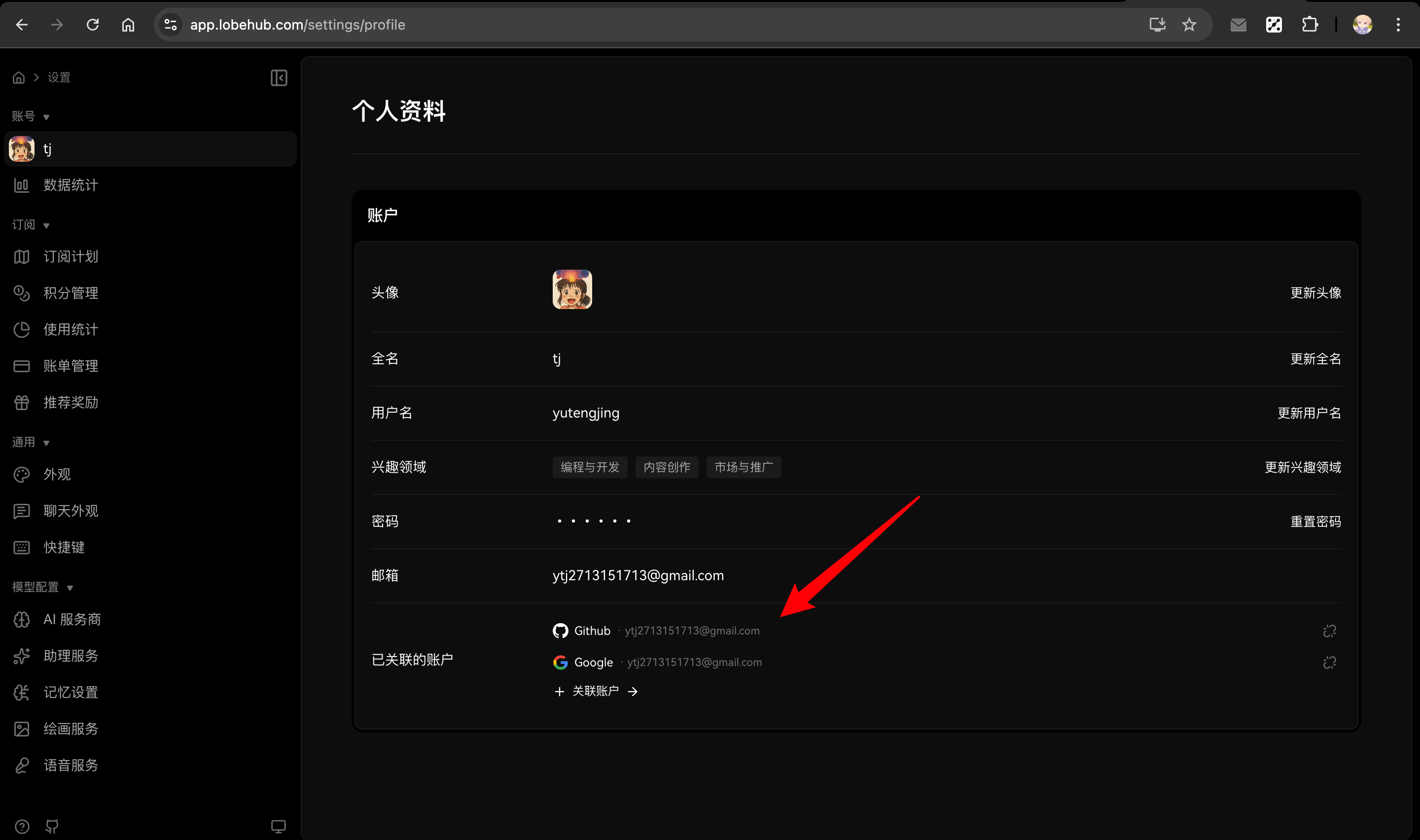
4. After logging in, go to **Settings → Profile → Linked Accounts** to re-link your secondary accounts
|
|
|
|
|
|
|
|
### Problem: SSO Login Doesn't Work After Migration
|
|
|
|
**Check:**
|
|
|
|
1. Ensure the SSO provider is configured in `AUTH_SSO_PROVIDERS`
|
|
2. Verify the provider credentials (`AUTH_<PROVIDER>_ID`, `AUTH_<PROVIDER>_SECRET`)
|
|
3. For full migration, verify account records were created correctly:
|
|
|
|
```sql
|
|
SELECT * FROM accounts WHERE provider = 'google'; -- or your provider
|
|
```
|
|
|
|
### Problem: Can't Find My Original User Data
|
|
|
|
**Check:**
|
|
|
|
1. Verify the email you're using matches the one in the `users` table
|
|
2. Check if you might have used a different email or SSO provider originally
|
|
3. Query the database directly to find users matching your criteria:
|
|
|
|
```sql
|
|
SELECT * FROM users WHERE email LIKE '%your-domain.com';
|
|
```
|
|
|
|
## Related Reading
|
|
|
|
<Cards>
|
|
<Card href={'/docs/self-hosting/migration/v2/auth/nextauth-to-betterauth'} title={'NextAuth Migration Guide'} />
|
|
|
|
<Card href={'/docs/self-hosting/migration/v2/auth/clerk-to-betterauth'} title={'Clerk Migration Guide'} />
|
|
|
|
<Card href={'/docs/self-hosting/auth'} title={'Authentication Configuration'} />
|
|
</Cards>
|